Fully on-device
Private AI note taker for Mac.
No bot joins your call, and nothing leaves your Mac. As your AI note taker, NoteOwl writes the notes, knows who said what and remembers who promised what, for unlimited meetings, so you can ask any past meeting a question and see the exact moment it was said.
- Free download
- Works offline
- macOS 26+, Apple silicon
Record
Records your mic and the call, on your Mac
NoteOwl records your microphone and the call audio from Zoom, Google Meet, Teams, FaceTime, Webex, Slack huddles or any other app — no bot joins the call.
Transcribe
Transcribes every speaker
When you stop, it writes the transcript on your Mac and labels every line with who said it.
Summarize
Writes the summary and action items
You get a summary, the decisions and the action items, from 22 built-in templates or your own.
Remember
Saves every commitment and who made it
Every promise goes on one list of what you owe and what you’re owed, linked to the moment it was said.
Ask
Answers questions about past meetings
Ask in plain English; every answer cites the exact passage and opens the recording at that moment.
Library00
Dictations04
Meeting Scribe04
Transcripts00
Memory01
Review
Chat
Commitments25
People05
Calendar00
Configure02
Vocabulary
Templates
Today · 3 speakers
Pilot Program Updates And Next Steps
Saved
Transcript3 speakers
The transcript appears when you stop recording.
Daniel Okafor
So the pilot is now capped at ninety thousand dollars
Maya Rao
Okay thank you for telling me early ninety thousand changes what we can build
Daniel Okafor
Grace wants the pilot limited to personal accounts only
Maya Rao
At ninety thousand I’d suggest we cut the pilot from twelve weeks to eight and focus on one flow
Priya Shah
It removes the upload step completely
Daniel Okafor
I’ll confirm the engineering lead by Monday it will probably be Marcus from the mobile team
Daniel Okafor
And I’ll give you a start date after our planning meeting on October second
Maya Rao
I’ll send a revised pilot proposal at ninety thousand dollars by next Wednesday
Priya Shah
I’ll send Maya the compliance checklist by Friday
RecordingOn this Mac
You · Microphone
Others · Call audio
Summary
This meeting focused on reviewing the current status of the pilot project, addressing significant budget and scope changes, and aligning on the next steps for the pilot launch.
Decisions03
- The pilot budget has been reduced from $120,000 to $90,000.
- The pilot will be limited to personal accounts only.
- The pilot timeline has been reduced from 12 weeks to 8 weeks.
Action items05
- DanielConfirm the Engineering Lead (likely Marcus) by Monday.
- Provide the pilot start date after the October 2nd planning meeting.
- MayaSend a revised pilot proposal (at $90,000) by next Wednesday, the 30th.
- PriyaSend the compliance checklist to Maya by Friday.
- Send the calendar invite for the midpoint review on October 8th.
People in this meeting03
↗ I owe01
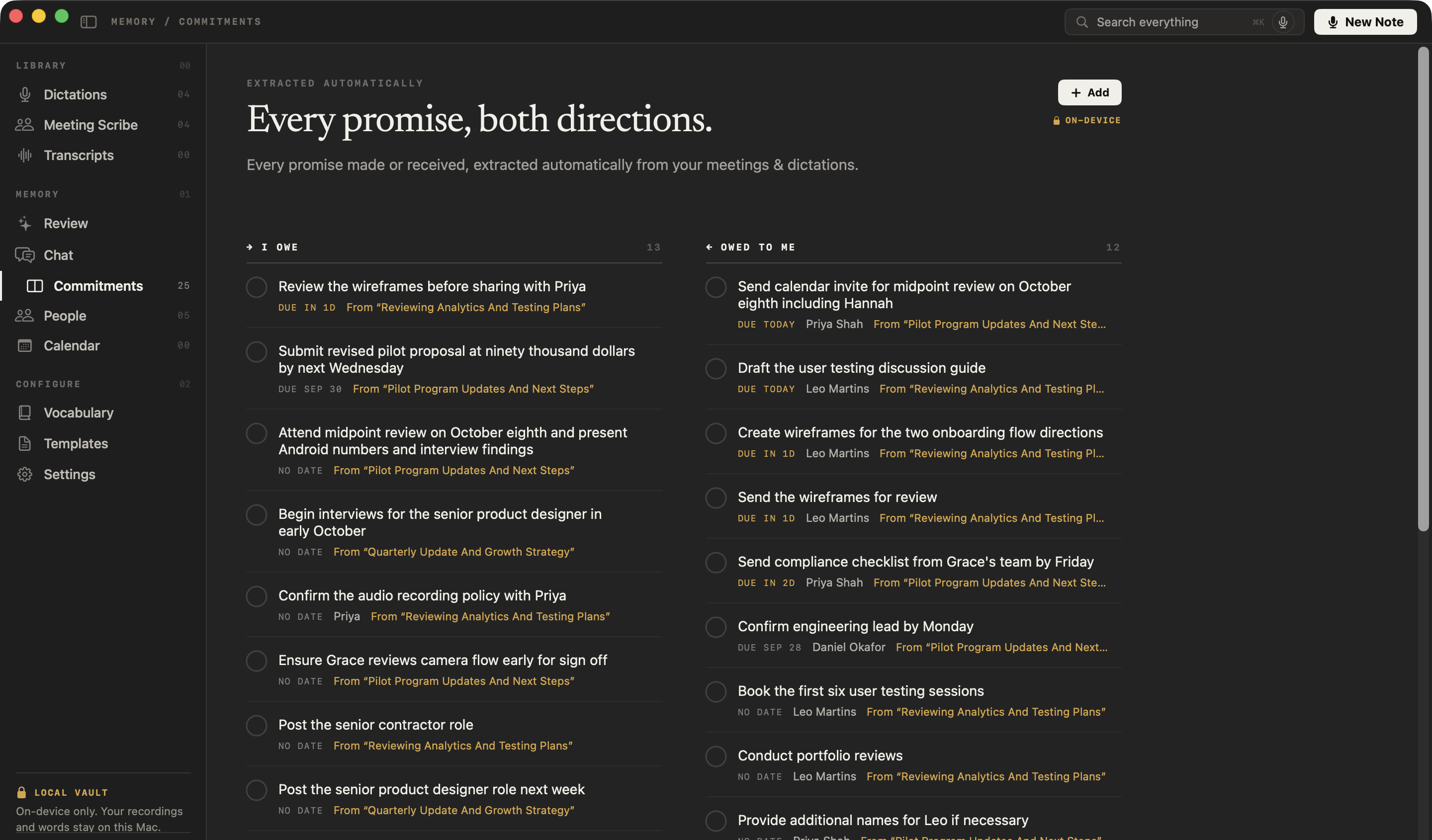
Submit revised pilot proposal at ninety thousand dollars by next Wednesday
↙ Owed to me02
Send compliance checklist from Grace’s team by Friday
Confirm engineering lead by Monday
You
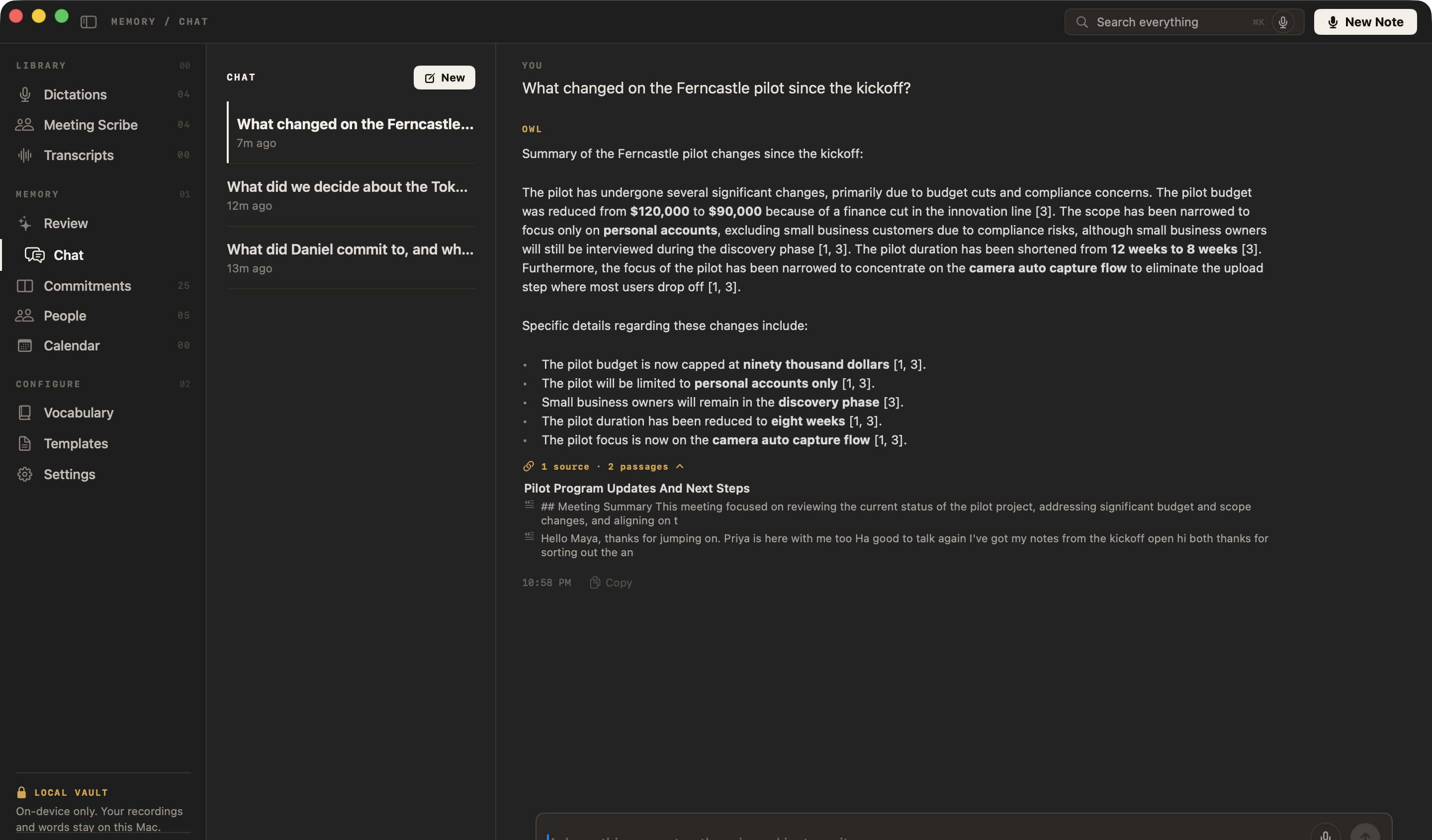
What changed on the Ferncastle pilot since the kickoff?
OwlOn-device
The pilot budget was reduced from $120,000 to $90,000 because of a finance cut in the innovation line.
- The pilot will be limited to personal accounts only.source 1
- The pilot duration has been reduced to eight weeks.source 1
- The pilot focus is now on the camera auto capture flow.source 1
Sources01
“So the pilot is now capped at ninety thousand dollars”
- RecordingFerncastle follow-up24:18
Library00
Dictations04
Meeting Scribe04
Transcripts00
Memory01
Review
Chat
Commitments25
People05
Calendar00
Configure02
Vocabulary
Templates
Local vaultOn-device only. Your recordings and words stay on this Mac.Today · 3 speakers
Ferncastle follow-up
RecordingOn this Mac
You · Microphone
Others · Call audio
Record
Records your mic and the call, on your Mac
NoteOwl records your microphone and the call audio from Zoom, Google Meet, Teams, FaceTime, Webex, Slack huddles or any other app — no bot joins the call.
Transcribe
Transcribes every speaker
When you stop, it writes the transcript on your Mac and labels every line with who said it.
Transcript3 speakers
The transcript appears when you stop recording.
Maya Rao
At ninety thousand I’d suggest we cut the pilot from twelve weeks to eight and focus on one flow
Priya Shah
It removes the upload step completely
Daniel Okafor
I’ll confirm the engineering lead by Monday it will probably be Marcus from the mobile team
Daniel Okafor
And I’ll give you a start date after our planning meeting on October second
Maya Rao
I’ll send a revised pilot proposal at ninety thousand dollars by next Wednesday
Priya Shah
I’ll send Maya the compliance checklist by Friday
Summarize
Writes the summary and action items
You get a summary, the decisions and the action items, from 22 built-in templates or your own.
Summary
This meeting focused on reviewing the current status of the pilot project, addressing significant budget and scope changes, and aligning on the next steps for the pilot launch.
Decisions03
- The pilot budget has been reduced from $120,000 to $90,000.
- The pilot will be limited to personal accounts only.
- The pilot timeline has been reduced from 12 weeks to 8 weeks.
Action items05
- DanielConfirm the Engineering Lead (likely Marcus) by Monday.
- Provide the pilot start date after the October 2nd planning meeting.
- MayaSend a revised pilot proposal (at $90,000) by next Wednesday, the 30th.
- PriyaSend the compliance checklist to Maya by Friday.
- Send the calendar invite for the midpoint review on October 8th.
Remember
Saves every commitment and who made it
Every promise goes on one list of what you owe and what you’re owed, linked to the moment it was said.
People in this meeting03
Daniel OkaforPriya ShahLeo Martins↗ I owe01
Submit revised pilot proposal at ninety thousand dollars by next Wednesday
↙ Owed to me02
Send compliance checklist from Grace’s team by Friday
Confirm engineering lead by Monday
Ask
Answers questions about past meetings
Ask in plain English; every answer cites the exact passage and opens the recording at that moment.
You
What changed on the Ferncastle pilot since the kickoff?
OwlOn-device
The pilot budget was reduced from $120,000 to $90,000 because of a finance cut in the innovation line.
- The pilot will be limited to personal accounts only.source 1
- The pilot duration has been reduced to eight weeks.source 1
- The pilot focus is now on the camera auto capture flow.source 1
Sources01
“So the pilot is now capped at ninety thousand dollars”
No bot in the call.
Nobody sees a guest join. NoteOwl records your Mac’s own audio.
Nothing uploaded.
Recordings, transcripts and memory never leave your Mac.
Works offline.
After the one-time model download, no connection needed.
No subscription.
Download it free. Nothing renews behind your back.
Privacy
Private meeting notes that never leave your Mac
Recording, transcription, speaker detection, summaries and search all run on your Mac — even with Wi-Fi off.
| What happens | Where |
|---|---|
| Recording your meeting | On your Mac |
| Turning speech into text | On your Mac |
| Telling speakers apart | On your Mac |
| Summaries and action items | On your Mac |
| Answering your questions | On your Mac |
| Storing everything | On your Mac, in files you own |
The internet is used to download NoteOwl’s on-device AI models once, to check for updates, and to activate your licence. Your recordings, transcripts and memory never leave your Mac. Read how privacy works
NoteOwl doesn’t join your call, so tell people you’re taking notes. It’s the right thing to do — and in many places, the law.
Memory
Chat with all your meetings, even offline
Ask anything about your meetings and get answers that link to the exact moment it was said — with Wi-Fi off, too. If the answer isn’t there, NoteOwl says so.
You ask
“What did we decide about the Tokyo office?”
NoteOwl
Nothing in your memory matches that.
Commitments & people
Track commitments and the people behind them
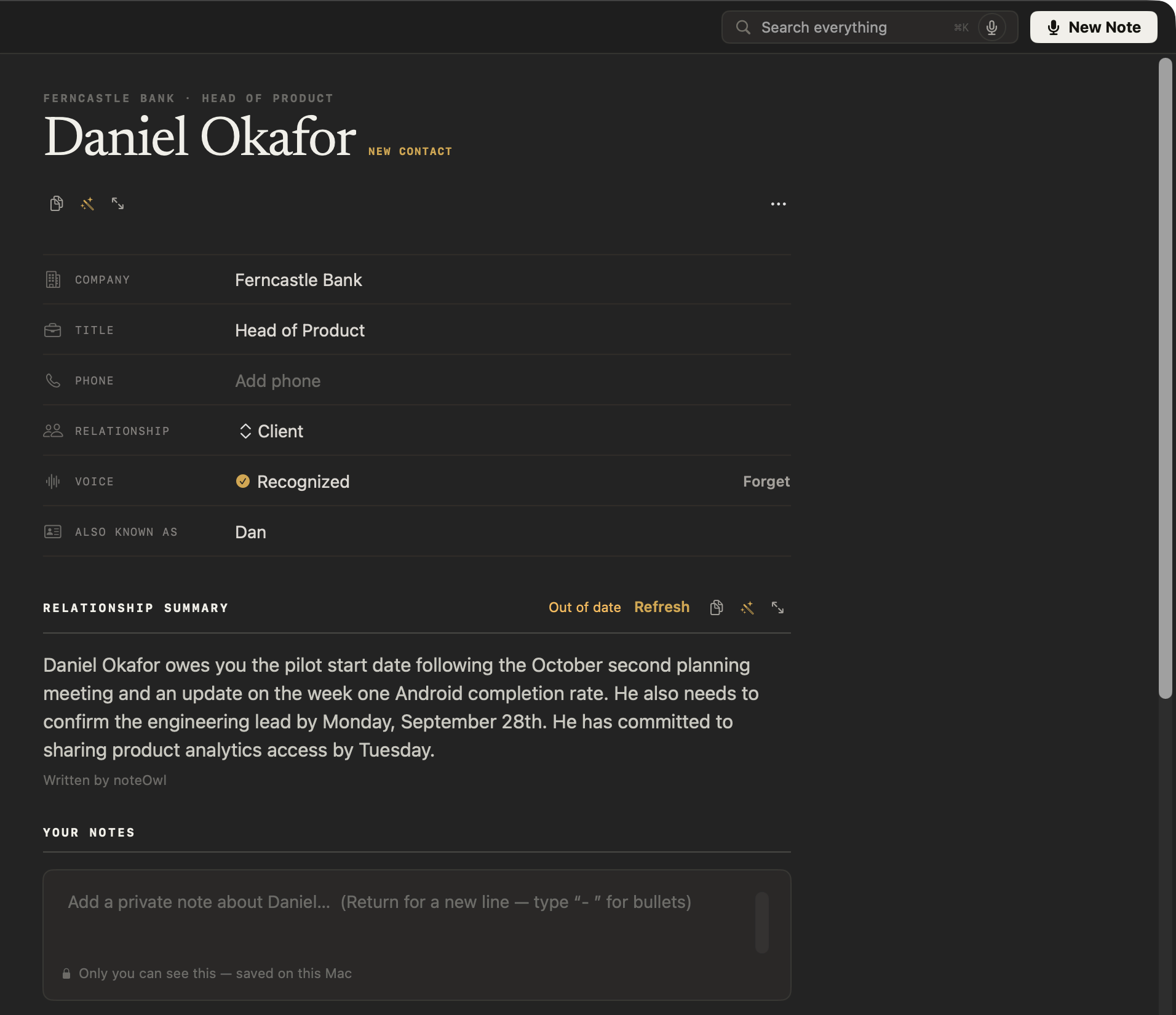
Who promised what, to whom, by when — and a profile for everyone you meet.
Features
Everything NoteOwl does in and after a meeting
Capture, transcripts, speakers, summaries, action items and a memory you can search — all of it running on your Mac.
Meeting notes
Capture, transcribe and summarize — without a bot in the call.
Notices the call
Zoom, Teams, FaceTime, Webex, Discord, Slack huddles or Meet in a browser — NoteOwl offers to take notes, or starts on its own. No bot joins.
Help mid-meeting
Catch up on what you missed, get questions to ask, or see the action items so far. Only you see it.
A notes box
Jot down what matters while you talk. Your notes feed the summary.
Nothing gets lost
Audio is saved to disk as you record, so a crash or a flat battery doesn’t cost you the meeting. No length limit.
Learns voices
Speakers are separated automatically. Name a voice once and it’s recognised in every meeting after.
Transcripts and imports
Drag in audio or video you already have — m4a, mp3, wav, mp4 and more — and get a speaker-labelled transcript. Tap any line to replay it; re-transcribe any time.
Summaries your way
22 built-in templates — stand-ups, sales calls, lectures, interviews, 1:1s, journals — or write your own.
Action items that stick
Each keeps its owner, and becomes a commitment you can track.
Turn it into something
Draft an email, a report, a blog or social post — or anything you describe — from any meeting.
Memory and search
Ask, search and follow up on everything that was said.
Chat with your meetings, offline
Ask about any past meeting in plain English. Answers cite the passage and open the recording at that moment.
Recall from any app
Ask your memory out loud from wherever you are; the answer appears in the notch.
Search everything
Every meeting, note and person, one keystroke away.
People
A profile for everyone you talk to: what’s open between you, and every conversation you’ve had.
Commitments, both ways
What you owe and what you’re owed, pulled from your conversations and sorted by what’s due — each linked to the moment it was said.
A daily review
What’s overdue, what’s due today, and what came in — every morning.
Walk in prepared
NoteOwl reads your Mac’s calendar and builds a prep page for each meeting: who’s coming, your notes, and what’s still open with them.
Honest when it doesn’t know
If nothing in your meetings answers the question, NoteOwl says so — it never makes up an answer or a source.
Templates
22 meeting note templates
Stand-ups, sales calls, 1:1s, interviews, board meetings, lectures, legal consultations — or write your own.
Business
Stand-up
Yesterday · Today · Blockers · Team status
Business
Executive Board
Key decisions · Risks · Financial highlights · Action items
Business
Sales Call
Customer needs · Objections · Next steps · Follow-ups with dates
Business
Meeting Report
Attendees · Purpose · Key points · Decisions · Action items · Open questions
Business
1:1 Check-in
Wins · Blockers · Feedback · Growth · Follow-ups
Business
Support Call
The issue · Steps tried · Resolution · Follow-ups
Professional
Doctor’s Visit
Symptoms · Findings · Diagnosis · Treatment · Follow-up
Professional
Legal Consultation
The matter · Key facts · Advice given · Risks · Next steps
Professional
Interview
Background · Questions & answers · Strengths · Concerns · Verdict
Professional
Consultation
Situation & goals · Advice · Options · Next steps
Academic
Student Lecture
Main topics · Key concepts · Examples · For the exam
Academic
Research
Questions · Findings · Evidence · Open questions
Academic
Training
Objectives · Skills & steps · Takeaways · Pitfalls
Productivity
To-Do List
High priority · Medium · Low · Owners & deadlines
Productivity
Project Log
Progress · Decisions · Blockers · Next milestones
General
Quick Summary
3–5 key points · Bottom line
General
Brainstorm
Ideas by theme · Standouts · Next experiments
Content
Podcast Show Notes
Overview · Segments · Notable quotes · Resources
Content
Presentation
Main message · Key points · Standout moments · Q&A
Personal
Therapy Session
Themes · Reflections · Coping strategies · Intentions
Personal
Journal
Reflections · Mood & highlights · Gratitude
Personal
Memories
Who was there · Where & when · What happened · Why it mattered
Free dictation
Free dictation for every app on your Mac
Tap fn and talk. Your words type where your cursor is, in 34 languages, and one tap polishes them in the right tone for each app.
Casual in chat
Hey Leo, quick update from the Ferncastle call. They cut the pilot budget to $90,000, so let’s focus only on the camera auto-capture flow. Can you prioritize those wireframes for Thursday? Thanks.
- To
- Daniel Okafor
- Subject
- Next steps
Hi Daniel,
Thanks for the update today. Just confirming next steps: I will send the revised pilot proposal at $90,000 by Wednesday, the 30th. It will cover an eight-week pilot focused on camera auto-capture for personal accounts only.
I look forward to hearing who your engineering lead will be by Monday. Thanks again.
12export const pilot = {13 budgetCap: 90_000,14 weeks: 8,15 accounts: 'personal',16};17
Voice tools
Voice tools that live on your keyboard
Dictate, rewrite, ask and search from any app on your Mac — one shortcut each.
Dictation. Tap fn and speak — your words type where your cursor is, in any app.
- Voice notes — the raw words kept beside the cleaned-up version
- Custom vocabulary — names and jargon spelled your way
- 34 languages — detected automatically
Your data
Export everything.
Any note as Markdown, PDF, text or subtitles — or all of it as one zip of plain files.
Delete everything.
One click in Settings, and it’s really gone from your Mac.
Files you own.
Transcripts, audio and memory live in a plain folder on your Mac.
Works offline.
After the one-time model download, NoteOwl needs no connection at all.
Who it’s for
Who uses NoteOwl
Founders, sales, recruiters, researchers, lawyers, therapists — anyone whose work happens in conversation.
For founders
Investor updates, customer calls and hiring conversations — with every promise you made, and every one made to you, kept track of.
- Template
- Meeting Report
- Attendees
- Purpose
- Key points
- Decisions
- Action items
- Open questions
- Ask your memory
- “What did I promise the investors last month?”
FAQ
Frequently asked questions
Does a bot join my meetings?
No. NoteOwl records your microphone and your Mac’s audio directly. Nobody sees a guest appear — which is why you should tell people you’re taking notes.
Does anything get uploaded?
Your recordings, transcripts, notes and memory never leave your Mac. NoteOwl uses the internet to download its AI models once, check for updates, and activate Pro.
Does it work offline?
Yes. After the one-time model download, everything works without a connection — including Pro.
Which apps does it work with?
Any app that plays audio on your Mac: Zoom, Google Meet, Microsoft Teams, FaceTime, Webex, Slack huddles, Discord and more.
What do I need?
A Mac with Apple silicon (M1 or newer), macOS 26 or later, and 16 GB of memory (24 GB recommended).
What languages does it understand?
34 languages, detected automatically — you can even switch between Hindi and English mid-sentence. The full list is on the languages page.
What happens after the trial?
NoteOwl goes back to Free. Everything you recorded stays on your Mac and stays yours.
Is it a subscription?
No. NoteOwl is free to download and dictation is free forever. Pro is a one-time purchase for one Mac — the pricing page has the details.
Can I get my data out?
Yes — export any note as Markdown, PDF, text or subtitles, or export everything at once. It’s your data.

Download NoteOwl for Mac
Free to download. Runs entirely on your Mac.
- macOS 26 or later
- Apple silicon (M1 or newer)
- 16 GB memory
- 20.0 MB download