Template
Therapy session notes template
This therapy session notes template comes in the two most common progress note formats — DAP (data, assessment, plan) and SOAP (subjective, objective, assessment, plan) — and copies as plain text into your records app, a document or a notebook.
In NoteOwl, you can talk instead of type: dictate after the session, and a DAP or SOAP template you write once lays out your note on your Mac. NoteOwl’s built-in Therapy Session template is something else: a reflection for the person in therapy.
Progress note formats · DAP and SOAP
DAP
- DData
- AAssessment
- PPlan
SOAP
- SSubjective
- OObjective
- AAssessment
- PPlan
Copy the templates ↓Set it up in NoteOwl ↓See a reflection ↓
What should therapy session notes include?
Three things, whichever format you use: what happened in the session, your professional view of it, and the plan. DAP puts them under Data, Assessment and Plan; SOAP splits what the client said from what you observed. Use the format your practice, supervisor or payer expects.
DAP: Data, Assessment, Plan
- D · Data
- What goes in itWhat the client reported and what you observed: the topics discussed, words worth quoting, the interventions you used and how the client responded.
- A · Assessment
- What goes in itYour professional interpretation of the data: progress toward the treatment goals, what has changed since the last session, and anything to keep an eye on.
- P · Plan
- What goes in itWhat happens next: tasks between sessions, the focus of the next session, any referral or coordination, and the next appointment.
| Section | What goes in it |
|---|---|
| D · Data | What the client reported and what you observed: the topics discussed, words worth quoting, the interventions you used and how the client responded. |
| A · Assessment | Your professional interpretation of the data: progress toward the treatment goals, what has changed since the last session, and anything to keep an eye on. |
| P · Plan | What happens next: tasks between sessions, the focus of the next session, any referral or coordination, and the next appointment. |
SOAP: Subjective, Objective, Assessment, Plan
- S · Subjective
- What goes in itWhat the client reports, in their own words where it matters: how they have been, their concerns, and what they want to work on.
- O · Objective
- What goes in itWhat you observe: presentation, affect and engagement in the session, and the results of any measures you used.
- A · Assessment
- What goes in itYour clinical impression: how the session relates to the treatment plan and goals, and the progress so far.
- P · Plan
- What goes in itNext steps: interventions to continue or change, tasks between sessions, and the next appointment.
| Section | What goes in it |
|---|---|
| S · Subjective | What the client reports, in their own words where it matters: how they have been, their concerns, and what they want to work on. |
| O · Objective | What you observe: presentation, affect and engagement in the session, and the results of any measures you used. |
| A · Assessment | Your clinical impression: how the session relates to the treatment plan and goals, and the progress so far. |
| P · Plan | Next steps: interventions to continue or change, tasks between sessions, and the next appointment. |
A therapy notes template to copy
Paste either one into the note field of your records app, a document or a notebook, and fill it in straight after the session. Both are plain text, so they keep their shape anywhere.
The sections match the instructions further down, so a note you type and a note NoteOwl lays out from your dictation read the same.
DAP PROGRESS NOTE

Client:
Date of session:
Session length:
Clinician:

D - DATA
What the client reported:
-
What I observed:
-
Topics and interventions used:
-

A - ASSESSMENT
Progress toward goals:
-
Changes since last session:
-
Anything to follow up:
-

P - PLAN
Tasks between sessions:
-
Focus of next session:
-
Next appointment:
SOAP PROGRESS NOTE

Client:
Date of session:
Session length:
Clinician:

S - SUBJECTIVE
What the client reported, in their words:
-

O - OBJECTIVE
What I observed (presentation, affect, engagement):
-
Measures used, if any:
-

A - ASSESSMENT
Clinical impression and progress toward goals:
-

P - PLAN
Interventions to continue or change:
-
Tasks between sessions:
-
Next appointment:
How do you get a DAP note written in NoteOwl?
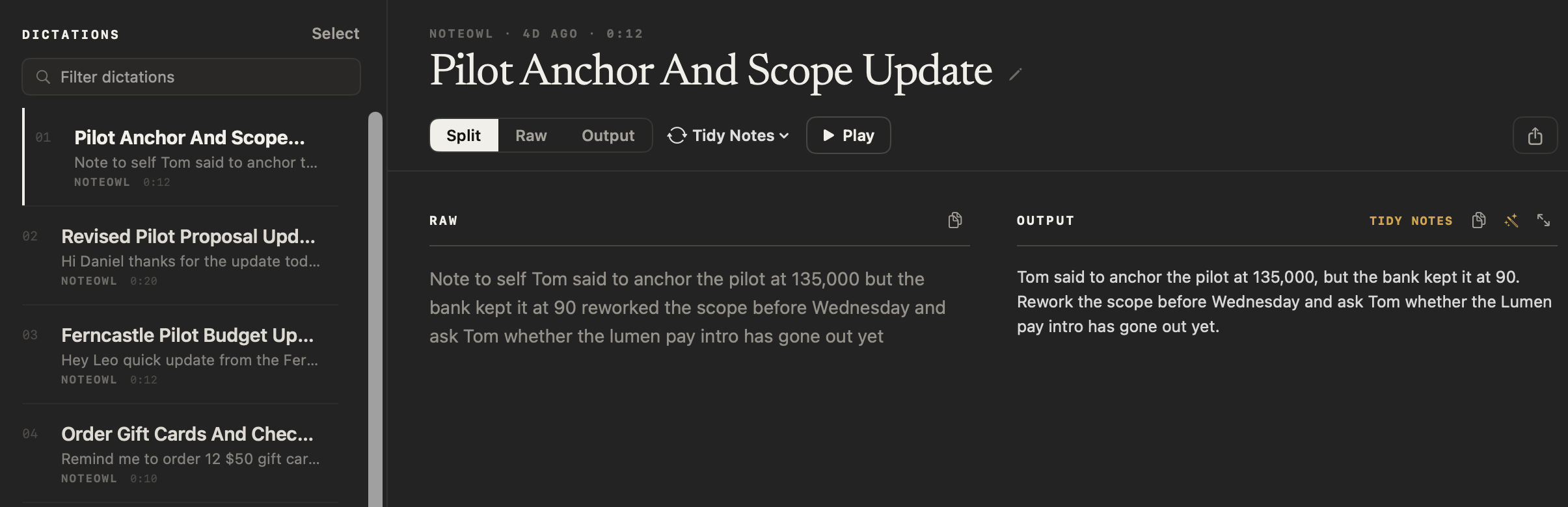
Talk instead of typing, with a template you write once. Record a voice note in NoteOwl after the session, then choose Transform as → your DAP template. NoteOwl lays out your words as Data, Assessment and Plan on your Mac, and keeps your raw words beside it.
- 1
Make the DAP template once
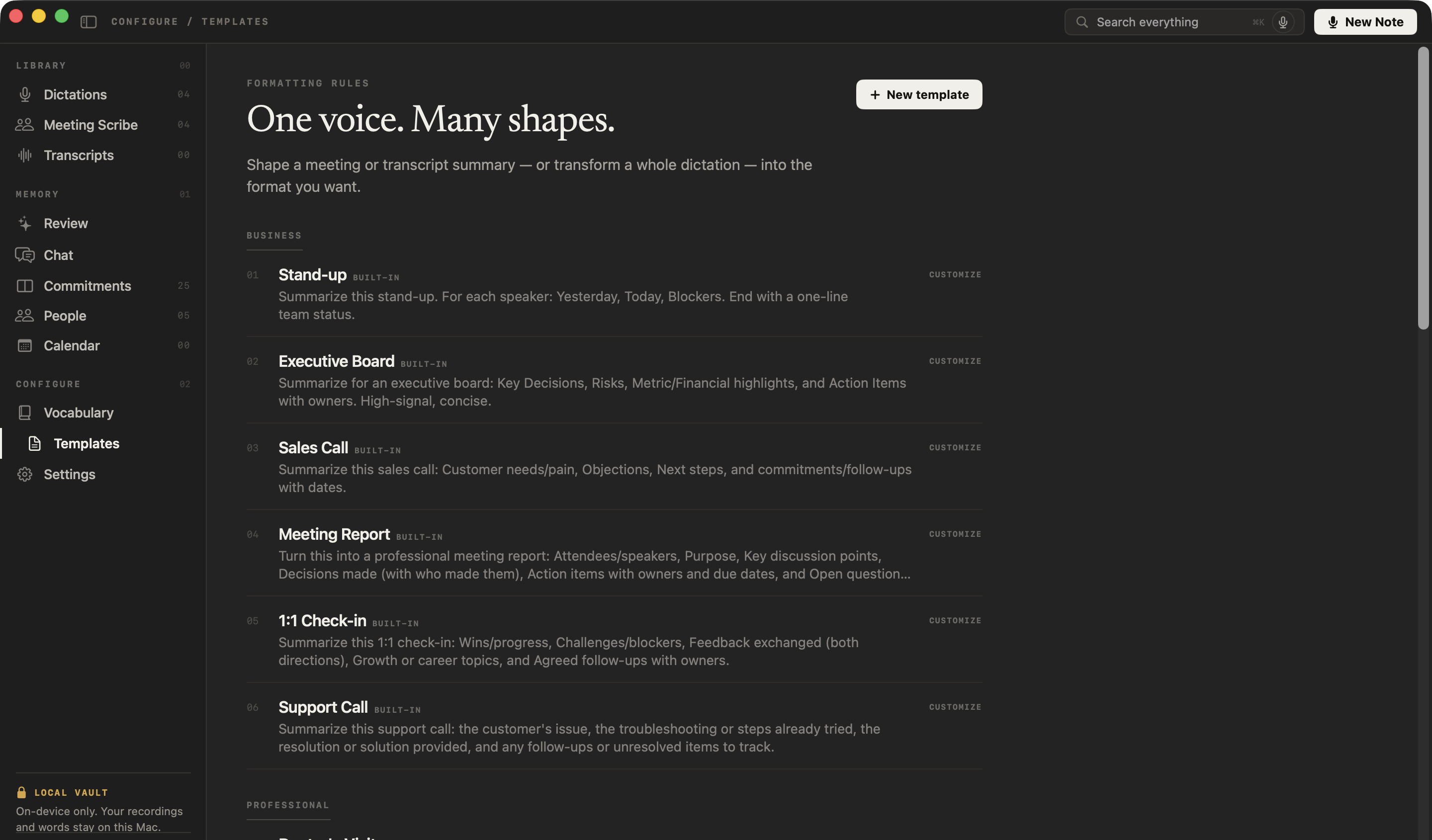
In NoteOwl, click Templates in the sidebar, then New template. Name it “DAP note”, leave the group as Custom or choose another, paste the DAP instruction below as the prompt, and click Add.
- 2
Dictate after the session
Open Dictations and press New Dictation, then talk through the session: what happened, your assessment and the plan, in any order. Press Stop when you’re done; pausing to think doesn’t end the note.
- 3
Choose Transform as → DAP note
Open the style menu above the note (it shows the current style, such as Polish) and pick DAP note under Transform as — Custom. NoteOwl lays your words out as Data, Assessment and Plan on your Mac, and keeps your raw words beside it.
- 4
Review it, then copy it into your records
Read the note and correct anything that isn’t right. Then right-click it in the list, choose Copy, and paste it into the progress note in the app you already use.
Voice notes are free and unlimited, with no account. Templates and Transform as are part of NoteOwl Pro, with a 7-day free trial in the app. A telehealth or in-room session recorded with NoteOwl Pro gets the same template through Summarize as.
What should a DAP template tell NoteOwl?
The sections you want, in order, what goes in each, and one rule: use only what you said. These instructions are ours, not built into NoteOwl. Paste one as the prompt of a new template, then change it to match the way you write notes.
Write this up as a DAP progress note with three headed sections. Data: what the client reported, what I observed, the topics discussed and the interventions I used. Assessment: my assessment exactly as I stated it, including progress toward the client's goals. Plan: tasks between sessions, the focus of the next session and the next appointment. Use only what I said: don't add a diagnosis, an assessment or any detail I didn't give, and leave a section empty if I didn't mention it. Professional, concise, third person.
Write this up as a SOAP progress note with four headed sections. Subjective: what the client reported, in their words where possible. Objective: what I observed in the session. Assessment: my clinical impression exactly as I stated it, including progress toward the client's goals. Plan: interventions to continue or change, tasks between sessions and the next appointment. Use only what I said: don't add a diagnosis, an assessment or any detail I didn't give, and leave a section empty if I didn't mention it. Professional, concise, third person.
NoteOwl writes up what you dictate. It doesn’t diagnose or assess on your behalf, and it can get things wrong, so read every note before it goes in the record. For the steps, see write your own summary template in the NoteOwl docs.
What is NoteOwl’s Therapy Session template for?
For the person in therapy, not the therapist. It turns a client’s own voice note after a session into a reflection: the themes discussed, their insights, the coping strategies they explored and their intentions. It isn’t a progress note, and it doesn’t write DAP or SOAP.
“Summarize this session with a respectful, first-person-friendly tone: the themes discussed, personal reflections and insights, coping strategies or techniques explored, and any intentions or goals set for going forward.”
Its warm, first-person voice suits someone keeping notes on their own therapy, in the same way as the journal template. For a clinical record, use a DAP or SOAP template like the ones above.
What does a session reflection look like?
Like this: NoteOwl’s Therapy Session output from a two-minute voice note, a client talking through what she took from her session about work and boundaries. It keeps her own words and is written for her, not for a clinical record.
Session Reflection: Thursday, 24 September
Themes Discussed
- Work that never stops: answering messages at eleven at night, and saying yes to the office move project on top of everything else.
- Saying yes too quickly: what I think would happen if I said no.
Personal Reflections & Insights
- My honest answer to Ruth's question: I worry people would think I'm not coping. That's why I say yes so fast. It isn't really about the work.
- Ruth called it my "yes reflex". It made me laugh, but it's true: it happens before I've even thought about it.
- I felt a bit guilty talking about wanting less work, as if I was complaining. Worth remembering: wanting a life outside work isn't the same as not caring about the job.
Coping Strategies & Techniques Explored
- The pause sentence: "Let me check my week and get back to you this afternoon." It buys me time to actually decide. Practising it out loud felt awkward, but less so the second time.
- A five-minute wind-down at the end of the day: write down tomorrow's three most important things, close the laptop, and take a short walk before looking at my phone.
- Breathing: in for four, hold for four, out for four, when I notice my shoulders going up.
Intentions for This Week
- Turn off work notifications on my phone after seven.
- Use the pause sentence at least once.
- Do the wind-down on the days I'm in the office.
- Talk to Greg on Monday about the office move: I can take it on if something else comes off my list.
How I feel: lighter, and a bit nervous about Monday.
FAQ
Questions about therapy session notes
What is a DAP note?
A DAP note is a therapy progress note in three sections: Data (what the client reported and what you observed, including the interventions used), Assessment (your professional interpretation, including progress toward goals) and Plan (next steps and the next session). It is shorter than SOAP because report and observation share one section.
What is the difference between DAP and SOAP notes?
SOAP separates what the client reports (Subjective) from what you observe (Objective); DAP puts both under Data. Assessment and Plan work the same way in both. Use whichever format your practice, supervisor or payer expects; the templates on this page cover either.
What is a BIRP note?
BIRP is another progress note format: Behavior (what the client said and did), Intervention (what you did), Response (how the client responded) and Plan. You can make a BIRP template in NoteOwl the same way as a DAP one: name it, list the four sections as the prompt, and apply it with Transform as.
Does NoteOwl have a built-in DAP or SOAP template?
No. None of NoteOwl’s built-in templates writes DAP, SOAP or BIRP. You can make your own in a minute: on the Templates screen, click New template and paste one of the instructions on this page. It then appears under Transform as and Summarize as. Templates are part of NoteOwl Pro.
Can NoteOwl write my progress note from a dictation?
Yes. Dictate after the session, then choose Transform as → your DAP or SOAP template, and NoteOwl lays out what you said in those sections on your Mac with on-device AI models. It is told to use only what you said, but it can still get things wrong, so read every note before it goes in the record. Templates are part of NoteOwl Pro: $79 once for one Mac, with a 7-day free trial in the app.
Is it private to dictate session notes with NoteOwl?
NoteOwl transcribes your dictation and applies your template on your Mac with on-device AI models. Your recordings, transcripts and notes are never uploaded, and no third party processes the audio. It works with Wi-Fi off once the models are downloaded.
Who is NoteOwl’s Therapy Session template for?
The person in therapy. After a session, record a voice note in NoteOwl about what you took from it, then choose Transform as → Therapy Session for a reflection with the themes, your insights, the coping strategies you explored and your intentions. Voice notes are free; templates are part of NoteOwl Pro.
Related
- AI notes for therapists Dictate the note the moment the client leaves, free, on your Mac.
- Journal template Reflections by theme, mood and highlights, and gratitude, from a voice note.
- Voice notes on your Mac Record in NoteOwl and each note is saved as searchable text, with the audio. Free.
- Free dictation on your Mac Tap fn in any app and talk; your words type at the cursor.
This page explains common progress note formats and how NoteOwl works. It isn’t legal or clinical advice. Check your own professional rules and state law.
Keep exploring
More templates
- Doctor visit notes templateA doctor visit notes template to copy, what each section holds, an example, and how NoteOwl writes a plain-language visit summary on your Mac
- Lecture notes templateA template to copy for study notes from a lecture: topics, definitions, examples and exam points, with an example, and how NoteOwl writes it
- Meeting agenda templateA meeting agenda template to copy or fill in online, with start times for every item, a team meeting example and how to write one
- Retrospective templateA retrospective template to fill in online in four formats (went well / to improve / try next, start stop continue, mad sad glad, 4Ls), with votes and action items
Dictate your session notes on your Mac
Free to download. Runs entirely on your Mac.
macOS 26 or later · Apple Silicon (M1 or newer) · 16 GB memory minimum, 24 GB recommended
About NoteOwl
NoteOwl is private AI meeting notes and memory for the Mac. It captures meetings without a bot joining the call, labels every speaker, writes summaries and action items, and builds a memory of every conversation that you can chat with — fully offline, because the speech recognition and the AI run on the Mac itself. Dictation into any app is free; Pro is a one-time purchase.
NoteOwl pricing: what’s free and what Pro adds
Last updated