Template
Legal consultation notes template
This legal consultation notes template has five sections — the matter or issue, the key facts, the advice given, the risks, and the next steps and documents needed — and it copies as plain text into Word, Google Docs, a matter note or any notes app.
In NoteOwl, the Legal Consultation template writes these notes from the recording of a client consultation, on your Mac, with no third party processing the audio. An example is below.
Legal Consultation · 5 sections
- 01Matter / issue
- 02Key facts
- 03Advice given
- 04Risks
- 05Next steps / documents needed
What should legal consultation notes include?
Five things: the matter or issue, the key facts, the advice you gave, the risks, and the next steps, including the documents you need from the client. Write the facts as the client stated them, and mark what the documents still have to confirm.
- Matter / issue
- What to writeWhat the client needs help with, in a line or two: the other party, the kind of matter, and the deadline or decision that brought them in. Note your conflict check.
- Key facts
- What to writeDates, amounts, documents and who did what, as the client tells it. Mark anything the documents still have to confirm.
- Advice given
- What to writeWhat you advised and why, and anything you said depends on documents you haven’t read yet.
- Risks
- What to writeWhat could go wrong for the client, and by when: deadlines, personal liability, weak points, and the cost of doing nothing.
- Next steps / documents needed
- What to writeWho does what by when, on both sides: the documents the client will send, your engagement letter and fee, and the next call.
| Section | What to write |
|---|---|
| Matter / issue | What the client needs help with, in a line or two: the other party, the kind of matter, and the deadline or decision that brought them in. Note your conflict check. |
| Key facts | Dates, amounts, documents and who did what, as the client tells it. Mark anything the documents still have to confirm. |
| Advice given | What you advised and why, and anything you said depends on documents you haven’t read yet. |
| Risks | What could go wrong for the client, and by when: deadlines, personal liability, weak points, and the cost of doing nothing. |
| Next steps / documents needed | Who does what by when, on both sides: the documents the client will send, your engagement letter and fee, and the next call. |
A legal consultation template to copy
Paste it into Word, Google Docs or your notes app and fill it in during the consultation or straight after it. It is plain text, so it keeps its shape anywhere, including a matter note in the software you already use.
The five sections match NoteOwl’s Legal Consultation template, so notes you write by hand and notes NoteOwl writes read the same in the client file.
LEGAL CONSULTATION NOTES

Client:
Matter:
Other party:
Date:
Attorney:
Conflict check: cleared / pending
Engagement: consultation only / engaged / declined

1. MATTER / ISSUE
- What the client needs:
- The deadline or decision that brought them in:

2. KEY FACTS
Date   | What happened | Source (client / document)
       |               |
       |               |
To confirm from the documents:

3. ADVICE GIVEN
- Advice, and why
- Depends on (documents not yet read):

4. RISKS
Risk   | By when | What it could cost the client
       |         |

5. NEXT STEPS / DOCUMENTS NEEDED
Owner    | Next step or document | By when
Client   |                       |
Attorney |                       |

Fee discussed:
Next call:
What questions should you ask in a legal consultation?
Questions that fill the five sections: what happened and what the client wants, the facts and documents behind it, what shapes your advice, what could go wrong, and what each side does next. Ask early about any notice or date, because it sets the pace for everything else.
- Matter / issue
- Questions to askWhat happened, and what would you like to happen? Who is on the other side? Is there a letter, a notice or a date that brought you in now?
- Key facts
- Questions to askWhen did it start? What was agreed, and is it in writing? What have you already said or sent to the other side?
- Advice given
- Questions to askWhat matters most to you: money, time or keeping the relationship? What have you tried already? Is there anything the other side might raise that I should know now?
- Risks
- Questions to askHave you signed anything personally, such as a guarantee? Have you received any notices or deadlines? Could any insurance apply?
- Next steps / documents needed
- Questions to askWhich documents can you send me, and by when? Who else should I speak to? When can we talk again?
| Section | Questions to ask |
|---|---|
| Matter / issue | What happened, and what would you like to happen? Who is on the other side? Is there a letter, a notice or a date that brought you in now? |
| Key facts | When did it start? What was agreed, and is it in writing? What have you already said or sent to the other side? |
| Advice given | What matters most to you: money, time or keeping the relationship? What have you tried already? Is there anything the other side might raise that I should know now? |
| Risks | Have you signed anything personally, such as a guarantee? Have you received any notices or deadlines? Could any insurance apply? |
| Next steps / documents needed | Which documents can you send me, and by when? Who else should I speak to? When can we talk again? |
What do good legal consultation notes look like?
Like this: NoteOwl’s Legal Consultation notes for a first consultation, in which a solo lawyer advises a print shop owner in a dispute with his landlord. Each piece of advice comes with its reason, and each document with the person sending it.
Legal Consultation Summary: Marsh Print Co.
Client: Theo Marsh, Marsh Print Co. · Attorney: Dana Whitfield, Whitfield Law
Matter / Issue
- Commercial lease dispute with the landlord, Calder Street Properties, over the ground-floor unit where Theo runs his print shop.
- Theo withheld September's rent; on September 22nd the landlord served a notice of default: pay within 10 days (by October 2nd) or it can end the lease.
- Conflict check: cleared.
Key Facts
- Lease: five years, signed in March 2024. Rent is $4,200 a month, and Theo signed a personal guarantee.
- Scaffolding: since July 6th, scaffolding from the landlord's renovation has blocked the entrance and front window; walk-in sales are down about a third on last summer.
- Leak: on August 14th, water from the work upstairs ruined about $3,800 of paper stock and put a printer out of action. After three emails to the landlord, the leak is still not fixed.
- Client's goal: stay, get a rent reduction for the scaffolding months, and have the landlord pay for the damage.
Advice Given
- Withholding rent is risky: most commercial leases don't allow it, and it gives the landlord a default to act on.
- Pay under protest: pay September's rent before October 2nd, stating in writing that it is paid under protest, to keep the leak and scaffolding claims separate. Paying doesn't end them.
- Lease review first: the advice depends on the lease. Clauses to check: repairs, quiet enjoyment / access, any limit on the landlord's liability for water damage, and how notices must be served.
- Insurance: Theo's business insurance may cover the damaged stock.
Risks
- If the default is not cured by October 2nd, the landlord may try to terminate the lease.
- Because of the personal guarantee, Theo could be personally liable for the unpaid rent.
Next Steps / Documents Needed
- Theo Marsh: send by tomorrow: the lease and amendments, the personal guarantee, the notice, his three emails, dated photos of the scaffolding and ceiling, invoices for the stock and printer repair, and July–September sales figures for this year and last.
- Theo Marsh: call his insurance broker; decide on the rent after Monday's call, paying before October 2nd.
- Dana Whitfield: send the engagement letter today: a flat fee of $1,500 to review the lease and write to the landlord.
- Dana Whitfield: after Monday's call, draft a reply to the notice before the deadline.
- Next call: Monday at 4 pm.
How do you get legal consultation notes written automatically?
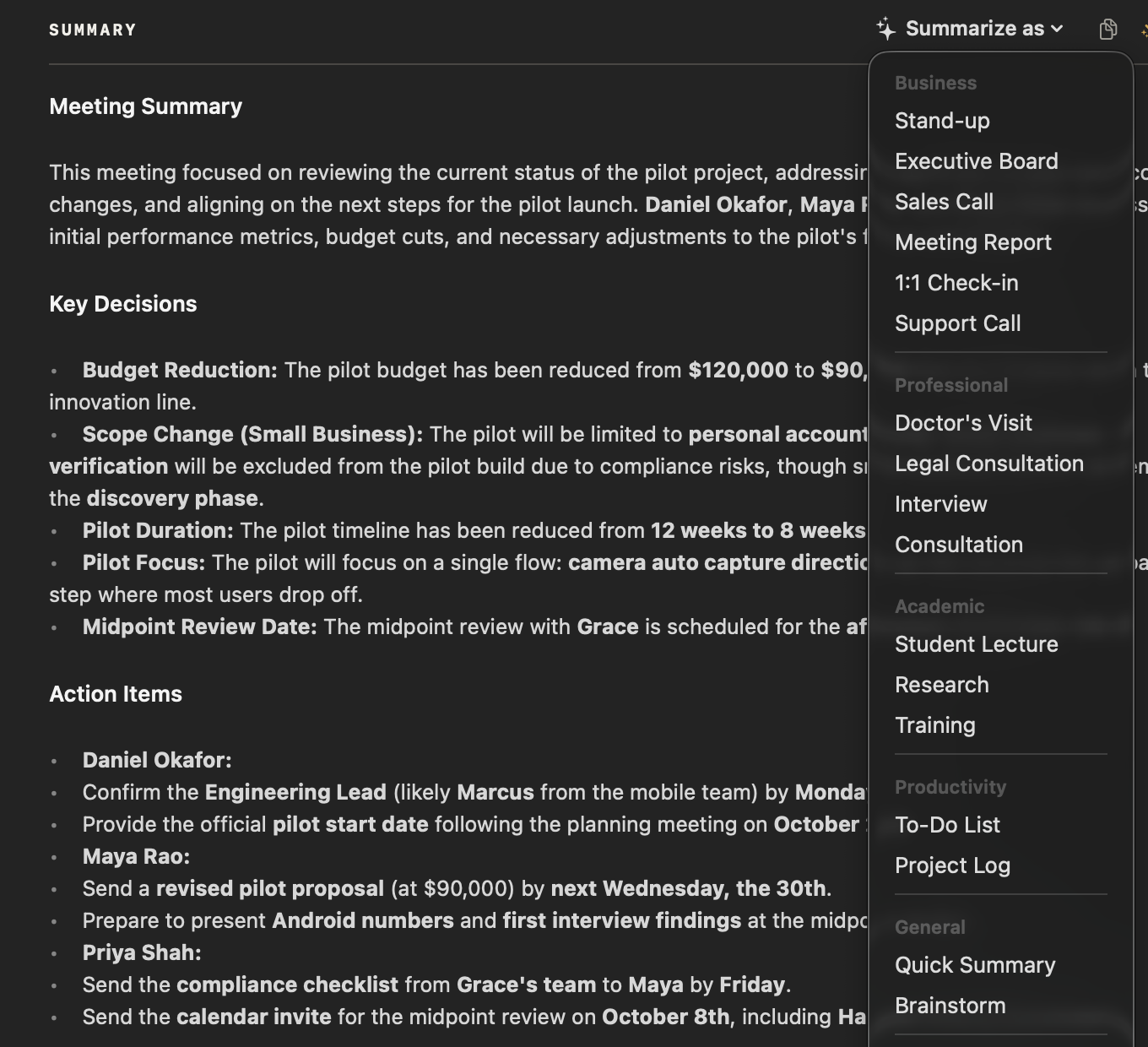
Record the consultation in NoteOwl — it takes meeting notes without a bot — then choose Summarize as → Legal Consultation. NoteOwl writes the matter, key facts, advice, risks and next steps from the recording, on your Mac with on-device AI models, and no third party processes the audio.
- 1
Record the consultation
Press ⌥Space or click Start Meeting when the consultation begins, in your office or on a call. NoteOwl records your microphone and your Mac’s audio; no bot joins the call.
- 2
Open it in Meeting Scribe
When the consultation ends, NoteOwl writes the transcript, with each speaker labelled, and a summary, on your Mac.
- 3
Choose Summarize as → Legal Consultation
Above the summary, open Summarize as and pick Legal Consultation, under Professional. NoteOwl rewrites the notes as the matter, key facts, advice given, risks and next steps.
- 4
Check it, then file it
Read the notes against the transcript, then copy them as Markdown or use Export to save them as Markdown or PDF for the client file. Action items that involve you land on your Commitments board.
Meeting notes and templates are part of NoteOwl Pro, with a 7-day free trial in the app and no card. Every call also gets an AI meeting summary; see NoteOwl for lawyers for client calls, internal case meetings and where the audio goes.
What does NoteOwl’s Legal Consultation template ask for?
Exactly the five sections above. This is the template’s instruction to NoteOwl, word for word; you can change it, or write your own, in NoteOwl’s Templates screen (see how to customize a template).
“Summarize this legal consultation: Matter/Issue, Key facts, Advice given, Risks, and Next steps / documents needed.”
FAQ
Questions about legal consultation notes
What should legal consultation notes include?
The matter or issue, the key facts as the client gave them, the advice you gave and why, the risks you discussed, and the next steps, including the documents the client will send. NoteOwl’s Legal Consultation template writes them in those five sections from the recording.
How is a legal consultation template different from client consultation notes?
General client consultation notes record the client’s goals, your recommendations and the options. A legal consultation template adds the key facts as the client stated them and the risks, and starts from the matter. For advisory calls with no legal matter, NoteOwl’s Consultation template fits better.
Can NoteOwl write legal consultation notes automatically?
Yes. Record the consultation in NoteOwl, then choose Summarize as → Legal Consultation, and it writes the matter, key facts, advice given, risks and next steps from the recording, on your Mac with on-device AI models. Meeting notes and templates are part of NoteOwl Pro: $79 once for one Mac, with a 7-day free trial in the app.
Is the recording of a legal consultation uploaded anywhere?
No. NoteOwl records, transcribes and summarizes the consultation on your Mac with on-device AI models, so the recording, the transcript and the notes never leave your Mac, and no third party processes the audio.
Can I rely on the notes without checking them?
No. Read them against the transcript before you rely on them, and replay the recording for any name, date or figure that matters. NoteOwl writes the notes from the transcript, and either can contain mistakes.
Can I add sections, such as the fee or the conflict check, to the Legal Consultation template?
Yes. In NoteOwl’s Templates screen you can customize the Legal Consultation template or write your own, for example to add the fee arrangement and the conflict check, then summarize any recorded consultation again in the new format.
Can NoteOwl find what a client said in an earlier consultation?
Yes. Every recorded consultation goes into a searchable memory on your Mac. Search for a client or a fact, or ask Chat, and the answer cites the passage it came from, so you can check it. Chat and memory are part of NoteOwl Pro.
Related
- AI note taker for lawyers Client calls and consultations written up on your Mac, with no third party processing the audio.
- Consultation notes template For advisory calls: the client’s situation and goals, recommendations, options and next steps.
- All 22 meeting notes templates Stand-ups, 1:1s, sales calls, interviews and more, with their sections.
- AI meeting summaries The decisions and action items NoteOwl writes when a meeting ends.
This page explains how NoteOwl works. It isn’t legal advice. Check your own professional rules and state law.
Keep exploring
More templates
- Therapy session notes templateTherapy session notes templates to copy, what each section holds, and how NoteOwl writes them on your Mac
- Doctor visit notes templateA doctor visit notes template to copy, what each section holds, an example, and how NoteOwl writes a plain-language visit summary on your Mac
- Lecture notes templateA template to copy for study notes from a lecture: topics, definitions, examples and exam points, with an example, and how NoteOwl writes it
- Meeting agenda templateA meeting agenda template to copy or fill in online, with start times for every item, a team meeting example and how to write one
Get your legal consultation notes written on your Mac
Free to download. Runs entirely on your Mac.
macOS 26 or later · Apple Silicon (M1 or newer) · 16 GB memory minimum, 24 GB recommended
About NoteOwl
NoteOwl is private AI meeting notes and memory for the Mac. It captures meetings without a bot joining the call, labels every speaker, writes summaries and action items, and builds a memory of every conversation that you can chat with — fully offline, because the speech recognition and the AI run on the Mac itself. Dictation into any app is free; Pro is a one-time purchase.
NoteOwl pricing: what’s free and what Pro adds
Last updated