Calendar · Pro
Meeting prep from your calendar
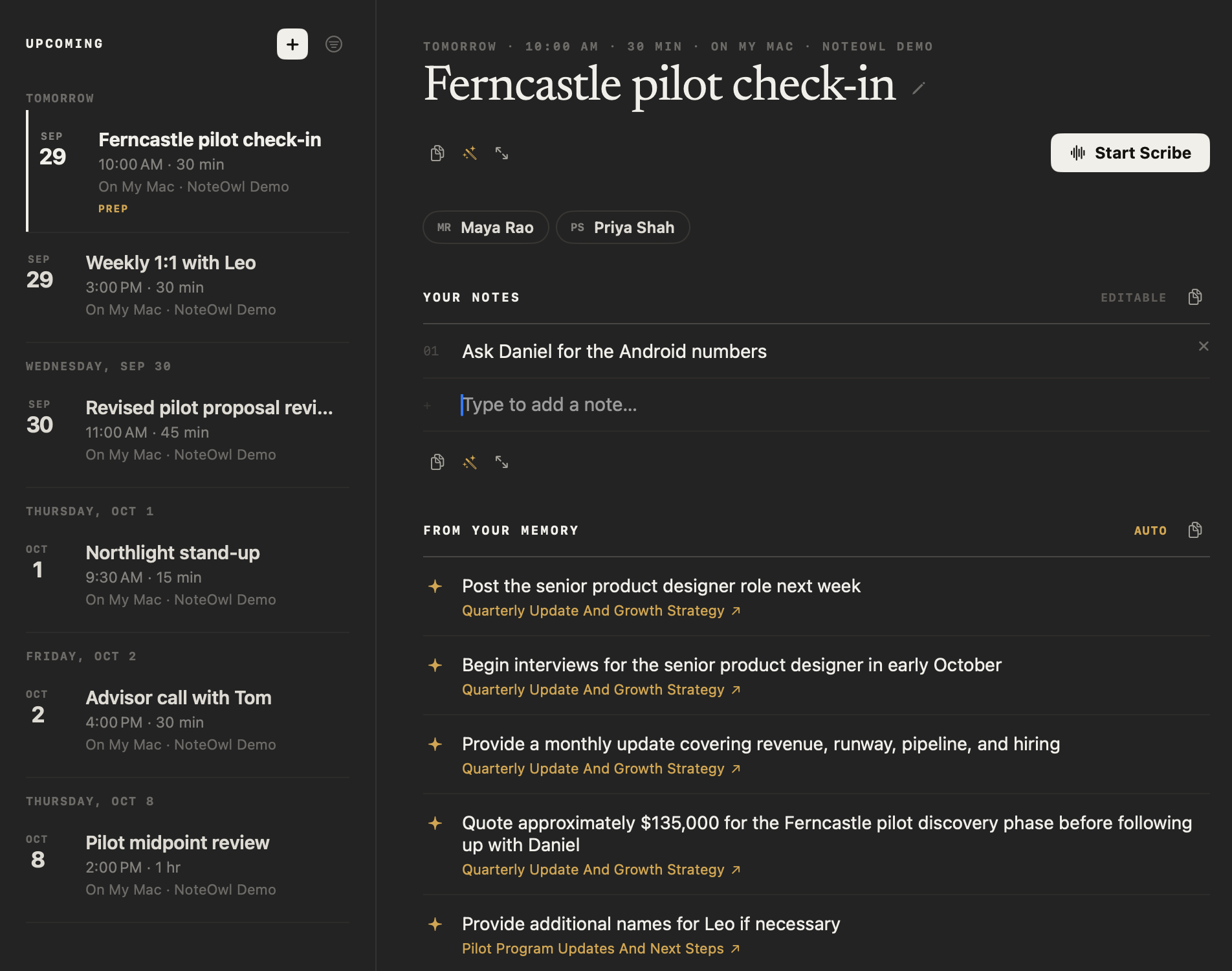
NoteOwl gives every event on your calendar a meeting prep page: the attendees, the notes you add, and up to five open commitments involving those people, each linked to the conversation it came from. Click Start Scribe when the call begins, and your prep goes into the meeting.
NoteOwl reads your calendar on your Mac and never changes it, and a daily Review shows what needs you today. Calendar and Review are part of NoteOwl Pro, with a 7-day free trial in the app.
Read the transcript
Meeting in ten minutes. Quick, what did you promise them last time?
This is NoteOwl. It’s a Mac app that takes your meeting notes, with no bot in the call.
Before every meeting, it shows who’s coming, and what’s still open with them, pulled from your past calls.
Jot down what you want to raise. It stays with the meeting.
Your one-on-one with Leo? Here’s everything he’s working on.
When the call starts, your notes carry straight into the summary. And your calendar never leaves your Mac.
NoteOwl. Free to download. Try it before your next meeting.
How do you prepare for a meeting with NoteOwl?
Open Calendar in NoteOwl and click the meeting. Its prep page shows who’s coming, the notes you add and what’s still open with those people from earlier conversations. When the call starts, click Start Scribe and NoteOwl records the meeting with your prep.
- 1
Connect your calendar
Click Calendar in NoteOwl’s sidebar, then Connect, and allow access when macOS asks. NoteOwl reads the calendars already set up on your Mac.
- 2
Pick the meeting
Your events for the next two weeks are listed under Upcoming, by day. Click one to open its prep page.
- 3
Add your notes
Under Your notes, type a point you want to raise and press Return to save it. Add as many as you like.
- 4
Click Start Scribe
When the meeting begins, click Start Scribe. NoteOwl records it on your Mac, names it after the event and carries your prep into it.
Every button and setting is in the docs: set up Calendar and the daily Review.
What’s on the prep page for each meeting?
Everything you need in the minutes before a call: when it is and which calendar it’s on, the attendees, your own notes, and what your memory holds about the people coming. Nothing on it is sent anywhere, and the event itself is never changed.
When and where
The day, the time, how long it runs and which calendar it’s on.
Attendees
Everyone on the invite, by name, straight from your calendar.
Your notes
Points to raise, typed in before the call. They belong to this one meeting, so each week of a weekly meeting has its own.
From your memory
Up to five open commitments involving the attendees, each linked to the meeting it came from.
Copy, Ask and Focus
Copy the whole page, ask NoteOwl to write something from it on your Mac, or read it in one view.
Start Scribe and Join
Start Scribe records the meeting with your prep. Join opens the call link when the invite has one.
How does NoteOwl choose what’s in From your memory?
From your commitments. NoteOwl shows up to five open ones in which someone on the invite owes something or is owed something, newest first. Each names the conversation it came from, so you can check what was actually said before you walk in.
Commitments are the promises NoteOwl finds in your meetings, imported recordings and notes, including each meeting’s action items, with owners and due dates.
Matched to the invite
A commitment shows when the person who owes it, or the person it’s owed to, is an attendee, matched by name.
Still open
Commitments you’ve marked done are left out.
Newest first, up to five
The most recently captured come first, so the page stays short.
Linked to the source
Each one names the meeting, recording or note it came from. Click it to open that conversation where it was said.
What happens to your prep when the meeting starts?
Click Start Scribe on the prep page and NoteOwl starts recording, names the meeting after the event and saves your prep with it. The summary and action items use it as background, while the transcript stays the record of what was said.
NoteOwl records the call from your Mac, with nothing joining it: see AI meeting notes without a bot.
The meeting’s name
The recording in Meeting Scribe takes the event’s title.
Background for the summary
Your notes and the memory items help write the summary, marked as preparation rather than as something said.
Names for action items
The attendees help NoteOwl put the right name on who owes what.
Kept with the meeting
The prep is saved with the recording, so a summary you rewrite later with another template uses it too, even if the event changes.
“When the meeting starts, your notes and this context merge into the live Scribe summary automatically.”
How do you prepare for a 1:1 meeting?
The same way, with one attendee. The prep page for your 1:1 lists what’s still open with that person, from your earlier 1:1s or any other conversation. Each week’s 1:1 has its own notes.
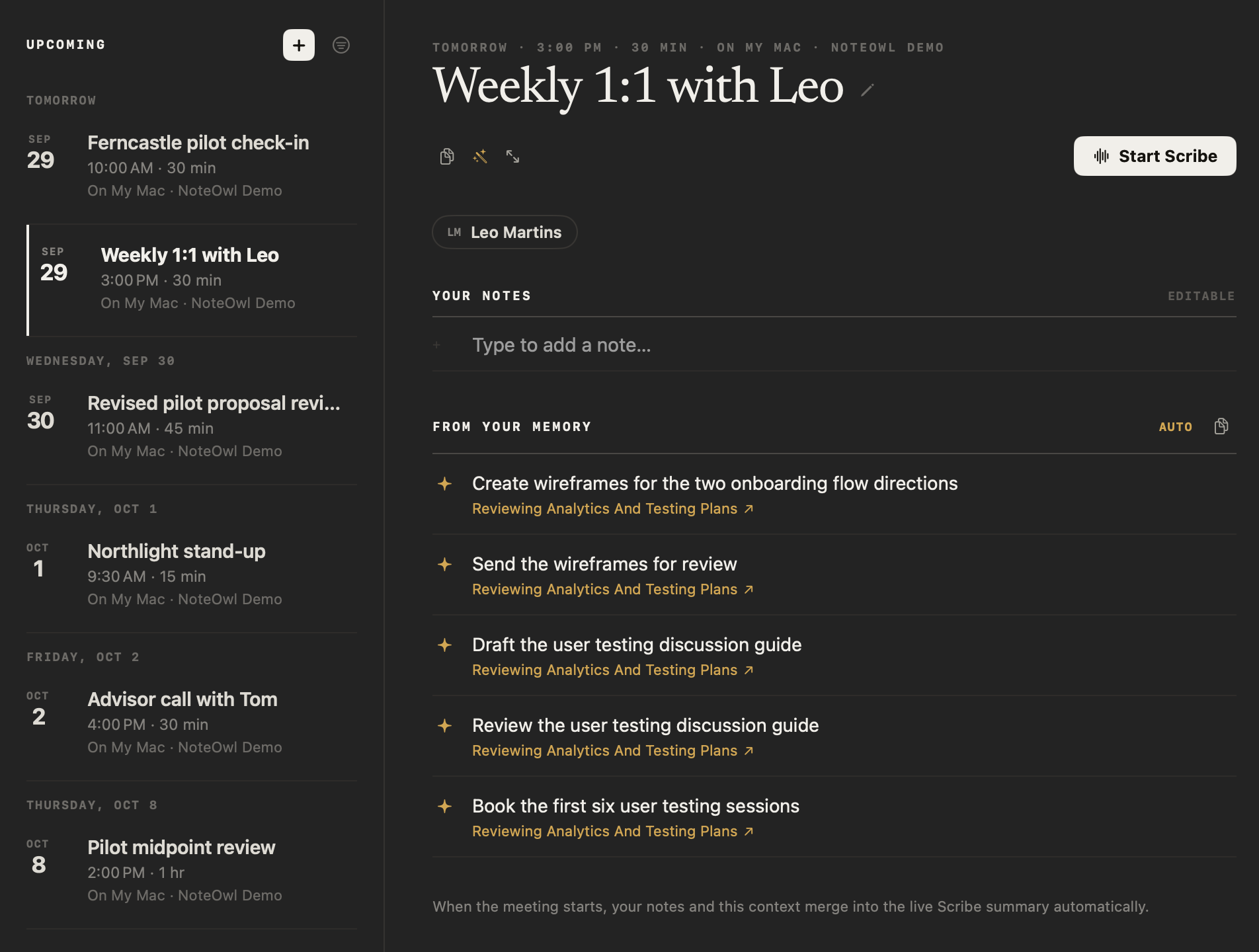
After the call, choose Summarize as → 1:1 Check-in and NoteOwl rewrites the summary in that template’s sections, still using your prep. The sections, with an example, are on the 1:1 meeting template page.
Which calendars does NoteOwl read?
The ones already set up on your Mac: iCloud, Google, Exchange and any other account you’ve added to macOS. NoteOwl reads the next two weeks, lets you choose which calendars count, and never adds, changes or deletes an event.
Missing a work calendar? Add its account in System Settings → Internet Accounts and it appears in NoteOwl’s Calendars panel. NoteOwl reads through macOS, with no sign-in of its own.
Any account on your Mac
iCloud, Google, Exchange, CalDAV, subscribed and local calendars, through macOS. There’s no separate sign-in.
The next two weeks
Fourteen days ahead, read again whenever your calendar changes.
Your choice of calendars
Switch any calendar off in the Calendars panel. Once you’ve chosen, a calendar added later waits until you click Include.
Only your schedule
Cancelled events and invitations you declined are left out. Ones you might go to are marked Maybe.
“NoteOwl reads these to prepare you for meetings. It never changes them.”
Can NoteOwl remind you before a meeting?
Yes. In the Calendars panel, set Remind me before a meeting to the start or 5, 10 or 15 minutes before. The reminder is a Mac notification that opens the prep page for that meeting, so your notes are in front of you when the call begins.
- Remind me before a meeting
- How it worksOff, At start, 5 min, 10 min or 15 min
- The reminder
- How it worksA Mac notification with the meeting’s title, when it starts and up to three attendees
- Its buttons
- How it worksOpen in NoteOwl, which opens the prep page, and Start Scribe
- All-day events
- How it worksLeft out unless you turn on Include all-day events
- Permission
- How it worksNoteOwl asks to show notifications only when you turn reminders on
| How it works | |
|---|---|
| Remind me before a meeting | Off, At start, 5 min, 10 min or 15 min |
| The reminder | A Mac notification with the meeting’s title, when it starts and up to three attendees |
| Its buttons | Open in NoteOwl, which opens the prep page, and Start Scribe |
| All-day events | Left out unless you turn on Include all-day events |
| Permission | NoteOwl asks to show notifications only when you turn reminders on |
“A reminder opens the event in NoteOwl. It never starts recording on its own.”
What does the daily Review show?
What needs you today: a short brief, what you captured in the last day, your open and overdue commitments, the ones due soon, and today’s events from your calendar. Click an event and its prep page opens.
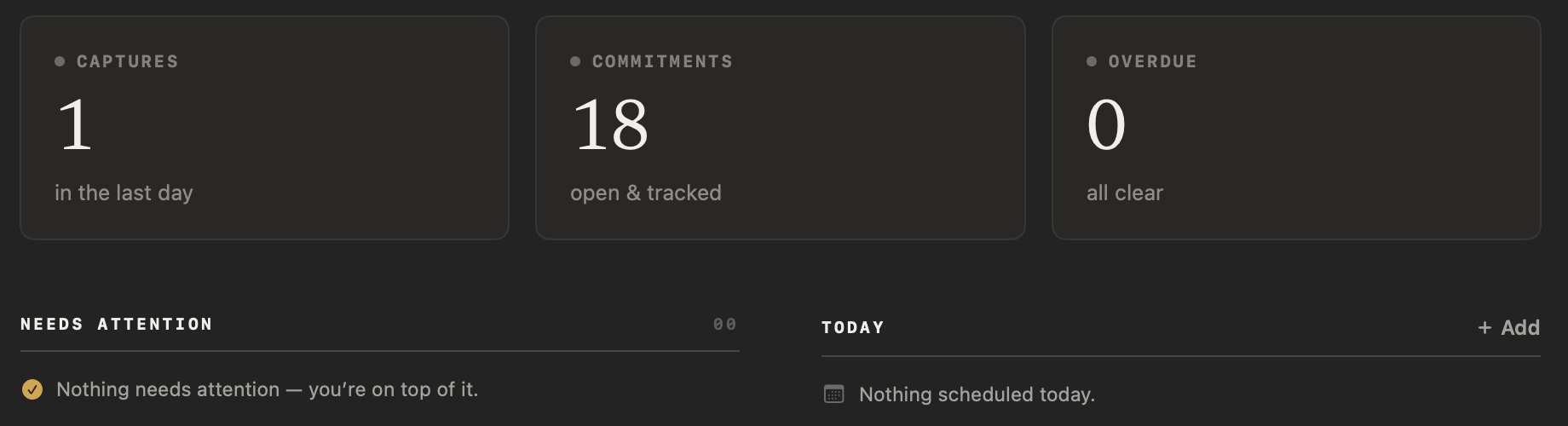
A short brief
What’s overdue, what’s due today, today’s events and what you captured in the last day. Each line opens what it’s about.
Three numbers
Captures in the last day, open commitments and overdue ones. Click a number to open that list.
Needs attention
Commitments that are overdue, due today or due in the next three days, most urgent first, ready to tick off.
Today
Today’s events from your calendar and your own. Click one to open its prep page, or + Add to add one.
Is your calendar kept private?
Yes. NoteOwl reads your calendar on your Mac and never sends it anywhere. Your prep notes, and the prep saved with each meeting, stay in NoteOwl’s files on your Mac, and the on-device AI models that use them run there too, even offline.
“NoteOwl reads the calendars already set up on this Mac — iCloud, Google, Exchange and others — so it can prep you before a meeting. It only ever reads them.”
Yours to keep or erase
Export all data includes your calendar setup and your prep notes, and Delete all data removes them from your Mac.
Is meeting prep free?
No. Calendar, prep pages and the daily Review are part of NoteOwl Pro, along with meetings, commitments and people. Dictation into any app and voice notes are free and unlimited, forever.
NoteOwl Pro is $79 once for one Mac, with a 7-day free trial in the app and no card.
- Dictation into any app
- FreeUnlimited
- ProUnlimited
- Voice notes
- FreeUnlimited
- ProUnlimited
- Calendar and a prep page for every meeting
- FreeNo
- ProYes
- Daily Review
- FreeNo
- ProYes
- Meetings, commitments and people
- FreeNo
- ProYes
| Free | Pro | |
|---|---|---|
| Dictation into any app | Unlimited | Unlimited |
| Voice notes | Unlimited | Unlimited |
| Calendar and a prep page for every meeting | No | Yes |
| Daily Review | No | Yes |
| Meetings, commitments and people | No | Yes |
NoteOwl meeting preparation at a glance
The facts, in one table. NoteOwl reads your calendar and runs its on-device AI models on your Mac, so your schedule and your notes stay there.
- Where
- Calendar, in NoteOwl’s sidebar under Memory
- Calendars
- The ones set up on your Mac, such as iCloud, Google and Exchange; you choose which
- How far ahead
- The next two weeks
- On each prep page
- Attendees, your notes, up to five open commitments with them, and Start Scribe
- Into the meeting
- Start Scribe saves the prep with the recording for its summary and action items
- Reminders
- Off, at the start, or 5, 10 or 15 minutes before; a reminder never starts recording
- Your calendar
- Read on your Mac, never changed, never uploaded
- Plan
- NoteOwl Pro, $79 once for one Mac; 7-day free trial in the app
- Requirements
- macOS 26 or later, Apple Silicon (M1 or newer), 16 GB memory minimum, 24 GB recommended
What else does NoteOwl do?
Prep is the part before the call. NoteOwl is private AI meeting notes and memory for Mac: it records meetings without a bot, labels every speaker, writes summaries and action items, and lets you chat with everything you’ve recorded.
A personal CRM that fills itself
Everyone on the invite has a profile too: their company and title, a relationship summary and everything still open between you.
Action items that stay tracked
The commitments on a prep page start as action items in your meetings, each with an owner and a due date, and you can tick them off on the Commitments board.
FAQ
Questions about preparing for meetings
How do I prepare for a meeting with NoteOwl?
Connect your calendar on NoteOwl’s Calendar screen, then click the meeting under Upcoming. Its prep page shows the attendees and the commitments still open with them. Add anything you want to raise under Your notes, and click Start Scribe when the call begins.
Does NoteOwl change my calendar?
No. NoteOwl only reads the calendars on your Mac. It never adds, changes or deletes an event, and renaming a meeting in NoteOwl changes only the name NoteOwl shows. Events you add in NoteOwl stay in NoteOwl.
Which calendars work with NoteOwl?
Any calendar set up on your Mac, such as iCloud, Google, Exchange, CalDAV, subscribed and local calendars. NoteOwl reads them through macOS, so there’s no separate sign-in. If a work calendar is missing, add its account in System Settings → Internet Accounts.
Where do the items under From your memory come from?
From your commitments: the promises NoteOwl found in your meetings, imported recordings and notes, plus any you added yourself. A prep page shows up to five that are still open and involve the attendees, newest first, each linked to the conversation it came from.
Does a meeting reminder start recording?
No. A reminder is a Mac notification that opens the prep page for that meeting in NoteOwl. Recording starts only when you click Start Scribe, on the prep page or on the notification.
Can I prepare for a meeting that isn’t on my calendar?
Yes. Click + beside Upcoming on NoteOwl’s Calendar screen, type a title, a date and a time, and click Add Event. It gets its own prep page for your notes, and it stays in NoteOwl: nothing is added to your Mac’s calendar.
Is meeting prep free in NoteOwl?
No. Calendar, prep pages and the daily Review are part of NoteOwl Pro, a one-time $79 purchase for one Mac, with a 7-day free trial in the app and no card. Dictation into any app and voice notes are free.
Related
- Set up Calendar and Review Every step: connect, choose calendars, reminders and prep pages.
- A personal CRM from your meetings A profile for everyone you meet, with what’s still open between you.
- Action items and commitments Every promise from your meetings, tracked with its owner and due date.
- AI meeting notes without a bot What Start Scribe records: your microphone and your Mac’s audio.
- 1:1 meeting template The five sections NoteOwl’s 1:1 Check-in template writes.
Keep exploring
Related features
- AI meeting notes without a botHow NoteOwl records calls from your Mac with no bot joining, and what you get when the call ends
- AI meeting summariesAI meeting summaries, decisions and action items written on your Mac from any template, when the call ends
- Action items and commitmentsAction items that involve you become commitments: what you owe and what you are owed, sorted by what is due
Walk into every meeting prepared
Free to download. Runs entirely on your Mac.
macOS 26 or later · Apple Silicon (M1 or newer) · 16 GB memory minimum, 24 GB recommended
About NoteOwl
NoteOwl is private AI meeting notes and memory for the Mac. It captures meetings without a bot joining the call, labels every speaker, writes summaries and action items, and builds a memory of every conversation that you can chat with — fully offline, because the speech recognition and the AI run on the Mac itself. Dictation into any app is free; Pro is a one-time purchase.
NoteOwl pricing: what’s free and what Pro adds
Last updated