For product teams
AI meeting notes for product teams
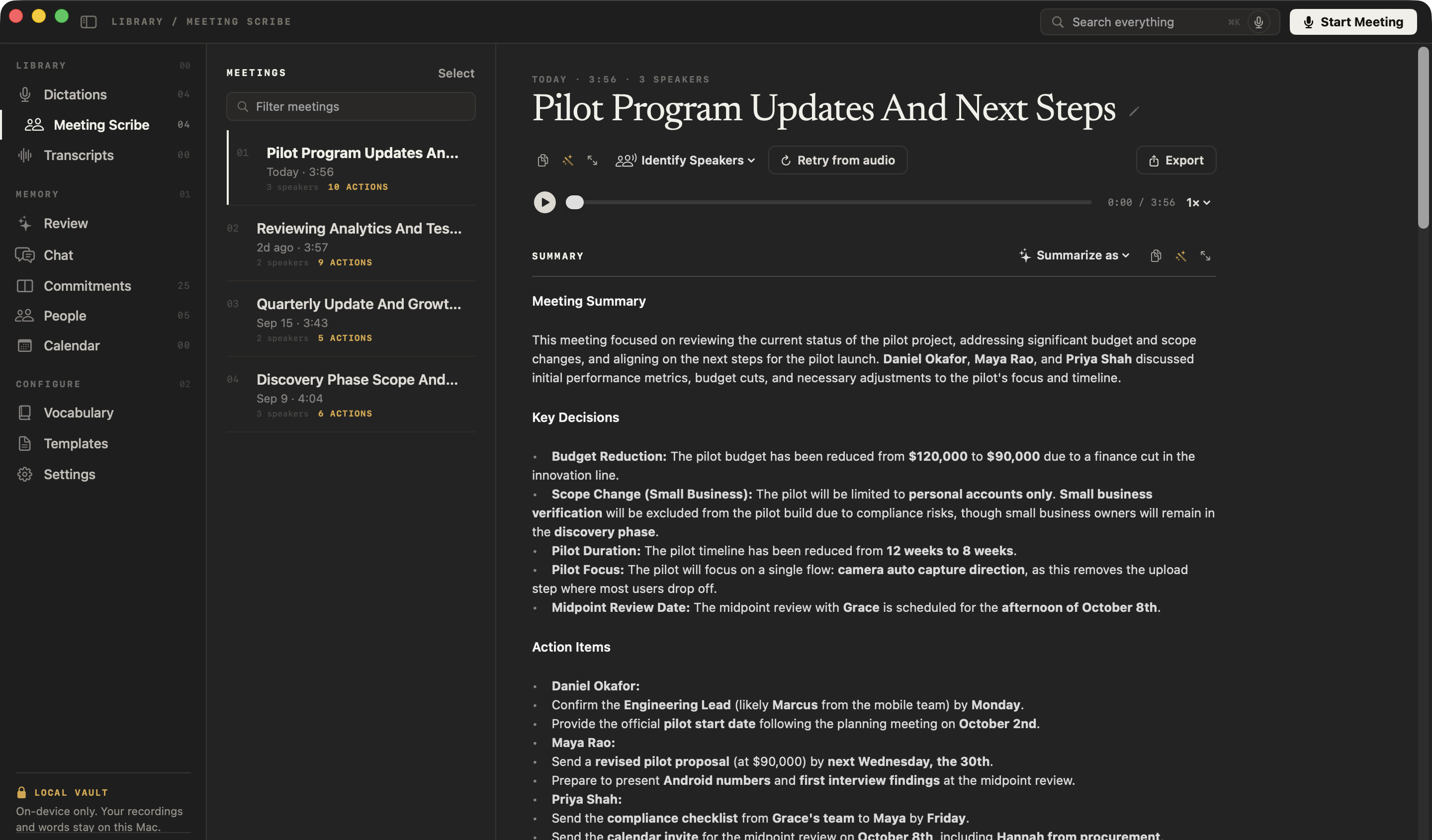
NoteOwl is an AI note taker for product teams: it takes notes on customer interviews, design reviews, stand-ups and 1:1s on your Mac, with no bot joining the call, and writes down what was decided and who owns each next step.
Search or ask every customer interview at once and see the exact passage behind each answer. Between meetings, dictation is free: tap fn in a spec, a ticket or Slack, talk, and your words type at the cursor.
How do product teams use an AI note taker?
For the conversations a roadmap rests on: customer interviews, design reviews, stand-ups and 1:1s. NoteOwl takes the notes without a bot in the call, writes down the decisions and owners, and lets you ask any past meeting a question.
Before the meeting
Walk in knowing what’s open
NoteOwl reads your Mac’s Calendar and builds a prep page for each meeting: who’s coming, your notes, and the commitments still open with them.
During the call
Listen to the customer
No bot joins the interview or the review. Type what matters in the notes box and it feeds the summary; joined late? Catch up tells you what you missed — only you see it.
After the call
Decisions and owners, written down
The summary, the key decisions and the action items with their owners are written on your Mac, and the promises that involve you go to your commitments board.
Interviews you already have
Bring in the recordings
Drag in a customer interview recorded in another app — m4a, mp3, wav, mp4 and more — and get a speaker-labelled transcript, a summary and action items.
Can you dictate specs, tickets and Slack messages?
Yes, and it’s free. Tap fn in a spec, a ticket or Slack — anywhere you can type — and talk. NoteOwl types your words at the cursor, and one tap on Polish rewrites them in the tone set for that app. How free dictation works on your Mac
Casual in chat
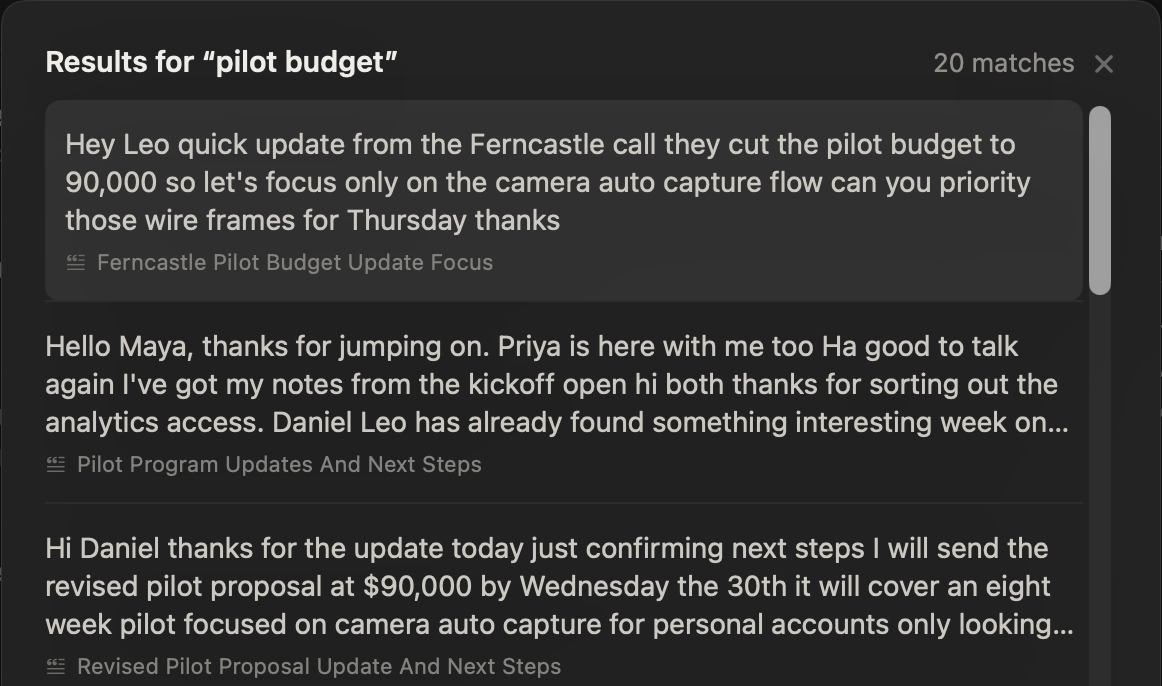
Hey Leo, quick update from the Ferncastle call. They cut the pilot budget to $90,000, so let’s focus only on the camera auto-capture flow. Can you prioritize those wireframes for Thursday? Thanks.
- To
- Daniel Okafor
- Subject
- Next steps
Hi Daniel,
Thanks for the update today. Just confirming next steps: I will send the revised pilot proposal at $90,000 by Wednesday, the 30th. It will cover an eight-week pilot focused on camera auto-capture for personal accounts only.
I look forward to hearing who your engineering lead will be by Monday. Thanks again.
12export const pilot = {13 budgetCap: 90_000,14 weeks: 8,15 accounts: 'personal',16};17
- Rewrite by voice — select a draft, press ⌥X and say how to change itPro
- Voice notes — an idea recorded with New Dictation, audio and text kept together
- Custom vocabulary — product names, feature names and acronyms spelled your wayPro
- 34 languages — detected automatically
What does NoteOwl write after a design review?
The decisions, and who does what by when. This is NoteOwl’s real summary of a meeting where Maya Rao and her designer, Leo Martins review the onboarding numbers and choose design directions.
Summary · Reviewing Analytics And Testing Plans
Key decisions
- Onboarding Flow Direction: Direction 1 (allowing exploration before verification) was rejected due to anticipated friction with the Grace and Risk teams. Direction 2 and Direction 3 (splitting verification and using auto-capture for identity documents) were selected for further development.
- Prototype Testing: Future prototype testing in weeks five and six will be conducted on real phones, not laptops.
Action items
- Leo MartinsDeliver wireframes for the two selected onboarding directions by Thursday.
- Leo MartinsDraft the user testing discussion guide by Wednesday, September 23rd.
- Maya RaoReview the user testing discussion guide on the afternoon Leo sends it.
Important updates
- Analytics Update: The Ferncastle funnel completion is currently low (11% overall), with Android lagging at 7%.
Can you search across every customer interview?
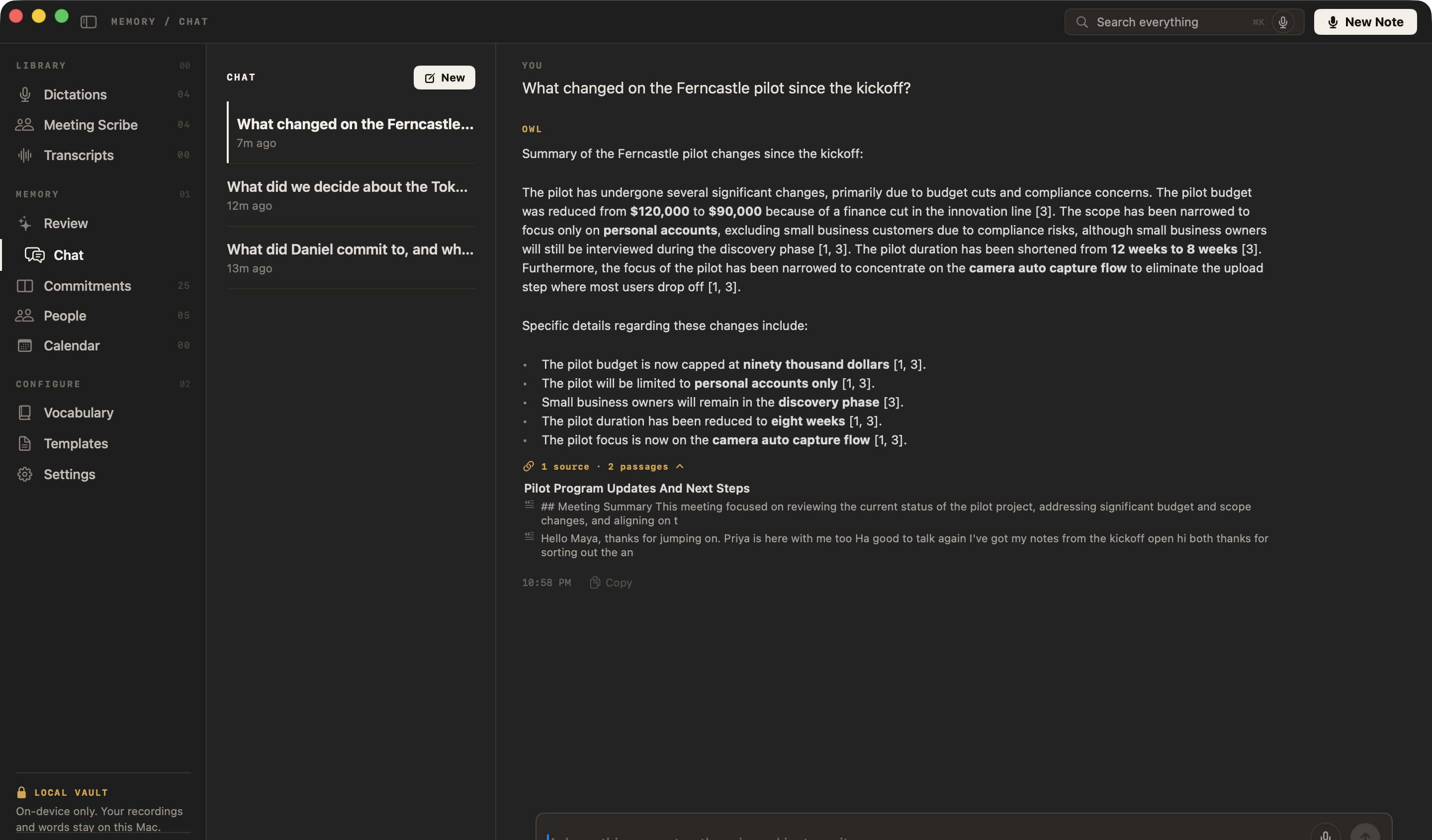
Yes. Press ⌘K to search all your meetings, interviews and notes by word or meaning, or ask NoteOwl’s chat with your meetings a question: it answers only from your own recordings and cites the passages it used.
You asked
What changed on the Ferncastle pilot since the kickoff?
NoteOwl
The pilot duration has been shortened from 12 weeks to 8 weeks [3]. Furthermore, the focus of the pilot has been narrowed to concentrate on the camera auto capture flow to eliminate the upload step where most users drop off [1, 3].
Questions you could ask your interviews
- Where do users say they get stuck in onboarding?
- Which customers asked for the camera flow?
- What did we decide about small business accounts?
How does NoteOwl write stand-up notes?
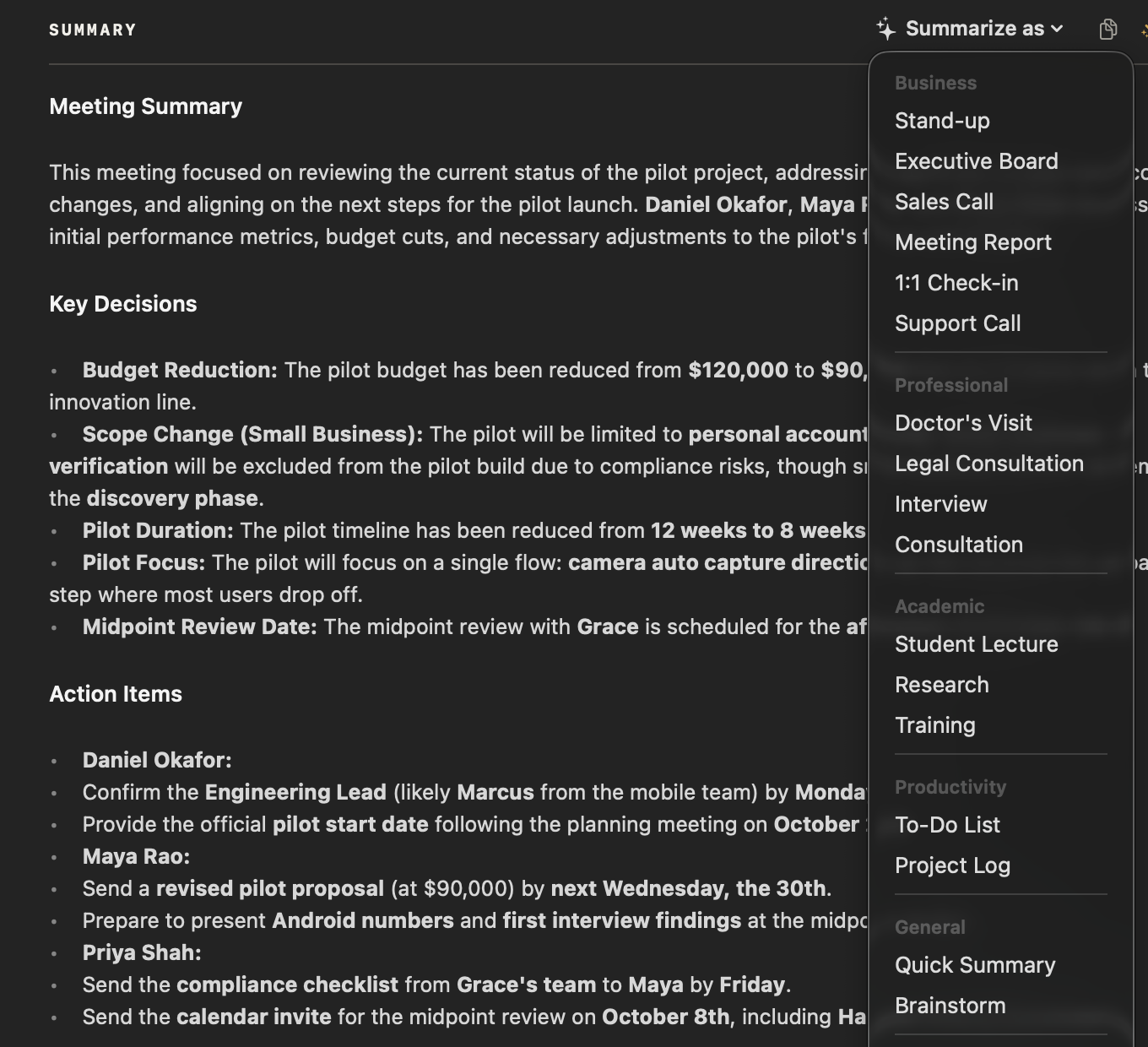
Record the stand-up, then choose Summarize as → Stand-up. NoteOwl rewrites the summary with each speaker’s yesterday, today and blockers, and ends with a one-line team status — on your Mac, once the meeting is over.
Template · Stand-up
“Summarize this stand-up. For each speaker: Yesterday, Today, Blockers. End with a one-line team status.”
How do you keep track of who owns each next step?
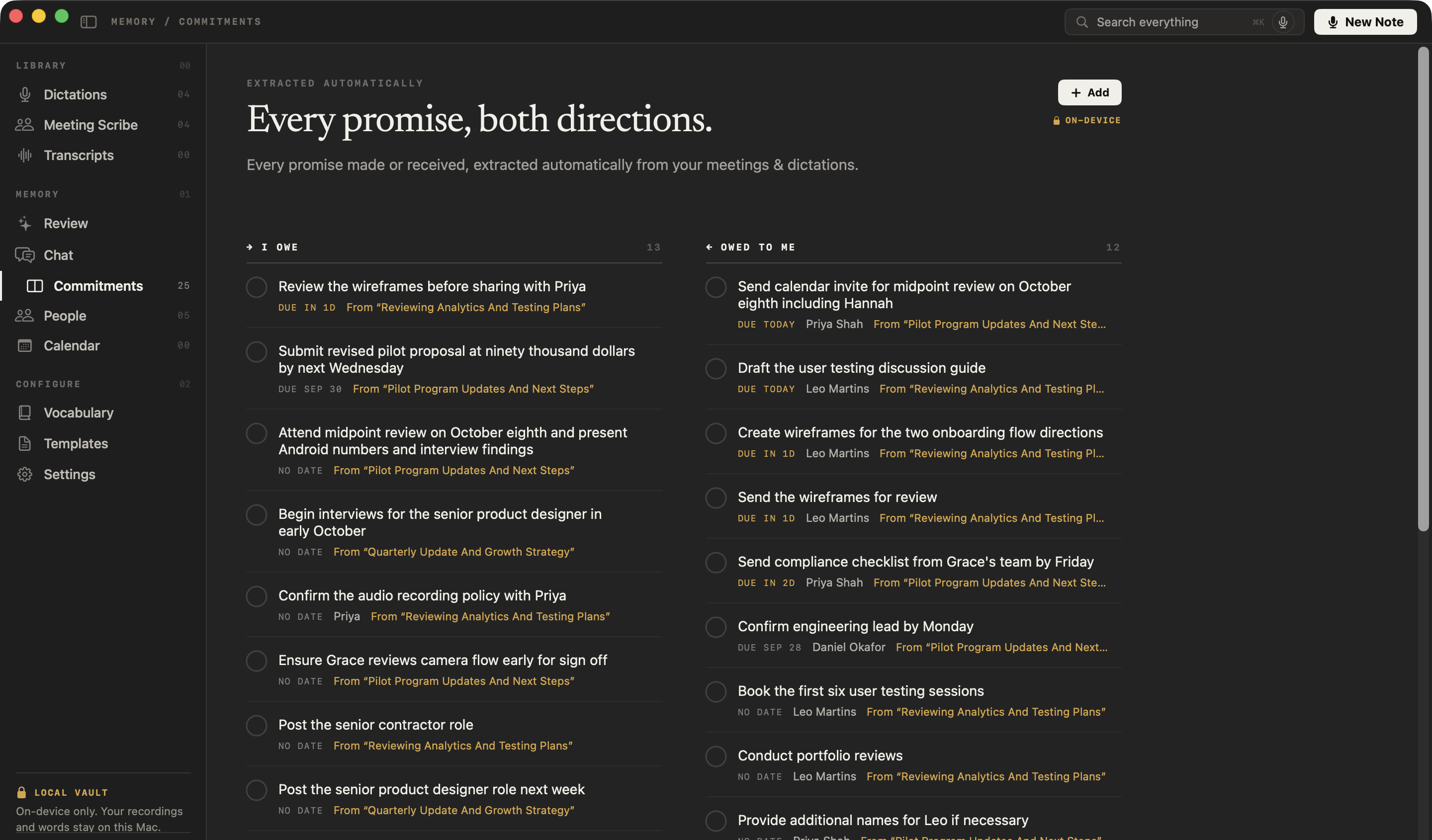
Each action item keeps its owner, and the ones that involve you land on one board of what you owe and what you’re owed, sorted by what’s due and linked to the meeting they came from. Tick one off anywhere and it’s done everywhere.
You owe
Review the wireframes before sharing with Priya
From “Reviewing Analytics And Testing Plans”
You owe
Ensure Grace reviews camera flow early for sign off
From “Pilot Program Updates And Next Steps”
Owed to you · Leo Martins
Create wireframes for the two onboarding flow directions
From “Reviewing Analytics And Testing Plans”
Owed to you · Leo Martins
Book the first six user testing sessions
From “Reviewing Analytics And Testing Plans”
What else does NoteOwl do for a product team?
Everything between the meetings, with NoteOwl Pro: recaps drafted, interviews imported, answers recalled from any app — all on your Mac, even with Wi-Fi off.
Recaps drafted from the call
In a meeting, ask the wand for the follow-up email, a recap for the team or anything you describe; it writes from the summary, action items and transcript.
Help mid-meeting
Joined the review late? Catch up on what you missed, or get questions to ask. Only you see it.
Recall from any app
Between meetings, press ⌥Z and ask out loud; the cited answer appears in the notch.
Every speaker labelled
Each line says who said it. Name a teammate once and later meetings know their voice; voice profiles stay on your Mac.
Paste it into your docs
Copy a meeting as Markdown for a spec, a wiki or a ticket, or save it as a Markdown file or a PDF.
Transcribe interviews you already have
Drag in mp3, wav, m4a, aiff, flac, aac or mp4 — one recording at a time — and get a speaker-labelled transcript, a summary and action items, all added to your memory.
A daily review
What’s overdue, what’s due today, and what came in — every morning.
Works with Wi-Fi off
Transcription, summaries and chat run on your Mac, so they keep working with no network.
Interviews in 34 languages
Customer calls and dictation in 34 languages, detected automatically — Hindi and English in one sentence included.
Which meeting notes templates suit product teams?
NoteOwl writes the summary when the call ends; Summarize as then rewrites it in any of the 22 meeting notes templates. These six fit most of a product team’s week.
| Meeting | Template | What it writes |
|---|---|---|
| Customer interviews | Research | Questions · Findings · Evidence · Open questions |
| Daily stand-ups | Stand-up | Yesterday · Today · Blockers · Team status |
| Design critiques and brainstorms | Brainstorm | Ideas by theme · Standouts · Next experiments |
| Sprint reviews and roadmap check-ins | Project Log | Progress · Decisions · Blockers · Next milestones |
| Demos and readouts | Presentation | Main message · Key points · Standout moments · Q&A |
| 1:1s with your team | 1:1 Check-in | Wins · Blockers · Feedback · Growth · Follow-ups |
Is it safe to record customer calls with an AI note taker?
With NoteOwl, nothing you record leaves your Mac: transcription, summaries and chat run on your Mac with on-device AI models, and recordings are never uploaded. Because no bot joins, tell the customers you interview that you’re taking notes.
| When NoteOwl connects | What it sends |
|---|---|
| The one-time model download | Model files are downloaded to your Mac; nothing of yours is sent |
| Checking for app updates | No personal data or content |
| Starting the trial or activating Pro | Your email address and an identifier for this Mac |
| A licence check, at most once a week (Pro) | Only the certificate identifier |
Recordings, transcripts, notes and memory are never sent. The details are in NoteOwl’s privacy policy.
FAQ
Questions product teams ask about NoteOwl
Can NoteOwl take notes on customer interviews in Zoom, Teams or Google Meet?
Yes. NoteOwl records your microphone and your Mac’s audio, so it takes notes on customer interviews and design reviews in Zoom, Microsoft Teams, Google Meet, Webex or Slack huddles with no bot joining. Tell the people you meet that you are taking notes.
Can NoteOwl transcribe customer interviews recorded in another app?
Yes. Drag the recording into NoteOwl — mp3, wav, m4a, aiff, flac, aac or mp4, one at a time — and NoteOwl transcribes it on your Mac, labels the speakers, writes a summary and action items, and adds it to your memory. Importing recordings is part of NoteOwl Pro.
Can I search across all our customer interviews in NoteOwl?
Yes. NoteOwl searches every meeting, imported interview and note on your Mac with ⌘K, and NoteOwl’s chat answers questions across all of them, citing the passages each answer came from. Search and chat are part of NoteOwl Pro.
Can NoteOwl write stand-up notes?
Yes. Record the stand-up in NoteOwl, then choose Summarize as → Stand-up: NoteOwl rewrites the notes with each speaker’s yesterday, today and blockers, and ends with a one-line team status. Stand-up is one of NoteOwl’s 22 built-in templates; meeting notes and templates are part of NoteOwl Pro.
Does NoteOwl connect to issue trackers or Slack?
No. NoteOwl doesn’t connect to issue trackers, Slack or other web apps; it works on your Mac. Copy a meeting’s notes as Markdown and paste them into a ticket, a doc or Slack, or tap fn in any of them and dictate — NoteOwl types at the cursor, and dictation is free.
Does NoteOwl send customer calls to the cloud?
No. NoteOwl transcribes, summarizes and answers questions on your Mac with on-device AI models, so customer interviews and team meetings are never uploaded, and it works offline after the one-time model download.
How much does NoteOwl cost for a product team?
Meeting notes, imports, search and chat are part of NoteOwl Pro: $79 once for one Mac, no subscription, with a 7-day free trial in the app and no card needed. Each person buys it for their own Mac, inside the app (the … menu next to your name → License…). Dictation into any app is free forever.
Related
- AI meeting summaries The summary, decisions and action items, written on your Mac when the call ends.
- Transcription with speaker identification Every line says who said it, and a voice you name is recognised later.
- AI note taker for founders Customer calls, investor updates and 1:1s, with every promise tracked.
- NoteOwl Pro, $79 once No subscription; one Mac; try it free first.
Keep exploring
Made for this work
- Stand-up meeting templateA stand-up meeting template to fill in online or copy, what each section holds, an example, and how NoteOwl writes stand-up notes
- User interview templateA user interview template to copy, what each section holds, an example, and how NoteOwl writes research notes from a user interview
- Project update templateA project update template to copy, what each section holds, an example, and how NoteOwl writes project update notes
- Brainstorming templateA brainstorming template to copy, what each section holds, an example, and how NoteOwl writes brainstorm notes
- Action items and commitmentsAction items that involve you become commitments: what you owe and what you are owed, sorted by what is due
- Retrospective templateA retrospective template to fill in online in four formats (went well / to improve / try next, start stop continue, mad sad glad, 4Ls), with votes and action items
- Decision log templateA decision log builder: numbered decisions with date, who decided, status, context, options considered and the reason, with a CSV for a spreadsheet
Other roles
- AI transcription for journalistsInterviews transcribed speaker by speaker with timestamps, quotes checked against the audio, nothing uploaded
- AI note taker for managers1:1s and team meetings: commitments tracked both ways, what is open with each person before you meet, plus free dictation
- AI transcription for podcastersEpisodes imported and transcribed speaker by speaker on your Mac, show notes from the Podcast Show Notes template, SRT subtitles; nothing uploaded
Every customer interview, searchable on your Mac
Free to download. Runs entirely on your Mac.
macOS 26 or later · Apple Silicon (M1 or newer) · 16 GB memory minimum, 24 GB recommended
About NoteOwl
NoteOwl is private AI meeting notes and memory for the Mac. It captures meetings without a bot joining the call, labels every speaker, writes summaries and action items, and builds a memory of every conversation that you can chat with — fully offline, because the speech recognition and the AI run on the Mac itself. Dictation into any app is free; Pro is a one-time purchase.
NoteOwl pricing: what’s free and what Pro adds
Last updated