People
A personal CRM that fills itself from your meetings
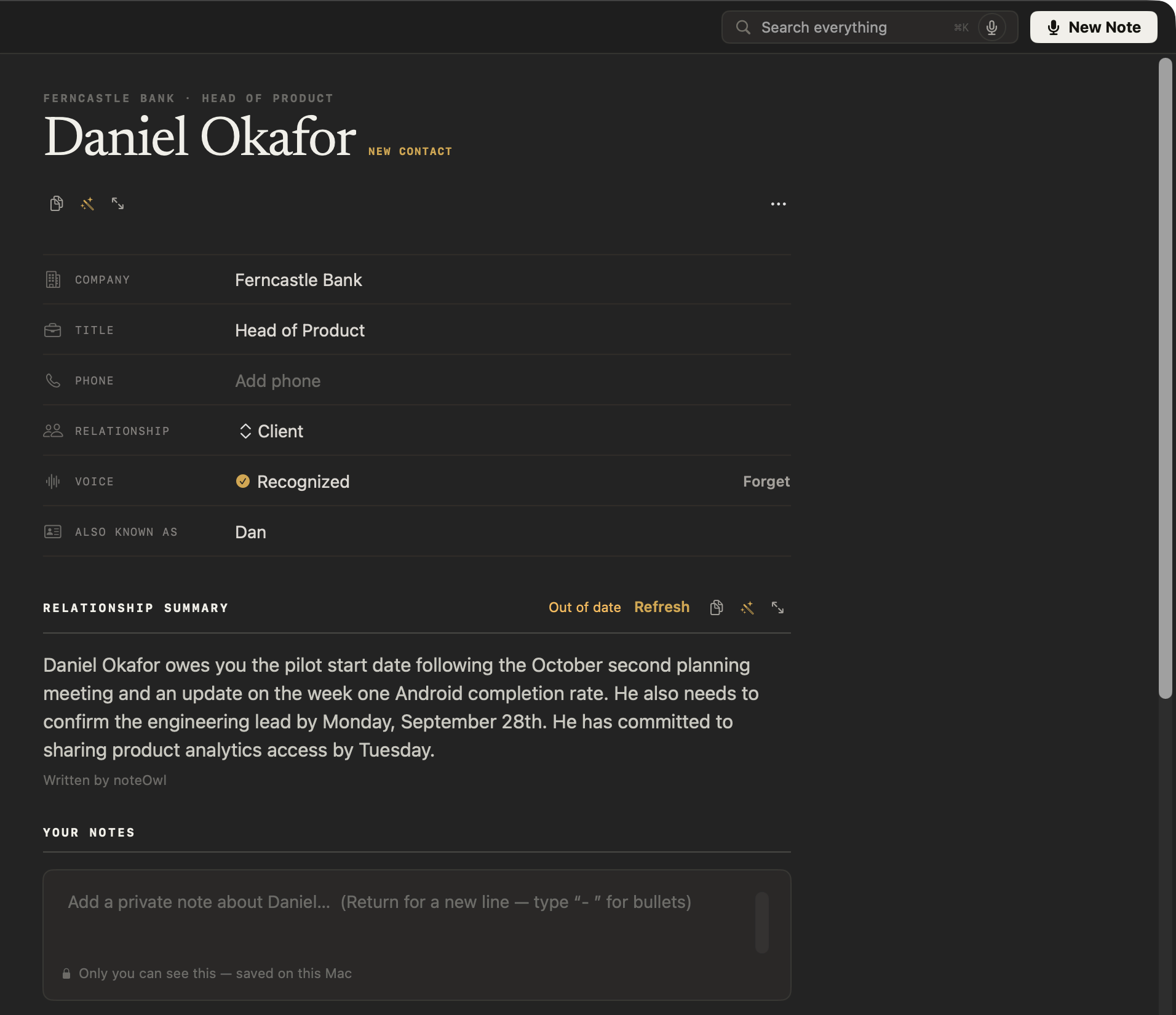
NoteOwl is a personal CRM that fills itself from your meetings: everyone you meet gets a profile with their company and title, a relationship summary written from your conversations, what’s still open between you, and every meeting you’ve had.
Add private notes, name a voice once so NoteOwl recognises them in later meetings, and prepare for the next call from your Mac’s Calendar — all on your Mac, even offline, as part of NoteOwl Pro.
Read the transcript
You’re meeting Daniel tomorrow. So… what do you actually know about him?
NoteOwl keeps a page on everyone you meet. Right on your Mac.
Where things stand, written from your meetings. And the three things he still owes you.
Add a private note for next time. Only you can see it.
And every meeting you’ve had with him is one click away.
NoteOwl. Free to download. Try it on your next call.
What goes into each person’s profile?
Everything your meetings say about them, in one place: company and title, your relationship, a summary of it written on your Mac, what’s still open between you, every conversation you’ve had, and your own private notes.
- Company and title
- What it holdsFrom your Mac’s Contacts if you allow it, or a role mentioned in a meeting; click to edit
- Phone
- What it holdsFrom your Mac’s Contacts, or typed in
- Relationship
- What it holdsYour choice: Client, Colleague, Partner, External, Family, Friend, Other, or your own word
- Voice
- What it holdsRecognised once you’ve named them on a transcript; Forget removes the voice profile
- Also known as
- What it holdsThe other names they go by in your meetings, such as a nickname
- Relationship summary
- What it holdsA short summary written on your Mac: who they are, what’s outstanding between you, and recent context
- Your notes
- What it holdsPrivate notes only you write, saved on your Mac
- At a glance
- What it holdsWhen you last met, how many meetings you’ve had, and how many commitments are open
- Open
- What it holdsEvery commitment between you, both ways, with its due date; tick one off to mark it done
- Timeline
- What it holdsEvery conversation they appear in, newest first; each one opens at the passage
| On the profile | What it holds |
|---|---|
| Company and title | From your Mac’s Contacts if you allow it, or a role mentioned in a meeting; click to edit |
| Phone | From your Mac’s Contacts, or typed in |
| Relationship | Your choice: Client, Colleague, Partner, External, Family, Friend, Other, or your own word |
| Voice | Recognised once you’ve named them on a transcript; Forget removes the voice profile |
| Also known as | The other names they go by in your meetings, such as a nickname |
| Relationship summary | A short summary written on your Mac: who they are, what’s outstanding between you, and recent context |
| Your notes | Private notes only you write, saved on your Mac |
| At a glance | When you last met, how many meetings you’ve had, and how many commitments are open |
| Open | Every commitment between you, both ways, with its due date; tick one off to mark it done |
| Timeline | Every conversation they appear in, newest first; each one opens at the passage |
How does NoteOwl fill in a profile from your meetings?
By reading each meeting when it ends. NoteOwl finds the people in it, what each one promised and the details worth keeping, files them under the right person, and writes the relationship summary on your Mac when you open the profile.
- 1
You meet
Record a call or import a recording as usual. There is nothing to type.
- 2
NoteOwl picks out the people
When the meeting ends, NoteOwl finds the people in it, what each one promised and the details worth keeping, each tied to the passage it came from.
- 3
It files them under the right person
A name or nickname they’ve used before lands on the same profile. Someone new is marked New contact for their first week.
- 4
The summary keeps up
Open a profile and NoteOwl writes the relationship summary on your Mac. When new conversations change the picture, it’s marked Out of date, and Refresh rewrites it.
Yours to correct
Edit any field
Click a field on the card to change it. A field you clear stays cleared.
Rewrite the summary
Ask for changes with the wand, or edit it yourself. Your own words are never overwritten.
Add, merge or remove
Add someone by hand, merge a duplicate into one profile with its history, commitments and notes, or remove a profile.
Find anyone
Search people by name, nickname, company or title.
Draft from the profile
The wand at the top turns the whole profile into what you describe, such as a one-page report or a follow-up email.
How do you see what’s still open with someone?
Open their profile. The Open section lists every commitment between you — OWE for what you promised, OWED for what they promised — with its due date, and ticking one off marks it done on the board and in the meeting too.
The commitments come from your meetings’ action items: see how NoteOwl tracks meeting action items.
Ferncastle Bank · Head of Product
Daniel Okafor
Relationship summary
Daniel Okafor owes you the pilot start date following the October second planning meeting and an update on the week one Android completion rate. He also needs to confirm the engineering lead by Monday, September 28th. He has committed to sharing product analytics access by Tuesday.
Does NoteOwl recognise people by voice?
Yes, once you name them. Name a speaker on a transcript and NoteOwl learns the voice, so later meetings label that person for you. The voice profile is stored only on your Mac, and Forget on their profile removes it.
How do you prepare for a meeting with someone?
Open their profile for the whole relationship, or the event in Calendar for the meeting itself. NoteOwl reads your Mac’s Calendar, never changes it, and builds a prep page for each event: who’s coming, your notes, and what’s still open with them.
Who’s coming
The people invited, from your Mac’s Calendar.
Your notes
Points you want to raise, typed in before the call.
From your memory
Up to five commitments still open with the people invited, each opening where it was said.
Into the summary
Click Start Scribe on the prep page, and your notes and this context go into the meeting’s summary.
Is a personal CRM built from your meetings private?
With NoteOwl it is. Profiles, relationship summaries, your notes and voice profiles are built and kept on your Mac with on-device AI models; nothing is uploaded, and it works offline after the one-time model download.
People profiles are part of NoteOwl Pro; dictation and voice notes are free.
- Who gets a profile
- The people in your meetings and imported recordings, plus anyone you add
- What a profile holds
- Company, title, phone, relationship, voice, other names, a relationship summary, your notes, open commitments and every conversation
- Relationship summary
- Written on your Mac from your conversations; marked Out of date when they change
- Voice recognition
- Learned when you name someone on a transcript; the voice profile stays on your Mac
- Contacts and Calendar
- Read on your Mac if you allow them, never changed
- Where the AI runs
- On your Mac, with on-device AI models; works offline
- Plan
- NoteOwl Pro, $79 once for one Mac; 7-day free trial in the app
- Requirements
- macOS 26 or later, Apple Silicon (M1 or newer), 16 GB memory minimum, 24 GB recommended
FAQ
Questions about NoteOwl’s people profiles
What is a personal CRM?
A personal CRM is a private record of the people you know: who they are, what you last talked about, and what you owe each other. NoteOwl is a personal CRM for Mac that fills itself in from your meetings instead of asking you to type it.
How does NoteOwl build a profile for each person?
NoteOwl finds the people in every meeting it records and keeps a profile for each one: company and title, a relationship summary written on your Mac, the commitments still open between you, and every conversation they appear in, each opening at the passage.
Is NoteOwl a personal CRM app for Mac?
Yes. NoteOwl is a Mac app whose People screen works as a personal CRM app that fills itself from your meetings. You can still edit any field, add private notes, add people by hand and merge duplicates.
Does NoteOwl recognise people by voice?
Yes, once you name them. When you name a speaker on a transcript, NoteOwl learns that voice and labels the person in later meetings. The voice profile is stored only on your Mac, and Forget on the person’s profile removes it.
Can I keep private notes about someone in NoteOwl?
Yes. Every NoteOwl profile has a Your notes field for your own private notes about that person. The notes are saved on your Mac, stay separate from the relationship summary NoteOwl writes, and are never uploaded.
Does NoteOwl use my calendar to prepare for meetings?
Yes, if you connect it. NoteOwl reads your Mac’s Calendar without changing it and builds a prep page for each meeting: who is coming, your notes, and the commitments still open with them, each linked to where it was said.
Does NoteOwl upload my contacts or conversations?
No. NoteOwl builds every profile, relationship summary and voice profile on your Mac with on-device AI models. If you allow Contacts, NoteOwl reads names, companies, titles and phone numbers on your Mac to fill in profiles; nothing is uploaded.
Are NoteOwl’s people profiles free?
People profiles are part of NoteOwl Pro, a one-time $79 purchase for one Mac with no subscription. You can try every Pro feature free for 7 days in the app with no card; dictation and voice notes stay free.
Related
- All NoteOwl features Meeting notes, transcription, chat and memory, dictation, templates and languages.
- Action items and commitments What you owe and what you’re owed, from every meeting, sorted by what’s due.
- AI meeting summaries The summary, decisions and action items written when the call ends.
- AI note taker for founders Customer calls, investor updates and 1:1s, with every promise tracked.
Keep exploring
Related features
- Offline AI meeting notesEvery NoteOwl feature works offline after a one-time model download; what the app sends over the network, and what it never does
- Chat with your meetingsAsk your own meetings a question on your Mac, even offline; every answer cites the passage it came from
- Search all your meetingsOne search across every meeting, dictation, transcript and person on your Mac, plus Recall by voice from any app
Who uses it
- AI note taker for consultantsClient calls, workshops and interviews with every commitment tracked and answers cited, on your Mac
- AI note taker for recruitersCandidate screens and hiring-manager calls with no bot: interview notes from the Interview template, a profile per candidate, free dictation for scorecards
Walk into your next meeting knowing what’s open
Free to download. Runs entirely on your Mac.
macOS 26 or later · Apple Silicon (M1 or newer) · 16 GB memory minimum, 24 GB recommended
About NoteOwl
NoteOwl is private AI meeting notes and memory for the Mac. It captures meetings without a bot joining the call, labels every speaker, writes summaries and action items, and builds a memory of every conversation that you can chat with — fully offline, because the speech recognition and the AI run on the Mac itself. Dictation into any app is free; Pro is a one-time purchase.
NoteOwl pricing: what’s free and what Pro adds
Last updated