NoteOwl vs MacWhisper
A MacWhisper alternative with meeting memory
NoteOwl is a MacWhisper alternative for Mac that turns your calls and recordings into a memory you can ask: with NoteOwl Pro, every meeting and imported file is transcribed on your Mac, and a voice you name once is recognised in later meetings.
Its AI is built in and runs on your Mac, with nothing to connect: summaries in 22 templates, a board of what you owe and are owed, and chat that answers across every meeting with the passage it came from. NoteOwl Pro is $79 once.
Read the transcript
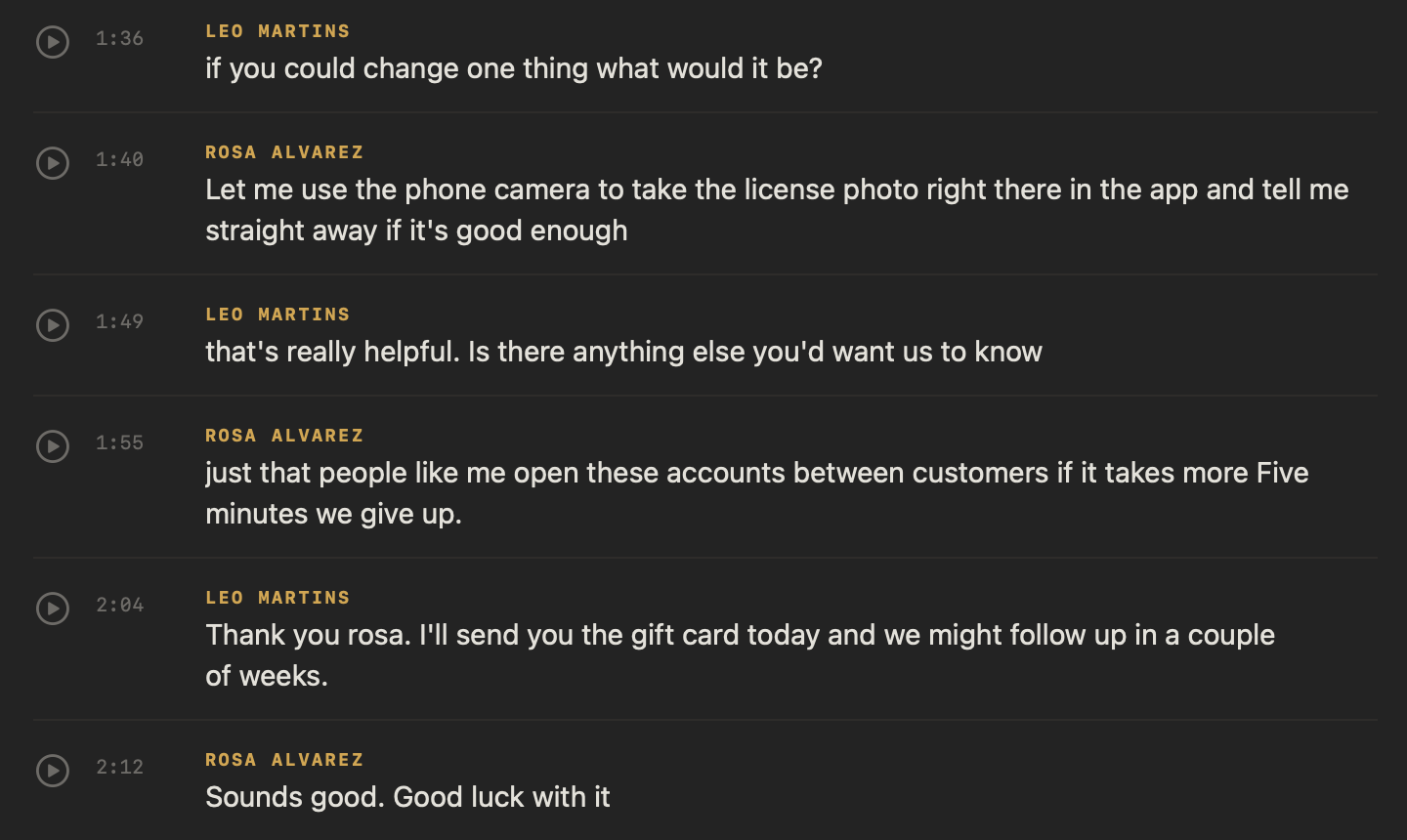
Got an interview recording you still haven’t listened to?
Drag it into NoteOwl.
It’s transcribed right here, on your Mac. Nothing’s uploaded.
Then you get a title, a summary, and the action items.
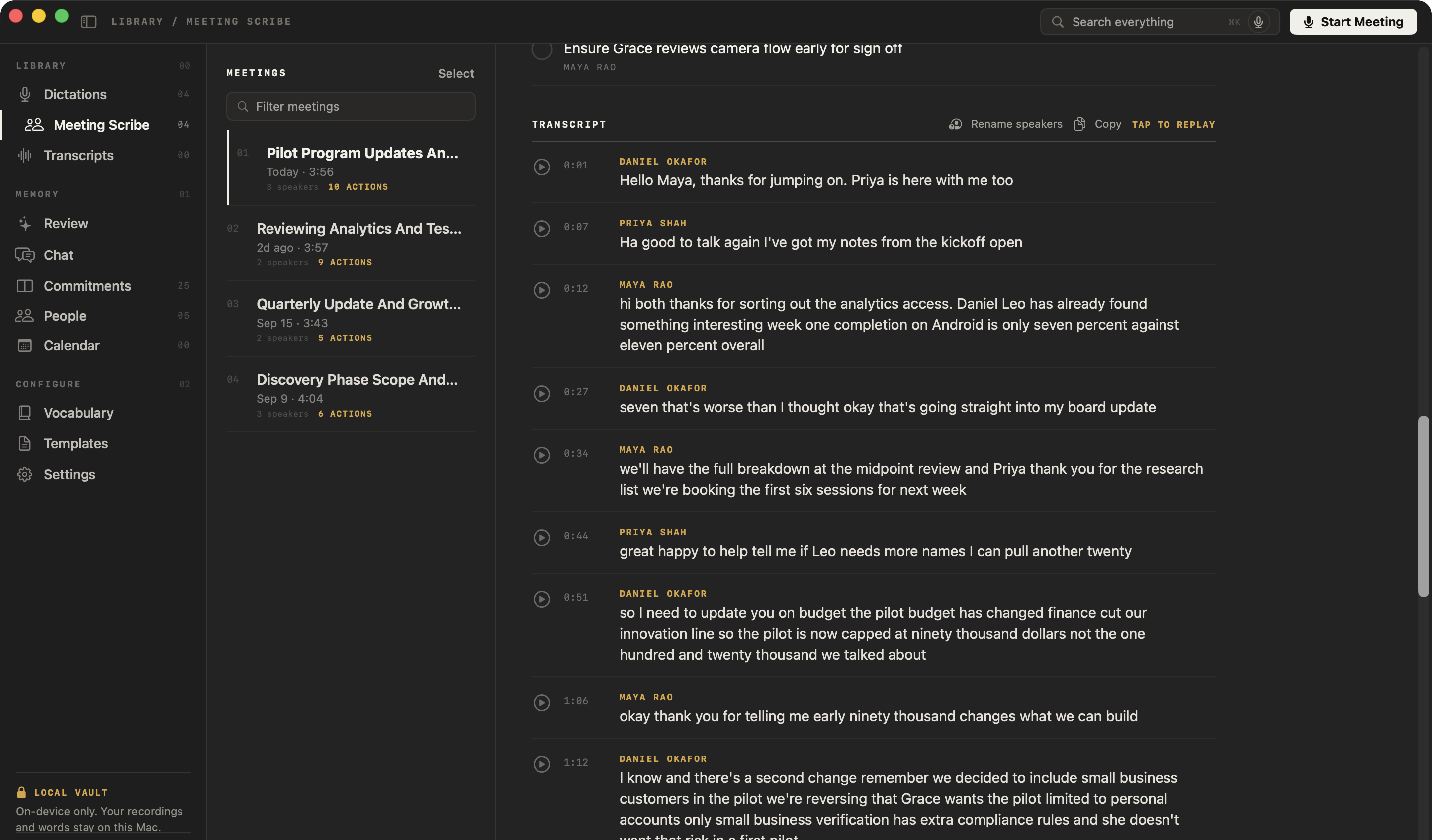
And every line, with who said it.
Tap any line to hear it again.
(The interview) “It asked me to upload a photo of my driving licence, and I took it on the kitchen counter.”
NoteOwl. Free to download. Drop in your next recording.
Why choose NoteOwl over MacWhisper?
Because NoteOwl Pro turns every meeting and recording into one memory: voices recognised in every call, promises tracked, and answers from everything you’ve recorded, citing the passage. Its AI is built in and runs on your Mac, with no provider or API key to set up.
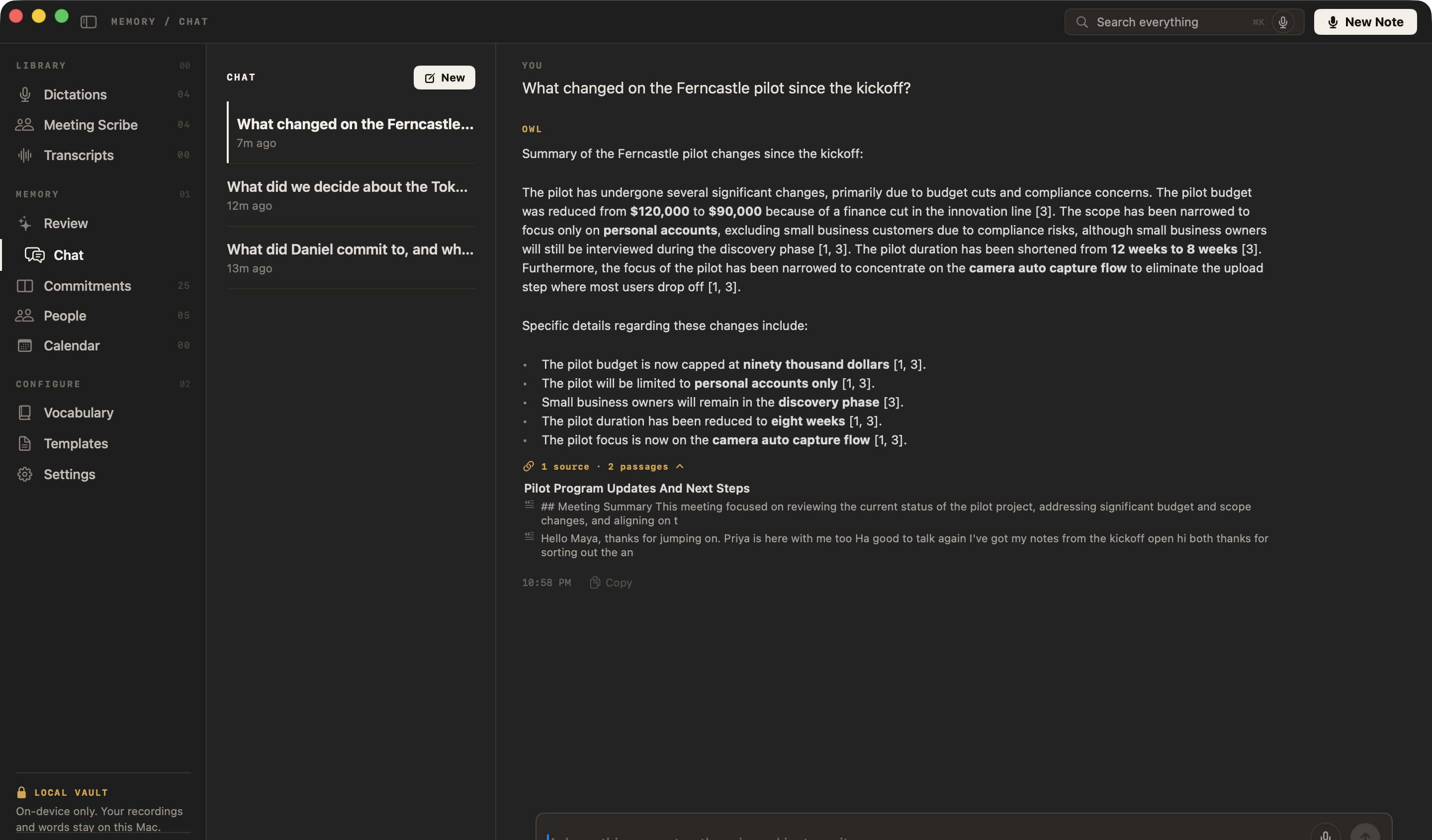
Ask every meeting at once
In NoteOwl Pro, Chat answers from all your meetings, notes and imported recordings together, and cites the passage it used — or tells you when nothing matches. In MacWhisper, you open a transcript to summarize it or chat with it, through the AI provider you connect.[3]
Voices recognised in every meeting
Name a voice once and it’s recognised in every meeting after; the voice profile stays on your Mac. MacWhisper names speakers Speaker 1, Speaker 2, and you rename them, with names you’ve used before suggested.[4]
Summaries in 22 templates
Written on your Mac when the call ends or an import finishes. Summarize as rewrites it as a 1:1, a sales call, an interview or any other template.
Every promise, and everyone you meet
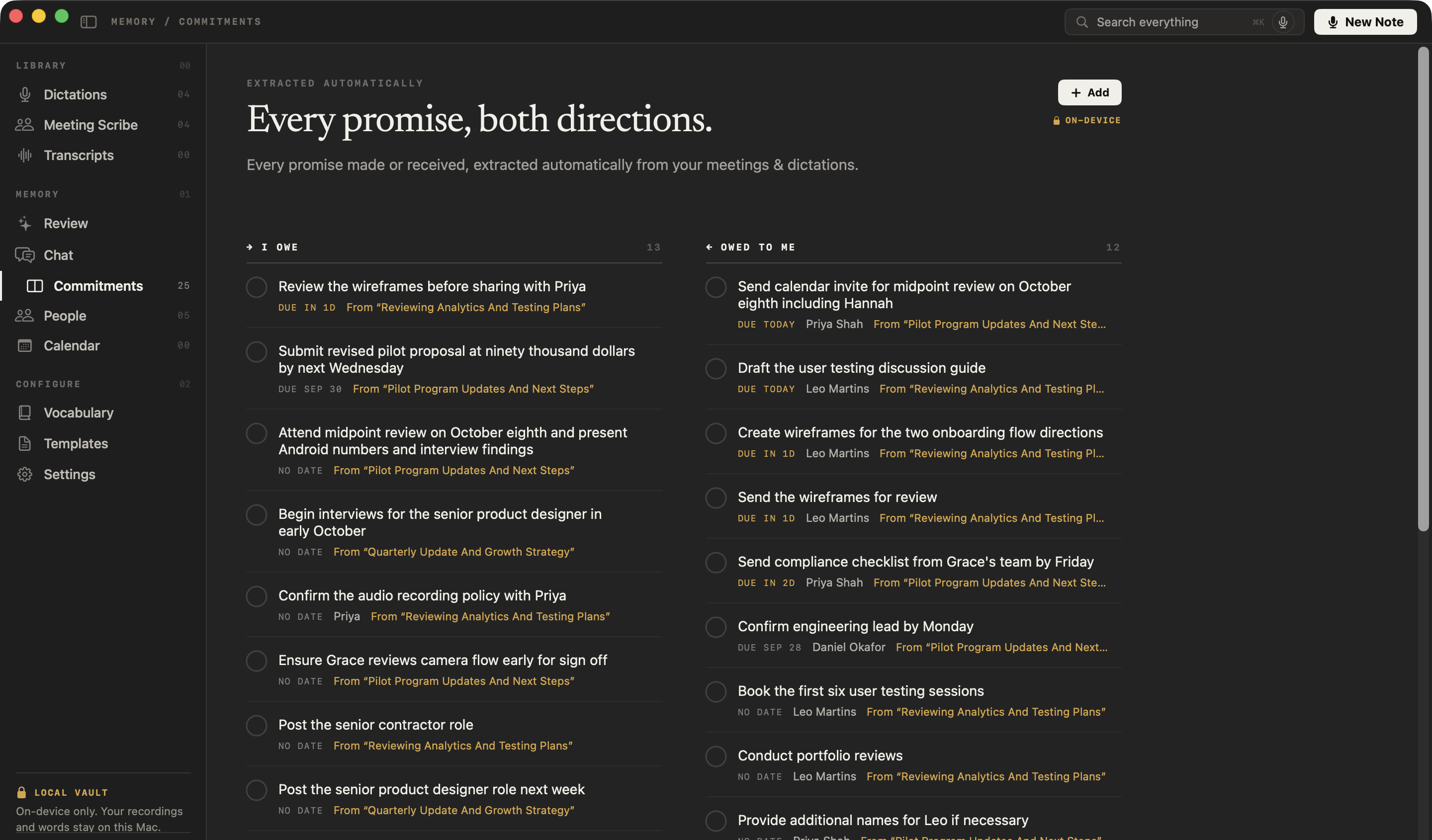
Also in Pro: action items become a board of what you owe and what you’re owed, each linked to the moment it was said, and everyone you meet gets a profile, with prep pages from your Mac’s Calendar.
AI built in, on your Mac
Transcripts, speakers, summaries and chat all run on your Mac with on-device AI models, with nothing to connect and no usage bill. MacWhisper’s AI features run through a provider you add: a cloud service with your own API key, billed by that provider, or a local option.[3]
Imports join your memory
In NoteOwl Pro, a recording you drag in gets what a meeting gets: speakers labelled, a summary, action items for your board, and answers in Chat.
The same with Wi-Fi off
Transcription, summaries and chat all work offline after the one-time model download.
MacWhisper pricing
How much does MacWhisper cost?
MacWhisper Pro is €64 once on MacWhisper’s website and €65 at its Gumroad checkout, for your personal devices.[1,2] NoteOwl Pro is $79 once for one Mac, with its AI built in: there’s no AI provider to connect and no usage bill on top.
You can try all of it first: every NoteOwl Pro feature is free for 7 days in the app, with no card, and dictation stays free after that.
- Price
- NoteOwl$79 once for one Mac, after a 7-day free trial with no card
- MacWhisperPro €64 once on its website, €65 at the Gumroad checkout, for your personal devices (a soft limit of 3)[1,2,6]
- AI summaries and chat
- NoteOwlIncluded and on your Mac: nothing to connect, no usage bill
- MacWhisperThrough an AI provider you connect: a cloud service with your own API key, billed by that provider, or a local option on your Mac[3]
- Memory across meetings
- NoteOwlIncluded in Pro: voices recognised in later meetings, a board of what you owe and are owed, a profile for everyone you meet, and one chat across everything
- MacWhisperYou open a transcript to summarize it or chat with it; tracking action items, people or a calendar isn’t described in its Help Center or Gumroad listing[2,3,15]
| NoteOwl | MacWhisper | |
|---|---|---|
| Price | $79 once for one Mac, after a 7-day free trial with no card | Pro €64 once on its website, €65 at the Gumroad checkout, for your personal devices (a soft limit of 3)[1,2,6] |
| AI summaries and chat | Included and on your Mac: nothing to connect, no usage bill | Through an AI provider you connect: a cloud service with your own API key, billed by that provider, or a local option on your Mac[3] |
| Memory across meetings | Included in Pro: voices recognised in later meetings, a board of what you owe and are owed, a profile for everyone you meet, and one chat across everything | You open a transcript to summarize it or chat with it; tracking action items, people or a calendar isn’t described in its Help Center or Gumroad listing[2,3,15] |
How is NoteOwl different from MacWhisper?
- Where transcription runs
- NoteOwlOn your Mac, always, with on-device AI models
- MacWhisperOn your Mac by default, speaker identification included; cloud transcription with your own API key is an option in Pro[2,9,10]
- Where summaries and chat run
- NoteOwlOn your Mac, built in; nothing to connect and no usage bill
- MacWhisperThrough the AI provider you connect: a cloud service with your own API key, which receives the transcript text and bills you separately, or a local option on your Mac[3]
- Works offline
- NoteOwlEverything, summaries and chat included, after the one-time model download
- MacWhisperTranscription, with its local models; AI features only with a local provider[3,12]
- Price
- NoteOwl$79 once for one Mac; no subscription. Dictation is free
- MacWhisperPro €64 once on its website, €65 at the Gumroad checkout, for your personal devices; the App Store edition is sold through in-app purchases, including subscriptions[1,2,6,7]
- Bot in the call
- NoteOwlNone; records your microphone and your Mac’s audio, and can offer to take notes when a call starts
- MacWhisperNone: Pro records your Mac’s audio, and offers to record when it detects a meeting in apps such as Zoom, Teams and Slack[1,11]
- Speaker labels
- NoteOwlPro: every speaker labelled in any call app or recording; name a voice once and it’s recognised in later meetings; voice profiles stay on your Mac
- MacWhisperPro: detected on the Mac (M-series Macs) or by two cloud services; named Speaker 1, Speaker 2, then renamed by hand, with names you’ve used before suggested[2,4]
- Summaries and action items
- NoteOwlPro: written on your Mac when the call ends or an import finishes; Summarize as rewrites it in any of 22 templates; action items go to a board of what you owe and are owed
- MacWhisperSummaries, questions and your own prompts, through the AI provider you connect, with ready-made prompts[1,3]
- Chat
- NoteOwlPro: one chat across every meeting, note and imported recording; answers cite the passage and work offline
- MacWhisperOpen a transcript and chat with it, through the AI provider you connect[3]
- Commitments, people and calendar
- NoteOwlPro: a board of what you owe and are owed; a profile for everyone you meet; prep pages from your Mac’s Calendar
- MacWhisperNot described in MacWhisper’s Help Center or Gumroad listing[2,15]
- Search
- NoteOwlDictations are searchable for free; in Pro, ⌘K searches every meeting, note and person
- MacWhisperFull-text and speaker search across all your transcripts[2]
- Import recordings
- NoteOwlPro: MP3, WAV, M4A, AIFF, FLAC, AAC and MP4, with speakers labelled, a summary and action items
- MacWhisperMP3, WAV, M4A, OGG, OPUS, MOV and MP4, dragged in or straight from Voice Memos; Pro adds batches, YouTube links and watch folders[1,2]
- Getting notes out
- NoteOwlCopy any note into any app, export it as Markdown, PDF, text or SRT, or export everything as plain files
- MacWhisperTXT, SRT and VTT, plus Markdown, PDF, HTML, DOCX, CSV and custom formats; MacWhisper’s own pages differ on which need Pro[1,2]
- Dictation into other apps
- NoteOwlFree and unlimited; one tap polishes it in the right tone for each app, on your Mac
- MacWhisperSystem-wide dictation in the direct download; AI clean-up needs Pro and an AI service you set up[2,5]
| NoteOwl | MacWhisper | |
|---|---|---|
| Where transcription runs | On your Mac, always, with on-device AI models | On your Mac by default, speaker identification included; cloud transcription with your own API key is an option in Pro[2,9,10] |
| Where summaries and chat run | On your Mac, built in; nothing to connect and no usage bill | Through the AI provider you connect: a cloud service with your own API key, which receives the transcript text and bills you separately, or a local option on your Mac[3] |
| Works offline | Everything, summaries and chat included, after the one-time model download | Transcription, with its local models; AI features only with a local provider[3,12] |
| Price | $79 once for one Mac; no subscription. Dictation is free | Pro €64 once on its website, €65 at the Gumroad checkout, for your personal devices; the App Store edition is sold through in-app purchases, including subscriptions[1,2,6,7] |
| Bot in the call | None; records your microphone and your Mac’s audio, and can offer to take notes when a call starts | None: Pro records your Mac’s audio, and offers to record when it detects a meeting in apps such as Zoom, Teams and Slack[1,11] |
| Speaker labels | Pro: every speaker labelled in any call app or recording; name a voice once and it’s recognised in later meetings; voice profiles stay on your Mac | Pro: detected on the Mac (M-series Macs) or by two cloud services; named Speaker 1, Speaker 2, then renamed by hand, with names you’ve used before suggested[2,4] |
| Summaries and action items | Pro: written on your Mac when the call ends or an import finishes; Summarize as rewrites it in any of 22 templates; action items go to a board of what you owe and are owed | Summaries, questions and your own prompts, through the AI provider you connect, with ready-made prompts[1,3] |
| Chat | Pro: one chat across every meeting, note and imported recording; answers cite the passage and work offline | Open a transcript and chat with it, through the AI provider you connect[3] |
| Commitments, people and calendar | Pro: a board of what you owe and are owed; a profile for everyone you meet; prep pages from your Mac’s Calendar | Not described in MacWhisper’s Help Center or Gumroad listing[2,15] |
| Search | Dictations are searchable for free; in Pro, ⌘K searches every meeting, note and person | Full-text and speaker search across all your transcripts[2] |
| Import recordings | Pro: MP3, WAV, M4A, AIFF, FLAC, AAC and MP4, with speakers labelled, a summary and action items | MP3, WAV, M4A, OGG, OPUS, MOV and MP4, dragged in or straight from Voice Memos; Pro adds batches, YouTube links and watch folders[1,2] |
| Getting notes out | Copy any note into any app, export it as Markdown, PDF, text or SRT, or export everything as plain files | TXT, SRT and VTT, plus Markdown, PDF, HTML, DOCX, CSV and custom formats; MacWhisper’s own pages differ on which need Pro[1,2] |
| Dictation into other apps | Free and unlimited; one tap polishes it in the right tone for each app, on your Mac | System-wide dictation in the direct download; AI clean-up needs Pro and an AI service you set up[2,5] |
| Devices | Mac | Mac, as a direct download or as a separate App Store edition; plus an iPhone and iPad app[7,8] |
| Mac requirements | macOS 26 or later, Apple silicon, 16 GB memory | Apple silicon or Intel, with some features on M-series Macs only; macOS 14 or later on its Gumroad page, macOS 15 for the App Store edition; more than 8 GB of memory for the larger models[1,2,7] |
Does MacWhisper transcribe on your Mac?
MacWhisper, in its own words
“By default, transcriptions (including Speaker Identification) is all performed locally on your Mac or iOS device, and transcription data doesn’t leave the local device.”[9]
“However, the following additional features do involve transmitting data to the cloud” — among them cloud transcription and AI prompts sent to a remote provider.[9]
“When you use a remote provider, MacWhisper sends the transcript text and your prompt to that provider for processing.”[3]
“Charges from a connected provider are billed by that provider and are separate from your MacWhisper purchase or subscription.”[3]
NoteOwl
Recording, transcription, speaker detection, summaries, search and chat all run on the Mac, with on-device AI models. There is no AI provider to choose, no API key to add and no usage bill. Your recordings, transcripts and notes are never uploaded to NoteOwl or anyone else, and the app has no analytics or telemetry.
The only network use: the one-time model download, update checks and, for Pro, signing in and an occasional licence check — none of which sends what you record. Offline AI meeting notes, and what stays on your Mac
Does MacWhisper record meetings?
Who said what. NoteOwl separates every speaker in any call app, and a voice you name once is recognised in every meeting after. Transcription with speaker identification
What was promised. Action items become a board of what you owe and what you’re owed, each linked to the moment it was said. Meeting action items, tracked
What was said, months later. Ask Chat about any meeting and the answer cites the passage it came from — offline. Chat with meeting notes
Can NoteOwl transcribe audio files like MacWhisper?
Yes, with NoteOwl Pro. Drag an audio or video file into Transcripts, or click Import Recording, and it’s transcribed on your Mac with speakers labelled. Then it’s treated like a meeting: a summary, action items for your board, and answers in Chat.
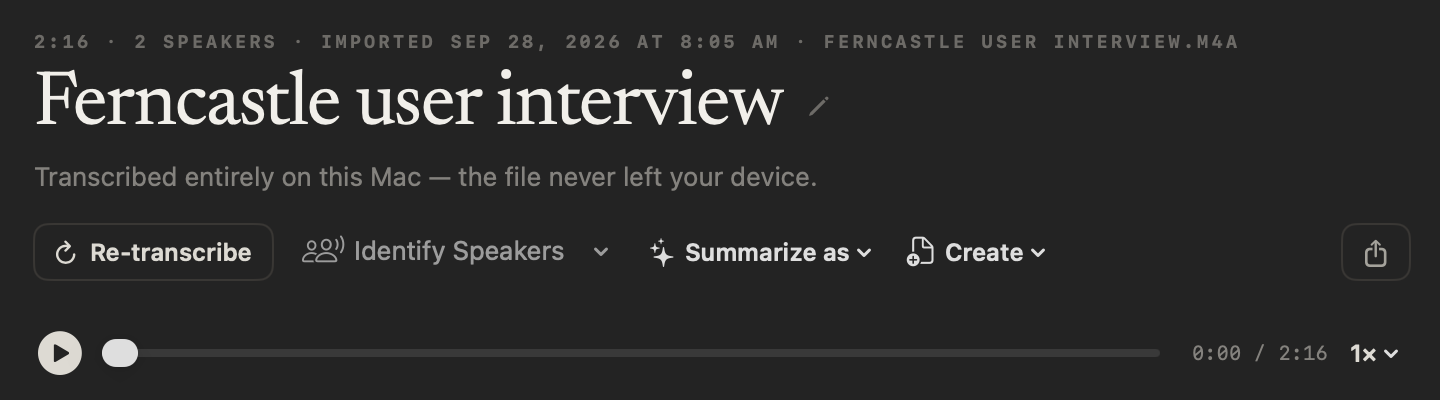
NoteOwl takes MP3, WAV, M4A, AIFF, FLAC, AAC and MP4 files, one at a time. The audio stays with the transcript, so you can tap any line to hear it, or re-transcribe it later. From the transcript’s header:
- Identify Speakers
- Label every speaker automatically, or tell NoteOwl there are 2 to 8. Rename speakers updates the whole transcript.
- Summarize as
- Rewrite the summary in any of 22 templates, from Interview to Podcast Show Notes.
- Create
- Draft a report, an email, a blog post or a social post from the transcript, or give your own instruction.
- Share
- Save it as Markdown, PDF, text or SRT subtitles: plain files, never a web link.
How to transcribe a voice memo on Mac · What is an SRT file?
Can you switch from MacWhisper to NoteOwl?
Yes. Download NoteOwl and drag in the recordings you still have as audio or video files; each is transcribed on your Mac with speakers labelled. Your next call can be recorded with no bot. Both are part of NoteOwl Pro, free for 7 days in the app.
Dictation stays free: tap fn in any app and your words type at the cursor, polished in the right tone for that app. And your notes are never locked in: copy any note into any app, or export your meeting notes as Markdown, PDF, text or SRT — or all of your data at once as plain files.
Sources
Last checked . MacWhisper facts are quoted or summarised from MacWhisper’s own website, Help Center, Gumroad listing and App Store listing, with prices in euros as MacWhisper publishes them. Plans and policies change; check them before you decide.
- [1]MacWhisper, Home page, with its Free vs Pro table and FAQ
- [2]MacWhisper on Gumroad, MacWhisper — the product page and its checkout options
- [3]MacWhisper Help Center, Setting up AI providers in MacWhisper
- [4]MacWhisper Help Center, Automatic speaker recognition in MacWhisper
- [5]MacWhisper Help Center, How to use the dictation feature
- [6]MacWhisper Help Center, Your license is disabled
- [7]Apple App Store, MacWhisper’s App Store edition
- [8]MacWhisper Help Center, The direct download and the App Store edition
- [9]MacWhisper Help Center, Keeping Transcriptions Private
- [10]MacWhisper Help Center, Cloud Transcription
- [11]MacWhisper Help Center, Record Meetings
- [12]MacWhisper, Meeting recording
- [13]MacWhisper Help Center, Batch Transcription
- [14]MacWhisper Help Center, Automatically transcribing files in Watch Folders
- [15]MacWhisper Help Center, All articles — all 32 articles, read for calendar, people and action-item tracking
FAQ
Questions about NoteOwl and MacWhisper
Is there a MacWhisper alternative with meeting memory?
Yes. NoteOwl transcribes your meetings and imported recordings on your Mac, like MacWhisper, then keeps them as a memory: voices recognised in later meetings, promises on a board of what you owe and are owed, and one chat that answers across everything with the passage it came from. Its AI runs on your Mac, with nothing to connect.
How much does MacWhisper cost?
MacWhisper Pro is €64 once on MacWhisper’s website and €65 at its Gumroad checkout, for your personal devices; its App Store edition is sold through in-app purchases, including subscriptions. NoteOwl Pro is $79 once for one Mac, with a 7-day free trial and no card, and its AI is built in. Prices checked on 28 September 2026.
Does MacWhisper need an API key?
Only for its cloud features. MacWhisper transcribes on your Mac by default; cloud transcription and online AI providers use your own API key, and its AI features can use a local option on your Mac instead. NoteOwl needs no API key: transcription, summaries and chat all run on your Mac with on-device AI models.
Does MacWhisper record meetings?
Yes. MacWhisper Pro records meetings from your Mac with no bot, and the direct download can offer to record when it detects a meeting. NoteOwl Pro records with no bot too, then remembers across meetings: voices recognised, promises tracked and answers that cite the passage, all on your Mac.
Does NoteOwl run on Windows or iPhone?
No. NoteOwl is a Mac app for macOS 26 or later on Apple silicon with 16 GB of memory. Its speech recognition and AI run on the Mac itself, which is what keeps your meetings and recordings off the cloud.
Related
- Speaker recognition on your Mac Name a voice once and NoteOwl recognises it in every meeting after.
- Chat with your meetings Ask about any past meeting on your Mac, even offline; every answer cites the passage.
- A Superwhisper alternative for Mac NoteOwl and Superwhisper side by side: every step on your Mac.
- Pricing: Free vs Pro What is free forever, what Pro adds, and the free trial.
Keep exploring
More comparisons
- NoteOwl vs TurboScribeTurboScribe uploads your files to its servers; NoteOwl transcribes on your Mac with nothing uploaded, plus meetings, summaries and memory
- NoteOwl vs PlaudWhy NoteOwl over Plaud, the first-year cost with a recorder, and a sourced side-by-side: no device to buy, and on your Mac instead of the cloud
How NoteOwl does it
- Audio to textTranscription software for your Mac: drop in an audio or video file and get a speaker-labelled transcript with timestamps, unlimited, with nothing uploaded
- Subtitle generatorTurn a recording into an SRT subtitle file with timecodes and speaker names, on your Mac
- Speaker recognitionTranscripts that say who said what: speakers separated automatically, and a voice named once is recognised in later meetings, on your Mac
- Export your notesExport meetings, dictations and notes as Markdown or PDF, imported transcripts as text or SRT, or everything as plain files; nothing is locked in
Try meeting memory that stays on your Mac
Free to download. Runs entirely on your Mac.
macOS 26 or later · Apple Silicon (M1 or newer) · 16 GB memory minimum, 24 GB recommended
About NoteOwl
NoteOwl is private AI meeting notes and memory for the Mac. It captures meetings without a bot joining the call, labels every speaker, writes summaries and action items, and builds a memory of every conversation that you can chat with — fully offline, because the speech recognition and the AI run on the Mac itself. Dictation into any app is free; Pro is a one-time purchase.
NoteOwl pricing: what’s free and what Pro adds
Last updated