NoteOwl vs Aqua Voice
An Aqua Voice alternative for Mac that works offline
NoteOwl is an Aqua Voice alternative for Mac that turns your speech into text on the Mac itself: tap fn in any app, talk, and your words type at the cursor — free, unlimited and offline.
The same app takes your meeting notes in NoteOwl Pro: no bot in the call, every speaker labelled and a memory you can ask about any meeting, all on your Mac — for $79 once instead of a subscription.
Read the transcript
Typing is slow. Talking isn’t.
Tap fn, and just talk.
(Dictating) “Um, so, quick update for the team. The budget’s ninety thousand, and, uh, we start on the twenty-first. Can you all send me your plans by Friday?”
Your words land right where you’re typing. In any app.
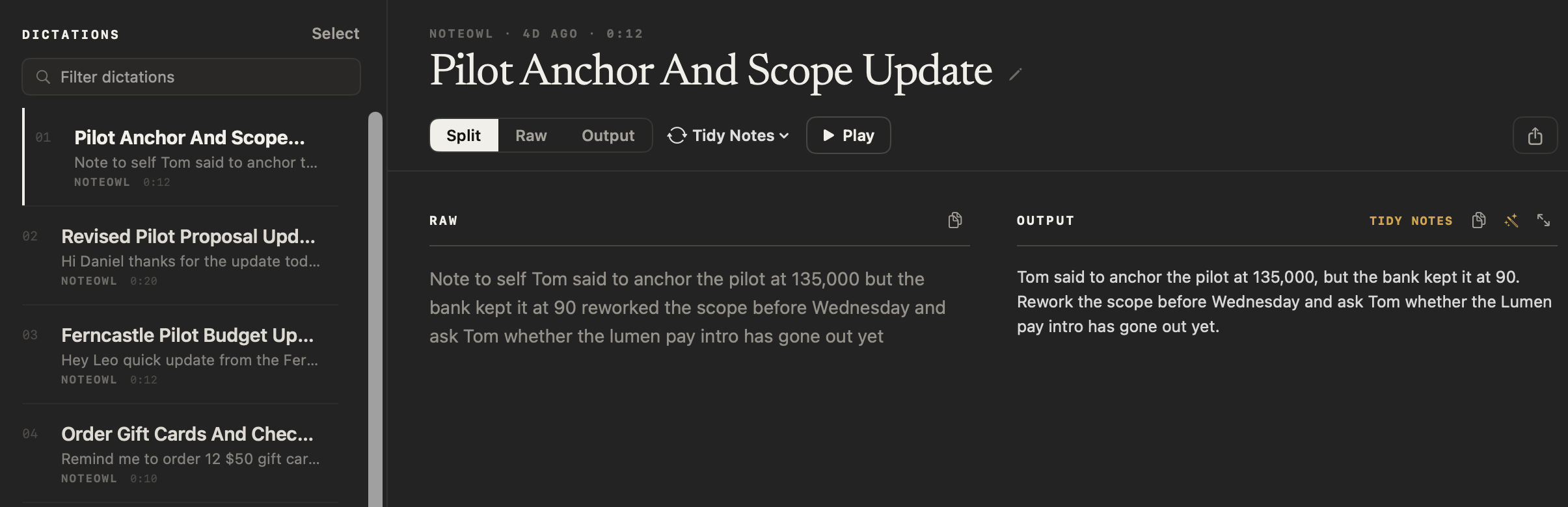
Tap Polish, and it’s tidied up. Filler words gone, punctuation fixed.
And it all runs on your Mac.
NoteOwl. Free to download. Dictation’s free, forever.
Why choose NoteOwl over Aqua Voice?
Because dictation runs on your Mac, works with Wi-Fi off and is free with no word limit. Add NoteOwl Pro and the same app takes your meeting notes with no bot, keeps every promise and answers questions about any meeting — for $79 once.
Works with Wi-Fi off
Dictation, meeting notes and Chat all work offline after the one-time model download. Aqua says its Mac app has “no offline mode”.[3]
Meeting notes with no bot in the call
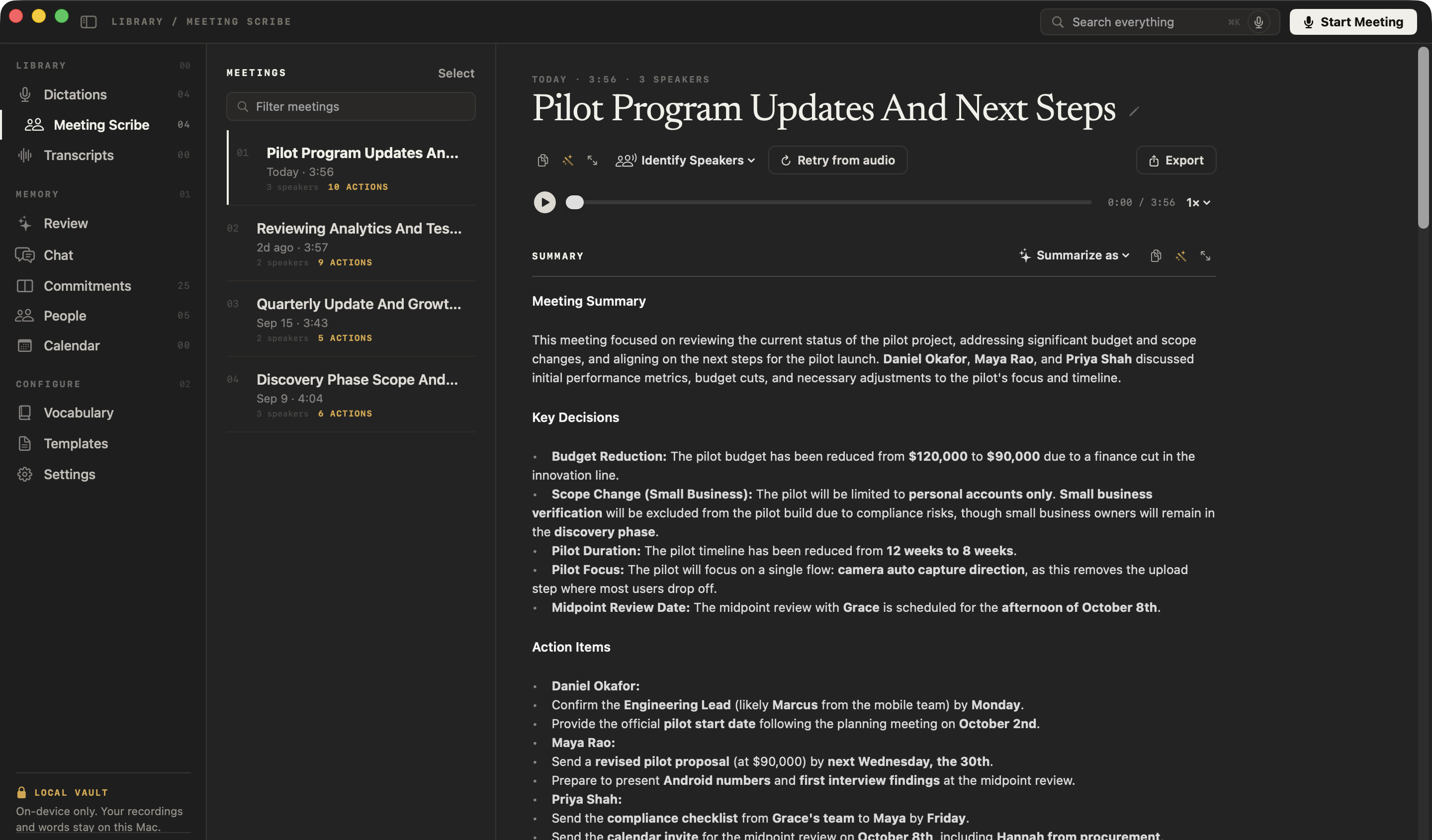
Record Zoom, Teams, Meet or FaceTime from your Mac. NoteOwl Pro labels every speaker, recognises voices you’ve named, and writes the summary and action items — rewrite them in any of 22 templates.
Ask every meeting, even offline
In NoteOwl Pro, Chat answers from your own meetings and notes and cites the passage it used — or tells you when nothing matches.
Every promise, and everyone you meet
Also in Pro: a board of what you owe and what you’re owed, a profile for everyone you meet, and prep pages from your Mac’s Calendar.
Aqua Voice pricing
Is NoteOwl cheaper than Aqua Voice?
Yes, for one person on one Mac. Unlimited dictation is free in NoteOwl. With Aqua Voice it takes Pro: $96 a year, billed annually — $288 over three years — or $10 a month, month to month.[1,4]
NoteOwl Pro, which adds meeting notes, speakers, chat and memory, is $79 once, and every Pro feature is free for 7 days in the app, with no card. Aqua Voice’s free Starter plan includes 1,000 words in total.[1,2]
What one person pays
After 1 year
NoteOwl Pro$79Aqua Voice Pro, billed annually$96After 2 years
NoteOwl Pro$79Aqua Voice Pro, billed annually$192After 3 years
NoteOwl Pro$79Aqua Voice Pro, billed annually$288
What is Aqua Voice, and how is NoteOwl different?
- Where dictation turns into text
- NoteOwlOn your Mac, with on-device AI models
- Aqua VoiceIn the cloud, on Aqua’s own speech model; Realtime Mode, on the Max plan, streams audio to a third-party provider[1,3,4]
- Works offline
- NoteOwlEverything — dictation, meeting notes and Chat — after the one-time model download
- Aqua VoiceNo: on Mac, “there is no offline mode”[3]
- Free dictation
- NoteOwlUnlimited and free forever; no account needed
- Aqua VoiceStarter: 1,000 words in total, about 7 minutes of talking by Aqua’s count; no card[1,2,3]
- Transcripts on the company’s servers
- NoteOwlNothing is uploaded; the app has no analytics or telemetry
- Aqua VoicePrivacy Mode is off by default, and then transcripts may be stored on Aqua’s servers to improve the product; turn it on and they aren’t stored[4,5]
- Price
- NoteOwl$79 once for one Mac; no subscription. Dictation is free
- Aqua VoicePro, for unlimited words: $8 a month billed annually ($96 a year), or $10 month to month; covers Mac, Windows and iPhone. Max: $24 a month billed annually[1,3,4]
- Meeting notes
- NoteOwlPro: no bot in the call; every speaker labelled and named voices recognised; a summary and action items when the call ends
- Aqua VoiceNone listed on Aqua’s website or in its own product summary[4,6]
- Transcribe audio or video files
- NoteOwlPro: MP3, WAV, M4A, AIFF, FLAC, AAC and MP4, transcribed with speaker labels
- Aqua VoiceNot in the apps; Aqua sells batch transcription as a developer API[4]
- Your past dictations
- NoteOwlEvery dictation kept on your Mac, raw words beside the polished version; ⌘K search across everything and Chat in Pro
- Aqua VoiceA History tab kept on your device; the audio of recent sessions is deleted after 3 days[7]
| NoteOwl | Aqua Voice | |
|---|---|---|
| Where dictation turns into text | On your Mac, with on-device AI models | In the cloud, on Aqua’s own speech model; Realtime Mode, on the Max plan, streams audio to a third-party provider[1,3,4] |
| Works offline | Everything — dictation, meeting notes and Chat — after the one-time model download | No: on Mac, “there is no offline mode”[3] |
| Free dictation | Unlimited and free forever; no account needed | Starter: 1,000 words in total, about 7 minutes of talking by Aqua’s count; no card[1,2,3] |
| Transcripts on the company’s servers | Nothing is uploaded; the app has no analytics or telemetry | Privacy Mode is off by default, and then transcripts may be stored on Aqua’s servers to improve the product; turn it on and they aren’t stored[4,5] |
| Price | $79 once for one Mac; no subscription. Dictation is free | Pro, for unlimited words: $8 a month billed annually ($96 a year), or $10 month to month; covers Mac, Windows and iPhone. Max: $24 a month billed annually[1,3,4] |
| Meeting notes | Pro: no bot in the call; every speaker labelled and named voices recognised; a summary and action items when the call ends | None listed on Aqua’s website or in its own product summary[4,6] |
| Transcribe audio or video files | Pro: MP3, WAV, M4A, AIFF, FLAC, AAC and MP4, transcribed with speaker labels | Not in the apps; Aqua sells batch transcription as a developer API[4] |
| Your past dictations | Every dictation kept on your Mac, raw words beside the polished version; ⌘K search across everything and Chat in Pro | A History tab kept on your device; the audio of recent sessions is deleted after 3 days[7] |
| Devices | Mac | Mac, Windows and iPhone; Android is waitlist-only[1] |
| Mac requirements | macOS 26 or later, Apple silicon, 16 GB memory | macOS 12 or later; one download for Apple silicon and Intel[3,8] |
Where does Aqua Voice process your dictation?
Aqua Voice, in its own words
On Mac: “Aqua processes audio in the cloud … there is no offline mode.”[3]
“With Privacy Mode off (the default), transcripts may be stored on our servers to improve the product. Turn Privacy Mode on and they are not stored …”[4]
On Realtime Mode, part of the Max plan: “… Realtime mode streams audio to a third-party realtime speech provider.”[1,4]
NoteOwl
Dictation, the polish, recording, transcription, speaker detection, summaries, search and chat all run on the Mac, with on-device AI models. Your dictations, recordings, transcripts and notes are never uploaded to NoteOwl or anyone else, and the app has no analytics or telemetry. The tone for each dictation is picked from the app you’re dictating into, on the Mac.
The only network use: the one-time model download, update checks and, for Pro, signing in and an occasional licence check — none of which sends what you say or record. How NoteOwl’s speech to text for Mac works
Does Aqua Voice take meeting notes?
Who said what. NoteOwl separates every speaker in any call app, and a voice you name once is recognised in every meeting after; the voice profile stays on your Mac. Transcription with speaker identification
What was promised. The summary is written when the call ends, and its action items become a board of what you owe and what you’re owed. Track meeting action items
What was said, months later. Ask Chat about any meeting and the answer cites the passage it came from — offline. Chat with your meetings
When is Aqua Voice the better choice?
When you want a cloud service. Aqua Voice turns your speech into text in its cloud. If you want your words on your Mac, online or offline — and your meeting notes too — choose NoteOwl.[3]
Can you switch from Aqua Voice to NoteOwl?
Yes, in a few minutes. Download NoteOwl, allow the permissions it asks for, and tap fn in any app: your words type at the cursor, turned into text on your Mac. Your next meeting can be recorded with NoteOwl Pro, free for 7 days.
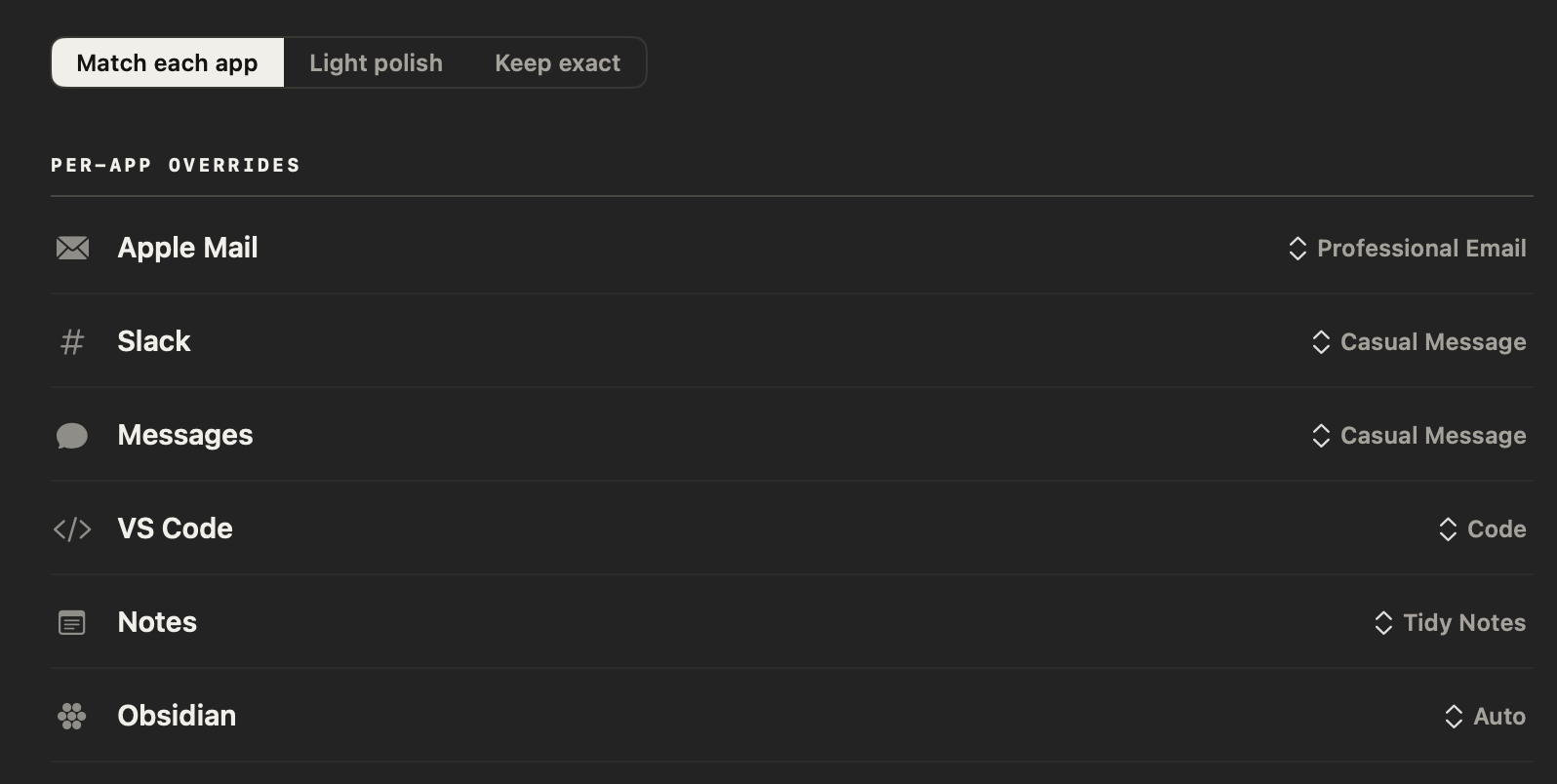
NoteOwl sets the tone for each app for you — Mail gets a professional email, Slack a casual message — and you can change any of them in Settings → Auto-Context. Teach it your names and jargon with custom vocabulary (NoteOwl Pro), and they’re spelled your way in dictation and meetings. And your words are never locked in: copy any note into any app, or export your meeting notes as Markdown, PDF, text or SRT — or all of your data at once as plain files.
Sources
Last checked . Aqua Voice facts are quoted or summarised from Aqua’s own website, user guide, privacy policy and llms.txt, with prices in US dollars. Plans and policies change; check them before you decide.
- [1]Aqua Voice, Pricing and FAQ
- [2]Aqua Voice, Aqua Voice vs Monologue
- [3]Aqua Voice, Aqua Voice for Mac
- [4]Aqua Voice, llms.txt (Aqua’s own summary, updated 9 September 2026)
- [5]Aqua Voice, Privacy policy (effective 29 July 2026)
- [6]Aqua Voice, Home page — with llms.txt, searched for meeting features
- [7]Aqua Voice user guide, History
- [8]Aqua Voice, Download
FAQ
Questions about NoteOwl and Aqua Voice
Is there an Aqua Voice alternative that works offline?
Yes. NoteOwl dictates into any Mac app, like Aqua Voice, but it turns your speech into text on the Mac itself, so dictation, meeting notes and chat all work offline after a one-time model download. Aqua Voice says its Mac app processes audio in the cloud and has no offline mode.
Is NoteOwl cheaper than Aqua Voice?
Yes, for one person on one Mac. Unlimited dictation is free in NoteOwl, and NoteOwl Pro, which adds meeting notes, chat and memory, is $79 once, with a 7-day free trial and no card. Aqua Voice Pro, for unlimited words, is $96 a year billed annually, or $10 a month — $288 over three years at the annual price. Prices checked on 27 September 2026.
Does Aqua Voice store my transcripts?
Aqua Voice says that with Privacy Mode off, which is the default, transcripts may be stored on its servers to improve the product; with Privacy Mode on, they are not stored. NoteOwl uploads nothing: your dictations, recordings and transcripts stay on your Mac.
Does Aqua Voice record meetings?
Not as far as its website shows: Aqua Voice lists dictation for Mac, Windows and iPhone, but no meeting notes. NoteOwl Pro records meetings from your Mac with no bot in the call, labels the speakers, writes the summary and action items, and answers questions about past meetings, all on the Mac.
Is NoteOwl dictation really free?
Yes. Dictation into any app is part of NoteOwl Free, with no word limit, no account and no end date, and every dictation is saved as a voice note you can search, play and export. Rewrite by voice and custom vocabulary are NoteOwl Pro features: $79 once, after a 7-day free trial.
Does NoteOwl run on Windows or iPhone?
No. NoteOwl is a Mac app for macOS 26 or later on Apple silicon with 16 GB of memory. Its speech recognition and AI run on the Mac itself, which is what keeps your dictation and meetings off the cloud.
Related
- AI meeting notes without a bot How NoteOwl records any call from your Mac, and what you get when it ends.
- A voice notes app for Mac Record a thought, keep the audio, and get your words back tidied up — free.
- A Wispr Flow alternative for Mac NoteOwl and Wispr Flow side by side: dictation on your Mac or in the cloud.
- Pricing: Free vs Pro What is free forever, what Pro adds, and the free trial.
Keep exploring
More comparisons
- NoteOwl vs SpokenlyWhy NoteOwl over Spokenly, the total cost, and a sourced side-by-side
- NoteOwl vs Wispr FlowWhy NoteOwl over Wispr Flow: free dictation that runs on your Mac, plus meeting notes, and the total cost
- NoteOwl vs SuperwhisperWhy NoteOwl over Superwhisper, the total cost, and a sourced side-by-side
- NoteOwl vs VoiceInkWhy NoteOwl over VoiceInk, the total cost, and a sourced side-by-side
How NoteOwl does it
- Free dictation into any appFree, unlimited speech to text in every app on your Mac: tap fn, talk, and the words type at your cursor; one tap polishes them in the right tone for that app
- Custom vocabularyTeach NoteOwl names, jargon and spellings once, and every dictation, meeting and import uses them
- Voice notes on your MacVoice notes and dictations saved as searchable text on your Mac, with the raw words beside the polished version; free
- Offline AI meeting notesEvery NoteOwl feature works offline after a one-time model download; what the app sends over the network, and what it never does
Try free dictation that stays on your Mac
Free to download. Runs entirely on your Mac.
macOS 26 or later · Apple Silicon (M1 or newer) · 16 GB memory minimum, 24 GB recommended
About NoteOwl
NoteOwl is private AI meeting notes and memory for the Mac. It captures meetings without a bot joining the call, labels every speaker, writes summaries and action items, and builds a memory of every conversation that you can chat with — fully offline, because the speech recognition and the AI run on the Mac itself. Dictation into any app is free; Pro is a one-time purchase.
NoteOwl pricing: what’s free and what Pro adds
Last updated