Voice notes · Free
Voice notes on your Mac, saved as searchable text
NoteOwl is a free voice notes app for Mac: press New Dictation, talk, press Stop, and your note is saved as text you can search — your exact words beside a polished version, with the audio kept to play back.
It transcribes on your Mac with on-device AI models, works offline after a one-time model download, and is free and unlimited, with no account.
Read the transcript
Your best ideas never wait for a keyboard.
Press New Dictation, and just think out loud.
(Voice note) “Okay, um… idea for Ferncastle. What if we ask for the ID photo after people see their balance, not before? That’s where most of them drop off.”
Press Stop. NoteOwl writes it down on your Mac: your exact words, a tidy version, and the audio.
Later, you remember one word. Type it, and there’s your idea.
NoteOwl. Free to download. Voice notes, free and unlimited.
How do you record a voice note on a Mac?
Open Dictations in NoteOwl, press New Dictation and talk. Press Stop when you’re done: NoteOwl transcribes the note on your Mac, writes a polished version beside your exact words, and saves it with the audio.
- 1
Open Dictations
In NoteOwl, choose Dictations in the sidebar. Every voice note and dictation you have made is listed there, newest first.
- 2
Press New Dictation and talk
The button in the title bar turns into Stop while NoteOwl listens. Pausing to think doesn’t end the note.
- 3
Press Stop
NoteOwl transcribes the note on your Mac, writes a polished version beside your exact words, gives it a title and saves it with the audio.
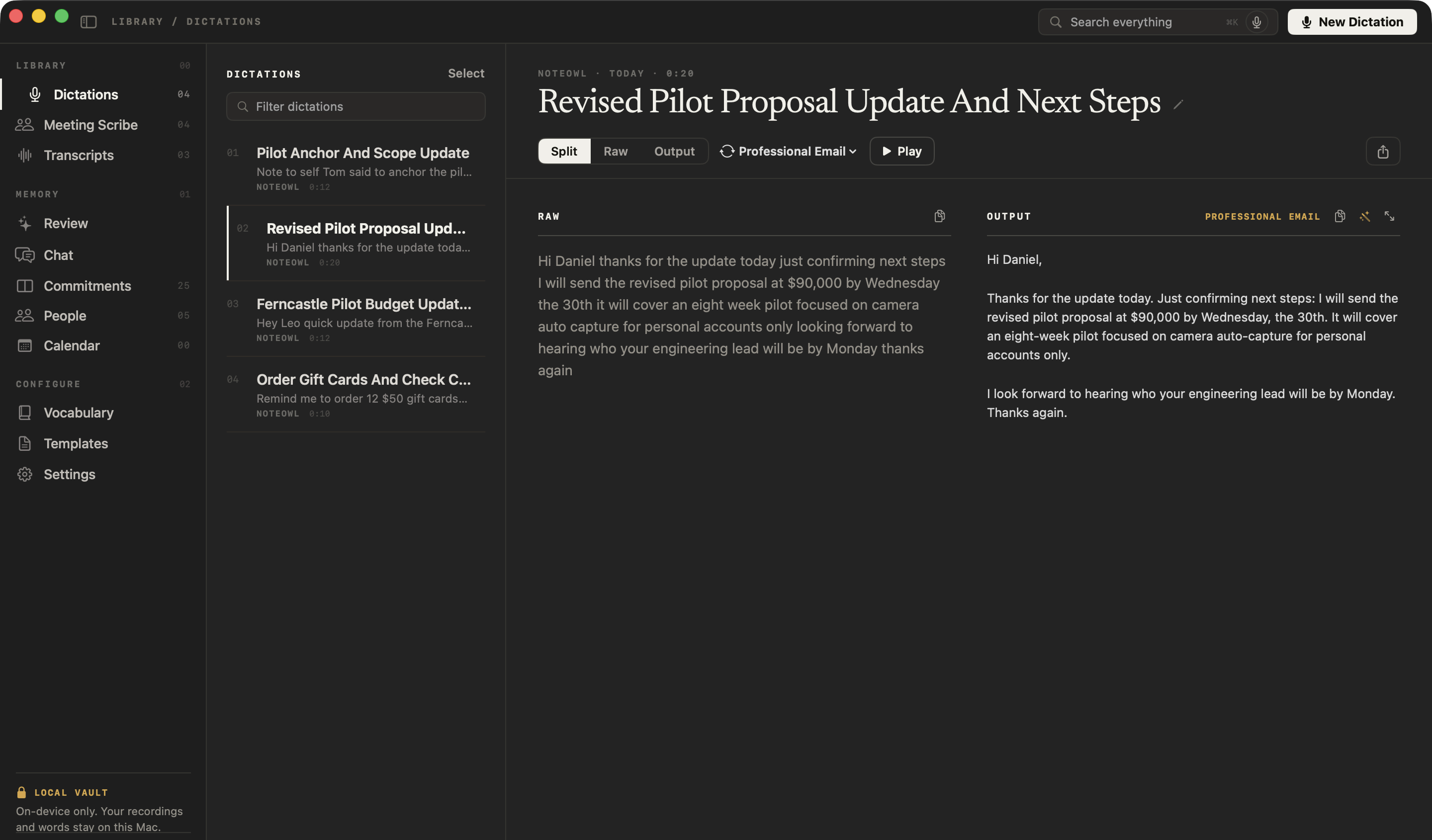
A voice note needs only the microphone permission, and NoteOwl asks for it the first time if it doesn’t have it yet. Want the words in another app instead? Tap fn and NoteOwl types as you speak — free speech to text for Mac, in any app — and saves that dictation in the same list.
Does NoteOwl keep the audio of a voice note?
Yes, for every note you record inside NoteOwl with New Dictation: press Play to hear it. A dictation you make by tapping fn in another app is saved as text only — your raw words and the polished version — with no audio.
Each saved note also says where it was spoken, when, and for how long, so a note taken in NoteOwl is easy to tell from an email you dictated.
- Where you start it
- New DictationDictations, in NoteOwl
- fn in another appAny app with a text cursor
- Where the words go
- New DictationSaved in Dictations
- fn in another appTyped at your cursor, then saved in Dictations
- Audio kept, with Play
- New DictationYes
- fn in another appNo
- Your raw words beside a polished version
- New DictationYes
- fn in another appYes
- Feeds your memory
- New DictationAlways
- fn in another appOnly if you switch it on
- Price
- New DictationFree, unlimited
- fn in another appFree, unlimited
| New Dictation | fn in another app | |
|---|---|---|
| Where you start it | Dictations, in NoteOwl | Any app with a text cursor |
| Where the words go | Saved in Dictations | Typed at your cursor, then saved in Dictations |
| Audio kept, with Play | Yes | No |
| Your raw words beside a polished version | Yes | Yes |
| Feeds your memory | Always | Only if you switch it on |
| Price | Free, unlimited | Free, unlimited |
Can you change a voice note after you record it?
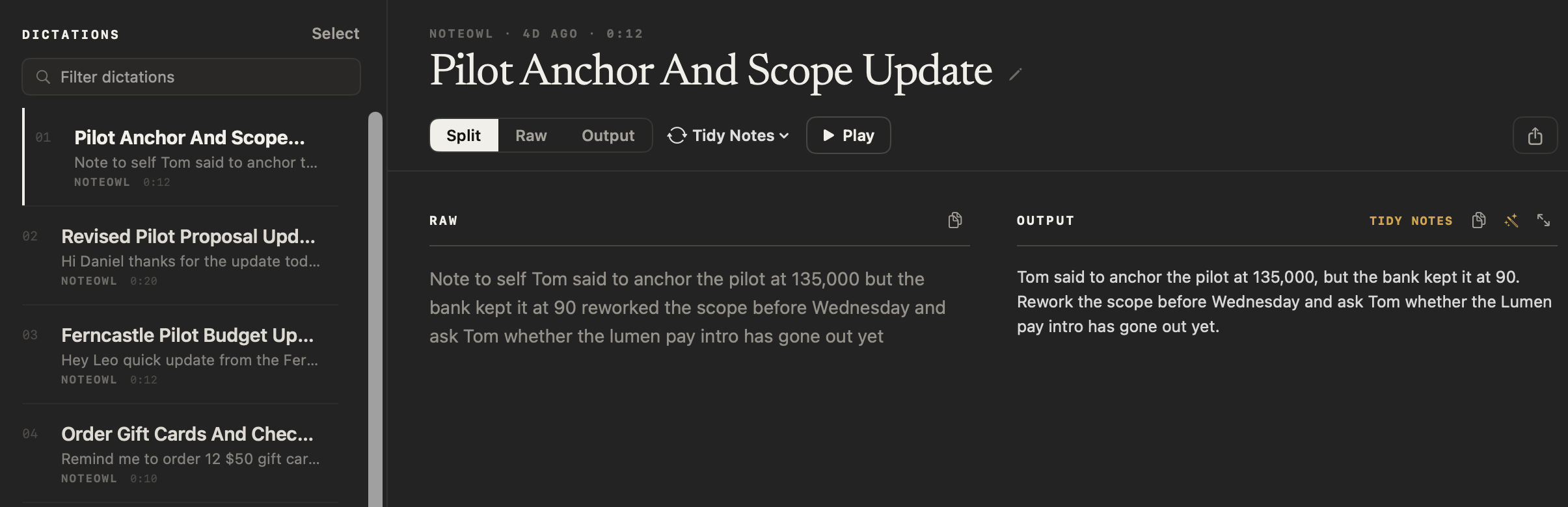
Your raw words never change, but the polished version can be redone any time. Pick another style from the menu beside Split, Raw and Output, such as Tidy Notes or Professional Email, and NoteOwl rewrites it on your Mac.
- Polish
- What it doesRemoves filler words and false starts and fixes punctuation, without changing your tone
- PlanFree
- Verbatim
- What it doesKeeps the note exactly as you said it, with nothing rewritten
- PlanFree
- Professional Email
- What it doesClear, complete sentences in short paragraphs
- PlanFree
- Casual Message
- What it doesCasual, concise and conversational
- PlanFree
- Tidy Notes
- What it doesClean prose; spoken lists become bullets and spoken headings become headings
- PlanFree
- Code
- What it doesIdentifiers, symbols and casing kept as spoken
- PlanFree
- Transform as a template
- What it doesRewrites the note in the shape of a template, such as To-Do List or Quick Summary
- PlanPro
| Style | What it does | Plan |
|---|---|---|
| Polish | Removes filler words and false starts and fixes punctuation, without changing your tone | Free |
| Verbatim | Keeps the note exactly as you said it, with nothing rewritten | Free |
| Professional Email | Clear, complete sentences in short paragraphs | Free |
| Casual Message | Casual, concise and conversational | Free |
| Tidy Notes | Clean prose; spoken lists become bullets and spoken headings become headings | Free |
| Code | Identifiers, symbols and casing kept as spoken | Free |
| Transform as a template | Rewrites the note in the shape of a template, such as To-Do List or Quick Summary | Pro |
Rename, copy, export
NoteOwl titles each note from what you said. Click the pencil beside the title to rename it, or right-click a note in the list to rename, copy or delete it. Each pane has its own copy button.
The Share button saves the note as Markdown or PDF, or sends it with Mail or Messages — the polished version and your raw words, each under its own heading.
Can you search your voice notes?
Yes. Filter dictations, above the list, finds a word in any note’s title, raw words or polished version, and it’s free. With NoteOwl Pro, Search everything finds voice notes beside your meetings, and Chat can answer from them.
- Filter dictations
- Where it isAbove the list in Dictations
- What it findsA word in any note’s title, raw words or polished version
- PlanFree
- Search everything
- Where it isThe title bar, on every screen
- What it findsPassages across every meeting, transcript and dictation
- PlanPro
- Chat
- Where it isChat, in the sidebar
- What it findsAnswers from your meetings and transcripts, and from dictations when you tick them in
- PlanPro
| Search | Where it is | What it finds | Plan |
|---|---|---|---|
| Filter dictations | Above the list in Dictations | A word in any note’s title, raw words or polished version | Free |
| Search everything | The title bar, on every screen | Passages across every meeting, transcript and dictation | Pro |
| Chat | Chat, in the sidebar | Answers from your meetings and transcripts, and from dictations when you tick them in | Pro |
Are NoteOwl voice notes free?
Yes. Voice notes are free and unlimited, forever, with no account: recording, the audio, the polished version, every style in the menu, filter, rename and export. NoteOwl Pro adds templates, Search everything and Chat across your notes and meetings.
NoteOwl Pro is $79 once for one Mac, with a 7-day free trial in the app, no card. When the trial ends, every note you made stays.
- Record voice notes, with the audio kept
- FreeUnlimited
- ProUnlimited
- Your raw words beside a polished version
- FreeYes
- ProYes
- Polish, Verbatim, Professional Email, Casual Message, Tidy Notes, Code
- FreeYes
- ProYes
- Filter, rename, copy and export as Markdown or PDF
- FreeYes
- ProYes
- Rewrite a note with a template
- FreeNo
- ProYes
- Search everything and Chat, across notes and meetings
- FreeNo
- ProYes
- Meeting notes, summaries and action items
- FreeNo
- ProYes
| Free | Pro | |
|---|---|---|
| Record voice notes, with the audio kept | Unlimited | Unlimited |
| Your raw words beside a polished version | Yes | Yes |
| Polish, Verbatim, Professional Email, Casual Message, Tidy Notes, Code | Yes | Yes |
| Filter, rename, copy and export as Markdown or PDF | Yes | Yes |
| Rewrite a note with a template | No | Yes |
| Search everything and Chat, across notes and meetings | No | Yes |
| Meeting notes, summaries and action items | No | Yes |
NoteOwl voice notes at a glance
The facts, in one table. NoteOwl records and transcribes voice notes on your Mac with on-device AI models, so they work offline and nothing you say is uploaded.
- Record
- New Dictation, in the Dictations screen; press Stop to finish
- Saved as
- Your raw words, a polished version and the audio
- Title
- Written from what you said; rename it any time
- Styles
- Polish, Verbatim, Professional Email, Casual Message, Tidy Notes, Code
- Export
- Markdown or PDF, or send it with Mail or Messages
- Languages
- 34, detected automatically
- Internet
- Not needed once the on-device AI models are downloaded: about 8 GB, downloaded once after install (keep around 10 GB free)
- Permission
- Microphone
- Price
- Free and unlimited, with no account
- Requirements
- macOS 26 or later, Apple Silicon (M1 or newer), 16 GB memory minimum, 24 GB recommended
What else does NoteOwl do?
Voice notes are the free part you use every day. NoteOwl is private AI meeting notes and memory for Mac: with NoteOwl Pro it records meetings without a bot, labels every speaker, writes summaries and action items, and lets you chat with everything you’ve recorded.
AI meeting notes without a bot
NoteOwl records your microphone and your Mac’s audio, so it takes notes on Zoom, Google Meet or Teams with nothing joining the call — then writes the speaker-labelled transcript, the summary and the action items on your Mac.
Chat with your meetings
Ask a question about any past meeting — or your voice notes, once you tick them in — and the answer cites the passage it came from. It runs on your Mac, even offline.
FAQ
Questions about voice notes on a Mac
Is NoteOwl a free voice notes app for Mac?
Yes. NoteOwl’s voice notes are free and unlimited, forever, with no account: record with New Dictation, play the audio back, change the style, filter, rename and export as Markdown or PDF. NoteOwl Pro, $79 once, adds templates, Search everything and Chat across your voice notes and meetings.
Does NoteOwl keep the audio of my voice notes?
NoteOwl keeps the audio of every voice note you record inside the app with New Dictation, and shows a Play button to hear it. A dictation made by tapping fn in another app is saved as text only, your raw words beside the polished version, with no audio.
Can NoteOwl record a voice memo on a Mac?
Yes. In NoteOwl, a voice memo is a voice note: open Dictations, press New Dictation, talk and press Stop. NoteOwl saves the recording and its text together, so the memo can be searched and read as well as played.
Can I search my voice notes in NoteOwl?
Yes. In NoteOwl’s Dictations screen, Filter dictations finds any word in a title, in your raw words or in the polished version, free. With NoteOwl Pro, Search everything also finds voice notes, and Chat answers from them when you tick Meetings, transcripts & dictations.
Do NoteOwl voice notes work offline?
Yes. NoteOwl transcribes voice notes on your Mac with on-device AI models, so after the one-time model download they work with no internet connection. The recordings and their text stay on your Mac and are never uploaded.
Can I export a voice note from NoteOwl?
Yes. Every NoteOwl voice note has a Share button with Copy Markdown, Save as Markdown, Save PDF, Share…, Mail and Messages. The file holds the polished version and your raw words, each under its own heading.
Is NoteOwl just a voice notes app?
No. NoteOwl is private AI meeting notes and memory for Mac, and free voice notes and dictation are the part you use every day. NoteOwl Pro records meetings without a bot, labels every speaker, writes summaries and action items, and lets you chat with everything you have recorded.
Related
- Export your meeting notes Any note as Markdown or PDF, or everything you’ve recorded as one zip file.
- Offline AI meeting notes Every feature works with Wi-Fi off after the one-time model download.
- Set the tone for each app Change the style NoteOwl uses for dictation in each app.
- 34 languages The full list NoteOwl understands, detected automatically.
Keep exploring
Related features
- Audio to textTranscription software for your Mac: drop in an audio or video file and get a speaker-labelled transcript with timestamps, unlimited, with nothing uploaded
- Lecture recorderRecord lectures in the room through your Mac’s microphone, in an online class with no bot, or from a file, then turn them into study notes
- Subtitle generatorTurn a recording into an SRT subtitle file with timecodes and speaker names, on your Mac
Record voice notes on your Mac, free
Free to download. Runs entirely on your Mac.
macOS 26 or later · Apple Silicon (M1 or newer) · 16 GB memory minimum, 24 GB recommended
About NoteOwl
NoteOwl is private AI meeting notes and memory for the Mac. It captures meetings without a bot joining the call, labels every speaker, writes summaries and action items, and builds a memory of every conversation that you can chat with — fully offline, because the speech recognition and the AI run on the Mac itself. Dictation into any app is free; Pro is a one-time purchase.
NoteOwl pricing: what’s free and what Pro adds
Last updated