Export
Export your meeting notes as plain files
NoteOwl lets you export meeting notes as plain files: copy a meeting as Markdown, save it as Markdown, PDF, plain text or SRT subtitles, or send it with Mail or Messages.
Export all data puts everything you have recorded, with your memory and settings, in one zip file on your Mac, on every plan including Free. Nothing is uploaded, and nothing is locked in.
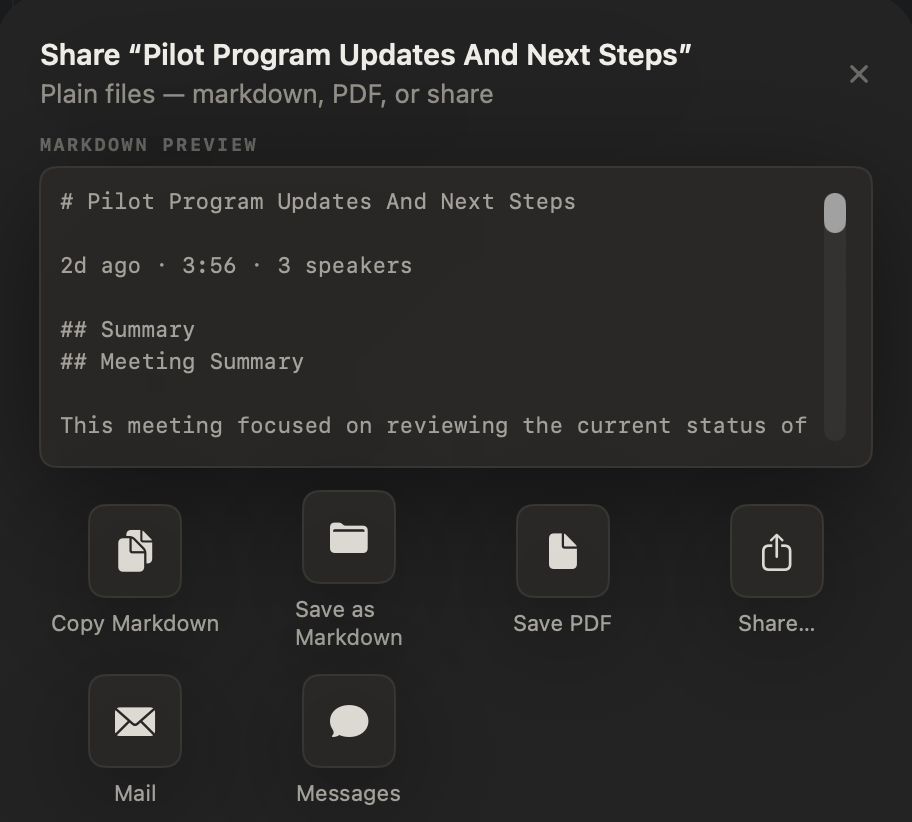
How do you export a meeting from NoteOwl?
Open the meeting and click Export. A Share sheet shows the Markdown it will write, with Copy Markdown, Save as Markdown, Save PDF, Share…, Mail and Messages. Dictations and imported transcripts have the same sheet, behind their Share button.
- Copy Markdown
- What you getThe notes on the clipboard, ready to paste into any app
- Save as Markdown
- What you getA .md file, saved where you choose
- Save PDF
- What you getThe same notes as a PDF, on US Letter pages
- Save Text
- What you getThe transcript as a .txt file, each line labelled with its speaker, without timecodes
- Save Subtitles
- What you getAn .srt subtitle file, each cue timed from the transcript
- Share…
- What you getThe macOS share menu, with the notes as a Markdown file
- Mail · Messages
- What you getA new email or message with the notes in it
| Choice | What you get |
|---|---|
| Copy Markdown | The notes on the clipboard, ready to paste into any app |
| Save as Markdown | A .md file, saved where you choose |
| Save PDF | The same notes as a PDF, on US Letter pages |
| Save Text | The transcript as a .txt file, each line labelled with its speaker, without timecodes |
| Save Subtitles | An .srt subtitle file, each cue timed from the transcript |
| Share… | The macOS share menu, with the notes as a Markdown file |
| Mail · Messages | A new email or message with the notes in it |
What does an exported meeting include?
Everything on the meeting’s page, as Markdown: the summary, the action items as a checklist with owners and due dates, and the full transcript with each speaker’s name and time. A dictation exports both its polished version and your raw words.
- A meeting
- WhereMeeting Scribe → Export
- What the file holdsThe title; when it was recorded, its length and the number of speakers; the summary; the action items as a checklist with owners and due dates; and the transcript, each line with its speaker and time
- A dictation or voice note
- WhereDictations → the Share button
- What the file holdsThe polished version, named with the style that made it, and your raw words
- An imported recording
- WhereTranscripts → the Share button, or right-click → Export…
- What the file holdsThe summary and action items, then the transcript with speaker names and timestamps. Also as .txt or .srt
| What you export | Where | What the file holds |
|---|---|---|
| A meeting | Meeting Scribe → Export | The title; when it was recorded, its length and the number of speakers; the summary; the action items as a checklist with owners and due dates; and the transcript, each line with its speaker and time |
| A dictation or voice note | Dictations → the Share button | The polished version, named with the style that made it, and your raw words |
| An imported recording | Transcripts → the Share button, or right-click → Export… | The summary and action items, then the transcript with speaker names and timestamps. Also as .txt or .srt |
How do you export all your data from NoteOwl?
Open Settings → Memory, click Export all data… and tick what to include. Then click Choose destination… and pick a folder. NoteOwl saves one zip file there, on your Mac: nothing is uploaded and no account is involved.
- Original transcripts
- What it includesThe words as spoken, with timings and speakers, plus your own notes on each recording
- By defaultTicked
- Audio recordings
- What it includesEach recording; for meetings, your microphone and the other participants as separate tracks too
- By defaultTicked
- Processed content
- What it includesSummaries, cleaned-up dictations and everything else NoteOwl wrote from your recordings
- By defaultTicked
- Memory and setup
- What it includesPeople, commitments, chats, meeting preparation, calendar notes, templates, vocabulary and preferences
- By defaultTicked
- Voice profiles
- What it includesThe voice fingerprints NoteOwl uses to tell speakers apart. Marked sensitive
- By defaultUnticked
| Category | What it includes | By default |
|---|---|---|
| Original transcripts | The words as spoken, with timings and speakers, plus your own notes on each recording | Ticked |
| Audio recordings | Each recording; for meetings, your microphone and the other participants as separate tracks too | Ticked |
| Processed content | Summaries, cleaned-up dictations and everything else NoteOwl wrote from your recordings | Ticked |
| Memory and setup | People, commitments, chats, meeting preparation, calendar notes, templates, vocabulary and preferences | Ticked |
| Voice profiles | The voice fingerprints NoteOwl uses to tell speakers apart. Marked sensitive | Unticked |
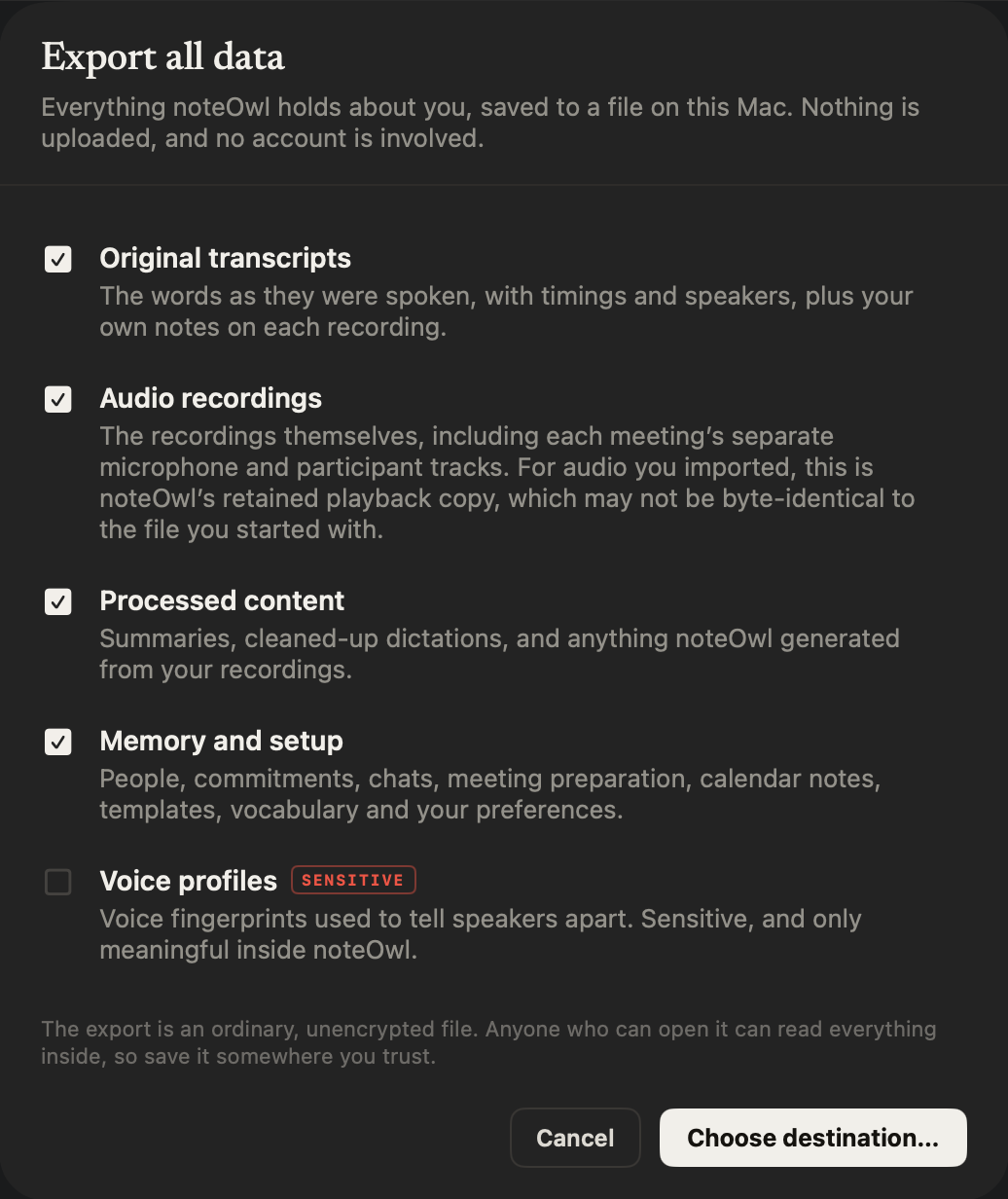
What’s inside the export file?
Ordinary files that open without NoteOwl: Markdown for anything meant to be read, JSON for anything a program should read, and the audio as WAV. A README explains the layout, and a manifest lists every file with its SHA-256 checksum.
README.mdWhat is inside, in plain words, and anything that could not be readmanifest.jsonEvery file in the zip, with its size and SHA-256 checksumdocuments/<id>/One folder per meeting, dictation or imported recording: document.json for its title and date, transcript.md and segments.json for the words, source.md for your notes with the transcriptdocuments/<id>/outputs/Summaries and everything else NoteOwl wrote, as Markdown, listed in outputs.jsondocuments/<id>/audio/mixed.wav, and for meetings you.wav and others.wavmemory/Chats (chats.md and chats.json), people and commitments with the words each came from (people-and-commitments.md and graph.json), meeting preparation, templates, vocabulary, calendar and preferencesvoice/Voice profiles, only if you tick them
Not in the export
- NoteOwl’s internal database and search index: everything they hold about your content is already in the zip, in portable form
- The on-device AI models, which are software, not your data
- Your licence, which stays in the macOS Keychain on this Mac
- Events and contacts from the macOS Calendar and Contacts apps, which stay in those apps
- Crash logs and repair queues, which describe the installation, not you
The README says the same, so whoever opens the file later knows what they have.
Can you take your notes with you if you leave NoteOwl?
Yes. Nothing is locked in: Export all data works on NoteOwl Free as well as Pro, so meetings recorded during the trial can always leave with you, as Markdown, JSON and WAV files that open without NoteOwl.
No links, no uploads
Every export is a plain file made on your Mac. NoteOwl never creates a web link to your notes and never uploads them; Mail, Messages and Share… hand them to the app you pick. The zip is an ordinary file, so anyone who can open it can read it: keep it somewhere you trust. Voice profiles stay out unless you tick them.
Your notes were made on your Mac in the first place — NoteOwl takes offline AI meeting notes — so there is no cloud copy to fetch them from. The privacy policy has the details.
Coming from another note taker
Bring the recordings you already have. NoteOwl Pro transcribes an mp3, wav, m4a, aiff, flac, aac or mp4 file on your Mac, labels the speakers and writes the summary — and everything it makes can leave again as plain files.
Meetings, imports and memory are part of NoteOwl Pro, $79 once with a 7-day free trial in the app; exporting what you made never needs it.
NoteOwl export at a glance
The facts, in one table. Every export is made on your Mac, and NoteOwl works offline, so no copy of your notes needs a server to leave with you.
- One note
- Copy Markdown, Save as Markdown, Save PDF, Share…, Mail, Messages
- Transcripts
- Also Save Text (.txt) and Save Subtitles (.srt)
- Everything
- Settings → Memory → Export all data…, saved as one .zip file
- Inside the zip
- A README, a manifest with SHA-256 checksums, Markdown, JSON and WAV audio
- You choose
- Transcripts, audio, processed content, memory and setup; voice profiles only if you tick them
- Where it goes
- Only where you save or send it; NoteOwl never creates a web link or uploads your notes
- Plan
- Export all data works on every plan, NoteOwl Free included
- Account
- Not needed to export
- Requirements
- macOS 26 or later, Apple Silicon (M1 or newer), 16 GB memory minimum, 24 GB recommended
What else does NoteOwl do?
Export is how your notes leave. NoteOwl is private AI meeting notes and memory for Mac: it records meetings without a bot, labels every speaker, writes summaries and action items, and lets you chat with everything you’ve recorded — with free dictation and voice notes for every day.
AI meeting notes without a bot
NoteOwl records your microphone and your Mac’s audio, so it takes notes on Zoom, Google Meet or Teams with nothing joining the call — then writes the speaker-labelled transcript, the summary and the action items on your Mac.
A memory of every conversation
Ask about any past meeting in Chat and the answer cites the passage. Your action items become commitments, and each person’s profile shows what’s open between you.
FAQ
Questions about exporting your notes
How do I export meeting notes from NoteOwl?
Open the meeting in NoteOwl’s Meeting Scribe and click Export. Choose Copy Markdown, Save as Markdown, Save PDF, Share…, Mail or Messages. The export holds the summary, the action items and the transcript with speaker names, as plain Markdown.
Can NoteOwl export a transcript as SRT subtitles?
Yes. NoteOwl exports any transcript as an SRT subtitle file or plain text, as well as Markdown and PDF, and can export all of your data at once as one zip file.
How do I export all my data from NoteOwl?
In NoteOwl, open Settings → Memory, click Export all data… and tick what to include — transcripts, audio, processed content, memory and setup, and optionally voice profiles — then choose where to save. NoteOwl writes one zip file on your Mac, with a README explaining what is inside.
Is Export all data a Pro feature in NoteOwl?
No. NoteOwl’s Export all data works on every plan, NoteOwl Free included, so when the 7-day trial ends everything you recorded, meetings included, can still be saved to a file. Meetings themselves are part of NoteOwl Pro, $79 once.
Does NoteOwl upload my exports anywhere?
No. NoteOwl exports are plain files saved on your Mac, where you choose. NoteOwl never creates a web link, never uploads your notes and needs no account to export. Mail, Messages and Share… hand the notes to the app you pick.
What format is NoteOwl’s full data export?
NoteOwl’s Export all data saves a single zip file. Inside are Markdown files to read, JSON files for programs, WAV audio, a README that explains the layout and a manifest listing every file with its size and SHA-256 checksum.
Can I delete my data after exporting it from NoteOwl?
Yes. Delete all my data sits just below Export all data in NoteOwl’s Settings → Memory, and erases every recording, transcript and memory from the Mac. It cannot be undone, so export first.
Related
- Granola alternative that works offline NoteOwl vs Granola, on your Mac vs the cloud, side by side with sources.
- Voice notes on your Mac Free voice notes saved as searchable text, with the audio kept.
- Delete a recording or all your data What Delete all my data erases, and what stays.
- The 7-day Pro trial What happens to your recordings when the trial ends.
Keep exploring
Related features
- Free dictation into any appFree, unlimited speech to text in every app on your Mac: tap fn, talk, and the words type at your cursor; one tap polishes them in the right tone for that app
- Voice notes on your MacVoice notes and dictations saved as searchable text on your Mac, with the raw words beside the polished version; free
- Audio to textTranscription software for your Mac: drop in an audio or video file and get a speaker-labelled transcript with timestamps, unlimited, with nothing uploaded
Free tools
- SRT to VTT converterConvert SRT to VTT, VTT to SRT, or either to clean text with each speaker’s lines merged, in your browser; Zoom and Teams transcripts work
- WAV to MP3 converterConvert WAV to MP3 in your browser, 16-bit to 32-bit float at any sample rate, and see how much smaller the MP3 is; nothing is uploaded
Keep your meeting notes as plain files on your Mac
Free to download. Runs entirely on your Mac.
macOS 26 or later · Apple Silicon (M1 or newer) · 16 GB memory minimum, 24 GB recommended
About NoteOwl
NoteOwl is private AI meeting notes and memory for the Mac. It captures meetings without a bot joining the call, labels every speaker, writes summaries and action items, and builds a memory of every conversation that you can chat with — fully offline, because the speech recognition and the AI run on the Mac itself. Dictation into any app is free; Pro is a one-time purchase.
NoteOwl pricing: what’s free and what Pro adds
Last updated