Template
Project update template
This project update template has four sections — progress since the last update, decisions taken, blockers and challenges, and the next milestones or pending items — and it copies as plain text into an email, Google Docs, Notion or any notes app.
In NoteOwl, the Project Log template writes a project status update in exactly this format from the recording of your update meeting, on your Mac; an example is below.
Project Log · 4 sections
- 01Progress made since the last update
- 02Decisions taken
- 03Blockers or challenges encountered
- 04Next milestones or pending items
What should a project update include?
Four things: the progress since the last update, the decisions taken, the blockers or challenges, and the next milestones or pending items with owners. Lead with a one-line status — on track, at risk or off track — so readers know where things stand.
- Progress made since the last update
- What to writeWhat was finished or moved forward since the last update, with the numbers that show it.
- Decisions taken
- What to writeEach decision, who made it, and what it changes for the project.
- Blockers or challenges encountered
- What to writeWhat is stuck or at risk, what it affects and who can unblock it. Mark the ones already resolved.
- Next milestones or pending items
- What to writeThe next milestones with their dates, and each open item with an owner.
| Section | What to write |
|---|---|
| Progress made since the last update | What was finished or moved forward since the last update, with the numbers that show it. |
| Decisions taken | Each decision, who made it, and what it changes for the project. |
| Blockers or challenges encountered | What is stuck or at risk, what it affects and who can unblock it. Mark the ones already resolved. |
| Next milestones or pending items | The next milestones with their dates, and each open item with an owner. |
A project update template to copy
Paste it into an email, Google Docs, Notion, Word or Apple Notes and fill it in before or after the update meeting. It is plain text, so it keeps its shape anywhere.
The sections match NoteOwl’s Project Log template, so updates you write by hand and updates NoteOwl writes read the same.
PROJECT UPDATE

Project:
Date:
Update from:
Sent to:
Status: on track / at risk / off track

1. PROGRESS SINCE THE LAST UPDATE
- What was finished or moved forward
- The numbers that show it

2. DECISIONS TAKEN
- Decision (made by: name)
- Decision (made by: name)

3. BLOCKERS OR CHALLENGES
- Blocker: what it affects, and who can unblock it
- Challenge: what we are doing about it

4. NEXT MILESTONES OR PENDING ITEMS
Milestone or item | Owner | Date
What happens next | Name  | Date
What happens next | Name  | Date

Next update:
What should a project update meeting agenda include?
A one-line status, then the four sections in order, with the most time for blockers: they are what the people in the room can fix. Here is a 20-minute weekly agenda with a question for each item.
- Status at a glance
- Time2 min
- Questions to askIs the project on track, at risk or off track, and why?
- Progress since the last update
- Time5 min
- Questions to askWhat was finished? What moved, and what do the numbers say?
- Decisions
- Time3 min
- Questions to askWhat was decided since last time? Which decisions do we need from this group?
- Blockers and challenges
- Time7 min
- Questions to askWhat is stuck? Who here can unblock it, and by when?
- Next milestones and pending items
- Time3 min
- Questions to askWhat happens before the next update, who owns it, and what is the date?
| Agenda item | Time | Questions to ask |
|---|---|---|
| Status at a glance | 2 min | Is the project on track, at risk or off track, and why? |
| Progress since the last update | 5 min | What was finished? What moved, and what do the numbers say? |
| Decisions | 3 min | What was decided since last time? Which decisions do we need from this group? |
| Blockers and challenges | 7 min | What is stuck? Who here can unblock it, and by when? |
| Next milestones and pending items | 3 min | What happens before the next update, who owns it, and what is the date? |
What does a good project update look like?
Like this: NoteOwl’s Project Log for a three-minute weekly update from a design studio to the bank it is running a pilot with. Progress comes with its numbers, and each blocker says what happens next.
Project Log: Ferncastle Pilot Weekly Update
With: Maya Rao, Priya Shah and Marcus (engineering lead)
Progress Since the Last Update
- Analytics audit finished (Leo): the drop-off is almost all at the photo upload screen, and worst on Android: 7% completion against 11% overall.
- Interviews started: 3 of 12 done, including two of the small business owners. Every participant had a photo rejected at least once, and two had to start over from the beginning.
- Compliance checklist received from Priya on Friday. Two points change the design: the licence photo can't stay on the phone after upload, and the selfie can be its own step if it's taken in the same session as the licence photo.
- Engineering lead: Marcus is confirmed as Ferncastle's engineering lead for the pilot.
Decisions Taken
- Only the camera auto capture direction goes into the pilot, because of the new budget. The split verification direction is dropped.
- The selfie becomes its own step, after the licence photo, now that the checklist allows it.
- Daniel is happy with both decisions (via Priya).
Blockers & Challenges
- Start date: Daniel's planning meeting moved from October 2nd to October 6th, so the pilot start date can't be fixed until then.
- Test phones: Leo needs at least two older Android phones for the prototype tests in weeks five and six. Resolved: Marcus will lend three Android phones from the mobile team's device lab, including two older ones, by Friday.
- Participants: two interview participants cancelled for this week. Priya will send six more names from the extra list by Wednesday.
- Photo storage on Android: the image is already deleted after upload on iPhone; Marcus needs to check Android.
Next Milestones & Pending Items
- Wednesday the 30th: Maya sends Daniel the revised pilot proposal at $90,000.
- Next two weeks: the remaining nine interviews.
- Monday the 5th: Leo sends Marcus the auto capture prototype.
- October 6th: Daniel's planning meeting; the pilot start date follows.
- Afternoon of October 8th: midpoint review with Grace. Maya and the team bring the Android numbers, the interview findings and the first auto capture prototype.
- Next update: same time next Monday.
How do you get a project update written automatically?
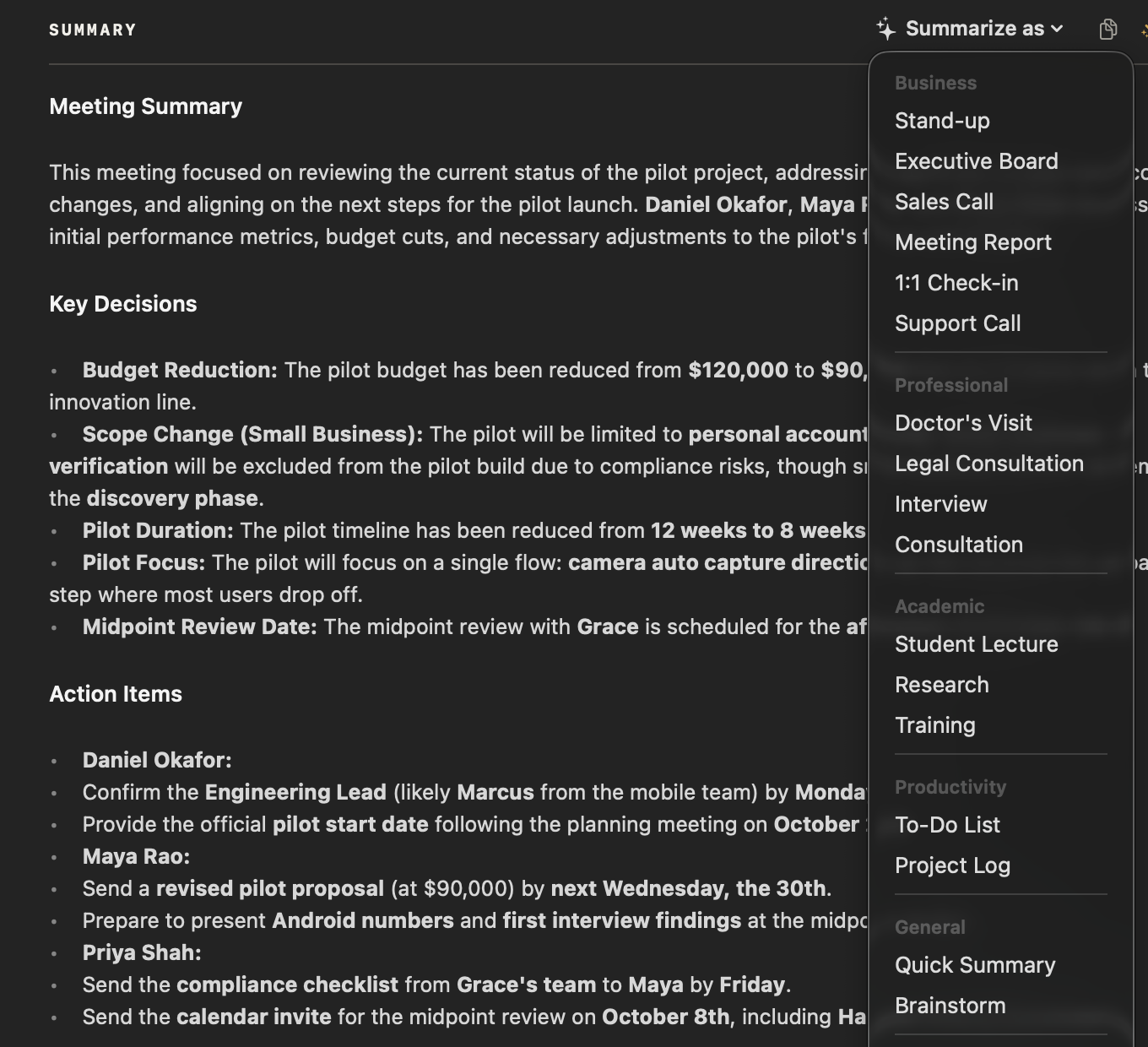
Record the update meeting in NoteOwl — it takes meeting notes without a bot — then choose Summarize as → Project Log. NoteOwl writes the progress, decisions, blockers and next milestones from the recording, on your Mac with on-device AI models, and nothing is uploaded.
- 1
Record the update meeting
Press ⌥Space or click Start Meeting. NoteOwl records your microphone and your Mac’s audio; no bot joins the call.
- 2
Open it in Meeting Scribe
When the meeting ends, NoteOwl writes the speaker-labelled transcript and a summary, on your Mac.
- 3
Choose Summarize as → Project Log
Above the summary, open Summarize as and pick Project Log. NoteOwl rewrites it as progress, decisions, blockers and next milestones.
- 4
Send it, and track what’s pending
Copy the update into an email, or use Export to save it as Markdown or PDF. Action items that involve you land on your Commitments board.
Tell everyone you’re recording. Meeting notes and templates are part of NoteOwl Pro, with a 7-day free trial in the app. Every meeting also gets NoteOwl’s standard summary: see AI meeting summaries.
What does NoteOwl’s Project Log template ask for?
Exactly the four sections above. This is the template’s instruction to NoteOwl, word for word; you can change it, or write your own, in NoteOwl’s Templates screen.
“Summarize this project update: progress made since the last update, decisions taken, blockers or challenges encountered, and the next milestones or pending items.”
For the steps, see choose or write a summary template in the NoteOwl docs.
FAQ
Questions about project updates
What is a project status update?
A project status update is a short, regular report on a project: what moved since the last one, what was decided, what is blocked and what comes next. NoteOwl’s Project Log template writes one in those four sections from the recording of an update meeting.
How often should you send a project update?
Weekly suits most active projects, and every two weeks suits slower ones. A steady rhythm matters more than the exact day, so people know when the next update comes. With NoteOwl, every recorded update meeting can become a Project Log in the same four sections.
Can I use this project update template in an email or Google Docs?
Yes. It is plain text, so it pastes into an email, Google Docs, Notion, Word or Apple Notes and keeps its four sections; the milestones work as a list or as a three-column table.
Can NoteOwl write project updates automatically?
Yes. Record the update meeting in NoteOwl, then choose Summarize as → Project Log, and it writes the progress, decisions, blockers and next milestones from the recording, on your Mac with on-device AI models. Meeting notes and templates are part of NoteOwl Pro: $79 once for one Mac, with a 7-day free trial in the app.
Can I find what was decided in an earlier project update?
Yes. NoteOwl keeps every recorded meeting in a searchable memory on your Mac, so you can search for a decision or ask Chat about it, and the answer cites the meeting it came from. Chat and memory are part of NoteOwl Pro.
Is recording a project update meeting with NoteOwl private?
NoteOwl records, transcribes and summarizes the meeting on your Mac with on-device AI models, so the recording, the transcript and the update are never uploaded, and no bot joins the call. Tell everyone at the meeting that you are recording with NoteOwl before you start.
Can I change the sections of NoteOwl’s Project Log template?
Yes. In NoteOwl’s Templates screen you can customize the Project Log template — for example, to add a status line or a budget section — or write your own, then summarize any recorded update again in the new format.
Related
- All 22 meeting notes templates Stand-ups, 1:1s, sales calls, board meetings and more, with their sections.
- Action items and commitments Action items with owners and dates, and one board of what you owe and what you’re owed.
- AI note taker for managers 1:1s and team meetings with no bot, and every commitment tracked both ways.
- AI meeting notes for product teams Customer interviews, design reviews and stand-ups, with every decision and owner written down.
Keep exploring
More templates
- Support call notes templateA support call notes template to copy, what each section holds, an example, and how NoteOwl writes it
- Consultation notes templateA consultation notes template to copy, what each section holds, an example, and how NoteOwl writes it
- Training notes templateA training notes template to copy, what each section holds, an example, and how NoteOwl writes it
- To-do list templateA to-do list template to copy, what each section holds, an example, and how NoteOwl writes it
Get your project updates written on your Mac
Free to download. Runs entirely on your Mac.
macOS 26 or later · Apple Silicon (M1 or newer) · 16 GB memory minimum, 24 GB recommended
About NoteOwl
NoteOwl is private AI meeting notes and memory for the Mac. It captures meetings without a bot joining the call, labels every speaker, writes summaries and action items, and builds a memory of every conversation that you can chat with — fully offline, because the speech recognition and the AI run on the Mac itself. Dictation into any app is free; Pro is a one-time purchase.
NoteOwl pricing: what’s free and what Pro adds
Last updated