For doctors in private practice
AI notes for doctors, dictated on your Mac
NoteOwl is an AI note taker for doctors who run their own practice. When the patient leaves, tap fn and dictate the visit note straight into the note field of the software you already use. It’s free, it runs on your own Mac, and no third party processes the audio.
NoteOwl Pro turns what you dictated into a structured note in your own template, such as SOAP, and lets you ask what you told a patient last time, with the note it came from. It works with Wi-Fi off, and there’s no monthly subscription.
After the visit
- 01
Dictate the noteFree
Click into the note field, tap fn, talk, tap fn again. Your words are typed at the cursor.
- 02
Shape itPro
Transform as → your SOAP template rewrites the dictation under your headings, with your raw words kept beside it.
- 03
Find it laterPro
Ask Chat what you told a patient, and see the note the answer came from.
For physicians who run their own practice — direct primary care, concierge, psychiatry, aesthetics and small specialty practices. If you’re employed by a hospital or group, ask your IT or compliance team first.
How do doctors in private practice use an AI note taker?
Mostly for the note after each visit. Dictate it the moment the patient leaves, straight into the chart; then, with NoteOwl Pro, put it in your own format and ask your past notes questions. All of it runs on your Mac.
Right after the visit
Dictate while it’s fresh
Put the cursor in the chart’s note field, tap fn and talk. NoteOwl types your words, and keeps a copy in its Dictations screen on your Mac. Free.
Between patients
Put it in your format
Open the dictation in NoteOwl and choose Transform as → your SOAP template. Read it, fix anything it misheard, and copy it into the chart. Pro.
Before a follow-up
See what you said last time
Ask Chat in plain English. It answers from your own notes and recordings only, and shows the passage it used. Pro.
Telehealth visits
Record the call, when you choose to
NoteOwl records your microphone and your Mac’s audio from any call app, then writes a speaker-labelled transcript and a summary on your Mac. Pro.
Can I dictate visit notes into my EHR?
Yes, and it’s free. Put the cursor in the note field — in a browser or a Mac app — tap fn, talk, and tap fn again. NoteOwl types your words where the cursor is. It doesn’t connect to your EHR; it types, the way you would.
Every dictation is also kept as text in NoteOwl’s Dictations screen, on your Mac, with your raw words beside the tidied version. Delete it there and it’s removed from NoteOwl’s library. How free dictation works
- Polish — cleans up what you said, keeping every term as spoken
- Offline — dictation works with Wi-Fi off
- Custom vocabulary — drug and colleague names spelled your wayPro
- Transform as — rewrite a dictation in your own templatePro
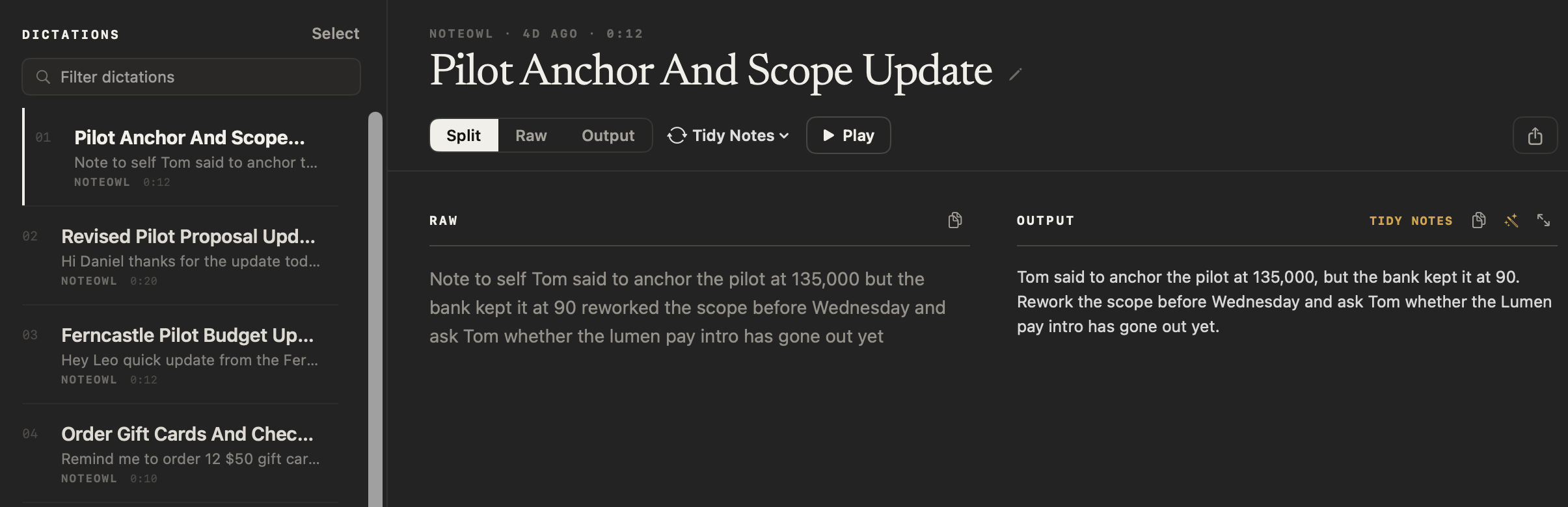
Where does patient audio go?
Nowhere. NoteOwl turns speech into text on your Mac with on-device AI models, and has no server that receives your content. So NoteOwl never receives your patients’ audio, transcripts or notes, and no third party processes them. A cloud scribe sends the audio to its vendor.
What stays on your Mac
- Your dictations, recordings, transcripts and notes are kept in a folder on your Mac. They are never uploaded, synced to a cloud or shared with us or anyone else.
- Speech to text, templates and Chat run on your Mac, with on-device AI models.
- The app has no analytics or telemetry. We have no way to see what you record or say.
- After the one-time model download, all of it works with Wi-Fi off.
- Deleting a recording in NoteOwl moves its audio file to the macOS Trash, where it can be recovered until you empty the Trash.
| When NoteOwl connects | What it sends |
|---|---|
| The one-time model download | Model files are downloaded to your Mac; nothing of yours is sent |
| Checking for app updates | No personal data or content |
| Starting the trial or activating Pro | Your email address and an identifier for this Mac |
| A licence check, at most once a week (Pro) | Only the certificate identifier |
Recordings, transcripts and notes are never sent. The details are in NoteOwl’s privacy policy.
NoteOwl never receives your patients’ information, but the notes on your Mac are still your patients’ records. Your practice’s own duties for them stay with you: who uses the Mac, backups, how long you keep notes, and what happens if the Mac is lost.
How can you check where your notes go?
Test it instead of taking our word for it. Turn off Wi-Fi and use NoteOwl: dictation, templates and Chat still work, because they run on your Mac. Then compare the connections the privacy policy lists with what you see.
- 1
Turn off Wi-Fi
After the one-time model download, dictate a note, transform it with your template and ask Chat about it. All three still work, because they run on your Mac.
- 2
Read the list of connections
NoteOwl goes online only for the model download, update checks, starting the trial or activating Pro, and a licence check at most once a week. None of them sends recordings, transcripts or notes.
- 3
Open your library
Everything you record is in one folder on your Mac. In NoteOwl, Settings → General → Show in Finder opens it.
The full list is in the privacy policy’s section on network use, and the folder’s location is in where NoteOwl stores your data.
What does NoteOwl write after a visit?
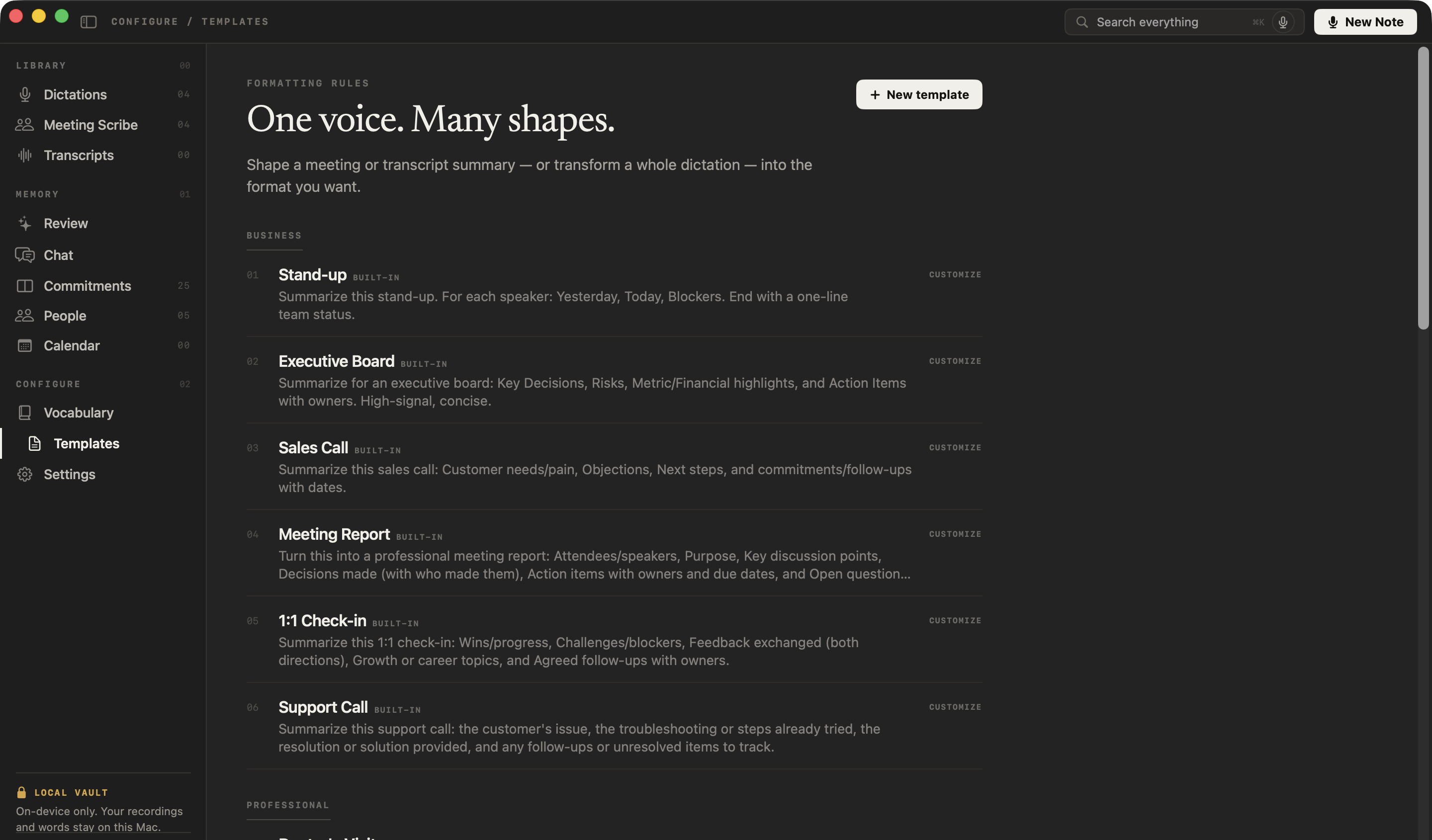
Whatever shape you give it. NoteOwl has no built-in SOAP template, so you make one in a minute: paste the instruction below into Templates → New template. The built-in Doctor’s Visit writes something else, a plain-language summary a patient can read.
- 1
Open Templates
In NoteOwl’s sidebar, under Configure, click Templates, then New template at the top right.
- 2
Name it and paste the instruction
Call it “SOAP note”, set Group to Professional so it sits beside Doctor’s Visit, paste the instruction below as the prompt, and click Add.
- 3
Use it on a dictation
Open a dictation in Dictations, open its style menu and choose Transform as → SOAP note. Your raw words stay beside the note.
- 4
Read it, then copy it
Check every line against what you said, fix anything misheard, and copy the note into the chart. A recorded telehealth visit takes the same template from Summarize as.
Write a SOAP note using only what was said. Don't add anything.
Subjective: the patient's concerns and history, as described.
Objective: the vital signs, examination findings and results mentioned.
Assessment: the clinician's assessment, in their words.
Plan: tests, medications with doses, referrals, instructions and follow-up.
If something wasn't mentioned, write "Not stated".
NoteOwl writes down what you said, in the shape you asked for. It doesn’t diagnose, suggest treatment or check your reasoning, and it can mishear, so read every note before it goes in the chart.
For your patients, Doctor’s Visit sets out symptoms, findings, diagnosis, medications and follow-up in plain language. See the doctor visit notes template, with an example.
How well does NoteOwl handle medical terms?
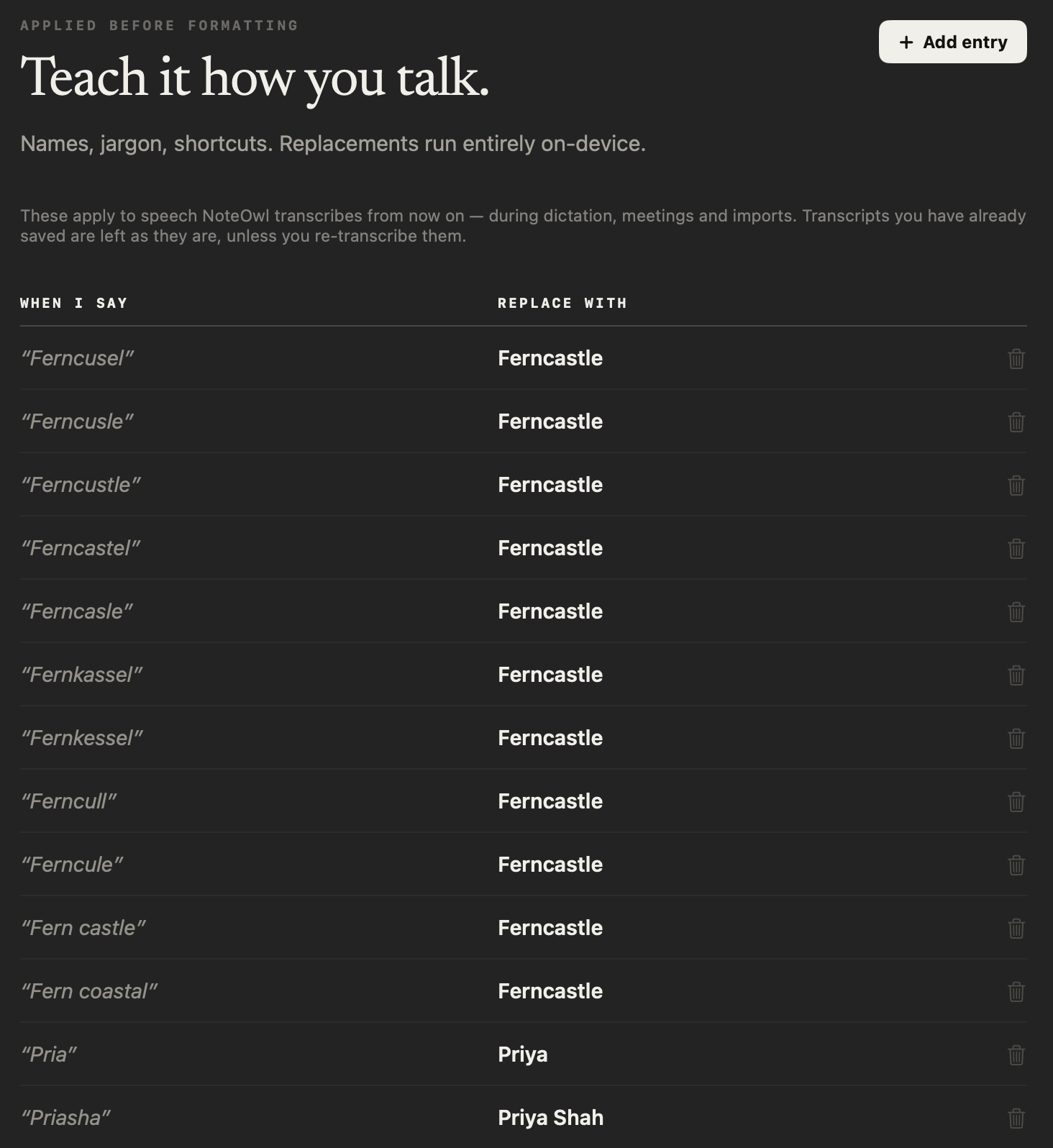
NoteOwl makes no accuracy claim for medical words, so read every note before it goes in the chart. When it mishears a drug, a condition or a colleague’s name, add a Vocabulary rule — When I say, Replace with — and from then on it writes the word your way.
When I say
met forming
Replace with
metformin
Can you find what you told a patient last time?
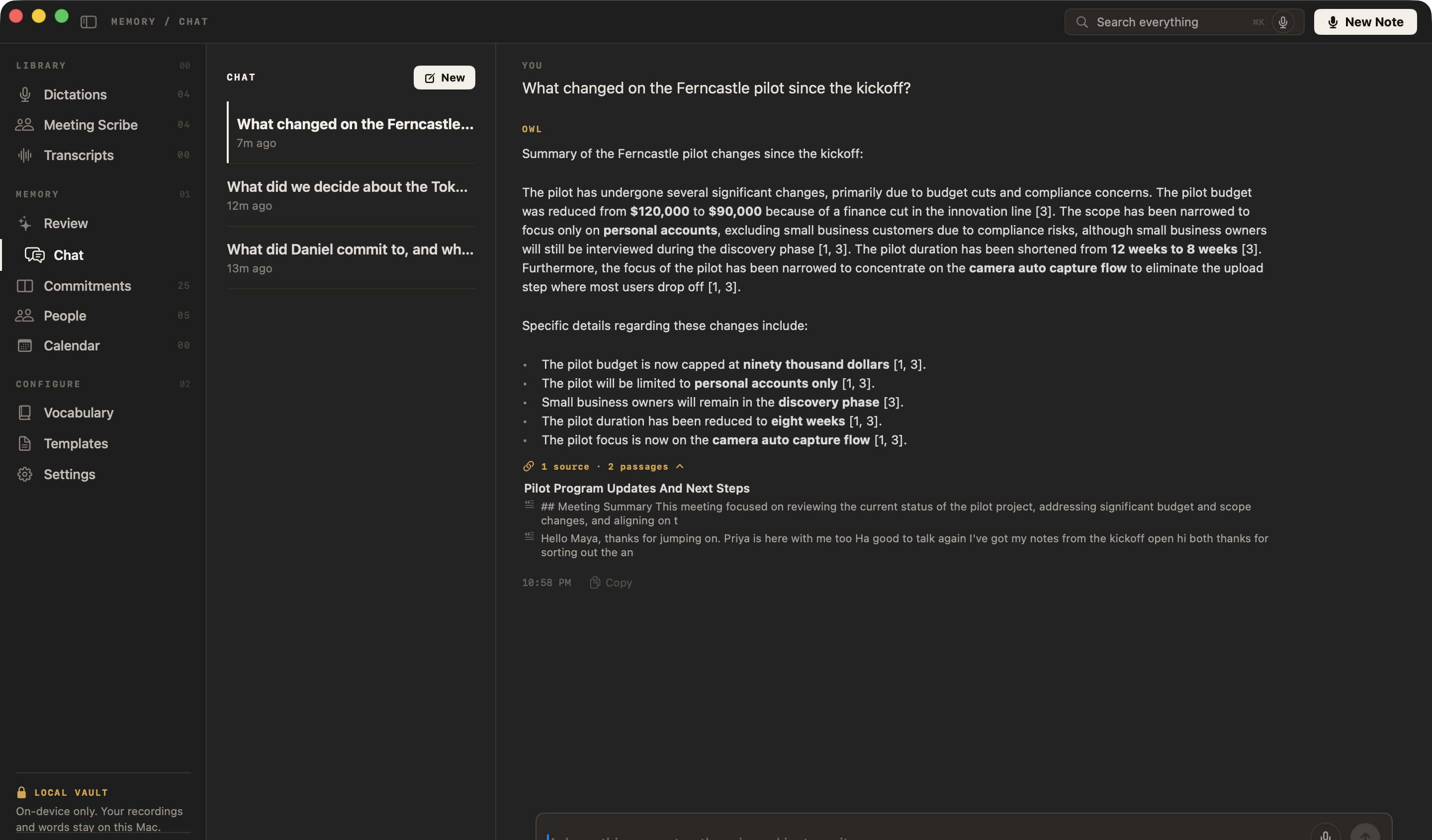
Yes, with NoteOwl Pro. Ask Chat in plain English and it answers only from your own notes and recordings, shows the passages it used, and says so when nothing matches instead of guessing.
You ask
What follow-up did I recommend for Ben’s ankle?
What else does NoteOwl do for a practice?
Beyond the visit note, NoteOwl Pro turns the rest of your practice’s talking into notes you can find: telehealth visits, staff meetings and recordings you import, all on your Mac.
Telehealth visits, transcribed
Record a video visit from any call app. NoteOwl writes a speaker-labelled transcript and a summary on your Mac, and Summarize as reshapes it in your template.
Search everything
Every dictation, visit and recording, one keystroke away with ⌘K.
Works with Wi-Fi off
Dictation, templates and Chat run on your Mac, in the exam room or on a plane.
Recordings you already have
Drag in a voice memo or a recorded lecture — m4a, mp3, wav, mp4 and more — and get a transcript you can search and summarize.
Voice notes with audio
Record a note inside NoteOwl with New Dictation and the audio is kept beside the text. Free.
Staff meetings
Practice meetings get a summary with decisions and action items: who does what, by when.
What does NoteOwl cost compared with a monthly scribe subscription?
Less, and you pay once. NoteOwl Pro is $79 for one Mac, with no subscription and nothing per visit; AI scribes usually bill every month, per clinician. Dictation into any app stays free, and you can try Pro free for 7 days in the app, with no card.
Free, forever
$0
- Dictation into any app, unlimited
- Polish and a tone for each app
- Voice notes, kept with their audio
- Every dictation saved, searchable and exportable
NoteOwl Pro · one-time
$79 once, for one Mac
- Transform as and Summarize as, with your own SOAP template
- Custom vocabulary for drug and colleague names
- Chat and Search everything across your notes
- Telehealth visit recording and imported recordings
Download NoteOwl free, then try NoteOwl Pro free for 7 days in the app, no card needed. Buy it inside the app when you’re ready (the … menu next to your name → License…).
FAQ
Questions doctors ask about NoteOwl
Does NoteOwl sign a BAA?
No. We don’t sign BAAs, because we never receive, store or transmit your patients’ information: your recordings, transcripts and notes stay on your Mac, and NoteOwl has no server that receives them. Your practice’s own duties for the patient data on your Mac stay with you, and how the rules apply to your practice is a question for your counsel.
Does NoteOwl work in the exam room without internet?
Yes. After the one-time model download, dictation, templates, Chat and an activated Pro licence all work with Wi-Fi off, because the AI runs on your Mac. NoteOwl goes online to check for updates and, at most once a week, to check your licence.
Does NoteOwl integrate with my EHR?
No. NoteOwl doesn’t connect to any EHR. Free dictation types your words at the cursor, so you dictate into the note field the way you would type. With NoteOwl Pro, you can shape the note in your own template first and copy it into the chart.
Does NoteOwl diagnose or suggest treatment?
No. NoteOwl writes down what you said, in the shape you ask for. It doesn’t diagnose, suggest treatment or check your clinical reasoning, and it can mishear words, so read and correct every note before it goes in the chart.
Can I use NoteOwl on an iPad or iPhone?
No. NoteOwl is a Mac app and needs macOS 26 or later on Apple Silicon (M1 or newer). You can record on your iPhone and import the file into NoteOwl on your Mac; importing recordings is part of NoteOwl Pro.
How do I delete a patient’s note completely?
Delete it in NoteOwl: the dictation or recording, its transcript and its search entry are removed from your library. If it had recorded audio, that file moves to the macOS Trash, where it can be recovered, so empty the Trash too. Anything you pasted into your chart stays there.
What Mac do I need for NoteOwl?
A Mac with Apple Silicon (M1 or newer), macOS 26 or later, and 16 GB memory minimum, 24 GB recommended. NoteOwl downloads its on-device AI models once after install: about 8 GB, downloaded once after install (keep around 10 GB free).
Is dictation in NoteOwl really free?
Yes. Dictation into any app is free, unlimited and needs no account. NoteOwl Pro — templates, custom vocabulary, Chat, visit recording and imports — is $79 once for one Mac, with a 7-day free trial in the app and no card needed.
This page explains how NoteOwl works. It isn’t legal or medical advice: check your own professional rules and the law where you practise.
Related
- Doctor visit notes template A plain-language visit summary to copy, a SOAP outline, and an example.
- Free dictation into any app Tap fn in any app, talk, and your words are typed at the cursor.
- Custom vocabulary Teach NoteOwl the drug and colleague names it gets wrong.
- Offline AI meeting notes Dictation, templates and Chat with Wi-Fi off, after one model download.
Keep exploring
Made for this work
- Doctor visit notes templateA doctor visit notes template to copy, what each section holds, an example, and how NoteOwl writes a plain-language visit summary on your Mac
- Free dictation into any appFree, unlimited speech to text in every app on your Mac: tap fn, talk, and the words type at your cursor; one tap polishes them in the right tone for that app
- Custom vocabularyTeach NoteOwl names, jargon and spellings once, and every dictation, meeting and import uses them
- Offline AI meeting notesEvery NoteOwl feature works offline after a one-time model download; what the app sends over the network, and what it never does
Other roles
- StudentsLectures recorded in the room or an online class, or imported, turned into study notes you can ask questions of before the exam; dictating essays is free
- AI note taker for foundersCustomer calls, investor updates and 1:1s — commitments tracked, answers cited — plus free dictation into any app
- AI note taker for consultantsClient calls, workshops and interviews with every commitment tracked and answers cited, on your Mac
Dictate your next visit note on your own Mac
Free to download. Runs entirely on your Mac.
macOS 26 or later · Apple Silicon (M1 or newer) · 16 GB memory minimum, 24 GB recommended
About NoteOwl
NoteOwl is private AI meeting notes and memory for the Mac. It captures meetings without a bot joining the call, labels every speaker, writes summaries and action items, and builds a memory of every conversation that you can chat with — fully offline, because the speech recognition and the AI run on the Mac itself. Dictation into any app is free; Pro is a one-time purchase.
NoteOwl pricing: what’s free and what Pro adds
Last updated