Works offline
AI meeting notes that work offline, on your Mac
NoteOwl takes offline AI meeting notes on your Mac: after a one-time model download, recording, speaker labels, summaries, dictation and Chat all work with Wi-Fi off, because the AI runs on the Mac itself.
It goes online only to download its models, check for updates and, for Pro, handle your licence — never to send recordings, transcripts or notes — and the app has no analytics or telemetry.
Read the transcript
Where do your meeting notes actually go?
With NoteOwl? Nowhere. Watch. Wi-Fi off.
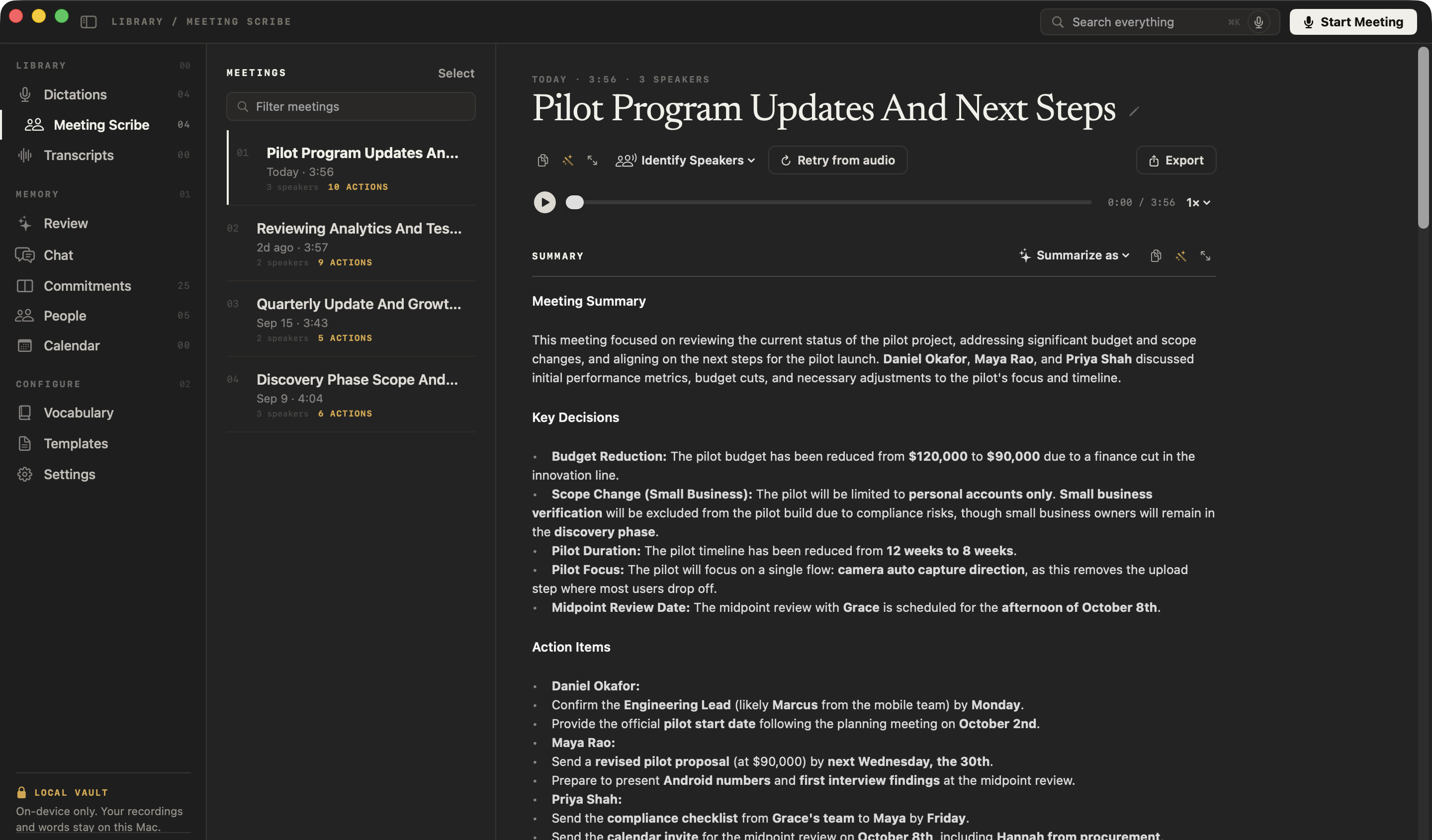
Every meeting is still here. The summary, the action items, the transcript. It’s all on your Mac, and NoteOwl wrote it here, too.
Search every call, and it still finds the moment the budget got cut. Searched entirely on this Mac.
No upload. No cloud. Nothing leaves your Mac.
NoteOwl. Private AI meeting notes for Mac. Free to download.
Does NoteOwl work without internet?
Yes, once its on-device AI models are on your Mac (about 8 GB, downloaded once). Every feature then works with Wi-Fi off, on a plane or anywhere else, because the transcription and the AI run on the Mac, not on a server.
Works with Wi-Fi off
- Dictation into any appFree
- Polish in each app’s toneFree
- Voice notesFree
- Export as Markdown, PDF, text or SRTFree
- Meeting notes with no bot in the callPro
- Speaker labels and voice recognitionPro
- Summaries, action items and 22 templatesPro
- Transcribing imported recordingsPro
- Chat, Search everything and RecallPro
- People, Commitments and ReviewPro
Needs a connection
- The one-time model download, and a model part the first time a feature needs it
- Starting the trial, buying NoteOwl Pro and activating a Mac
- Downloading an app update
A video call still needs the internet, of course — NoteOwl doesn’t. It records your microphone and your Mac’s audio as an AI note taker without a bot, and writes the notes on the Mac.
What does NoteOwl send over the internet?
Four kinds of request, and none carries your content: the model download, update checks and, only for Pro or the trial, your account and a weekly licence check. Recordings, transcripts, notes and chats never leave your Mac.
- Downloading the on-device AI models
- WhenOnce, after you install: about 8 GB. A model part a feature hasn’t used yet downloads the first time you use that feature. While you’re online, NoteOwl also checks the model files are current when it loads them.
- What leaves your MacRequests for the model files, to the models’ distribution servers. Nothing you have recorded or typed.
- Checking for app updates
- WhenAutomatically in the background, and when you choose NoteOwl → Check for Updates…. An update downloads and installs only when you say so.
- What leaves your MacA request for NoteOwl’s release list on noteowl.ai. No personal data, and nothing you have recorded.
- Your account (Pro and the trial only)
- WhenWhen you sign in with your email, start the trial, buy NoteOwl Pro or activate this Mac. While you’re signed in, NoteOwl also asks when it opens, and when you open the licence panel, whether a trial or offer is available to you.
- What leaves your MacYour email address and an identifier for this Mac. Never recordings, transcripts or notes.
- Licence check (Pro)
- WhenAt most once a week, and only when you’re already online. If it fails, NoteOwl waits for the next week instead of retrying.
- What leaves your MacOnly the licence certificate’s identifier. A missed check never switches Pro off.
| Connection | When | What leaves your Mac |
|---|---|---|
| Downloading the on-device AI models | Once, after you install: about 8 GB. A model part a feature hasn’t used yet downloads the first time you use that feature. While you’re online, NoteOwl also checks the model files are current when it loads them. | Requests for the model files, to the models’ distribution servers. Nothing you have recorded or typed. |
| Checking for app updates | Automatically in the background, and when you choose NoteOwl → Check for Updates…. An update downloads and installs only when you say so. | A request for NoteOwl’s release list on noteowl.ai. No personal data, and nothing you have recorded. |
| Your account (Pro and the trial only) | When you sign in with your email, start the trial, buy NoteOwl Pro or activate this Mac. While you’re signed in, NoteOwl also asks when it opens, and when you open the licence panel, whether a trial or offer is available to you. | Your email address and an identifier for this Mac. Never recordings, transcripts or notes. |
| Licence check (Pro) | At most once a week, and only when you’re already online. If it fails, NoteOwl waits for the next week instead of retrying. | Only the licence certificate’s identifier. A missed check never switches Pro off. |
What does NoteOwl never send?
Anything you record or write. Audio, transcripts, summaries, chats and dictations stay in a folder on your Mac. The app has no analytics or telemetry, and crash reports are saved on your Mac; sending one to support is your choice.
The licensing service has no field for anything you record — not a title, a filename or a search query — and the on-device AI models read your meetings on your Mac.
- Meeting recordings and audio
- Transcripts, speaker names and voice profiles
- Summaries, notes and action items
- Chat questions and answers
- Dictations and voice notes
- People, commitments, your calendar and contacts
- Titles, filenames and search queries
- How you use the app: there are no analytics or telemetry
Can you ask your meetings questions offline?
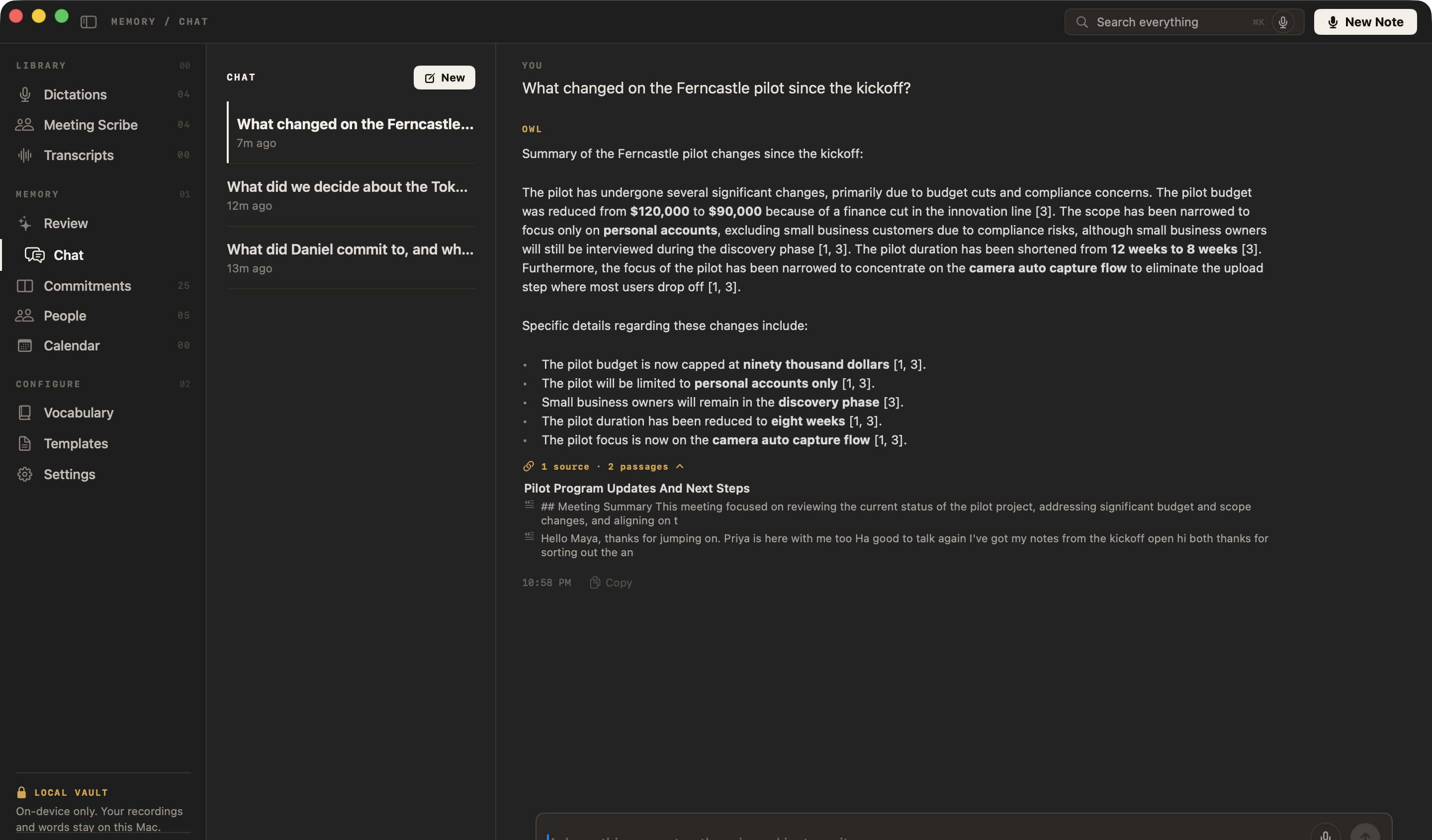
Yes. Chat finds the passages and writes the answer on your Mac, so it works with Wi-Fi off, and every answer still cites the meeting it came from. Recall (⌥Z) and Search everything (⌘K) work offline too.
See how to chat with your meetings, follow up and open the source of any answer.
How can you check that NoteOwl works offline?
Turn off Wi-Fi and use it. Once the model download has finished, dictation, meeting notes and Chat keep working with no connection at all — there is no server for them to wait on.
- 1
Let the download finish
Open NoteOwl once while you are online and let the one-time model download finish.
- 2
Turn off Wi-Fi
Click Wi-Fi in the menu bar and switch it off, and unplug any Ethernet cable.
- 3
Use it
Tap fn and dictate into another app. On Pro or the trial, press ⌥Space to record a short meeting, stop it, then ask Chat about it. Nothing waits for a server.
Are offline meeting notes more private?
Yes. When the transcript, summary and answers are made on your Mac, no copy of your meetings sits on a server — that is what makes them private meeting notes. Tell the people you meet that you are taking notes.
Meeting notes, Chat and memory are part of NoteOwl Pro; dictation and voice notes are free.
- Works offline
- Every feature, after the one-time model download
- Model download
- about 8 GB, downloaded once after install (keep around 10 GB free)
- Where the AI runs
- On your Mac, with on-device AI models
- Goes online for
- The model download and update checks; for Pro and the trial, your account and a weekly licence check
- Never uploaded
- Recordings, transcripts, summaries, notes, chats
- Analytics and telemetry
- None in the app
- Crash reports
- Saved on your Mac, never sent automatically
- Requirements
- macOS 26 or later, Apple Silicon (M1 or newer), 16 GB memory minimum, 24 GB recommended
- Plan
- Dictation free; Pro $79 once for one Mac, with a 7-day free trial in the app
FAQ
Questions about offline meeting notes
Does NoteOwl work offline?
Yes. After the one-time download of its on-device AI models, NoteOwl works with Wi-Fi off: dictation, meeting notes with speaker labels, summaries, action items, Chat, search and Recall all run on your Mac, with no server involved.
What does NoteOwl send over the internet?
NoteOwl connects only to download its on-device AI models, to check for app updates and, for NoteOwl Pro or the trial, for your account — signing in, activating a Mac, seeing whether a trial is available — and a licence check at most once a week. None of these sends recordings, transcripts, notes or chats.
Does NoteOwl have analytics or telemetry?
No. The NoteOwl app has no analytics, no telemetry and no advertising, and its crash reports are saved on your Mac rather than uploaded. The noteowl.ai website counts page views and download clicks without cookies.
Does NoteOwl Pro need an internet connection?
Only to sign in, start the trial, buy NoteOwl Pro and activate your Mac. After that, NoteOwl checks the licence on the Mac itself; it asks the licensing service at most once a week, when you are already online, and a missed check never switches Pro off.
Can NoteOwl take notes on a Zoom call without internet?
A Zoom, Google Meet or Teams call needs the internet itself, but NoteOwl does not: it records your microphone and your Mac’s audio and writes the transcript and notes on the Mac. In-person meetings, recorded with the microphone, need no connection at all.
How big is NoteOwl’s offline model download?
NoteOwl’s on-device AI models are about 8 GB, downloaded once after install (keep around 10 GB free). The app itself is a 20.0 MB download, and NoteOwl Free and Pro use the same models.
Are offline AI meeting notes private?
More private than cloud notes, because nothing is uploaded: NoteOwl records, transcribes, summarizes and answers questions on your Mac, so no copy of your meetings sits on a server. Tell the people you meet that you are taking notes.
Related
- Chat with your meetings, offline Ask any past meeting a question; every answer cites the passage.
- AI note taker without a bot How NoteOwl records any call from your Mac, with nothing joining it.
- Granola alternative that works offline NoteOwl vs Granola, on your Mac vs the cloud, side by side with sources.
- NoteOwl Pro, $79 once What is free, what is in Pro, and the 7-day trial.
Keep exploring
Related features
- Chat with your meetingsAsk your own meetings a question on your Mac, even offline; every answer cites the passage it came from
- Search all your meetingsOne search across every meeting, dictation, transcript and person on your Mac, plus Recall by voice from any app
- People profilesA personal CRM that fills itself from your meetings: who they are, what is open between you, every conversation
Who uses it
- AI note taker for lawyersClient calls and consultations transcribed and summarized on your Mac; no third party processes the audio, and every answer cites the moment it was said
- AI notes for therapistsSession notes dictated the moment the client leaves, on your Mac; no third party processes the audio, and your recordings and notes are never uploaded
- AI note taker for doctorsVisit notes dictated on your own Mac for doctors in private practice; no third party processes patient audio, and no subscription
Take meeting notes on your Mac, with or without Wi-Fi
Free to download. Runs entirely on your Mac.
macOS 26 or later · Apple Silicon (M1 or newer) · 16 GB memory minimum, 24 GB recommended
About NoteOwl
NoteOwl is private AI meeting notes and memory for the Mac. It captures meetings without a bot joining the call, labels every speaker, writes summaries and action items, and builds a memory of every conversation that you can chat with — fully offline, because the speech recognition and the AI run on the Mac itself. Dictation into any app is free; Pro is a one-time purchase.
NoteOwl pricing: what’s free and what Pro adds
Last updated