Template
Brainstorming template
This brainstorming template has three sections — every idea grouped by theme, the standout ideas worth pursuing, and the next experiments or actions you agree — and it copies as plain text into Google Docs, Notion, Word or any notes app.
In NoteOwl, the Brainstorm template writes your brainstorm notes in exactly this format from the recording, on your Mac; an example is below.
Brainstorm · 3 sections
- 01All ideas, grouped by theme
- 02Standout ideas worth pursuing
- 03Agreed next experiments or actions
What should brainstorm notes include?
Three things: every idea, grouped by theme; the standout ideas worth pursuing, and why; and the next experiments or actions you agree, each with an owner. Keep the parked ideas too, so they aren’t lost.
- All ideas, grouped by theme
- What to writeEvery idea that was said, the wild ones included, sorted into a few themes. Note who suggested each one.
- Standout ideas worth pursuing
- What to writeThe two or three ideas the group picked, and why. List what was parked for later, so it isn’t lost.
- Agreed next experiments or actions
- What to writeThe smallest test of each standout idea: who runs it, by when, and what you will measure.
| Section | What to write |
|---|---|
| All ideas, grouped by theme | Every idea that was said, the wild ones included, sorted into a few themes. Note who suggested each one. |
| Standout ideas worth pursuing | The two or three ideas the group picked, and why. List what was parked for later, so it isn’t lost. |
| Agreed next experiments or actions | The smallest test of each standout idea: who runs it, by when, and what you will measure. |
A brainstorming template to copy
Paste it into Google Docs, Notion, Word or Apple Notes and fill it in as the ideas come, or straight after the session. It is plain text, so it keeps its shape anywhere.
The sections match NoteOwl’s Brainstorm template, so brainstorm notes you write by hand and notes NoteOwl writes read the same.
BRAINSTORM

The question: How might we ...?
Date:
Who was there:
Time box:

1. ALL IDEAS, GROUPED BY THEME
Theme:
- Idea (suggested by: name)
- Idea (suggested by: name)
Theme:
- Idea (suggested by: name)
- Idea (suggested by: name)

2. STANDOUT IDEAS WORTH PURSUING
- Idea: why it stands out
- Idea: why it stands out
- Parked for later:

3. NEXT EXPERIMENTS OR ACTIONS
Owner | Experiment or action | What we'll measure | By when
Name  | What will be tried   | The result that counts | Date
Name  | What will be tried   | The result that counts | Date

Next check-in:
How do you run a brainstorming session?
Start with one clear question and give ideas their own time before anyone judges them. Then group them into themes, pick the standouts together, and end with small experiments that each have an owner and a date. Here is a 45-minute agenda.
- Frame the question
- Time5 min
- What to doWhat problem are we solving, and for whom? Write it as one question, such as “How might we…?”
- Generate ideas
- Time15 min
- What to doEvery idea goes down, with no judging yet. Build on each other’s ideas: quantity first.
- Group by theme
- Time10 min
- What to doWhich ideas belong together? Give each group a name.
- Pick the standouts
- Time10 min
- What to doWhich two or three are worth pursuing, and why? What do we park for later?
- Agree next experiments
- Time5 min
- What to doWhat is the smallest test of each standout? Who runs it, by when, and what will we measure?
| Step | Time | What to do |
|---|---|---|
| Frame the question | 5 min | What problem are we solving, and for whom? Write it as one question, such as “How might we…?” |
| Generate ideas | 15 min | Every idea goes down, with no judging yet. Build on each other’s ideas: quantity first. |
| Group by theme | 10 min | Which ideas belong together? Give each group a name. |
| Pick the standouts | 10 min | Which two or three are worth pursuing, and why? What do we park for later? |
| Agree next experiments | 5 min | What is the smallest test of each standout? Who runs it, by when, and what will we measure? |
What do good brainstorm notes look like?
Like this: NoteOwl’s Brainstorm output for a short brainstorm at a design studio about the ID photo step in a bank’s app. Every idea is kept and grouped by theme, and each next experiment names who runs it.
Brainstorm: Fixing the ID Photo Step
Question: How do we stop people giving up at the ID photo step?
Ideas by Theme
Keeping progress
- Never lose what people typed: if the photo fails, only the photo step repeats (Leo). Save the form before the camera opens (Ines).
Capture
- Auto capture: the camera takes the picture when the licence is in the frame and sharp, with no shutter button (Ines).
- Card outline on the screen, so people know where to hold it (Leo).
- Glare detection: say "tilt it slightly" before taking the picture (Ines).
- Short video instead of a photo: turn the card in your hand and pick the best frame (Ines).
Feedback
- Plain words while the camera is still open: "Too blurry, hold still." "Too dark, move nearer a window." (Maya)
- A clear tick when it's done, so nobody waits until the next day for an email (Leo).
Other steps
- Separate selfie step after the card, instead of a selfie holding the licence (Leo).
- QR code for people who start on a laptop, so they can finish on their phone (Ines).
Standout Ideas Worth Pursuing
- Auto capture with instant feedback: "the heart of it" (Leo).
- Keeping what people typed: cheap, and it fixes the worst part of Rosa's story (Ines).
- Separate selfie step: third, if the bank's rules allow it.
- Parked: the video idea (a conversation with Grace and the risk team, after the pilot) and the QR code.
Next Experiments & Actions
- Leo Martins: add auto capture with the three feedback messages to the prototype by Thursday.
- Ines Duarte: build the save-before-camera behaviour into the same prototype, so both can be tested together.
- Test: put it in front of five people on real phones, at least two of them on Android, where completion is worst.
- Measure: how many tries it takes to get a good photo, and how long the whole thing takes. Target: under five minutes, start to finish.
- Maya Rao: ask Priya today whether the selfie can be a separate step.
How do you get brainstorm notes written automatically?
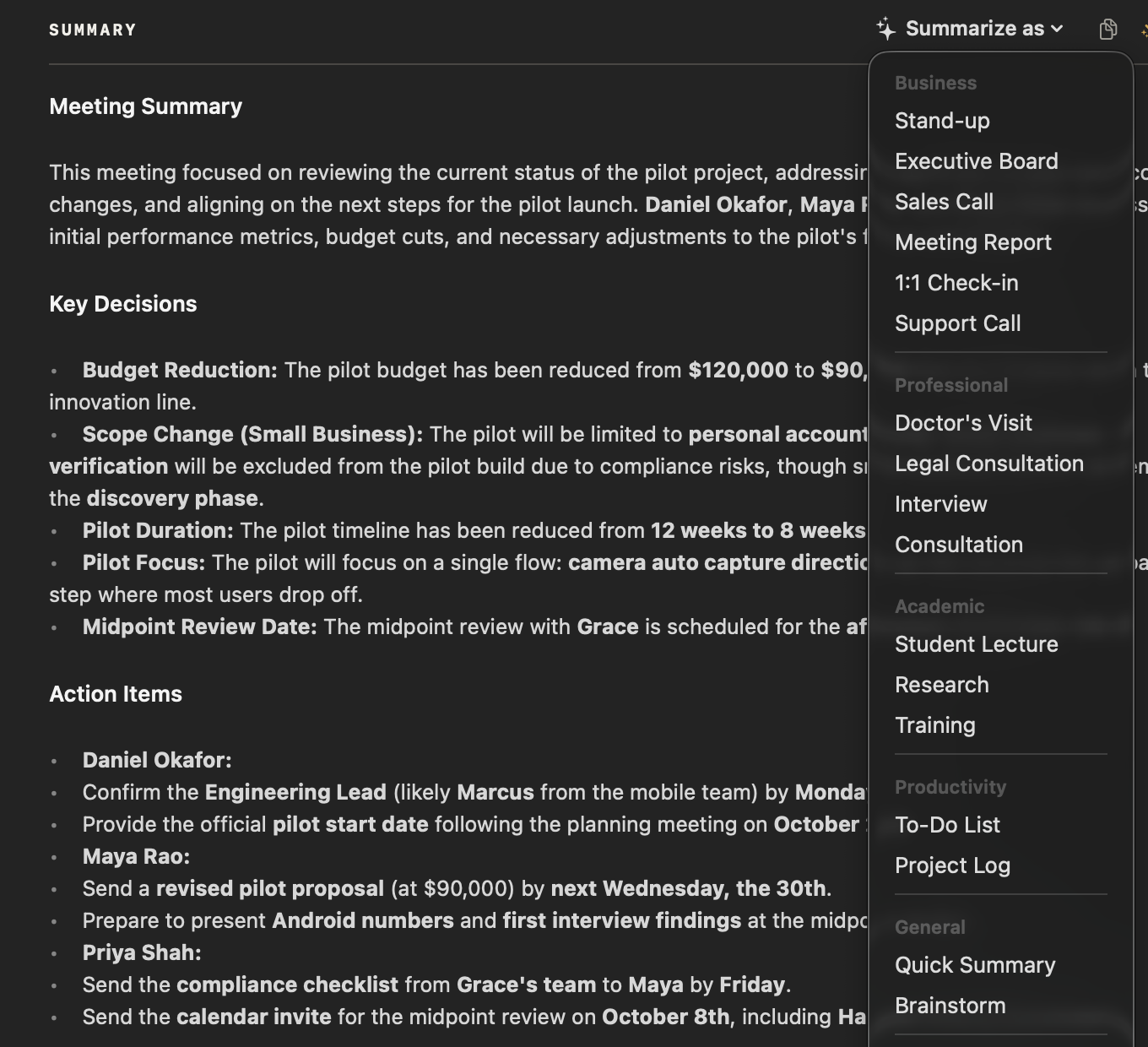
Record the brainstorm in NoteOwl — it takes meeting notes without a bot — then choose Summarize as → Brainstorm. NoteOwl groups every idea by theme and writes the standouts and next experiments from the recording, on your Mac with on-device AI models, and nothing is uploaded.
- 1
Record the brainstorm
Press ⌥Space or click Start Meeting. NoteOwl records your microphone and your Mac’s audio, in the room or on a call; no bot joins.
- 2
Open it in Meeting Scribe
When the brainstorm ends, NoteOwl writes the speaker-labelled transcript and a summary, on your Mac.
- 3
Choose Summarize as → Brainstorm
Above the summary, open Summarize as and pick Brainstorm. NoteOwl rewrites the notes as ideas by theme, standout ideas and next experiments.
- 4
Follow up the experiments
The meeting’s action items stay under Actions with their owners, and the ones that involve you land on your Commitments board, sorted by what’s due.
Tell everyone you’re recording. Meeting notes and templates are part of NoteOwl Pro, with a 7-day free trial in the app.
What does NoteOwl’s Brainstorm template ask for?
Exactly the three sections above. This is the template’s instruction to NoteOwl, word for word; you can change it, or write your own, in NoteOwl’s Templates screen.
“Summarize this brainstorm: all ideas grouped by theme, the standout ideas worth pursuing, and the agreed next experiments or actions.”
For the steps, see choose or write a summary template in the NoteOwl docs.
FAQ
Questions about brainstorming
How do you capture ideas in a brainstorm without slowing it down?
Record it. When one person writes every idea down, everyone waits for the note-taker. Record the brainstorm in NoteOwl and every idea is in the transcript, labelled by speaker; Summarize as → Brainstorm then groups the ideas by theme.
How many people should be in a brainstorm?
Few enough that everyone gets to speak: often three to eight people. With NoteOwl recording, nobody has to stop to write ideas down, so the person who would have taken notes can join in.
Can I use this brainstorm template in Google Docs, Notion or Word?
Yes. NoteOwl’s brainstorm template is plain text, so it pastes into Google Docs, Notion, Word, Pages or Apple Notes and keeps its three sections; the next experiments work as a list or as a table.
Can NoteOwl write brainstorm notes automatically?
Yes. Record the brainstorm in NoteOwl, then choose Summarize as → Brainstorm, and it writes every idea grouped by theme, the standout ideas and the agreed next experiments from the recording, on your Mac with on-device AI models. Meeting notes and templates are part of NoteOwl Pro: $79 once for one Mac, with a 7-day free trial in the app.
Can NoteOwl record a brainstorm in a meeting room?
Yes. NoteOwl records your Mac’s microphone, so it captures a brainstorm around a table as well as one on a call. Put the Mac near the middle of the table, and tell everyone that you are recording before you start.
Can I change the sections of NoteOwl’s Brainstorm template?
Yes. In NoteOwl’s Templates screen you can customize the Brainstorm template — for example, to add a section for risks — or write your own, then summarize any recorded brainstorm again in the new format.
Related
- All 22 meeting notes templates Stand-ups, 1:1s, sales calls, board meetings and more, with their sections.
- Action items and commitments Action items with owners and dates, and one board of what you owe and what you’re owed.
- AI meeting summaries The summary NoteOwl writes when a meeting ends, and Summarize as.
- AI meeting notes for product teams Customer interviews, design reviews and stand-ups, with every decision and owner written down.
Keep exploring
More templates
- Project update templateA project update template to copy, what each section holds, an example, and how NoteOwl writes project update notes
- Support call notes templateA support call notes template to copy, what each section holds, an example, and how NoteOwl writes it
- Consultation notes templateA consultation notes template to copy, what each section holds, an example, and how NoteOwl writes it
- Training notes templateA training notes template to copy, what each section holds, an example, and how NoteOwl writes it
Get your brainstorm notes written on your Mac
Free to download. Runs entirely on your Mac.
macOS 26 or later · Apple Silicon (M1 or newer) · 16 GB memory minimum, 24 GB recommended
About NoteOwl
NoteOwl is private AI meeting notes and memory for the Mac. It captures meetings without a bot joining the call, labels every speaker, writes summaries and action items, and builds a memory of every conversation that you can chat with — fully offline, because the speech recognition and the AI run on the Mac itself. Dictation into any app is free; Pro is a one-time purchase.
NoteOwl pricing: what’s free and what Pro adds
Last updated