Chat
Chat with your meetings, offline
NoteOwl lets you chat with meeting notes on your Mac: ask questions about past meetings in plain English, typed or spoken, and get an answer that cites the exact passages it came from.
It answers only from your own meetings and recordings, never the web, says so when nothing matches, and works with Wi-Fi off; Chat is part of NoteOwl Pro.
Read the transcript
Someone asks what you decided on the pilot. And nobody quite remembers.
So ask. NoteOwl answers from your own meetings, right on your Mac.
The budget went from a hundred and twenty thousand to ninety. And every point shows where it came from.
One click, and you’re back in the meeting, right where it was said.
And if it was never said? It tells you. No guessing.
NoteOwl. Free to download. Ask your meetings.
How do you chat with your meeting notes?
Open Chat in NoteOwl, click New, and type or say your question. NoteOwl finds the passages in your meetings that answer it, writes the answer on your Mac, and lists the sources underneath. Ask follow-ups in the same thread.
- 1
Open Chat
Click Chat in the sidebar, then New. Each conversation is saved as a thread you can come back to.
- 2
Ask your question
Type it and press Return, or tap the mic and say it. Plain English works: “What did we decide about the budget?”
- 3
Read the cited answer
NoteOwl finds the passages that answer it and writes the answer on your Mac, with numbered references like [3].
- 4
Check it, then follow up
Open the sources under the answer and click a passage to jump there. Ask a follow-up in the same thread; NoteOwl reads it in context.
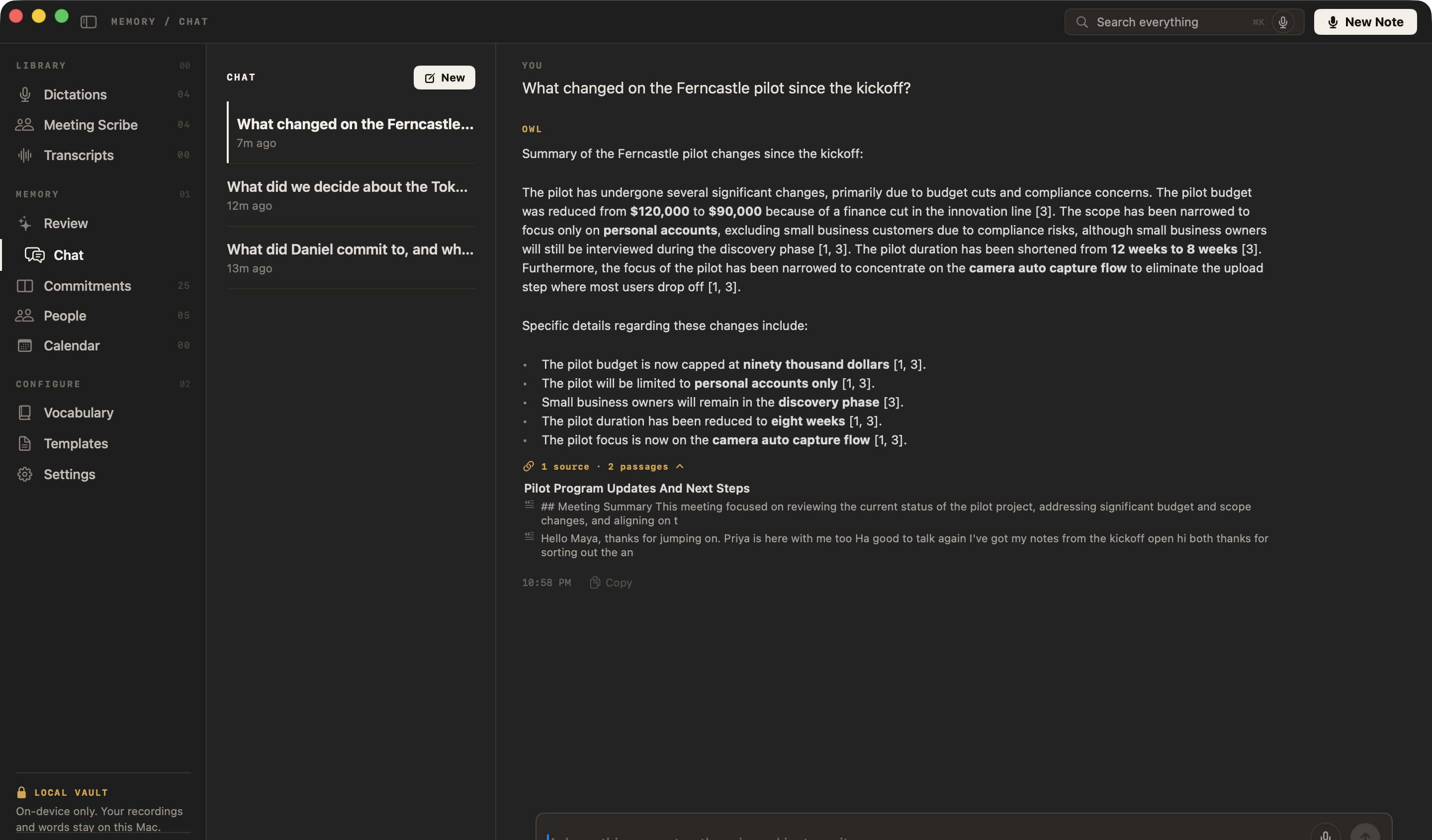
Where do the answers come from?
Only from your own library: the meetings you recorded and the files you imported, never the web. Every answer is cited, with numbered references and, underneath, every passage it used. Click a passage and the meeting opens at that point.
To include your dictations and voice notes, tick the box under the question: it reads Meetings & transcripts, or Meetings, transcripts & dictations when they are in.
From a real NoteOwl answer · excerpt
What changed on the Ferncastle pilot since the kickoff?
The pilot budget was reduced from $120,000 to $90,000 because of a finance cut in the innovation line [3]. … The pilot duration has been shortened from 12 weeks to 8 weeks [3].
1 source · 2 passagesPilot Program Updates And Next Steps
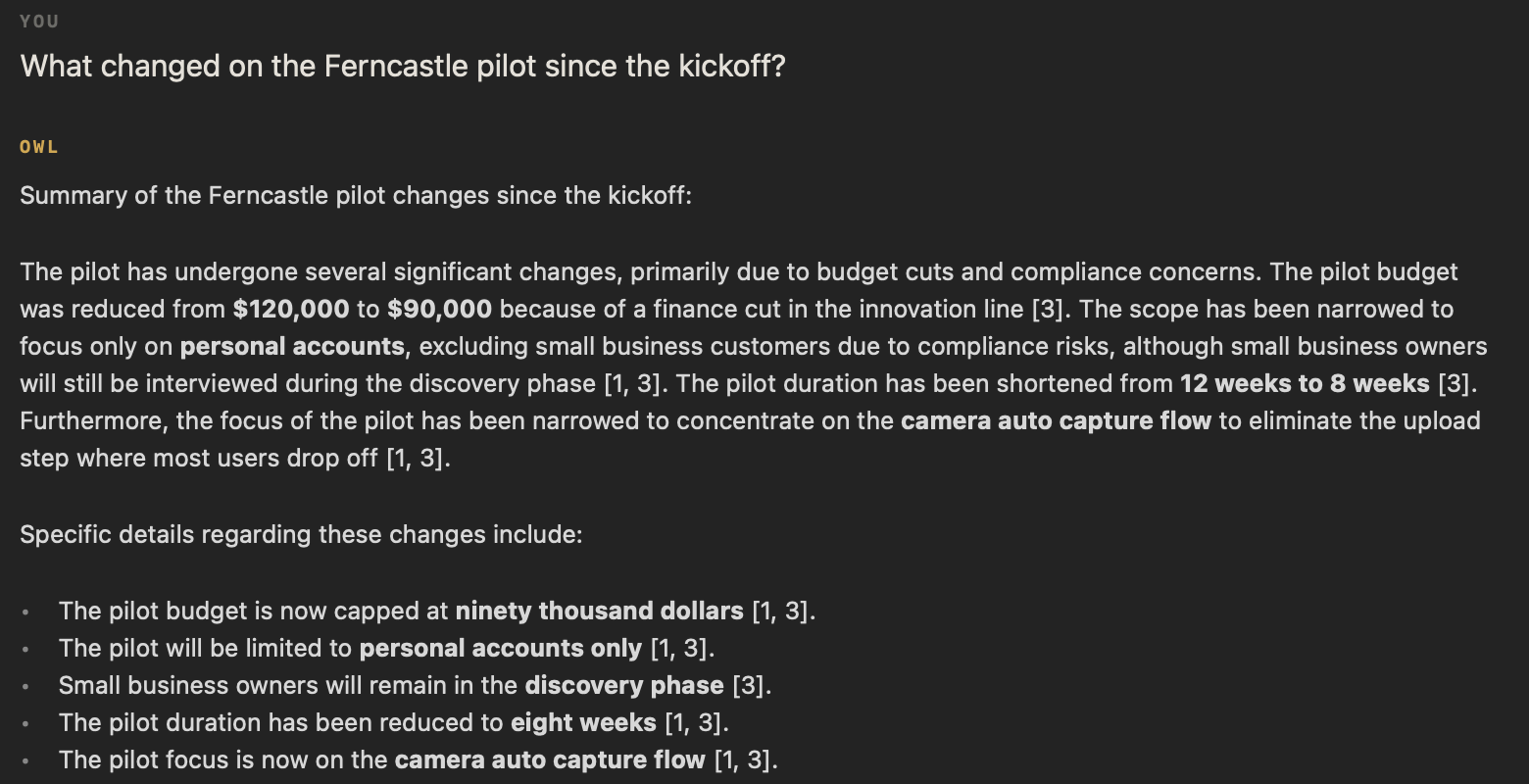
What can you ask about past meetings?
Anything they covered: what was decided, what changed since the last call, who promised what, or what someone said. NoteOwl searches every meeting you have recorded and every file you have imported, and answers from what was actually said.
Asked about past meetings
- “What changed on the Ferncastle pilot since the kickoff?”
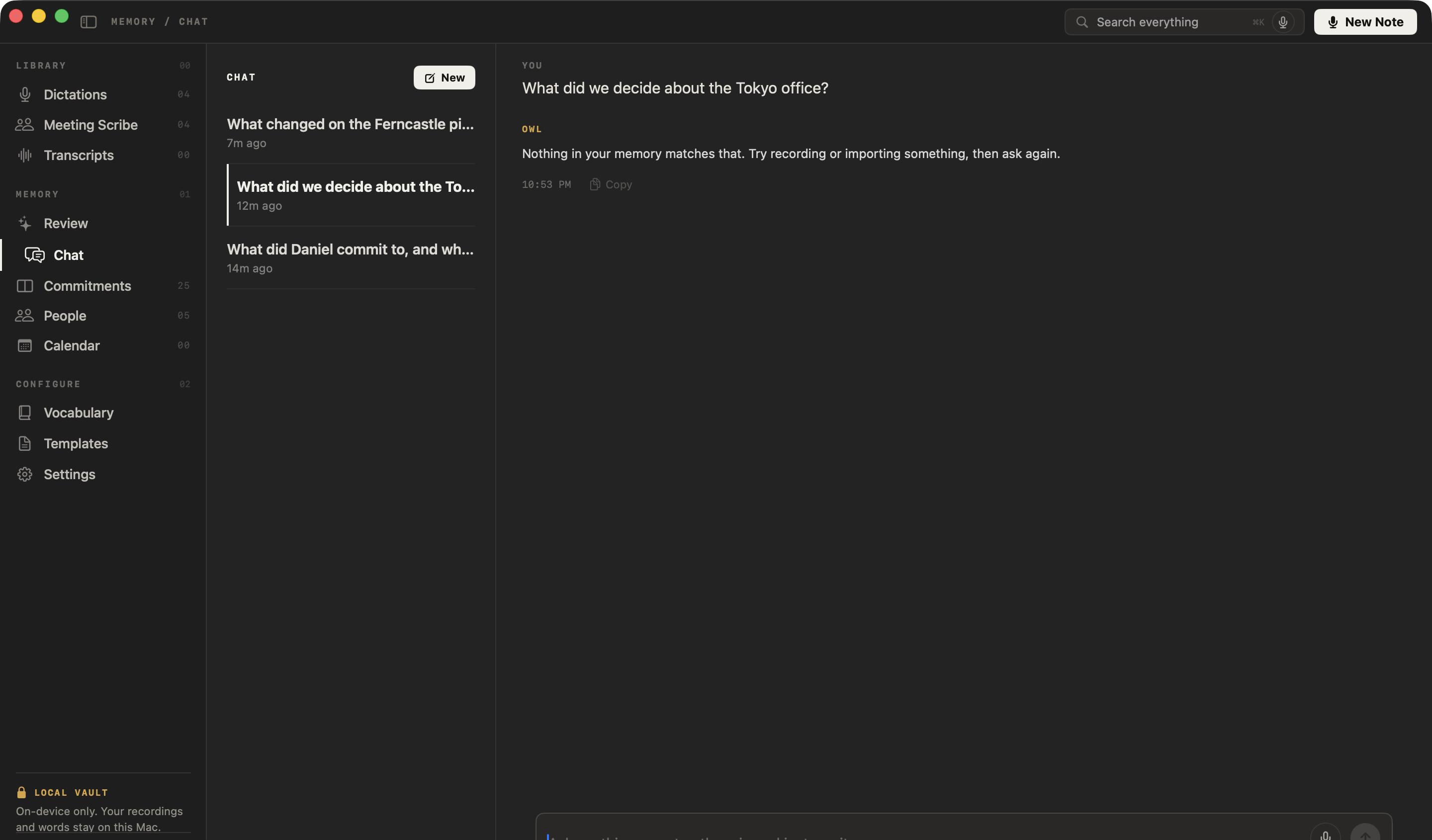
- “What did we decide about the Tokyo office?”
Suggested in a new chat
- What did I commit to this week?
- What’s overdue?
- Summarize my last meeting
- Who owes me something?
With your own meetings, they name a person from your commitments, or your latest recording.
What happens when nothing matches?
NoteOwl says so. Asked about a Tokyo office that no meeting mentioned, it replied: “Nothing in your memory matches that. Try recording or importing something, then ask again.” It never invents a source.
Can you ask about your meetings from any app?
Yes, with Recall. Press ⌥Z in any app and ask out loud; the answer, with its source, appears in the notch panel at the top of your screen, and is never typed into the app you are in.
- ⌥Z
Recall, from any app
Press ⌥Z anywhere and ask out loud. The answer, with its source, appears in the notch panel at the top of your screen and is never typed into the app you are in.
- ⌥Z
Follow up by voice
While an answer is showing, press ⌥Z again to ask a follow-up, or open the whole exchange in Chat to keep going there.
- ⌘K
Search everything
Inside NoteOwl, ⌘K jumps to Search everything: every meeting, note and person, one keystroke away.
Does Chat work offline?
Yes. NoteOwl finds the passages and writes every answer on your Mac with on-device AI models, so Chat works with Wi-Fi off after the one-time model download. Your questions, answers and meetings are never uploaded.
Everything else does too: see offline AI meeting notes and exactly what NoteOwl sends over the network. Chat, search and Recall are part of NoteOwl Pro; dictation and voice notes are free.
The answers are only as good as what you record: an AI meeting summary is written for every call, and NoteOwl records any call app without a bot.
- Answers from
- Your meetings and imported recordings; your dictations too, if you tick the box under the question
- Never from
- The web
- How you ask
- Type, or tap the mic and talk; ⌥Z from any app
- Sources
- Every passage the answer used, each opening the meeting at that point
- When nothing matches
- Says so, and never invents a source
- Conversations
- Saved threads with follow-ups; copy any answer
- Where the AI runs
- On your Mac, with on-device AI models; works offline
- Plan
- NoteOwl Pro, $79 once for one Mac; 7-day free trial in the app
- Requirements
- macOS 26 or later, Apple Silicon (M1 or newer), 16 GB memory minimum, 24 GB recommended
FAQ
Questions about chatting with your meetings
Can I chat with my meeting notes in NoteOwl?
Yes. NoteOwl Chat answers questions about your past meetings on your Mac. Type or say a question, and NoteOwl answers from your meetings and imported recordings, cites every passage it used, and opens the meeting at that passage when you click a source.
Where do NoteOwl Chat’s answers come from?
Only from your own library: the meetings you recorded and the audio or video files you imported, plus your dictations if you tick the box under the question. NoteOwl Chat does not search the web, and it is not a general assistant.
What does NoteOwl do when it can’t find an answer?
NoteOwl says so. When nothing in your meetings matches a question, Chat replies “Nothing in your memory matches that. Try recording or importing something, then ask again.” NoteOwl never invents a source.
Does NoteOwl Chat work offline?
Yes. NoteOwl finds the passages and writes the answer on your Mac with on-device AI models, so Chat works with Wi-Fi off after the one-time model download, and your questions, answers and meetings are never uploaded.
Can I ask NoteOwl a question without opening the app?
Yes. Press ⌥Z in any app and ask out loud: NoteOwl Recall shows the answer, with its source, in the notch panel at the top of your screen and never types it into the app. Press ⌥Z again for a follow-up, or open the exchange in Chat.
Does NoteOwl save my chats?
Yes. Each NoteOwl chat is saved as a thread you can reopen and continue with follow-up questions. Deleting a chat removes only that conversation and its messages; your recordings and memory are untouched.
Is chat with meeting notes free in NoteOwl?
Chat, Search everything and Recall are part of NoteOwl Pro, a one-time $79 purchase for one Mac with no subscription. You can try them free for 7 days in the app with no card; dictation and voice notes stay free.
Related
- All NoteOwl features Meeting notes, transcription, chat and memory, dictation, templates and languages.
- Offline AI meeting notes Every feature with Wi-Fi off, and exactly what NoteOwl sends over the network.
- AI meeting summaries The summary, decisions and action items, written on your Mac when the call ends.
- AI note taker without a bot How NoteOwl records any call from your Mac, with nothing joining it.
Keep exploring
Related features
- Search all your meetingsOne search across every meeting, dictation, transcript and person on your Mac, plus Recall by voice from any app
- People profilesA personal CRM that fills itself from your meetings: who they are, what is open between you, every conversation
- Offline AI meeting notesEvery NoteOwl feature works offline after a one-time model download; what the app sends over the network, and what it never does
Who uses it
- AI note taker for lawyersClient calls and consultations transcribed and summarized on your Mac; no third party processes the audio, and every answer cites the moment it was said
- StudentsLectures recorded in the room or an online class, or imported, turned into study notes you can ask questions of before the exam; dictating essays is free
Ask your next meeting a question, on your Mac
Free to download. Runs entirely on your Mac.
macOS 26 or later · Apple Silicon (M1 or newer) · 16 GB memory minimum, 24 GB recommended
About NoteOwl
NoteOwl is private AI meeting notes and memory for the Mac. It captures meetings without a bot joining the call, labels every speaker, writes summaries and action items, and builds a memory of every conversation that you can chat with — fully offline, because the speech recognition and the AI run on the Mac itself. Dictation into any app is free; Pro is a one-time purchase.
NoteOwl pricing: what’s free and what Pro adds
Last updated