Search
Search across all your meetings, notes and people
NoteOwl lets you search across all your meetings, dictations and imported recordings at once on your Mac: press ⌘K, type or say what you remember, and every matching passage appears with the meeting or note it came from.
Search everything runs entirely on your Mac, even offline, and matches meaning as well as exact words; it is part of NoteOwl Pro.
Read the transcript
Someone said what the Ferncastle deal was worth. On some call. Weeks ago.
Press Command K, anywhere in NoteOwl, and type what you remember.
There. Forty-eight thousand, in the quarterly update with Tom. One click, and you’re right at that moment.
Your voice notes too. Every word you’ve captured, searched right here on your Mac.
NoteOwl. Free to download. Find anything you’ve heard.
How do you search all your meetings at once?
Press ⌘K in NoteOwl, type or say what you remember, and press Return. NoteOwl lists the passages that match from every meeting, dictation and imported recording, each with the title it came from; click one to open it at that point.
- 1
Press ⌘K
Anywhere in NoteOwl, press ⌘K or click Search everything in the title bar.
- 2
Type or say it
Type a few words you remember, or click the mic and say them, then press Return.
- 3
Scan the passages
Up to 20 of the best-matching passages appear, each with the meeting or note it came from.
- 4
Open the moment
Click a passage, or pick it with the arrow keys and press Return, and NoteOwl opens it at that point.
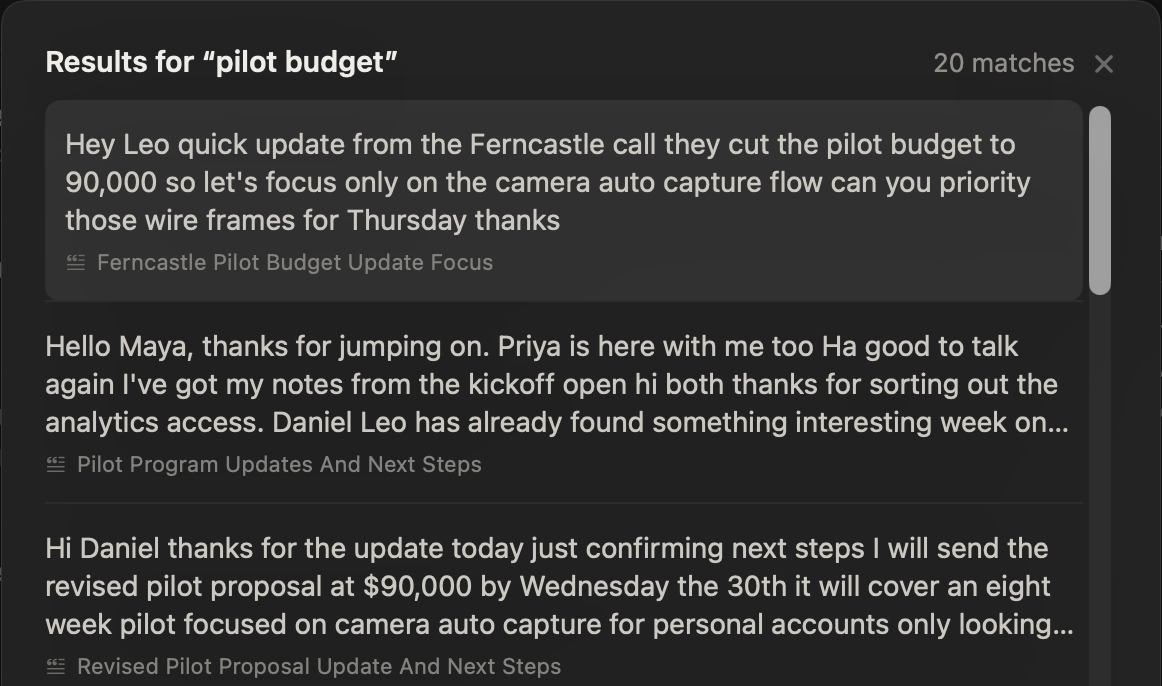
What does Search everything look through?
Everything you have captured in NoteOwl: your meeting transcripts, your dictations and voice notes, the audio or video files you imported, and the people you meet.
A voice note is searchable once it’s saved: see the voice notes app for Mac that’s free in NoteOwl.
- Search everything (⌘K)
- What it searchesEvery meeting, dictation and imported recording, passage by passage
- PlanPro
- Recall (⌥Z)
- What it searchesYour memory, asked out loud from any app; the answer appears in the notch panel
- PlanPro
- Filter meetings
- What it searchesThe Meetings list, by title, summary or transcript
- PlanPro
- Search people
- What it searchesPeople, by name, nickname, company or title
- PlanPro
- Filter dictations
- What it searchesThe Dictations list, by title or text
- PlanFree
- Filter transcripts
- What it searchesThe Transcripts list, by name, file name, summary or text
- PlanFree
| Where | What it searches | Plan |
|---|---|---|
| Search everything (⌘K) | Every meeting, dictation and imported recording, passage by passage | Pro |
| Recall (⌥Z) | Your memory, asked out loud from any app; the answer appears in the notch panel | Pro |
| Filter meetings | The Meetings list, by title, summary or transcript | Pro |
| Search people | People, by name, nickname, company or title | Pro |
| Filter dictations | The Dictations list, by title or text | Free |
| Filter transcripts | The Transcripts list, by name, file name, summary or text | Free |
Can you search by meaning, not just exact words?
Yes. NoteOwl looks for the words you typed and for passages that say the same thing in other words, and ranks them together. Add yesterday, last week or last month to search only that stretch of time.
Type a question instead, one that ends in a question mark or starts with what, who or when, and NoteOwl also writes a short answer from your memory above the results, with the sources it used.
- Searches
- Every meeting, dictation, voice note and imported recording on your Mac
- How you search
- ⌘K or the title bar; type, or click the mic and say it
- Results
- Up to 20 best-matching passages, each with the meeting or note it came from
- Matching
- Exact words and passages that say the same thing; yesterday, last week or last month narrow it
- Questions
- Get a short answer from your memory above the results, with its sources
Should you search or ask Chat?
Search when you remember the words; ask Chat when you have a question. Search lists the passages that match. Chat reads them and writes an answer with numbered references, in a thread you can follow up in.
See how to chat with your meetings and check every answer against its source.
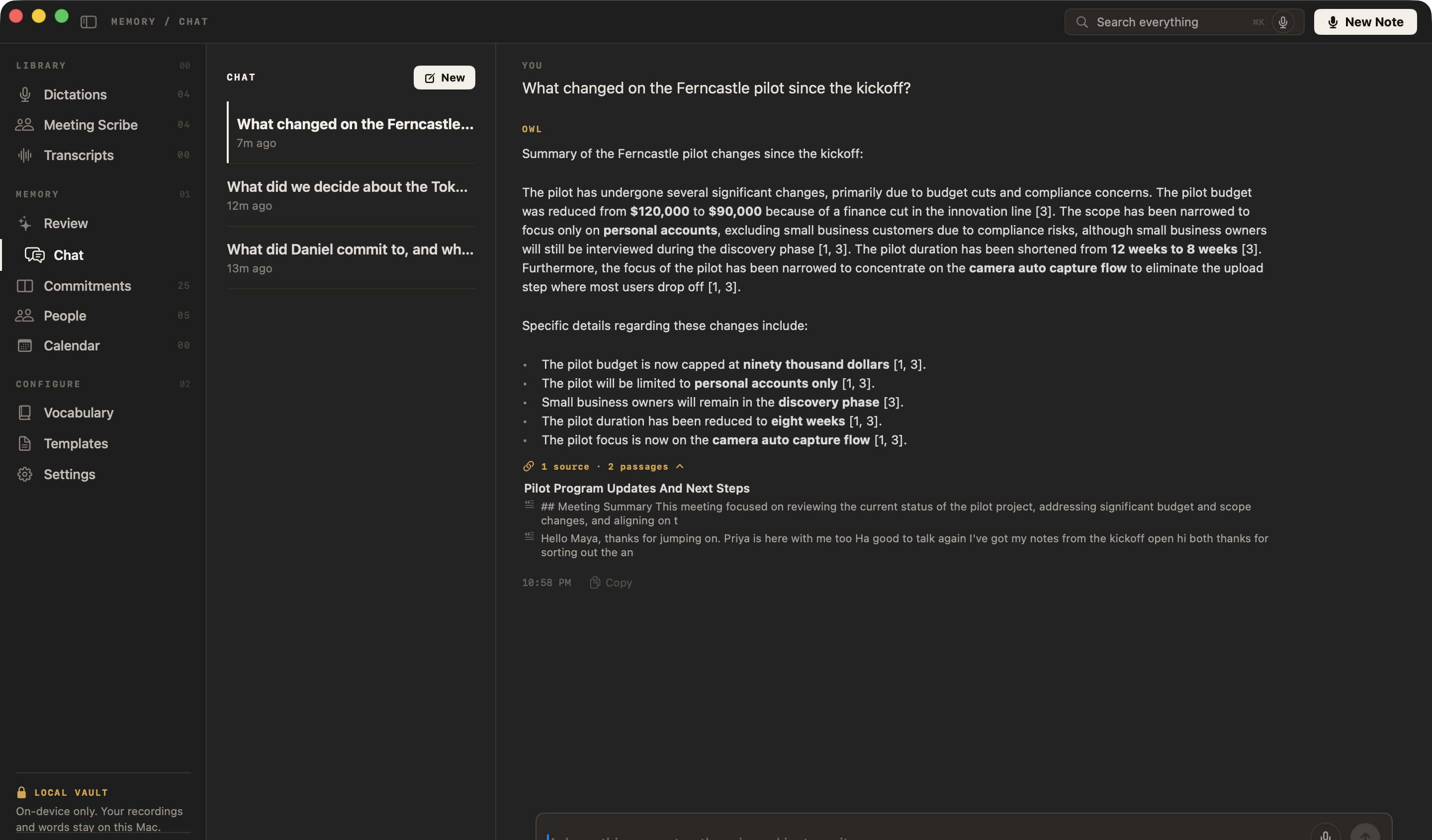
Can you search your meetings from any app?
Yes, by voice, with Recall. Press ⌥Z in any app and ask out loud: NoteOwl answers from your meetings in the notch panel at the top of your screen, with its source, and never types into the app you’re in.
- ⌥Z
Recall, from any app
Press ⌥Z anywhere and ask out loud. The answer, with its source, appears in the notch panel at the top of your screen and is never typed into the app you are in.
- ⌥Z
Follow up by voice
While an answer is showing, press ⌥Z again to ask a follow-up, or open the exchange in Chat to keep going there.
- ↑ ↓ ↩
Keyboard through results
Inside NoteOwl, the arrow keys move through the passages, Return opens one, and Esc closes the search.
Recall isn’t available while NoteOwl is recording.
Is searching your meetings private?
Yes. NoteOwl builds the search index, finds the passages and writes any answer on your Mac with on-device AI models. Search works with Wi-Fi off after the one-time model download, and nothing you search for leaves your Mac.
The rest of the app works offline too: see offline AI meeting notes. Search everything and Recall are part of NoteOwl Pro; dictation and voice notes are free.
- From any app
- Recall: press ⌥Z and ask out loud
- Where it runs
- Entirely on your Mac, with on-device AI models; works offline
- Plan
- NoteOwl Pro, $79 once for one Mac; 7-day free trial in the app
- Requirements
- macOS 26 or later, Apple Silicon (M1 or newer), 16 GB memory minimum, 24 GB recommended
FAQ
Questions about searching your meetings
Can I search all my meetings at once in NoteOwl?
Yes. Press ⌘K in NoteOwl, or click Search everything in the title bar, and type or say what you remember. NoteOwl searches every meeting, dictation and imported recording on your Mac and lists the matching passages, each with the meeting or note it came from.
What does NoteOwl’s Search everything include?
NoteOwl’s Search everything looks through everything you have captured: meeting transcripts, dictations and voice notes, imported audio or video files, and the people you meet.
Does NoteOwl search find more than exact words?
Yes. NoteOwl looks for the exact words you type and for passages that say the same thing in other words, then ranks them together. Adding yesterday, last week or last month limits a NoteOwl search to that stretch of time.
What is the difference between NoteOwl search and Chat?
NoteOwl search lists the passages that match what you type, so you can jump to the moment. NoteOwl Chat reads the matching passages and writes an answer with numbered references, in a thread you can follow up in. Search is for words you remember; Chat is for questions.
Can I search my meetings without opening NoteOwl?
Yes, by voice. Press ⌥Z in any app and ask out loud: NoteOwl Recall answers from your meetings in the notch panel at the top of your screen, with its source, and never types into the app you are in. Recall isn’t available while NoteOwl is recording.
Does NoteOwl search work offline?
Yes. NoteOwl builds its search index and finds passages on your Mac with on-device AI models, so Search everything works with Wi-Fi off after the one-time model download. Your searches and meetings are never uploaded.
Is searching my meetings free in NoteOwl?
Search everything and Recall are part of NoteOwl Pro, a one-time $79 purchase for one Mac with no subscription, with a 7-day free trial in the app and no card. The Filter dictations and Filter transcripts boxes in NoteOwl stay free.
Related
- All NoteOwl features Meeting notes, transcription, chat and memory, dictation, templates and languages.
- Chat with your meetings Ask a question and get an answer that cites the exact passage, even offline.
- Voice notes on your Mac Voice notes and dictations saved as searchable text, free.
- Speaker recognition Transcripts that say who said what, with voices recognised in later meetings.
Keep exploring
Related features
- People profilesA personal CRM that fills itself from your meetings: who they are, what is open between you, every conversation
- Offline AI meeting notesEvery NoteOwl feature works offline after a one-time model download; what the app sends over the network, and what it never does
- Chat with your meetingsAsk your own meetings a question on your Mac, even offline; every answer cites the passage it came from
Who uses it
- AI note taker for researchersUser interviews transcribed speaker by speaker, past recordings imported, searchable and askable across a study; nothing uploaded
- AI notes for therapistsSession notes dictated the moment the client leaves, on your Mac; no third party processes the audio, and your recordings and notes are never uploaded
Find anything anyone said, on your Mac
Free to download. Runs entirely on your Mac.
macOS 26 or later · Apple Silicon (M1 or newer) · 16 GB memory minimum, 24 GB recommended
About NoteOwl
NoteOwl is private AI meeting notes and memory for the Mac. It captures meetings without a bot joining the call, labels every speaker, writes summaries and action items, and builds a memory of every conversation that you can chat with — fully offline, because the speech recognition and the AI run on the Mac itself. Dictation into any app is free; Pro is a one-time purchase.
NoteOwl pricing: what’s free and what Pro adds
Last updated