Action items
Action items and commitments from every meeting
NoteOwl is a meeting action items tracker for Mac: when a call ends, it pulls out the action items with their owners and due dates, and puts the ones that involve you on one board of what you owe and what you’re owed, sorted by what’s due.
Each commitment links to the moment it was said, ticking it off in the meeting ticks it off everywhere, and it all runs on your Mac, even offline, as part of NoteOwl Pro.
Read the transcript
Three calls this week. Everyone promised something. So… who promised what?
NoteOwl keeps track. Every promise from your calls lands in one place. What you owe, and what you’re owed.
Daniel’s confirming the engineering lead by Monday. Wait, did he actually say that?
One click, and you’re right at the moment he said it.
Daniel: “I’ll confirm the engineering lead by Monday.”
Done with one of yours? Tick it off, and it’s off your list.
NoteOwl. Free to download. Never lose a promise again.
How does NoteOwl find the action items in a meeting?
It reads the meeting when you stop recording. From the speaker-labelled transcript, NoteOwl lists the action items and agreed next steps — who will do what, for whom, and by when — on your Mac, and ties each one to the passage it came from.
- 1
Record the call
Press ⌥Space or click Start Meeting. NoteOwl records your microphone and your Mac’s audio, with no bot in the call.
- 2
Stop when it ends
NoteOwl writes the speaker-labelled transcript and the summary, then lists the action items and agreed next steps: who will do what, for whom, and by when.
- 3
Check them in the meeting
They appear under Actions in the meeting, each with its owner and due date. Edit them, add your own or re-extract them there.
- 4
Track them on the board
The ones that involve you land on the Commitments board under I owe or Owed to me, sorted by what’s due, and in your daily Review.
The action items sit in the meeting next to the AI meeting summary and its decisions. Recordings you import get the same treatment.
How do you keep track of who owes what?
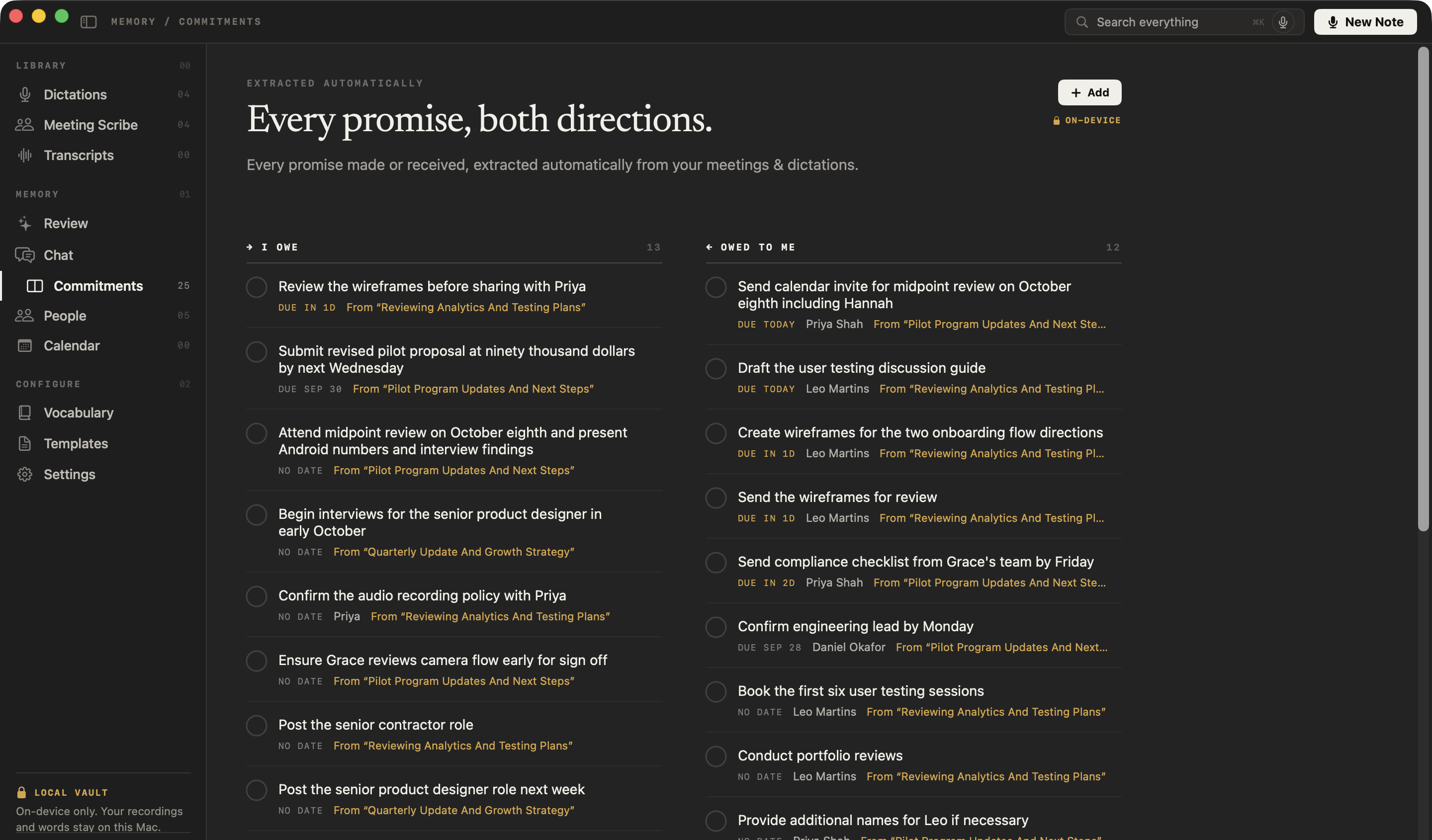
On one board with two columns: I owe, for what you promised, and Owed to me, for what others promised you. Open commitments are sorted by what’s due, so the ones slipping are always at the top.
- 1OverdueAnything past its date, the oldest first
- 2Due todayWhat has to happen today
- 3Due in 1–3 daysWhat’s coming up in the next three days
- 4Later datesShown with the date, in date order
- 5No datePromises made without a deadline, last
Both directions
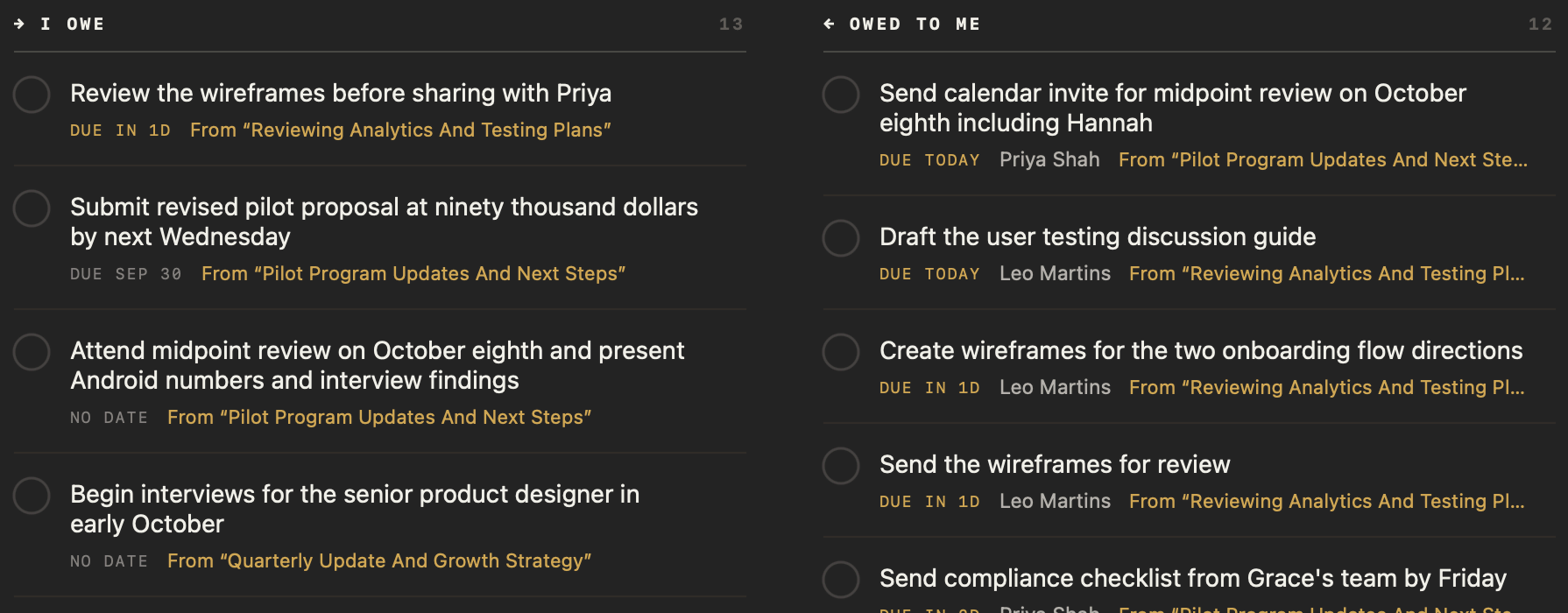
What you promised sits under I owe; what someone promised you sits under Owed to me, with their name.
The moment it was said
Click “From …” on any commitment and the meeting opens at the passage it came from.
One row per promise
A promise repeated in several meetings appears once, with every meeting it came from.
Resolved, not lost
Tick one off and it moves to Resolved, newest first; untick it to reopen it.
Can you edit action items or add your own?
Yes, in the meeting and on the board. Right-click an action item to edit, mark done, copy or delete it; add one with an owner; or re-extract them from the transcript. On the board, Add takes a person and a due date.
- Mark done
- In the meetingYes
- On the Commitments boardYes
- Edit
- In the meetingThe wording
- On the Commitments boardThe wording, the person, the due date and the direction
- Add your own
- In the meetingWith an owner
- On the Commitments boardWith a person and a due date such as “Friday” or “Mar 14”
- Copy or delete
- In the meetingYes
- On the Commitments boardYes, with a confirmation before deleting
- Re-extract from the transcript
- In the meetingYes
- On the Commitments boardNo
| In the meeting | On the Commitments board | |
|---|---|---|
| Mark done | Yes | Yes |
| Edit | The wording | The wording, the person, the due date and the direction |
| Add your own | With an owner | With a person and a due date such as “Friday” or “Mar 14” |
| Copy or delete | Yes | Yes, with a confirmation before deleting |
| Re-extract from the transcript | Yes | No |
How do you see what’s overdue and due today?
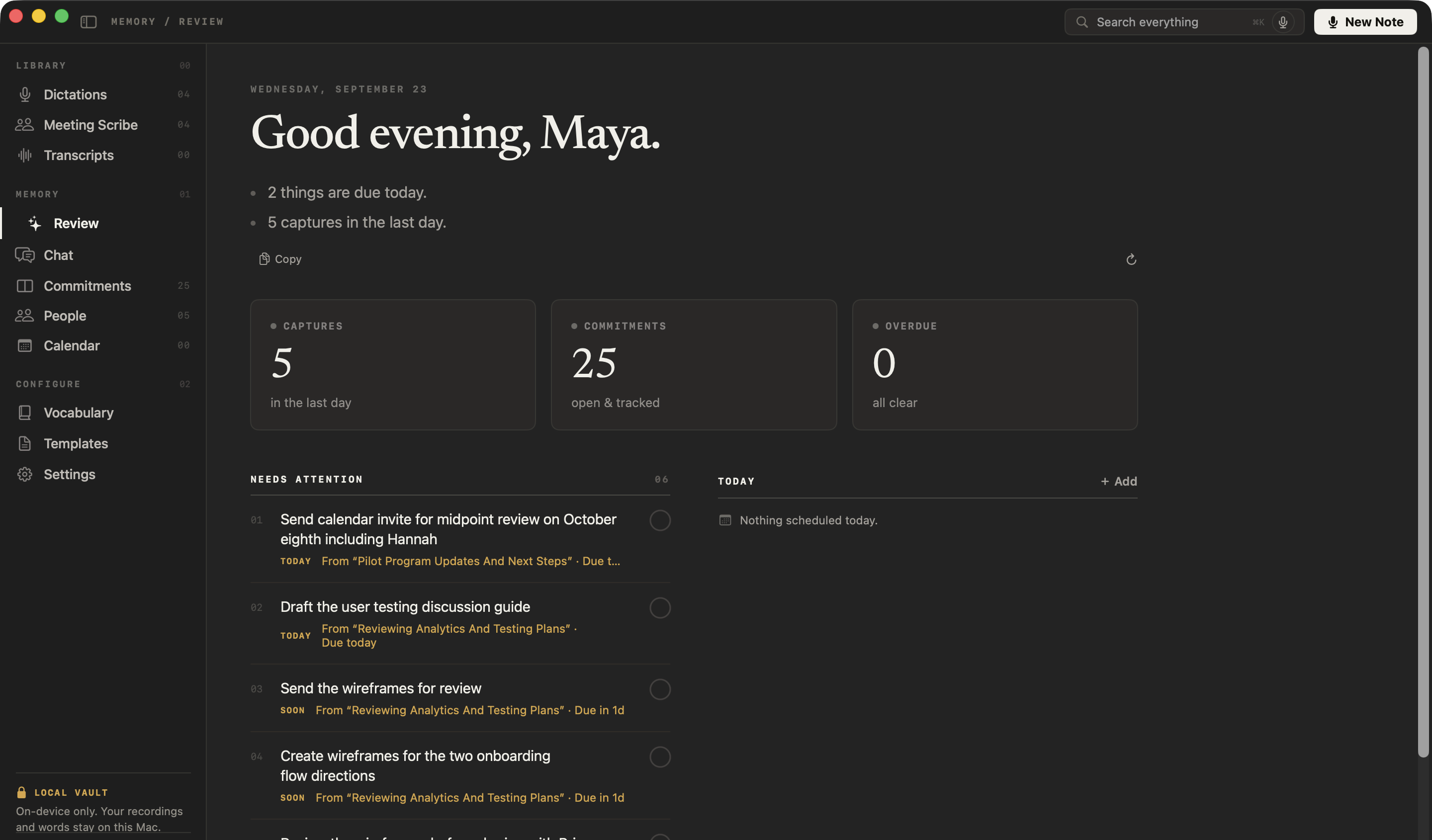
Open Review. It starts with a short brief of what’s overdue, what’s due today, today’s events and what you captured in the last day, then lists everything that needs attention, ready to tick off.
A short brief
What’s overdue, what’s due today, today’s events and what you captured in the last day. Copy it in one click.
Three numbers
Captures in the last day, open commitments and overdue ones. Click one to open that list.
Needs attention
Overdue, due today and due soon, in that order, ready to tick off or edit.
Today
The day’s events from your Mac’s Calendar, and your own.
Where do your commitments show up?
Everywhere they matter, as one record. Tick one off in the meeting, on the board, in Review or on the other person’s profile, and it’s done in all of them.
In the meeting
Under Actions, with its owner and due date.
On the Commitments board
Under I owe or Owed to me, sorted by what’s due.
In your daily Review
When it’s overdue, due today or due soon.
On their profile
In the Open section of the other person’s profile.
In meeting prep
On the prep page for your next meeting with them.
Each person’s profile also keeps a summary of your relationship and every conversation you’ve had: see the personal CRM that fills itself from your meetings.
Is a meeting action items tracker private?
NoteOwl’s is. It finds action items and keeps your commitments on your Mac with on-device AI models, so nothing is uploaded, and it works with Wi-Fi off after the one-time model download.
Action items, commitments and Review are part of NoteOwl Pro; dictation and voice notes are free.
- Where action items come from
- Every meeting you record, and every recording you import
- What each one keeps
- The task, its owner, a due date when one was said, and the passage it came from
- The board
- I owe and Owed to me; open items sorted by what’s due, overdue first
- Due labels
- Overdue, Due today, Due in 1–3 days, a date, or No date
- Daily Review
- What’s overdue, what’s due today, today’s events and the last day’s captures
- Where the AI runs
- On your Mac, with on-device AI models; works offline
- Plan
- NoteOwl Pro, $79 once for one Mac; 7-day free trial in the app
- Requirements
- macOS 26 or later, Apple Silicon (M1 or newer), 16 GB memory minimum, 24 GB recommended
FAQ
Questions about meeting action items
How does NoteOwl track action items from meetings?
NoteOwl pulls the action items out of every meeting it records, with the owner and, when one was said, the due date. The ones that involve you become commitments on one board of what you owe and what you are owed, sorted by what is due and linked to the passage each came from.
Can NoteOwl show who owes what after a meeting?
Yes. NoteOwl’s Commitments board has two columns, I owe and Owed to me, so every promise from your meetings sits on the side it belongs to, with the other person’s name, the due date and the meeting it came from.
Can I edit or add action items in NoteOwl?
Yes. In a meeting, NoteOwl lets you right-click an action item to edit, mark done, copy or delete it, add your own with an owner, or re-extract them from the transcript. On the Commitments board, Add creates a commitment with a person and a due date.
Does ticking off an action item in NoteOwl update the Commitments board?
Yes. A meeting’s action items and NoteOwl’s Commitments board are the same records, so marking one done in the meeting marks it done on the board, in the daily Review and on the other person’s profile.
What does NoteOwl’s daily Review show?
NoteOwl’s Review opens with a short brief of what is overdue, what is due today, today’s events and what you captured in the last day, then counts of open and overdue commitments and a Needs attention list you can tick off.
Does NoteOwl track meeting action items offline?
Yes. NoteOwl finds action items, keeps the Commitments board and builds the daily Review on your Mac with on-device AI models, so it works with Wi-Fi off after the one-time model download, and nothing is uploaded.
Is NoteOwl’s action item tracking free?
Action items, the Commitments board and the daily Review are part of NoteOwl Pro, a one-time $79 purchase for one Mac with no subscription. You can try every Pro feature free for 7 days in the app with no card; dictation and voice notes stay free.
Related
- All NoteOwl features Meeting notes, transcription, chat and memory, dictation, templates and languages.
- AI meeting summaries The summary, decisions and action items written when the call ends.
- People profiles Everyone you meet, what’s open between you, and every conversation.
- AI note taker for founders Customer calls, investor updates and 1:1s, with every promise tracked.
Keep exploring
Related features
- Speaker recognitionTranscripts that say who said what: speakers separated automatically, and a voice named once is recognised in later meetings, on your Mac
- Follow-up emailAsk NoteOwl to draft the follow-up email from a meeting: decisions, owners and dates, written on your Mac
- Meeting prepA prep page for every meeting on your calendar: who is coming, your notes, and what your memory holds about them, on your Mac
Who uses it
- AI note taker for foundersCustomer calls, investor updates and 1:1s — commitments tracked, answers cited — plus free dictation into any app
- AI note taker for salesDiscovery calls and demos with no bot in the call: next steps written, promises to prospects tracked, follow-ups drafted, free dictation into your CRM
- AI note taker for product teamsCustomer interviews, design reviews and stand-ups: decisions and owners written down, every interview searchable, plus free dictation
- AI note taker for managers1:1s and team meetings: commitments tracked both ways, what is open with each person before you meet, plus free dictation
Guides
Free tools
- Action item tracker templateAn action item tracker builder: owner, due date, status and priority for each action, overdue items first, counted by owner, with a CSV for Excel or Google Sheets
- Decision log templateA decision log builder: numbered decisions with date, who decided, status, context, options considered and the reason, with a CSV for a spreadsheet
Never lose a promise from a meeting again
Free to download. Runs entirely on your Mac.
macOS 26 or later · Apple Silicon (M1 or newer) · 16 GB memory minimum, 24 GB recommended
About NoteOwl
NoteOwl is private AI meeting notes and memory for the Mac. It captures meetings without a bot joining the call, labels every speaker, writes summaries and action items, and builds a memory of every conversation that you can chat with — fully offline, because the speech recognition and the AI run on the Mac itself. Dictation into any app is free; Pro is a one-time purchase.
NoteOwl pricing: what’s free and what Pro adds
Last updated