Guide · Meeting minutes
How to write meeting minutes
How to write meeting minutes: before the meeting, set up a page from the agenda; during it, write down each decision with who made it and each action item with an owner and a due date; afterwards, write them up in the standard format and send them the same day.
This guide covers each step, the meeting minutes format, an example and the mistakes to avoid — and how NoteOwl writes minutes from a recording, on your Mac.
Meeting minutes · 3 stages
01Before the meeting
Get the agenda · Set up the page · Know how formal the minutes are
02During the meeting
Record who is there · Write down each decision · Give every action item an owner and a date · Keep the key points, not every word
03After the meeting
Write them up the same day · Have them checked · Send and file them
How do you write meeting minutes, step by step?
In three stages. Before the meeting, set up a page from the agenda. During it, record who is there, each decision, and each action item with an owner and a date. Afterwards, write the minutes up in the standard format, have them checked, and send them the same day.
Before the meeting
- 1
Get the agenda
Ask the organiser for the agenda, or write one. Its items become the headings of your notes, so the minutes follow the meeting’s order.
- 2
Set up the page
Fill in the meeting name, date and time, the place or call link, the people invited and your own name as the minute-taker. Leave space under each agenda item.
- 3
Know how formal the minutes are
A board or committee needs formal minutes, with motions and votes. A team meeting needs decisions and action items. Knowing which decides how much you write down.
During the meeting
- 4
Record who is there
Note who attended, who sent apologies, and anyone who joined late or left early.
- 5
Write down each decision
Note what was decided and who made or agreed the decision. If it isn’t clear what was decided, ask the chair to confirm it before the meeting moves on.
- 6
Give every action item an owner and a date
Write the action, the one person who owns it and when it is due. If nobody says a date, ask for one.
- 7
Keep the key points, not every word
Sum up each discussion in a line or two: the facts and figures that were said, and who raised them. Leave out the back-and-forth.
After the meeting
- 8
Write them up the same day
Turn your notes into short, plain sentences in the standard format while the meeting is fresh: attendees, purpose, key points, decisions, action items and open questions.
- 9
Have them checked
Ask the chair or organiser to read the minutes before they go out, especially the decisions and the action items.
- 10
Send and file them
Send the minutes to everyone invited, including people who missed the meeting, and keep them where the group can find them. Formal minutes are approved at the next meeting.
What is the standard meeting minutes format?
A header — the meeting name, date and time, place or call link, and who took the minutes — then six sections in order: attendees, purpose, key discussion points, decisions with who made them, action items with owners and due dates, and open questions.
What to write in each section, and a blank version to copy into Word or Google Docs, is in NoteOwl’s meeting minutes template.
- Meeting name
- Date and time
- Place or call link
- Minute-taker
- 01Attendees/speakers
- 02Purpose
- 03Key discussion points
- 04Decisions made (with who made them)
- 05Action items with owners and due dates
- 06Open questions / next steps
How are formal minutes different from team meeting minutes?
Formal minutes — for a board, a committee or an association — add the procedure: whether a quorum was present, approval of the previous minutes, each motion with who proposed it and the result of the vote, and the time the meeting closed.
- Header
- Team meeting minutesMeeting name, date, attendees and minute-taker
- Formal minutesThe same, plus whether enough members were present to make decisions (a quorum)
- Previous minutes
- Team meeting minutesNot usually mentioned
- Formal minutesApproved, or corrected and then approved, near the start
- Discussion
- Team meeting minutesThe key points, and who raised them
- Formal minutesThe key points, kept brief and neutral
- Decisions
- Team meeting minutesEach decision, and who made it
- Formal minutesEach motion, who proposed it, and the result of the vote
- Action items
- Team meeting minutesOwner, action and due date
- Formal minutesOwner, action and due date
- Close
- Team meeting minutesThe next meeting, if one is set
- Formal minutesThe time the meeting closed, and the next meeting
- Sign-off
- Team meeting minutesChecked by the organiser, then sent
- Formal minutesSigned by the chair or secretary once approved
| Team meeting minutes | Formal minutes | |
|---|---|---|
| Header | Meeting name, date, attendees and minute-taker | The same, plus whether enough members were present to make decisions (a quorum) |
| Previous minutes | Not usually mentioned | Approved, or corrected and then approved, near the start |
| Discussion | The key points, and who raised them | The key points, kept brief and neutral |
| Decisions | Each decision, and who made it | Each motion, who proposed it, and the result of the vote |
| Action items | Owner, action and due date | Owner, action and due date |
| Close | The next meeting, if one is set | The time the meeting closed, and the next meeting |
| Sign-off | Checked by the organiser, then sent | Signed by the chair or secretary once approved |
What does a meeting minutes example look like?
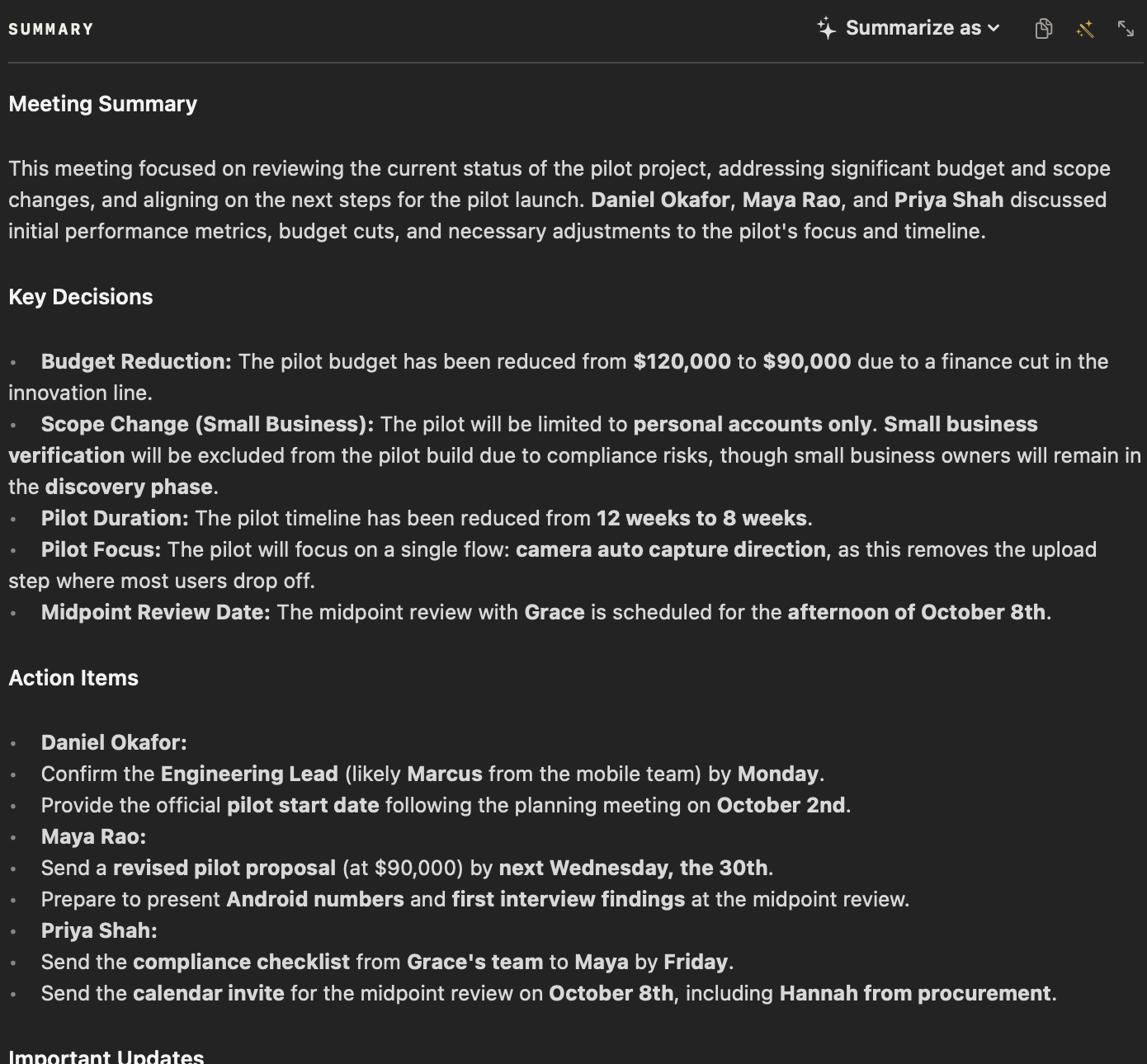
Like this one: NoteOwl’s Meeting Report for a four-minute call between a design studio and a bank about a pilot. The notes beside it show what makes minutes useful to someone who wasn’t there.
Meeting minutes — Ferncastle pilot follow-up
Date: Wednesday 23 September 2026 · Length: 4 minutes
Attendees
- Daniel Okafor — Head of Product, Ferncastle Bank
- Priya Shah — Product Manager, Ferncastle Bank
- Maya Rao — Northlight Studio
Purpose
Review early pilot findings and agree how the pilot changes after a cut to Ferncastle's budget.
Key discussion points
- Early analytics: week-one completion on Android is 7%, against 11% overall. Daniel will include it in his board update; the full breakdown comes at the midpoint review.
- Research: Priya's participant list is in use; the first six user-testing sessions are being booked for next week. Priya can supply 20 more names if needed.
- Budget: Finance cut the innovation line, so the pilot is capped at $90,000 instead of $120,000.
- Scope: small-business customers are no longer part of the pilot. Their verification carries extra compliance rules, and Grace doesn't want that risk in a first pilot. The four small-business owners will still be interviewed during discovery.
- Focus: at $90,000, the pilot concentrates on one flow — camera auto-capture, which removes the upload step where most people drop off.
- Discovery phase: still $48,000, unchanged; the first invoice was paid last week.
Decisions made
- The pilot budget is $90,000 (Daniel, following Finance's cut).
- The pilot covers personal accounts only; small-business owners stay in discovery interviews (Daniel, on Grace's direction).
- The pilot is shortened from 12 weeks to 8 and focuses on the camera auto-capture flow (proposed by Maya, agreed by Daniel and Priya).
- The midpoint review is on the afternoon of 8 October (Grace's availability; confirmed by Maya).
Action items
| Owner | Action | Due |
|---|---|---|
| Daniel Okafor | Confirm Ferncastle's engineering lead (likely Marcus from the mobile team) | Monday |
| Daniel Okafor | Give the pilot start date after the planning meeting | After 2 October |
| Maya Rao | Send the revised pilot proposal at $90,000 | Wednesday 30 September |
| Priya Shah | Send Maya the compliance checklist from Grace's team | Friday |
| Priya Shah | Send the calendar invite for the midpoint review, including Hannah from procurement | Today |
| Maya Rao and Leo Martins | Bring the Android numbers and first interview findings to the midpoint review | 8 October |
Open questions / next steps
- Pilot start date — depends on Ferncastle's 2 October planning meeting.
- Engineering lead to be confirmed by Monday.
- Daniel wants Grace to see the camera flow early, so there are no surprises at sign-off.
What are the most common mistakes in meeting minutes?
Writing too much of what doesn’t matter and too little of what does: a record of every word, but action items with no owner and decisions with no name beside them. Here are six mistakes, and what to do instead.
- 01
Writing down everything
Record outcomes: decisions, action items and the key points behind them. Every word belongs in a transcript, not in the minutes.
- 02
Action items with no owner or date
Give each action one named person and a due date. “The team will look into it” means nobody will.
- 03
Decisions without who made them
Note who made or agreed each decision, so nobody has to work it out later.
- 04
Opinions and adjectives
Keep it neutral: “Maya proposed an eight-week pilot”, not “Maya pushed hard for a shorter pilot”.
- 05
Sending them days later
Write them up the same day, while people remember what was agreed and can correct you.
- 06
Shorthand only you understand
Spell out names, acronyms and dates. Minutes are also for the people who weren’t there.
Can AI write meeting minutes for you?
Yes. An AI note taker can record the meeting, transcribe it and draft the minutes for a person to check. NoteOwl does it on your Mac: it records meetings without a bot, writes a summary when the call ends, and Summarize as → Meeting Report turns it into minutes.
More on AI meeting summaries and the 22 templates they can follow.
- 1
Record the meeting
Press ⌥Space or click Start Meeting. NoteOwl records your microphone and your Mac’s audio; no bot joins the call.
- 2
Stop when it ends
NoteOwl writes the speaker-labelled transcript, then a summary with the decisions and action items, on your Mac.
- 3
Choose Summarize as → Meeting Report
NoteOwl rewrites the summary as minutes: attendees, purpose, key discussion points, decisions, action items with owners and due dates, and open questions.
- 4
Check, then send
Read the minutes against the transcript beside them and edit anything you need to. Copy them to send, or export them with the transcript as Markdown or PDF.
NoteOwl transcribes and summarizes with on-device AI models, so the recording and the minutes never leave your Mac. Summaries and templates are part of NoteOwl Pro: $79 once, with a 7-day free trial in the app. If you record a meeting, tell everyone first.
FAQ
Questions about writing meeting minutes
How soon should meeting minutes be sent?
Meeting minutes should go out as soon as they have been checked — ideally the same day, while people remember what was agreed and can correct mistakes. NoteOwl writes a meeting’s summary on your Mac as soon as the call ends, so the minutes can be checked and sent straight after the meeting.
How long should meeting minutes be?
Meeting minutes should be as short as they can be while still recording every decision, every action item with its owner and date, and the key points behind them — a page or two for most meetings. NoteOwl’s Meeting Report template keeps minutes concise, with the full transcript beside them for anyone who needs the detail.
Do meeting minutes need to be approved?
Formal minutes, such as a board’s or a committee’s, are usually approved at the next meeting and then signed or filed as the official record. Team meeting minutes rarely need approval; the chair or organiser reads them before they are sent. Minutes written by NoteOwl are a draft for that same check.
What is the difference between meeting minutes and a transcript?
A transcript records every word that was said; meeting minutes record the outcomes — who attended, what was decided and by whom, and who will do what by when. NoteOwl gives you both: a speaker-labelled transcript of the recording, and minutes written from it with Summarize as → Meeting Report.
Can you write meeting minutes from a recording?
Yes. Play the recording back and note each decision, owner and due date — or let NoteOwl do it. NoteOwl transcribes the meetings it records, and audio or video files you import such as mp3, m4a, wav or mp4, on your Mac, then writes minutes with Summarize as → Meeting Report.
Is NoteOwl free for writing meeting minutes?
Meeting minutes are part of NoteOwl Pro, a one-time $79 purchase for one Mac, and you can try them free for 7 days in the app with no card. NoteOwl’s free plan covers dictation and voice notes, and NoteOwl’s meeting minutes template is free to copy and fill in by hand.
Related
- Meeting minutes template The six sections, what goes in each, and a blank template to copy.
- AI meeting summaries The summary, decisions and action items NoteOwl writes when a call ends.
- AI meeting notes without a bot How NoteOwl records any call from your Mac, with nothing joining it.
- All 22 meeting notes templates Stand-ups, 1:1s, sales calls, board meetings and more, with their sections.
Keep exploring
What this guide recommends
- Meeting minutes templateA meeting minutes template to fill in online or copy, what each section holds, an example, and how NoteOwl writes minutes
- Board meeting minutes templateA board meeting minutes template to copy, what each section holds, an example, and how NoteOwl writes board minutes
- AI meeting summariesAI meeting summaries, decisions and action items written on your Mac from any template, when the call ends
More guides
- Taking meeting notesHow to take meeting notes before, during and after a meeting, with or without an AI note taker
- Voice memo to textHow to turn a Voice Memos recording into text on a Mac, with Apple’s own tools and with NoteOwl
- Record Mac audioHow to record the sound your Mac plays (system audio) with Apple’s own tools, and how NoteOwl records calls without a bot
Let NoteOwl write your next meeting’s minutes
Free to download. Runs entirely on your Mac.
macOS 26 or later · Apple Silicon (M1 or newer) · 16 GB memory minimum, 24 GB recommended
About NoteOwl
NoteOwl is private AI meeting notes and memory for the Mac. It captures meetings without a bot joining the call, labels every speaker, writes summaries and action items, and builds a memory of every conversation that you can chat with — fully offline, because the speech recognition and the AI run on the Mac itself. Dictation into any app is free; Pro is a one-time purchase.
NoteOwl pricing: what’s free and what Pro adds
Last updated