Meeting summaries
AI meeting summaries and minutes, written on your Mac
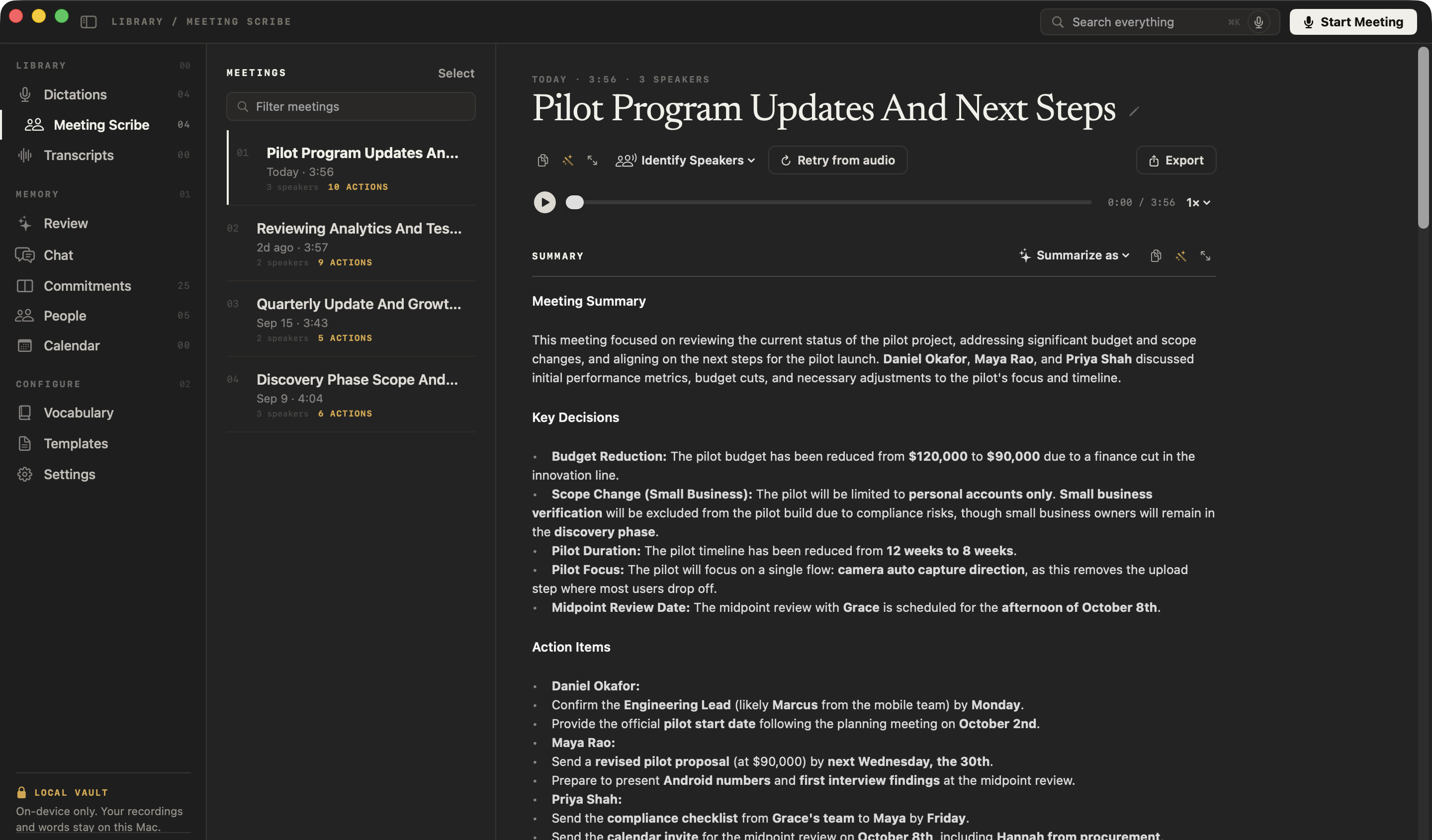
NoteOwl writes an AI meeting summary on your Mac when the call ends: what was discussed, the decisions, and the action items with their owners, from a call that no bot joined.
Rewrite it in any of 22 templates, including Meeting Report for formal minutes, or in your own; it works offline, has no meeting length limit, and is part of NoteOwl Pro.
Read the transcript
Your boss wants the minutes. Your team wants a to-do list. Leadership wants the headlines. Same meeting.
NoteOwl already summarized the call. Choose Summarize as, and pick a template.
Meeting Report. Who was there, the purpose, and what got decided.
To-Do List. Every task, and who’s doing it.
Executive Board. The decisions and the risks, for the people who weren’t there.
Twenty-two templates, or write your own. All written on your Mac.
NoteOwl. Free to download.
What does an AI meeting summary include?
Five sections, written from the speaker-labelled transcript: what the meeting covered, the key decisions, the action items with their owners, important updates, and next steps. Because the transcript knows who spoke, the summary can say who decided what.
- Meeting Summary
- What it holdsWhy the meeting was held and what it covered, in a short paragraph.
- Key Decisions
- What it holdsEach decision the meeting reached.
- Action Items
- What it holdsWhat each person agreed to do, with its owner.
- Important Updates
- What it holdsAnnouncements, figures and changes worth knowing.
- Next Steps
- What it holdsOpen issues, follow-up meetings and deadlines.
| Section | What it holds |
|---|---|
| Meeting Summary | Why the meeting was held and what it covered, in a short paragraph. |
| Key Decisions | Each decision the meeting reached. |
| Action Items | What each person agreed to do, with its owner. |
| Important Updates | Announcements, figures and changes worth knowing. |
| Next Steps | Open issues, follow-up meetings and deadlines. |
How does NoteOwl summarize a meeting?
When you stop recording. NoteOwl finishes the speaker-labelled transcript, writes the summary on your Mac with on-device AI models, then adds the action items to your commitments. Nothing is uploaded, no bot joins the call, and it works with Wi-Fi off.
- 1
Record the call
Press ⌥Space or click Start Meeting. NoteOwl records your microphone and your Mac’s audio, so it works in any call app and nothing joins the meeting.
- 2
Jot notes if you like
Type anything that matters in the notes box while you talk; your notes feed the summary.
- 3
Stop when the call ends
NoteOwl writes the speaker-labelled transcript, then the summary, the decisions and the action items, on your Mac.
- 4
Change the format any time
Open Summarize as above the summary and pick a template; NoteOwl rewrites the summary in that template’s sections.
NoteOwl records any call app without a bot joining the meeting. Tell the people you meet that you are taking notes.
Can you change the format of a meeting summary?
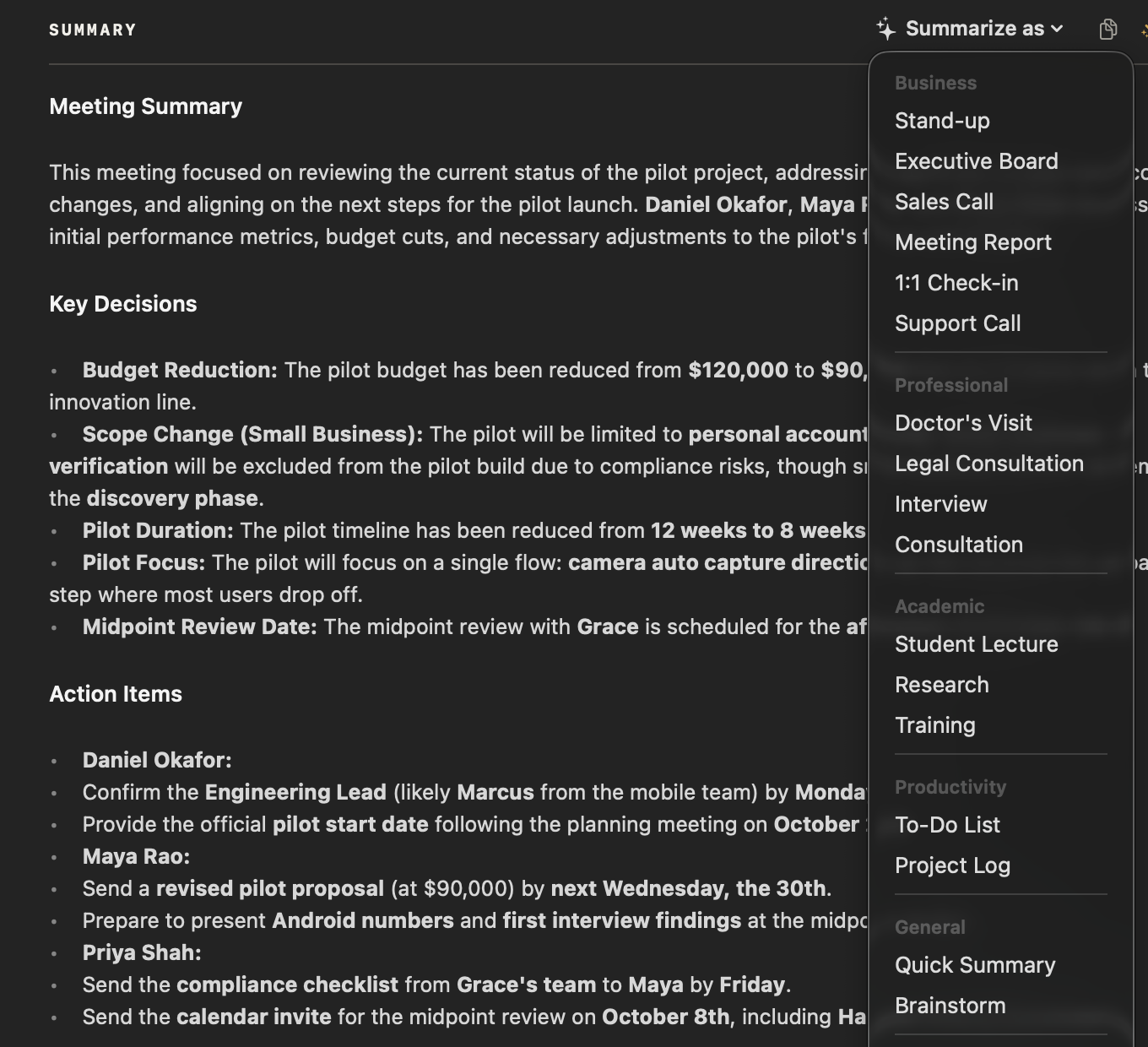
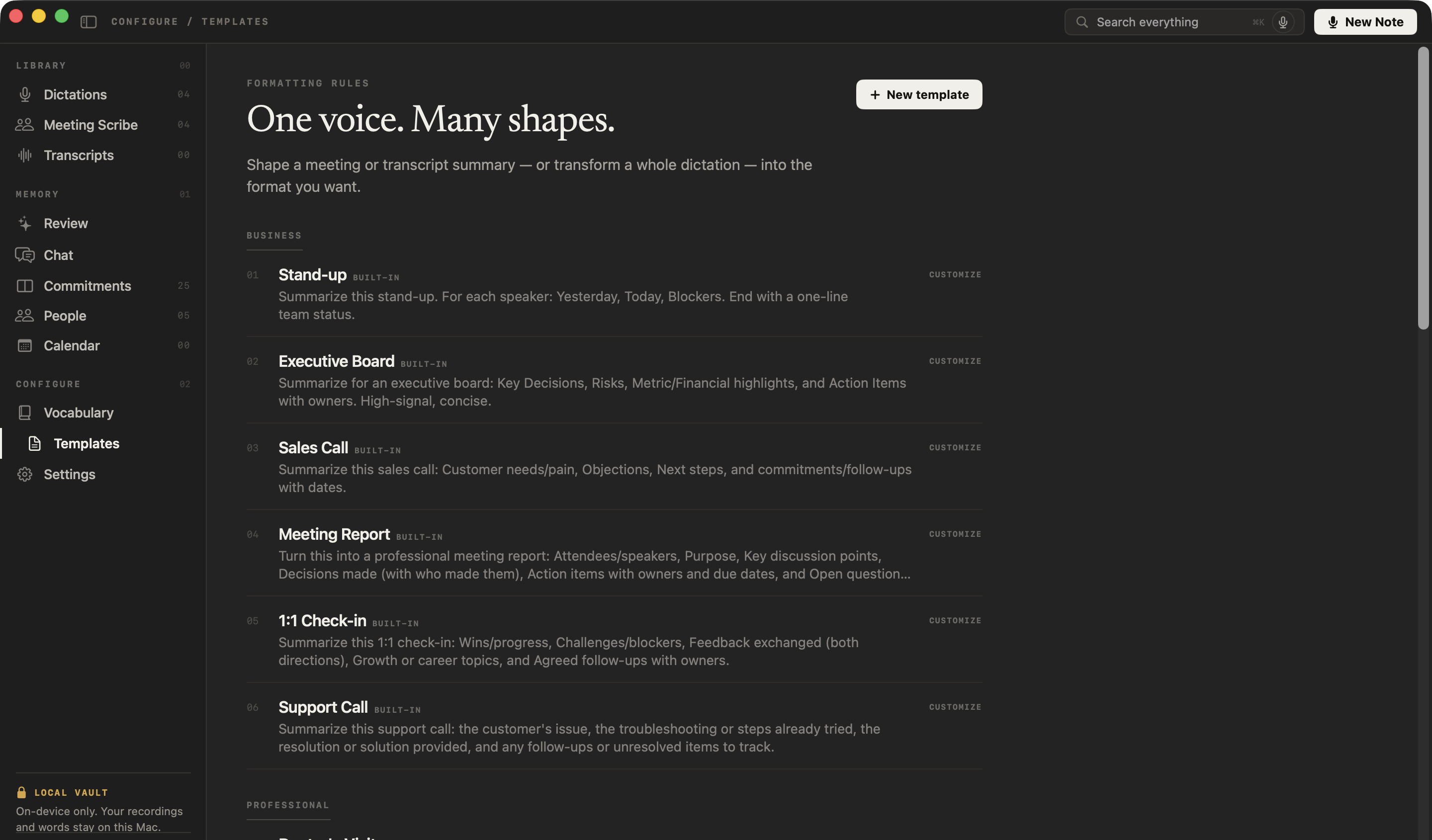
Yes. Summarize as, above every summary, rewrites it in any of NoteOwl’s 22 built-in templates — Meeting Report for formal minutes, Sales Call, Stand-up, 1:1 Check-in and more — or in a template you write yourself.
Business
- Stand-up
- Executive Board
- Sales Call
- Meeting Report
- 1:1 Check-in
- Support Call
Professional
- Doctor’s Visit
- Legal Consultation
- Interview
- Consultation
Academic
- Student Lecture
- Research
- Training
Productivity
- To-Do List
- Project Log
General
- Quick Summary
- Brainstorm
Content
- Podcast Show Notes
- Presentation
Personal
- Therapy Session
- Journal
- Memories
In the Templates screen, New template takes a name and a plain description of how the summary should be formatted, and Customize saves your own editable copy of a built-in one. See every meeting notes template and its sections.
How do you get AI meeting minutes from a recording?
Choose Summarize as → Meeting Report. NoteOwl rewrites the summary as formal minutes: attendees, purpose, key discussion points, decisions with who made them, action items with owners and due dates, and open questions.
The sections and an example are on the meeting minutes template page, and the whole process is in how to write meeting minutes.
- Sections
- Summary when the call endsMeeting summary, key decisions, action items, important updates, next steps
- Summarize as → Meeting ReportAttendees, purpose, key discussion points, decisions made, action items, open questions and next steps
- Decisions
- Summary when the call endsListed
- Summarize as → Meeting ReportListed with who made them
- Action items
- Summary when the call endsWith their owners
- Summarize as → Meeting ReportWith owners and due dates
- When you get it
- Summary when the call endsAutomatically, when the call ends
- Summarize as → Meeting ReportWhen you choose Summarize as → Meeting Report
- Best for
- Summary when the call endsYour own record of the call
- Summarize as → Meeting ReportMinutes to send to everyone invited
| Summary when the call ends | Summarize as → Meeting Report | |
|---|---|---|
| Sections | Meeting summary, key decisions, action items, important updates, next steps | Attendees, purpose, key discussion points, decisions made, action items, open questions and next steps |
| Decisions | Listed | Listed with who made them |
| Action items | With their owners | With owners and due dates |
| When you get it | Automatically, when the call ends | When you choose Summarize as → Meeting Report |
| Best for | Your own record of the call | Minutes to send to everyone invited |
What happens to the action items after the meeting?
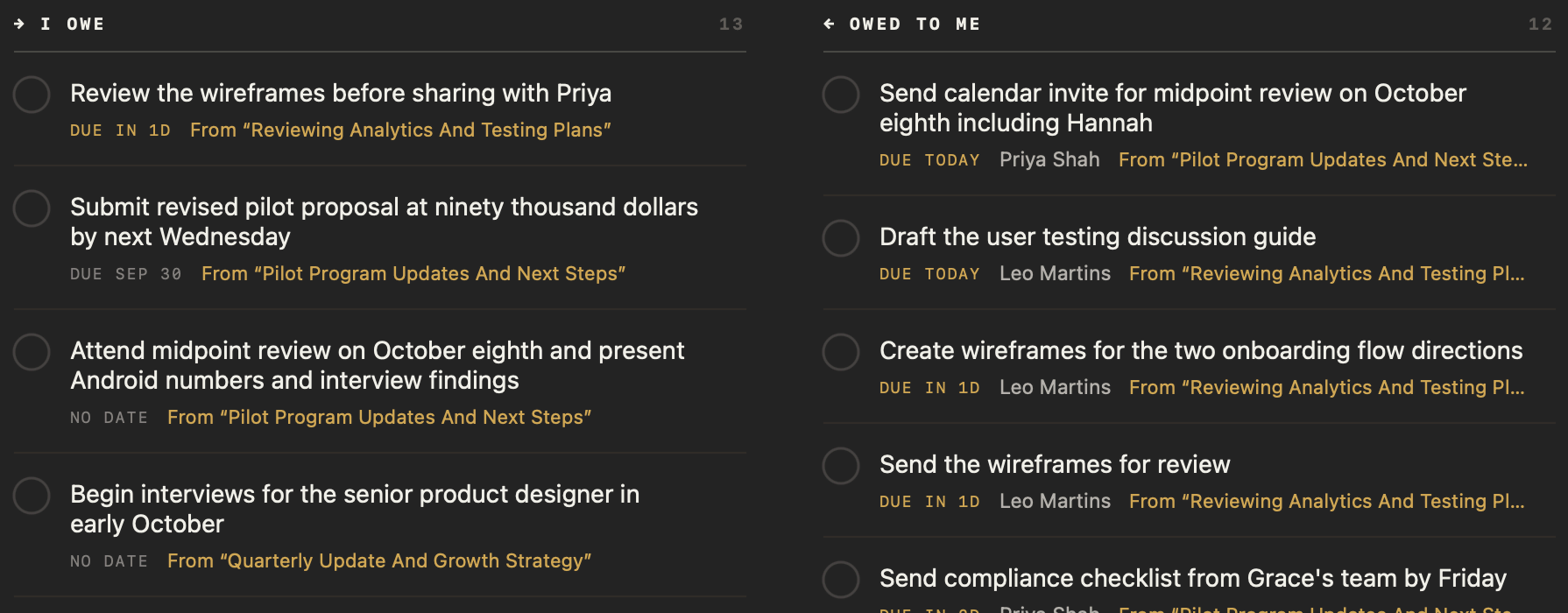
The ones that involve you become commitments, with the owner and due date, on the Commitments board under I owe or Owed to me, linked to the meeting it came from. Tick it off in the meeting or on the board, and both stay in step.
Owner and due date
Each action item keeps who owns it and when it is due; on the board, one with no date says so.
Linked to the meeting
On the Commitments board, each item shows the meeting it came from.
Ticked off in one place
Mark an item done in the meeting or on the board, and the other follows — so does your daily Review.
Yours to correct
Right-click to edit, copy or delete an item, add your own with an owner, or re-extract them from the transcript.
What else can you make from a meeting?
Anything you can describe. Ask NoteOwl for a follow-up email, a one-page report or a post, and it writes a draft from the whole meeting on your Mac, ready to copy. You can also ask for changes to the summary, or edit it yourself.
Drafts from the whole meeting
The wand in a meeting’s toolbar takes an instruction such as “draft a follow-up email” or “write a one-page report” and writes it from the summary, action items and transcript.
Create, for imported recordings
For audio and video files you import, the Create menu has Report, Email draft, Blog post and Social post ready, or Custom… for anything you describe.
Ask for changes
The wand above the summary rewrites it from a plain instruction, such as “make it more concise and formal”.
Edit, copy or export
Open the summary in Focus to edit it with bold, headings and bullets, copy it, or export the meeting as Markdown or PDF.
Are AI meeting summaries private?
They are when the AI runs on your own computer. NoteOwl writes every summary on your Mac with on-device AI models: the recording, transcript and summary are never uploaded, and it works offline after the one-time model download.
Summaries are part of NoteOwl Pro; dictation and voice notes are free.
- When it is written
- When you stop recording, right after the speaker-labelled transcript
- Where the AI runs
- On your Mac, with on-device AI models; works offline
- What it contains
- Summary, key decisions, action items with owners, important updates, next steps
- Formats
- 22 built-in templates, plus templates you write
- Action items
- Tracked as commitments, with owners and due dates
- Meeting length
- No limit; a long meeting is summarized in parts, then combined
- Copy and export
- Copy, or export as Markdown or PDF
- Plan
- NoteOwl Pro, $79 once for one Mac; 7-day free trial in the app
- Requirements
- macOS 26 or later, Apple Silicon (M1 or newer), 16 GB memory minimum, 24 GB recommended
FAQ
Questions about AI meeting summaries
How does NoteOwl write an AI meeting summary?
NoteOwl records your microphone and your Mac’s audio with no bot in the call and transcribes the meeting with speaker labels. When you stop, it writes the summary, the key decisions and the action items on your Mac with on-device AI models. Nothing is uploaded.
Can NoteOwl summarize a meeting in a different format?
Yes. In NoteOwl, open Summarize as above any meeting’s summary and choose one of 22 built-in templates, such as Meeting Report, Sales Call, Stand-up or 1:1 Check-in, or a template you wrote. NoteOwl rewrites the summary in that template’s sections, on your Mac.
Does NoteOwl find the action items in a meeting?
Yes. NoteOwl pulls the action items out of every meeting it records, with the owner and, when one was said, the due date, and adds them to the Commitments board under I owe or Owed to me. You can edit them, add your own, tick them off or re-extract them.
Is there meeting minutes AI that works offline?
Yes. NoteOwl writes meeting minutes, summaries and action items on your Mac with on-device AI models, so it works with Wi-Fi off after the one-time model download, and recordings, transcripts and summaries are never uploaded.
Does NoteOwl summarize long meetings?
Yes. NoteOwl has no meeting length limit: audio is saved to disk as you record, and a long meeting is summarized in parts that are then combined into one summary, all on your Mac.
Can I write my own summary template in NoteOwl?
Yes. In NoteOwl’s Templates screen, click New template, give it a name and describe how the summary should be formatted, or click Customize on a built-in template to save your own editable copy. Then choose it from Summarize as on any meeting.
Are NoteOwl’s AI meeting summaries free?
Meeting summaries, minutes and action items are part of NoteOwl Pro, a one-time $79 purchase for one Mac with no subscription. You can try every Pro feature free for 7 days in the app with no card; dictation and voice notes stay free.
Related
- All NoteOwl features Meeting notes, transcription, chat and memory, dictation, templates and languages.
- AI meeting notes without a bot How NoteOwl records any call from your Mac, with nothing joining it.
- All 22 meeting notes templates Every built-in template and the sections it writes.
- NoteOwl Pro, $79 once What is free, what is in Pro, and the 7-day trial.
Keep exploring
Related features
- Action items and commitmentsAction items that involve you become commitments: what you owe and what you are owed, sorted by what is due
- Speaker recognitionTranscripts that say who said what: speakers separated automatically, and a voice named once is recognised in later meetings, on your Mac
- Follow-up emailAsk NoteOwl to draft the follow-up email from a meeting: decisions, owners and dates, written on your Mac
Who uses it
- AI note taker for consultantsClient calls, workshops and interviews with every commitment tracked and answers cited, on your Mac
- AI note taker for recruitersCandidate screens and hiring-manager calls with no bot: interview notes from the Interview template, a profile per candidate, free dictation for scorecards
Free tools
- Meeting minutes templateA meeting minutes template to fill in online or copy, what each section holds, an example, and how NoteOwl writes minutes
- Meeting agenda templateA meeting agenda template to copy or fill in online, with start times for every item, a team meeting example and how to write one
- Video summarizerUpload a video or paste its transcript and get an AI summary, the key points and key moments with times; nothing is stored
- SummarizerPaste an article, report, essay, email or notes and get a short, medium or detailed summary and the key points; nothing is stored
Get your next meeting summarized on your Mac
Free to download. Runs entirely on your Mac.
macOS 26 or later · Apple Silicon (M1 or newer) · 16 GB memory minimum, 24 GB recommended
About NoteOwl
NoteOwl is private AI meeting notes and memory for the Mac. It captures meetings without a bot joining the call, labels every speaker, writes summaries and action items, and builds a memory of every conversation that you can chat with — fully offline, because the speech recognition and the AI run on the Mac itself. Dictation into any app is free; Pro is a one-time purchase.
NoteOwl pricing: what’s free and what Pro adds
Last updated