NoteOwl vs TurboScribe
A TurboScribe alternative that transcribes on your Mac
NoteOwl is a TurboScribe alternative that transcribes your recordings on your Mac, not on a website: drag an audio or video file into NoteOwl Pro and it becomes a transcript with every speaker labelled, and the file never leaves your device.
Then it summarizes the recording in any of 22 templates, picks out the action items and adds it to a memory you can ask — and it records your calls too, with no bot. It all works offline, for $79 once.
Read the transcript
Got an interview recording you still haven’t listened to?
Drag it into NoteOwl.
It’s transcribed right here, on your Mac. Nothing’s uploaded.
Then you get a title, a summary, and the action items.
And every line, with who said it.
Tap any line to hear it again.
(The interview) “It asked me to upload a photo of my driving licence, and I took it on the kitchen counter.”
NoteOwl. Free to download. Drop in your next recording.
Why choose NoteOwl over TurboScribe?
Because your recordings never leave your Mac: NoteOwl Pro transcribes them on the computer, with nothing uploaded, even offline. Then it goes further — summaries, action items and cited answers across every recording and meeting, written on your Mac — for $79 once.
Pay once. No subscription.
NoteOwl Pro is $79 once for your Mac. TurboScribe Unlimited is $120 a year, or $20 a month.[1]
Works with Wi-Fi off
Transcription, summaries and chat all work offline after the one-time model download. TurboScribe is web-based, used from a device with internet access.[5]
Voices recognised next time
Every speaker is labelled, automatically or for the number you choose. Name a voice once and it’s recognised in later meetings; the voice profile stays on your Mac.
Summaries in 22 templates
Summarize as rewrites any transcript as an Interview, Podcast Show Notes, a Student Lecture or any other template.
Every promise, and everyone you meet
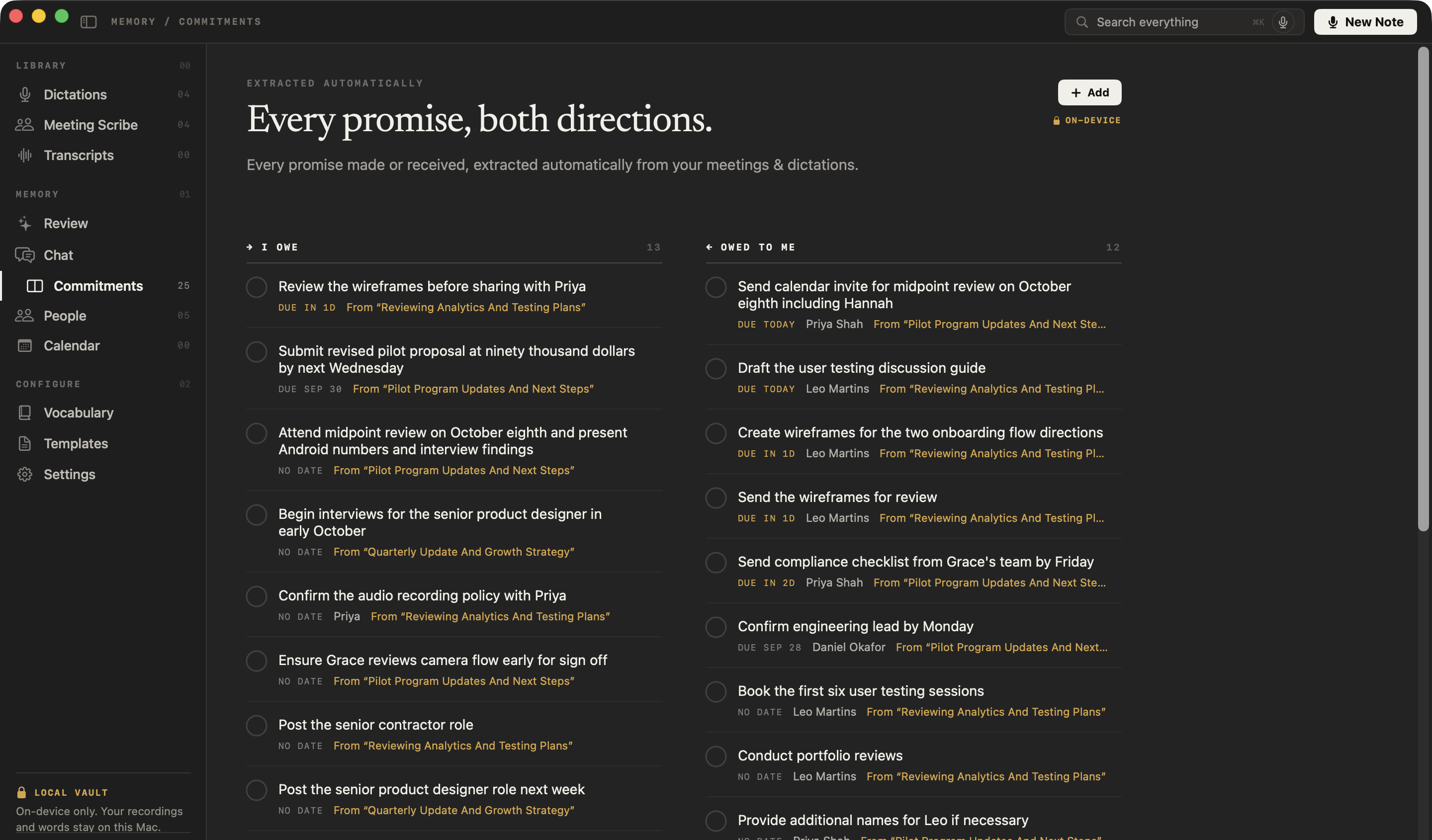
Also in Pro: action items go to a board of what you owe and what you’re owed, each linked to the moment it was said, and everyone you meet gets a profile.
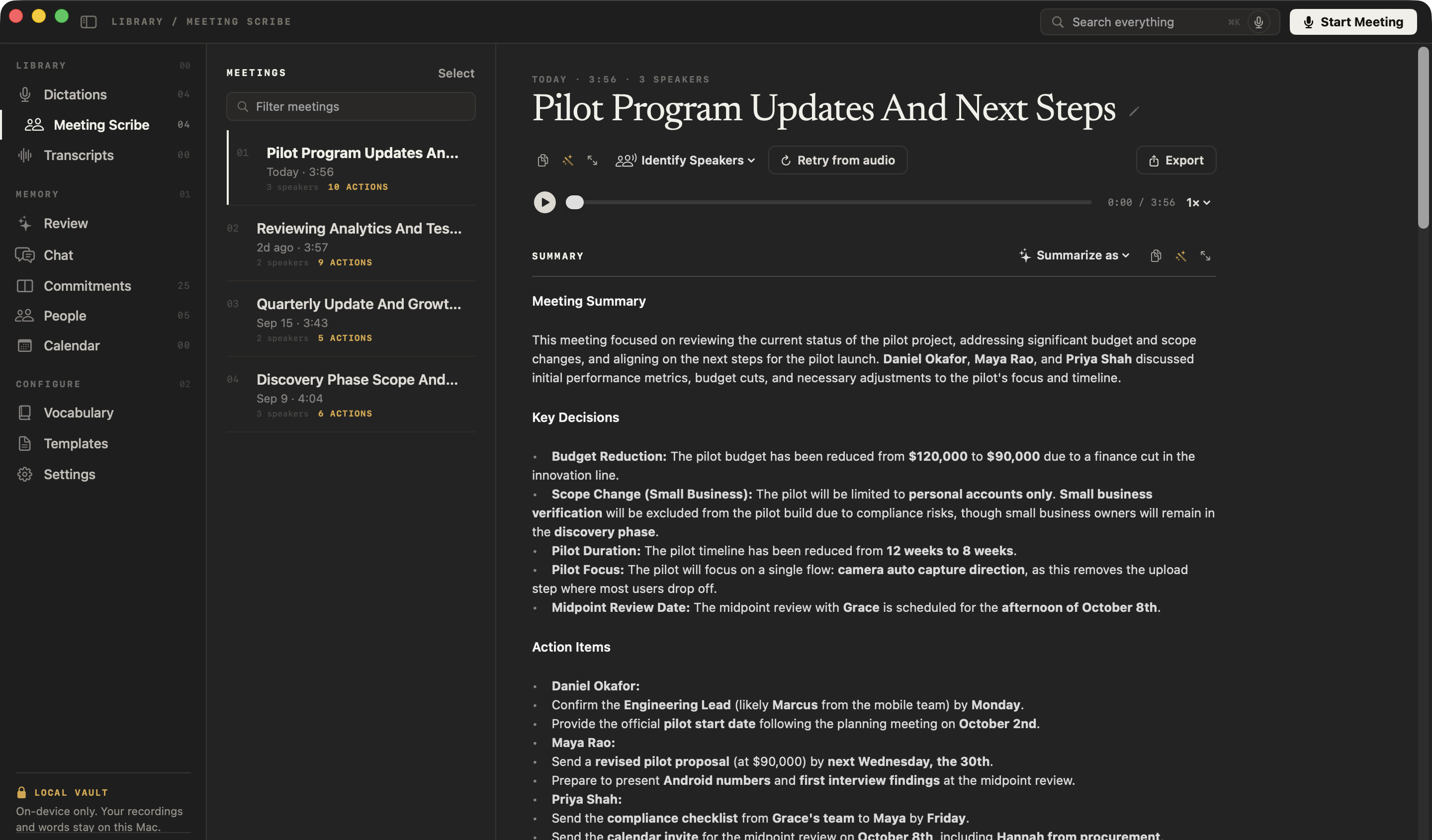
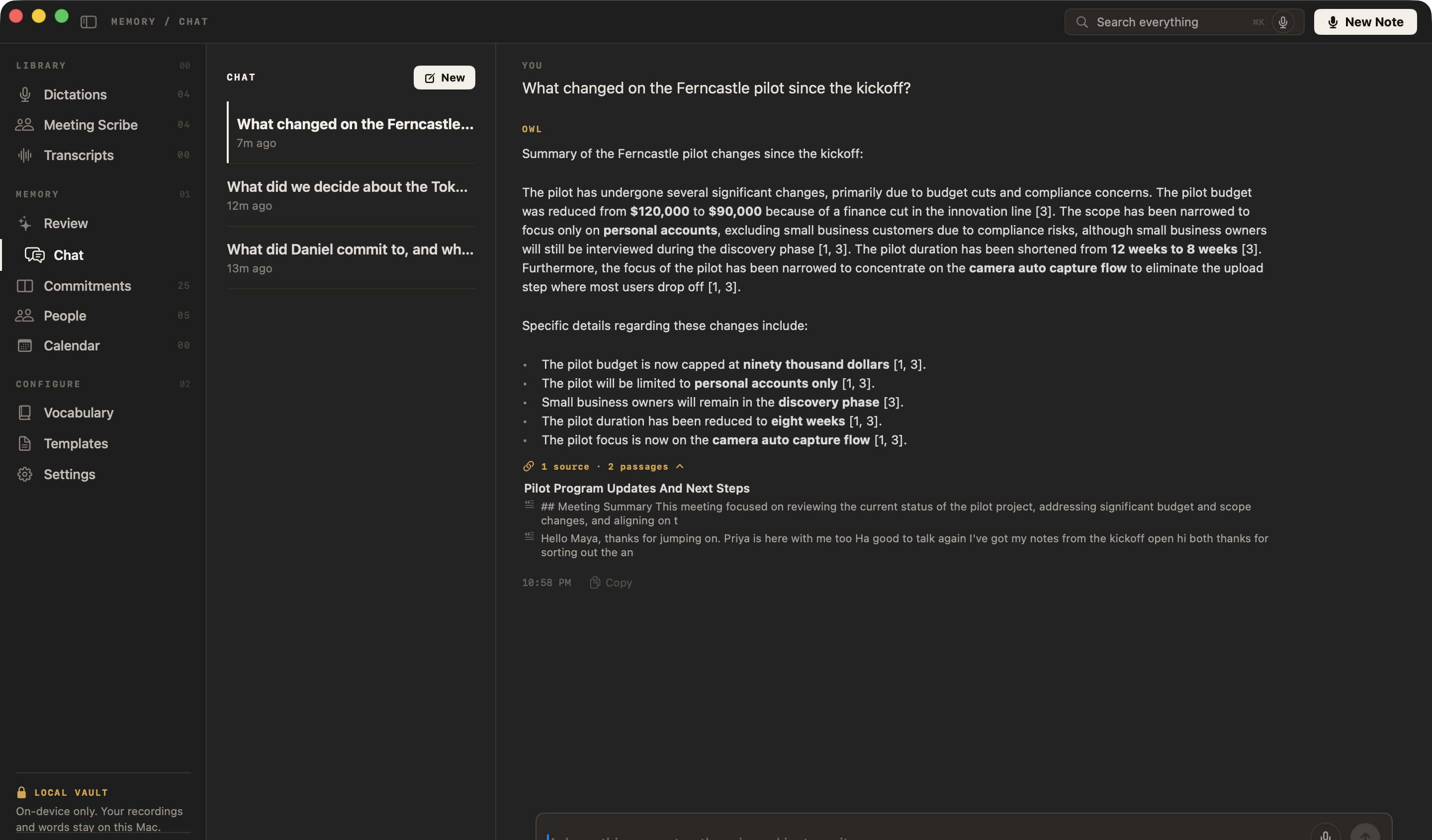
TurboScribe pricing
Is NoteOwl cheaper than TurboScribe?
For one person on one Mac, yes. NoteOwl Pro is $79 once. TurboScribe Unlimited is $120 a year, billed yearly — $240 over two years and $360 over three — or $20 a month, for one person in any browser.[1]
You can try NoteOwl first: every Pro feature, importing included, is free for 7 days in the app, with no card. Dictation stays free after that.
What one person pays
After 1 year
NoteOwl Pro$79TurboScribe Unlimited, billed yearly$120After 2 years
NoteOwl Pro$79TurboScribe Unlimited, billed yearly$240After 3 years
NoteOwl Pro$79TurboScribe Unlimited, billed yearly$360
What is TurboScribe, and how is NoteOwl different?
- Where transcription runs
- NoteOwlOn your Mac, with on-device AI models; nothing is uploaded
- TurboScribeOn TurboScribe’s own servers: you upload the audio or video file, or paste a YouTube link[2,3,12]
- Where your files are kept
- NoteOwlA folder on your Mac; never uploaded
- TurboScribeOn its servers, with its primary data infrastructure in the United States, for as long as your account is active unless you delete them[4]
- Summaries and chat
- NoteOwlPro: written on your Mac when the transcript is ready, in any of 22 templates; Chat answers across every recording and meeting, citing the passage
- TurboScribeIn ChatGPT: TurboScribe writes a prompt with the transcript for you to paste there, or you use its custom GPT inside ChatGPT[6,7]
- Action items
- NoteOwlPro: picked out of every recording and meeting, onto a board of what you owe and are owed
- TurboScribeNot built in; its custom GPT can be asked for them in ChatGPT[7]
- Training on your data
- NoteOwlNothing is uploaded; the app has no analytics or telemetry
- TurboScribeSays it doesn’t train AI on your media files or transcripts[3]
- Works offline
- NoteOwlEverything, summaries and chat included, after the one-time model download
- TurboScribeWeb-based: used from a device with internet access[5]
- Price
- NoteOwl$79 once for one Mac; no subscription
- TurboScribeUnlimited $120 a year billed yearly, or $20 a month, for one person[1,2]
- Speaker labels
- NoteOwlPro: automatic, or set 2 to 8 speakers; name a voice once and it’s recognised in later meetings
- TurboScribeAn option at upload: 2 to 8 speakers, or detect automatically[2,11]
- Import formats
- NoteOwlPro: MP3, WAV, M4A, AIFF, FLAC, AAC and MP4, dragged in or chosen with Import Recording
- TurboScribe24 audio and video formats, plus YouTube links[2,12]
- Meetings
- NoteOwlPro: records Zoom, Teams, Meet or FaceTime from your Mac with no bot, and transcribes the call the same way
- TurboScribeNo meeting bot; its meeting pages ask you to upload a recording made elsewhere[8,9,10]
- Getting notes out
- NoteOwlCopy any note into any app, export it as Markdown, PDF, text or SRT, or export everything as plain files
- TurboScribePDF, DOCX, SRT, VTT, CSV and TXT; up to 50 transcripts at a time as a ZIP[2,13]
- Dictation into other apps
- NoteOwlFree and unlimited: tap fn in any app and your words type at the cursor
- TurboScribeA Record button records your microphone in the browser, to transcribe[14]
- Devices
- NoteOwlMac
- TurboScribeAny device with a web browser, phones included; no App Store or Google Play app[15]
- Mac requirements
- NoteOwlmacOS 26 or later, Apple silicon, 16 GB memory
- TurboScribeNone: nothing to install[5]
| NoteOwl | TurboScribe | |
|---|---|---|
| Where transcription runs | On your Mac, with on-device AI models; nothing is uploaded | On TurboScribe’s own servers: you upload the audio or video file, or paste a YouTube link[2,3,12] |
| Where your files are kept | A folder on your Mac; never uploaded | On its servers, with its primary data infrastructure in the United States, for as long as your account is active unless you delete them[4] |
| Summaries and chat | Pro: written on your Mac when the transcript is ready, in any of 22 templates; Chat answers across every recording and meeting, citing the passage | In ChatGPT: TurboScribe writes a prompt with the transcript for you to paste there, or you use its custom GPT inside ChatGPT[6,7] |
| Action items | Pro: picked out of every recording and meeting, onto a board of what you owe and are owed | Not built in; its custom GPT can be asked for them in ChatGPT[7] |
| Training on your data | Nothing is uploaded; the app has no analytics or telemetry | Says it doesn’t train AI on your media files or transcripts[3] |
| Works offline | Everything, summaries and chat included, after the one-time model download | Web-based: used from a device with internet access[5] |
| Price | $79 once for one Mac; no subscription | Unlimited $120 a year billed yearly, or $20 a month, for one person[1,2] |
| Speaker labels | Pro: automatic, or set 2 to 8 speakers; name a voice once and it’s recognised in later meetings | An option at upload: 2 to 8 speakers, or detect automatically[2,11] |
| Import formats | Pro: MP3, WAV, M4A, AIFF, FLAC, AAC and MP4, dragged in or chosen with Import Recording | 24 audio and video formats, plus YouTube links[2,12] |
| Meetings | Pro: records Zoom, Teams, Meet or FaceTime from your Mac with no bot, and transcribes the call the same way | No meeting bot; its meeting pages ask you to upload a recording made elsewhere[8,9,10] |
| Getting notes out | Copy any note into any app, export it as Markdown, PDF, text or SRT, or export everything as plain files | PDF, DOCX, SRT, VTT, CSV and TXT; up to 50 transcripts at a time as a ZIP[2,13] |
| Dictation into other apps | Free and unlimited: tap fn in any app and your words type at the cursor | A Record button records your microphone in the browser, to transcribe[14] |
| Devices | Mac | Any device with a web browser, phones included; no App Store or Google Play app[15] |
| Mac requirements | macOS 26 or later, Apple silicon, 16 GB memory | None: nothing to install[5] |
Does TurboScribe upload your files?
TurboScribe, in its own words
“We run all audio/video transcription in-house on machines we own or control.”[3]
“Our primary data infrastructure is located in the United States.”[4]
“Unless you delete this content, we may keep this content as long as your account is active.”[4]
“After choosing a type of content, you’ll be able to quickly copy the prompt, open ChatGPT, and paste the prompt to begin.”[6]On its summaries
NoteOwl
Importing, transcription, speaker detection, summaries, search and chat all run on the Mac, with on-device AI models. Your recordings, transcripts and notes are never uploaded to NoteOwl or anyone else, and the app has no analytics or telemetry.
The only network use: the one-time model download, update checks and, for Pro, signing in and an occasional licence check — none of which sends what you record. Offline AI meeting notes: what NoteOwl sends, and what it never does
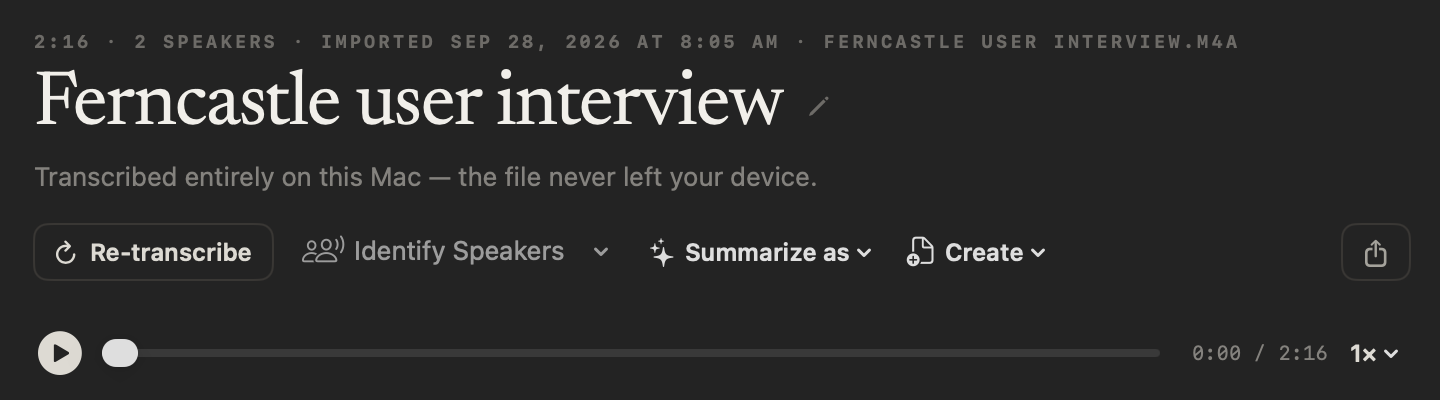
How do you transcribe a recording on your Mac with NoteOwl?
Drag an audio or video file into Transcripts, or click Import Recording. NoteOwl Pro transcribes it on your Mac, labels the speakers, writes a summary and picks out the action items. The audio stays with the transcript, so you can tap any line to hear it again.
NoteOwl takes MP3, WAV, M4A, AIFF, FLAC, AAC and MP4 files, one at a time, and works the same with Wi-Fi off. From the transcript’s header:
- Identify Speakers
- Label every speaker automatically, or tell NoteOwl there are 2 to 8. Rename speakers updates the whole transcript.
- Summarize as
- Rewrite the summary in any of 22 templates, from Interview to Podcast Show Notes.
- Create
- Draft a report, an email, a blog post or a social post from the transcript, or give your own instruction.
- Share
- Save it as Markdown, PDF, text or SRT subtitles: plain files, never a web link.
- Re-transcribe
- Run speech to text again on the kept audio, and tap any line to replay that moment.
How to transcribe a voice memo on Mac · What is an SRT file?
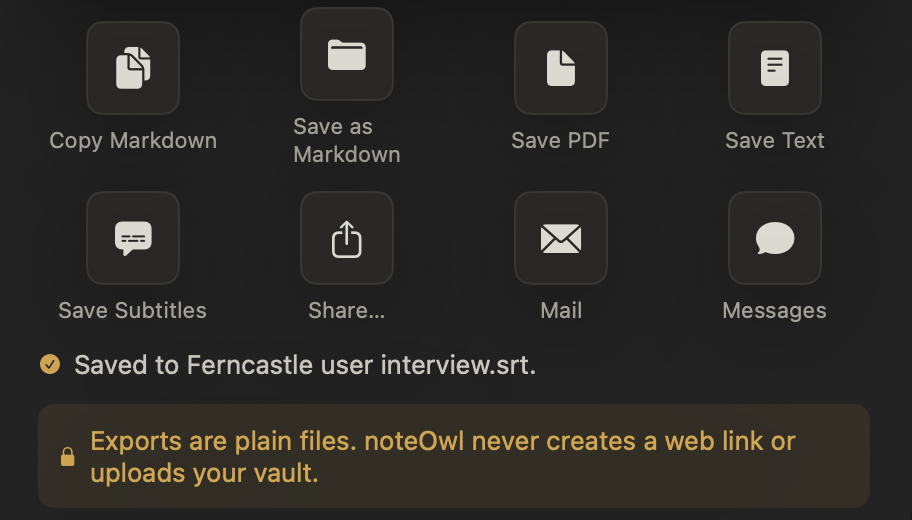
Does TurboScribe have a meeting bot?
Any call app. Record Zoom, Teams, Meet or FaceTime from your microphone and your Mac’s audio; NoteOwl can offer to take notes when a call starts. AI meeting notes without a bot
What was promised. Action items become a board of what you owe and what you’re owed, each linked to the moment it was said. Meeting action items, tracked
What was said, months later. Ask Chat about any meeting or recording and the answer cites the passage it came from — offline. Chat with meeting notes
Can you switch from TurboScribe to NoteOwl?
Yes. TurboScribe lets you download your original media files at any time[3], and NoteOwl Pro transcribes each one on your Mac when you drag it in. Your next call can be recorded with no bot. Pro is free for 7 days in the app, with no card.
Your notes are never locked in: copy any note into any app, or export your meeting notes as Markdown, PDF, text or SRT — or all of your data at once as plain files.
Sources
Last checked . TurboScribe facts are quoted or summarised from TurboScribe’s own website, pricing page, blog, help pages and Privacy Policy, using US-dollar list prices. Plans and policies change; check them before you decide.
- [1]TurboScribe, Pricing
- [2]TurboScribe, Home page and FAQ
- [3]TurboScribe Blog, Security and Privacy FAQ
- [4]TurboScribe, Privacy Policy
- [5]TurboScribe, MacWhisper alternative — quoted only for what it says about TurboScribe
- [6]TurboScribe Blog, Transcribe and Import Audio & Video Files into ChatGPT
- [7]TurboScribe Blog, TurboScribe GPT
- [8]TurboScribe, TurboScribe vs Fireflies — quoted only for what it says about TurboScribe
- [9]TurboScribe, Transcribe Zoom Meetings
- [10]TurboScribe, Transcribe Google Meet Recordings
- [11]TurboScribe, Help and Support Center
- [12]TurboScribe, Transcribe YouTube Videos
- [13]TurboScribe Blog, Export Transcripts and Manage Files in Bulk
- [14]TurboScribe, Transcribe Voice Memos
- [15]TurboScribe Help, Does TurboScribe have a mobile app?
FAQ
Questions about NoteOwl and TurboScribe
Is there a TurboScribe alternative that doesn’t upload your files?
Yes. NoteOwl transcribes audio and video files on your Mac with on-device AI models, so the file never leaves your device, and it works offline after a one-time model download. TurboScribe transcribes on its own servers, so each file is uploaded and stays in your account until you delete it.
Is NoteOwl cheaper than TurboScribe?
For one person on one Mac, yes. NoteOwl Pro is $79 once, with a 7-day free trial and no card. TurboScribe Unlimited is $120 a year billed yearly — $360 over three years — or $20 a month, for one person in any browser. Prices checked on 28 September 2026.
Where does TurboScribe transcribe my files?
On its own servers. TurboScribe says it runs all transcription in-house on machines it owns or controls, and that its primary data infrastructure is in the United States. NoteOwl transcribes on your Mac and keeps every recording and transcript in a folder on your Mac.
Does TurboScribe summarize transcripts?
Through ChatGPT. TurboScribe writes a summary prompt for you to paste into ChatGPT, or you use its custom GPT there. NoteOwl Pro writes the summary and action items on your Mac, in any of 22 templates, and Chat answers questions across every recording and meeting.
What files can NoteOwl transcribe?
MP3, WAV, M4A, AIFF, FLAC, AAC and MP4 files, dragged into Transcripts or chosen with Import Recording. Importing is part of NoteOwl Pro, $79 once after a 7-day free trial, and you can save each transcript as Markdown, PDF, text or SRT subtitles.
Does NoteOwl run on Windows or iPhone?
No. NoteOwl is a Mac app for macOS 26 or later on Apple silicon with 16 GB of memory. Its speech recognition and AI run on the Mac itself, which is what keeps your recordings and meetings off the cloud.
Related
- How to transcribe a voice memo on Mac Two ways: Voice Memos’ own transcript, or NoteOwl with speaker labels.
- AI meeting summaries on your Mac The summary, decisions and action items when the call ends, written on the Mac.
- A Notta alternative for Mac NoteOwl and Notta side by side: on your Mac or in the cloud.
- Pricing: Free vs Pro What is free forever, what Pro adds, and the free trial.
Keep exploring
More comparisons
- NoteOwl vs PlaudWhy NoteOwl over Plaud, the first-year cost with a recorder, and a sourced side-by-side: no device to buy, and on your Mac instead of the cloud
- NoteOwl vs MacWhisperMacWhisper transcribes files on your Mac; NoteOwl adds built-in on-device AI, meeting memory across every call, recognised voices and tracked commitments
How NoteOwl does it
- Audio to textTranscription software for your Mac: drop in an audio or video file and get a speaker-labelled transcript with timestamps, unlimited, with nothing uploaded
- Subtitle generatorTurn a recording into an SRT subtitle file with timecodes and speaker names, on your Mac
- Speaker recognitionTranscripts that say who said what: speakers separated automatically, and a voice named once is recognised in later meetings, on your Mac
- Export your notesExport meetings, dictations and notes as Markdown or PDF, imported transcripts as text or SRT, or everything as plain files; nothing is locked in
Transcribe your next recording on your Mac
Free to download. Runs entirely on your Mac.
macOS 26 or later · Apple Silicon (M1 or newer) · 16 GB memory minimum, 24 GB recommended
About NoteOwl
NoteOwl is private AI meeting notes and memory for the Mac. It captures meetings without a bot joining the call, labels every speaker, writes summaries and action items, and builds a memory of every conversation that you can chat with — fully offline, because the speech recognition and the AI run on the Mac itself. Dictation into any app is free; Pro is a one-time purchase.
NoteOwl pricing: what’s free and what Pro adds
Last updated