Template
Doctor visit notes template
This doctor visit notes template has five sections — symptoms and concerns, findings, diagnosis, treatment and medications, and follow-up instructions — in plain language, so you leave an appointment knowing what was found and what to do next. It copies as plain text into Apple Notes, Google Docs or any notes app.
For clinicians, there’s a SOAP outline too. In NoteOwl, the built-in Doctor’s Visit template writes the five sections from a recording of the appointment, on your Mac; an example is below.
Doctor’s Visit · 5 sections
- 01Symptoms / concerns
- 02Findings
- 03Diagnosis
- 04Treatment / medications
- 05Follow-up instructions
What should doctor visit notes include?
Five things: your symptoms and concerns, what the doctor found, what they said it is, the treatment and medications, and the follow-up instructions. Write the diagnosis and the doses in the doctor’s own words, so you can check them later.
- Symptoms / concerns
- What to writeWhat brought you in and since when, what makes it better or worse, and the questions you wanted answered.
- Findings
- What to writeWhat the doctor examined or measured, such as blood pressure or a test result, and what they said about each.
- Diagnosis
- What to writeWhat the doctor said it is, in their words, or that they aren’t sure yet and what they want to rule out.
- Treatment / medications
- What to writeEach medicine with its dose, how often, for how long and what it’s for, plus anything else to do: exercises, rest, diet.
- Follow-up instructions
- What to writeWhen to come back or book a test, who to call, and the signs that mean you should come back sooner.
| Section | What to write |
|---|---|
| Symptoms / concerns | What brought you in and since when, what makes it better or worse, and the questions you wanted answered. |
| Findings | What the doctor examined or measured, such as blood pressure or a test result, and what they said about each. |
| Diagnosis | What the doctor said it is, in their words, or that they aren’t sure yet and what they want to rule out. |
| Treatment / medications | Each medicine with its dose, how often, for how long and what it’s for, plus anything else to do: exercises, rest, diet. |
| Follow-up instructions | When to come back or book a test, who to call, and the signs that mean you should come back sooner. |
A doctor visit notes template to copy
Paste it into Apple Notes, Google Docs or Word, and fill it in during the appointment or straight after. It is plain text, so it keeps its shape anywhere, including the notes app on your phone.
The sections match NoteOwl’s Doctor’s Visit template, so visit notes you write by hand and the ones NoteOwl writes from a recording read the same.
DOCTOR VISIT NOTES

Date:
Doctor / clinic:
Reason for the visit:
Who came with me:

1. SYMPTOMS / CONCERNS
- What's wrong, and since when:
- What makes it better or worse:
- My questions:

2. FINDINGS
- What the doctor checked:
- Measurements or results (blood pressure, weight, tests):

3. DIAGNOSIS
- What the doctor said it is, in their words:
- Anything still to rule out:

4. TREATMENT / MEDICATIONS
Medicine | Dose | How often | For how long | What it's for
         |      |           |              |
Other things to do (exercises, rest, diet):

5. FOLLOW-UP INSTRUCTIONS
- Next appointment or test:
- Come back sooner if:
- Who to call:
What should you ask at a doctor’s appointment?
Questions that fill the five sections: what might be causing it, what the exam showed, what the doctor thinks it is, how and for how long to take each medicine, and when to come back. Write them down before you go.
- Symptoms / concerns
- Questions to askWhat could be causing this? Is there anything else you need to know about it?
- Findings
- Questions to askWhat did the exam or the test show? Is that result normal for me?
- Diagnosis
- Questions to askWhat do you think it is? How sure are you? What else could it be?
- Treatment / medications
- Questions to askWhat is this medicine for? How long do I take it? What side effects should I look out for?
- Follow-up
- Questions to askWhen should I come back? What would mean I should come back sooner? Who do I call?
| Section | Questions to ask |
|---|---|
| Symptoms / concerns | What could be causing this? Is there anything else you need to know about it? |
| Findings | What did the exam or the test show? Is that result normal for me? |
| Diagnosis | What do you think it is? How sure are you? What else could it be? |
| Treatment / medications | What is this medicine for? How long do I take it? What side effects should I look out for? |
| Follow-up | When should I come back? What would mean I should come back sooner? Who do I call? |
How is a SOAP note different from a visit summary?
A SOAP note is the clinician’s record for the chart: Subjective, Objective, Assessment and Plan. A visit summary is for the patient, in plain language. NoteOwl’s Doctor’s Visit writes the second; for the first, copy this outline or make your own SOAP template in NoteOwl.
- Subjective
- What it holdsWhat the patient tells you: the complaint, its history, their medications and allergies, in their words where it matters.
- Objective
- What it holdsWhat you observe and measure: vital signs, examination findings, lab and imaging results.
- Assessment
- What it holdsYour clinical assessment of the problem, with the differential when it isn’t settled.
- Plan
- What it holdsTests, medications with doses, referrals, what you told the patient, and when you’ll see them again.
| Part | What it holds |
|---|---|
| Subjective | What the patient tells you: the complaint, its history, their medications and allergies, in their words where it matters. |
| Objective | What you observe and measure: vital signs, examination findings, lab and imaging results. |
| Assessment | Your clinical assessment of the problem, with the differential when it isn’t settled. |
| Plan | Tests, medications with doses, referrals, what you told the patient, and when you’ll see them again. |
SOAP NOTE

Patient:
Date of visit:
Clinician:

S - SUBJECTIVE
Chief complaint:
History of present illness (onset, location, duration, character, severity, what makes it better or worse):
Relevant history, current medications, allergies:
Review of systems:

O - OBJECTIVE
Vital signs:
Examination:
Results (labs, imaging):

A - ASSESSMENT
Assessment, and differential if any:

P - PLAN
Tests ordered:
Medications (name, dose, route, frequency, duration):
Referrals:
Patient instructions:
Follow-up:
How do you make a SOAP template in NoteOwl?
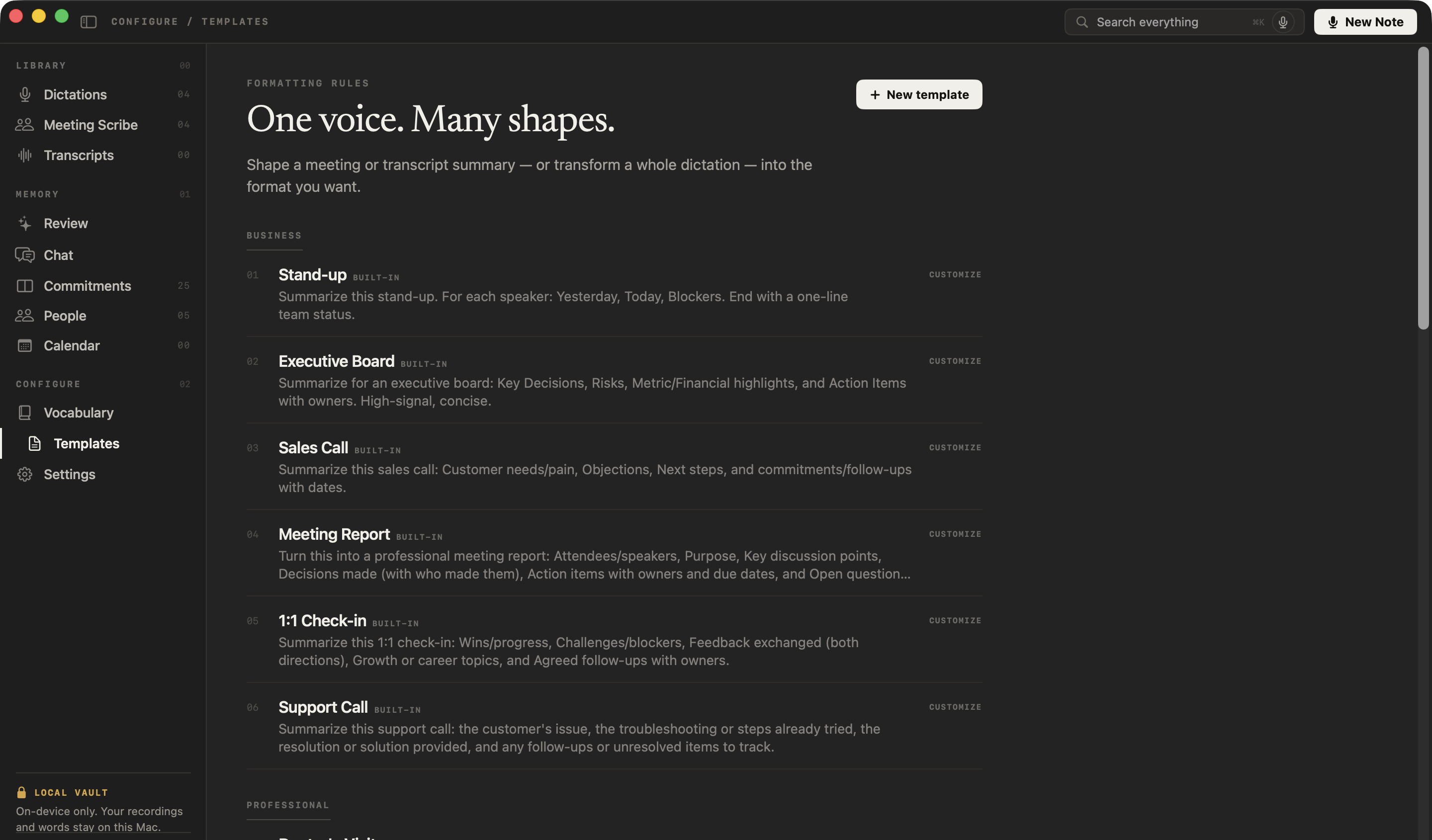
On NoteOwl’s Templates screen, click New template, name it, paste a SOAP instruction as the prompt and click Add. It then appears in Transform as for dictations and Summarize as for recordings. NoteOwl has no built-in SOAP template, so this is how you get one.
- 1
Open Templates
In NoteOwl’s sidebar, under Configure, click Templates, then New template at the top right.
- 2
Name it and paste the instruction
Call it “SOAP note”, set Group to Professional so it sits beside Doctor’s Visit, paste the instruction below as the prompt, and click Add.
- 3
Use it on a dictation
Open a dictation in Dictations, open its style menu and choose Transform as → SOAP note. Your raw words stay beside the note.
- 4
Read it, then copy it
Check every line against what you said, fix anything misheard, and copy the note into the chart. A recorded telehealth visit takes the same template from Summarize as.
Write a SOAP note using only what was said. Don't add anything.
Subjective: the patient's concerns and history, as described.
Objective: the vital signs, examination findings and results mentioned.
Assessment: the clinician's assessment, in their words.
Plan: tests, medications with doses, referrals, instructions and follow-up.
If something wasn't mentioned, write "Not stated".
Templates are part of NoteOwl Pro, with a 7-day free trial in the app. Dictating into any app is free. How doctors use NoteOwl for visit notes
What does a doctor visit summary look like?
Like this: NoteOwl’s Doctor’s Visit summary of a patient’s own recording of a routine follow-up for a sprained ankle. The diagnosis is what the doctor said; NoteOwl only writes it down, in plain language.
Visit Summary: Ankle Sprain Follow-up
Patient: Ben · Doctor: Dr. Chen
Symptoms / Concerns
- A follow-up two weeks after Ben hurt his ankle playing football.
- It is much better: the swelling has mostly gone down, the bruise has faded to yellow, and he can walk to work again.
- It still hurts going down stairs and is stiff first thing in the morning.
- No new swelling and no numbness or tingling in the foot.
- He takes one 400 mg ibuprofen tablet most evenings, two on a bad day, with no stomach trouble.
Findings
- Walks normally, with no limp.
- A little swelling on the outside of the ankle.
- Tender over the ligament, but not over the bone.
- A little less movement turning the foot in, which Dr. Chen said is normal at this stage.
Diagnosis
- Dr. Chen said it is a moderate sprain of the ligament on the outside of the ankle, and it is healing well.
- No X-ray needed, because there is no tenderness on the bone and Ben is walking normally.
Treatment / Medications
- Ibuprofen 400 mg with food, only when needed, up to three times a day, for about another week.
- Brace: he can stop wearing it during the day, but should wear it for any sport for the next six weeks.
- Balance exercises: stand on the injured leg for 30 seconds, three times a day, and do 10 slow heel raises.
- Ice for 15 minutes after the exercises if it aches.
- The exercises will be printed at the front desk.
Follow-up Instructions
- Running: if the stairs are pain-free in two weeks, start with 10 minutes of easy jogging on flat ground and build up.
- Football: with the brace, in about four weeks, as long as jogging doesn't hurt.
- Come back if the ankle isn't clearly better in four weeks; Dr. Chen will then refer him to a physiotherapist.
- Come back sooner if the swelling returns, he can't put weight on it, or his foot goes numb.
How do you get a visit summary written automatically?
Record the appointment on your iPhone and import it into NoteOwl — it can transcribe audio to text on your Mac — then choose Summarize as → Doctor’s Visit. NoteOwl writes the five sections with on-device AI models, and the recording is never uploaded.
- 1
Record the appointment
Record it with Voice Memos on your iPhone, or any recorder, and bring the file to your Mac.
- 2
Import it into NoteOwl
On the Transcripts screen, click Import Recording, or drag the file onto it. NoteOwl writes the transcript, with each speaker labelled, and a first summary, on your Mac.
- 3
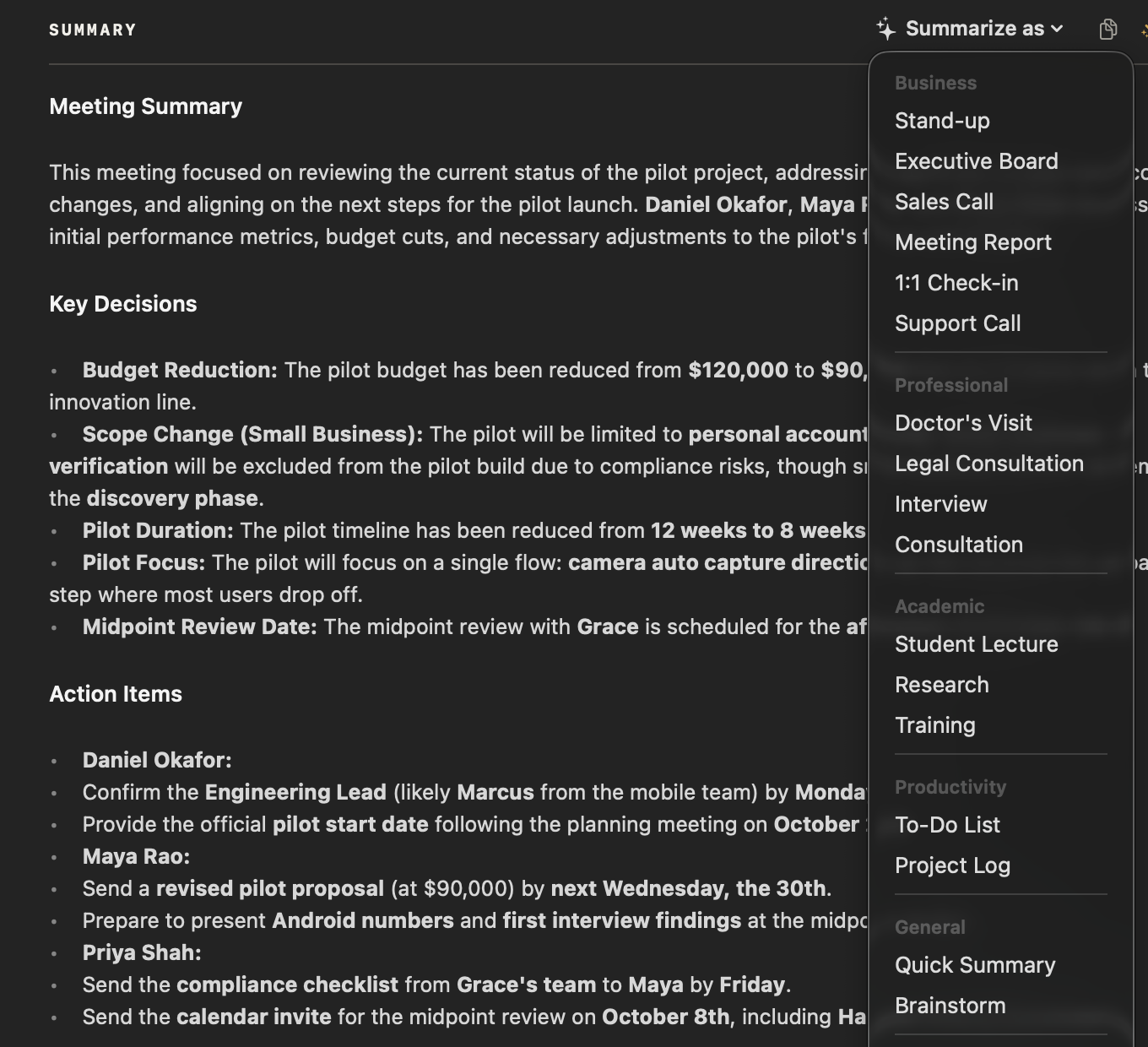
Choose Summarize as → Doctor’s Visit
At the top of the recording, open Summarize as and pick Doctor’s Visit, in the Professional group. NoteOwl rewrites the summary as symptoms, findings, diagnosis, medications and follow-up.
- 4
Check it, and keep it with the recording
Read the summary against what you were told. The summary, the transcript and the audio stay together on your Mac; export them as Markdown or PDF to share with family or take to your next appointment.
Importing recordings and templates are part of NoteOwl Pro, with a 7-day free trial in the app. A doctor can use the same template on a dictation, with Transform as → Doctor’s Visit, to write a plain-language summary for the patient.
What does NoteOwl’s Doctor’s Visit template ask for?
The five sections above, in plain language. This is the template’s instruction to NoteOwl, word for word. It records what was said: the Diagnosis section is the doctor’s words, not NoteOwl’s. You can customize it on NoteOwl’s Templates screen.
“Summarize this medical visit in plain language: Symptoms/Concerns, Findings, Diagnosis, Treatment/Medications, Follow-up instructions.”
FAQ
Questions about doctor visit notes
What is a doctor visit summary?
A doctor visit summary is a short, plain-language record of an appointment: why you went, what the doctor found, what they said it is, the treatment and medications, and what to do next. Kept for every visit, it makes your own history easy to follow.
Is NoteOwl’s Doctor’s Visit template a SOAP note?
No. Doctor’s Visit writes a plain-language summary for the patient. A SOAP note is a clinician’s record, and NoteOwl has no built-in SOAP template; a clinician can make one on the Templates screen with New template, using an instruction like the one on this page.
Does NoteOwl diagnose anything?
No. NoteOwl writes down what was said. The Diagnosis section holds what the doctor said, in plain words; NoteOwl doesn’t add, check or suggest a diagnosis or a treatment, and it can mishear, so check the summary against what you were told.
Can a doctor use this template for an after-visit summary?
Yes. Dictate the summary for the patient, then choose Transform as → Doctor’s Visit, or use Summarize as on a recorded telehealth visit. NoteOwl rewrites it in plain language on your Mac, for you to check before you hand it over. Templates are part of NoteOwl Pro.
Can NoteOwl write a visit summary from a recording automatically?
Yes. Import the recording into NoteOwl, then choose Summarize as → Doctor’s Visit, and it writes the symptoms, findings, diagnosis, medications and follow-up on your Mac with on-device AI models. Importing recordings and templates are part of NoteOwl Pro: $79 once for one Mac, with a 7-day free trial in the app.
Is my appointment recording uploaded anywhere?
No. NoteOwl transcribes the recording and writes the summary on your Mac with on-device AI models, so the audio, the transcript and the summary are never uploaded. They stay on your Mac until you choose to share them.
Does NoteOwl keep the recording?
Yes. NoteOwl keeps an audio copy of an imported recording to play back beside its transcript; it doesn’t keep your original file. If you delete the recording in NoteOwl, its audio moves to the macOS Trash, where it can be recovered until you empty the Trash.
This page explains how NoteOwl works and offers general note-taking templates. It isn’t medical or legal advice: follow what your own doctor tells you, and if you’re a clinician, check your own professional rules.
Related
- AI note taker for doctors Dictate visit notes on your own Mac, then shape them in your own template.
- Consultation notes template The client’s situation, your advice, the options and next steps.
- Transcribe audio to text Import any recording and get a speaker-labelled transcript, on your Mac.
- How to transcribe a voice memo on Mac Bring a recording from your iPhone’s Voice Memos into NoteOwl as text.
Keep exploring
More templates
- Lecture notes templateA template to copy for study notes from a lecture: topics, definitions, examples and exam points, with an example, and how NoteOwl writes it
- Meeting agenda templateA meeting agenda template to copy or fill in online, with start times for every item, a team meeting example and how to write one
- Retrospective templateA retrospective template to fill in online in four formats (went well / to improve / try next, start stop continue, mad sad glad, 4Ls), with votes and action items
- Project kickoff meeting agendaA kickoff meeting agenda builder: the eight usual items timed from the start, with the goal, scope, milestones, roles and risks the kickoff agrees
Keep your visit notes on your own Mac
Free to download. Runs entirely on your Mac.
macOS 26 or later · Apple Silicon (M1 or newer) · 16 GB memory minimum, 24 GB recommended
About NoteOwl
NoteOwl is private AI meeting notes and memory for the Mac. It captures meetings without a bot joining the call, labels every speaker, writes summaries and action items, and builds a memory of every conversation that you can chat with — fully offline, because the speech recognition and the AI run on the Mac itself. Dictation into any app is free; Pro is a one-time purchase.
NoteOwl pricing: what’s free and what Pro adds
Last updated