Guide · Meeting notes
How to take meeting notes (with or without an AI note taker)
How to take meeting notes: before the meeting, turn the agenda into headings; during it, write down each decision, each action item with an owner and a due date, and each open question; afterwards, tidy your notes and send the action items the same day.
This guide covers each step, what to write down, three note-taking methods and the mistakes to avoid — and how NoteOwl, an AI note taker for Mac, takes the notes for you with no bot in the call.
Meeting notes · 3 stages
01Before the meeting
Read the agenda · Know what it has to decide · Set up the page
02During the meeting
Write outcomes, not every word · Give each action item an owner and a date · Mark what you’ll need later · Get names and numbers exactly right
03After the meeting
Tidy them the same day · Send the decisions and action items · Keep them where you’ll look
How do you take meeting notes, step by step?
In three stages. Before the meeting, turn the agenda into headings. During it, write down decisions, action items with an owner and a date, and open questions. Afterwards, tidy the notes the same day and send the decisions and action items to everyone involved.
Before the meeting
- 1
Read the agenda
Look at the agenda, or ask the organiser what the meeting is for. Write each item down as a heading, so your notes follow the meeting’s order.
- 2
Know what it has to decide
Note the questions the meeting is meant to answer. They tell you what to listen for, and what to raise if the meeting ends without an answer.
- 3
Set up the page
Put the meeting name, the date and who is invited at the top. Leave space under each heading, and a section at the end for action items.
During the meeting
- 4
Write outcomes, not every word
Note what was decided, what was agreed and what is still open. Sum up each discussion in a line and leave out the back-and-forth.
- 5
Give each action item an owner and a date
Write the task, the one person doing it and when it is due. If nobody says, ask before the meeting moves on.
- 6
Mark what you’ll need later
Use a simple mark for each kind of note — a D for a decision, a ? for an open question, a box for an action — so you can find them at a glance.
- 7
Get names and numbers exactly right
Figures, dates, names and anything quoted are what people check later. Shorten everything else, but not these.
After the meeting
- 8
Tidy them the same day
While the meeting is fresh, fill in the gaps, spell out your shorthand and gather every action item into one list.
- 9
Send the decisions and action items
Share them with everyone who was there and anyone who has to act on them, and ask people to correct anything you got wrong.
- 10
Keep them where you’ll look
File the notes with the project or the person, and check the open action items before the next meeting.
What should you write down in meeting notes?
The outcomes: each decision and who made it, each action item with one owner and a due date, the questions still open, and the facts and numbers people will check later. Add who was there and when you meet next.
- Decisions
- What to noteWhat was decided, and who decided or agreed it
- Example“Launch moves to 14 October — agreed by Sam.”
- Action items
- What to noteThe task, one owner and a due date
- Example“Priya: send the revised quote by Friday.”
- Open questions
- What to noteWhat is still unresolved, and who will find out
- Example“Budget for phase two — Alex to ask Finance.”
- Key facts and numbers
- What to noteFigures, dates and names, written exactly
- Example“Sign-ups are 1,240 this month, against 1,100 planned.”
- Who was there
- What to noteAttendees, and anyone who needs to hear what happened
- Example“Sam, Priya, Alex; Jo sent apologies.”
- Next meeting
- What to noteThe date, if one was set, and what it will cover
- Example“Review on 21 October: launch checklist.”
| What to note | Example | |
|---|---|---|
| Decisions | What was decided, and who decided or agreed it | “Launch moves to 14 October — agreed by Sam.” |
| Action items | The task, one owner and a due date | “Priya: send the revised quote by Friday.” |
| Open questions | What is still unresolved, and who will find out | “Budget for phase two — Alex to ask Finance.” |
| Key facts and numbers | Figures, dates and names, written exactly | “Sign-ups are 1,240 this month, against 1,100 planned.” |
| Who was there | Attendees, and anyone who needs to hear what happened | “Sam, Priya, Alex; Jo sent apologies.” |
| Next meeting | The date, if one was set, and what it will cover | “Review on 21 October: launch checklist.” |
Which note-taking method works best for meetings?
The one that fits the meeting. The outline method suits meetings with an agenda, action-focused notes suit stand-ups and project check-ins, and the Cornell method suits meetings you will review later. All three work on paper, in a notes app or in a document.
- Cornell method
- How it worksDivide the page into a narrow cue column on the left, a wide notes column on the right and a summary strip along the bottom. Take notes on the right; afterwards, add keywords or questions on the left and a short summary at the bottom.
- Best forMeetings you will review later, such as training sessions and briefings
- Outline method
- How it worksA heading for each agenda item, with indented bullet points under it, and sub-points indented again.
- Best forStructured meetings that follow an agenda
- Action-focused notes
- How it worksOnly three lists: decisions, action items with an owner and a date, and open questions. Everything else is left out.
- Best forStand-ups, project check-ins and any meeting where the outcome matters more than the discussion
| Method | How it works | Best for |
|---|---|---|
| Cornell method | Divide the page into a narrow cue column on the left, a wide notes column on the right and a summary strip along the bottom. Take notes on the right; afterwards, add keywords or questions on the left and a short summary at the bottom. | Meetings you will review later, such as training sessions and briefings |
| Outline method | A heading for each agenda item, with indented bullet points under it, and sub-points indented again. | Structured meetings that follow an agenda |
| Action-focused notes | Only three lists: decisions, action items with an owner and a date, and open questions. Everything else is left out. | Stand-ups, project check-ins and any meeting where the outcome matters more than the discussion |
How are meeting notes different from minutes?
Meeting notes are your own working record, in whatever shape helps you. Minutes are the group’s official record: written up in a standard format, checked by the chair or organiser, and sent to everyone, including people who missed the meeting.
If you are the one taking the official record, see how to write meeting minutes, or start from NoteOwl’s meeting minutes template.
- Who they are for
- Meeting notesYou, and the people you share them with
- Meeting minutesThe whole group, and anyone who missed the meeting
- Format
- Meeting notesWhatever works for you
- Meeting minutesA standard format: attendees, purpose, key points, decisions, action items, open questions
- Tone
- Meeting notesShorthand is fine
- Meeting minutesPlain, neutral sentences anyone can read
- Checked and approved
- Meeting notesNo
- Meeting minutesChecked by the chair or organiser; formal minutes are approved at the next meeting
| Meeting notes | Meeting minutes | |
|---|---|---|
| Who they are for | You, and the people you share them with | The whole group, and anyone who missed the meeting |
| Format | Whatever works for you | A standard format: attendees, purpose, key points, decisions, action items, open questions |
| Tone | Shorthand is fine | Plain, neutral sentences anyone can read |
| Checked and approved | No | Checked by the chair or organiser; formal minutes are approved at the next meeting |
What are the most common mistakes when taking meeting notes?
Writing down too much of the discussion and too little of the outcome: pages of notes, but action items with no owner, and nothing sent until days later. Here are six mistakes, and what to do instead.
- 01
Trying to write down everything
You stop listening and still miss what matters. Write the outcomes; a transcript is the place for every word.
- 02
Action items with no owner or date
Give each action one named person and a due date. “Someone will look into it” means nobody will.
- 03
Shorthand you can’t read a week later
Spell out names, acronyms and numbers when you tidy up, while you still remember what they meant.
- 04
Leaving them for days
Tidy and send your notes the same day, while people can still correct you.
- 05
Keeping them to yourself
Action items only work if the people doing them see them. Send them, and put them where the team will look.
- 06
Recording without saying so
If you record a meeting to help with your notes, tell everyone first. It is courteous and, in many places, the law.
Can an AI note taker take meeting notes for you?
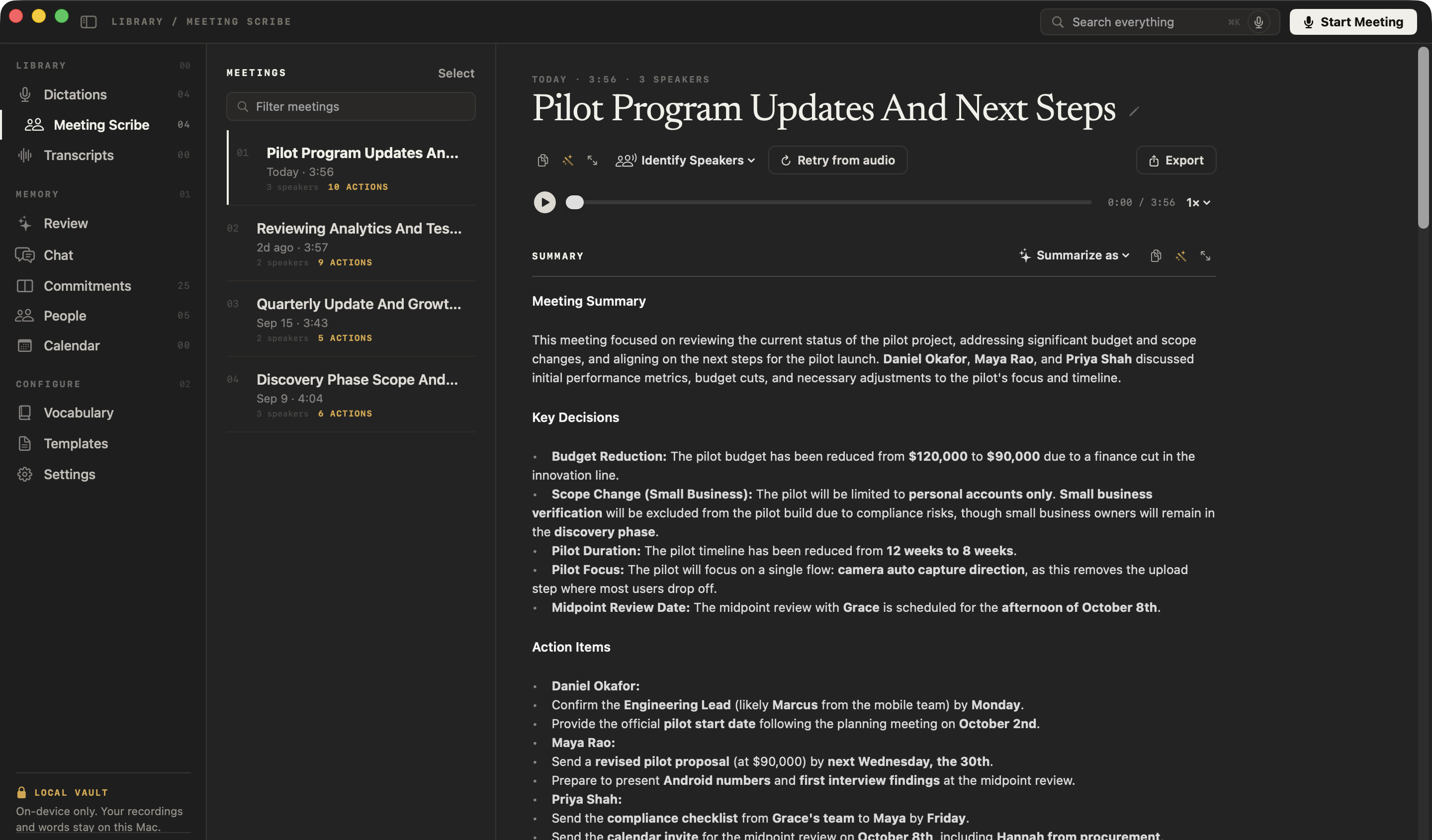
Yes. An AI note taker records the meeting, transcribes it and writes the notes for you to check. NoteOwl does it on your Mac with no bot in the call, and writes the summary, decisions and action items when the call ends.
More on AI meeting notes without a bot, and the meeting notes templates a summary can follow.
- 1
Start taking notes
Press ⌥Space or click Start Meeting. NoteOwl records your microphone and your Mac’s audio; no bot joins the call.
- 2
Jot down what matters to you
Anything you type in the notes box during the meeting feeds the summary.
- 3
Stop when the call ends
NoteOwl writes the speaker-labelled transcript, then a summary with the decisions and the action items with owners, on your Mac.
- 4
Reshape it and send it
Summarize as rewrites the summary in any of 22 templates, such as Stand-up or 1:1 Check-in. Copy it, or export it with the transcript as Markdown or PDF.
NoteOwl transcribes and summarizes with on-device AI models, so the recording and the notes never leave your Mac. Meeting notes are part of NoteOwl Pro: $79 once, with a 7-day free trial in the app. Nobody on the call sees NoteOwl, so tell people you’re taking notes.
FAQ
Questions about taking meeting notes
What should meeting notes include?
Meeting notes should include the meeting name, the date and who was there; each decision and who made it; each action item with an owner and a due date; open questions; and the key facts and figures. NoteOwl’s summary of a meeting lists the decisions and the action items with owners for you.
How do you take meeting notes and still take part in the meeting?
Write outcomes rather than every word — decisions, action items and open questions — and tidy the notes up afterwards. Or let an AI note taker keep the record: NoteOwl records the call on your Mac and writes the meeting notes when it ends, so you can listen and talk.
What is the best format for meeting notes?
For most meetings: the agenda items as headings, with decisions, action items and open questions under each, and one list of action items with owners and due dates. NoteOwl’s meeting summary lists the decisions and action items for you, and Summarize as rewrites it in any of 22 templates, such as Stand-up or 1:1 Check-in.
Should you record a meeting instead of taking notes?
A recording keeps every word, but you still need notes: nobody replays an hour to find one decision. If you record, tell everyone first. NoteOwl does both — it records the meeting on your Mac and writes the notes from it, with the transcript beside them.
Can an AI note taker take meeting notes without a bot joining the call?
Yes. NoteOwl takes meeting notes on your Mac without a bot: it records your microphone and your Mac’s audio, so nothing joins your Zoom, Google Meet or Teams call. Because nobody on the call can see it, tell the people you are meeting that you are taking notes.
Is NoteOwl free for taking meeting notes?
Meeting notes are part of NoteOwl Pro, a one-time $79 purchase for one Mac, and you can try them free for 7 days in the app with no card. NoteOwl’s free plan covers dictation and voice notes, and every method in this guide works with a pen and paper.
Related
- 22 meeting notes templates Stand-ups, 1:1s, sales calls, board meetings and more, with the sections each one writes.
- How to write meeting minutes The formal record: the format, an example and the mistakes to avoid.
- AI meeting notes without a bot How NoteOwl records any call from your Mac, with nothing joining it.
- Meeting action items tracker Every action item that involves you, with its owner, due date and the meeting it came from.
Keep exploring
What this guide recommends
- AI meeting notes without a botHow NoteOwl records calls from your Mac with no bot joining, and what you get when the call ends
- Meeting minutes templateA meeting minutes template to fill in online or copy, what each section holds, an example, and how NoteOwl writes minutes
- Action items and commitmentsAction items that involve you become commitments: what you owe and what you are owed, sorted by what is due
More guides
- Voice memo to textHow to turn a Voice Memos recording into text on a Mac, with Apple’s own tools and with NoteOwl
- Record Mac audioHow to record the sound your Mac plays (system audio) with Apple’s own tools, and how NoteOwl records calls without a bot
- Tracking action itemsHow to capture, assign and follow up action items after a meeting, by hand and with NoteOwl
Let NoteOwl take your next meeting’s notes
Free to download. Runs entirely on your Mac.
macOS 26 or later · Apple Silicon (M1 or newer) · 16 GB memory minimum, 24 GB recommended
About NoteOwl
NoteOwl is private AI meeting notes and memory for the Mac. It captures meetings without a bot joining the call, labels every speaker, writes summaries and action items, and builds a memory of every conversation that you can chat with — fully offline, because the speech recognition and the AI run on the Mac itself. Dictation into any app is free; Pro is a one-time purchase.
NoteOwl pricing: what’s free and what Pro adds
Last updated