For recruiters
AI interview notes for recruiters
NoteOwl is an AI note taker for recruiters: it takes notes on candidate screens, interviews and hiring-manager calls on your Mac, with no bot joining the call, so you can listen to the candidate instead of typing.
When the call ends, the summary and action items are written, and Summarize as turns them into interview notes — background, answers, strengths, concerns and a verdict. Dictating scorecards and outreach is free: tap fn in any app and talk.
Read the transcript
Quick question. What did you actually promise in your last meeting? …Yeah. Me neither.
This is NoteOwl. It’s a Mac app that takes notes on your calls. And no, there’s no bot joining your meeting.
The second the call ends, it’s written everything up. What got decided. Who’s doing what. And by when.
All those promises end up in one list. What you owe people… and what they owe you.
And here’s the part that got me. You can just ask it. “What changed on the Ferncastle pilot?” And it shows you exactly where that came from.
The whole thing runs on your Mac. Nothing gets uploaded. It even works with the Wi-Fi off.
NoteOwl. It’s free to download. Try it on your next call.
How do recruiters use an AI note taker?
For the calls a hiring decision rests on: candidate screens, interviews, intake calls and debriefs. NoteOwl takes the notes without a bot in the call, writes them up as interview notes, and keeps every promise you made along the way.
Before the call
Pick up where you left off
NoteOwl reads your Mac’s Calendar and builds a prep page for each interview: who’s invited, the points you want to cover, and the commitments still open with them.
During the interview
Listen, don’t transcribe
No bot joins. Note a follow-up question in the notes box and it feeds the summary; Questions to ask suggests what to cover next — only you see it.
After the interview
Interview notes, written
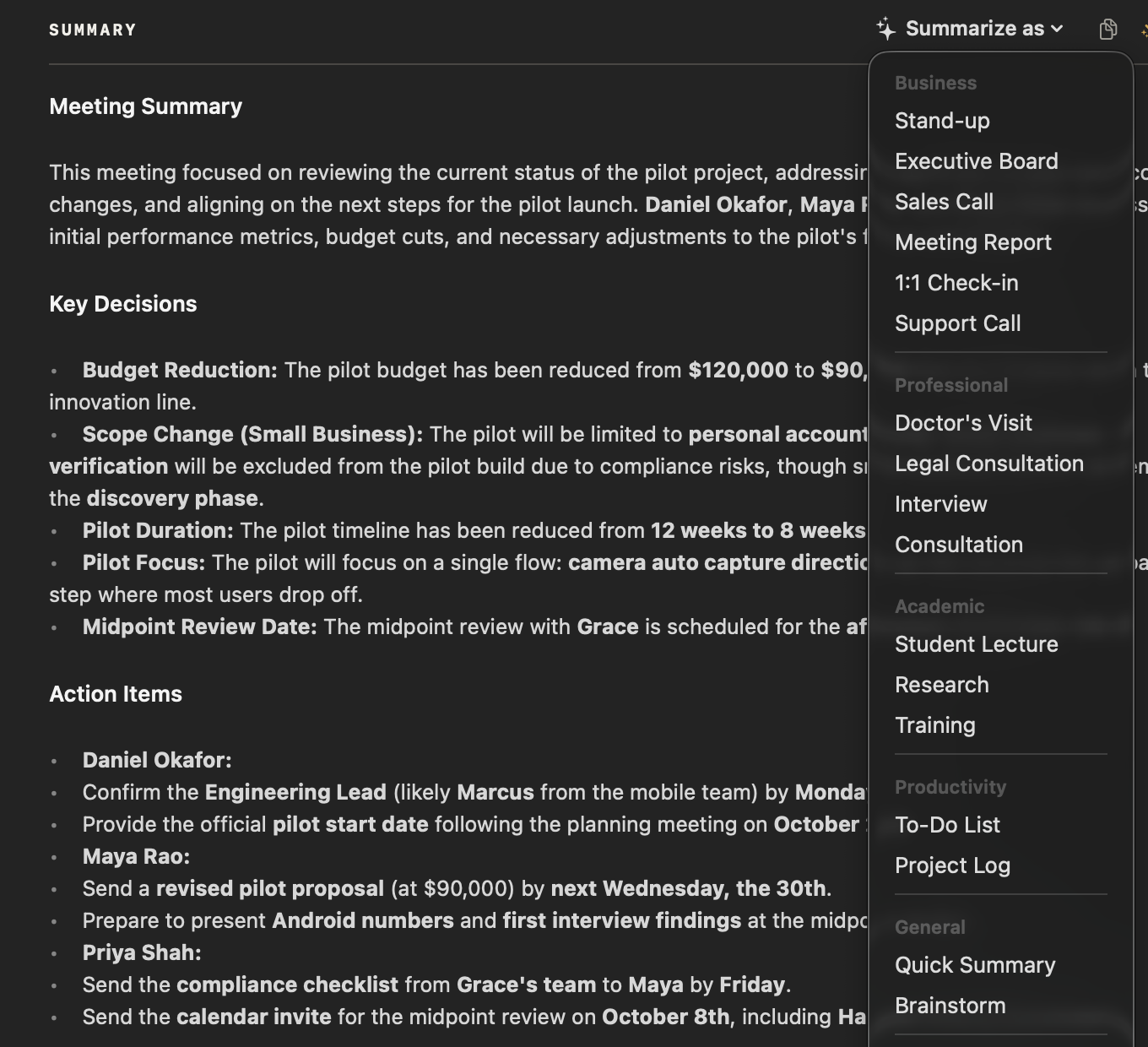
Summarize as rewrites the summary with the Interview template: the candidate’s background, key questions and answers, strengths, concerns and a verdict.
With the hiring manager
Intake and debriefs, kept
Intake calls and panel debriefs get notes too, and promises on both sides go onto your commitments board with their due dates.
Can you dictate scorecards and candidate outreach?
Yes, and it’s free. Tap fn in a scorecard, an outreach email or Slack — anywhere you can type — and talk. NoteOwl types at your cursor; one tap on Polish rewrites it in the tone set for that app. How free dictation works on your Mac
Casual in chat
Hey Leo, quick update from the Ferncastle call. They cut the pilot budget to $90,000, so let’s focus only on the camera auto-capture flow. Can you prioritize those wireframes for Thursday? Thanks.
- To
- Daniel Okafor
- Subject
- Next steps
Hi Daniel,
Thanks for the update today. Just confirming next steps: I will send the revised pilot proposal at $90,000 by Wednesday, the 30th. It will cover an eight-week pilot focused on camera auto-capture for personal accounts only.
I look forward to hearing who your engineering lead will be by Monday. Thanks again.
12export const pilot = {13 budgetCap: 90_000,14 weeks: 8,15 accounts: 'personal',16};17
- Rewrite by voice — select a message, press ⌥X and say how to change itPro
- Voice notes — your impressions, recorded straight after the interview
- Custom vocabulary — company names, tools and job titles spelled rightPro
- 34 languages — detected automatically
What goes into NoteOwl’s interview notes?
Five sections, written from the interview itself. NoteOwl writes an AI meeting summary when the call ends; Summarize as rewrites it with the Interview template, whose instruction is below, word for word.
Template · Interview
“Summarize this interview: Candidate/guest background, Key questions and their answers, Notable strengths, Concerns or gaps, and a Verdict / recommended next steps.”
- Background
- The candidate’s background, as they told it
- Questions & answers
- The key questions you asked and what they answered
- Strengths
- Notable strengths
- Concerns
- Concerns or gaps
- Verdict
- A verdict, or the recommended next steps
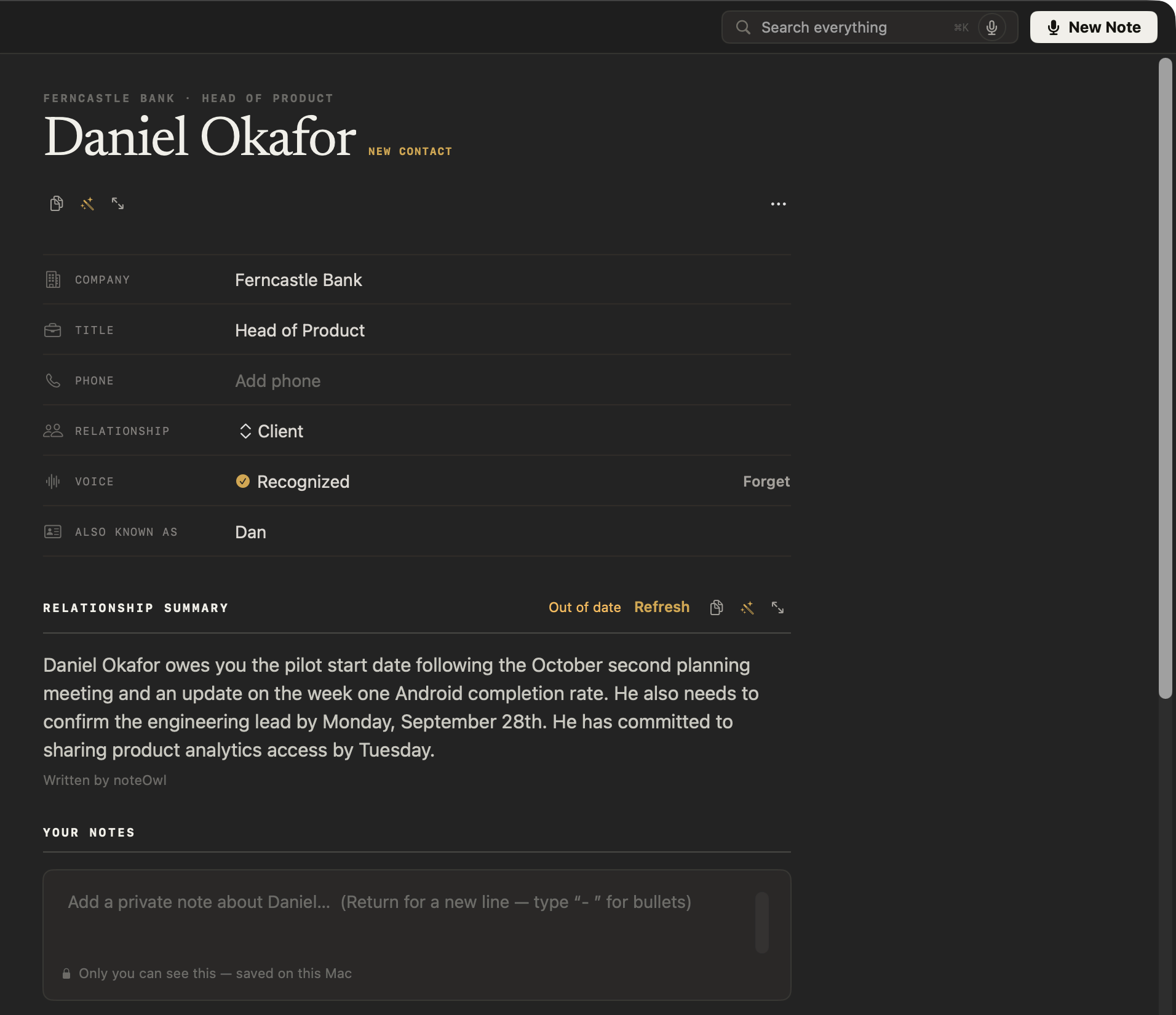
How do you keep notes on each candidate?
In their profile. NoteOwl keeps a profile for the people you meet: a summary written from your conversations, your own private notes, what’s still open between you, and every call. Set the relationship to Candidate to tell them apart.
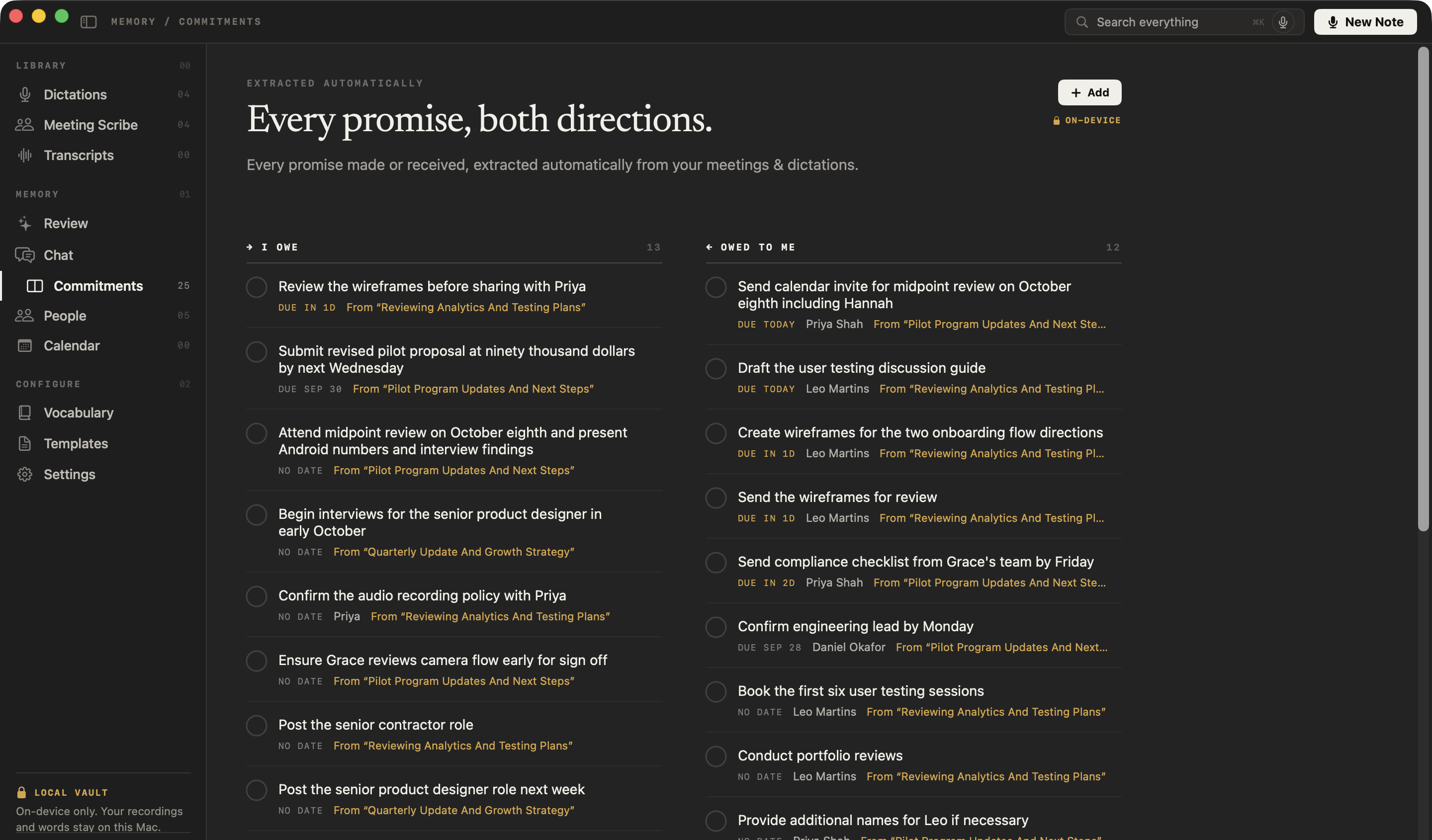
How do you keep track of what you promised candidates and hiring managers?
Let NoteOwl keep it. Every promise from your calls — yours, the candidate’s and the hiring manager’s — goes onto one board of what you owe and what you’re owed, sorted by what’s due and linked to the call it came from.
You owe
Post the senior product designer role next week
From “Quarterly Update And Growth Strategy”
You owe
Begin interviews for the senior product designer in early October
From “Quarterly Update And Growth Strategy”
You owe
Post the senior contractor role
From “Reviewing Analytics And Testing Plans”
Owed to you · Leo Martins
Conduct portfolio reviews
From “Reviewing Analytics And Testing Plans”
Hiring commitments from past meetings, as NoteOwl pulled them out.
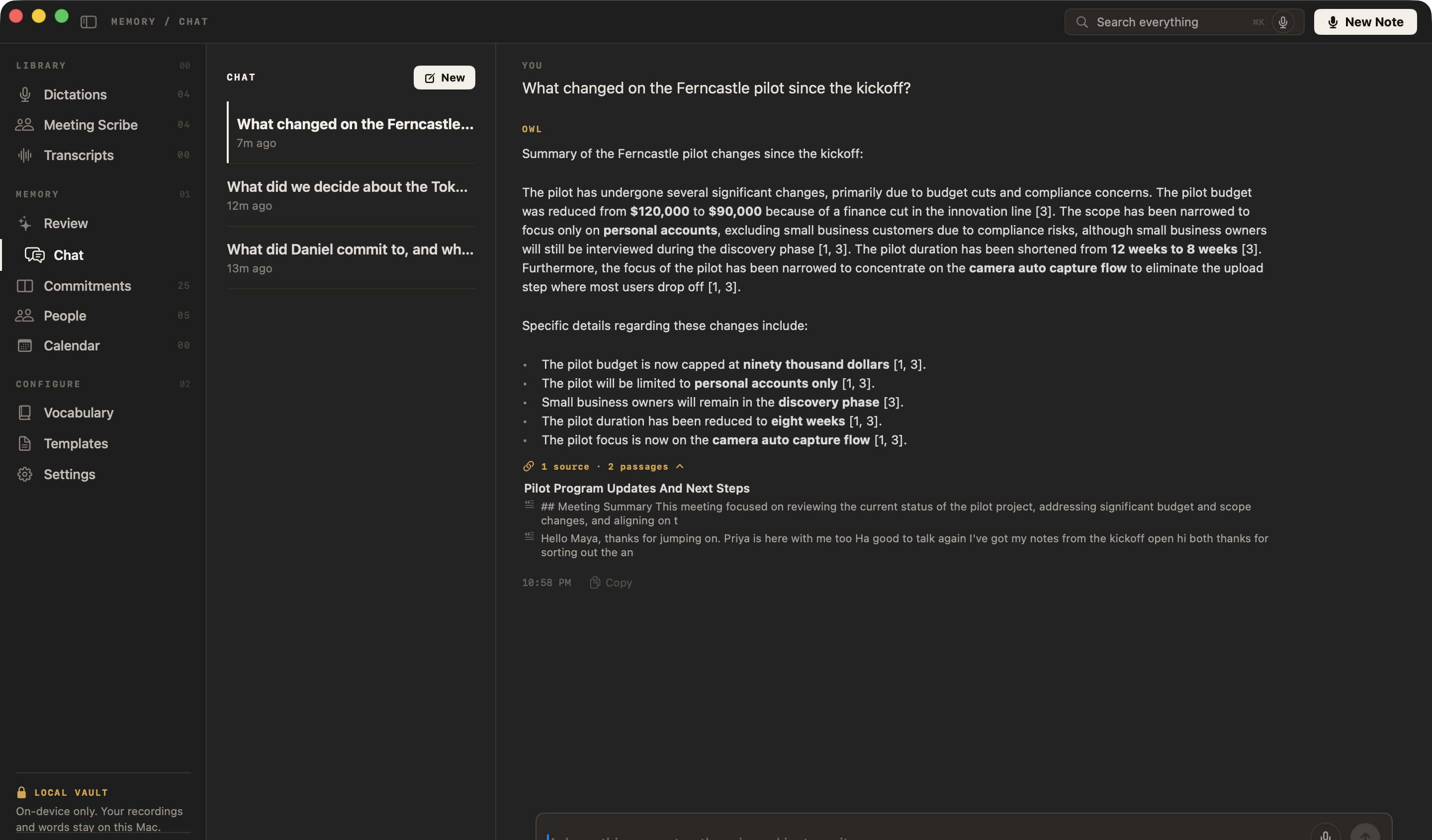
Can you find what a candidate said weeks ago?
Yes. Ask NoteOwl’s chat with your meetings in plain English and it answers only from your own calls, citing the passages it used — or press ⌘K to search all your meetings, transcripts and notes.
Questions you could ask
- What did the second candidate say about notice period?
- What did the hiring manager say the must-haves were?
- Which candidates did I promise feedback to?
What else does NoteOwl do for a recruiter?
Everything between the calls, with NoteOwl Pro: write-ups drafted, answers recalled before the next interview, a review every morning — all on your Mac.
Write-ups drafted from the call
In a meeting, ask the wand for a candidate summary for the hiring manager, a follow-up email or anything you describe; it writes from the summary, action items and transcript.
Help mid-interview
Get questions to ask, or catch up if you joined a panel late. Only you see it.
Recall between calls
Before the next interview, press ⌥Z in any app and ask out loud; the answer, with its source, appears in the notch.
Who said what
Each line of the transcript names its speaker. Name a colleague once and later calls know their voice; voice profiles stay on your Mac.
Search every interview
Every meeting, note and person on your Mac, one keystroke away.
Transcribe interviews recorded elsewhere
Drag in a recording — mp3, wav, m4a, aiff, flac, aac or mp4 — and get a speaker-labelled transcript, a summary and action items, added to your memory.
A daily review
What’s overdue, what’s due today and what came in — every morning, before the first screen.
Works with Wi-Fi off
Everything runs on your Mac, so notes, chat and dictation work offline.
Interviews in 34 languages
Candidate calls and dictation in 34 languages, detected automatically — Hindi and English in one sentence included.
Which meeting notes templates do recruiters use?
Interview for the candidate, and a few more for the calls around it. These four of the 22 meeting notes templates cover most of a recruiter’s week.
| Meeting | Template | What it writes |
|---|---|---|
| Candidate screens and interviews | Interview | Background · Questions & answers · Strengths · Concerns · Verdict |
| Intake calls with a hiring manager | Meeting Report | Attendees · Purpose · Key points · Decisions · Action items · Open questions |
| Panel debriefs | Quick Summary | 3–5 key points · Bottom line |
| Weekly hiring syncs | Project Log | Progress · Decisions · Blockers · Next milestones |
Do you need to tell candidates you’re taking notes?
Yes — tell them. No bot joins and NoteOwl doesn’t notify anyone on the call, so say at the start that you’re taking notes; in many places the law requires consent to record. Recordings, transcripts and notes stay on your Mac and are never uploaded.
FAQ
Questions recruiters ask about NoteOwl
Can NoteOwl take interview notes on Zoom, Teams or Google Meet calls?
Yes. NoteOwl records your microphone and your Mac’s audio, so it takes interview notes on Zoom, Microsoft Teams, Google Meet, Webex or FaceTime calls with no bot joining. Tell candidates at the start that you are taking notes.
Can NoteOwl write interview notes for each candidate?
Yes. NoteOwl writes a summary when each interview ends, and Summarize as rewrites it with the Interview template: the candidate’s background, key questions and answers, strengths, concerns and a verdict. Interview is one of 22 built-in templates, and NoteOwl can save your own editable copy of it.
Does NoteOwl keep a record of each candidate?
Yes. NoteOwl keeps a profile for the people in your calls: a relationship summary written from your conversations, your own private notes, the commitments still open between you, and every call you have had with them. You can set the relationship to Candidate.
Does NoteOwl connect to my applicant tracking system?
No. NoteOwl has no applicant tracking system integration. Copy the interview notes from NoteOwl and paste them into the candidate’s record, or tap fn in the scorecard and dictate — NoteOwl types at the cursor in any app, and dictation is free.
Does NoteOwl tell candidates it is taking notes?
No. NoteOwl has no bot and sends no notice to anyone on the call, so tell candidates yourself that you are taking notes with NoteOwl. It is the right thing to do, and in many places the law requires it.
Are candidate interviews uploaded to the cloud?
No. NoteOwl transcribes and summarizes candidate interviews on your Mac with on-device AI models, so recordings, transcripts and interview notes are never uploaded, and it works offline after the one-time model download.
How much does NoteOwl cost for a recruiter?
Interview notes, candidate profiles, commitments and chat are part of NoteOwl Pro: $79 once for one Mac, no subscription, with a 7-day free trial in the app and no card needed. Buy it inside the app (the … menu next to your name → License…). Dictation into any app is free forever.
Related
- Speaker identification Transcripts that say who said what, line by line.
- Voice notes on your Mac Record your impressions after an interview, kept as searchable text. Free.
- AI note taker for founders Customer calls, investor updates and hiring conversations, with every promise tracked.
- NoteOwl Pro, $79 once No subscription; one Mac; try it free first.
Keep exploring
Made for this work
- Interview notes templateAn interview notes template to copy, what each section holds, an example, and how NoteOwl writes interview notes
- People profilesA personal CRM that fills itself from your meetings: who they are, what is open between you, every conversation
- AI meeting summariesAI meeting summaries, decisions and action items written on your Mac from any template, when the call ends
Other roles
- AI note taker for researchersUser interviews transcribed speaker by speaker, past recordings imported, searchable and askable across a study; nothing uploaded
- AI note taker for product teamsCustomer interviews, design reviews and stand-ups: decisions and owners written down, every interview searchable, plus free dictation
- AI transcription for journalistsInterviews transcribed speaker by speaker with timestamps, quotes checked against the audio, nothing uploaded
Interview notes written for you, on your Mac
Free to download. Runs entirely on your Mac.
macOS 26 or later · Apple Silicon (M1 or newer) · 16 GB memory minimum, 24 GB recommended
About NoteOwl
NoteOwl is private AI meeting notes and memory for the Mac. It captures meetings without a bot joining the call, labels every speaker, writes summaries and action items, and builds a memory of every conversation that you can chat with — fully offline, because the speech recognition and the AI run on the Mac itself. Dictation into any app is free; Pro is a one-time purchase.
NoteOwl pricing: what’s free and what Pro adds
Last updated