Template
Meeting minutes template
This meeting minutes template has six sections — attendees, purpose, key discussion points, decisions made, action items with owners and due dates, and open questions — and it copies as plain text into Word, Google Docs or any notes app.
In NoteOwl, the Meeting Report template writes minutes in exactly this format from the recording, on your Mac; an example is below.
Meeting minutes · 6 sections
- 01Attendees/speakers
- 02Purpose
- 03Key discussion points
- 04Decisions made (with who made them)
- 05Action items with owners and due dates
- 06Open questions / next steps
Fill in your minutes online
Type into the form, or paste the meeting’s transcript and have the form filled in for you, and the minutes appear beside it in the six-section format, ready to copy, download as Word, Markdown or text, or print. What you type stays in your browser; a pasted transcript is sent to be summarized and isn’t stored.
Purpose, topics, decisions, action items and open questions. 5 free a day; the transcript is sent to be summarized and isn’t stored.
The meeting
Attendees and purpose
Agenda items
Action items
Open questions and next steps
Preview
Your minutes appear here as you fill in the form, formatted with the six sections above. Or press Fill in an example to see a finished set.
Copy pastes as plain text into email, Slack, Google Docs or Notion. The Word file opens in Word, Pages and Google Docs.
NoteOwl writes these minutes from the meeting itself, on your Mac, with no bot in the call.
What should meeting minutes include?
Six things: who attended, why you met, the key discussion points, the decisions and who made them, the action items with owners and due dates, and the open questions. Record outcomes, not a word-for-word account.
- Attendees/speakers
- What to writeEveryone who took part, with their role or organisation. Note who was absent if it matters.
- Purpose
- What to writeOne or two sentences on why the meeting was held.
- Key discussion points
- What to writeThe main topics, with the facts and figures that were said and who raised them.
- Decisions made (with who made them)
- What to writeEach decision in one line, and the person who made it or agreed to it.
- Action items with owners and due dates
- What to writeWhat will be done, who owns it and when it is due. A three-column table works best.
- Open questions / next steps
- What to writeWhat is still undecided, what it depends on, and when the group meets next.
| Section | What to write |
|---|---|
| Attendees/speakers | Everyone who took part, with their role or organisation. Note who was absent if it matters. |
| Purpose | One or two sentences on why the meeting was held. |
| Key discussion points | The main topics, with the facts and figures that were said and who raised them. |
| Decisions made (with who made them) | Each decision in one line, and the person who made it or agreed to it. |
| Action items with owners and due dates | What will be done, who owns it and when it is due. A three-column table works best. |
| Open questions / next steps | What is still undecided, what it depends on, and when the group meets next. |
A meeting minutes template to copy
Paste it into Word, Google Docs, Pages, Notion or Apple Notes and fill in each section during or after the meeting. It is plain text, so it keeps its shape anywhere.
The sections match NoteOwl’s Meeting Report template, so minutes you write by hand and minutes NoteOwl writes read the same.
MEETING MINUTES

Meeting:
Date and time:
Location or call link:
Minutes taken by:

1. ATTENDEES
- Name, role or organisation
- Absent:

2. PURPOSE
- Why the meeting was held, in one or two sentences

3. KEY DISCUSSION POINTS
- Topic: what was said, and by whom
- Topic: what was said, and by whom

4. DECISIONS MADE
- Decision (made by: name)
- Decision (made by: name)

5. ACTION ITEMS
Owner | Action | Due
Name  | What will be done | Date
Name  | What will be done | Date

6. OPEN QUESTIONS / NEXT STEPS
- Open question, and who will follow it up
- Next meeting:
What do good meeting minutes look like?
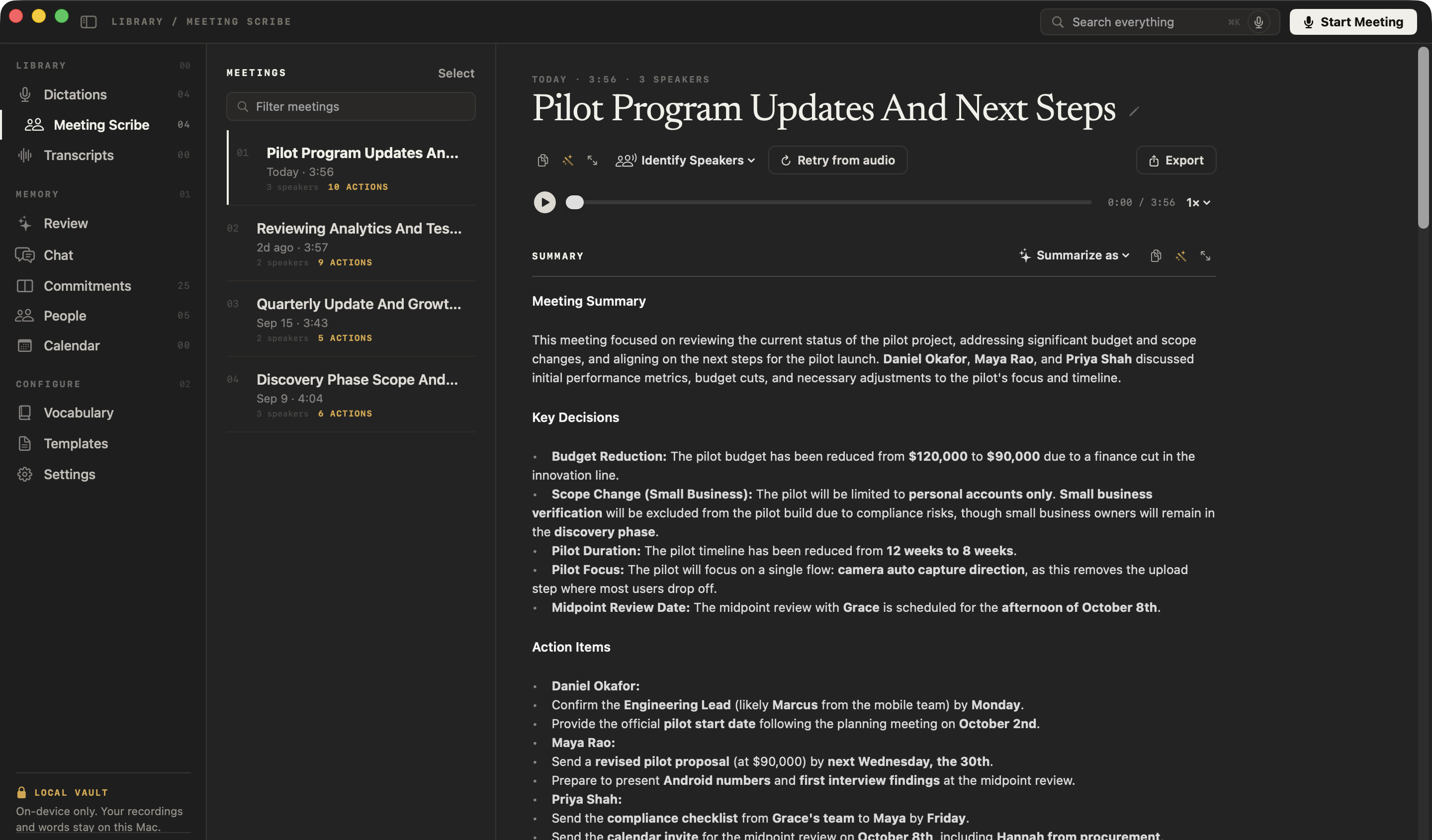
Like this: NoteOwl’s Meeting Report for a four-minute call between a design studio and a bank about a pilot. Every decision names who made it, and every action item has an owner and a date.
Meeting minutes — Ferncastle pilot follow-up
Date: Wednesday 23 September 2026 · Length: 4 minutes
Attendees
- Daniel Okafor — Head of Product, Ferncastle Bank
- Priya Shah — Product Manager, Ferncastle Bank
- Maya Rao — Northlight Studio
Purpose
Review early pilot findings and agree how the pilot changes after a cut to Ferncastle's budget.
Key discussion points
- Early analytics: week-one completion on Android is 7%, against 11% overall. Daniel will include it in his board update; the full breakdown comes at the midpoint review.
- Research: Priya's participant list is in use; the first six user-testing sessions are being booked for next week. Priya can supply 20 more names if needed.
- Budget: Finance cut the innovation line, so the pilot is capped at $90,000 instead of $120,000.
- Scope: small-business customers are no longer part of the pilot. Their verification carries extra compliance rules, and Grace doesn't want that risk in a first pilot. The four small-business owners will still be interviewed during discovery.
- Focus: at $90,000, the pilot concentrates on one flow — camera auto-capture, which removes the upload step where most people drop off.
- Discovery phase: still $48,000, unchanged; the first invoice was paid last week.
Decisions made
- The pilot budget is $90,000 (Daniel, following Finance's cut).
- The pilot covers personal accounts only; small-business owners stay in discovery interviews (Daniel, on Grace's direction).
- The pilot is shortened from 12 weeks to 8 and focuses on the camera auto-capture flow (proposed by Maya, agreed by Daniel and Priya).
- The midpoint review is on the afternoon of 8 October (Grace's availability; confirmed by Maya).
Action items
| Owner | Action | Due |
|---|---|---|
| Daniel Okafor | Confirm Ferncastle's engineering lead (likely Marcus from the mobile team) | Monday |
| Daniel Okafor | Give the pilot start date after the planning meeting | After 2 October |
| Maya Rao | Send the revised pilot proposal at $90,000 | Wednesday 30 September |
| Priya Shah | Send Maya the compliance checklist from Grace's team | Friday |
| Priya Shah | Send the calendar invite for the midpoint review, including Hannah from procurement | Today |
| Maya Rao and Leo Martins | Bring the Android numbers and first interview findings to the midpoint review | 8 October |
Open questions / next steps
- Pilot start date — depends on Ferncastle's 2 October planning meeting.
- Engineering lead to be confirmed by Monday.
- Daniel wants Grace to see the camera flow early, so there are no surprises at sign-off.
How do you get meeting minutes written automatically?
Record the meeting in NoteOwl — it takes meeting notes without a bot — then choose Summarize as → Meeting Report. NoteOwl writes the minutes in this format from the recording, on your Mac with on-device AI models, and nothing is uploaded.
- 1
Record the meeting
Press ⌥Space or click Start Meeting. NoteOwl records your microphone and your Mac’s audio; no bot joins the call.
- 2
Open it in Meeting Scribe
When the call ends, NoteOwl writes the speaker-labelled transcript and a summary, on your Mac.
- 3
Choose Summarize as → Meeting Report
Above the summary, open Summarize as and pick Meeting Report. NoteOwl rewrites the summary as minutes with these six sections.
- 4
Copy or export
Copy the minutes to send, or use Export to save them, with the transcript, as Markdown or PDF.
What does NoteOwl’s Meeting Report template ask for?
Exactly the six sections above. This is the template’s instruction to NoteOwl, word for word; you can change it, or write your own, in NoteOwl’s Templates screen.
“Turn this into a professional meeting report: Attendees/speakers, Purpose, Key discussion points, Decisions made (with who made them), Action items with owners and due dates, and Open questions / next steps. Keep it concise and actionable.”
What is the difference between meeting minutes and meeting notes?
Minutes are the formal record — who attended, what was decided and by whom, who does what by when — shared with everyone invited. Notes can take any shape and are often just for the person who wrote them.
- What they are
- Meeting minutesThe formal record of a meeting
- Meeting notesInformal notes for yourself or your team
- Structure
- Meeting minutesFixed sections: attendees, decisions, action items
- Meeting notesAny shape
- Decisions and who made them
- Meeting minutesAlways recorded
- Meeting notesSometimes
- Action items with owners and dates
- Meeting minutesAlways recorded
- Meeting notesSometimes
- Who reads them
- Meeting minutesEveryone invited, including people who missed it
- Meeting notesMostly the person who wrote them
- Shared after the meeting
- Meeting minutesYes, usually the same or next day
- Meeting notesOften not
| Meeting minutes | Meeting notes | |
|---|---|---|
| What they are | The formal record of a meeting | Informal notes for yourself or your team |
| Structure | Fixed sections: attendees, decisions, action items | Any shape |
| Decisions and who made them | Always recorded | Sometimes |
| Action items with owners and dates | Always recorded | Sometimes |
| Who reads them | Everyone invited, including people who missed it | Mostly the person who wrote them |
| Shared after the meeting | Yes, usually the same or next day | Often not |
FAQ
Questions about meeting minutes
How do you write meeting minutes?
Start with the date, the attendees and the purpose. During the meeting, note each decision with the person who made it and each action item with an owner and a due date. Afterwards, add the key discussion points and open questions, and send the minutes while the meeting is fresh — or record the meeting in NoteOwl and let it write the minutes for you.
What is the format of minutes of meeting (MoM)?
Minutes of meeting, often shortened to MoM, follow the standard meeting minutes format: the meeting name, date and attendees, the purpose, the key discussion points, each decision with who made it, each action item with an owner and a due date, and the open questions. NoteOwl’s Meeting Report template writes minutes of meeting in exactly this format.
Who should take the minutes in a meeting?
Usually someone who is not running the meeting, such as a secretary, a project coordinator or a team member who takes turns, so the chair can focus on the discussion. With NoteOwl, whoever records the meeting gets the minutes written from the recording, ready to check and send.
Should meeting minutes include who said what?
Meeting minutes record the decisions, the action items and the main points, not a word-for-word account. Name people where it matters: who made each decision and who owns each action. In NoteOwl, the full speaker-labelled transcript stays beside the minutes if you need the exact words.
Can I fill in meeting minutes online?
Yes. NoteOwl’s free minutes builder on this page fills in the template as you type, and nothing you type is uploaded. Have a transcript? Paste it above the form and press Write the minutes: the purpose, topics, decisions, action items and open questions are filled in for you to edit. The transcript is sent to an AI service to be summarized and isn’t stored.
Can I use NoteOwl’s meeting minutes template in Word or Google Docs?
Yes. NoteOwl’s meeting minutes template is plain text, so it pastes into Word, Google Docs, Pages, Notion or Apple Notes and keeps its six sections; the action items work as a list or as a three-column table.
Can NoteOwl write meeting minutes automatically?
Yes. Record the meeting in NoteOwl, then choose Summarize as → Meeting Report, and it writes minutes with these six sections from the recording, on your Mac with on-device AI models.
Can I change the sections NoteOwl uses for meeting minutes?
Yes. In NoteOwl’s Templates screen you can customize the Meeting Report template or write your own with the sections you want, then summarize any recorded meeting again in the new format.
Related
- All 22 meeting notes templates Stand-ups, 1:1s, sales calls, board meetings and more, with their sections.
- AI meeting notes without a bot How NoteOwl records any call from your Mac, with nothing joining it.
- Summaries, decisions and action items What NoteOwl writes when a meeting ends.
- Meeting agenda template Plan the meeting first: items, leads and time boxes, with a builder.
Keep exploring
More templates
- 1:1 meeting templateA 1:1 meeting template to copy, a 1:1 meeting agenda builder, what each section holds, an example, and how NoteOwl writes 1:1 notes
- Board meeting minutes templateA board meeting minutes template to copy, what each section holds, an example, and how NoteOwl writes board minutes
- Stand-up meeting templateA stand-up meeting template to fill in online or copy, what each section holds, an example, and how NoteOwl writes stand-up notes
- Sales call notes templateA sales call notes template to copy, what each section holds, an example, and how NoteOwl writes sales call notes
More template builders
- Meeting agenda templateA meeting agenda template to copy or fill in online, with start times for every item, a team meeting example and how to write one
- Team meeting agenda templateA weekly team meeting agenda builder: standing items, topics added this week, last week’s action items and a rotating facilitator, timed from the start
How it’s written
More free tools
Get your meeting minutes written on your Mac
Free to download. Runs entirely on your Mac.
macOS 26 or later · Apple Silicon (M1 or newer) · 16 GB memory minimum, 24 GB recommended
About NoteOwl
NoteOwl is private AI meeting notes and memory for the Mac. It captures meetings without a bot joining the call, labels every speaker, writes summaries and action items, and builds a memory of every conversation that you can chat with — fully offline, because the speech recognition and the AI run on the Mac itself. Dictation into any app is free; Pro is a one-time purchase.
NoteOwl pricing: what’s free and what Pro adds
Last updated