Template
Stand-up meeting template
This stand-up meeting template asks each person three things — what they did yesterday, what they will do today, and what is blocking them — and ends with a one-line team status. It copies as plain text into Slack, Notion, Google Docs or any notes app.
Fill it in below and download the notes as Word, PDF or Markdown. In NoteOwl, the Stand-up template writes your standup meeting notes in this format from the recording of a stand-up call, on your Mac; an example is below.
Stand-up · 4 sections
- 01Yesterday
- 02Today
- 03Blockers
- 04Team status (one line)
Fill in the template ↓Copy the template ↓What counts as a blocker ↓See an example ↓
Stand-up notes builder
Add each person’s yesterday, today and blockers, and the team status. The notes are written up beside the form, with every blocker gathered into one table of who can help. Nothing you type leaves your browser.
The stand-up
People
The team
Preview
Your stand-up notes appear here as you fill in the form: each person’s yesterday, today and blockers, then the team status. Or press Fill in an example.
Copy pastes as plain text into email, Slack, Google Docs or Notion. The Word file opens in Word, Pages and Google Docs.
NoteOwl records the stand-up call on your Mac and writes each person’s yesterday, today and blockers for you, with no bot in the call.
What should a stand-up meeting include?
Three answers from each person — yesterday, today and blockers — and one line on where the team stands. Keep it to what changed and what is stuck; the detailed discussion happens after the stand-up, with only the people who need to be there.
- Yesterday
- What to writeWhat each person finished or moved forward since the last stand-up. Outcomes, not every task.
- Today
- What to writeWhat each person will work on before the next stand-up, most important first.
- Blockers
- What to writeAnything stopping the work, and who can unblock it. Name it in the stand-up; solve it straight after.
- Team status (one line)
- What to writeWhere the whole team stands — on track or not — and the one thing that decides it.
| Section | What to write |
|---|---|
| Yesterday | What each person finished or moved forward since the last stand-up. Outcomes, not every task. |
| Today | What each person will work on before the next stand-up, most important first. |
| Blockers | Anything stopping the work, and who can unblock it. Name it in the stand-up; solve it straight after. |
| Team status (one line) | Where the whole team stands — on track or not — and the one thing that decides it. |
A stand-up meeting template to copy
Paste it into Slack, Notion, Google Docs or Apple Notes, add a block for each person, and fill it in during the stand-up. It is plain text, so it keeps its shape anywhere. For written stand-ups, each person fills in their own block.
The sections match NoteOwl’s Stand-up template, so stand-up notes you write by hand and notes NoteOwl writes read the same.
STAND-UP MEETING

Date:
Team:

NAME
Yesterday:
- What I finished or moved forward
Today:
- What I'll work on before the next stand-up
Blockers:
- What's stopping me, and who can help (or "None")

NAME
Yesterday:
-
Today:
-
Blockers:
-

(one block for each person)

TEAM STATUS (one line)
On track / at risk, because:

AFTER THE STAND-UP
Blocker | Who will help | By when
What counts as a blocker in a stand-up?
Anything that stops your work without help from someone else: waiting on a person, a decision, access or another team. Say who can unblock it, and by when. Work that is simply hard or slow is not a blocker.
- Waiting on a person
- ExampleThe design review hasn’t happened, so I can’t start building.
- What to sayWho you are waiting on, and since when.
- A decision nobody has made
- ExampleWe haven’t chosen between the two layouts.
- What to sayWho needs to decide, and by when.
- Missing access or information
- ExampleI still don’t have access to the analytics.
- What to sayWhat you need, and who can give it.
- An outside dependency
- ExampleThe client’s checklist arrives on Friday, and the proposal can’t be finished without it.
- What to sayThe date it is due, and what slips if it is late.
- Not a blocker
- ExampleThe bug is taking longer than I expected.
- What to saySay it under Today, and ask for help after the stand-up if you want it.
| Kind of blocker | Example | What to say |
|---|---|---|
| Waiting on a person | The design review hasn’t happened, so I can’t start building. | Who you are waiting on, and since when. |
| A decision nobody has made | We haven’t chosen between the two layouts. | Who needs to decide, and by when. |
| Missing access or information | I still don’t have access to the analytics. | What you need, and who can give it. |
| An outside dependency | The client’s checklist arrives on Friday, and the proposal can’t be finished without it. | The date it is due, and what slips if it is late. |
| Not a blocker | The bug is taking longer than I expected. | Say it under Today, and ask for help after the stand-up if you want it. |
What do good stand-up notes look like?
Like this: NoteOwl’s Stand-up notes for a short stand-up at a small design studio. Each blocker says what the person is waiting for, and the team status fits on one line.
Stand-up summary
Speakers: Leo Martins, Nina Park, Maya Rao
Leo Martins
- Yesterday: Finished the discussion guide for the user interviews and sent it to Maya; started the camera auto capture wireframes.
- Today: Make Maya's changes to the guide, finish the wireframes and send them to Maya this afternoon, then book the first six sessions for next week from Priya's list.
- Blockers: Can't book anyone until the recording rules are confirmed, because the invite has to say how sessions are recorded.
Nina Park
- Yesterday: Set up the booking page for the sessions (45-minute slots over Zoom) and drafted the consent form.
- Today: Order the twelve $50 gift cards and send the consent form to Maya to check.
- Blockers: Can't finish the consent form until the bank's recording rules are known.
Maya Rao
- Yesterday: Ferncastle follow-up with Daniel and Priya. Finance cut the pilot budget to $90,000, so the pilot is eight weeks instead of twelve, personal accounts only, focused on the camera auto capture flow. Left comments on Leo's guide.
- Today: Email Priya about the recording rules, start the revised pilot proposal (due to Daniel Wednesday the 30th) and post the senior contractor role.
- Blockers: Needs Grace's compliance checklist, which Priya is sending by Friday, to finish the proposal. If it slips, the proposal slips.
Team status
On track: wireframes today, sessions booked for next week, and the proposal on track if the checklist arrives Friday.
How do you get stand-up notes written automatically?
Record the stand-up call in NoteOwl — it takes meeting notes without a bot — then choose Summarize as → Stand-up. NoteOwl writes each speaker’s yesterday, today and blockers from the recording, on your Mac with on-device AI models, and nothing is uploaded.
- 1
Record the stand-up
Press ⌥Space or click Start Meeting when the stand-up call begins. NoteOwl records your microphone and your Mac’s audio; no bot joins the call.
- 2
Open it in Meeting Scribe
When the stand-up ends, NoteOwl writes the speaker-labelled transcript and a summary, on your Mac.
- 3
Choose Summarize as → Stand-up
Above the summary, open Summarize as and pick Stand-up. NoteOwl rewrites the notes as each speaker’s yesterday, today and blockers, with a one-line team status.
- 4
Share it with the team
Copy the notes as Markdown to paste into your team chat, or use Export to save them as Markdown or PDF.
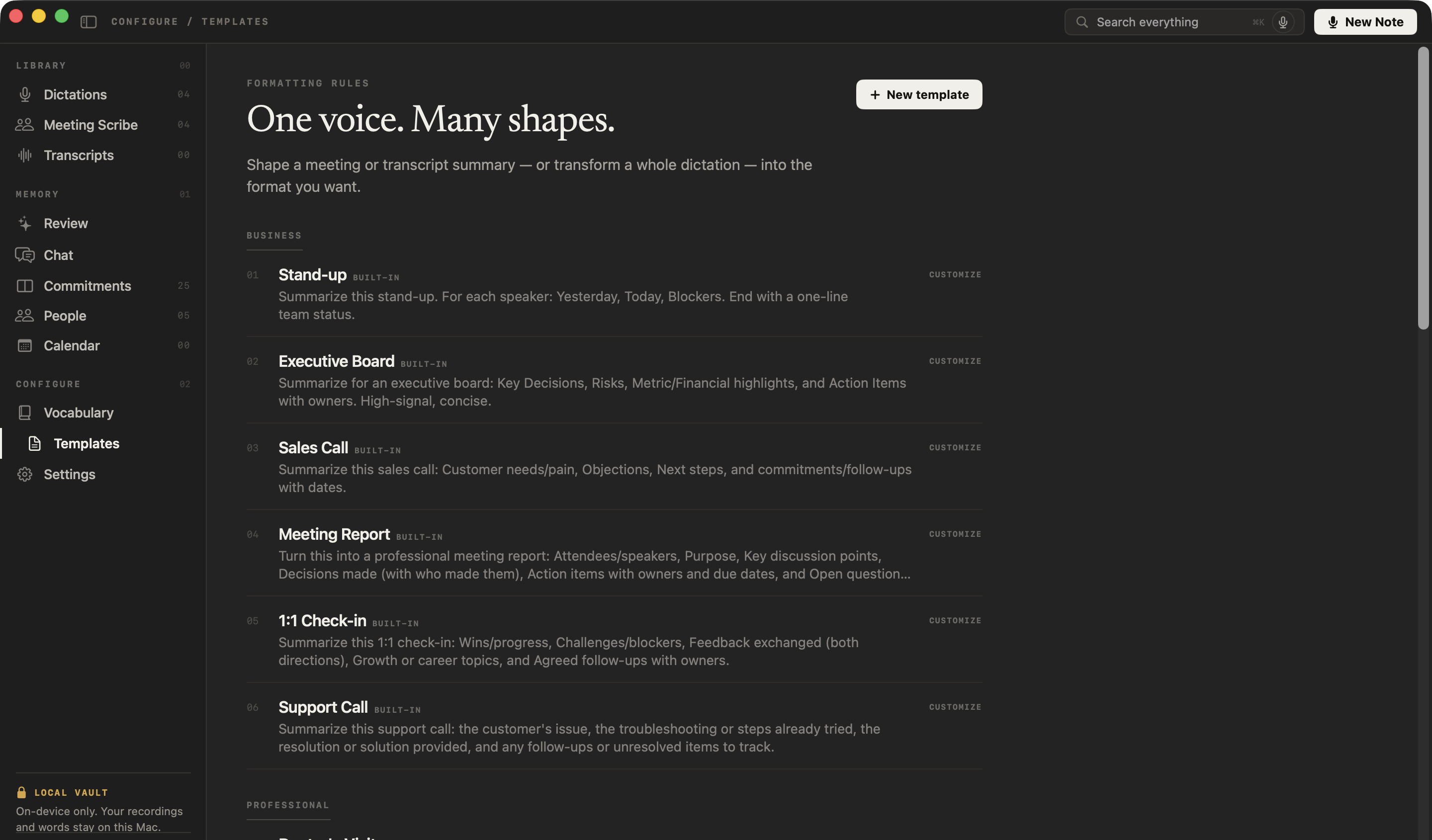
What does NoteOwl’s Stand-up template ask for?
Each speaker’s yesterday, today and blockers, then a one-line team status. This is the template’s instruction to NoteOwl, word for word; you can change it, or write your own, in NoteOwl’s Templates screen (see how to customize a template).
“Summarize this stand-up. For each speaker: Yesterday, Today, Blockers. End with a one-line team status.”
FAQ
Questions about stand-up meetings
What are the three stand-up questions?
What did you do yesterday, what will you do today, and is anything blocking you? Each person answers all three in a minute or two. NoteOwl’s Stand-up template writes each person’s answers under those three headings and ends with a one-line team status.
How long should a stand-up meeting be?
Fifteen minutes or less, at the same time every day, with each person speaking for a minute or two. Anything that needs a longer discussion, such as solving a blocker, moves to a smaller conversation straight after the stand-up.
What should go in standup meeting notes?
For each person: what they did yesterday, what they will do today and what is blocking them, then one line on where the team stands and who is helping with each blocker. Standup meeting notes are short: a record for anyone who missed it, not minutes.
Can I use this stand-up meeting template in Slack, Notion or Google Docs?
Yes. It is plain text, so it pastes into Slack, Notion, Google Docs, Word or Apple Notes and keeps its shape. It also works as a daily standup template for written stand-ups, with each person filling in their own block.
Can NoteOwl write stand-up notes automatically?
Yes. Record the stand-up call in NoteOwl, then choose Summarize as → Stand-up, and it writes each speaker’s yesterday, today and blockers and a one-line team status from the recording, on your Mac with on-device AI models, and no bot joins the call.
How does NoteOwl know who said what in a stand-up?
NoteOwl labels each speaker in the transcript: your microphone is You, and the other voices on the call are told apart when the meeting ends. Rename a speaker once and NoteOwl learns that voice, so later stand-ups can name your teammates for you. Voice profiles stay on your Mac.
Can I change the sections of NoteOwl’s Stand-up template?
Yes. In NoteOwl’s Templates screen you can customize the Stand-up template or write your own, for example with a section for decisions, then summarize any recorded stand-up again in the new format.
Related
- All 22 meeting notes templates 1:1s, sales calls, interviews, board meetings and more, with their sections.
- AI note taker for product teams Customer interviews, design reviews and stand-ups, with every decision and owner written down.
- AI note taker for managers 1:1s and team meetings with no bot, and commitments tracked both ways.
- AI meeting summaries The decisions and action items NoteOwl writes when a meeting ends.
Keep exploring
Who uses it
- AI note taker for product teamsCustomer interviews, design reviews and stand-ups: decisions and owners written down, every interview searchable, plus free dictation
- AI note taker for managers1:1s and team meetings: commitments tracked both ways, what is open with each person before you meet, plus free dictation
More templates
- Sales call notes templateA sales call notes template to copy, what each section holds, an example, and how NoteOwl writes sales call notes
- Interview notes templateAn interview notes template to copy, what each section holds, an example, and how NoteOwl writes interview notes
- User interview templateA user interview template to copy, what each section holds, an example, and how NoteOwl writes research notes from a user interview
- Podcast show notes templateA podcast show notes template to copy, what each section holds, an example, and how NoteOwl writes show notes from an episode
More template builders
- Retrospective templateA retrospective template to fill in online in four formats (went well / to improve / try next, start stop continue, mad sad glad, 4Ls), with votes and action items
- Project kickoff meeting agendaA kickoff meeting agenda builder: the eight usual items timed from the start, with the goal, scope, milestones, roles and risks the kickoff agrees
- Client onboarding call agendaA client onboarding call agenda builder: the client’s goals, first deliverables, what you need from them, contacts, ways of working and next steps, timed
Get your stand-up notes written on your Mac
Free to download. Runs entirely on your Mac.
macOS 26 or later · Apple Silicon (M1 or newer) · 16 GB memory minimum, 24 GB recommended
About NoteOwl
NoteOwl is private AI meeting notes and memory for the Mac. It captures meetings without a bot joining the call, labels every speaker, writes summaries and action items, and builds a memory of every conversation that you can chat with — fully offline, because the speech recognition and the AI run on the Mac itself. Dictation into any app is free; Pro is a one-time purchase.
NoteOwl pricing: what’s free and what Pro adds
Last updated