NoteOwl vs Krisp
A Krisp alternative that keeps meeting notes on your Mac
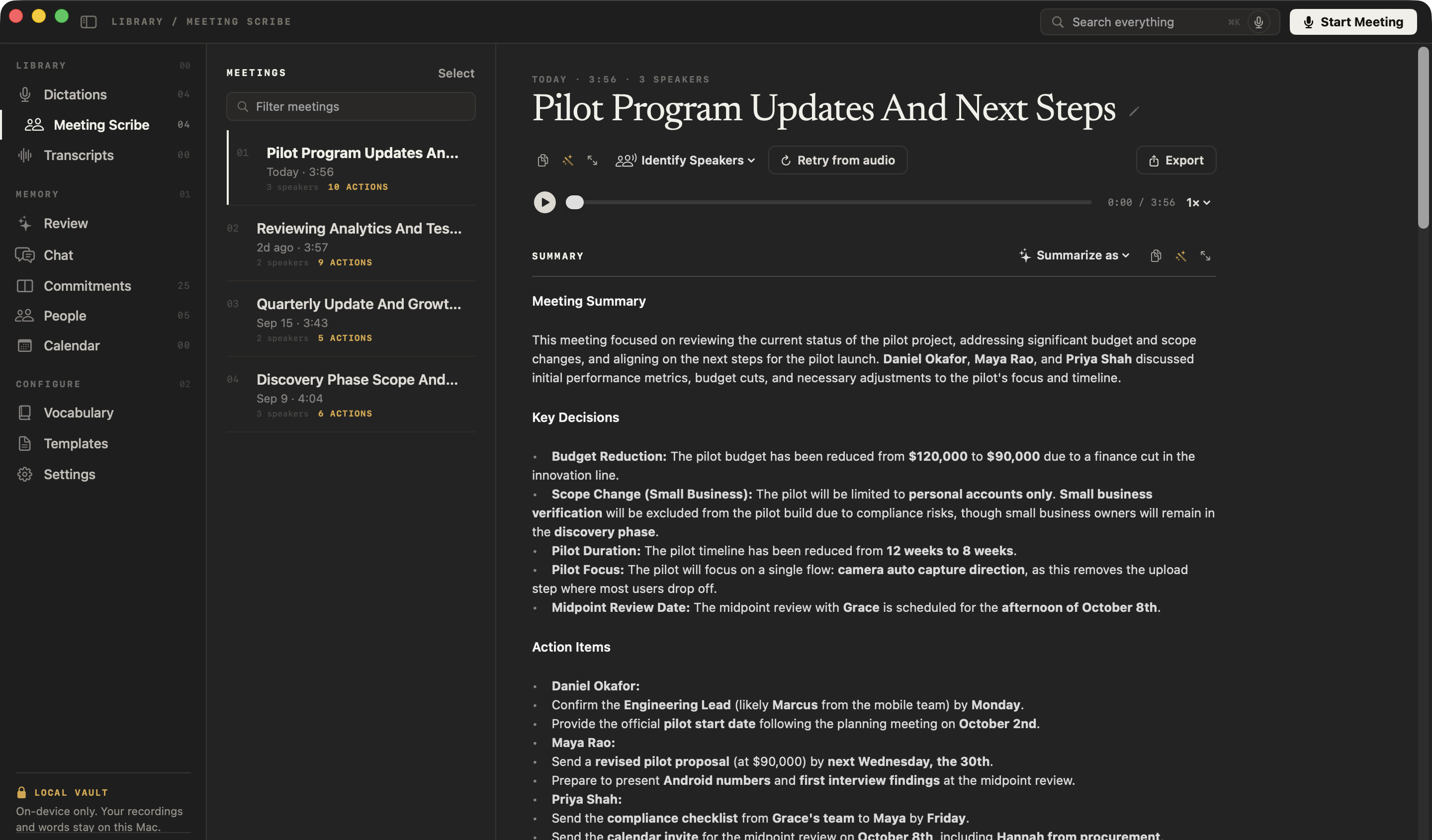
NoteOwl is a Krisp alternative for Mac that keeps your meetings on your computer: like Krisp, no bot joins the call, but NoteOwl transcribes, summarizes and answers questions on the Mac itself.
It works the same with or without internet, keeps your recordings in a folder on your Mac instead of a cloud account, recognises voices in any call app and adds free dictation into every app — and you pay once instead of subscribing.
Read the transcript
Quick question. What did you actually promise in your last meeting? …Yeah. Me neither.
This is NoteOwl. It’s a Mac app that takes notes on your calls. And no, there’s no bot joining your meeting.
The second the call ends, it’s written everything up. What got decided. Who’s doing what. And by when.
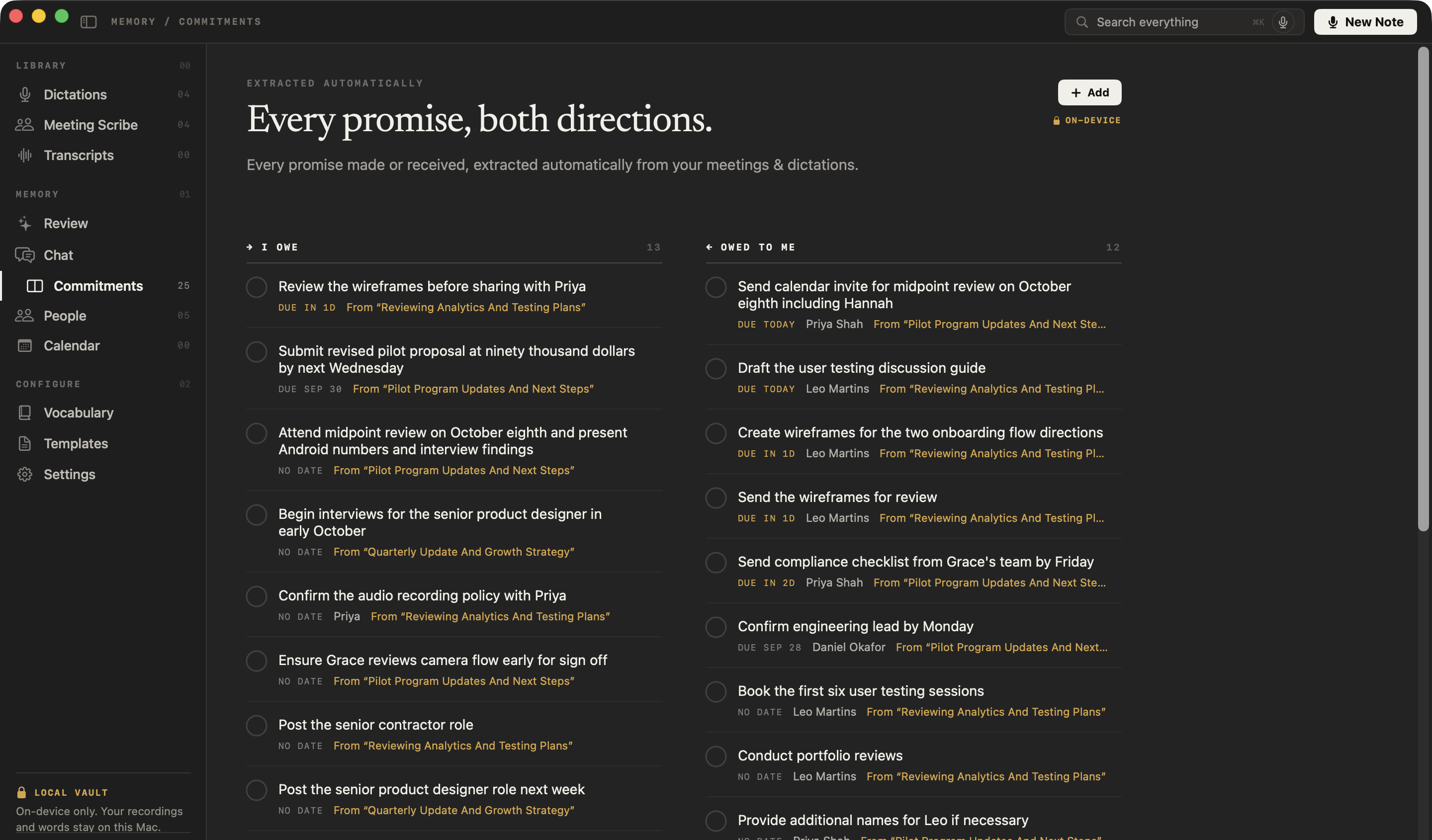
All those promises end up in one list. What you owe people… and what they owe you.
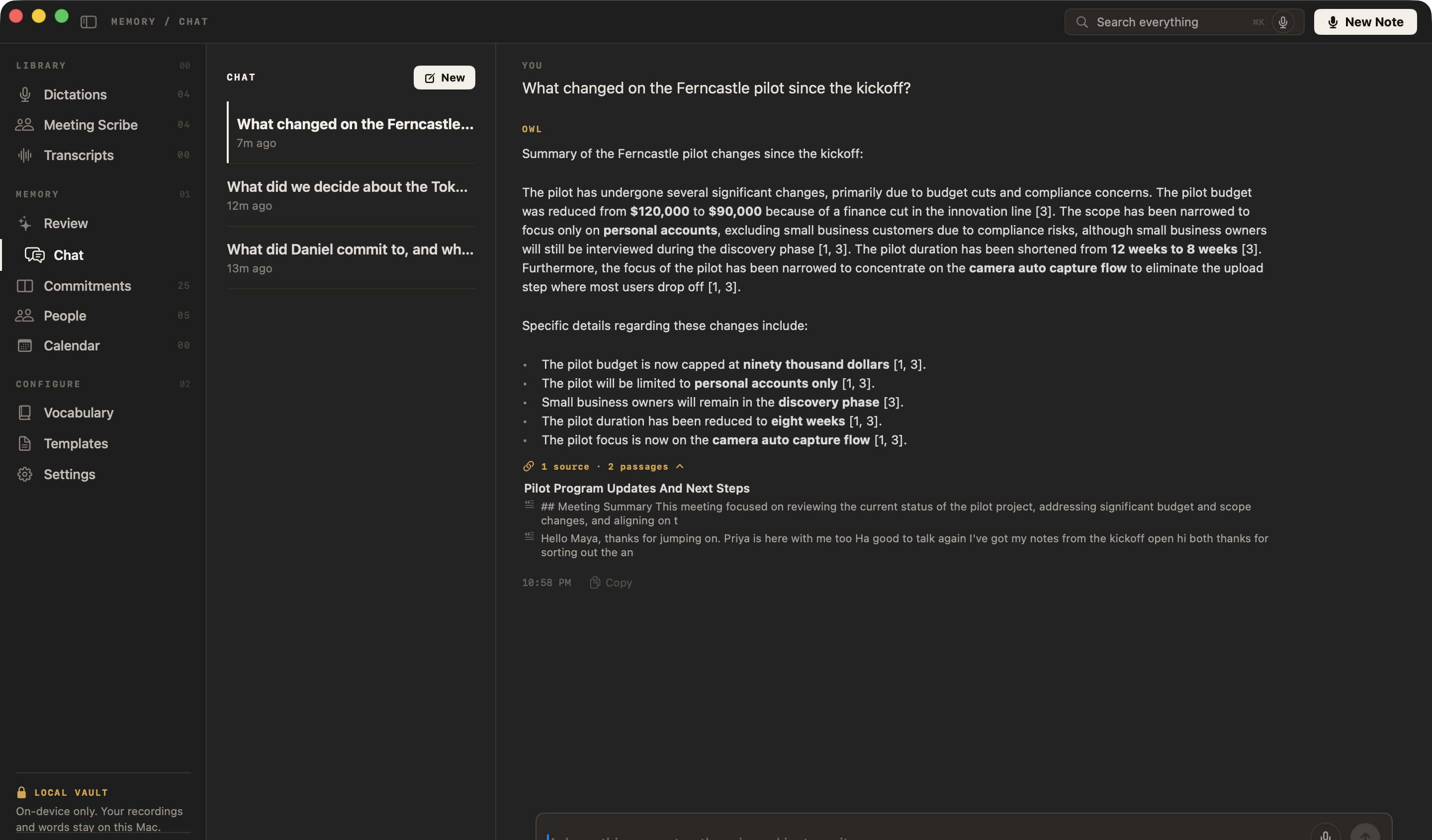
And here’s the part that got me. You can just ask it. “What changed on the Ferncastle pilot?” And it shows you exactly where that came from.
The whole thing runs on your Mac. Nothing gets uploaded. It even works with the Wi-Fi off.
NoteOwl. It’s free to download. Try it on your next call.
Why choose NoteOwl over Krisp?
Because your meetings never leave your Mac, every feature works the same with or without internet, and you pay once. On top of that you get free dictation in every app, voices recognised in any call, and a memory you can ask — offline.
Your meetings stay on your Mac
Recording, transcription, summaries and chat all run on your Mac with on-device AI models, and nothing is uploaded. Krisp uses Microsoft Azure to write meeting summaries and keeps transcripts and recordings on servers in the United States.[3]
The same online or offline
Every feature works with Wi-Fi off, Chat included, after the one-time model download. Krisp says its app stops operating when it can’t connect to its backend.[3]
Pay once. No subscription.
NoteOwl Pro is $79 once for your Mac. Krisp Core is $8 a month per user, billed annually.[1]
Voices recognised, on your Mac
Speakers are separated in any call app. Name a voice once and it’s recognised in every meeting after; the voice profile stays on your Mac. Krisp says it doesn’t know speaker names on its own.[11]
Free dictation in every app
Tap fn and talk in Mail, Slack, Notion or your code editor. Your words type at the cursor as you talk, and one tap polishes them in the right tone for each app — free and unlimited.
Ask every meeting, even offline
Chat answers from your own meetings and cites the passage it used — or tells you when nothing matches.
Every promise, and everyone you meet
A board of what you owe and what you’re owed, a profile for everyone you meet, and prep pages from your Mac’s Calendar — Apple Calendar included.
What is Krisp, and how is NoteOwl different?
- Bot in the call
- NoteOwlNone; records your microphone and your Mac’s audio
- KrispNone by default: the desktop app works as a virtual microphone and speaker; an optional Krisp Bot joins Zoom, Google Meet and Teams as a participant the others can see[2,7]
- Where transcription runs
- NoteOwlOn your Mac, with on-device AI models
- KrispKrisp’s pages differ: its security page says transcripts are generated on your machine; its product FAQ, on-device for English and on its servers for 15 other languages; its Help Center, that meetings are transcribed in the cloud[2,3,6]
- Where summaries are written
- NoteOwlOn your Mac, when the call ends
- KrispIn the cloud: Krisp uses Microsoft Azure to generate meeting summaries from transcripts[3]
- Where recordings and notes are stored
- NoteOwlA folder on your Mac; never uploaded
- KrispKrisp’s cloud, on servers in the United States; Core includes 10 GB of recording storage per user[3,8,9]
- Training on your data
- NoteOwlNothing is uploaded; the app has no analytics or telemetry
- KrispKrisp says your meeting data is never used to train its AI models[1]
- Sharing by default
- NoteOwlNothing is shared or emailed; a note leaves your Mac only when you copy, export or share it
- KrispAuto-share, on by default, shares transcripts, notes and recordings with calendar invitees in the same Krisp workspace[10]
- Works offline
- NoteOwlEverything, after the one-time model download
- KrispThe app stops operating when it can’t connect to Krisp’s backend[3]
- Price
- NoteOwl$79 once for one Mac; no subscription
- KrispCore $8 per user per month billed annually, or $16 billed monthly; Advanced $15 per user per month billed annually, or $30 billed monthly[1]
- Free to use
- NoteOwlDictation and voice notes free forever; every Pro feature free for 7 days, no card
- KrispA 7-day free trial with no card; unless you buy a plan, access ends with the trial, and you have 90 days to export your content[1,4]
- Meeting length
- NoteOwlNo limit; audio is saved to disk as you record
- KrispA recording is cut at 4 hours and a new one starts[8]
- Speaker names
- NoteOwlSpeakers separated in any call app; name a voice once and it’s recognised in later meetings; voice profiles stay on your Mac
- KrispSpeaker-aware transcripts with generic labels such as “Speaker 1”; Krisp doesn’t know names on its own, so you pick them from your contacts or directory[2,11]
- Chat with your meetings
- NoteOwlAnswers from your own meetings and notes, citing the passage; works offline
- KrispAI Chat on one meeting, a folder or all your meetings, on Core and Advanced[13]
- Dictation into other apps
- NoteOwlYes, free and unlimited; one tap polishes it in the right tone for each app
- KrispNot listed on Krisp’s pricing page or in its Help Center[1,16]
- Languages
- NoteOwl34, detected automatically, including Hindi and English mixed
- Krisp16 in its Help Center; 17 on its product page[2,12]
- Getting notes out
- NoteOwlCopy any note into any app, export it as Markdown, PDF, text or SRT, or export everything as plain files
- KrispTranscripts as .txt; recordings as MP3[14]
- Devices
- NoteOwlMac
- KrispMac and Windows desktop apps, iOS and Android apps, and a browser extension[2,15]
- Mac requirements
- NoteOwlmacOS 26 or later, Apple silicon, 16 GB memory
- KrispRecommended: macOS 14 or later, Intel Core i5 or Apple silicon, 8 GB of memory or more[15]
| NoteOwl | Krisp | |
|---|---|---|
| Bot in the call | None; records your microphone and your Mac’s audio | None by default: the desktop app works as a virtual microphone and speaker; an optional Krisp Bot joins Zoom, Google Meet and Teams as a participant the others can see[2,7] |
| Where transcription runs | On your Mac, with on-device AI models | Krisp’s pages differ: its security page says transcripts are generated on your machine; its product FAQ, on-device for English and on its servers for 15 other languages; its Help Center, that meetings are transcribed in the cloud[2,3,6] |
| Where summaries are written | On your Mac, when the call ends | In the cloud: Krisp uses Microsoft Azure to generate meeting summaries from transcripts[3] |
| Where recordings and notes are stored | A folder on your Mac; never uploaded | Krisp’s cloud, on servers in the United States; Core includes 10 GB of recording storage per user[3,8,9] |
| Training on your data | Nothing is uploaded; the app has no analytics or telemetry | Krisp says your meeting data is never used to train its AI models[1] |
| Sharing by default | Nothing is shared or emailed; a note leaves your Mac only when you copy, export or share it | Auto-share, on by default, shares transcripts, notes and recordings with calendar invitees in the same Krisp workspace[10] |
| Works offline | Everything, after the one-time model download | The app stops operating when it can’t connect to Krisp’s backend[3] |
| Price | $79 once for one Mac; no subscription | Core $8 per user per month billed annually, or $16 billed monthly; Advanced $15 per user per month billed annually, or $30 billed monthly[1] |
| Free to use | Dictation and voice notes free forever; every Pro feature free for 7 days, no card | A 7-day free trial with no card; unless you buy a plan, access ends with the trial, and you have 90 days to export your content[1,4] |
| Meeting length | No limit; audio is saved to disk as you record | A recording is cut at 4 hours and a new one starts[8] |
| Speaker names | Speakers separated in any call app; name a voice once and it’s recognised in later meetings; voice profiles stay on your Mac | Speaker-aware transcripts with generic labels such as “Speaker 1”; Krisp doesn’t know names on its own, so you pick them from your contacts or directory[2,11] |
| Chat with your meetings | Answers from your own meetings and notes, citing the passage; works offline | AI Chat on one meeting, a folder or all your meetings, on Core and Advanced[13] |
| Dictation into other apps | Yes, free and unlimited; one tap polishes it in the right tone for each app | Not listed on Krisp’s pricing page or in its Help Center[1,16] |
| Languages | 34, detected automatically, including Hindi and English mixed | 16 in its Help Center; 17 on its product page[2,12] |
| Getting notes out | Copy any note into any app, export it as Markdown, PDF, text or SRT, or export everything as plain files | Transcripts as .txt; recordings as MP3[14] |
| Devices | Mac | Mac and Windows desktop apps, iOS and Android apps, and a browser extension[2,15] |
| Mac requirements | macOS 26 or later, Apple silicon, 16 GB memory | Recommended: macOS 14 or later, Intel Core i5 or Apple silicon, 8 GB of memory or more[15] |
Krisp pricing
Is NoteOwl cheaper than Krisp?
Yes, for one person on one Mac. NoteOwl Pro is $79 once. Krisp Core is $8 per user per month, billed annually — $96 a year and $288 over three years — or $16 per user per month, billed monthly.[1]
And you can start free: dictation and voice notes are free forever, and every Pro feature is free for 7 days in the app, with no card. Krisp’s pricing page lists a 7-day free trial and paid plans; its terms say that unless you buy a plan, access ends with the trial, leaving 90 days to export your content.[1,4]
What one person pays
After 1 year
NoteOwl Pro$79Krisp Core, billed annually$96After 2 years
NoteOwl Pro$79Krisp Core, billed annually$192After 3 years
NoteOwl Pro$79Krisp Core, billed annually$288
Where does Krisp process and store your meetings?
Krisp, in its own words
“Krisp uses Microsoft Azure services to generate meeting summaries from meeting transcripts.”[3]
“All data is stored on secure servers located in the United States.”[3]
“When it detects that it can no longer connect to the backend it stops operating.”[3]
On transcription, three Krisp pages differ
“Meeting transcripts are generated on the user’s machine.”[3]Security for AI Meeting Assistant
“Krisp supports on-device English transcription for maximum privacy and speed, plus server-based transcription in 15 additional languages”[2]AI Meeting Assistant, FAQ
“When you use AI Meeting Assistant, your meetings are transcribed in the cloud, and the data used for transcription is deleted immediately after processing.”[6]Help Center
NoteOwl
Recording, transcription, speaker detection, summaries, search and chat all run on the Mac. Recordings, transcripts and notes are never uploaded to NoteOwl or anyone else, and the app has no analytics or telemetry.
The only network use: the one-time model download, update checks and, for Pro, signing in and an occasional licence check — none of which sends what you record. Offline AI meeting notes: what NoteOwl sends, and what it never does
Can you switch from Krisp to NoteOwl?
Yes, starting with your next meeting. Download NoteOwl, and the next call you take is transcribed and summarized on your Mac. Recordings you already have as audio or video files can be imported into NoteOwl Pro and transcribed with speaker labels.
Your notes are never locked in: copy any note into any app, or export your meeting notes as Markdown, PDF, text or SRT — or all of your data at once as plain files.
Sources
Last checked . Krisp facts are quoted or summarised from Krisp’s own website, terms and Help Center, using US-dollar list prices. Where Krisp’s own pages disagree, each is quoted. Plans and policies change; check them before you decide.
- [1]Krisp, Pricing
- [2]Krisp, AI Meeting Assistant
- [3]Krisp, Security for AI Meeting Assistant
- [4]Krisp, Terms of Use — last updated 4 March 2026
- [5]Krisp Help Center, Noise Cancellation with AI Meeting Assistant
- [6]Krisp Help Center, What data Krisp sends to the cloud?
- [7]Krisp Help Center, Krisp Bot
- [8]Krisp Help Center, Recording FAQ
- [9]Krisp Help Center, Manage storage
- [10]Krisp Help Center, Sharing your meetings
- [11]Krisp Help Center, Connect your Calendar
- [12]Krisp Help Center, Record your meetings
- [13]Krisp Help Center, Krisp AI Chat
- [14]Krisp Help Center, Access your meetings
- [15]Krisp Help Center, System requirements
- [16]Krisp, Help Center — all 240 articles, searched for dictation
FAQ
Questions about NoteOwl and Krisp
Is there a Krisp alternative that works offline?
Yes. NoteOwl takes meeting notes with no bot, like Krisp, but its transcription, summaries and chat run on your Mac, so everything works offline after a one-time model download. Krisp says its app stops operating when it can’t connect to its backend.
Is NoteOwl cheaper than Krisp?
Yes, for one person on one Mac. NoteOwl Pro is $79 once, with a 7-day free trial and no card, and NoteOwl’s dictation is free forever. Krisp Core is $8 per user per month, billed annually — $96 a year, or $288 over three years — or $16 per user per month billed monthly. Prices checked on 27 September 2026.
Where does Krisp store meeting notes and recordings?
Krisp stores meeting transcripts and recordings in its cloud, on servers in the United States, and uses Microsoft Azure to generate meeting summaries. NoteOwl keeps every recording, transcript and note in a folder on your Mac and uploads nothing.
Does NoteOwl join my calls?
No. NoteOwl records your microphone and your Mac’s audio, so no bot joins your Zoom, Google Meet or Teams call. Nothing tells the other people that you are taking notes, so tell them yourself — it is the right thing to do and, in many places, the law.
Does NoteOwl have a free plan?
Yes. Dictation into any app and voice notes are free forever, with no limit. Meeting notes, chat and the rest of NoteOwl Pro are free for 7 days in the app, with no card; after that Pro is $79 once. Krisp’s pricing page lists a 7-day free trial and paid plans.
Can I switch from Krisp to NoteOwl?
Yes, starting with your next meeting. Download NoteOwl, and the next call you take is transcribed and summarized on your Mac. Recordings you already have as audio or video files can be imported into NoteOwl Pro and transcribed with speaker labels.
Does NoteOwl run on Windows or iPhone?
No. NoteOwl is a Mac app for macOS 26 or later on Apple silicon with 16 GB of memory. Its AI runs on the Mac itself, which is what keeps your meetings off the cloud.
Related
- AI meeting notes without a bot How NoteOwl records any call from your Mac, and what you get when it ends.
- AI meeting summaries on your Mac The summary, decisions and action items when the call ends, written on the Mac.
- An Otter AI alternative for Mac NoteOwl and Otter side by side: no bot, and on your Mac instead of the cloud.
- Pricing: Free vs Pro What is free forever, what Pro adds, and the free trial.
Keep exploring
More comparisons
- NoteOwl vs CluelyNoteOwl vs Cluely for meeting notes: sourced, on-device vs cloud, and the total cost
- NoteOwl vs GranolaWhy NoteOwl over Granola, the total cost over three years, and a sourced side-by-side: on-device vs cloud, recordings, speakers, dictation, export and price
- NoteOwl vs OtterWhy NoteOwl over Otter, the total cost, and a sourced side-by-side: no bot and on-device vs Otter’s cloud
- NoteOwl vs FirefliesWhy NoteOwl over Fireflies.ai, the total cost, and a sourced side-by-side: no bot and on-device vs Fireflies’ cloud
How NoteOwl does it
- AI meeting notes without a botHow NoteOwl records calls from your Mac with no bot joining, and what you get when the call ends
- Offline AI meeting notesEvery NoteOwl feature works offline after a one-time model download; what the app sends over the network, and what it never does
- Chat with your meetingsAsk your own meetings a question on your Mac, even offline; every answer cites the passage it came from
- AI meeting summariesAI meeting summaries, decisions and action items written on your Mac from any template, when the call ends
Take your next meeting’s notes on your Mac, even offline
Free to download. Runs entirely on your Mac.
macOS 26 or later · Apple Silicon (M1 or newer) · 16 GB memory minimum, 24 GB recommended
About NoteOwl
NoteOwl is private AI meeting notes and memory for the Mac. It captures meetings without a bot joining the call, labels every speaker, writes summaries and action items, and builds a memory of every conversation that you can chat with — fully offline, because the speech recognition and the AI run on the Mac itself. Dictation into any app is free; Pro is a one-time purchase.
NoteOwl pricing: what’s free and what Pro adds
Last updated