Template
Sales call notes template
This sales call notes template has four sections — the customer’s needs and pain, their objections, the next steps, and the commitments on both sides with dates — and it copies as plain text into a CRM note, Google Docs, Notion or any notes app.
In NoteOwl, the Sales Call template writes these notes from the recording of a discovery call, demo or follow-up, on your Mac; an example is below.
Sales Call · 4 sections
- 01Customer needs/pain
- 02Objections
- 03Next steps
- 04Commitments/follow-ups with dates
Copy the template ↓Discovery call questions ↓See an example ↓
What should sales call notes include?
Four things: what the customer needs and why, the objections they raised, the next steps in the deal, and every commitment on both sides with a date. Write the customer’s words, not your pitch, so anyone picking up the deal knows where it stands.
- Customer needs/pain
- What to writeThe problem the customer wants solved, why it matters now, and the numbers or examples they gave, in their words.
- Objections
- What to writeEach concern that could stop the deal — budget, scope, timing, risk — why they raised it, how you answered, and whether it is settled.
- Next steps
- What to writeWhat happens next in the deal: the next meeting, who else gets involved, and what each side needs from the other.
- Commitments/follow-ups with dates
- What to writeEvery promise on both sides, with its owner and date. Send your recap the same day.
| Section | What to write |
|---|---|
| Customer needs/pain | The problem the customer wants solved, why it matters now, and the numbers or examples they gave, in their words. |
| Objections | Each concern that could stop the deal — budget, scope, timing, risk — why they raised it, how you answered, and whether it is settled. |
| Next steps | What happens next in the deal: the next meeting, who else gets involved, and what each side needs from the other. |
| Commitments/follow-ups with dates | Every promise on both sides, with its owner and date. Send your recap the same day. |
A sales call notes template to copy
Paste it into a CRM note, Google Docs, Notion or Apple Notes and fill it in during or straight after the call. It is plain text, so it keeps its shape anywhere.
The sections match NoteOwl’s Sales Call template, so call notes you write by hand and notes NoteOwl writes read the same.
SALES CALL NOTES

Company:
Date:
Call: discovery / demo / follow-up
On the call (name, role):

1. CUSTOMER NEEDS / PAIN
- The problem, in their words:
- Why now:
- Numbers or examples they gave:

2. OBJECTIONS
Objection | Why they raised it | How we answered | Settled?
Budget    |                    |                 | yes / no
Scope     |                    |                 | yes / no

3. NEXT STEPS
- Next meeting:
- Who else needs to be involved:
- What we need from them:
- What they need from us:

4. COMMITMENTS / FOLLOW-UPS
Owner | Commitment | By when
Us    | What we will do | Date
Them  | What they will do | Date
What questions should you ask on a discovery call?
Questions that fill the four sections: what the customer needs and why now, what could stop them buying, what happens next, and who does what by when. Ask open questions, listen more than you talk, and write down their words.
- Customer needs/pain
- Questions to askWhat made you look at this now? What happens if nothing changes? How do you measure it today?
- Objections
- Questions to askWhat could stop this going ahead? Who else has to agree, and what will they worry about? What budget is set aside?
- Next steps
- Questions to askWhat does your process look like from here? Who should be in the next conversation?
- Commitments/follow-ups
- Questions to askWhat do you need from us, and by when? When will you have an answer?
| Section | Questions to ask |
|---|---|
| Customer needs/pain | What made you look at this now? What happens if nothing changes? How do you measure it today? |
| Objections | What could stop this going ahead? Who else has to agree, and what will they worry about? What budget is set aside? |
| Next steps | What does your process look like from here? Who should be in the next conversation? |
| Commitments/follow-ups | What do you need from us, and by when? When will you have an answer? |
What do good sales call notes look like?
Like this: NoteOwl’s Sales Call notes for a four-minute call in which a design studio’s customer, a bank, cuts the budget for a pilot. Each objection says why it was raised and how it was answered, and every follow-up has an owner and a date.
Sales call summary — Ferncastle pilot
With: Maya Rao (Northlight Studio), Daniel Okafor and Priya Shah (Ferncastle Bank)
Customer needs / pain
- Onboarding drop-off: Week one completion on Android is only 7%, against 11% overall. Daniel said it is worse than he thought, and it is going into his board update.
- The upload step: Priya said the camera auto capture flow removes the upload step completely, which is where they lose most people.
- No surprises at sign-off: Daniel wants Grace to see the camera flow early.
Objections
- Budget: Finance cut Ferncastle's innovation line, so the pilot is capped at $90,000, not the $120,000 discussed. Maya proposed cutting the pilot from 12 weeks to 8 and focusing on one flow, camera auto capture. Priya and Daniel agreed.
- Scope: Grace wants the pilot limited to personal accounts only. Small business verification has extra compliance rules, and she doesn't want that risk in a first pilot. The four small business owners stay in the discovery interviews.
Next steps
- Maya needs a pilot start date and a named engineering lead from Ferncastle.
- Midpoint review on the afternoon of October 8, when Grace can attend. Maya and Leo will bring the Android numbers and the first interview findings.
- The discovery phase is still $48,000, unchanged, and the first invoice was paid last week.
- The first six research sessions are being booked for next week. Priya can pull 20 more names if needed.
Commitments / follow-ups
- Maya Rao: Send the revised pilot proposal at $90,000 by Wednesday the 30th.
- Daniel Okafor: Confirm the engineering lead by Monday (probably Marcus from the mobile team).
- Daniel Okafor: Give the pilot start date after the planning meeting on October 2.
- Priya Shah: Send Maya the compliance checklist from Grace's team by Friday.
- Priya Shah: Send the calendar invite for October 8 today, including Hannah from procurement, so she can see the revised scope.
How do you get sales call notes written automatically?
Record the call in NoteOwl — it takes meeting notes without a bot — then choose Summarize as → Sales Call. NoteOwl writes the customer’s needs, objections, next steps and dated follow-ups from the recording, on your Mac with on-device AI models, and nothing is uploaded.
- 1
Record the call
Press ⌥Space or click Start Meeting. NoteOwl records your microphone and your Mac’s audio; no bot joins the call.
- 2
Open it in Meeting Scribe
When the call ends, NoteOwl writes the speaker-labelled transcript and a summary, on your Mac.
- 3
Choose Summarize as → Sales Call
Above the summary, open Summarize as and pick Sales Call. NoteOwl rewrites the notes as the customer’s needs, objections, next steps and follow-ups with dates.
- 4
Paste it into your CRM
Copy the notes as Markdown and paste them into the deal in your CRM, or use Export to save them as Markdown or PDF.
Tell the customer you’re taking notes. Meeting notes and templates are part of NoteOwl Pro, with a 7-day free trial in the app.
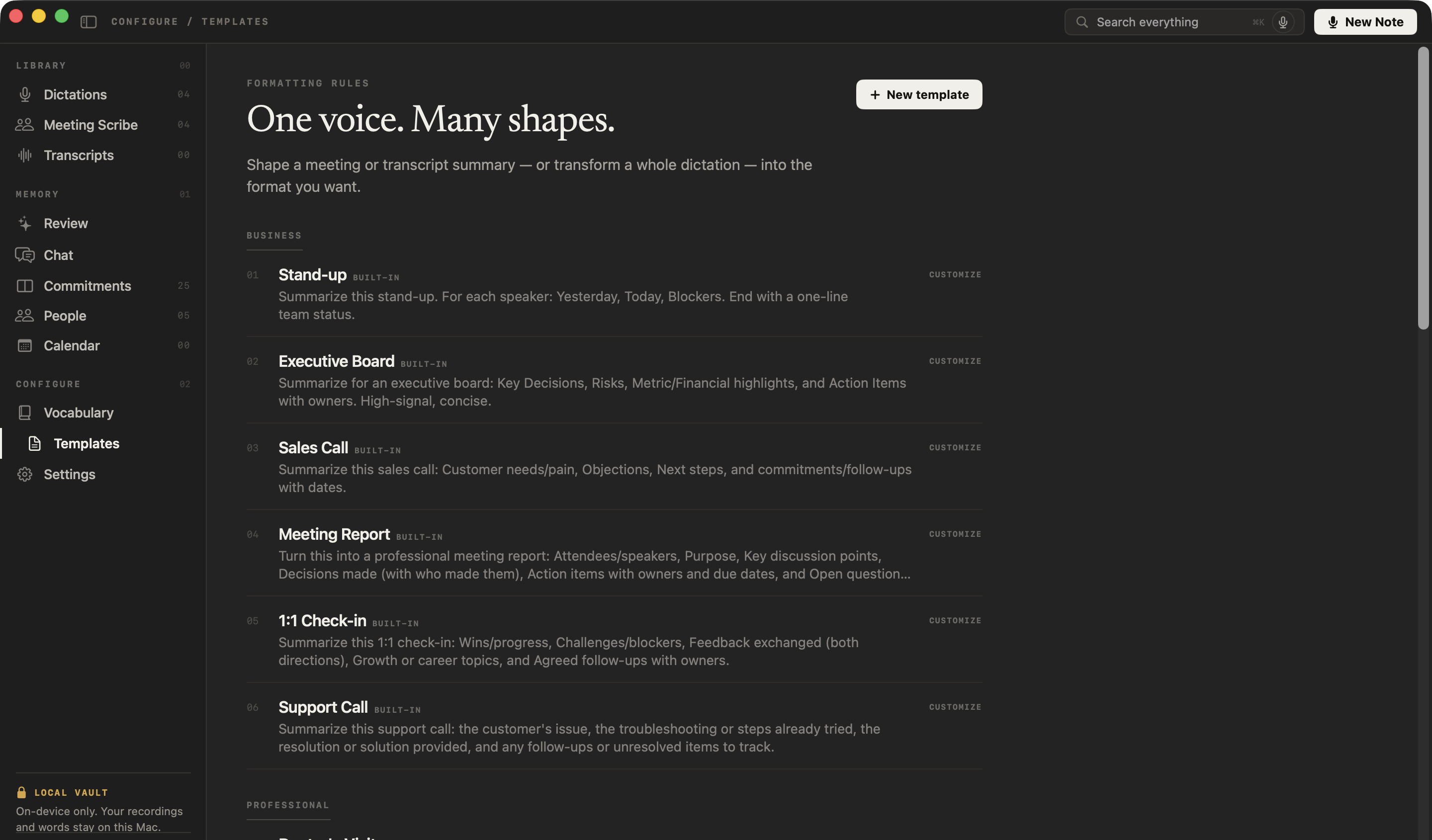
What does NoteOwl’s Sales Call template ask for?
Exactly the four sections above. This is the template’s instruction to NoteOwl, word for word; you can change it, or write your own, in NoteOwl’s Templates screen (see how to customize a template).
“Summarize this sales call: Customer needs/pain, Objections, Next steps, and commitments/follow-ups with dates.”
FAQ
Questions about sales call notes
What is a discovery call?
A discovery call is an early sales conversation where you learn what the customer needs, why now, what could get in the way and how they decide, before you propose anything. NoteOwl’s Sales Call template writes discovery call notes in those sections: needs, objections, next steps and follow-ups.
How do you write down objections from a sales call?
Write each objection in the customer’s words, with the reason behind it, how you answered and whether it is settled. Budget, scope, timing and risk are the usual ones. NoteOwl’s Sales Call template keeps objections in their own section, so none gets lost among the next steps.
Should you take notes during a sales call?
Keep typing to a minimum, so you can listen and ask follow-up questions; note only the numbers and names you will need. If you record the call in NoteOwl, it writes the notes afterwards from the recording, so you can stay in the conversation.
Can I paste NoteOwl’s sales call notes into my CRM?
Yes, by copy and paste: NoteOwl doesn’t connect to a CRM. Copy the notes as Markdown and paste them into the deal or contact record, or use Export to save them as Markdown or PDF. The template on this page is plain text, so it pastes anywhere too.
Can NoteOwl write sales call notes automatically?
Yes. Record the call in NoteOwl, then choose Summarize as → Sales Call, and it writes the customer’s needs, objections, next steps and follow-ups with dates from the recording, on your Mac with on-device AI models. Meeting notes and templates are part of NoteOwl Pro: $79 once for one Mac, with a 7-day free trial in the app.
Does a bot join the sales call?
No. NoteOwl records your microphone and your Mac’s audio on your Mac, so nothing joins the call and nothing is uploaded. Tell the customer you are taking notes with NoteOwl before you start: it is the right thing to do and, in many places, the law.
Can I change the sections of NoteOwl’s Sales Call template?
Yes. In NoteOwl’s Templates screen you can customize the Sales Call template — for example, to add budget, decision-makers and timeline — or write your own, then summarize any recorded call again in the new format.
Related
- All 22 meeting notes templates Stand-ups, 1:1s, interviews, board meetings and more, with their sections.
- AI note taker for sales Discovery calls and demos with no bot in the call, and every promise tracked.
- Meeting minutes template The same call, written up as formal minutes.
- AI meeting summaries The decisions and action items NoteOwl writes when a meeting ends.
Keep exploring
More templates
- Interview notes templateAn interview notes template to copy, what each section holds, an example, and how NoteOwl writes interview notes
- User interview templateA user interview template to copy, what each section holds, an example, and how NoteOwl writes research notes from a user interview
- Podcast show notes templateA podcast show notes template to copy, what each section holds, an example, and how NoteOwl writes show notes from an episode
- Brainstorming templateA brainstorming template to copy, what each section holds, an example, and how NoteOwl writes brainstorm notes
Get your sales call notes written on your Mac
Free to download. Runs entirely on your Mac.
macOS 26 or later · Apple Silicon (M1 or newer) · 16 GB memory minimum, 24 GB recommended
About NoteOwl
NoteOwl is private AI meeting notes and memory for the Mac. It captures meetings without a bot joining the call, labels every speaker, writes summaries and action items, and builds a memory of every conversation that you can chat with — fully offline, because the speech recognition and the AI run on the Mac itself. Dictation into any app is free; Pro is a one-time purchase.
NoteOwl pricing: what’s free and what Pro adds
Last updated