For consultants
AI meeting notes for consultants
NoteOwl is an AI note taker for consultants: it takes notes on client calls, discovery interviews and online workshops on your Mac, with no bot joining the call, and keeps every promise — yours and the client’s — on one board, sorted by what’s due.
Ask a whole engagement’s meetings a question and see the exact passage that answers it, even offline. Between calls, dictation is free: tap fn in any app, talk, and your words type at the cursor.
Read the transcript
Quick question. What did you actually promise in your last meeting? …Yeah. Me neither.
This is NoteOwl. It’s a Mac app that takes notes on your calls. And no, there’s no bot joining your meeting.
The second the call ends, it’s written everything up. What got decided. Who’s doing what. And by when.
All those promises end up in one list. What you owe people… and what they owe you.
And here’s the part that got me. You can just ask it. “What changed on the Ferncastle pilot?” And it shows you exactly where that came from.
The whole thing runs on your Mac. Nothing gets uploaded. It even works with the Wi-Fi off.
NoteOwl. It’s free to download. Try it on your next call.
How do consultants use an AI note taker?
For the conversations a deliverable rests on: client calls, discovery and stakeholder interviews, workshops and steering meetings. NoteOwl takes the notes without a bot in the call, keeps who-owes-what, and lets you ask any past meeting a question.
Before the call
Walk in knowing what’s open
NoteOwl reads your Mac’s Calendar and builds a prep page for each meeting: who’s coming, your notes, and the commitments still open with them.
During the call
Stay with the client
No bot joins. Type what matters in the notes box and it feeds the summary; joined late? Catch up tells you what you missed — only you see it.
After the call
Notes, owners, dates — done
The summary, decisions and action items with owners are written on your Mac, promises go to your commitments board, and NoteOwl drafts the follow-up email or a report when you ask.
Recordings you already have
Bring in the interviews
Drag in a stakeholder interview or a workshop recording — m4a, mp3, wav, mp4 and more — and get a speaker-labelled transcript, a summary and action items.
Can you dictate client emails instead of typing?
Yes, and it’s free. Tap fn in Mail, Slack, Notion — anywhere you can type — and talk. NoteOwl types your words at the cursor, one tap on Polish rewrites them in the tone set for that app, and it’s unlimited. How free dictation works on your Mac
Casual in chat
Hey Leo, quick update from the Ferncastle call. They cut the pilot budget to $90,000, so let’s focus only on the camera auto-capture flow. Can you prioritize those wireframes for Thursday? Thanks.
- To
- Daniel Okafor
- Subject
- Next steps
Hi Daniel,
Thanks for the update today. Just confirming next steps: I will send the revised pilot proposal at $90,000 by Wednesday, the 30th. It will cover an eight-week pilot focused on camera auto-capture for personal accounts only.
I look forward to hearing who your engineering lead will be by Monday. Thanks again.
12export const pilot = {13 budgetCap: 90_000,14 weeks: 8,15 accounts: 'personal',16};17
- Rewrite by voice — select text, press ⌥X and say how to change itPro
- Voice notes — recorded with New Dictation, audio and text kept together
- Custom vocabulary — client names and acronyms spelled your wayPro
- 34 languages — detected automatically
What does NoteOwl write after a client meeting?
The decisions, and who does what by when. This is NoteOwl’s real summary of a kickoff call between Maya Rao of Northlight Studio and her client, Daniel Okafor and Priya Shah of Ferncastle Bank.
Summary · Discovery Phase Scope And Timeline
Key decisions
- Scope: The discovery phase will focus exclusively on onboarding and verification.
- Duration: The discovery phase will last six weeks.
- Success Metric: The primary goal is to increase onboarding completion from the current 11% to 20% during the pilot phase.
- Budget: The discovery phase has a fixed fee of $48,000.
- Payment Schedule: Payments will be split into two installments: one upon kickoff and one upon presentation of findings.
Action items
- Maya RaoSend the written proposal (including timeline, fee schedule, and interview plan) by Friday, September 11th, copying Hannah (Procurement Lead).
- Daniel OkaforShare access to product analytics by Tuesday, September 15th, pending security team clearance.
- Priya ShahProvide a list of 40 customers with consent flags for research by Monday, September 14th.
Read the transcript
The call’s over. Now comes the follow-up email.
Open the meeting in NoteOwl, and choose Ask.
Tell it what you need.
It drafts the email on your Mac, from what was actually said: the decisions, and who owes what.
Copy it, and send it yourself.
NoteOwl. Free to download. Try it on your next call.
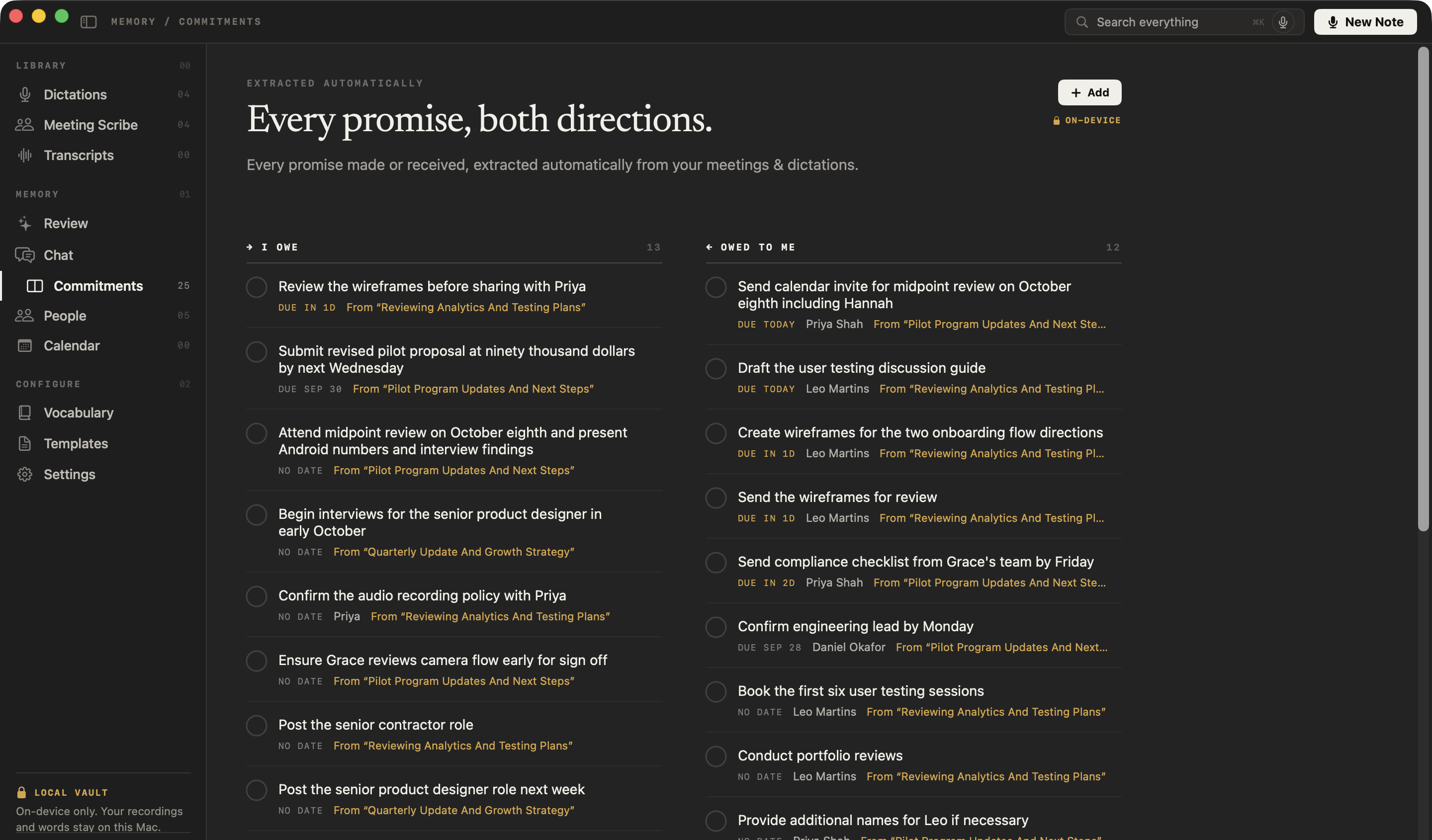
How do you keep track of what you promised a client?
You don’t have to. NoteOwl pulls every promise out of your client calls — yours and theirs — onto one board of what you owe and what you’re owed, sorted by what’s due and linked to the meeting it came from.
You owe
Submit revised pilot proposal at ninety thousand dollars by next Wednesday
From “Pilot Program Updates And Next Steps”
You owe
Attend midpoint review on October eighth and present Android numbers and interview findings
From “Pilot Program Updates And Next Steps”
Owed to you · Priya Shah
Send compliance checklist from Grace’s team by Friday
From “Pilot Program Updates And Next Steps”
Owed to you · Daniel Okafor
Confirm engineering lead by Monday
From “Pilot Program Updates And Next Steps”
Can you ask questions across a whole client engagement?
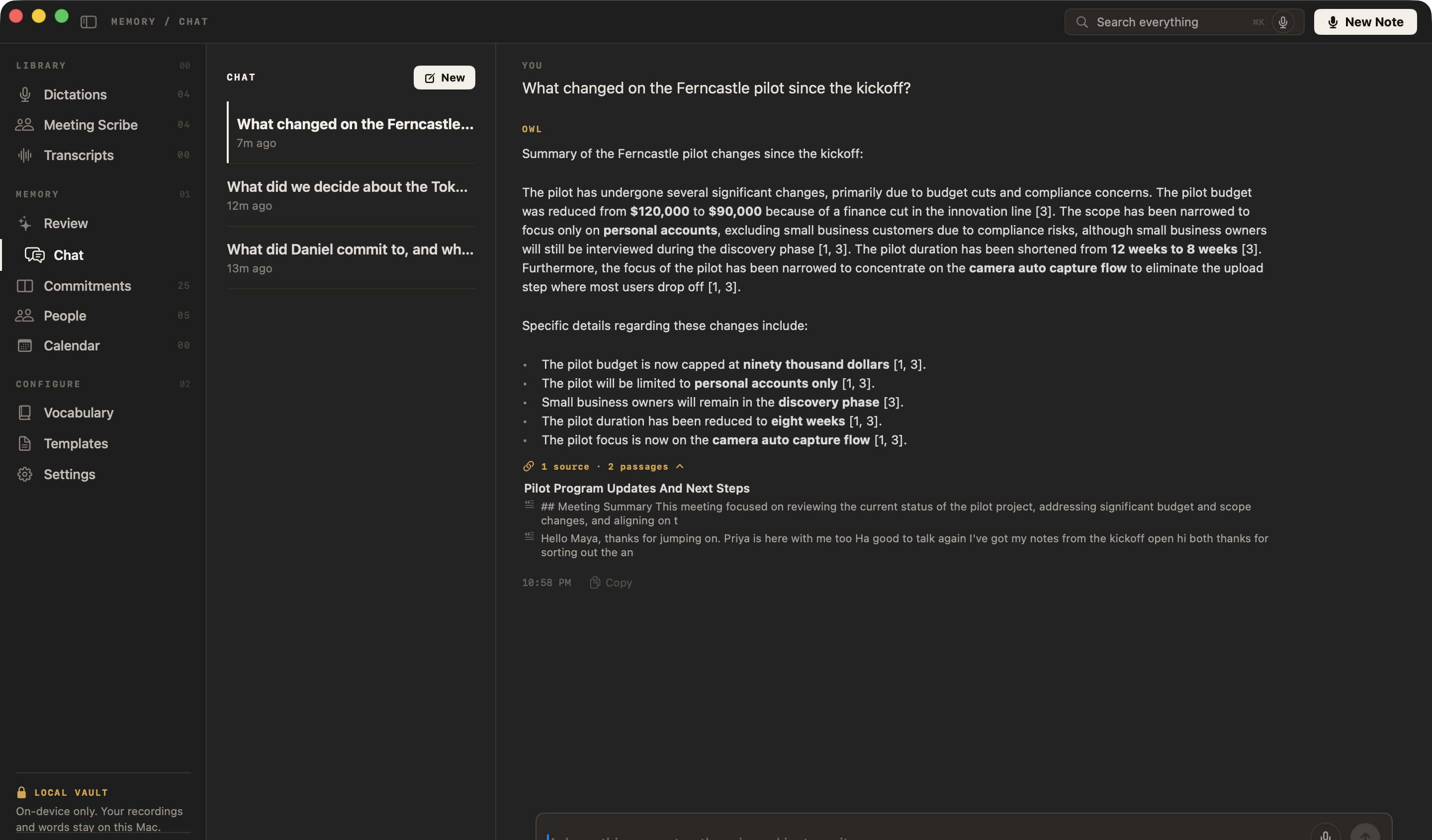
Yes — in plain English, even offline. NoteOwl’s chat with your meetings answers only from what you’ve recorded and imported, cites the passages it used, and says so when nothing matches instead of guessing.
You asked
What changed on the Ferncastle pilot since the kickoff?
NoteOwl
The pilot has undergone several significant changes, primarily due to budget cuts and compliance concerns. The pilot budget was reduced from $120,000 to $90,000 because of a finance cut in the innovation line [3].
How do you prepare for the next meeting with a stakeholder?
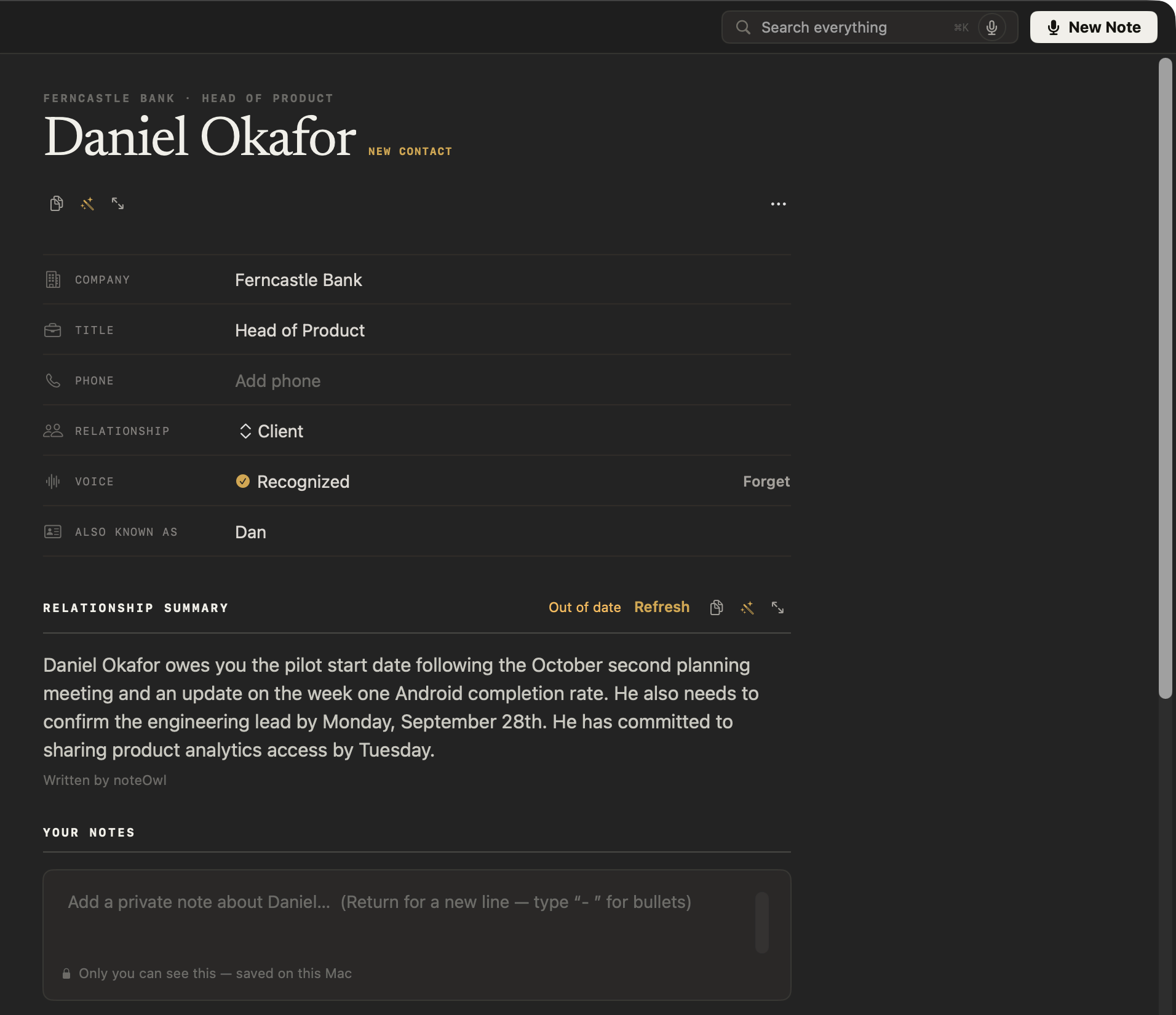
Open their profile. NoteOwl keeps a profile for everyone you meet: who they are, a summary of your relationship written from your meetings, what’s still open between you, and every conversation you’ve had.
What else does NoteOwl do for a consultant?
Everything between the calls, with NoteOwl Pro: deliverables drafted, interviews transcribed, a review every morning — all on your Mac, even with Wi-Fi off.
Deliverables drafted from the call
In a meeting, the wand drafts the follow-up email, a status report or anything you describe, from the summary, action items and transcript. Imported recordings get a Create menu with Report and Email draft.
Help mid-meeting
Joined late? Catch up on what you missed, or get questions to ask. Only you see it.
Recall from any app
Between calls, press ⌥Z and ask out loud; the cited answer appears in the notch.
Every speaker labelled
Each line says who said it. Name a teammate once and later meetings know their voice; voice profiles stay on your Mac.
Search everything
Every meeting, note and person, one keystroke away.
Transcribe interviews you already have
Drag in mp3, wav, m4a, aiff, flac, aac or mp4 — one recording at a time — and get a speaker-labelled transcript, a summary and action items, all added to your memory.
A daily review
What’s overdue, what’s due today, and what came in — every morning.
Works with Wi-Fi off
Everything runs on your Mac, so notes, chat and dictation work offline — on a plane or at a client site.
34 languages
Client calls and dictation in 34 languages, detected automatically — Hindi and English in one sentence included.
Which meeting notes templates do consultants use?
NoteOwl writes the summary when the call ends; Summarize as then rewrites it in any of the 22 meeting notes templates. These six fit most of a consultant’s week.
| Meeting | Template | What it writes |
|---|---|---|
| Client calls and advisory sessions | Consultation | Situation & goals · Advice · Options · Next steps |
| Stakeholder and discovery interviews | Research | Questions · Findings · Evidence · Open questions |
| Expert calls | Interview | Background · Questions & answers · Strengths · Concerns · Verdict |
| Workshops | Brainstorm | Ideas by theme · Standouts · Next experiments |
| Steering and status meetings | Project Log | Progress · Decisions · Blockers · Next milestones |
| Executive readouts | Executive Board | Key decisions · Risks · Financial highlights · Action items |
Is an AI note taker safe for confidential client meetings?
With NoteOwl, nothing you record leaves your Mac: transcription, summaries and chat run on your Mac with on-device AI models, and recordings are never uploaded. Because no bot joins, tell the people you meet that you’re taking notes.
| When NoteOwl connects | What it sends |
|---|---|
| The one-time model download | Model files are downloaded to your Mac; nothing of yours is sent |
| Checking for app updates | No personal data or content |
| Starting the trial or activating Pro | Your email address and an identifier for this Mac |
| A licence check, at most once a week (Pro) | Only the certificate identifier |
Recordings, transcripts, notes and memory are never sent. The details are in NoteOwl’s privacy policy.
FAQ
Questions consultants ask about NoteOwl
Can NoteOwl take notes on client calls in Zoom, Teams or Google Meet?
Yes. NoteOwl records your microphone and your Mac’s audio, so it takes notes on client calls in Zoom, Microsoft Teams, Google Meet, Webex, FaceTime or Slack huddles with no bot joining. Tell the people you meet that you are taking notes.
Can NoteOwl transcribe stakeholder interviews I have already recorded?
Yes. Drag the recording into NoteOwl — mp3, wav, m4a, aiff, flac, aac or mp4, one at a time — and NoteOwl transcribes it on your Mac, labels the speakers, writes a summary and action items, and adds it to your memory. Importing recordings is part of NoteOwl Pro.
Can NoteOwl track what I promised a client?
Yes. NoteOwl pulls commitments out of every client meeting — who owes what to whom, and by when — and keeps them on one board of what you owe and what you are owed, each linked to the meeting it came from.
Can NoteOwl write a consultation summary or formal meeting minutes?
Yes. NoteOwl writes a summary when the call ends, and Summarize as rewrites it in any of 22 templates: Consultation for the client’s situation and goals, advice, options and next steps, or Meeting Report for formal minutes with attendees, decisions and action items.
Does NoteOwl send client meetings to the cloud?
No. NoteOwl transcribes, summarizes and answers questions on your Mac with on-device AI models, so client meetings are never uploaded, and it works offline after the one-time model download.
Can I dictate client emails with NoteOwl for free?
Yes. Tap fn in any app, talk, and tap fn again: NoteOwl types your words at the cursor, and one tap on Polish rewrites them in the tone set for that app — professional in Mail, casual in Slack. Dictation is free, unlimited and works offline.
How much does NoteOwl cost for a consultant?
Meeting notes, imports, commitments and chat are part of NoteOwl Pro: $79 once for one Mac, no subscription, with a 7-day free trial in the app and no card needed. Buy it inside the app (the … menu next to your name → License…). Dictation into any app is free forever.
Related
- AI meeting summaries The summary, decisions and action items, written on your Mac when the call ends.
- Meeting minutes template Formal minutes for a steering meeting, and how NoteOwl writes them.
- AI note taker for founders Customer calls, investor updates and 1:1s, with every promise tracked.
- NoteOwl Pro, $79 once No subscription; one Mac; try it free first.
Keep exploring
Made for this work
- Consultation notes templateA consultation notes template to copy, what each section holds, an example, and how NoteOwl writes it
- Follow-up emailAsk NoteOwl to draft the follow-up email from a meeting: decisions, owners and dates, written on your Mac
- AI meeting summariesAI meeting summaries, decisions and action items written on your Mac from any template, when the call ends
- People profilesA personal CRM that fills itself from your meetings: who they are, what is open between you, every conversation
- Client onboarding call agendaA client onboarding call agenda builder: the client’s goals, first deliverables, what you need from them, contacts, ways of working and next steps, timed
- Project kickoff meeting agendaA kickoff meeting agenda builder: the eight usual items timed from the start, with the goal, scope, milestones, roles and risks the kickoff agrees
Other roles
- AI note taker for salesDiscovery calls and demos with no bot in the call: next steps written, promises to prospects tracked, follow-ups drafted, free dictation into your CRM
- AI note taker for recruitersCandidate screens and hiring-manager calls with no bot: interview notes from the Interview template, a profile per candidate, free dictation for scorecards
- AI note taker for researchersUser interviews transcribed speaker by speaker, past recordings imported, searchable and askable across a study; nothing uploaded
Never lose a promise from a client call
Free to download. Runs entirely on your Mac.
macOS 26 or later · Apple Silicon (M1 or newer) · 16 GB memory minimum, 24 GB recommended
About NoteOwl
NoteOwl is private AI meeting notes and memory for the Mac. It captures meetings without a bot joining the call, labels every speaker, writes summaries and action items, and builds a memory of every conversation that you can chat with — fully offline, because the speech recognition and the AI run on the Mac itself. Dictation into any app is free; Pro is a one-time purchase.
NoteOwl pricing: what’s free and what Pro adds
Last updated