NoteOwl vs Plaud
A Plaud alternative for your Mac, with no device to buy
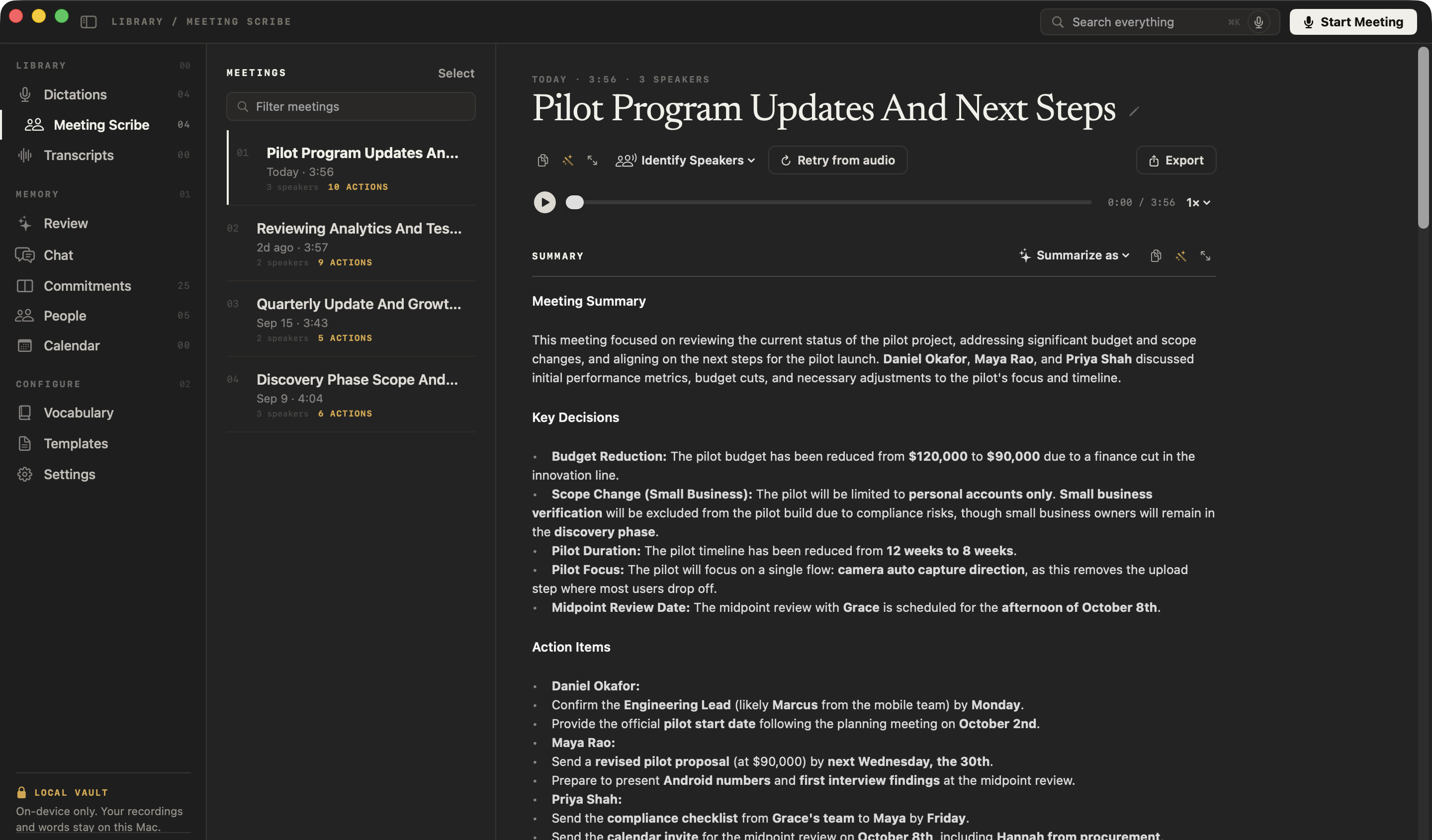
NoteOwl is a Plaud alternative for Mac with no device to buy: your Mac records your calls with no bot, and NoteOwl transcribes, summarizes and answers questions about them on the Mac itself.
Recordings you already have can be imported and transcribed too. Nothing is uploaded, everything works the same with or without internet, there are no minute caps, and you pay once — with free dictation into every app on top.
Read the transcript
Quick question. What did you actually promise in your last meeting? …Yeah. Me neither.
This is NoteOwl. It’s a Mac app that takes notes on your calls. And no, there’s no bot joining your meeting.
The second the call ends, it’s written everything up. What got decided. Who’s doing what. And by when.
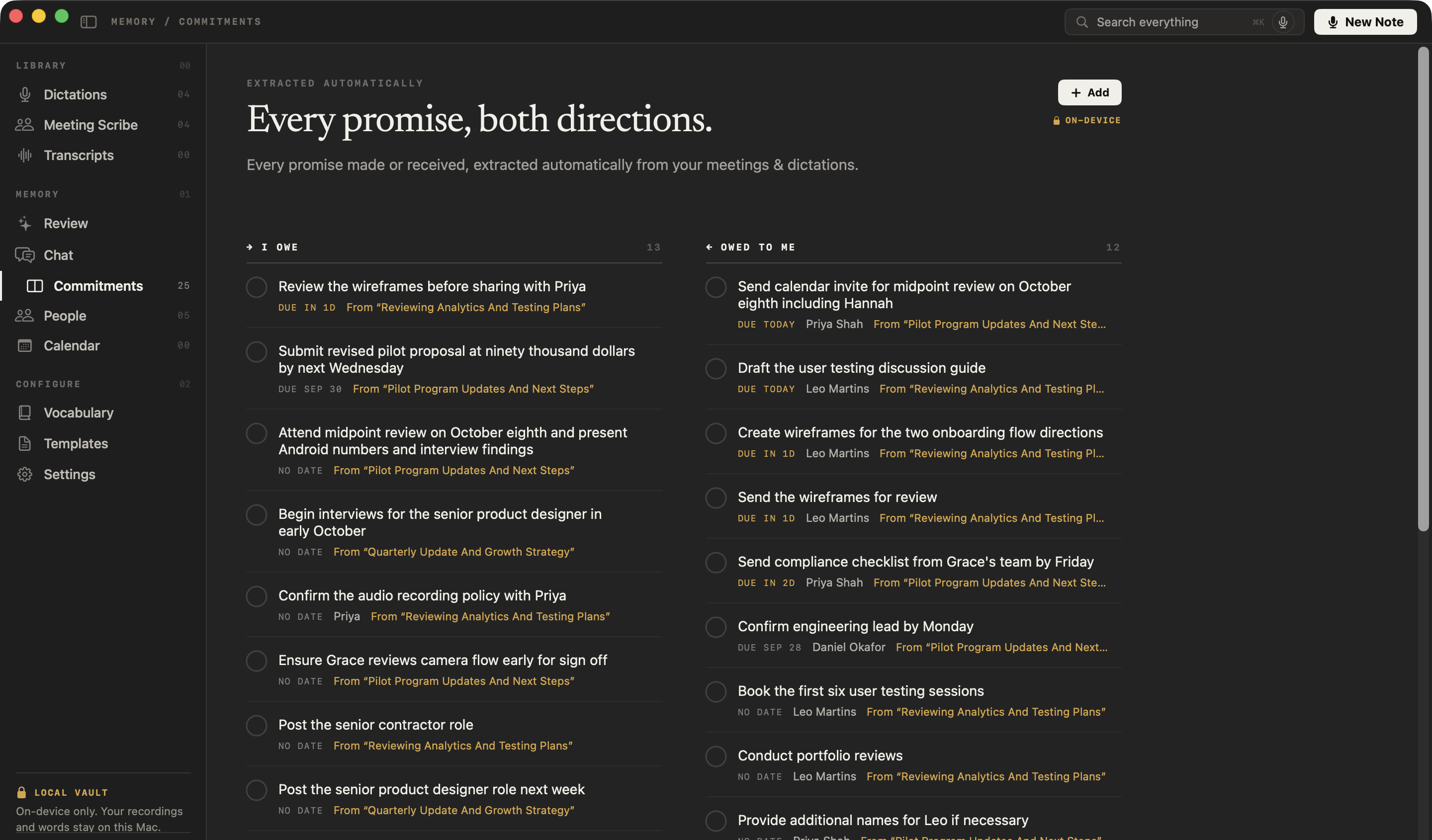
All those promises end up in one list. What you owe people… and what they owe you.
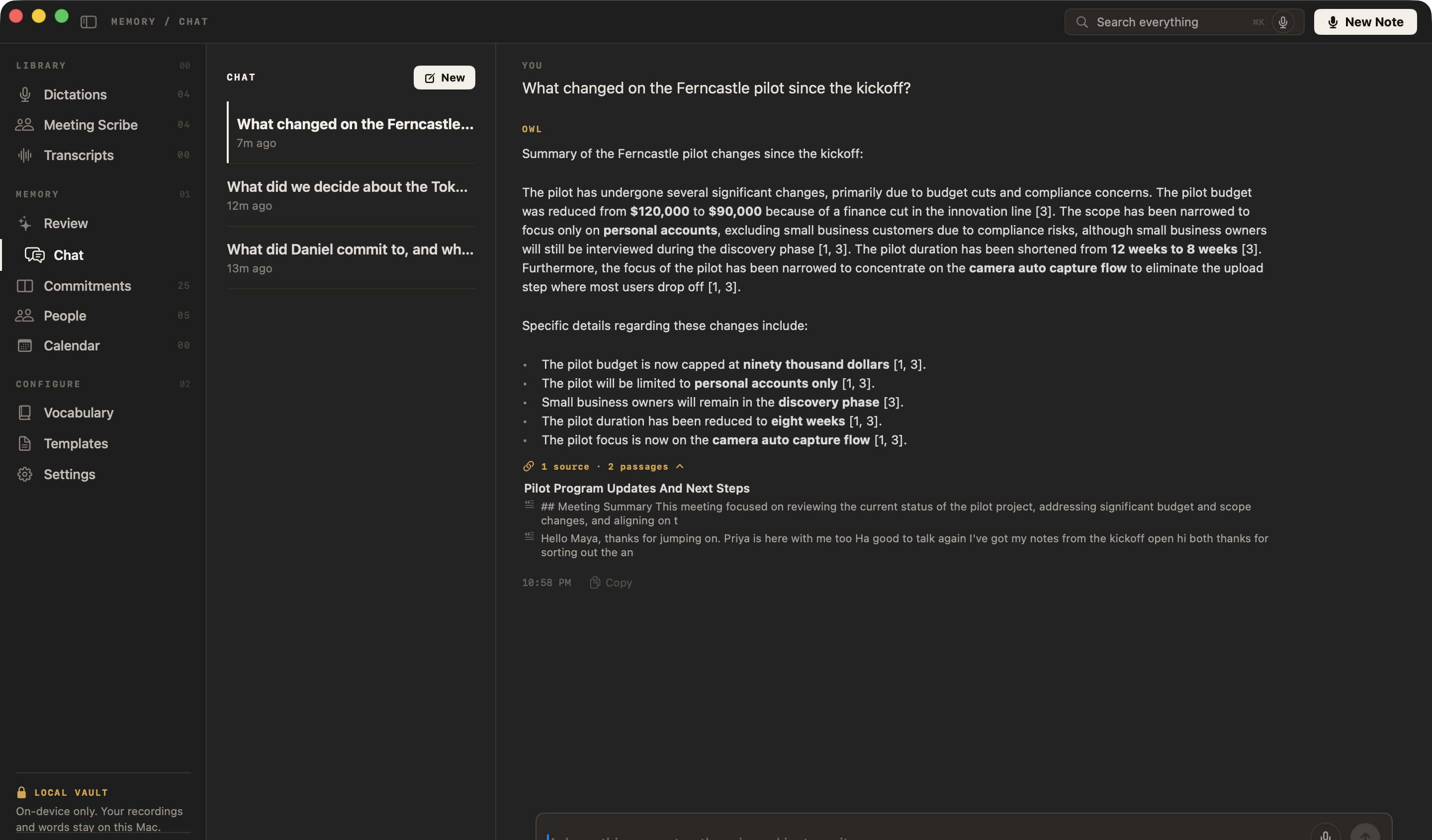
And here’s the part that got me. You can just ask it. “What changed on the Ferncastle pilot?” And it shows you exactly where that came from.
The whole thing runs on your Mac. Nothing gets uploaded. It even works with the Wi-Fi off.
NoteOwl. It’s free to download. Try it on your next call.
Why choose NoteOwl over Plaud?
Because there is no device to buy: your Mac records your calls, NoteOwl transcribes and summarizes them on the Mac, online or offline, and you pay once. On top of that you get free dictation in every app, voices recognised in any call, and every promise tracked.
The same online or offline
Transcripts, summaries and chat all work with Wi-Fi off, after the one-time model download. Plaud says an internet connection is typically required to transcribe and summarize.[15]
Your recordings stay on your Mac
Recording, transcription, summaries and chat all run on your Mac with on-device AI models, and nothing is uploaded. Plaud says: “All data is transferred to the cloud for processing.”[7]
Voices recognised, on your Mac
Speakers are separated in any call app. Name a voice once and it’s recognised in every meeting after; the voice profile stays on your Mac.
No minute caps
NoteOwl Pro transcribes meetings of any length and as many recordings as you like. Plaud Pro includes 1,200 transcription minutes a month, and unused minutes don’t carry over.[5]
Free dictation in every app
Tap fn and talk in Mail, Slack, Notion or your code editor. Your words type at the cursor as you talk, and one tap polishes them in the right tone for each app — free and unlimited.
Every promise, and everyone you meet
A board of what you owe and what you’re owed, a profile for everyone you meet, and prep pages from your Mac’s Calendar — Apple Calendar included.
What is Plaud, and how is NoteOwl different?
- What you need
- NoteOwlNoteOwl on your Mac; no device to buy
- PlaudA Plaud recorder: NotePin or Note $159, NotePin S $179, Note Pro $189[1,2,3,4]
- Recording calls on your computer
- NoteOwlRecords your microphone and your Mac’s audio in any call app, with no device and no bot
- PlaudPlaud Desktop records meetings on Mac or Windows without a bot, but needs a Plaud device bound to your account[12,13]
- Where transcription and AI run
- NoteOwlOn your Mac, with on-device AI models
- PlaudIn the cloud: “All data is transferred to the cloud for processing”, with third-party AI providers (OpenAI, Google and Microsoft)[7,8]
- Where recordings are stored
- NoteOwlA folder on your Mac; never uploaded
- PlaudOn the recorder until they move to the Plaud app on your phone; on Plaud’s servers after transcription only if Private Cloud Sync is enabled in the Plaud app[9,10]
- Training on your data
- NoteOwlNothing is uploaded; the app has no analytics or telemetry
- PlaudOff by default; only with your explicit opt-in[7]
- Works offline
- NoteOwlEverything, after the one-time model download
- PlaudThe recorder records with no connection; an internet connection is typically required for syncing, transcription and summaries[14,15]
- Price
- NoteOwl$79 once for one Mac; no subscription, no device
- PlaudA recorder, $159–$189 once, plus an AI plan: Starter free (300 minutes a month); Pro $99.99 a year or $17.99 a month; Unlimited $239.99 a year or $29.99 a month[1,4,5]
- Transcription limits
- NoteOwlNone: no minute limits, and no meeting length limit
- PlaudStarter: 300 minutes a month; Pro: 1,200; unused minutes don’t carry over[5,6]
- Speaker names
- NoteOwlSpeakers separated in any call app; name a voice once and it’s recognised in later meetings; voice profiles stay on your Mac
- PlaudLabelled per recording by default; optional auto speaker labeling recognises voices you’ve labelled in later recordings[7,17]
- Import recordings
- NoteOwlMP3, WAV, M4A, AIFF, FLAC, AAC and MP4 files
- PlaudIn Plaud Web: MP3, MP4, WAV, OGG and other formats, up to 500 MB a file[18]
- Chat with your recordings
- NoteOwlAnswers from your own meetings and notes, citing the passage; works offline
- PlaudAsk Plaud answers across your library of transcripts and summaries, with references to the recordings[19]
- Dictation into other apps
- NoteOwlYes, free and unlimited; one tap polishes it in the right tone for each app
- PlaudNot listed in Plaud’s Help Center[21]
- Getting notes out
- NoteOwlCopy any note into any app, export it as Markdown, PDF, text or SRT, or export everything as plain files
- PlaudTranscripts as TXT, SRT, DOCX or PDF; summaries as TXT, Markdown, DOCX or PDF; audio as MP3[20]
- Devices
- NoteOwlMac
- PlaudPlaud recorders, iOS and Android apps, Plaud Web, and Plaud Desktop for Mac and Windows[11]
| NoteOwl | Plaud | |
|---|---|---|
| What you need | NoteOwl on your Mac; no device to buy | A Plaud recorder: NotePin or Note $159, NotePin S $179, Note Pro $189[1,2,3,4] |
| Recording calls on your computer | Records your microphone and your Mac’s audio in any call app, with no device and no bot | Plaud Desktop records meetings on Mac or Windows without a bot, but needs a Plaud device bound to your account[12,13] |
| Where transcription and AI run | On your Mac, with on-device AI models | In the cloud: “All data is transferred to the cloud for processing”, with third-party AI providers (OpenAI, Google and Microsoft)[7,8] |
| Where recordings are stored | A folder on your Mac; never uploaded | On the recorder until they move to the Plaud app on your phone; on Plaud’s servers after transcription only if Private Cloud Sync is enabled in the Plaud app[9,10] |
| Training on your data | Nothing is uploaded; the app has no analytics or telemetry | Off by default; only with your explicit opt-in[7] |
| Works offline | Everything, after the one-time model download | The recorder records with no connection; an internet connection is typically required for syncing, transcription and summaries[14,15] |
| Price | $79 once for one Mac; no subscription, no device | A recorder, $159–$189 once, plus an AI plan: Starter free (300 minutes a month); Pro $99.99 a year or $17.99 a month; Unlimited $239.99 a year or $29.99 a month[1,4,5] |
| Transcription limits | None: no minute limits, and no meeting length limit | Starter: 300 minutes a month; Pro: 1,200; unused minutes don’t carry over[5,6] |
| Speaker names | Speakers separated in any call app; name a voice once and it’s recognised in later meetings; voice profiles stay on your Mac | Labelled per recording by default; optional auto speaker labeling recognises voices you’ve labelled in later recordings[7,17] |
| Import recordings | MP3, WAV, M4A, AIFF, FLAC, AAC and MP4 files | In Plaud Web: MP3, MP4, WAV, OGG and other formats, up to 500 MB a file[18] |
| Chat with your recordings | Answers from your own meetings and notes, citing the passage; works offline | Ask Plaud answers across your library of transcripts and summaries, with references to the recordings[19] |
| Dictation into other apps | Yes, free and unlimited; one tap polishes it in the right tone for each app | Not listed in Plaud’s Help Center[21] |
| Getting notes out | Copy any note into any app, export it as Markdown, PDF, text or SRT, or export everything as plain files | Transcripts as TXT, SRT, DOCX or PDF; summaries as TXT, Markdown, DOCX or PDF; audio as MP3[20] |
| Devices | Mac | Plaud recorders, iOS and Android apps, Plaud Web, and Plaud Desktop for Mac and Windows[11] |
| Mac requirements | macOS 26 or later, Apple silicon, 16 GB memory | Not stated; Plaud Desktop comes in Intel and Apple silicon builds and needs a bound Plaud device[11,13] |
Plaud pricing
Is NoteOwl cheaper than Plaud?
Yes, if you already have a Mac that runs NoteOwl. NoteOwl Pro is $79 once, with no device to buy. Plaud’s NotePin and Note recorders cost $159 to $189; with Plaud Pro at $99.99 a year, the first year comes to $258.99 or more.[1,4,5]
And you can start free: dictation and voice notes are free forever, and every Pro feature is free for 7 days in the app, with no card. Plaud’s free Starter plan, 300 transcription minutes a month, needs a Plaud device bound to your account.[5,6]
What one person pays
After 1 year
NoteOwl Pro$79Plaud recorder ($159) + Pro, billed annually$258.99After 2 years
NoteOwl Pro$79Plaud recorder ($159) + Pro, billed annually$358.98After 3 years
NoteOwl Pro$79Plaud recorder ($159) + Pro, billed annually$458.97
Where does Plaud process your recordings?
Plaud, in its own words
“The initial audio capture happens locally on your device, meaning recordings are stored on-device.”[7]
“All data is transferred to the cloud for processing.”[7]
“Plaud uses three AI providers (OpenAI, Google, and Microsoft) for transcription and summarization.”[8]
“An internet connection is typically required for syncing recordings to the app/cloud and for AI processing (e.g., transcription, summaries, mind maps, and other generated outputs).”[15]
NoteOwl
Recording, transcription, speaker detection, summaries, search and chat all run on the Mac. Recordings, transcripts and notes are never uploaded to NoteOwl or anyone else, and the app has no analytics or telemetry.
The only network use: the one-time model download, update checks and, for Pro, signing in and an occasional licence check — none of which sends what you record. Offline AI meeting notes: what NoteOwl sends, and what it never does
When is Plaud the better choice?
Can you use NoteOwl instead of Plaud?
Yes, for calls on your Mac and recordings you already have. NoteOwl records your calls with no device and no bot, and transcribes audio and video files you import. It records only on your Mac, and it doesn’t connect to Plaud devices.
NoteOwl Pro imports MP3, WAV, M4A, AIFF, FLAC, AAC and MP4 files, one at a time, to transcribe recordings on your Mac with speaker labels. Your notes are never locked in: copy any note into any app, or export your meeting notes as Markdown, PDF, text or SRT — or all of your data at once as plain files.
Sources
Last checked . Plaud facts are quoted or summarised from Plaud’s own website, store and Help Center, using US-dollar list prices. Plans and policies change; check them before you decide.
- [1]Plaud, Plaud NotePin
- [2]Plaud, Plaud NotePin S
- [3]Plaud, Plaud Note
- [4]Plaud, Plaud Note Pro
- [5]Plaud, AI plan pricing
- [6]Plaud Help Center, Transcription minutes
- [7]Plaud, Trust
- [8]Plaud Help Center, How your data is used in AI processing
- [9]Plaud Help Center, Security and compliance
- [10]Plaud Help Center, How is my data handled after transcription?
- [11]Plaud, Plaud Desktop
- [12]Plaud Help Center, Download the Plaud Desktop
- [13]Plaud Help Center, Device binding required
- [14]Plaud Help Center, Record through the Plaud App
- [15]Plaud Help Center, Does NotePin S work offline?
- [16]Plaud Help Center, NotePin calls
- [17]Plaud Help Center, Auto speaker labeling
- [18]Plaud Help Center, Audio import
- [19]Plaud Help Center, Ask Across All Files
- [20]Plaud Help Center, Export
- [21]Plaud, Help Center — all 565 articles, searched for dictation
FAQ
Questions about NoteOwl and Plaud
Is there a Plaud alternative with no device to buy?
Yes. NoteOwl is a Mac app: your Mac records your calls with no bot, and NoteOwl transcribes, summarizes and answers questions on the Mac itself, even offline. There is no recorder to buy, and NoteOwl Pro is $79 once; Plaud’s NotePin and Note recorders cost $159 to $189. Prices checked on 27 September 2026.
Is NoteOwl cheaper than Plaud?
For someone who already has a Mac that runs NoteOwl — macOS 26 or later, Apple silicon and 16 GB of memory — yes. NoteOwl Pro is $79 once, with a 7-day free trial and no card. Plaud’s NotePin and Note recorders cost $159 to $189, and Plaud Pro is $99.99 a year or $17.99 a month, so the first year with Pro billed annually comes to $258.99 or more. Prices checked on 27 September 2026.
Does Plaud process recordings in the cloud?
Yes. Plaud records on the device, but says all data is transferred to the cloud for processing, where third-party AI providers transcribe and summarize it. NoteOwl transcribes, summarizes and answers questions on your Mac and uploads nothing.
Does NoteOwl need a Plaud device or another recorder?
No. NoteOwl records your calls in any app through your Mac’s microphone and audio, with no bot, and transcribes audio and video files you import. NoteOwl records only on your Mac and doesn’t connect to Plaud devices.
Does NoteOwl work offline?
Yes. NoteOwl records, transcribes, summarizes and answers questions on your Mac, so every feature works offline after a one-time model download. A Plaud recorder records offline, but Plaud says an internet connection is typically required for transcription and summaries.
Does NoteOwl have a free plan?
Yes. Dictation into any app and voice notes are free forever, with no limit. Meeting notes, chat and the rest of NoteOwl Pro are free for 7 days in the app, with no card; after that Pro is $79 once.
Can I get NoteOwl notes into Notion, Slack or Google Docs?
Yes. Copy any NoteOwl summary, action list or transcript and paste it into any app, or export notes as Markdown, PDF, plain text or SRT subtitles.
Does NoteOwl run on Windows or iPhone?
No. NoteOwl is a Mac app for macOS 26 or later on Apple silicon with 16 GB of memory. Its AI runs on the Mac itself, which is what keeps your meetings off the cloud.
Related
- AI meeting notes without a bot How NoteOwl records any call from your Mac, and what you get when it ends.
- Transcription with speaker identification Who said what, on your Mac: a voice named once is recognised in later meetings.
- An Otter AI alternative for Mac NoteOwl and Otter side by side: no bot, and on your Mac instead of the cloud.
- Pricing: Free vs Pro What is free forever, what Pro adds, and the free trial.
Keep exploring
More comparisons
- NoteOwl vs MacWhisperMacWhisper transcribes files on your Mac; NoteOwl adds built-in on-device AI, meeting memory across every call, recognised voices and tracked commitments
- NoteOwl vs TurboScribeTurboScribe uploads your files to its servers; NoteOwl transcribes on your Mac with nothing uploaded, plus meetings, summaries and memory
How NoteOwl does it
- Audio to textTranscription software for your Mac: drop in an audio or video file and get a speaker-labelled transcript with timestamps, unlimited, with nothing uploaded
- Subtitle generatorTurn a recording into an SRT subtitle file with timecodes and speaker names, on your Mac
- Speaker recognitionTranscripts that say who said what: speakers separated automatically, and a voice named once is recognised in later meetings, on your Mac
- Export your notesExport meetings, dictations and notes as Markdown or PDF, imported transcripts as text or SRT, or everything as plain files; nothing is locked in
Record your next call on the Mac you already have
Free to download. Runs entirely on your Mac.
macOS 26 or later · Apple Silicon (M1 or newer) · 16 GB memory minimum, 24 GB recommended
About NoteOwl
NoteOwl is private AI meeting notes and memory for the Mac. It captures meetings without a bot joining the call, labels every speaker, writes summaries and action items, and builds a memory of every conversation that you can chat with — fully offline, because the speech recognition and the AI run on the Mac itself. Dictation into any app is free; Pro is a one-time purchase.
NoteOwl pricing: what’s free and what Pro adds
Last updated