Follow-up email · Pro
Draft a meeting follow-up email from your notes
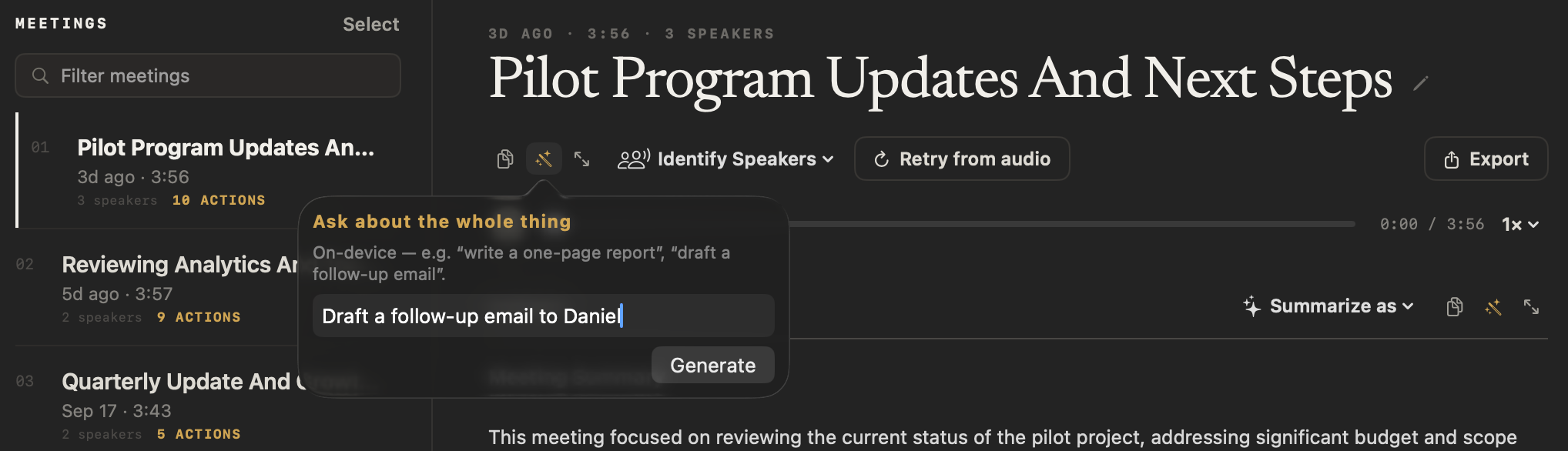
NoteOwl drafts your meeting follow-up email from the meeting itself: open a meeting, click Ask, type “Draft a follow-up email to Daniel” and click Generate. The draft is written from what was decided and who does what by when, ready to copy into your email.
It is written on your Mac by on-device AI models from the summary, the action items and the transcript, and NoteOwl never sends it for you. Meetings and drafts are part of NoteOwl Pro, with a 7-day free trial in the app.
Read the transcript
The call’s over. Now comes the follow-up email.
Open the meeting in NoteOwl, and choose Ask.
Tell it what you need.
It drafts the email on your Mac, from what was actually said: the decisions, and who owes what.
Copy it, and send it yourself.
NoteOwl. Free to download. Try it on your next call.
How do you draft a meeting follow-up email in NoteOwl?
Open the meeting, click Ask beside Copy, type what you want — such as “Draft a follow-up email to Daniel” — and click Generate. NoteOwl writes the draft on your Mac and opens it in the Focus view, ready to copy into your email.
- 1
Open the meeting
In NoteOwl’s Meeting Scribe, choose the meeting from the list.
- 2
Click Ask
Ask is the wand button beside Copy, under the meeting’s title. It opens “Ask about the whole thing”.
- 3
Say what to write
Type an instruction such as “Draft a follow-up email to Daniel”, with anything else you want in it.
- 4
Click Generate
NoteOwl writes the draft on your Mac and opens it in the Focus view. Click Copy, paste it into Mail or your email app, and send it yourself.
What does a follow-up email from NoteOwl look like?
Like this: NoteOwl’s draft for “Draft a follow-up email to Daniel”, from a four-minute meeting about a pilot program. What was decided comes first, then each next step with its owner and its date.
Subject: Following Up: Pilot Program Updates and Next Steps
Hi Daniel,
I'm following up on our recent discussion regarding the pilot program updates. To ensure we stay on track with the revised scope and budget, I wanted to summarize the key action items and timelines we agreed upon.
As discussed, the pilot budget has been reduced to $90,000, and the scope is now limited to personal accounts, focusing specifically on the camera auto capture direction flow for an 8-week duration.
Here is a quick recap of the immediate next steps:
- Engineering Lead Confirmation: Please confirm the Engineering Lead (likely Marcus) by Monday.
- Pilot Start Date: Please provide the official pilot start date following the planning meeting on October 2nd.
- Revised Proposal: I will send the revised pilot proposal at $90,000 by next Wednesday, the 30th.
- Compliance Review: Priya, please send the compliance checklist from Grace's team to me by Friday.
- Midpoint Review: I will ensure the calendar invite for the midpoint review on the afternoon of October 8th is sent, including Hannah from procurement.
I also noted your point regarding the Week One Android completion rate of 7%; I will ensure this data is included in the board update.
Please let me know if I have missed anything or if there are any adjustments needed from my side.
Best regards,
[Your Name]
What does NoteOwl write the draft from?
The whole meeting: its summary, its action items with owners and due dates, and the full transcript with every speaker’s name — plus your instruction. Ask writes a new draft and never changes the meeting’s summary, action items or transcript.
The same Ask takes other instructions too, such as “write a one-page report”.
The summary
What the meeting covered and what was decided.
The action items
Each task with its owner and due date.
The transcript
Every line with the speaker’s name and time, so the draft can use what was actually said.
Your instruction
Who the email is for, and anything else you ask for.
How do you draft a follow-up email from an imported recording?
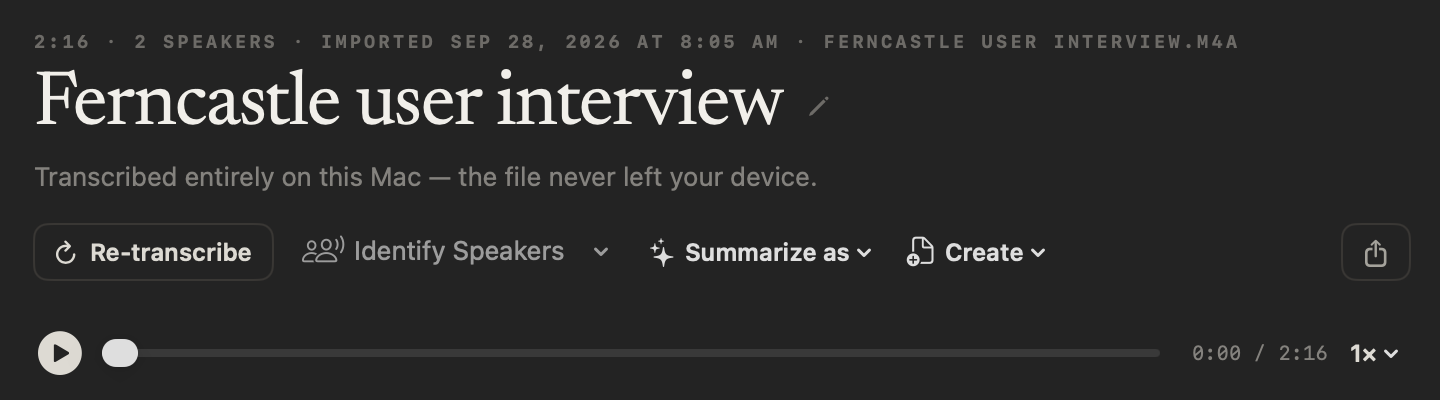
Open the recording in Transcripts, click Create and choose Email draft. NoteOwl writes the email from the transcript on your Mac and opens it in a Share sheet: copy it, or choose Mail to start a new email with it. NoteOwl keeps the draft with the recording.
What should a follow-up email after a meeting include?
A subject that names the meeting, a line of thanks, what was decided, each next step with an owner and a date, and a one-line close. Here is a follow up email template to copy.
Subject: [Meeting name]: decisions and next steps

Hi [Name],

Thanks for your time today. Here is what we agreed and what happens next.

Decisions
- [Decision]
- [Decision]

Next steps
- [Owner]: [task] by [date]
- [Owner]: [task] by [date]

[The next meeting or check-in, with its date, if there is one.]

Let me know if I missed anything.

[Your name]
Send it the same day
While everyone still remembers the meeting, and before the first deadline arrives.
One owner, one date
Every next step names the person doing it and when it is due, so nothing is left to “we”.
Decisions, not discussion
Say what was agreed. The full conversation is in your notes if anyone needs it.
Short enough for a phone
A subject that names the meeting, a few bullets and a one-line close.
Does NoteOwl send the email for you?
No. NoteOwl only writes the draft. You read it, change anything you like, and send it from Mail or your usual email app. NoteOwl never sends email, and your meeting is never uploaded to write it.
On-device — e.g. “write a one-page report”, “draft a follow-up email”.
Is the follow-up email draft free?
No. Drafting from a meeting or an imported recording is part of NoteOwl Pro, along with meetings, summaries and action items. Dictation into any app and voice notes are free and unlimited, forever.
NoteOwl Pro is $79 once for one Mac, with a 7-day free trial in the app and no card.
- Dictation into any app
- FreeUnlimited
- ProUnlimited
- Voice notes
- FreeUnlimited
- ProUnlimited
- Meetings, summaries and action items
- FreeNo
- ProYes
- Follow-up email drafts from a meeting or an imported recording
- FreeNo
- ProYes
| Free | Pro | |
|---|---|---|
| Dictation into any app | Unlimited | Unlimited |
| Voice notes | Unlimited | Unlimited |
| Meetings, summaries and action items | No | Yes |
| Follow-up email drafts from a meeting or an imported recording | No | Yes |
NoteOwl follow-up emails at a glance
The facts, in one table. NoteOwl writes every draft on your Mac with on-device AI models, so it works offline and your meeting never leaves your Mac.
- From a meeting
- Meeting Scribe → Ask → “Draft a follow-up email to …” → Generate
- From an import
- Transcripts → a recording → Create → Email draft
- Written from
- The whole meeting: the summary, the action items and the transcript
- Where it opens
- The Focus view, with Copy; for an import, a Share sheet with Copy Markdown, Mail and more
- Your notes
- Ask writes a new draft and never changes the summary, action items or transcript
- Sending
- You send it yourself; NoteOwl never sends email
- Where it runs
- On your Mac, with on-device AI models; nothing is uploaded
- Plan
- NoteOwl Pro, $79 once for one Mac; 7-day free trial in the app
- Requirements
- macOS 26 or later, Apple Silicon (M1 or newer), 16 GB memory minimum, 24 GB recommended
What else does NoteOwl do?
The follow-up is where a meeting turns into work. NoteOwl is private AI meeting notes and memory for Mac: it records meetings without a bot, labels every speaker, writes summaries and action items, and lets you chat with everything you’ve recorded.
Action items that stay tracked
The next steps in your email are already action items in NoteOwl, each with an owner and a due date, and they become commitments you can follow across meetings.
Free speech to text for Mac
Rather write the email yourself? Tap fn in Mail, talk and tap again: the words type at your cursor, and one tap polishes them in the right tone for that app. Free and unlimited.
FAQ
Questions about follow-up emails
How do I write a follow-up email after a meeting with NoteOwl?
Open the meeting in NoteOwl’s Meeting Scribe, click Ask beside Copy, type an instruction such as “Draft a follow-up email to Daniel” and click Generate. NoteOwl writes the draft on your Mac from the summary, the action items and the transcript, and opens it for you to copy.
What should a meeting follow-up email include?
A meeting follow-up email should include a subject that names the meeting, a short thank-you, what was decided, the next steps with an owner and a date for each, and a one-line close. Send it the same day, while the meeting is fresh.
Does NoteOwl send the follow-up email for me?
No. NoteOwl writes the draft and you send it: copy it into Mail or your email app, change anything you like, and send it yourself. NoteOwl never sends email and never uploads your meetings.
Does drafting an email change my meeting notes?
No. NoteOwl’s Ask writes a new draft from the whole meeting and never overwrites the summary, the action items or the transcript, so the meeting stays exactly as it was.
Can I draft a follow-up email for a recording made somewhere else?
Yes. Import the recording into NoteOwl’s Transcripts, which transcribes it on your Mac, then choose Create → Email draft. The draft opens in a Share sheet, where Mail starts a new email with it. Importing recordings is part of NoteOwl Pro.
Can NoteOwl write other things from a meeting?
Yes. NoteOwl’s Ask takes any instruction over the whole meeting, such as “write a one-page report”. For an imported recording, the Create menu also writes a report, a blog post or a social post, or follows your own instruction with Custom….
Is the follow-up email draft free in NoteOwl?
No. Meetings, imported recordings and the drafts NoteOwl writes from them are part of NoteOwl Pro, a one-time $79 purchase for one Mac, with a 7-day free trial in the app and no card. Dictation into any app and voice notes are free.
Related
- AI meeting summaries The summary and decisions the draft is written from.
- Action items and commitments Every task with an owner and a due date, tracked across meetings.
- Chat with your meetings Ask any past meeting a question and get an answer with its source.
- Meeting notes templates Every built-in template and the sections it writes.
- Transcribe audio to text Import a recording and get a speaker-labelled transcript on your Mac.
Keep exploring
Related features
- Meeting prepA prep page for every meeting on your calendar: who is coming, your notes, and what your memory holds about them, on your Mac
- AI meeting notes without a botHow NoteOwl records calls from your Mac with no bot joining, and what you get when the call ends
- AI meeting summariesAI meeting summaries, decisions and action items written on your Mac from any template, when the call ends
Who uses it
- AI note taker for foundersCustomer calls, investor updates and 1:1s — commitments tracked, answers cited — plus free dictation into any app
- AI note taker for consultantsClient calls, workshops and interviews with every commitment tracked and answers cited, on your Mac
- AI note taker for salesDiscovery calls and demos with no bot in the call: next steps written, promises to prospects tracked, follow-ups drafted, free dictation into your CRM
Send the follow-up while the meeting is fresh
Free to download. Runs entirely on your Mac.
macOS 26 or later · Apple Silicon (M1 or newer) · 16 GB memory minimum, 24 GB recommended
About NoteOwl
NoteOwl is private AI meeting notes and memory for the Mac. It captures meetings without a bot joining the call, labels every speaker, writes summaries and action items, and builds a memory of every conversation that you can chat with — fully offline, because the speech recognition and the AI run on the Mac itself. Dictation into any app is free; Pro is a one-time purchase.
NoteOwl pricing: what’s free and what Pro adds
Last updated