Templates
Meeting notes templates
Here are the 22 meeting notes templates built into NoteOwl, grouped by kind of meeting, with the sections each one writes.
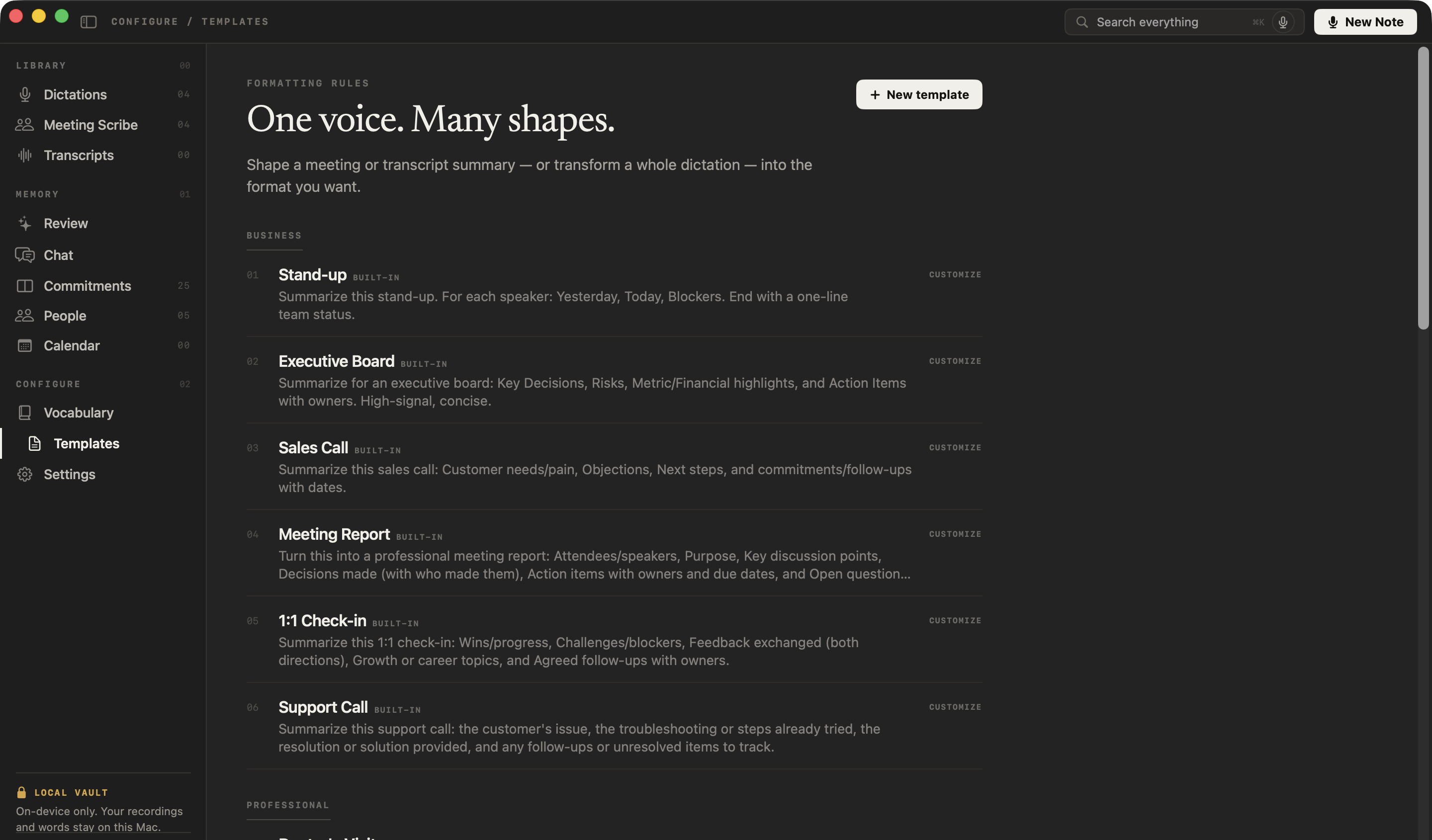
Use the section lists as a checklist in any notes app, or pick a template in NoteOwl and it writes the notes in that shape from the recording, on your Mac.
Meeting Report
The six sections most meetings need:
- 01Attendees
- 02Purpose
- 03Key points
- 04Decisions
- 05Action items
- 06Open questions
What should a meeting notes template include?
Who attended and why you met, the key discussion points, the decisions and who made them, the action items with owners and due dates, and the open questions. That is the Meeting Report template; the other 21 change the sections to fit the meeting.
All 22
Every template in NoteOwl
Business 6
- Yesterday
- Today
- Blockers
- Team status
- Key decisions
- Risks
- Financial highlights
- Action items
- Customer needs
- Objections
- Next steps
- Follow-ups with dates
- Attendees
- Purpose
- Key points
- Decisions
- Action items
- Open questions
- Wins
- Blockers
- Feedback
- Growth
- Follow-ups
- The issue
- Steps tried
- Resolution
- Follow-ups
Professional 4
- Symptoms
- Findings
- Diagnosis
- Treatment
- Follow-up
- The matter
- Key facts
- Advice given
- Risks
- Next steps
- Background
- Questions & answers
- Strengths
- Concerns
- Verdict
- Situation & goals
- Advice
- Options
- Next steps
Academic 3
- Main topics
- Key concepts
- Examples
- For the exam
- Questions
- Findings
- Evidence
- Open questions
- Objectives
- Skills & steps
- Takeaways
- Pitfalls
Productivity 2
- High priority
- Medium
- Low
- Owners & deadlines
- Progress
- Decisions
- Blockers
- Next milestones
General 2
- 3–5 key points
- Bottom line
- Ideas by theme
- Standouts
- Next experiments
Content 2
- Overview
- Segments
- Notable quotes
- Resources
- Main message
- Key points
- Standout moments
- Q&A
Personal 3
- Themes
- Reflections
- Coping strategies
- Intentions
- Reflections
- Mood & highlights
- Gratitude
- Who was there
- Where & when
- What happened
- Why it mattered
Which meeting notes template should I use?
Match the template to the meeting. These eight cover most calls; the full list above has the rest.
| The meeting | Template |
|---|---|
| A general meeting you need minutes for | Meeting Report |
| A daily or weekly team stand-up | Stand-up |
| A board or investor meeting | Executive Board |
| A customer or prospect call | Sales Call |
| A manager and report catching up | 1:1 Check-in |
| A job interview or an interview for a story | Interview |
| A lecture or class | Student Lecture |
| Any meeting, when you just want the gist | Quick Summary |
Which meeting templates can you fill in online?
These 14. Each page has a free builder that runs in your browser: fill in the form and the finished document is ready to copy, download or print, with nothing uploaded.
- Meeting minutes Attendees, discussion, decisions and action items.
- Meeting agenda Items with leads, time boxes and start times.
- Team meeting agenda Standing items, this week’s topics, last week’s actions.
- 1:1 meeting agenda Follow-ups, each person’s topics, feedback and growth.
- Stand-up notes Yesterday, today and blockers, with who can help.
- Retrospective Four formats, votes and action items.
- Kickoff meeting agenda The eight usual items, plus goal, scope and milestones.
- Client onboarding call Goals, requests, contacts and next steps.
- Weekly status report On track or not, milestones, risks and decisions.
- Action item tracker Owners, due dates and status, with a CSV.
- Decision log Numbered decisions, options and reasons.
- Project review Objectives against results, and lessons learned.
- Board meeting agenda The order of business, papers and motions.
- All-hands meeting agenda Company update, team updates and Q&A.
How do you use a template in NoteOwl?
Record the meeting — NoteOwl takes meeting notes without a bot — then choose the template the notes should follow. You can switch templates afterwards, because the recording stays on your Mac.
- 1
Open a meeting
In Meeting Scribe, open a meeting you recorded or an audio or video file you imported.
- 2
Choose Summarize as
Pick one of the 22 templates; NoteOwl rewrites the summary in that shape on your Mac. Switch as often as you like.
- 3
Make it yours
In Templates, customize any built-in template or write your own with the sections you want.
Read the transcript
Your boss wants the minutes. Your team wants a to-do list. Leadership wants the headlines. Same meeting.
NoteOwl already summarized the call. Choose Summarize as, and pick a template.
Meeting Report. Who was there, the purpose, and what got decided.
To-Do List. Every task, and who’s doing it.
Executive Board. The decisions and the risks, for the people who weren’t there.
Twenty-two templates, or write your own. All written on your Mac.
NoteOwl. Free to download.
FAQ
Questions about meeting notes templates
Which NoteOwl template writes meeting minutes?
The Meeting Report template. It writes the attendees, the purpose, the key discussion points, the decisions and who made them, the action items with owners and due dates, and the open questions — the sections of classic meeting minutes.
Can I change the template after the meeting in NoteOwl?
Yes. In NoteOwl you can summarize a recorded meeting again with a different template at any time, because the recording and transcript stay on your Mac.
Can I write my own template in NoteOwl?
Yes. NoteOwl lets you customize any of its 22 built-in templates or write your own, with the sections and instructions you want the summary to follow.
Can I use these meeting notes templates in Word, Google Docs or Notion?
Yes. The section lists on this page work as plain templates in Word, Google Docs, Notion or any editor; NoteOwl fills the same sections in for you from the recording.
Are NoteOwl’s meeting notes templates free?
The templates write meeting summaries, which are part of NoteOwl Pro — a one-time $79 purchase for one Mac, with a 7-day free trial. Reading the templates on this page is free.
Related
- AI meeting notes without a bot Record any call from your Mac, then pick the template for the notes.
- Summaries, decisions and action items What NoteOwl writes when a meeting ends.
- AI note taker for founders Which templates founders use for customer, investor and team calls.
- Meeting minutes template The six sections, a template to copy, and an example.
Let NoteOwl fill in the template for you
Free to download. Runs entirely on your Mac.
macOS 26 or later · Apple Silicon (M1 or newer) · 16 GB memory minimum, 24 GB recommended
About NoteOwl
NoteOwl is private AI meeting notes and memory for the Mac. It captures meetings without a bot joining the call, labels every speaker, writes summaries and action items, and builds a memory of every conversation that you can chat with — fully offline, because the speech recognition and the AI run on the Mac itself. Dictation into any app is free; Pro is a one-time purchase.
NoteOwl pricing: what’s free and what Pro adds
Last updated