Template
1:1 meeting template
This 1-on-1 template has five sections — wins and progress, challenges and blockers, feedback in both directions, growth and career, and agreed follow-ups with owners — and it copies as plain text into Google Docs, Notion, Word or any notes app.
Build the agenda for your next 1:1 below and download it as Word, PDF or Markdown. In NoteOwl, the 1:1 Check-in template writes your one-on-one meeting notes in this format from the recording, on your Mac; an example is below.
1:1 Check-in · 5 sections
- 01Wins/progress
- 02Challenges/blockers
- 03Feedback exchanged (both directions)
- 04Growth or career topics
- 05Agreed follow-ups with owners
1:1 meeting agenda builder
The 30-minute 1:1 agenda is already in the form. Add both names and a start time, last time’s follow-ups, each person’s topics and your talking points, and the agenda appears beside it. Nothing you type leaves your browser.
The 1:1
Agenda · 30 min
Follow-ups from the last 1:1
Topics
Talking points
Preview
The 30-minute 1:1 agenda is in the form already. Add the two names and a start time, then each person’s topics, and the agenda appears here. Or press Fill in an example.
Copy pastes as plain text into email, Slack, Google Docs or Notion. The Word file opens in Word, Pages and Google Docs.
NoteOwl records the 1:1 on your Mac and writes the wins, blockers, feedback and follow-ups with their owners, with no bot in the call.
What should a 1:1 meeting include?
Five things: what went well, what is stuck, feedback in both directions, growth and career, and the follow-ups you agree, each with an owner. Keep it about the person, not a status report — status updates can go in writing before the meeting.
- Wins/progress
- What to writeWhat went well since the last 1:1, and progress on the goals you agreed.
- Challenges/blockers
- What to writeWhat is stuck or slowing the work down, and what help would unblock it.
- Feedback exchanged (both directions)
- What to writeFeedback from the manager to the team member and from the team member to the manager, with a specific example each way.
- Growth or career topics
- What to writeSkills to build, stretch work, new responsibilities, and where the person wants to go next.
- Agreed follow-ups with owners
- What to writeEach follow-up, who owns it and when it is due. Start the next 1:1 by checking them.
| Section | What to write |
|---|---|
| Wins/progress | What went well since the last 1:1, and progress on the goals you agreed. |
| Challenges/blockers | What is stuck or slowing the work down, and what help would unblock it. |
| Feedback exchanged (both directions) | Feedback from the manager to the team member and from the team member to the manager, with a specific example each way. |
| Growth or career topics | Skills to build, stretch work, new responsibilities, and where the person wants to go next. |
| Agreed follow-ups with owners | Each follow-up, who owns it and when it is due. Start the next 1:1 by checking them. |
A 1:1 meeting template to copy
Paste this one-on-one meeting template into Google Docs, Notion, Word or Apple Notes and fill it in together during the 1:1. It is plain text, so it keeps its shape anywhere.
The sections match NoteOwl’s 1:1 Check-in template, so 1:1 notes you write by hand and notes NoteOwl writes read the same.
1:1 MEETING

Date:
Manager:
Team member:
Follow-ups from the last 1:1: done / still open

1. WINS / PROGRESS
- What went well since the last 1:1
- Progress on goals

2. CHALLENGES / BLOCKERS
- What is stuck, and what would help

3. FEEDBACK (BOTH DIRECTIONS)
- Manager to team member:
- Team member to manager:

4. GROWTH / CAREER
- Skills, goals, stretch work, next steps

5. AGREED FOLLOW-UPS
Owner | Follow-up | By when
Name  | What will be done | Date
Name  | What will be done | Date

Next 1:1:
What should be on a 1:1 meeting agenda?
The five sections, in order, with last time’s follow-ups first. Here is a 30-minute 1:1 meeting agenda with a question or two for each item. The team member usually owns the agenda, and either person can add to it.
- Check in
- Time5 min
- Questions to askHow are you doing? Which follow-ups from last time are done, and which are still open?
- Wins and progress
- Time5 min
- Questions to askWhat went well since we last spoke? How are the goals we set moving?
- Challenges and blockers
- Time8 min
- Questions to askWhat is getting in your way? What would help, and who can unblock it?
- Feedback, both ways
- Time5 min
- Questions to askWhat is one thing I could do differently? Here is one thing that went well, and one to change.
- Growth and career
- Time4 min
- Questions to askWhat do you want to learn next? Which work would stretch you?
- Follow-ups
- Time3 min
- Questions to askWhat will each of us do before the next 1:1, and by when?
| Agenda item | Time | Questions to ask |
|---|---|---|
| Check in | 5 min | How are you doing? Which follow-ups from last time are done, and which are still open? |
| Wins and progress | 5 min | What went well since we last spoke? How are the goals we set moving? |
| Challenges and blockers | 8 min | What is getting in your way? What would help, and who can unblock it? |
| Feedback, both ways | 5 min | What is one thing I could do differently? Here is one thing that went well, and one to change. |
| Growth and career | 4 min | What do you want to learn next? Which work would stretch you? |
| Follow-ups | 3 min | What will each of us do before the next 1:1, and by when? |
What do good 1:1 meeting notes look like?
Like this: NoteOwl’s 1:1 Check-in for a four-minute 1:1 between Maya Rao and her designer, Leo Martins. Feedback is recorded in both directions, and every follow-up names its owner.
1:1 check-in — Leo Martins
With: Maya Rao and Leo Martins
Wins / progress
- Leo went through the Ferncastle analytics that Daniel shared. Access came through on Wednesday, a day late, but everything is there.
- The funnel is worse than Daniel described: week-one completion is 11% overall and only 7% on Android. It goes front and centre at the midpoint review.
- Leo has sketched three directions for the onboarding flow: let people explore the app before they verify; split verification into two smaller steps; or use the phone camera to auto-capture the identity document instead of uploading photos.
- The user testing plan is set: 12 interviews, four of them with small business owners, run as 45-minute moderated sessions over Zoom, with a $50 gift card for every participant — $600 in incentives, well within the budget.
- Priya sent over the research list: 40 names.
Challenges / blockers
- Direction one will be hard to get past Grace and the risk team, so Leo is dropping it.
- Priya mentioned that the bank has rules about customer recordings. The sessions will record audio only, with written consent, and the recordings will be deleted after 60 days.
- Workload is heavy but manageable. If the pilot starts in November, Leo will definitely need help.
Feedback exchanged
- Maya → Leo: the Android numbers are "a great finding"; she likes directions two and three; "good catch" on the bank's recording rules.
- Leo → Maya: he agrees to drop direction one. On bringing in a senior contractor, he would be relieved — he would love another designer, even if it's only for three months.
- Agreed: the prototype tests run on a real phone, not a laptop. Verification is all about the camera, so a laptop would give the wrong answers.
Growth / career
- Tom thinks they should bring in a senior contractor before hiring anyone full time. Maya will post the role this week.
- Leo will do the portfolio reviews with Maya — he's good at spotting portfolios that look nicer than the work behind them.
Agreed follow-ups
| Owner | Follow-up | When |
|---|---|---|
| Leo Martins | Wireframes for directions two and three, sent to Maya first | Thursday |
| Maya Rao | Review the wireframes before anything is shared with Priya | Thursday evening |
| Leo Martins | Draft the user testing discussion guide | Wednesday 23 September |
| Maya Rao | Comment on the discussion guide | The afternoon Leo sends it |
| Leo Martins | Book the first six testing sessions, once Maya has commented on the guide | For next week |
| Maya Rao | Confirm the recording policy with Priya | Before the first session |
| Leo Martins | Run the prototype tests with Figma prototypes on a real phone | Weeks five and six |
| Maya Rao | Post the senior contractor role | This week |
| Maya Rao and Leo Martins | Review portfolios for the contractor role | Not set |
| Maya Rao and Leo Martins | Next check-in | Friday |
How do you get 1:1 notes written automatically?
Record the 1:1 in NoteOwl — it takes meeting notes without a bot — then choose Summarize as → 1:1 Check-in. NoteOwl writes the notes in these five sections from the recording, on your Mac with on-device AI models, and nothing is uploaded.
- 1
Record the 1:1
Press ⌥Space or click Start Meeting. NoteOwl records your microphone and your Mac’s audio; no bot joins the call.
- 2
Open it in Meeting Scribe
When the 1:1 ends, NoteOwl writes the speaker-labelled transcript and a summary, on your Mac.
- 3
Choose Summarize as → 1:1 Check-in
Above the summary, open Summarize as and pick 1:1 Check-in. NoteOwl rewrites the notes in these five sections.
- 4
Start the next 1:1 from what’s open
Your action items become commitments with their owners, and the person’s profile in People shows what’s still open between you.
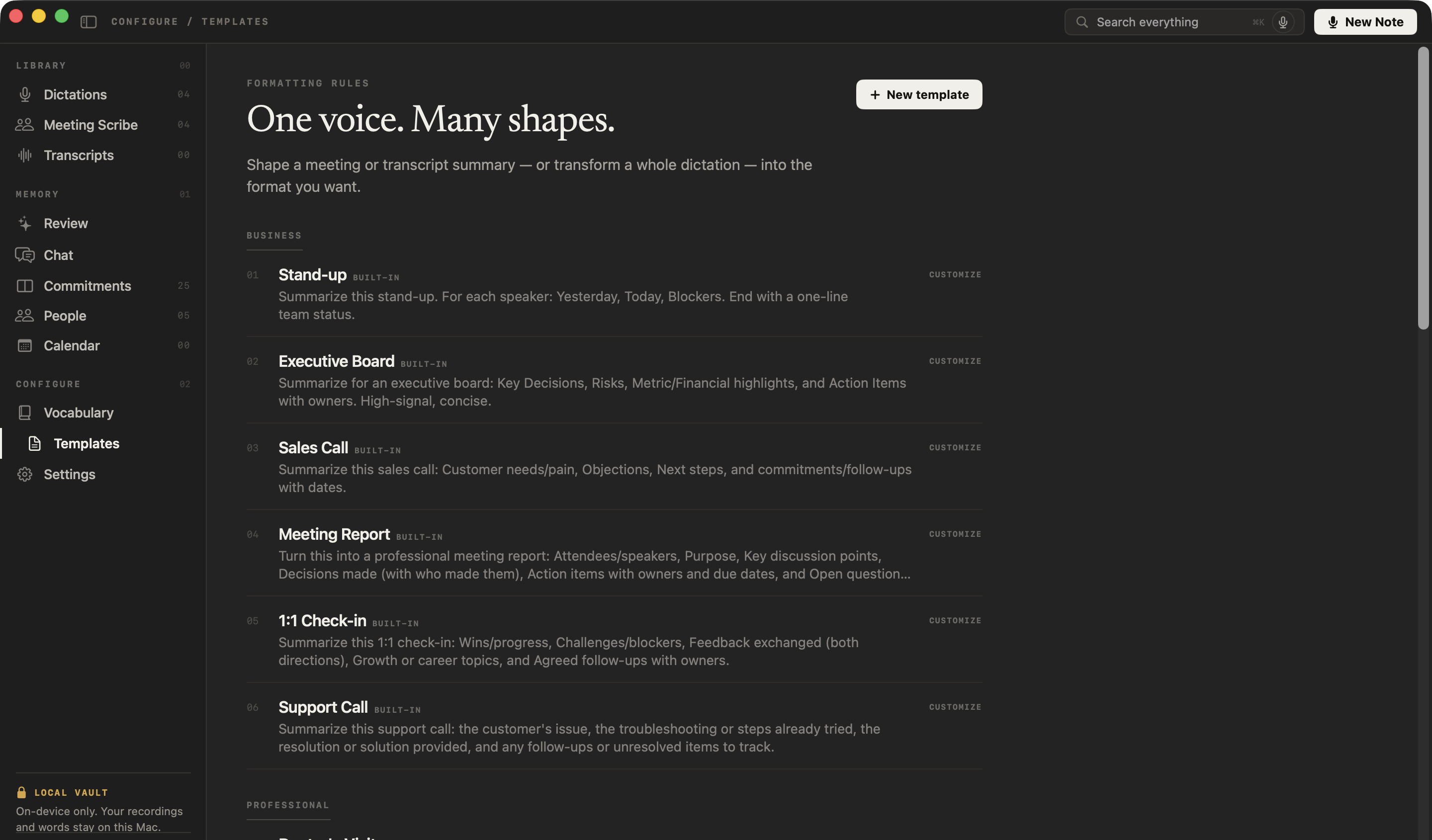
What does NoteOwl’s 1:1 Check-in template ask for?
Exactly the five sections above. This is the template’s instruction to NoteOwl, word for word; you can change it, or write your own, in NoteOwl’s Templates screen.
“Summarize this 1:1 check-in: Wins/progress, Challenges/blockers, Feedback exchanged (both directions), Growth or career topics, and Agreed follow-ups with owners.”
FAQ
Questions about 1:1 meetings
What is a 1:1 meeting?
A 1:1, or one-on-one, meeting is a regular private conversation between two people — usually a manager and someone on their team — about progress, blockers, feedback and growth. NoteOwl’s 1:1 Check-in template writes 1:1 notes in exactly those sections.
How often should you have 1:1 meetings?
Weekly or every other week is common for 1:1 meetings, usually for 30 to 60 minutes, and the slot is worth keeping even in a quiet week. With NoteOwl, each 1:1’s follow-ups become commitments, so the next 1:1 starts from what is still open.
Who should set the agenda for a 1:1?
The team member usually owns the 1:1 meeting agenda, because it is their time, and the manager adds items too. Using the five sections of NoteOwl’s 1:1 template — wins, blockers, feedback, growth and follow-ups — as a shared agenda keeps both people prepared.
Can I use this 1:1 template in Google Docs, Notion or Word?
Yes. NoteOwl’s 1:1 template is plain text, so it pastes into Google Docs, Notion, Word, Pages or Apple Notes and keeps its five sections; the follow-ups work as a list or as a three-column table.
Can NoteOwl write 1:1 meeting notes automatically?
Yes. Record the 1:1 in NoteOwl, then choose Summarize as → 1:1 Check-in, and it writes the wins, blockers, feedback, growth topics and follow-ups from the recording, on your Mac with on-device AI models, and no bot joins the call.
Is recording a 1:1 with NoteOwl private?
NoteOwl records and summarizes a 1:1 on your Mac with on-device AI models, so the recording, transcript and notes are never uploaded, and no bot joins the call.
Can I change the sections of NoteOwl’s 1:1 template?
Yes. In NoteOwl’s Templates screen you can customize the 1:1 Check-in template or write your own, for example with a section for goals, then summarize any recorded 1:1 again in the new format.
Related
- All 22 meeting notes templates Stand-ups, sales calls, board meetings and more, with their sections.
- Meeting minutes template The six sections of formal minutes, a template to copy, and an example.
- People profiles Who each person is, what’s open between you, and every conversation you’ve had.
- AI note taker for founders Customer calls, investor updates and 1:1s, with every promise tracked.
Keep exploring
Who uses it
More templates
- Board meeting minutes templateA board meeting minutes template to copy, what each section holds, an example, and how NoteOwl writes board minutes
- Stand-up meeting templateA stand-up meeting template to fill in online or copy, what each section holds, an example, and how NoteOwl writes stand-up notes
- Sales call notes templateA sales call notes template to copy, what each section holds, an example, and how NoteOwl writes sales call notes
- Interview notes templateAn interview notes template to copy, what each section holds, an example, and how NoteOwl writes interview notes
More template builders
- Retrospective templateA retrospective template to fill in online in four formats (went well / to improve / try next, start stop continue, mad sad glad, 4Ls), with votes and action items
- Project kickoff meeting agendaA kickoff meeting agenda builder: the eight usual items timed from the start, with the goal, scope, milestones, roles and risks the kickoff agrees
Get your 1:1 notes written on your Mac
Free to download. Runs entirely on your Mac.
macOS 26 or later · Apple Silicon (M1 or newer) · 16 GB memory minimum, 24 GB recommended
About NoteOwl
NoteOwl is private AI meeting notes and memory for the Mac. It captures meetings without a bot joining the call, labels every speaker, writes summaries and action items, and builds a memory of every conversation that you can chat with — fully offline, because the speech recognition and the AI run on the Mac itself. Dictation into any app is free; Pro is a one-time purchase.
NoteOwl pricing: what’s free and what Pro adds
Last updated