Template
Board meeting minutes template
This board meeting minutes template has the eight parts board minutes usually record — meeting details, attendance and quorum, approval of the previous minutes, reports, motions and votes, resolutions, action items, and the next meeting — and it copies as plain text into Word, Google Docs or any notes app.
In NoteOwl, the Executive Board template writes the core of your board minutes — key decisions, risks, financial highlights and action items with owners — from the recording, on your Mac; an example is below.
Board minutes · 8 parts
- 01Meeting details
- 02Attendance and quorum
- 03Approval of previous minutes
- 04Reports
- 05Motions and votes
- 06Resolutions and decisions
- 07Action items
- 08Next meeting and adjournment
What should board meeting minutes include?
The meeting details, who attended and whether there was a quorum, the approval of the last minutes, a summary of each report, every motion with who moved it and how the vote went, the resolutions adopted, and the action items. Record what the board did, not every word.
- Meeting details
- What to writeThe organisation, the kind of meeting (regular, special or annual), the date, time and place, who chaired and who took the minutes.
- Attendance and quorum
- What to writeDirectors present and absent, anyone else attending (officers, advisors, guests), and whether enough directors were present for a quorum.
- Approval of previous minutes
- What to writeWhether the minutes of the last meeting were approved as circulated or with corrections.
- Reports
- What to writeA short summary of each report — the chief executive’s, the financial report, committees — and the documents presented.
- Motions and votes
- What to writeEach motion in its exact wording, who moved it, the vote and whether it carried. Note abstentions and any conflicts of interest declared.
- Resolutions and decisions
- What to writeWhat the board resolved or decided, one line each, worded as it was adopted.
- Action items
- What to writeWhat will be done, who owns it and when it is due. A three-column table works best.
- Next meeting and adjournment
- What to writeThe date of the next meeting, the time this one ended, and a line for the approval and signature of the minutes.
| Part | What to write |
|---|---|
| Meeting details | The organisation, the kind of meeting (regular, special or annual), the date, time and place, who chaired and who took the minutes. |
| Attendance and quorum | Directors present and absent, anyone else attending (officers, advisors, guests), and whether enough directors were present for a quorum. |
| Approval of previous minutes | Whether the minutes of the last meeting were approved as circulated or with corrections. |
| Reports | A short summary of each report — the chief executive’s, the financial report, committees — and the documents presented. |
| Motions and votes | Each motion in its exact wording, who moved it, the vote and whether it carried. Note abstentions and any conflicts of interest declared. |
| Resolutions and decisions | What the board resolved or decided, one line each, worded as it was adopted. |
| Action items | What will be done, who owns it and when it is due. A three-column table works best. |
| Next meeting and adjournment | The date of the next meeting, the time this one ended, and a line for the approval and signature of the minutes. |
A board meeting minutes template to copy
Paste it into Word, Google Docs, Pages, Notion or Apple Notes and fill in each part during the meeting. It is plain text, so it keeps its shape anywhere. Write each motion down in its exact words as it is put to the vote.
For team and client meetings with no motions or quorum, the meeting minutes template is simpler. For step-by-step advice, see how to write meeting minutes.
BOARD MEETING MINUTES

1. MEETING DETAILS
Organisation:
Meeting: regular / special / annual
Date:
Place or call link:
Called to order at:
Chair:
Minutes taken by:

2. ATTENDANCE AND QUORUM
Directors present:
Directors absent:
Also attending (officers, advisors, guests):
Quorum present: yes / no

3. APPROVAL OF PREVIOUS MINUTES
Minutes of the meeting held on [date]:
approved as circulated / approved with corrections

4. REPORTS
- Chief executive's report: main points
- Financial report: main figures
- Committee reports:

5. MOTIONS AND VOTES
Motion: [exact wording]
Moved by:
Seconded by (if your rules require it):
Vote: for __ / against __ / abstained __
Result: carried / not carried
Conflicts of interest declared:

6. RESOLUTIONS AND DECISIONS
- Resolved that ...
- Decision:

7. ACTION ITEMS
Owner | Action | Due
Name  | What will be done | Date
Name  | What will be done | Date

8. NEXT MEETING AND ADJOURNMENT
Next meeting:
Meeting adjourned at:

Minutes approved by the board on:
Signed (chair or secretary):
What does NoteOwl’s Executive Board summary look like?
Like this: NoteOwl’s Executive Board output for a four-minute quarterly update between Maya Rao and her advisor, Tom Becker. It is an advisor meeting, not a formal board meeting, so it has no motions or votes: just the decisions, risks, numbers and action items.
Quarterly update — executive board summary
With: Maya Rao and Tom Becker
Key decisions
- Hiring: no full-time hire before the Ferncastle pilot is signed. Instead, bring in a senior contractor for three months and convert them if the work is there (Tom's advice; Maya agreed). Budget: about $9,000 a month, which Tom said sounds right for a senior product designer.
- Revenue concentration: get at least two more fintech conversations going by the end of October (agreed).
- Reporting: Maya sends Tom a short one-page update at the end of every month covering revenue, runway, pipeline and hiring. Anything unsigned, including the Ferncastle pilot numbers, is marked as pipeline, not revenue.
Risks
- One client: Ferncastle Bank is about 70% of revenue for the quarter. Tom called it too concentrated; Maya called Ferncastle going quiet her biggest worry.
- Delivery capacity: Leo is stretched thin. If the Ferncastle pilot happens, it can't be delivered with one designer.
- Pricing: $48,000 for a six-week discovery is on the low side for a bank (Tom).
- Founder time: Tom's advice is for Maya to protect her own time — she can't sell, design and manage all at once.
Metric / financial highlights
| Metric | Figure |
|---|---|
| Ferncastle Bank discovery phase | $48,000, signed; six weeks |
| Ferncastle pilot | Not signed yet; a real chance the discovery turns into a much larger pilot |
| Runway | About 9.5 months, up from about 7 before Ferncastle's first payment |
| Monthly burn | About $31,000, mostly salaries for Maya and Leo plus a couple of contractors |
| Revenue concentration | Ferncastle is about 70% of the quarter's revenue |
| Senior contractor | About $9,000 a month, for three months |
| Pilot quote | Maya was thinking of around $120,000; Tom advises anchoring at $135,000 and letting them negotiate down |
Action items with owners
| Owner | Action | Due |
|---|---|---|
| Tom Becker | Introduce Maya to Sarah Collins at Lumen Pay and Ravi Patel at Brightwater, two fintech founders redesigning onboarding this year | Friday 18 September |
| Maya Rao | Post the senior contractor role | Next week |
| Maya Rao | Start interviews for the contractor | Early October |
| Maya Rao | Get at least two more fintech conversations going | End of October |
| Maya Rao | Send Tom the first one-page monthly update | 30 September, then the end of every month |
| Maya Rao | Think over the Ferncastle pilot quote, with Tom's advice to anchor at $135,000 | Before her follow-up with Daniel |
| Maya Rao and Tom Becker | Next conversation | Next month |
Because it’s an advisor meeting, this isn’t a complete board meeting minutes example. For a real board meeting, the decisions and action items go into the template above, and you add attendance, quorum, the approval of the last minutes and each vote.
How do you get board minutes written automatically?
Record the board meeting in NoteOwl — it takes meeting notes without a bot — and when it ends, choose Summarize as → Executive Board. NoteOwl rewrites the summary as key decisions, risks, financial highlights and action items with owners, on your Mac with on-device AI models, and nothing is uploaded.
- 1
Record the board meeting
Press ⌥Space or click Start Meeting. NoteOwl records your microphone and your Mac’s audio; no bot joins the call.
- 2
Open it in Meeting Scribe
When the meeting ends, NoteOwl writes the speaker-labelled transcript and a summary, on your Mac.
- 3
Choose Summarize as → Executive Board
Above the summary, open Summarize as and pick Executive Board. NoteOwl rewrites it as key decisions, risks, metric and financial highlights, and action items with owners.
- 4
Put it into your board minutes
Copy the decisions and action items into your board minutes and add attendance, quorum and votes, or use Export to save the summary, with the transcript, as Markdown or PDF.
Tell everyone at the meeting that you’re recording. Meeting notes and templates are part of NoteOwl Pro, with a 7-day free trial in the app.
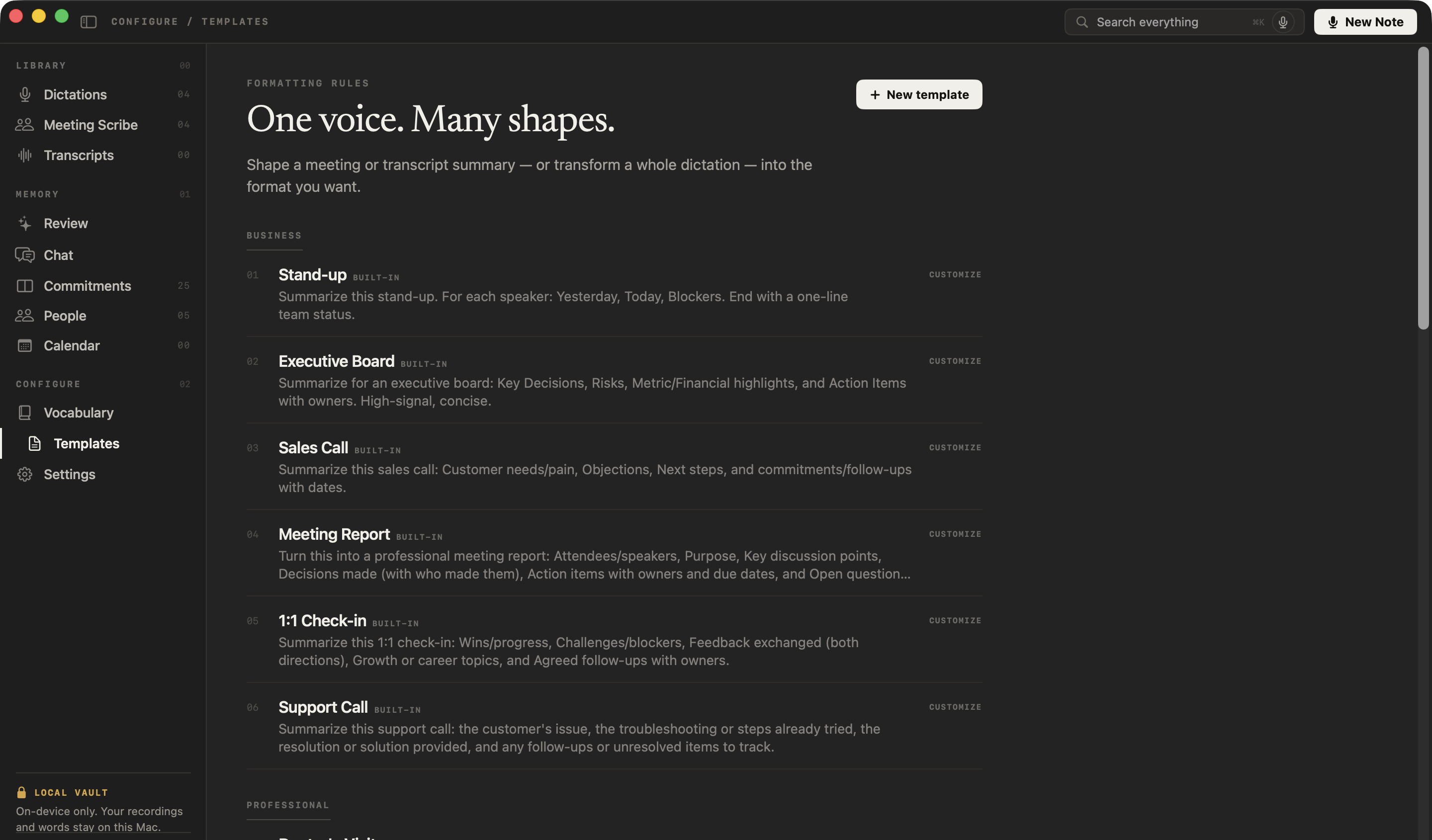
What does NoteOwl’s Executive Board template ask for?
Four sections: key decisions, risks, metric and financial highlights, and action items with owners. This is the template’s instruction to NoteOwl, word for word; you can change it, or write your own, in NoteOwl’s Templates screen.
“Summarize for an executive board: Key Decisions, Risks, Metric/Financial highlights, and Action Items with owners. High-signal, concise.”
- Key Decisions
- Where it goes in your board minutesResolutions and decisions. Check each one’s wording against the transcript before it goes in.
- Risks
- Where it goes in your board minutesReports, or the discussion under the item it belongs to.
- Metric/Financial highlights
- Where it goes in your board minutesReports: the financial report.
- Action Items with owners
- Where it goes in your board minutesAction items.
- Not written by the template
- Where it goes in your board minutesMeeting details, attendance and quorum, approval of the previous minutes, and each motion’s mover and vote. Add them yourself, or customize the template to ask for them.
| Executive Board section | Where it goes in your board minutes |
|---|---|
| Key Decisions | Resolutions and decisions. Check each one’s wording against the transcript before it goes in. |
| Risks | Reports, or the discussion under the item it belongs to. |
| Metric/Financial highlights | Reports: the financial report. |
| Action Items with owners | Action items. |
| Not written by the template | Meeting details, attendance and quorum, approval of the previous minutes, and each motion’s mover and vote. Add them yourself, or customize the template to ask for them. |
FAQ
Questions about board meeting minutes
Who takes the minutes at a board meeting?
Usually the board secretary, or someone the chair asks, so the chair can run the meeting; the draft minutes are then checked and approved at the next meeting. With NoteOwl, whoever records the board meeting gets the decisions, risks, financial highlights and action items written from the recording, ready for the secretary to check.
Do board meeting minutes need to be approved?
Usually, yes. The board reviews the draft minutes at its next meeting and approves them, with any corrections, and the approved copy becomes the board’s record. A summary from NoteOwl’s Executive Board template is a draft for the secretary to check and complete, not the approved minutes.
Should board minutes record who said what?
Usually not. Board minutes record what the board did — motions, votes, resolutions and action items — rather than a word-for-word account of the discussion. NoteOwl’s Executive Board template works the same way: key decisions, risks, financial highlights and action items, with the speaker-labelled transcript kept with the meeting in NoteOwl if you need the exact words.
Can I use this board meeting minutes template in Word or Google Docs?
Yes. NoteOwl’s board meeting minutes template is plain text, so it pastes into Word, Google Docs, Pages, Notion or Apple Notes and keeps its eight parts; the action items work as a list or as a three-column table.
Can NoteOwl write board meeting minutes automatically?
NoteOwl writes the core of them. Record the board meeting, and when it ends choose Summarize as → Executive Board: NoteOwl writes the key decisions, risks, metric and financial highlights, and action items with owners, on your Mac with on-device AI models. Attendance, quorum and each vote you add yourself. Meeting notes and templates are part of NoteOwl Pro: $79 once for one Mac, with a 7-day free trial in the app.
Is recording a board meeting with NoteOwl private?
NoteOwl records, transcribes and summarizes a board meeting on your Mac with on-device AI models, so the recording, transcript and summary are never uploaded, and no bot joins the call. Tell everyone at the meeting that you are recording with NoteOwl before you start, and check that your board’s rules allow recordings.
Can I add motions and votes to NoteOwl’s Executive Board template?
Yes. In NoteOwl’s Templates screen you can customize the Executive Board template — for example, to ask for attendance, motions and votes — or write your own, then summarize any recorded meeting again in the new format.
Related
- All 22 meeting notes templates Stand-ups, 1:1s, sales calls, board meetings and more, with their sections.
- AI meeting summaries The decisions and action items NoteOwl writes when a meeting ends.
- 1:1 meeting template Five sections for one-on-ones, an agenda, and an example.
- AI note taker for founders Investor updates, board meetings and customer calls, with every promise tracked.
Keep exploring
More templates
- Stand-up meeting templateA stand-up meeting template to fill in online or copy, what each section holds, an example, and how NoteOwl writes stand-up notes
- Sales call notes templateA sales call notes template to copy, what each section holds, an example, and how NoteOwl writes sales call notes
- Interview notes templateAn interview notes template to copy, what each section holds, an example, and how NoteOwl writes interview notes
- User interview templateA user interview template to copy, what each section holds, an example, and how NoteOwl writes research notes from a user interview
Get your board minutes written on your Mac
Free to download. Runs entirely on your Mac.
macOS 26 or later · Apple Silicon (M1 or newer) · 16 GB memory minimum, 24 GB recommended
About NoteOwl
NoteOwl is private AI meeting notes and memory for the Mac. It captures meetings without a bot joining the call, labels every speaker, writes summaries and action items, and builds a memory of every conversation that you can chat with — fully offline, because the speech recognition and the AI run on the Mac itself. Dictation into any app is free; Pro is a one-time purchase.
NoteOwl pricing: what’s free and what Pro adds
Last updated