Template
Interview notes template
This interview notes template has five sections — the candidate’s background, the key questions and their answers, notable strengths, concerns or gaps, and a verdict with next steps — and it copies as plain text into Google Docs, Word, Notion or any notes app.
In NoteOwl, the Interview template writes interview notes in exactly this format from the recording of an interview call, on your Mac; an example is below.
Interview · 5 sections
- 01Candidate/guest background
- 02Key questions and their answers
- 03Notable strengths
- 04Concerns or gaps
- 05Verdict / recommended next steps
What should interview notes include?
Five things: the candidate’s background, the questions you asked and what they answered, their strengths, your concerns, and a verdict with the next step. Every strength and concern should point back to an answer, so the verdict rests on evidence.
- Candidate/guest background
- What to writeTheir current role, their experience, and the work most relevant to the job, in a few lines.
- Key questions and their answers
- What to writeEach question you asked and what the candidate said, with the examples they gave. Their words, not your impressions.
- Notable strengths
- What to writeWhat stood out against the role’s requirements, each with the answer or example that shows it.
- Concerns or gaps
- What to writeWhere the evidence was thin or missing, and what to check in the next round or with references.
- Verdict / recommended next steps
- What to writeYour recommendation — move forward, hold or decline — with the reason, and what happens next.
| Section | What to write |
|---|---|
| Candidate/guest background | Their current role, their experience, and the work most relevant to the job, in a few lines. |
| Key questions and their answers | Each question you asked and what the candidate said, with the examples they gave. Their words, not your impressions. |
| Notable strengths | What stood out against the role’s requirements, each with the answer or example that shows it. |
| Concerns or gaps | Where the evidence was thin or missing, and what to check in the next round or with references. |
| Verdict / recommended next steps | Your recommendation — move forward, hold or decline — with the reason, and what happens next. |
An interview notes template to copy
Paste it into Google Docs, Word, Notion or Apple Notes and fill it in during or straight after the interview. It is plain text, so it keeps its shape anywhere, including a scorecard or your hiring system.
The sections match NoteOwl’s Interview template, so interview notes you write by hand and notes NoteOwl writes read the same.
INTERVIEW NOTES

Candidate:
Role:
Date:
Interviewer(s):
Interview: screen / skills / final

1. BACKGROUND
- Current role and experience:
- Most relevant work:

2. KEY QUESTIONS AND ANSWERS
Q:
A:
Q:
A:

3. NOTABLE STRENGTHS
- Strength, and the answer or example that shows it

4. CONCERNS OR GAPS
- Concern, and what to check next

5. VERDICT / NEXT STEPS
Recommendation: move forward / hold / decline
Reason:
Next step, owner and date:
What should you leave out of interview notes?
Anything that isn’t evidence about the job: impressions of personality, guesses, and personal details such as age, family or health. Write what the candidate said and did, in their words where you can, so anyone reading the notes later sees why you reached your verdict.
- Seems very hands-on
- Write thisTested her ID-check designs on real phones, in moderated sessions
- Probably weak on Android
- Write thisHasn’t led an Android design on her own, in her words
- Expensive
- Write thisAsked for $9,500 a month for a three-month contract; the budget is about $9,000
- Great culture fit
- Write thisInvited compliance to usability sessions, and they agreed to merge two screens
| Not this | Write this |
|---|---|
| Seems very hands-on | Tested her ID-check designs on real phones, in moderated sessions |
| Probably weak on Android | Hasn’t led an Android design on her own, in her words |
| Expensive | Asked for $9,500 a month for a three-month contract; the budget is about $9,000 |
| Great culture fit | Invited compliance to usability sessions, and they agreed to merge two screens |
What do good interview notes look like?
Like this: NoteOwl’s Interview notes for an interview in which a design studio’s founder interviews a senior product designer for a three-month contract. Every strength and concern points back to something the candidate said.
Interview summary — Elena Novak
Role: Senior product designer, three-month contract · Interviewer: Maya Rao, Northlight Studio
Candidate background
- Eight years as a product designer; freelance for the last two.
- Before that, three years at Harbourline, a digital insurance company, where she led the design of the claims flow.
- Last year she redesigned the ID check for a savings app, moving from photo uploads to camera capture in the app. Completion went from about 40% to 60%.
Key questions and answers
- How did you test it? On real phones, in moderated sessions with Figma prototypes on the participants' own phones.
- A time risk or compliance pushed back? At Harbourline, compliance wanted two extra confirmation screens. She invited them to the usability sessions; after watching people drop off, they agreed to merge them into one.
- Android? Most of her work has been iOS first. She has tested on Android but hasn't led an Android design on her own.
- Working with another designer? Split the flows, then a short critique twice a week.
- Start date and rate? Free full time from 2 November; until then another client takes two days a week. Usual rate $10,500 a month, or $9,500 for a three-month commitment. Maya's budget is about $9,000.
Notable strengths
- Directly relevant work: camera capture for an ID check, with a measured result.
- Tests on real phones.
- Brings compliance into the research instead of arguing, which matters for the bank's midpoint review with its head of risk.
Concerns or gaps
- Limited Android experience, and Android is where the numbers are worst.
- Rate is $500 a month over budget.
Verdict / recommended next steps
- Verdict: Promising, with directly relevant experience. Move to the next step, pending the rate and the Android gap.
- Portfolio walkthrough with Leo on Friday.
- Elena sends two references by Wednesday.
- Maya takes the $9,500 rate back and answers by Friday the 16th.
How do you get interview notes written automatically?
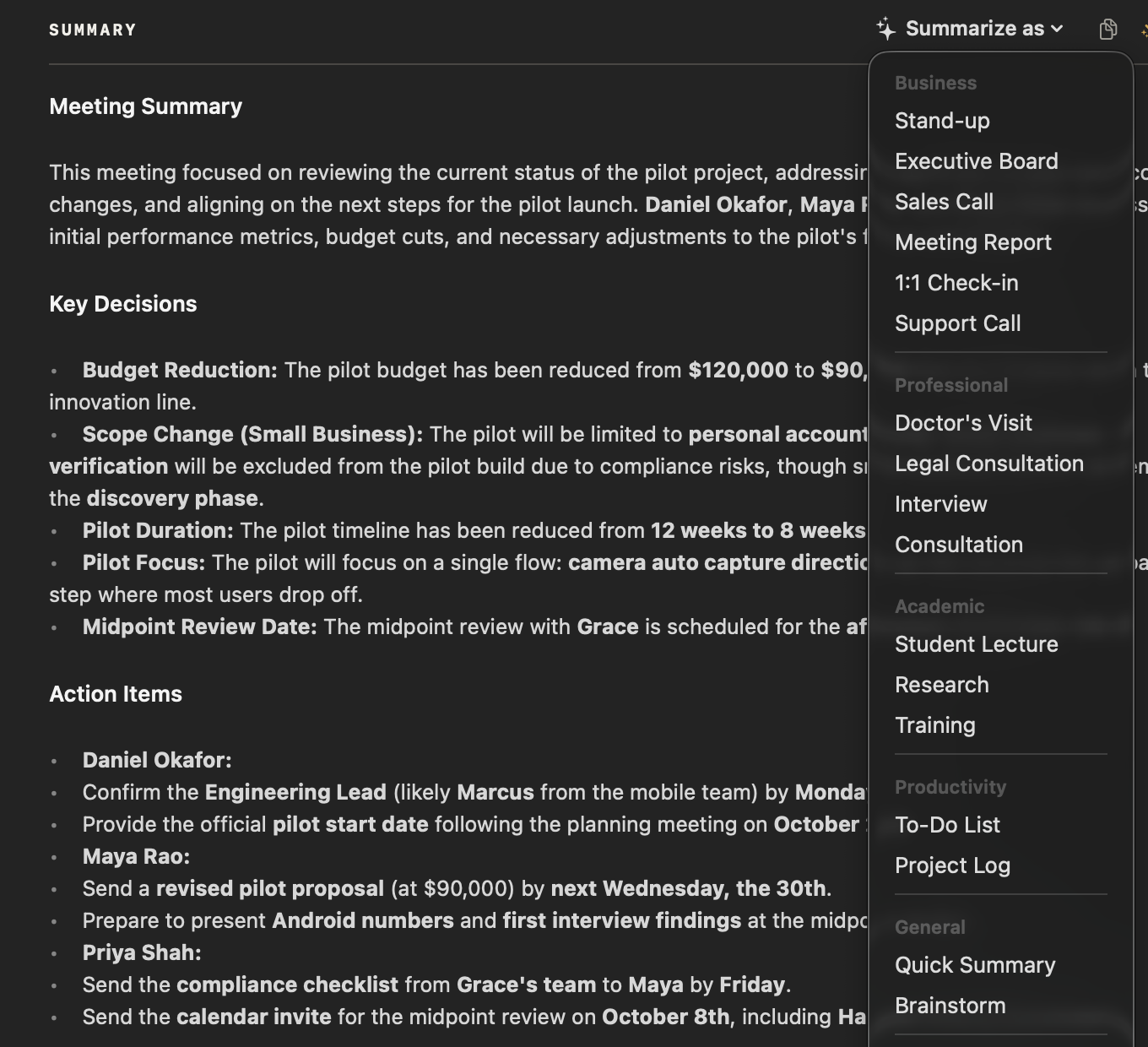
Record the interview call in NoteOwl — it takes meeting notes without a bot — then choose Summarize as → Interview. NoteOwl writes the background, questions and answers, strengths, concerns and a verdict from the recording, on your Mac with on-device AI models, and nothing is uploaded.
- 1
Record the interview
Press ⌥Space or click Start Meeting when the video call begins. NoteOwl records your microphone and your Mac’s audio; no bot joins the call.
- 2
Open it in Meeting Scribe
When the interview ends, NoteOwl writes the speaker-labelled transcript and a summary, on your Mac.
- 3
Choose Summarize as → Interview
Above the summary, open Summarize as and pick Interview. NoteOwl rewrites the notes as background, questions and answers, strengths, concerns and a verdict.
- 4
Add it to the candidate’s record
Copy the notes as Markdown and paste them into your hiring system or scorecard, or use Export to save them as Markdown or PDF.
Tell the candidate you’re recording. Meeting notes and templates are part of NoteOwl Pro, with a 7-day free trial in the app.
What does NoteOwl’s Interview template ask for?
Exactly the five sections above. This is the template’s instruction to NoteOwl, word for word; you can change it, or write your own, in NoteOwl’s Templates screen (see how to customize a template).
“Summarize this interview: Candidate/guest background, Key questions and their answers, Notable strengths, Concerns or gaps, and a Verdict / recommended next steps.”
FAQ
Questions about interview notes
Should you take notes during a job interview?
Brief ones: a few words per answer, so you can keep eye contact and ask follow-up questions, then write up the full notes straight after. If you record the interview in NoteOwl, with the candidate’s agreement, it writes the notes from the recording instead.
How soon should you write up interview notes?
The same day, ideally straight after the interview, while the answers are fresh and before you meet the next candidate. Write the evidence first and the verdict last, so the verdict rests on what the candidate actually said.
Does NoteOwl’s Interview template work for other kinds of interviews?
Yes. It asks for the candidate’s or guest’s background, so it suits podcast, expert and press interviews as well as job interviews. For user research interviews, NoteOwl’s Research template fits better: it writes the questions explored, findings, evidence and open questions.
Can I use this interview notes template in Google Docs or Word?
Yes. The interview notes template is plain text, so it pastes into Google Docs, Word, Notion or Apple Notes and keeps its five sections; the questions and answers work as a list or as a two-column table.
Can NoteOwl write interview notes automatically?
Yes. Record the interview call in NoteOwl, then choose Summarize as → Interview, and it writes the candidate’s background, questions and answers, strengths, concerns and a verdict from the recording, on your Mac with on-device AI models. Meeting notes and templates are part of NoteOwl Pro: $79 once for one Mac, with a 7-day free trial in the app.
Should I tell a candidate I’m recording the interview?
Yes. Tell the candidate before you start and ask whether they are comfortable being recorded. NoteOwl sends no bot and no notice to the call, so telling them is up to you, and in many places it is the law. The recording and notes stay on your Mac.
Can I change the sections of NoteOwl’s Interview template?
Yes. In NoteOwl’s Templates screen you can customize the Interview template — for example, to score each skill the role needs — or write your own, then summarize any recorded interview again in the new format.
Related
- All 22 meeting notes templates Stand-ups, 1:1s, sales calls, board meetings and more, with their sections.
- AI note taker for recruiters Candidate screens and hiring-manager calls with no bot, and interview notes written for you.
- User interview template Questions, findings, evidence and open questions for research interviews.
- AI meeting summaries The decisions and action items NoteOwl writes when a meeting ends.
Keep exploring
Who uses it
- AI note taker for recruitersCandidate screens and hiring-manager calls with no bot: interview notes from the Interview template, a profile per candidate, free dictation for scorecards
- AI transcription for journalistsInterviews transcribed speaker by speaker with timestamps, quotes checked against the audio, nothing uploaded
More templates
- User interview templateA user interview template to copy, what each section holds, an example, and how NoteOwl writes research notes from a user interview
- Podcast show notes templateA podcast show notes template to copy, what each section holds, an example, and how NoteOwl writes show notes from an episode
- Brainstorming templateA brainstorming template to copy, what each section holds, an example, and how NoteOwl writes brainstorm notes
- Project update templateA project update template to copy, what each section holds, an example, and how NoteOwl writes project update notes
Get your interview notes written on your Mac
Free to download. Runs entirely on your Mac.
macOS 26 or later · Apple Silicon (M1 or newer) · 16 GB memory minimum, 24 GB recommended
About NoteOwl
NoteOwl is private AI meeting notes and memory for the Mac. It captures meetings without a bot joining the call, labels every speaker, writes summaries and action items, and builds a memory of every conversation that you can chat with — fully offline, because the speech recognition and the AI run on the Mac itself. Dictation into any app is free; Pro is a one-time purchase.
NoteOwl pricing: what’s free and what Pro adds
Last updated