For lawyers
AI note taker for lawyers, on your Mac
NoteOwl is an AI note taker for lawyers that works on your Mac: it records client consultations, status calls and internal case meetings with no bot joining, labels who said what, and turns each call into a note for the file — the matter, key facts, advice given, risks and next steps. No third party processes the audio.
When a client calls back with one more thing, or you need what they told you in March, ask NoteOwl and read the answer beside the passage it came from, so you can check it. Dictation into any app is free forever.
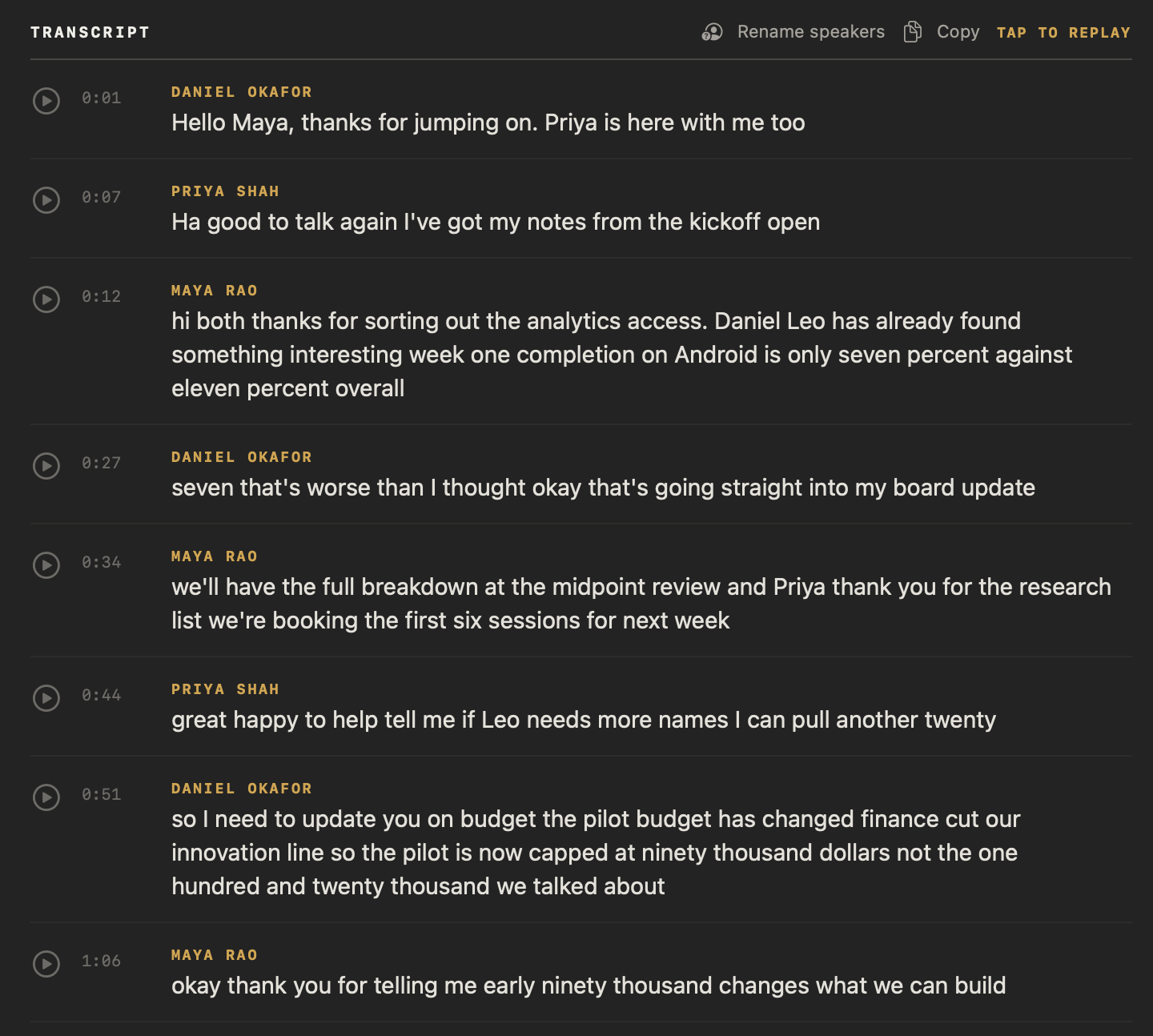
Read the transcript
Quick question. What did you actually promise in your last meeting? …Yeah. Me neither.
This is NoteOwl. It’s a Mac app that takes notes on your calls. And no, there’s no bot joining your meeting.
The second the call ends, it’s written everything up. What got decided. Who’s doing what. And by when.
All those promises end up in one list. What you owe people… and what they owe you.
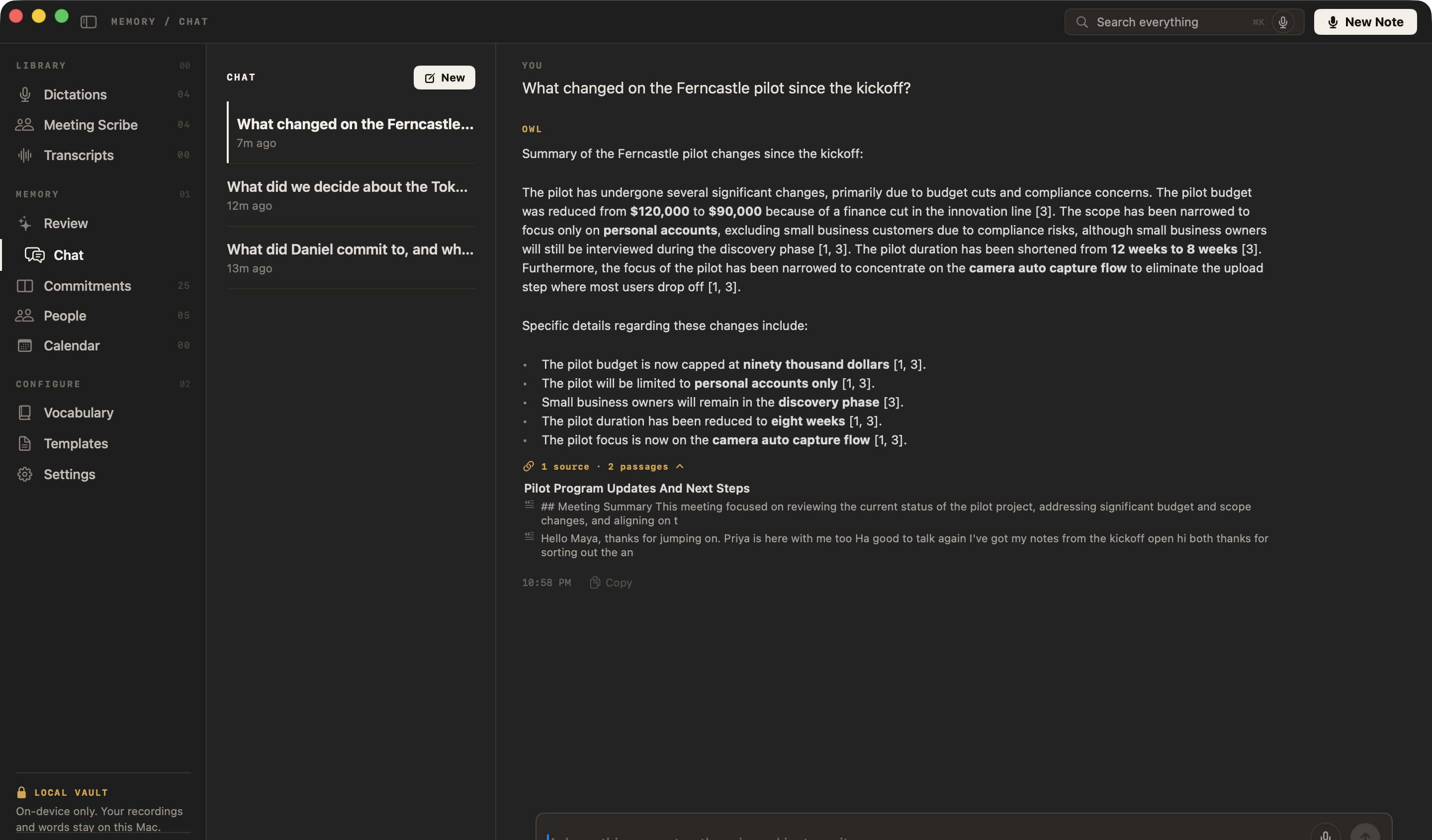
And here’s the part that got me. You can just ask it. “What changed on the Ferncastle pilot?” And it shows you exactly where that came from.
The whole thing runs on your Mac. Nothing gets uploaded. It even works with the Wi-Fi off.
NoteOwl. It’s free to download. Try it on your next call.
How do lawyers use an AI note taker?
For the conversations a file is built on: intake consultations, client status calls, the client who calls back with one more thing, and internal case meetings. NoteOwl records them on your Mac with no bot in the call, and writes them up when you hang up.
The intake consultation
Listen instead of typing
Record in your office with your Mac’s microphone, or on Zoom, Teams or Google Meet. No bot joins. When it ends, Summarize as → Legal Consultation writes the matter, key facts, advice given, risks and next steps.
The “one more thing” call
Catch the detail that changes the file
A client comes back with a date, a name or a figure they forgot. Record the call and it joins the same searchable memory as the consultation, with its own summary and action items.
Internal case meetings
Who does what, by when
Strategy meetings with an associate or co-counsel get attorney meeting notes: the decisions, each task with its owner and deadline, and the open questions. Tasks that involve you land on your Commitments board.
Voicemails and recordings
Bring in what you already have
Drag in a client’s voicemail saved as an audio file, or a call recorded in another app — m4a, mp3, wav, mp4 and more — and get a transcript with each speaker labelled, a summary and action items.
What does NoteOwl write after a client consultation?
Legal consultation notes for the file. Choose Summarize as → Legal Consultation and NoteOwl rewrites the call as the matter, key facts, advice given, risks and next steps, down to the documents the client said they’d send.
Here is its note of a consultation between a solo lawyer, Dana Whitfield, and a prospective client, Theo Marsh, about the lease on his print shop.
| Call | Template | What it writes |
|---|---|---|
| Intake and advice consultations | Legal Consultation | The matter · Key facts · Advice given · Risks · Next steps |
| Internal case meetings | Meeting Report | Attendees · Purpose · Key points · Decisions · Action items · Open questions |
| Short client status calls | Quick Summary | 3–5 key points · Bottom line |
| Advisory calls with no legal matter | Consultation | Situation & goals · Advice · Options · Next steps |
Legal Consultation Summary: Marsh Print Co.
Client: Theo Marsh, Marsh Print Co. · Attorney: Dana Whitfield, Whitfield Law
Matter / Issue
- Commercial lease dispute with the landlord, Calder Street Properties, over the ground-floor unit where Theo runs his print shop.
- Theo withheld September's rent; on September 22nd the landlord served a notice of default: pay within 10 days (by October 2nd) or it can end the lease.
Key Facts
- Lease: five years, signed in March 2024. Rent is $4,200 a month, and Theo signed a personal guarantee.
- Scaffolding: since July 6th, scaffolding from the landlord's renovation has blocked the entrance and front window; walk-in sales are down about a third on last summer.
Advice Given
- Withholding rent is risky: most commercial leases don't allow it, and it gives the landlord a default to act on.
- Pay under protest: pay September's rent before October 2nd, stating in writing that it is paid under protest, to keep the leak and scaffolding claims separate. Paying doesn't end them.
Risks
- If the default is not cured by October 2nd, the landlord may try to terminate the lease.
- Because of the personal guarantee, Theo could be personally liable for the unpaid rent.
Next Steps / Documents Needed
- Theo Marsh: send by tomorrow: the lease and amendments, the personal guarantee, the notice, his three emails, dated photos of the scaffolding and ceiling, invoices for the stock and printer repair, and July–September sales figures for this year and last.
- Theo Marsh: call his insurance broker; decide on the rent after Monday's call, paying before October 2nd.
How much time does an AI note taker save a lawyer?
The write-up, mostly. The note is written on your Mac when the call ends, so your time goes on reading and correcting it, not drafting it. The follow-up email, the memo to file and the time-entry description can start from what was said, not from memory.
- The note to file after an intake
- Without NoteOwlTyped up from your handwritten notes, often at the end of the day
- With NoteOwlWritten on your Mac when the call ends; you read it and correct it
- What the client said they would send
- Without NoteOwlIn your notes, if you caught it
- With NoteOwlListed under next steps, and on your Commitments board as owed to you
- The recap email to the client
- Without NoteOwlWritten from scratch
- With NoteOwlDrafted from the call when you ask, for you to edit
- The day’s time-entry descriptions
- Without NoteOwlRebuilt from your calendar and memory
- With NoteOwlDrafted from each call’s summary when you ask; you still record the time you actually spent
- What was said on a call in March
- Without NoteOwlSearched for across notes and email
- With NoteOwlAsked in Chat, and answered with the passage it came from
| The task | Without NoteOwl | With NoteOwl |
|---|---|---|
| The note to file after an intake | Typed up from your handwritten notes, often at the end of the day | Written on your Mac when the call ends; you read it and correct it |
| What the client said they would send | In your notes, if you caught it | Listed under next steps, and on your Commitments board as owed to you |
| The recap email to the client | Written from scratch | Drafted from the call when you ask, for you to edit |
| The day’s time-entry descriptions | Rebuilt from your calendar and memory | Drafted from each call’s summary when you ask; you still record the time you actually spent |
| What was said on a call in March | Searched for across notes and email | Asked in Chat, and answered with the passage it came from |
Can you find what a client said months later?
Yes. Ask NoteOwl in plain English, even offline. It answers only from your own recordings, cites the passage each point came from — click one to jump to that moment in the call — and says so when nothing matches instead of guessing.
Ask things like
- Which documents did the client say they would send?
- What did I advise about the September rent?
- When did the client first report the leak?
Where do your client recordings go?
They stay on your Mac. NoteOwl transcribes, summarizes and answers questions on your Mac with on-device AI models, and has no server that receives your content, so no third party processes the audio and we have no way to see what you record.
What stays on your Mac
- The audio of every call you record or import
- Transcripts, with each speaker labelled
- Summaries, legal consultation notes and action items
- People, commitments and everything in NoteOwl’s memory
- Your Chat questions and NoteOwl’s answers
- Your templates and vocabulary
None of it is uploaded, synced to a cloud or used to train AI models, and the app has no analytics or telemetry.
| When NoteOwl connects | What it sends |
|---|---|
| The one-time model download | Model files come to your Mac; nothing of yours is sent |
| Apple’s on-device language assets, once, if your Mac doesn’t have them | Nothing of yours; macOS downloads them from Apple |
| Checking for app updates, about once a day | A request for the list of NoteOwl versions; no personal data or content |
| Starting the trial, buying Pro or activating a Mac | Your email address and an identifier for this Mac |
| A licence status check, at most once a week (Pro) | Only your licence’s identifier |
For your IT person: every connection is listed in what NoteOwl sends over the network and in section 4 of NoteOwl’s privacy policy.
Is it ethical for a lawyer to use an AI note taker?
ABA Formal Opinion 512 asks lawyers who use AI to understand who can access their clients’ information and to review what the tool produces.[1] Here is how NoteOwl answers each question, so you can decide under your own jurisdiction’s rules.
- Who can access what you record?
- NoteOwl’s answerYou, on your Mac. NoteOwl has no server that receives recordings, transcripts or notes, and we have no way to see them.
- Does a third party process it?
- NoteOwl’s answerNo. Transcription, summaries and Chat run on your Mac with on-device AI models.
- Is it used to train AI models?
- NoteOwl’s answerNo. Nothing you record is sent anywhere, so nothing you record trains anything.
- Where is it kept, and for how long?
- NoteOwl’s answerIn one folder on your Mac, until you delete it. You decide what to keep.
- Can you check what it wrote?
- NoteOwl’s answerYes. The transcript, with speakers and timestamps, sits beside every summary, and Chat answers cite the passages they came from.
- What do the terms and policies say?
- NoteOwl’s answerNoteOwl’s privacy policy lists every connection the app makes and what each one sends.
| What to check | NoteOwl’s answer |
|---|---|
| Who can access what you record? | You, on your Mac. NoteOwl has no server that receives recordings, transcripts or notes, and we have no way to see them. |
| Does a third party process it? | No. Transcription, summaries and Chat run on your Mac with on-device AI models. |
| Is it used to train AI models? | No. Nothing you record is sent anywhere, so nothing you record trains anything. |
| Where is it kept, and for how long? | In one folder on your Mac, until you delete it. You decide what to keep. |
| Can you check what it wrote? | Yes. The transcript, with speakers and timestamps, sits beside every summary, and Chat answers cite the passages they came from. |
| What do the terms and policies say? | NoteOwl’s privacy policy lists every connection the app makes and what each one sends. |
“…confidentiality concerns may be mitigated by use of an inhouse generative AI rather than an outside generative AI where the data is hosted and stored by a third-party. If the use of a generative AI program does not involve the disclosure of confidential information to a third-party, a lawyer is not required to obtain a client’s informed consent pursuant to Rule 4-1.6.”
Does an AI note taker put attorney-client privilege at risk?
NoteOwl can’t make anything privileged, and neither can any software. What it removes is a third party: no vendor holds your client conversations, and no vendor’s terms of use give anyone else access to them. Whether a communication is privileged still depends on the communication and the law.
What running on your Mac changes
- No vendor holds the recording, the transcript or the notes.
- No vendor’s terms of use decide who else can access them.
- Nothing you record is used to train AI models.
- It works offline, so nothing waits on a connection.
What it doesn’t change
- Whether a communication is privileged depends on the communication and the law where you practice.
- A recording is a record. Like any file you keep, it can be subject to litigation holds, subpoenas and discovery.
- You still review the notes before you rely on them.
- Looking after your Mac, its password and its backups is up to you.
Can you delete a client recording completely?
Yes, in two steps. Delete it in NoteOwl and its audio and note files move to the macOS Trash; empty the Trash to remove them. Delete all my data, in Settings → Memory, erases your whole library at once without using the Trash.
- Recordings stay on your Mac until you delete them, so you keep them as long as your retention policy says, and no longer.
- Deleting a meeting also removes the commitments and other memory that came only from it.
- If you use Time Machine, your backups hold copies of NoteOwl’s folder too, so include them in your retention plan.
- Need the note in the client file first? Export it as Markdown, PDF or text before you delete the recording.
How can you check that NoteOwl doesn’t upload client calls?
Don’t take our word for it. The State Bar of California’s 2026 guidance says reasonable efforts “require more than reliance on generalized marketing assurances.”[3] These three checks run on your own Mac, by you or your IT person.
- 1
Turn off Wi-Fi and record
After the one-time model download, turn off Wi-Fi and record a short call. The transcript, the summary and Chat all still work, because they run on your Mac.
- 2
Open the folder
In NoteOwl, open Settings → General and click Show in Finder beside Local Vault. Your recordings, transcripts and notes are there, as files in ~/Library/Application Support/NoteOwl.
- 3
Watch the connections
Run a network monitor while you record and summarize a call. NoteOwl makes only the connections listed above, and none of them carries your content.
Can you dictate letters and file notes instead of typing?
Yes, and it’s free forever. Tap fn in Mail, a document or anywhere you can type, talk, and tap fn again: NoteOwl types your words at the cursor. It runs on your Mac, works offline and is unlimited. How free dictation works on your Mac
Casual in chat
Hey Leo, quick update from the Ferncastle call. They cut the pilot budget to $90,000, so let’s focus only on the camera auto-capture flow. Can you prioritize those wireframes for Thursday? Thanks.
- To
- Daniel Okafor
- Subject
- Next steps
Hi Daniel,
Thanks for the update today. Just confirming next steps: I will send the revised pilot proposal at $90,000 by Wednesday, the 30th. It will cover an eight-week pilot focused on camera auto-capture for personal accounts only.
I look forward to hearing who your engineering lead will be by Monday. Thanks again.
12export const pilot = {13 budgetCap: 90_000,14 weeks: 8,15 accounts: 'personal',16};17
- Polish — one tap tidies your words in the tone set for that app
- Voice notes — recorded with New Dictation, audio and text kept together
- Rewrite by voice — select text, press ⌥X and say how to change itPro
- Custom vocabulary — client, party and case names spelled your wayPro
What else does NoteOwl do for a lawyer?
Everything around the calls, with NoteOwl Pro: promises tracked both ways, a profile for every client, letters drafted from the call — all on your Mac, even with Wi-Fi off.
Every promise, both ways
What you owe clients and what they owe you — documents, dates, call-backs — on one board, sorted by what’s due and linked to the call it came from.
A profile for every client
Who they are, a summary of your relationship written from your calls, what’s still open, and every conversation you’ve had.
Who said what
Every line of the transcript is labelled by speaker. Rename Speaker 2 to your client once and the whole transcript updates.
Letters and memos drafted from the call
In a meeting, the wand drafts the follow-up email, a memo to file or anything you describe, from the summary and transcript, for you to edit.
Search everything
Every call, note and person, one keystroke away with ⌘K.
Export for the client file
Save any call as Markdown, PDF, text or SRT, to a folder you choose. Nothing is uploaded to share it.
Ready for the next call
NoteOwl reads your Mac’s Calendar and builds a prep page for each meeting: who’s coming, your notes, and what’s still open with them.
A daily review
What’s overdue, what’s due today, and what came in — every morning.
Works with Wi-Fi off
Notes, Chat and dictation run on your Mac, so they work on a plane, at the courthouse or anywhere the connection drops.
What does NoteOwl cost for a solo lawyer?
Dictation is free forever. NoteOwl Pro — meetings, legal consultation notes, Chat and everything above — is $79 once for one Mac, with no subscription. Try it free for 7 days in the app first, with no card.
Step 1
Download free
Install NoteOwl and dictate into any app, free forever. NoteOwl then downloads its on-device AI models: about 8 GB, downloaded once after install (keep around 10 GB free).
Step 2
Try Pro free for 7 days
Start the trial inside the app with your email address, with no card. Record your next client call and read the note.
Step 3
Pay once: $79
When you’re ready, buy NoteOwl Pro inside the app: a perpetual licence to NoteOwl Pro for one Mac, with no subscription.
Cloud note takers are usually a monthly subscription for each person who uses them. NoteOwl Pro is one payment, for one Mac, and it keeps working offline. What’s free and what Pro adds
NoteOwl needs a Mac with Apple Silicon (M1 or newer), 16 GB memory minimum, 24 GB recommended, and macOS 26 or later.
FAQ
Questions lawyers ask about NoteOwl
Does NoteOwl upload client calls or train on them?
No. NoteOwl records, transcribes and summarizes client calls on your Mac with on-device AI models. Your recordings, transcripts and notes never leave your Mac, no third party processes the audio, and nothing you record is used to train AI models.
Does a bot join Zoom or Teams calls?
No. NoteOwl records your microphone and your Mac’s audio, so it takes notes on Zoom, Microsoft Teams, Google Meet or any call app on your Mac with nothing joining the call.
Can I use NoteOwl for depositions or court hearings?
No. Depositions and court hearings have an official record, made by the court reporter under their own rules. NoteOwl is for your own client calls, consultations and internal meetings, not for making or replacing that record.
How do I delete a client recording completely?
Right-click it in NoteOwl and choose Delete: its audio and note files move to the macOS Trash, so empty the Trash to remove them. Delete all my data, in Settings → Memory, erases everything at once without using the Trash. If you use Time Machine, your backups hold copies too.
Does NoteOwl work offline, for example at the courthouse?
Yes. After the one-time model download, recording, transcripts, summaries, Chat and dictation all work with Wi-Fi off. Starting the trial or activating a Mac needs a connection; after that, an activated licence keeps working offline.
Can NoteOwl transcribe a client’s voicemail?
Yes. Save the voicemail as an audio file and drag it into NoteOwl — mp3, wav, m4a, aiff, flac, aac or mp4 — and it writes a transcript with each speaker labelled, a summary and action items, on your Mac. Importing recordings is part of NoteOwl Pro.
Does NoteOwl connect to my practice management software?
No. NoteOwl doesn’t integrate with practice management or document systems. Copy a note, or export it as Markdown, PDF or text, and file it with the matter; free dictation types into any app where you can type.
Is NoteOwl a subscription?
No. Dictation into any app is free forever, and NoteOwl Pro, with meetings, templates, Chat and memory, is $79 once for one Mac. Try Pro free for 7 days in the app first, with no card, then buy it inside the app.
Related
- Legal consultation notes template The five sections, a template to copy, and NoteOwl’s note of a consultation.
- AI meeting notes without a bot How NoteOwl records any call from your Mac, with nothing joining it.
- What NoteOwl sends over the network Every connection the app makes, and what each one sends.
- NoteOwl Pro, $79 once No subscription; one Mac; try it free first.
Sources
Last checked . Quotes are from the published texts; read each one in full before relying on it.
- [1]American Bar Association, Standing Committee on Ethics and Professional Responsibility, Formal Opinion 512: Generative Artificial Intelligence Tools (July 29, 2024)
- [2]The Florida Bar, Ethics Opinion 24-1 (January 19, 2024) — an advisory opinion; the Florida Bar notes that advisory ethics opinions are not binding
- [3]The State Bar of California, Standing Committee on Professional Responsibility and Conduct, Practical Guidance for the Use of Generative Artificial Intelligence in the Practice of Law (2026)
This page explains how NoteOwl works. It isn’t legal advice. Check your own professional rules and state law.
Keep exploring
Made for this work
- Legal consultation notes templateA legal consultation notes template to copy, what each section holds, an example, and how NoteOwl writes it on your Mac
- Consultation notes templateA consultation notes template to copy, what each section holds, an example, and how NoteOwl writes it
- Chat with your meetingsAsk your own meetings a question on your Mac, even offline; every answer cites the passage it came from
- AI meeting notes without a botHow NoteOwl records calls from your Mac with no bot joining, and what you get when the call ends
- Offline AI meeting notesEvery NoteOwl feature works offline after a one-time model download; what the app sends over the network, and what it never does
Other roles
- AI notes for therapistsSession notes dictated the moment the client leaves, on your Mac; no third party processes the audio, and your recordings and notes are never uploaded
- AI note taker for doctorsVisit notes dictated on your own Mac for doctors in private practice; no third party processes patient audio, and no subscription
- StudentsLectures recorded in the room or an online class, or imported, turned into study notes you can ask questions of before the exam; dictating essays is free
Try the AI note taker for lawyers on your next client call
Free to download. Runs entirely on your Mac.
macOS 26 or later · Apple Silicon (M1 or newer) · 16 GB memory minimum, 24 GB recommended
About NoteOwl
NoteOwl is private AI meeting notes and memory for the Mac. It captures meetings without a bot joining the call, labels every speaker, writes summaries and action items, and builds a memory of every conversation that you can chat with — fully offline, because the speech recognition and the AI run on the Mac itself. Dictation into any app is free; Pro is a one-time purchase.
NoteOwl pricing: what’s free and what Pro adds
Last updated