Features
NoteOwl features: meeting notes, transcription and dictation on your Mac
Notes on every call without a bot, transcripts that know who spoke, a memory you can ask, and dictation for every app — all running on your Mac.
How it works
How NoteOwl works
- Recording0:42
1Capture
Your mic and the call, recorded on your Mac.
Daniel Okafor0:58
So the pilot is now capped at ninety thousand dollars
Maya Rao1:06
Ninety thousand changes what we can build
Priya Shah2:45
I’ll send Maya the compliance checklist by Friday
2Transcript with speakers
Every line labelled with who said it.
- Revised pilot proposal at $90,000I oweSep 30Confirm engineering lead · DanielOwed to meSep 28Compliance checklist · PriyaOwed to meSep 25
3Summary & commitments
Decisions, action items and who owes what.
- You
What changed on the Ferncastle pilot since the kickoff?
Owl
The pilot budget was reduced from $120,000 to $90,000 because of a finance cut in the innovation line3
▶Pilot Program Updates And Next Steps · Daniel Okafor4Ask later, with sources
Questions answered from what was said.
NoteOwl features by category
Meetings, transcription, memory, dictation, templates and languages.
Meetings
Notes on any call without a bot: the summary, the decisions and the action items, written on your Mac.
Meeting notes
AI meeting notes on your Mac, without a bot
Start NoteOwl from the menu bar, or let it notice the call. When you hang up, the summary, decisions and action items are written — on your Mac.
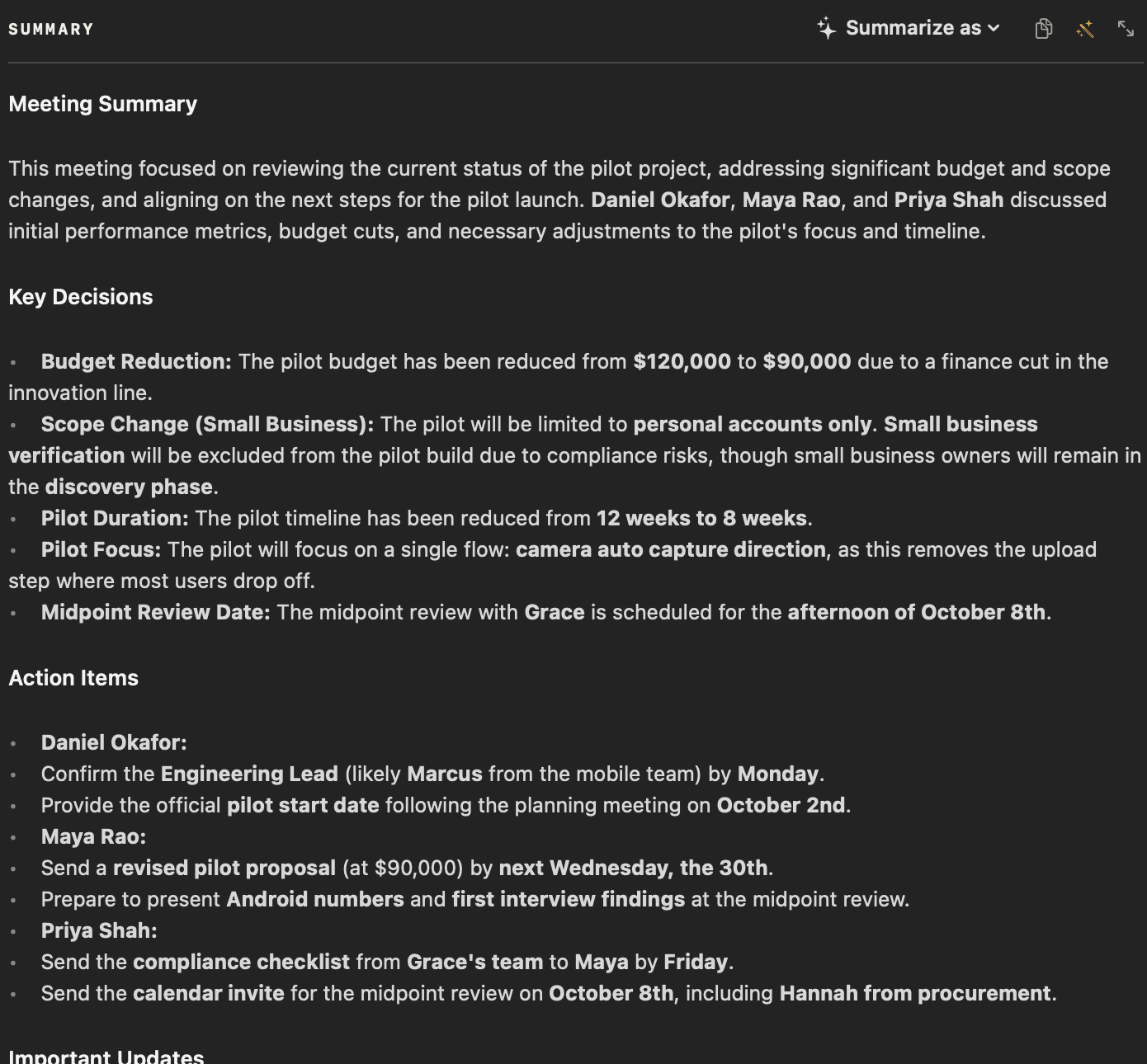
How AI meeting notes without a bot work
AI meeting summaries, written on your Mac
No bot in the call
Records your mic and your Mac’s audio, so it works with Zoom, Meet, Teams, FaceTime, Webex, Discord and Slack huddles.
Call detection
When a call starts, NoteOwl offers to take notes — or starts on its own, if you prefer.
Help during the meeting
Catch up, ask a question about the meeting so far, or pull the action items. Only you see it.
A notes box
Type what matters while you talk; your notes feed the summary.
Summary, decisions, action items
Written on your Mac when you stop; rewrite it in any of 22 templates or your own.
Your action items become commitments
The ones that involve you keep their owner and due date, linked to the moment they were said.
Emails, reports and posts
Ask NoteOwl to draft the follow-up email, a report or a post from any meeting — or anything you describe.
Crash-safe, no length limit
Audio is saved as you record, so a crash or a flat battery never costs you the meeting.
Transcription
Transcription with speaker labels
Meetings, voice notes and files you import are transcribed on your Mac, with every line labelled by who said it.
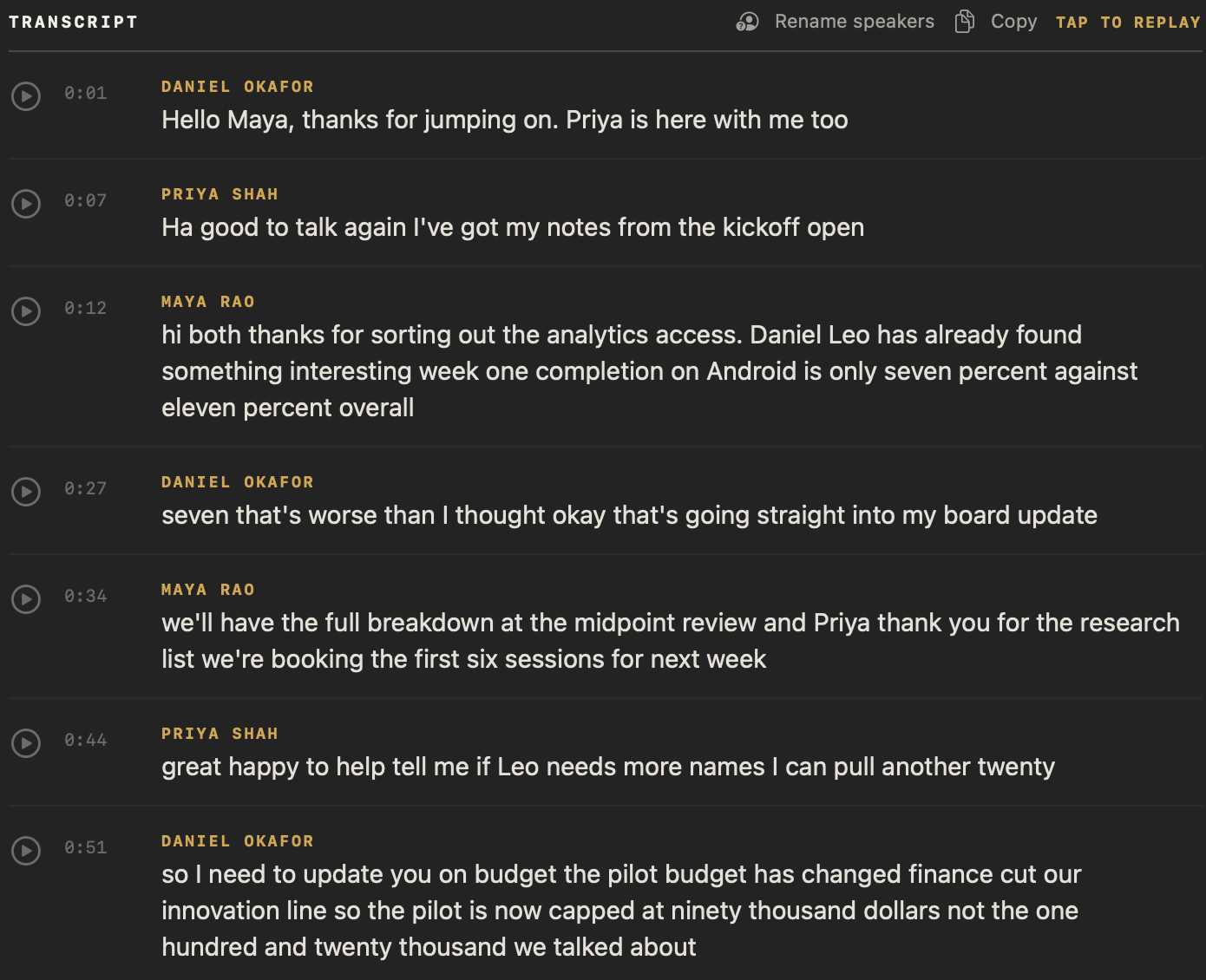
Transcription with speaker identification
Speaker labels
Every line says who said it. Speakers are separated automatically.
Learns voices
Name a speaker once and NoteOwl recognises them in every meeting after.
Transcribe files
Drag in mp3, wav, m4a, aiff, flac, aac or mp4 — one recording at a time.
Tap a line to replay
Play from any line, at 0.75× to 2× speed, with timestamps.
Re-transcribe any time
The audio is kept, so you can always run transcription again.
Chat and memory
Chat with all your meetings, even offline
Every meeting becomes part of a memory on your Mac — what was said, who promised what, and who everyone is. Ask about it in plain English, with Wi-Fi off too.
Chat with your meetings, offline
Type or speak a question in a saved thread and ask follow-ups. Answers come only from your own meetings, notes and imported recordings — not the web — and cite the exact passage. The AI runs on your Mac, so Chat works with Wi-Fi off.
Honest “nothing found”
If nothing answers the question, NoteOwl says so. It never invents a source.
- ⌥Z
Recall by voice
Ask your memory out loud from any app; the cited answer appears in the notch.
- ⌘K
Search everything
Every meeting, note and person in NoteOwl, one keystroke away.
People profiles
Who they are, what’s open between you, and every conversation you’ve had.
Commitments board
What you owe and what you’re owed, sorted by what’s due.
Daily review
What’s overdue, what’s due today, and what came in.
Meeting prep
From your Mac’s Calendar: who’s coming, your notes, and what’s still open.
Dictation and voice tools
Free dictation for every app on your Mac
Tap fn and talk: your words type where your cursor is, and one tap polishes them to fit the app. A few more shortcuts do the rest.
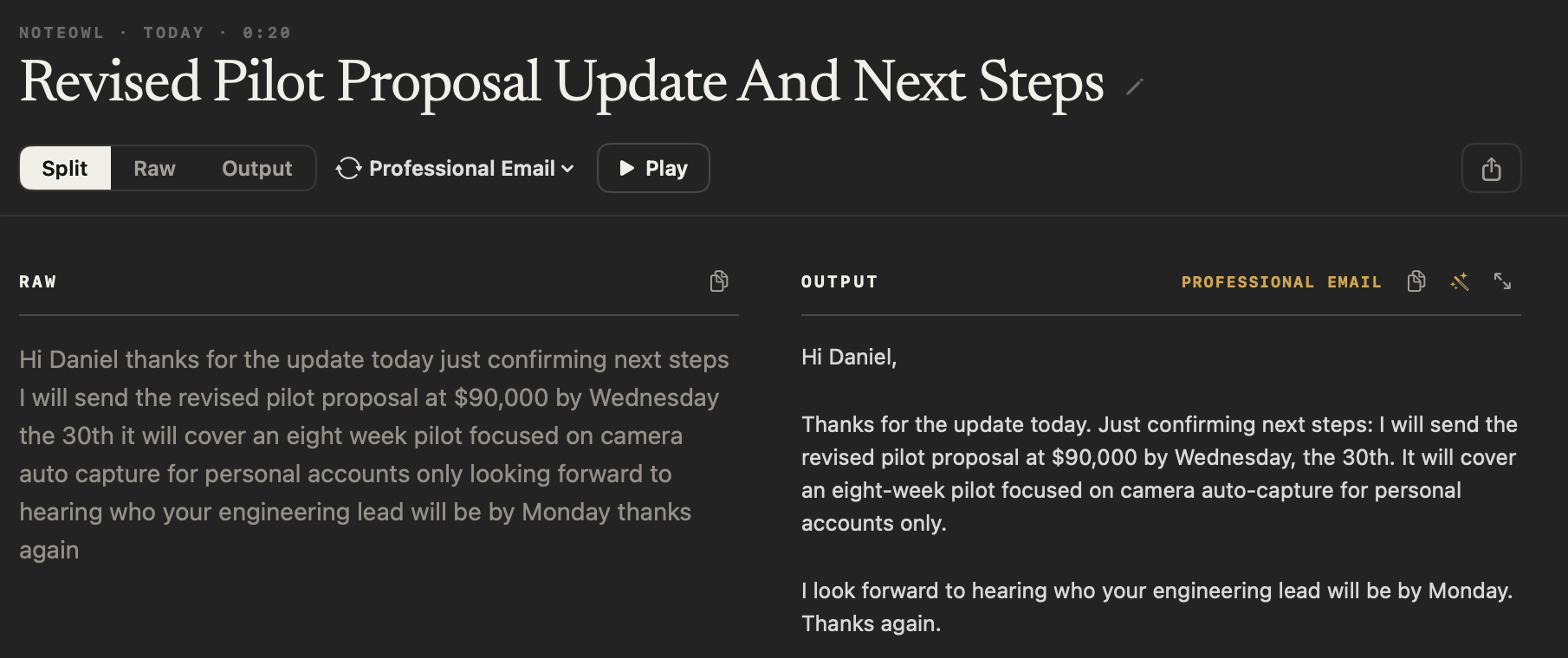
Free speech to text for every app on your Mac
A free voice notes app for Mac
- fn
Dictation into any app
Tap fn, talk, tap again. Words type live at your cursor — free and unlimited.
The right tone per app
Casual in Slack, professional in Mail, exact in code editors.
Polish, shorten, clarify
One tap to refine the result, with undo. Raw words are always kept.
Voice notes
Voice notes you record in NoteOwl keep their audio; every dictation is saved as text, raw words beside the polished version.
- ⌥X
Rewrite by voice
Select text in any app, say how to change it, and it’s replaced in place.
Custom vocabulary
Names and jargon spelled your way, in dictation, meetings and imports.
Templates
22 meeting note templates
A template decides which sections your summary gets. After a meeting, pick one to rewrite the summary in its shape, customize any of them or write your own, and switch to a different one whenever you like.
- Stand-up
- Executive Board
- Sales Call
- Meeting Report
- 1:1 Check-in
- Support Call
- Doctor’s Visit
- Legal Consultation
- Interview
- Consultation
- Student Lecture
- Research
- Training
- To-Do List
- Project Log
- Quick Summary
- Brainstorm
- Podcast Show Notes
- Presentation
- Therapy Session
- Journal
- Memories
- Customer needs
- Fewer drop-offs in account opening; the camera auto-capture flow removes the upload step.
- Objections
- The pilot budget is capped at $90,000; small-business verification adds compliance risk.
- Next steps
- An eight-week pilot, personal accounts only, focused on camera auto-capture.
- Follow-ups with dates
- Maya — revised proposal by Sep 30 · Daniel — engineering lead by Monday · Priya — compliance checklist by Friday.
Languages
34 languages, detected automatically
Just start talking — NoteOwl works out the language as you speak. You can even move between Hindi and English in one sentence.
Western Europe
- English
- French
- German
- Spanish
- Portuguese
- Italian
- Dutch
- Greek
Northern Europe
- Danish
- Finnish
- Norwegian
- Swedish
- Estonian
- Latvian
- Lithuanian
Central & Eastern Europe
- Bulgarian
- Croatian
- Czech
- Hungarian
- Polish
- Romanian
- Russian
- Slovak
- Slovenian
- Ukrainian
Middle East
- Arabic
- Hebrew
- Turkish
Asia
- Chinese
- Hindi
- Japanese
- Korean
- Thai
- Vietnamese
Proof
Cited answers, no made-up answers, and offline use
Your data
Private meeting notes that never leave your Mac
Recording, transcription, summaries, search and dictation run on your Mac with on-device AI models. Dictation needs no account at all.
What NoteOwl sends over the internet, and what it never does
Export your meeting notes as plain files
Export everything.
Any note as Markdown, PDF, text or subtitles — or all of it as one zip of plain files.
Delete everything.
One click in Settings, and it’s really gone from your Mac.
Files you own.
Transcripts, audio and memory live in a plain folder on your Mac.
Works offline.
After the one-time model download, NoteOwl needs no connection at all.
FAQ
Frequently asked questions
How is NoteOwl different from Otter or Granola?
NoteOwl never sends a bot into your call, and its AI runs on your Mac: recordings, transcripts and memory stay on your device. Otter and Granola process your meetings in the cloud. NoteOwl is not a subscription.
Does NoteOwl need a bot to join my meetings?
No. It records your microphone and your Mac’s audio directly, so it works with Zoom, Google Meet, Teams, FaceTime, Webex, Discord and Slack huddles without anyone seeing a guest join.
Can NoteOwl transcribe recordings I already have?
Yes. Drag in an mp3, wav, m4a, aiff, flac, aac or mp4 file and NoteOwl transcribes it on your Mac, labels the speakers, and adds it to your memory.
Can I ask questions about past meetings?
Yes — in Chat, or out loud from any app with ⌥Z. Answers cite the exact passage and open the recording at that moment. If nothing matches, NoteOwl says so.
Does Chat work offline?
Yes. After the one-time model download, everything — including Chat — runs on your Mac. Chat answers from your own meetings, notes and imported recordings, with sources; it isn’t a general assistant.
Does it work offline?
Yes. After the one-time download of its on-device AI models, recording, transcription, summaries, search and dictation all work without a connection.
Can I export transcripts as subtitles or PDF?
Yes. Export any note as Markdown, PDF, plain text or SRT subtitles, or export everything at once as a zip of plain files.
Every featureAI meeting notes without a botFree dictation into any appAI meeting summariesChat with your meetingsAction items and commitmentsPeople profilesOffline AI meeting notesSpeaker recognitionVoice notes on your MacExport your notesSearch all your meetingsCustom vocabularyAudio to textSubtitle generatorFollow-up emailMeeting prepLecture recorder
CompareNoteOwl vs GranolaNoteOwl vs OtterNoteOwl vs Wispr FlowNoteOwl vs Read AINoteOwl vs FirefliesNoteOwl vs FathomNoteOwl vs BluedotNoteOwl vs CluelyNoteOwl vs SuperwhisperNoteOwl vs tl;dvNoteOwl vs KrispNoteOwl vs JamieNoteOwl vs NottaNoteOwl vs PlaudNoteOwl vs MonologueNoteOwl vs VoiceInkNoteOwl vs Aqua VoiceNoteOwl vs SpokenlyNoteOwl vs MacWhisperNoteOwl vs TurboScribeNoteOwl vs CirclebackNoteOwl vs AnarlogNoteOwl vs MetaviewNoteOwl vs Meetily
Download NoteOwl for Mac
Free to download. Runs entirely on your Mac.
macOS 26 or later · Apple Silicon (M1 or newer) · 16 GB memory minimum, 24 GB recommended