For journalists
AI transcription for journalists
NoteOwl is AI transcription for journalists on your Mac: it transcribes interviews from a call or a recording speaker by speaker, puts a timestamp on every line, and plays any line back so you can check a quote against the audio.
Nothing is uploaded — transcription, search and chat run on your Mac with on-device AI models, even offline. Between interviews, dictation is free: tap fn in any app, talk, and your notes type at the cursor.
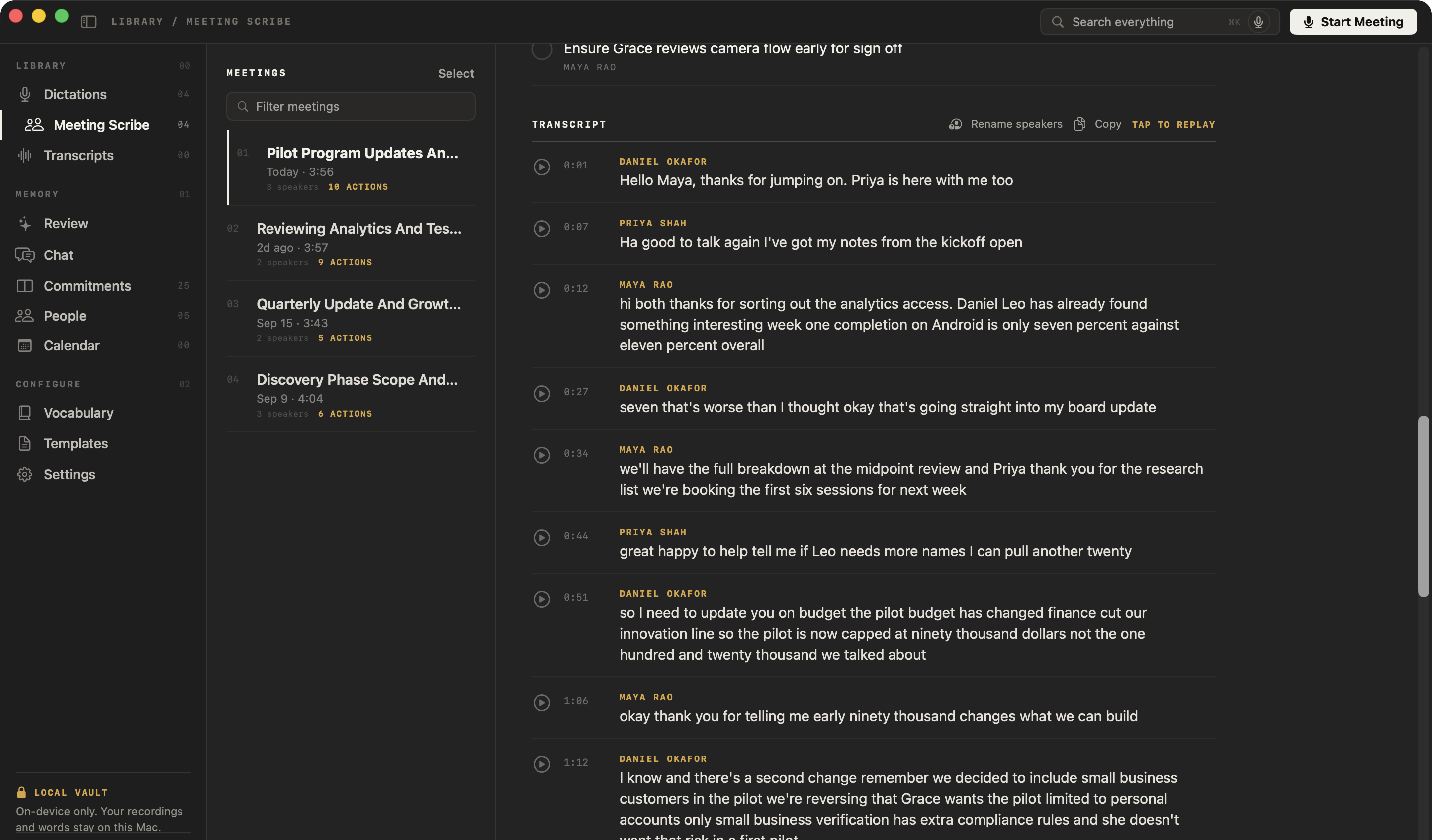
How do journalists use AI transcription?
For interview transcription you can check line by line: interviews on a call, interviews recorded in person, and the background calls around a story. NoteOwl records a call without a bot joining it, and every transcript stays on your Mac.
Before the interview
Names spelled right
Add your interviewee’s name, their organisation and any jargon to Vocabulary once, and NoteOwl spells them your way in every transcript after.
Interviews on a call
Record the call, no bot
NoteOwl records your microphone and your Mac’s audio in Zoom, Teams, Meet, FaceTime or any call app. Nothing joins the call, so tell your interviewee you’re recording.
Interviews in person
Record as usual, import later
Record on your phone or a recorder, then drag the file into NoteOwl — m4a, mp3, wav, mp4 and more — for a transcript with a timestamp on every line.
Writing it up
Check every quote
Tap any line to hear it in the speaker’s own voice, slow the recording down, and copy the words you need into your draft.
Can you dictate notes and drafts instead of typing?
Yes, and it’s free. Tap fn in your notes, a doc or an email — anywhere you can type — and talk. NoteOwl types your words at the cursor, and one tap on Polish tidies them in the tone set for that app. How free dictation works on your Mac
Casual in chat
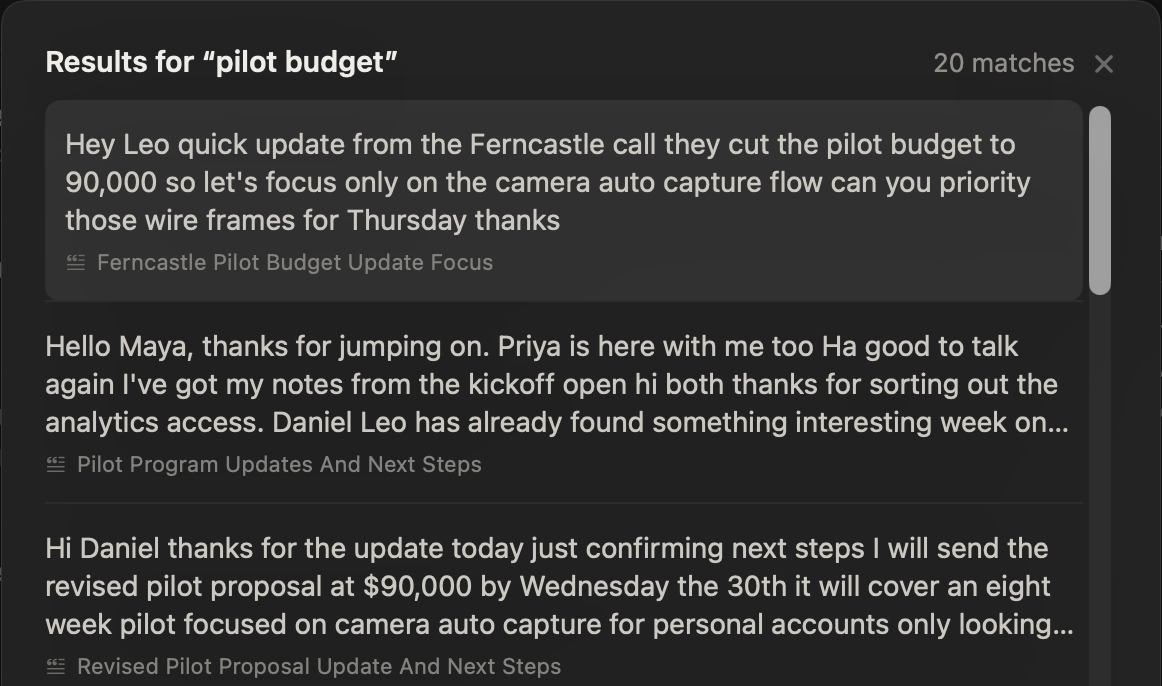
Hey Leo, quick update from the Ferncastle call. They cut the pilot budget to $90,000, so let’s focus only on the camera auto-capture flow. Can you prioritize those wireframes for Thursday? Thanks.
- To
- Daniel Okafor
- Subject
- Next steps
Hi Daniel,
Thanks for the update today. Just confirming next steps: I will send the revised pilot proposal at $90,000 by Wednesday, the 30th. It will cover an eight-week pilot focused on camera auto-capture for personal accounts only.
I look forward to hearing who your engineering lead will be by Monday. Thanks again.
12export const pilot = {13 budgetCap: 90_000,14 weeks: 8,15 accounts: 'personal',16};17
- Voice notes — a thought recorded straight after an interview, audio and text kept together
- Rewrite by voice — select a paragraph, press ⌥X and say how to change itPro
- Custom vocabulary — names and places spelled your wayPro
- 34 languages — detected automatically
How do you check a quote against the recording?
Tap the line. Every line of a NoteOwl transcript has its speaker, a timestamp and a play button, so you hear exactly what was said, in the speaker’s own voice, before the quote goes in your story.
- 01Tap the linePress play beside any line and NoteOwl plays exactly that moment.
- 02Slow it downPlay the whole recording at 0.75×, 1×, 1.25×, 1.5× or 2×, and drag to any point.
- 03Copy with names and timesFor a recorded call, Copy puts the whole transcript on your clipboard, every line with its speaker and time.
- 04Take one lineIn an imported interview, right-click a line to copy just those words, or assign it to the right speaker.
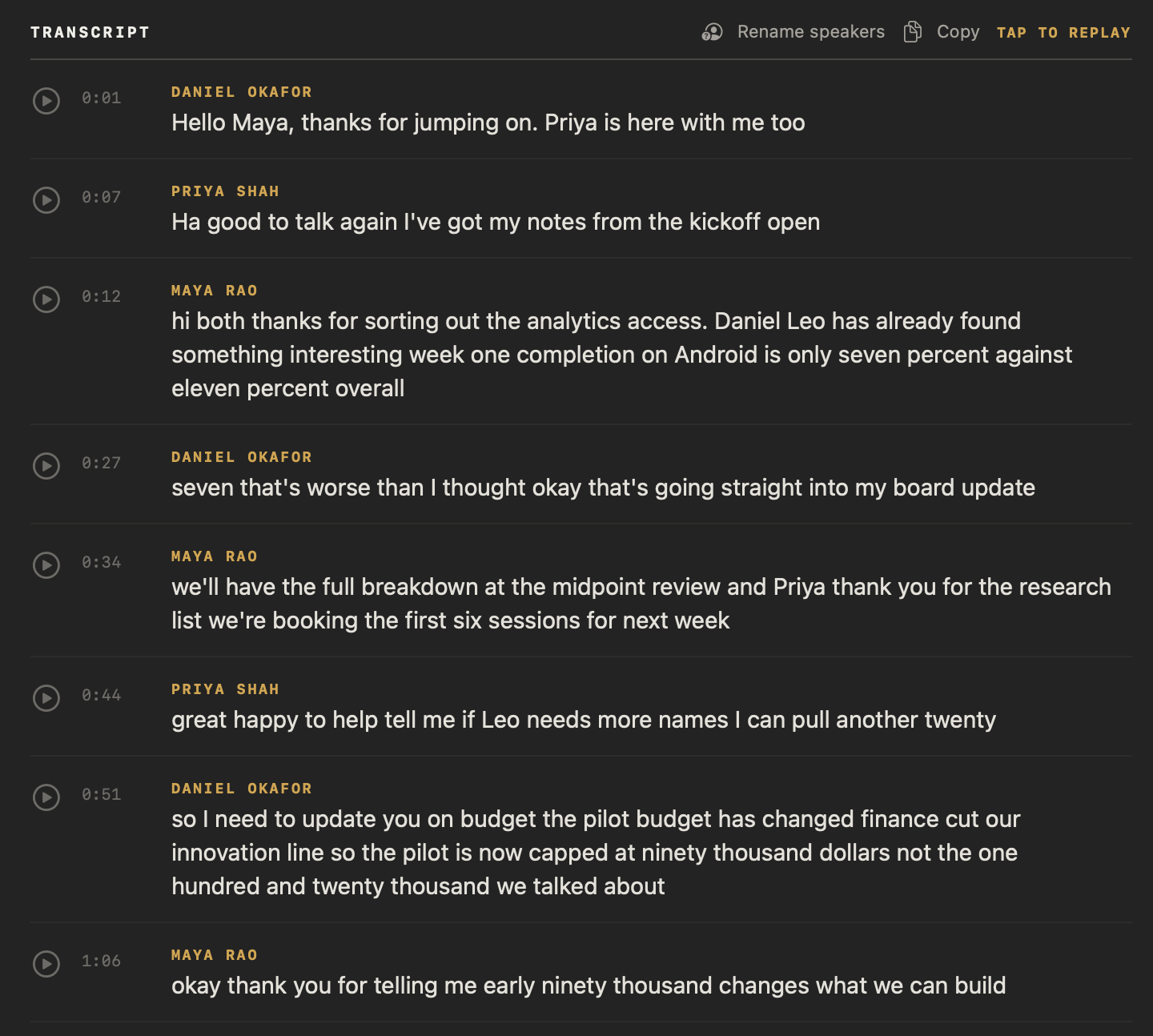
Copy puts it on your clipboard like this
[0:44] Priya Shah: great happy to help tell me if Leo needs more names I can pull another twenty
[0:51] Daniel Okafor: so I need to update you on budget the pilot budget has changed finance cut our innovation line so the pilot is now capped at ninety thousand dollars not the one hundred and twenty thousand we talked about
How do you find a quote weeks later?
Search for the words you remember. Press ⌘K to search all your meetings and recordings: every matching passage appears with the interview it came from, and opens there. Or ask chat with your meetings a question, and it cites its passages.
Questions you could ask your interviews
- What exactly did she say about the merger?
- Who first mentioned the budget cut?
- When did he say the report would be ready?
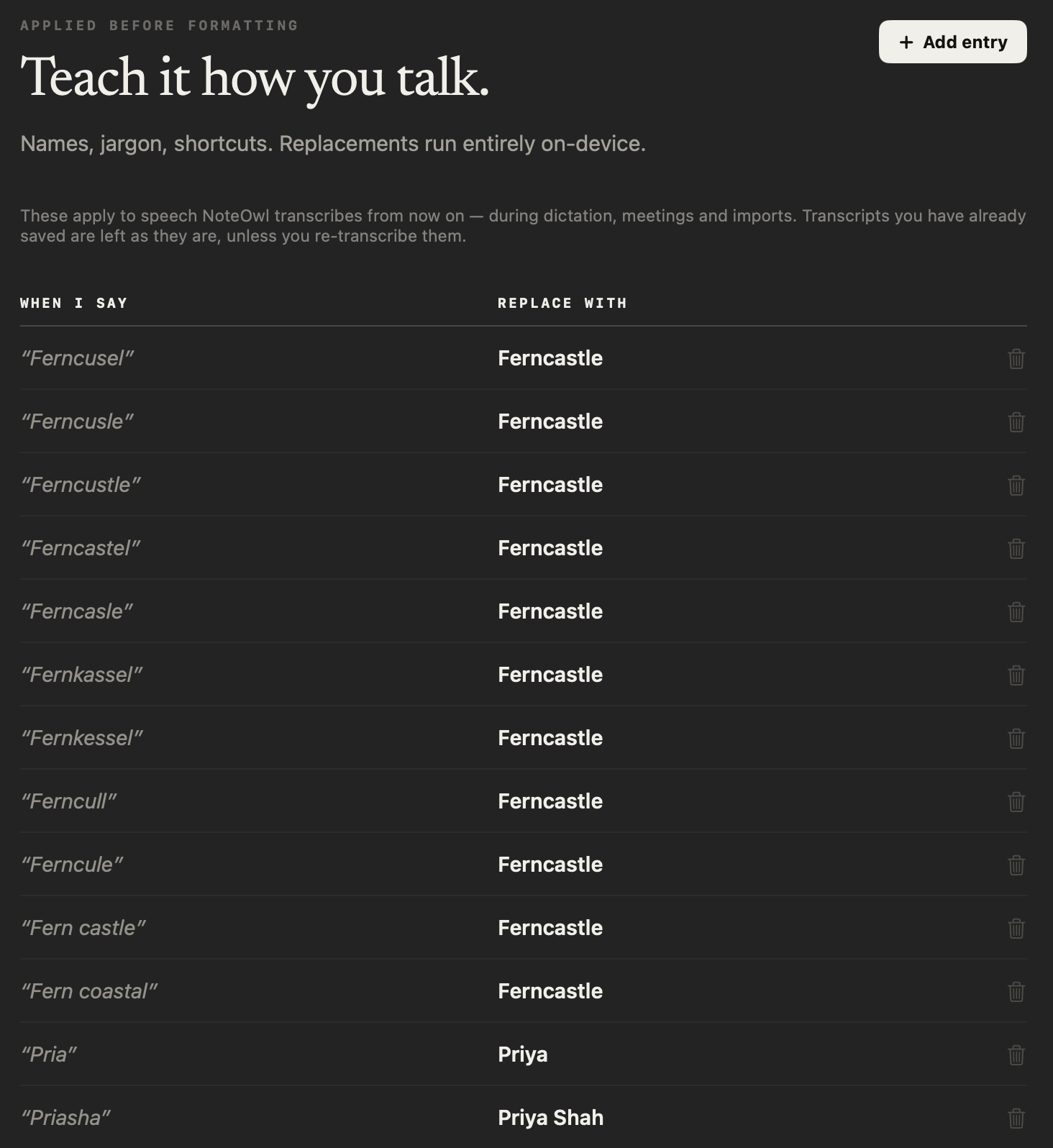
How do you get names spelled right in a transcript?
Teach NoteOwl once. In custom vocabulary, add “When I say” this, “Replace with” that — a person, a company, a place — and every transcript from then on spells it your way. Custom vocabulary is part of NoteOwl Pro.
How do you export an interview transcript?
As a plain file: Markdown or PDF with the summary, plain text with each line’s speaker, or SRT subtitles timed to the recording — or copy it as Markdown straight into your draft. NoteOwl never uploads it or makes a web link. Export your meeting notes
| Format | What you get |
|---|---|
| Copy Markdown | The notes and transcript on your clipboard, ready to paste into a draft |
| Markdown (.md) | The summary and the transcript, each line with its speaker and time |
| The same notes as a PDF, to file or share | |
| Text (.txt) | The transcript, each line labelled with its speaker, without timecodes |
| Subtitles (.srt) | Cues timed from the transcript, for a video or a clip |
What else does NoteOwl do for a journalist?
Everything around the interview: speakers fixed in a click, voice notes after the call, answers recalled from any app — all on your Mac, even with Wi-Fi off.
Fix who said what
Rename a speaker once and the whole transcript updates; in an imported interview, right-click a line and choose Assign to. Wrong number of voices? Pick 2 to 8 and NoteOwl separates them again.
Voice notes after the interview
Record your impressions in NoteOwl while they’re fresh; audio and text are kept together. Free.
Recall from any app
Between interviews, press ⌥Z and ask out loud; the answer, with its source, appears in the notch.
Re-transcribe any time
Added a name to Vocabulary? Re-transcribe an imported interview from its saved audio and the new spelling is used.
Long calls, kept safe
No time limit on a recorded call, and the audio is saved to disk as it records, so a crash doesn’t cost you the interview.
Files you own
Everything lives in a folder on your Mac. Export all data saves every recording, transcript and note as one zip of plain files, on every plan.
Works with Wi-Fi off
On a train or in the field: transcription, search and chat run on your Mac with no network.
A summary of every interview
When the transcript is ready, NoteOwl writes a summary on your Mac, and Summarize as reshapes it.
Interviews in 34 languages
Calls, recordings and dictation in 34 languages, detected automatically — Hindi and English in one sentence included.
Which summary templates suit an interview?
NoteOwl writes a summary when the transcript is ready; Summarize as rewrites it in any of the 22 meeting notes templates. These five fit reporting work. Treat a summary’s notable quotes as a shortlist: check each one against the audio.
| Recording | Template | What it writes |
|---|---|---|
| Interviews you’ll quote from | Podcast Show Notes | Overview · Segments · Notable quotes · Resources |
| Q&A interviews | Interview | Background · Questions & answers · Strengths · Concerns · Verdict |
| Background and research calls | Research | Questions · Findings · Evidence · Open questions |
| Press conferences and briefings | Presentation | Main message · Key points · Standout moments · Q&A |
| Editorial meetings | Meeting Report | Attendees · Purpose · Key points · Decisions · Action items · Open questions |
Do interview recordings leave your Mac?
No. NoteOwl transcribes, summarizes and answers questions on your Mac with on-device AI models; recordings and transcripts are never uploaded, and it works offline after the one-time model download. What your interviewees said stays on your Mac.
| When NoteOwl connects | What it sends |
|---|---|
| The one-time model download | Model files are downloaded to your Mac; nothing of yours is sent |
| Checking for app updates | No personal data or content |
| Starting the trial or activating Pro | Your email address and an identifier for this Mac |
| A licence check, at most once a week (Pro) | Only the certificate identifier |
Recordings, transcripts, notes and memory are never sent. To remove an interview, right-click it and choose Delete: it leaves your library, search and memory, and its files move to the macOS Trash (delete a recording or all your data). The details are in NoteOwl’s privacy policy.
Do you need to tell interviewees you’re recording?
Yes — tell them. No bot joins and NoteOwl doesn’t notify anyone on the call, so say at the start that you’re recording. The rules on recording conversations differ from place to place; follow the ones that apply to you.
FAQ
Questions journalists ask about NoteOwl
Can NoteOwl transcribe interviews on Zoom, Teams or FaceTime?
Yes. NoteOwl records your microphone and your Mac’s audio, so it transcribes interviews on Zoom, Microsoft Teams, Google Meet, FaceTime or any other call app on your Mac, with no bot joining. Tell the person you are interviewing that you are recording.
Can NoteOwl transcribe an interview I recorded on my phone?
Yes. Drag the recording into NoteOwl — m4a, mp3, wav, aiff, flac, aac or mp4, one at a time — and NoteOwl transcribes it on your Mac, with a timestamp on every line, and adds it to everything you can search. Importing recordings is part of NoteOwl Pro.
How do I check a quote in NoteOwl?
Open the interview in NoteOwl and press play beside the line: NoteOwl plays exactly that moment, in the speaker’s voice. Every line shows who said it and when, and for a recorded call, Copy puts the whole transcript on your clipboard with each speaker’s name and time.
Can NoteOwl spell names and places correctly?
Yes, once you teach it. Add a rule to NoteOwl’s Vocabulary, such as “Pria” → Priya, and every transcript from then on uses your spelling; Re-transcribe applies it to an interview you already imported. Custom vocabulary is part of NoteOwl Pro.
What formats can NoteOwl export an interview transcript in?
NoteOwl exports an interview transcript as Markdown, PDF, plain text or SRT subtitles, or copies it as Markdown to paste into a draft. Each export is a plain file saved on your Mac where you choose; NoteOwl never uploads it or makes a web link.
Does NoteOwl upload interviews to the cloud?
No. NoteOwl transcribes, summarizes and answers questions on your Mac with on-device AI models, so interview recordings and transcripts are never uploaded, and it works offline after the one-time model download. Your interviewees’ words stay on your Mac.
Does NoteOwl tell the interviewee they are being recorded?
No. NoteOwl has no bot and sends no notice to anyone on the call, so tell the people you interview that you are recording before you start. The rules on recording conversations differ from place to place; follow the ones that apply to you.
How much does NoteOwl cost for a journalist?
Transcribing calls and imported recordings, search and chat are part of NoteOwl Pro: $79 once for one Mac, no subscription, with a 7-day free trial in the app and no card needed. Buy it inside the app (the … menu next to your name → License…). Dictation and voice notes are free.
Related
- Transcription with speaker identification Every line says who said it, and a voice you name is recognised later.
- What is an SRT file? The subtitle format, and how NoteOwl saves one from a transcript.
- Voice notes on your Mac Free voice notes saved as searchable text, with the audio kept.
- NoteOwl Pro, $79 once No subscription; one Mac; try it free first.
Keep exploring
Made for this work
- Audio to textTranscription software for your Mac: drop in an audio or video file and get a speaker-labelled transcript with timestamps, unlimited, with nothing uploaded
- Subtitle generatorTurn a recording into an SRT subtitle file with timecodes and speaker names, on your Mac
- Speaker recognitionTranscripts that say who said what: speakers separated automatically, and a voice named once is recognised in later meetings, on your Mac
- Interview notes templateAn interview notes template to copy, what each section holds, an example, and how NoteOwl writes interview notes
Other roles
- AI note taker for managers1:1s and team meetings: commitments tracked both ways, what is open with each person before you meet, plus free dictation
- AI transcription for podcastersEpisodes imported and transcribed speaker by speaker on your Mac, show notes from the Podcast Show Notes template, SRT subtitles; nothing uploaded
- AI note taker for lawyersClient calls and consultations transcribed and summarized on your Mac; no third party processes the audio, and every answer cites the moment it was said
Every quote, checkable against the recording
Free to download. Runs entirely on your Mac.
macOS 26 or later · Apple Silicon (M1 or newer) · 16 GB memory minimum, 24 GB recommended
About NoteOwl
NoteOwl is private AI meeting notes and memory for the Mac. It captures meetings without a bot joining the call, labels every speaker, writes summaries and action items, and builds a memory of every conversation that you can chat with — fully offline, because the speech recognition and the AI run on the Mac itself. Dictation into any app is free; Pro is a one-time purchase.
NoteOwl pricing: what’s free and what Pro adds
Last updated