Custom vocabulary · Pro
Custom vocabulary: names and jargon spelled your way
NoteOwl’s custom vocabulary is a list of simple rules — “When I say” this, “Replace with” that — so names, company names and jargon are spelled your way in everything NoteOwl transcribes from then on: dictation, meetings and imports.
The replacements run entirely on your Mac, and vocabulary rules are part of NoteOwl Pro, with a 7-day free trial in the app.
How do you add custom vocabulary in NoteOwl?
Open Vocabulary in NoteOwl’s sidebar and click Add entry. Under “When I say…”, type the word the way NoteOwl writes it now; under “Replace with…”, type how it should be spelled; then click Add. Everything NoteOwl transcribes from then on uses it.
- 1
Open Vocabulary
In NoteOwl’s sidebar, choose Vocabulary, under Configure.
- 2
Click Add entry
In the sheet that opens, under “When I say…”, type the word or phrase the way NoteOwl writes it now.
- 3
Type the right spelling
Under “Replace with…”, type it exactly as it should appear, capitals included, then click Add.
- 4
Try it
Type a sentence the way you’d say it, and NoteOwl shows what it would write — without recording anything.
Click a rule to change it. The bin beside it deletes it, and Undo puts it back if you clicked by mistake.
Where do your vocabulary rules apply?
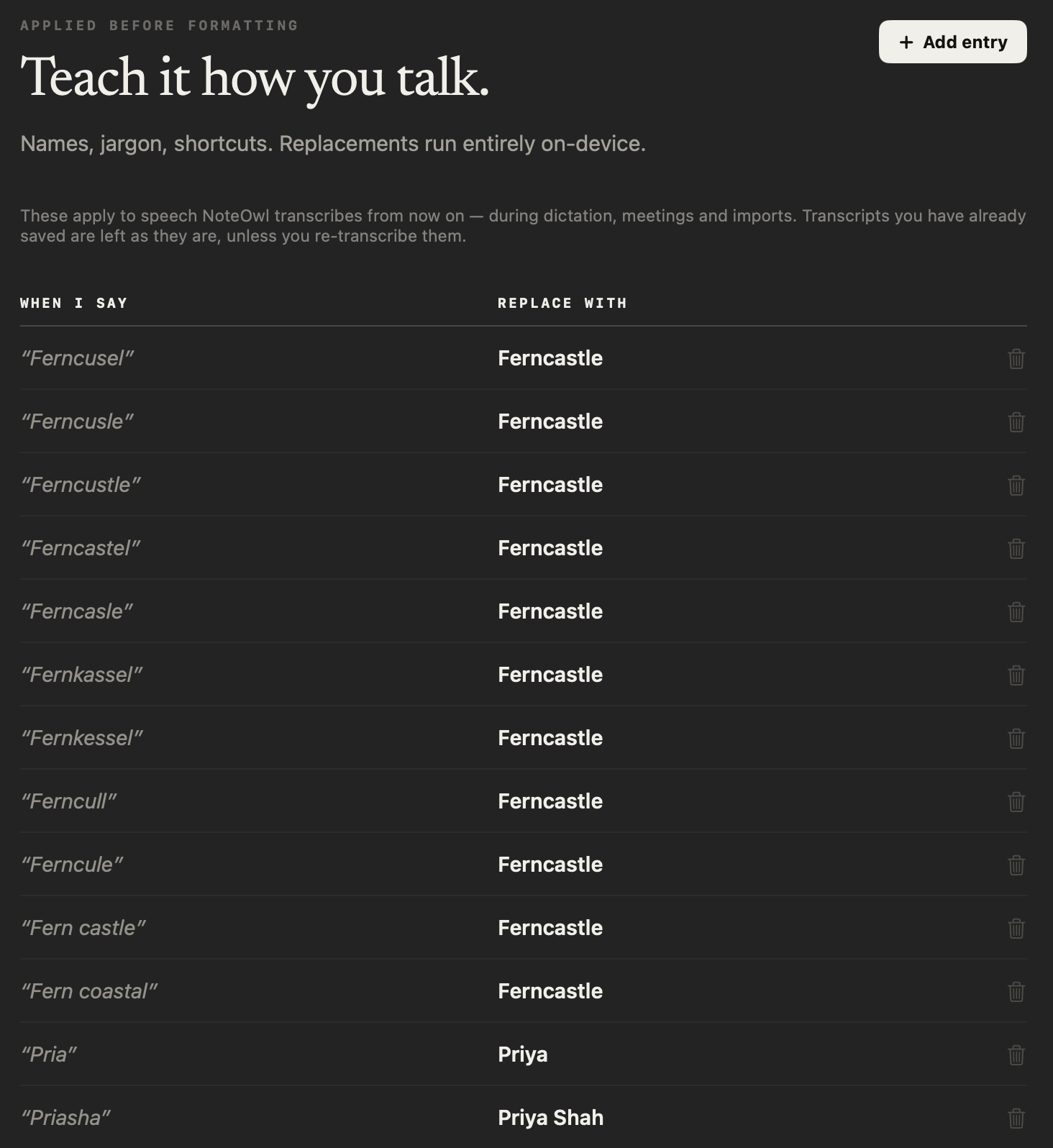
In everything NoteOwl transcribes after you add a rule. The Vocabulary screen says it plainly:
“These apply to speech NoteOwl transcribes from now on — during dictation, meetings and imports. Transcripts you have already saved are left as they are, unless you re-transcribe them.”
- Dictation into any app
- Uses your vocabularyYes
- What changesThe words typed at your cursor, and the dictation NoteOwl saves
- Voice notes recorded in NoteOwl
- Uses your vocabularyYes
- What changesThe note’s text
- Meetings
- Uses your vocabularyYes
- What changesThe meeting transcript
- Imported recordings
- Uses your vocabularyYes
- What changesThe transcript of the file
- Re-transcribe, in Transcripts
- Uses your vocabularyYes
- What changesThe new transcript uses the rules you have now
- Transcripts already saved
- Uses your vocabularyNo
- What changesLeft as they are, unless you re-transcribe them
| Uses your vocabulary | What changes | |
|---|---|---|
| Dictation into any app | Yes | The words typed at your cursor, and the dictation NoteOwl saves |
| Voice notes recorded in NoteOwl | Yes | The note’s text |
| Meetings | Yes | The meeting transcript |
| Imported recordings | Yes | The transcript of the file |
| Re-transcribe, in Transcripts | Yes | The new transcript uses the rules you have now |
| Transcripts already saved | No | Left as they are, unless you re-transcribe them |
Which names and terms should you add?
Names, jargon and shortcuts — the screen’s own three. Treat it as a custom dictionary for everything NoteOwl hears: people’s names, clients and products, the acronyms of your trade, and short phrases you want written out in full.
People’s names
Colleagues, clients and anyone whose name is easy to mishear, such as “Pria” → Priya.
Company and product names
Your clients, your own products and brand names with unusual spellings.
Jargon and acronyms
The terms of your trade, written the way your team writes them: “k8s” → Kubernetes, “see sharp” → C#.
Shortcuts
A short phrase you say, replaced with the longer text you want written.
“k8s → Kubernetes” and “see sharp → C#” are the examples NoteOwl itself suggests on an empty Vocabulary screen.
How does NoteOwl match a vocabulary rule?
Word for word, once the speech is transcribed and before anything is formatted: NoteOwl finds the words under “When I say…”, ignoring case and matching whole words only, and writes the “Replace with…” text in their place.
That is why the screen is headed Applied before formatting: when NoteOwl polishes a dictation, it starts from your spelling.
Whole words, any case
Matching ignores case and only replaces whole words, so a rule never changes part of a longer word.
Longer phrases first
When two rules could match in the same place, the longer phrase wins.
Written exactly as you typed it
The replacement keeps your capitals, spaces and punctuation.
One rule per mishearing
Add a rule for each way NoteOwl writes a name. The screen at the top of this page has eleven for one client.
Are your vocabulary rules private?
Yes. Your rules are kept on your Mac and applied there, so they work offline and are never uploaded. Export all data includes your vocabulary, so a copy goes with everything else you export.
“Names, jargon, shortcuts. Replacements run entirely on-device.”
“Replacements run fully on-device — your custom vocabulary never syncs to a server.”
Is custom vocabulary free?
No. Vocabulary rules are part of NoteOwl Pro, along with meetings and imported recordings. Dictation into any app and voice notes are free and unlimited, forever.
NoteOwl Pro is $79 once for one Mac, with a 7-day free trial in the app and no card.
- Dictation into any app
- FreeUnlimited
- ProUnlimited
- Voice notes
- FreeUnlimited
- ProUnlimited
- Custom vocabulary
- FreeNo
- ProYes
- Meetings and imported recordings
- FreeNo
- ProYes
| Free | Pro | |
|---|---|---|
| Dictation into any app | Unlimited | Unlimited |
| Voice notes | Unlimited | Unlimited |
| Custom vocabulary | No | Yes |
| Meetings and imported recordings | No | Yes |
NoteOwl’s vocabulary at a glance
The facts, in one table. NoteOwl transcribes with on-device AI models and applies your vocabulary on the Mac, so it works offline.
- Where it is
- Vocabulary, in NoteOwl’s sidebar under Configure
- A rule
- “When I say…” → “Replace with…”
- Applies to
- Speech transcribed from now on: dictation, meetings and imports
- Saved transcripts
- Left as they are, unless you re-transcribe them
- Matching
- Ignores case; whole words only; the longer phrase wins
- Test a rule
- Try it, without recording anything
- Where it runs
- On your Mac; replacements run entirely on-device
- Plan
- NoteOwl Pro, $79 once for one Mac; 7-day free trial in the app
- Requirements
- macOS 26 or later, Apple Silicon (M1 or newer), 16 GB memory minimum, 24 GB recommended
What else does NoteOwl do?
Vocabulary rules make NoteOwl’s transcripts read right. NoteOwl is private AI meeting notes and memory for Mac: it records meetings without a bot, labels every speaker, writes summaries and action items, and lets you chat with everything you’ve recorded.
Free speech to text for Mac
Tap fn, talk and tap again: the words type at your cursor in any app, and one tap polishes them in the right tone for that app. Free and unlimited.
Transcription with speaker identification
Vocabulary fixes the words; speaker labels say who said them. Name a voice once and NoteOwl recognises it in every meeting after.
FAQ
Questions about custom vocabulary
What is custom vocabulary in NoteOwl?
Custom vocabulary in NoteOwl is a list of rules that fix how names and jargon are written: when NoteOwl hears one thing, it writes another, such as “Pria” as Priya. The rules apply to dictation, meetings and imports from the moment you add them, and run entirely on your Mac.
Do my vocabulary rules work when I dictate into other apps?
Yes. With NoteOwl Pro, your vocabulary rules apply while you dictate into any app: the words typed at your cursor use your spelling, and so does the dictation NoteOwl saves. Dictation itself is free and unlimited; the vocabulary rules are part of NoteOwl Pro.
Does custom vocabulary change transcripts I already have?
No. A vocabulary rule applies to speech transcribed after you add it, and transcripts you have already saved are left as they are. To apply new rules to an imported recording, click Re-transcribe on it in NoteOwl’s Transcripts.
Are NoteOwl’s vocabulary rules case-sensitive?
No. NoteOwl matches a vocabulary rule whatever the case of the words it hears, and only replaces whole words, so a rule never changes part of a longer word. The replacement is written exactly as you typed it, capitals included.
How is custom vocabulary different from naming speakers?
Vocabulary rules fix the words inside what was said, such as a client’s name spelled wrong. Naming speakers sets who said each line of a NoteOwl meeting transcript, and NoteOwl then recognises that voice in later meetings. The two work side by side.
Are my vocabulary rules uploaded anywhere?
No. NoteOwl keeps your vocabulary rules on your Mac and applies them there: the replacements run entirely on-device and work offline. NoteOwl’s Export all data includes your vocabulary, so a copy goes with everything else you export.
Is custom vocabulary free in NoteOwl?
No. Vocabulary rules are part of NoteOwl Pro, a one-time $79 purchase for one Mac with no subscription, and you can try it free for 7 days in the app with no card. Dictation into any app and voice notes stay free.
Related
- Free speech to text for Mac Tap fn in any app, talk, and the words type at your cursor.
- Transcription with speaker identification Every line says who said it, and a voice you name is recognised later.
- All NoteOwl features Meeting notes, transcription, chat and memory, dictation, templates and languages.
- NoteOwl Pro, $79 once What is free, what Pro adds, and the 7-day trial.
Keep exploring
Related features
- Export your notesExport meetings, dictations and notes as Markdown or PDF, imported transcripts as text or SRT, or everything as plain files; nothing is locked in
- Free dictation into any appFree, unlimited speech to text in every app on your Mac: tap fn, talk, and the words type at your cursor; one tap polishes them in the right tone for that app
- Voice notes on your MacVoice notes and dictations saved as searchable text on your Mac, with the raw words beside the polished version; free
Who uses it
- AI note taker for doctorsVisit notes dictated on your own Mac for doctors in private practice; no third party processes patient audio, and no subscription
- StudentsLectures recorded in the room or an online class, or imported, turned into study notes you can ask questions of before the exam; dictating essays is free
Teach NoteOwl the names you say every day
Free to download. Runs entirely on your Mac.
macOS 26 or later · Apple Silicon (M1 or newer) · 16 GB memory minimum, 24 GB recommended
About NoteOwl
NoteOwl is private AI meeting notes and memory for the Mac. It captures meetings without a bot joining the call, labels every speaker, writes summaries and action items, and builds a memory of every conversation that you can chat with — fully offline, because the speech recognition and the AI run on the Mac itself. Dictation into any app is free; Pro is a one-time purchase.
NoteOwl pricing: what’s free and what Pro adds
Last updated