NoteOwl vs tl;dv
A tl;dv alternative with no bot in your call
NoteOwl is a tl;dv alternative for Mac that takes your meeting notes with no bot in the call: it records your microphone and your Mac’s audio, then transcribes, summarizes and answers questions on the Mac itself.
Nothing is uploaded, it works the same with or without internet, meetings have no length limit, and you pay once instead of paying per seat — with free dictation into every app on top.
Read the transcript
You know that moment when a bot joins your call… and everyone gets a little weird?
Yeah. NoteOwl doesn’t do that.
It’s a Mac app that takes your meeting notes right on your computer. Nothing leaves your Mac.
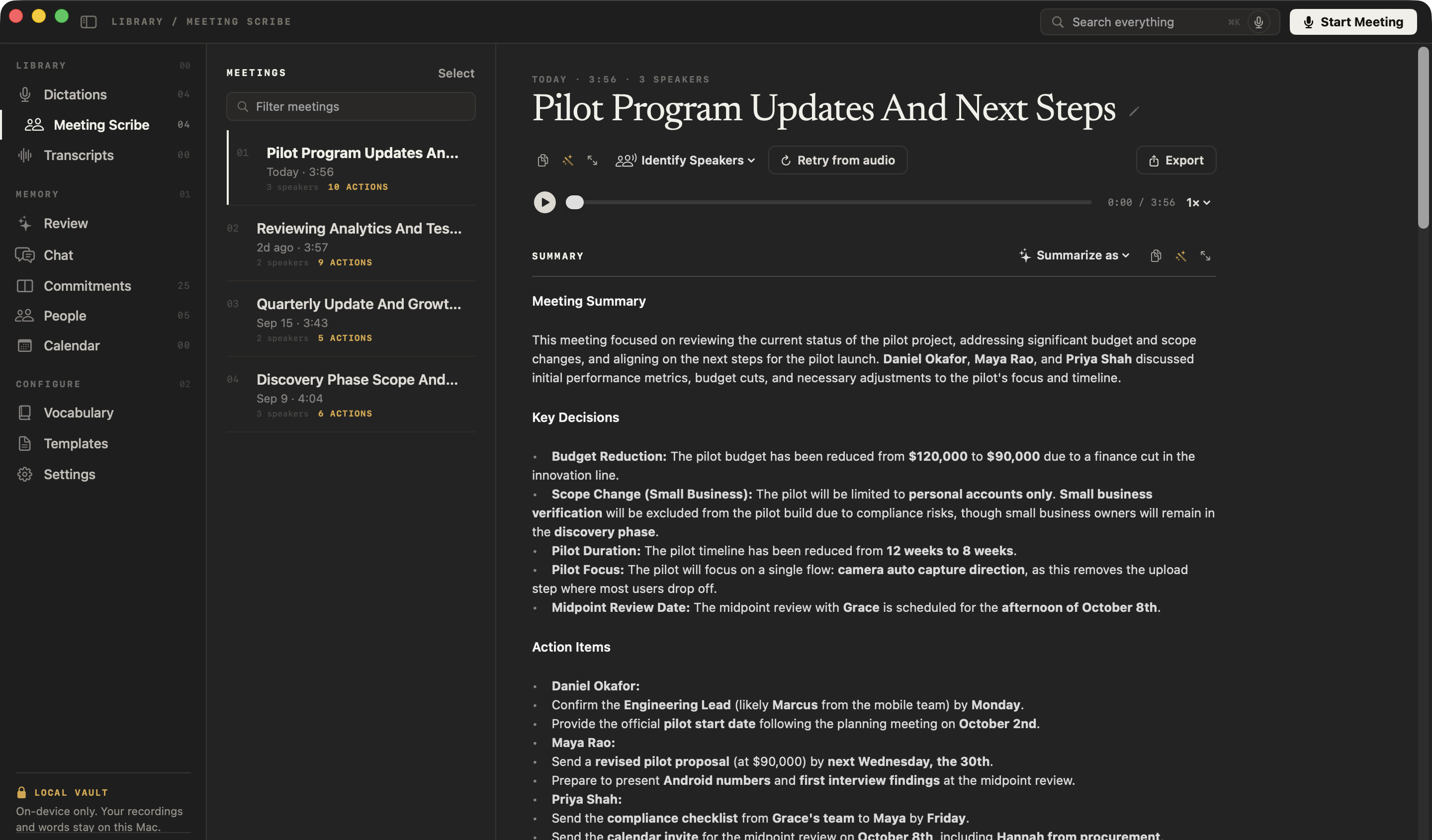
When you hang up? Summary, decisions, action items. All done.
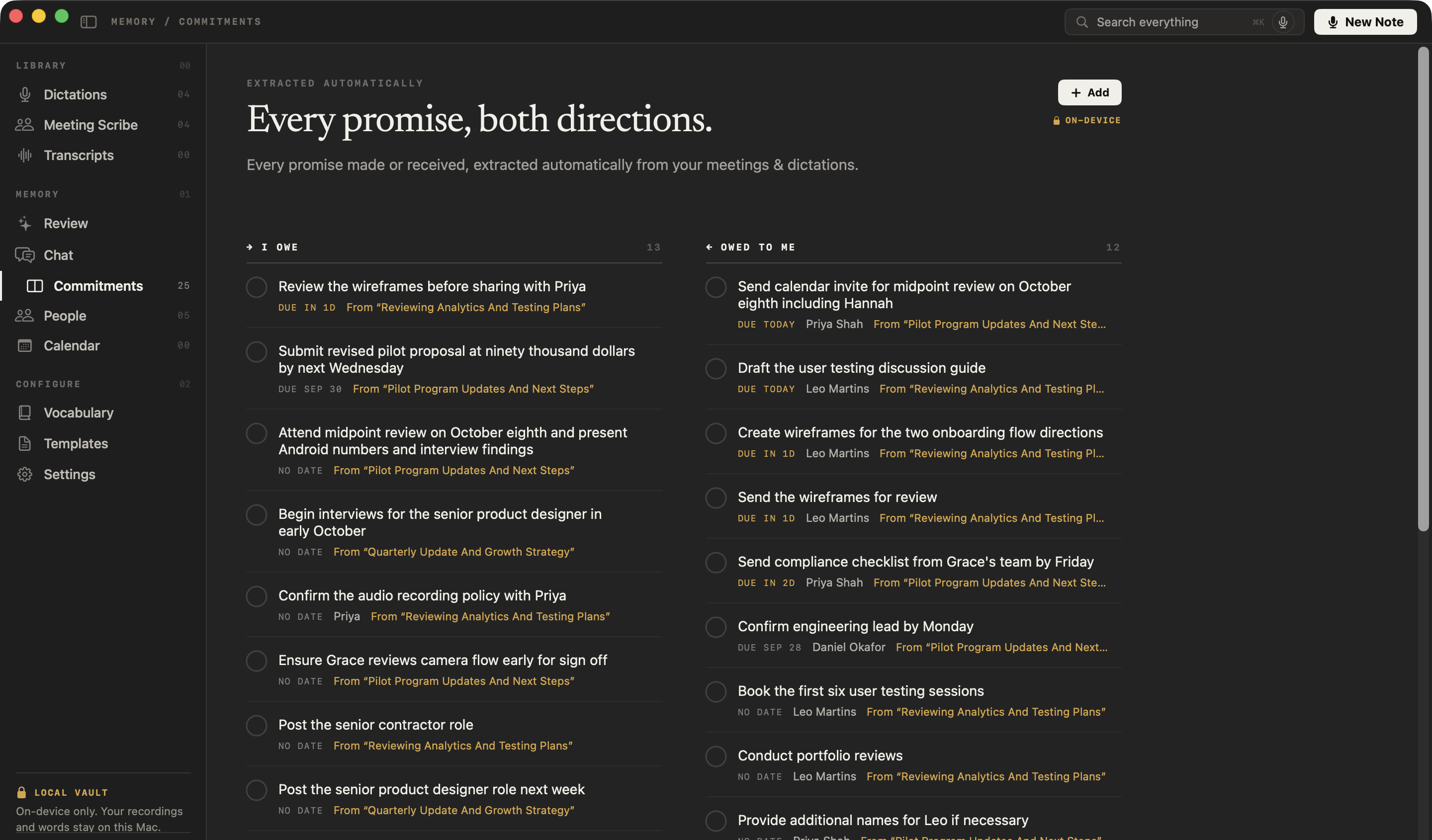
Every promise gets tracked, so nothing slips through.
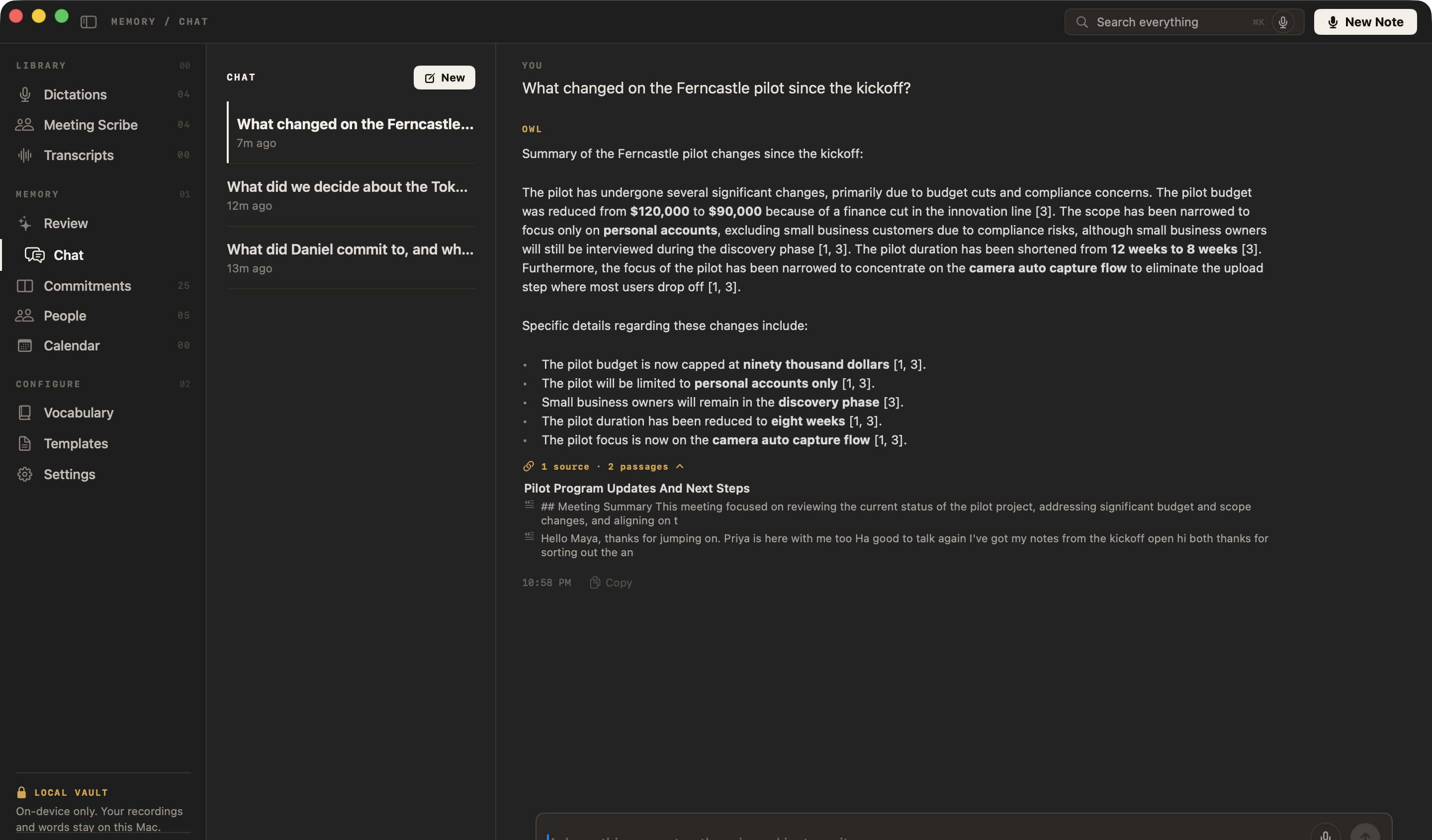
And you can chat with all your past meetings. Even offline.
NoteOwl. Free to download. Your next call’s the test.
Why choose NoteOwl over tl;dv?
Because no bot joins your call, your meetings never leave your Mac, everything works offline, and you pay once, with no limit on meeting length. On top of that you get voices recognised in any call, every promise tracked, and a memory you can ask — offline.
Your meetings stay on your Mac
Recording, transcription, summaries and chat all run on your Mac with on-device AI models, and nothing is uploaded. tl;dv’s bot-free desktop mode saves each recording to your tl;dv library, where it is transcribed and turned into AI notes.[6]
Voices recognised, on your Mac
Speakers are separated in any call app and in recordings you import. Name a voice once and it’s recognised in every meeting after; the voice profile stays on your Mac. tl;dv labels speakers in uploads Speaker 1, Speaker 2.[13]
Ask every meeting, even offline
Chat answers from your own meetings and notes and cites the passage it used, with Wi-Fi on or off — and ⌘K searches every meeting, note and person.
Every promise, and everyone you meet
A board of what you owe and what you’re owed, a profile for everyone you meet, and prep pages from your Mac’s Calendar — Apple Calendar included.
What is tl;dv, and how is NoteOwl different?
- Bot in the call
- NoteOwlNone; records your microphone and your Mac’s audio
- tl;dvA bot, by default: the tl;dv bot joins Google Meet, Zoom and Teams calls as a meeting attendee and, with auto-recording on, can record meetings you don’t attend. A bot-free desktop mode on Mac and Windows records audio only[4,5,6]
- Where transcription and AI run
- NoteOwlOn your Mac, with on-device AI models
- tl;dvIn tl;dv’s cloud; it may use large language models from Anthropic, and parts of transcripts are processed in the EU or the US, depending on the AI hosting location set in your account[6,10]
- Where recordings and notes are stored
- NoteOwlA folder on your Mac; never uploaded
- tl;dvtl;dv’s cloud, in data centres in Europe[9,10]
- Training on your data
- NoteOwlNothing is uploaded; the app has no analytics or telemetry
- tl;dvtl;dv says neither it nor its AI providers use customer content to train AI models[10,19]
- Sharing by default
- NoteOwlNothing is shared or emailed; a note leaves your Mac only when you copy, export or share it
- tl;dvRecordings are shared automatically with meeting participants from your own organisation[11]
- Works offline
- NoteOwlEverything, after the one-time model download
- tl;dvTranscription and AI notes run in tl;dv’s cloud; the mobile app records offline and uploads when it’s back online[6,17]
- Price
- NoteOwl$79 once for one Mac; no subscription
- tl;dvPro $18 per seat per month billed annually, or $29 billed monthly; Business $29 per seat per month billed annually, or $39 billed monthly[1,2,3]
- Meeting length
- NoteOwlNo limit; audio is saved to disk as you record
- tl;dvUp to 3 hours per recording or upload, on every plan[1,8]
- Import recordings
- NoteOwlMP3, WAV, M4A, AIFF, FLAC, AAC and MP4 files, with speaker labels and no monthly limit
- tl;dvUploads, in beta: audio and video files up to 3 hours each, unlimited on paid plans[1,13]
- Speaker names
- NoteOwlSpeakers separated in any call app; name a voice once and it’s recognised in later meetings; voice profiles stay on your Mac
- tl;dvAutomatic speaker detection and manual labels on every plan, voice prints from Pro; uploads show Speaker 1, Speaker 2[1,12,13]
- Notes after the call
- NoteOwlThe summary, decisions and action items with owners when the call ends; rewrite it in any of 22 templates, or ask NoteOwl to draft a follow-up
- tl;dvAI notes templates and follow-up email drafts[1,19]
- Chat with your meetings
- NoteOwlAnswers from your own meetings and notes, citing the passage; works offline
- tl;dvAsk tl;dv AI about one meeting or many, over 100 at once[14]
- Dictation into other apps
- NoteOwlYes, free and unlimited; one tap polishes it in the right tone for each app
- tl;dvNot listed on tl;dv’s pricing page or in its Help Center[1,20]
| NoteOwl | tl;dv | |
|---|---|---|
| Bot in the call | None; records your microphone and your Mac’s audio | A bot, by default: the tl;dv bot joins Google Meet, Zoom and Teams calls as a meeting attendee and, with auto-recording on, can record meetings you don’t attend. A bot-free desktop mode on Mac and Windows records audio only[4,5,6] |
| Where transcription and AI run | On your Mac, with on-device AI models | In tl;dv’s cloud; it may use large language models from Anthropic, and parts of transcripts are processed in the EU or the US, depending on the AI hosting location set in your account[6,10] |
| Where recordings and notes are stored | A folder on your Mac; never uploaded | tl;dv’s cloud, in data centres in Europe[9,10] |
| Training on your data | Nothing is uploaded; the app has no analytics or telemetry | tl;dv says neither it nor its AI providers use customer content to train AI models[10,19] |
| Sharing by default | Nothing is shared or emailed; a note leaves your Mac only when you copy, export or share it | Recordings are shared automatically with meeting participants from your own organisation[11] |
| Works offline | Everything, after the one-time model download | Transcription and AI notes run in tl;dv’s cloud; the mobile app records offline and uploads when it’s back online[6,17] |
| Price | $79 once for one Mac; no subscription | Pro $18 per seat per month billed annually, or $29 billed monthly; Business $29 per seat per month billed annually, or $39 billed monthly[1,2,3] |
| Meeting length | No limit; audio is saved to disk as you record | Up to 3 hours per recording or upload, on every plan[1,8] |
| Import recordings | MP3, WAV, M4A, AIFF, FLAC, AAC and MP4 files, with speaker labels and no monthly limit | Uploads, in beta: audio and video files up to 3 hours each, unlimited on paid plans[1,13] |
| Speaker names | Speakers separated in any call app; name a voice once and it’s recognised in later meetings; voice profiles stay on your Mac | Automatic speaker detection and manual labels on every plan, voice prints from Pro; uploads show Speaker 1, Speaker 2[1,12,13] |
| Notes after the call | The summary, decisions and action items with owners when the call ends; rewrite it in any of 22 templates, or ask NoteOwl to draft a follow-up | AI notes templates and follow-up email drafts[1,19] |
| Chat with your meetings | Answers from your own meetings and notes, citing the passage; works offline | Ask tl;dv AI about one meeting or many, over 100 at once[14] |
| Dictation into other apps | Yes, free and unlimited; one tap polishes it in the right tone for each app | Not listed on tl;dv’s pricing page or in its Help Center[1,20] |
| Getting notes out | Copy any note into any app, export it as Markdown, PDF, text or SRT, or export everything as plain files | Transcripts copy to the clipboard on paid plans; recordings download on Pro or Enterprise; no bulk export[15,16] |
| Devices | Mac | Web app, Chrome extension, Mac, Windows, iOS and Android[1,7,17,18] |
| Mac requirements | macOS 26 or later, Apple silicon, 16 GB memory | Apple silicon and Intel builds; no minimum macOS version published on tl;dv’s site or in its Help Center[7,20] |
tl;dv pricing
Is NoteOwl cheaper than tl;dv?
Yes, for one person on one Mac. NoteOwl Pro is $79 once. tl;dv Pro is $18 per seat per month, billed annually — $216 a year and $648 over three years — or $29 a month, billed monthly.[1,2,3]
And you can start free: dictation and voice notes are free forever, and every Pro feature is free for 7 days in the app, with no card. tl;dv’s free plan keeps recordings for 3 months and includes AI notes for 10 meetings.[1,8]
What one person pays
After 1 year
NoteOwl Pro$79tl;dv Pro, billed annually$216After 2 years
NoteOwl Pro$79tl;dv Pro, billed annually$432After 3 years
NoteOwl Pro$79tl;dv Pro, billed annually$648
Where does tl;dv process and store your meetings?
tl;dv, in its own words
“With auto-recording enabled, the ‘tl;dv bot’ will join each of your scheduled meetings as a virtual meeting attendee to record the session.”[4]
“All recordings are saved to your tl;dv library, where they are automatically transcribed …”[6]
“… limited portions of meeting transcripts may be processed either: within the European Union … or within the United States of America depending on the AI hosting location that you select in your account’s preferences.”[10]
“By default, tl;dv automatically shares your recordings with meeting participants that belong to your organization.”[11]
NoteOwl
Recording, transcription, speaker detection, summaries, search and chat all run on the Mac. Recordings, transcripts and notes are never uploaded to NoteOwl or anyone else, and the app has no analytics or telemetry.
Nothing is shared or emailed on your behalf. When you want a follow-up, ask NoteOwl to draft one, then send it yourself.
The only network use: the one-time model download, update checks and, for Pro, signing in and an occasional licence check — none of which sends what you record. How NoteOwl takes meeting notes without a bot
Can you switch from tl;dv to NoteOwl?
Yes, starting with your next meeting. Download NoteOwl, and the next call you take is transcribed and summarized on your Mac, with no bot. Recordings you already have as audio or video files can be imported into NoteOwl Pro and transcribed with speaker labels.
When the call ends you have the summary and the action items; Summarize as rewrites the summary in any of 22 templates, and NoteOwl drafts a follow-up when you ask. Your notes are never locked in: copy any note into any app, or export it as Markdown, PDF, text or SRT — or all of your data at once as plain files.
Sources
Last checked . tl;dv facts are quoted or summarised from tl;dv’s own website, Help Center, privacy policy and blog. Dollar prices are from tl;dv’s blog; its pricing page lists the same amounts in euros. Plans and policies change; check them before you decide.
- [1]tl;dv, Pricing
- [2]tl;dv blog, tl;dv vs Bluedot — US-dollar prices
- [3]tl;dv blog, Honest review — US-dollar prices; “Euro pricing matches the dollar figures”
- [4]tl;dv Help Center, Why do we use a bot?
- [5]tl;dv Help Center, Auto-record
- [6]tl;dv Help Center, Recording without a bot
- [7]tl;dv, Desktop app
- [8]tl;dv Help Center, What are the limits of the Free plan?
- [9]tl;dv, Security commitment
- [10]tl;dv, Privacy policy
- [12]tl;dv Help Center, Speaker identification in transcript
- [13]tl;dv Help Center, Uploads
- [14]tl;dv Help Center, How to use Ask tl;dv AI
- [15]tl;dv Help Center, How to download transcripts
- [16]tl;dv Help Center, How to download your recording
- [17]tl;dv Help Center, Mobile app
- [18]tl;dv Help Center, Chrome extension
- [19]tl;dv, Home page
- [20]tl;dv, Help Center — all 102 articles, searched for dictation and a minimum macOS version
FAQ
Questions about NoteOwl and tl;dv
Is there a tl;dv alternative without a bot?
Yes. NoteOwl is a Mac app that takes meeting notes with no bot in any call app: it records your microphone and your Mac’s audio, then transcribes, summarizes and answers questions on the Mac itself, so everything works offline after a one-time model download. tl;dv’s default is a bot that joins the call as a meeting attendee.
Is NoteOwl cheaper than tl;dv?
Yes, for one person on one Mac. NoteOwl Pro is $79 once, with a 7-day free trial and no card, and NoteOwl’s dictation is free forever. tl;dv Pro is $18 per seat per month, billed annually — $216 a year, or $648 over three years — or $29 per seat per month billed monthly. Prices checked on 27 September 2026.
Can tl;dv record without a bot?
Yes. tl;dv’s desktop app for Mac and Windows can record without a bot, capturing audio only, and saves each recording to your tl;dv library, where it is transcribed and turned into AI notes in tl;dv’s cloud. NoteOwl records without a bot too, but transcribes and summarizes on your Mac and uploads nothing.
Does NoteOwl join my calls?
No. NoteOwl records your microphone and your Mac’s audio, so no bot joins your Zoom, Google Meet or Teams call. Nothing tells the other people that you are taking notes, so tell them yourself — it is the right thing to do and, in many places, the law.
Does NoteOwl have a meeting length limit?
No. NoteOwl Pro has no meeting length limit; audio is saved to disk as you record. tl;dv limits each recording or upload to 3 hours, on every plan. Checked on 27 September 2026.
Does tl;dv train AI on my meetings?
tl;dv says neither it nor its AI providers use customer content, such as recordings and transcripts, to train AI models. The difference with NoteOwl is where your meetings go: tl;dv processes and stores them in its cloud, while NoteOwl keeps them on your Mac and uploads nothing.
Does NoteOwl have a free plan?
Yes. Dictation into any app and voice notes are free forever, with no limit. Meeting notes, chat and the rest of Pro are free for 7 days in the app, with no card; after that Pro is $79 once.
Does NoteOwl run on Windows or iPhone?
No. NoteOwl is a Mac app for macOS 26 or later on Apple silicon with 16 GB of memory. Its AI runs on the Mac itself, which is what keeps your meetings off the cloud.
Related
- AI meeting notes without a bot How NoteOwl records any call from your Mac, and what you get when it ends.
- AI meeting summaries on your Mac The summary, decisions and action items when the call ends, written on the Mac.
- An Otter AI alternative for Mac NoteOwl and Otter side by side: no bot and on your Mac, or in the cloud.
- Pricing: Free vs Pro What is free forever, what Pro adds, and the free trial.
Keep exploring
More comparisons
- NoteOwl vs NottaWhy NoteOwl over Notta, the total cost, and a sourced side-by-side: Notta’s cloud and Privacy Mode vs summaries on your Mac
- NoteOwl vs JamieWhy NoteOwl over Jamie, the total cost, and a sourced side-by-side
- NoteOwl vs BluedotWhy NoteOwl over Bluedot, the total cost, and a sourced side-by-side: both bot-free, but NoteOwl runs on your Mac
- NoteOwl vs KrispWhy NoteOwl over Krisp, the total cost, and a sourced side-by-side: both bot-free, but NoteOwl writes summaries on your Mac and works offline
How NoteOwl does it
- AI meeting notes without a botHow NoteOwl records calls from your Mac with no bot joining, and what you get when the call ends
- Offline AI meeting notesEvery NoteOwl feature works offline after a one-time model download; what the app sends over the network, and what it never does
- Chat with your meetingsAsk your own meetings a question on your Mac, even offline; every answer cites the passage it came from
- AI meeting summariesAI meeting summaries, decisions and action items written on your Mac from any template, when the call ends
Take your next meeting’s notes on your Mac, with no bot
Free to download. Runs entirely on your Mac.
macOS 26 or later · Apple Silicon (M1 or newer) · 16 GB memory minimum, 24 GB recommended
About NoteOwl
NoteOwl is private AI meeting notes and memory for the Mac. It captures meetings without a bot joining the call, labels every speaker, writes summaries and action items, and builds a memory of every conversation that you can chat with — fully offline, because the speech recognition and the AI run on the Mac itself. Dictation into any app is free; Pro is a one-time purchase.
NoteOwl pricing: what’s free and what Pro adds
Last updated