Template
Podcast show notes template
This podcast show notes template has four sections — a one- or two-sentence episode overview, the main topics as a bulleted outline, notable quotes, and the resources and links mentioned — and it copies as plain text into your podcast host, your website, Google Docs or any notes app.
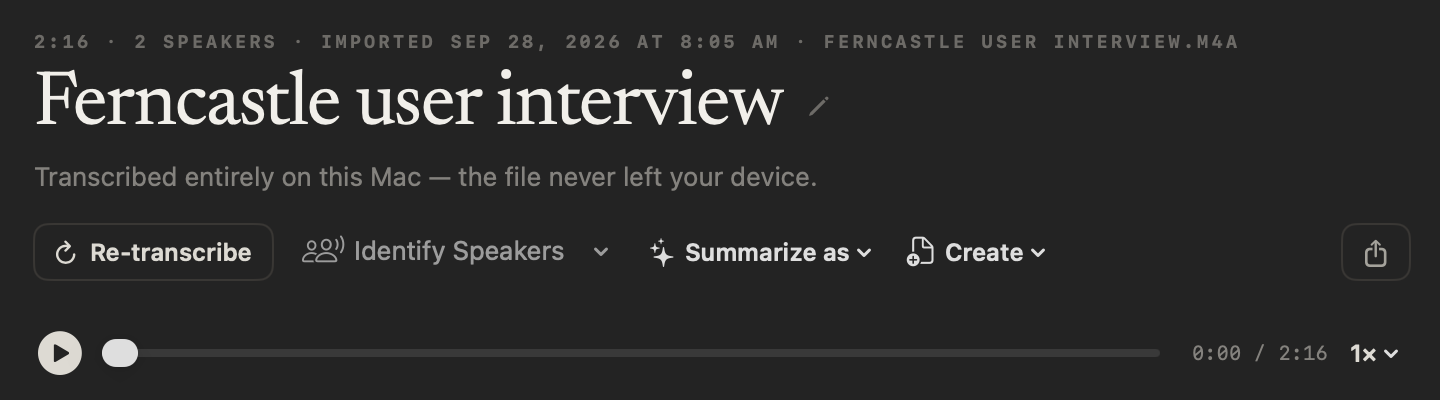
In NoteOwl, Summarize as → Podcast Show Notes writes show notes in exactly this format from an episode recording you import, on your Mac; an example is below.
Podcast Show Notes · 4 sections
- 01Episode overview (1–2 sentences)
- 02Main topics/segments
- 03Notable quotes
- 04Resources or links mentioned
What should podcast show notes include?
Four things: a one- or two-sentence overview of the episode, the main topics or segments as a bulleted outline, a few notable quotes, and every resource or link mentioned. Write them for the listener deciding whether to press play.
- Episode overview (1–2 sentences)
- What to writeWhat the episode is about and who is on it. It is often the only part people read before they press play.
- Main topics/segments
- What to writeA bulleted outline of what the episode covers, in the order it comes up. Add a timestamp to each if you publish them.
- Notable quotes
- What to writeTwo or three lines worth sharing, word for word, with who said them. Check each one against the recording.
- Resources or links mentioned
- What to writeEvery book, tool, website or earlier episode mentioned, with its link. Guest links and credits can go here too.
| Section | What to write |
|---|---|
| Episode overview (1–2 sentences) | What the episode is about and who is on it. It is often the only part people read before they press play. |
| Main topics/segments | A bulleted outline of what the episode covers, in the order it comes up. Add a timestamp to each if you publish them. |
| Notable quotes | Two or three lines worth sharing, word for word, with who said them. Check each one against the recording. |
| Resources or links mentioned | Every book, tool, website or earlier episode mentioned, with its link. Guest links and credits can go here too. |
A podcast show notes template to copy
Paste it into your podcast host’s episode description, your website, Google Docs or Notion, and fill it in after you record. It is plain text, so it keeps its shape anywhere.
The sections match NoteOwl’s built-in Podcast Show Notes, so show notes you write by hand and show notes NoteOwl writes read the same.
PODCAST SHOW NOTES

Podcast:
Episode number and title:
Release date:
Hosts:
Guests:

1. EPISODE OVERVIEW
One or two sentences: what this episode is about, and who is on it.

2. MAIN TOPICS / SEGMENTS
- [00:00] Topic or segment
- [00:00] Topic or segment
- [00:00] Topic or segment

3. NOTABLE QUOTES
- "Quote, word for word." — Name
- "Quote, word for word." — Name

4. RESOURCES AND LINKS MENTIONED
- Book, tool, website or episode: link
- Book, tool, website or episode: link

Where to find the guest:
Credits:
What is the difference between show notes and a transcript?
A transcript is every word of the episode, in order. Show notes are a short guide to it: what it covers, the best lines and the links. Many podcasts publish both, and one NoteOwl import gives you both.
NoteOwl exports the transcript as plain text, or as SRT subtitles for a video version of the episode.
- What it is
- Show notesA short guide to the episode
- TranscriptEvery word of the episode, in order
- Length
- Show notesA few hundred words
- TranscriptThousands of words for a long episode
- What it helps listeners do
- Show notesDecide whether to listen, and find what was mentioned
- TranscriptRead instead of listening, and find an exact line
- Quotes
- Show notesTwo or three of the best
- TranscriptAll of them
- Links
- Show notesEvery resource mentioned, with its link
- TranscriptNames only, as they were said
- Where it goes
- Show notesThe episode description and your website
- TranscriptIts own page, or a file beside the episode
| Show notes | Transcript | |
|---|---|---|
| What it is | A short guide to the episode | Every word of the episode, in order |
| Length | A few hundred words | Thousands of words for a long episode |
| What it helps listeners do | Decide whether to listen, and find what was mentioned | Read instead of listening, and find an exact line |
| Quotes | Two or three of the best | All of them |
| Links | Every resource mentioned, with its link | Names only, as they were said |
| Where it goes | The episode description and your website | Its own page, or a file beside the episode |
What do good podcast show notes look like?
Like this: NoteOwl’s Podcast Show Notes for a three-minute episode of a small-business podcast, with the founder of a design studio as the guest. Every topic, quote and resource comes from the recording.
Show Notes: The Corner Ledger, Episode 42
Episode Overview
Hosts Joel Brennan and Aisha Karim talk to Maya Rao, founder of the design studio Northlight Studio, about why customers give up halfway through sign-up forms, and what small business owners can do about it.
Main Topics & Segments
- Where people give up: at the step that asks for something they don't have in their hand, such as a photo of an ID, a document or a number from a letter at home. At one bank Northlight worked with, about a third of new customers left at a single photo upload screen.
- Lesson 1: Count your steps and time them. Try your sign-up on your phone, standing up, with one hand.
- Lesson 2: Never send people back to the start. Keep what people have typed, and only repeat the step that failed.
- Lesson 3: Say what went wrong straight away. Use plain words while the camera is still open ("too blurry, hold still"). The best version takes the photo itself when the card is sharp.
- For web shops: look at what your checkout or sign-up page asks for that people won't have to hand, and make it optional or ask for it later. Watch one real customer do it on their own phone, not a laptop.
- Next week: Aisha talks to two shop owners about hiring their first employee.
Notable Quotes
- "People like me open these accounts between customers. If it takes more than five minutes, we give up." — a bakery owner, quoted by Maya Rao
- "Keep what people have typed, and only repeat the step that failed." — Maya Rao
- "You'll learn more in ten minutes than from a month of reports." — Maya Rao
Resources & Links Mentioned
- The five-minute sign-up checklist: a free one-page checklist on the Northlight Studio website.
- Episode 38 of The Corner Ledger: on checkout pages.
How do you get podcast show notes written automatically?
Import the episode’s recording in NoteOwl — it can transcribe audio to text on your Mac — then choose Summarize as → Podcast Show Notes. NoteOwl writes the show notes from the recording with on-device AI models, and nothing is uploaded.
- 1
Import the episode
On the Transcripts screen, click Import Recording, or drag the file onto it: mp3, wav, m4a, aiff, flac, aac or mp4.
- 2
Let NoteOwl transcribe it
NoteOwl writes the transcript, with each speaker labelled and a time on every line, and a first summary, on your Mac. Rename speakers puts the hosts’ and guest’s names on it.
- 3
Choose Summarize as → Podcast Show Notes
At the top of the recording, open Summarize as and pick Podcast Show Notes. NoteOwl rewrites the summary as an overview, an outline, notable quotes and the resources mentioned.
- 4
Add the links and publish
Check the quotes against the transcript and paste in each web address, then copy the show notes, or use Export to save them, with the transcript, as Markdown or PDF.
Importing recordings and templates are part of NoteOwl Pro, with a 7-day free trial in the app.
What does NoteOwl’s show notes template ask for?
Exactly the four sections above. This is the template’s instruction to NoteOwl, word for word; you can change it, or write your own, in NoteOwl’s Templates screen.
“Write show notes: a 1-2 sentence episode overview, main topics/segments as a bulleted outline, notable quotes, and any resources or links mentioned.”
For the steps, see choose or write a summary template in the NoteOwl docs.
FAQ
Questions about podcast show notes
How long should podcast show notes be?
Short enough to read before pressing play: a one- or two-sentence overview, an outline of the main topics, two or three quotes and the links usually fit in a few hundred words. A full transcript can go below them or on its own page. NoteOwl writes show notes in the shorter format.
Should podcast show notes include timestamps?
Timestamps help listeners jump to the part of the episode they want, so add one to each topic in the outline if you publish them. NoteOwl’s transcript shows a time on every line, so you can find each topic’s start there.
Can I use this show notes template in my podcast host or Google Docs?
Yes. NoteOwl’s show notes template is plain text, so it pastes into your podcast host’s episode description, a blog post, Google Docs, Notion or Apple Notes, and keeps its four sections.
Can NoteOwl write podcast show notes automatically?
Yes. Import the episode’s recording in NoteOwl, then choose Summarize as → Podcast Show Notes, and it writes the overview, the outline, notable quotes and the resources mentioned from the recording, on your Mac with on-device AI models. Importing recordings and templates are part of NoteOwl Pro: $79 once for one Mac, with a 7-day free trial in the app.
Does NoteOwl add the links to the show notes?
It lists each resource that is said in the episode, by name. NoteOwl doesn’t search the web for addresses, so paste in each link before you publish.
Which recordings can NoteOwl import?
Audio and video files in mp3, wav, m4a, aiff, flac, aac and mp4, one at a time. NoteOwl transcribes the recording on your Mac and keeps an audio copy for playback, not your original file, so keep the original for publishing.
Is an unreleased episode uploaded anywhere?
No. NoteOwl transcribes an imported episode and writes its show notes on your Mac with on-device AI models, so the audio, the transcript and the show notes are never uploaded. The episode stays on your Mac until you publish it yourself.
Related
- All 22 meeting notes templates Stand-ups, 1:1s, sales calls, board meetings and more, with their sections.
- Transcribe audio to text Import any recording and get a speaker-labelled transcript, on your Mac.
- AI meeting summaries The summary NoteOwl writes for every meeting and recording, and Summarize as.
- AI note taker for founders Pitches, podcast interviews and customer calls, with every promise tracked.
Keep exploring
More templates
- Brainstorming templateA brainstorming template to copy, what each section holds, an example, and how NoteOwl writes brainstorm notes
- Project update templateA project update template to copy, what each section holds, an example, and how NoteOwl writes project update notes
- Support call notes templateA support call notes template to copy, what each section holds, an example, and how NoteOwl writes it
- Consultation notes templateA consultation notes template to copy, what each section holds, an example, and how NoteOwl writes it
Get your show notes written on your Mac
Free to download. Runs entirely on your Mac.
macOS 26 or later · Apple Silicon (M1 or newer) · 16 GB memory minimum, 24 GB recommended
About NoteOwl
NoteOwl is private AI meeting notes and memory for the Mac. It captures meetings without a bot joining the call, labels every speaker, writes summaries and action items, and builds a memory of every conversation that you can chat with — fully offline, because the speech recognition and the AI run on the Mac itself. Dictation into any app is free; Pro is a one-time purchase.
NoteOwl pricing: what’s free and what Pro adds
Last updated