Dictation · Free
Free speech to text for every app on your Mac
NoteOwl is free speech to text for Mac: tap fn, talk, and your words type live at your cursor in any app — an email, a message, a document or a code editor.
Dictation is unlimited and free forever. It runs on your Mac with on-device AI models, works offline after a one-time model download, and saves every dictation, raw words beside the polished version.
Read the transcript
Typing is slow. Talking isn’t.
Tap fn, and just talk.
(Dictating) “Um, so, quick update for the team. The budget’s ninety thousand, and, uh, we start on the twenty-first. Can you all send me your plans by Friday?”
Your words land right where you’re typing. In any app.
Tap Polish, and it’s tidied up. Filler words gone, punctuation fixed.
And it all runs on your Mac.
NoteOwl. Free to download. Dictation’s free, forever.
How do you use voice to text in any app on a Mac?
With NoteOwl, click where the words should go, tap fn and talk, then tap fn again or press Stop. Your words type live at the cursor as you speak, in any app, and a pause doesn’t cut you off.
- 1
Click where the words should go
An email, a message, a document or a code editor: any app with a text cursor.
- 2
Tap fn and talk
The NoteOwl panel opens at the top of the screen and listens. Your words type live at the cursor, and pausing doesn’t end the dictation.
- 3
Tap fn again, or press Stop
The panel shows where the words went, such as “Inserted into Mail”, and offers Polish, Rewrite, More… and Done.
Casual in chat
Hey Leo, quick update from the Ferncastle call. They cut the pilot budget to $90,000, so let’s focus only on the camera auto-capture flow. Can you prioritize those wireframes for Thursday? Thanks.
- To
- Daniel Okafor
- Subject
- Next steps
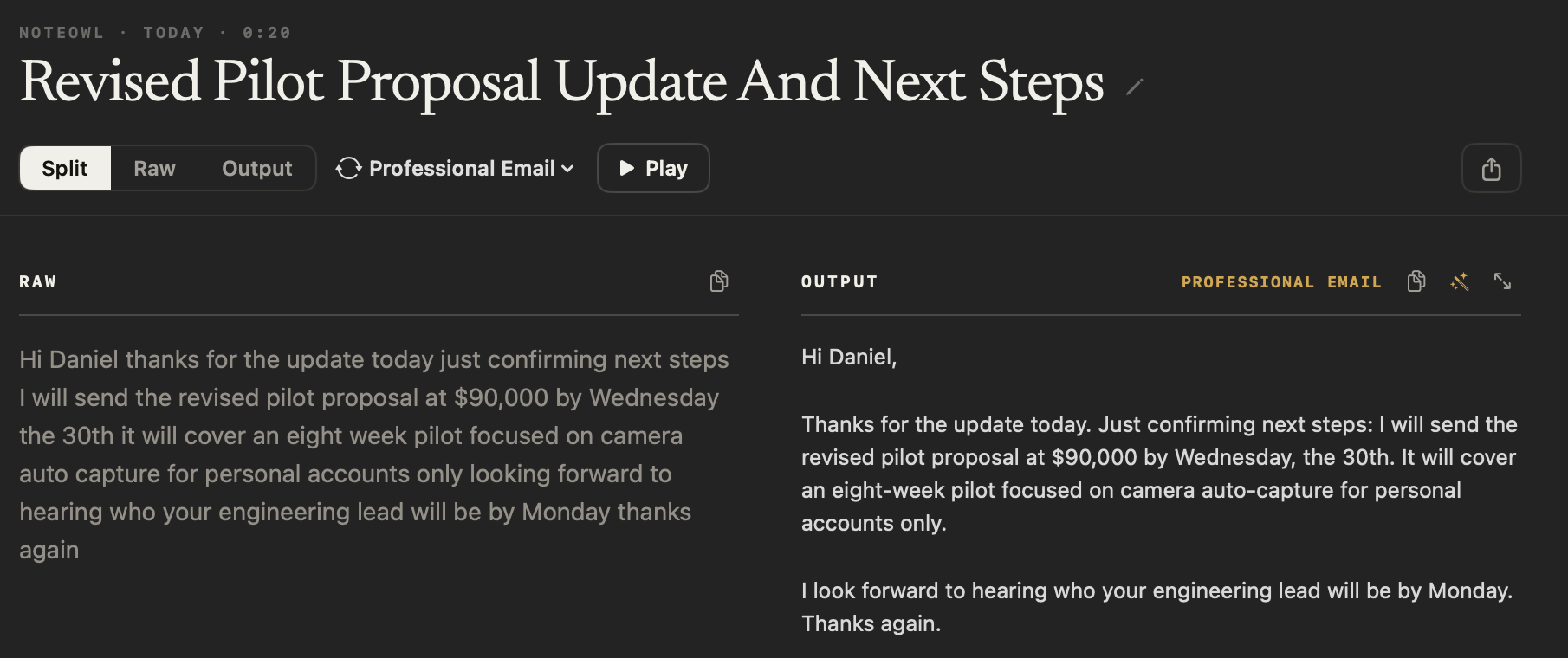
Hi Daniel,
Thanks for the update today. Just confirming next steps: I will send the revised pilot proposal at $90,000 by Wednesday, the 30th. It will cover an eight-week pilot focused on camera auto-capture for personal accounts only.
I look forward to hearing who your engineering lead will be by Monday. Thanks again.
12export const pilot = {13 budgetCap: 90_000,14 weeks: 8,15 accounts: 'personal',16};17
You can also start from the menu bar: click the NoteOwl icon and choose Start Dictation. Prefer the dictation built into macOS? Here is how to use dictation on Mac, and when an app helps more.
Does dictation change its tone for each app?
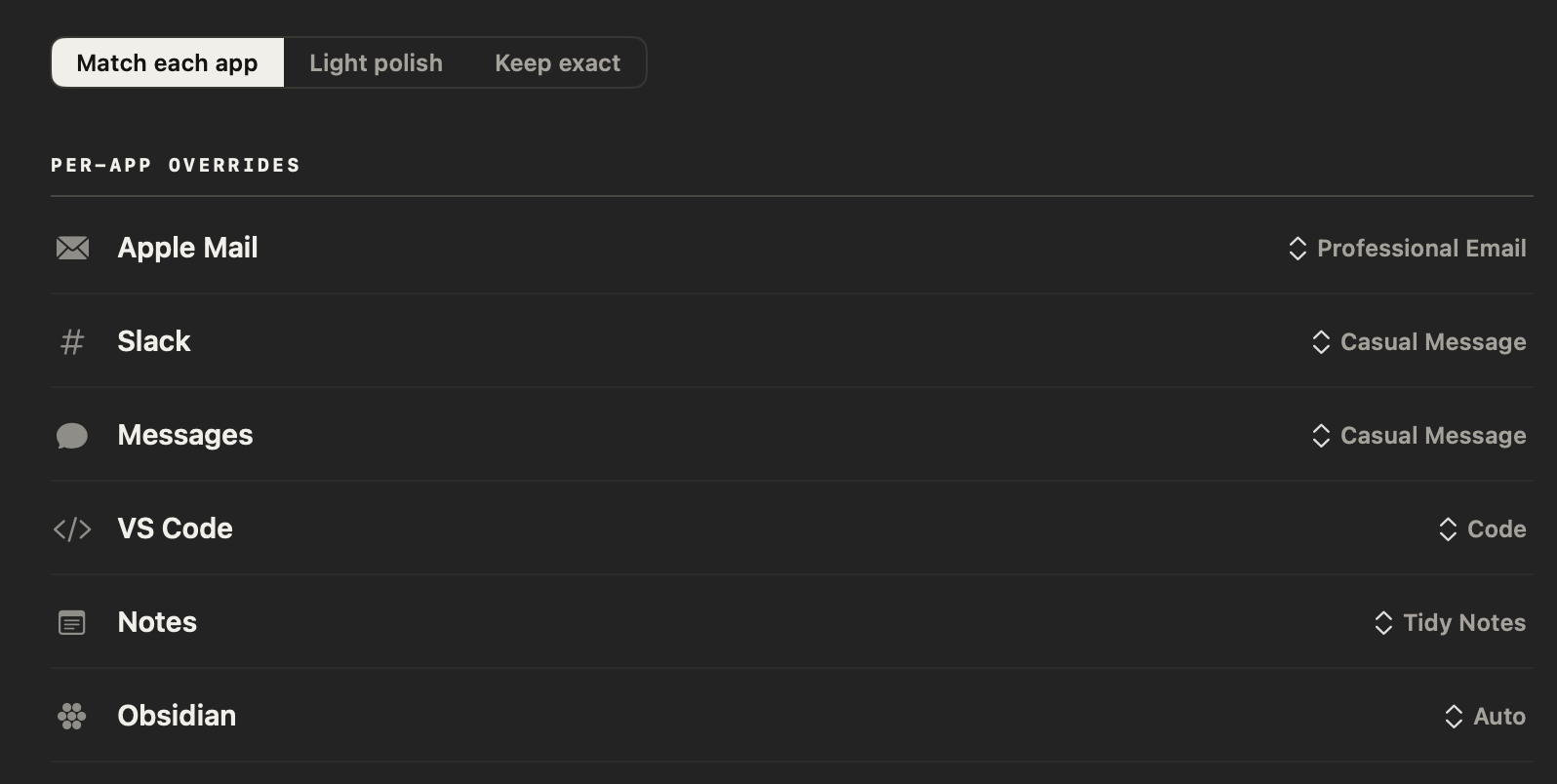
Yes. NoteOwl picks a tone for the app you’re dictating into — casual in Slack, professional in Mail, exact in code editors. Choose Polish when you stop and your words are rewritten in that tone; your raw words are always kept.
- Mail and Outlook
- ToneProfessional Email
- What it doesClear, complete sentences in short paragraphs
- Slack
- ToneCasual Message
- What it doesCasual, concise and conversational
- Notes and Obsidian
- ToneTidy Notes
- What it doesClean prose; spoken lists become bullets
- VS Code, Xcode, Zed and Terminal
- ToneCode
- What it doesIdentifiers, symbols and casing kept as spoken
- Any other app
- TonePolish
- What it doesCleaned up, with your tone left as it is
| Where you dictate | Tone | What it does |
|---|---|---|
| Mail and Outlook | Professional Email | Clear, complete sentences in short paragraphs |
| Slack | Casual Message | Casual, concise and conversational |
| Notes and Obsidian | Tidy Notes | Clean prose; spoken lists become bullets |
| VS Code, Xcode, Zed and Terminal | Code | Identifiers, symbols and casing kept as spoken |
| Any other app | Polish | Cleaned up, with your tone left as it is |
What can you do with the text after you stop?
Leave it, or tidy it up in one tap. The panel offers Polish, Rewrite, More… and Done. Your text only changes if you choose one, and a change can be undone.
- Polish
- What it doesRewrites the words NoteOwl typed in the tone set for that app, without changing what you meant
- PlanFree
- Shorten · Clarify
- What it doesSays the same thing in fewer words, or makes it easier to follow (under More…)
- PlanFree
- Make formal · Make friendly
- What it doesChanges the register (under More…)
- PlanFree
- Undo
- What it doesPuts back the words you said
- PlanFree
- Rewrite
- What it doesSay how you want the text changed
- PlanPro
- Done
- What it doesCloses the panel and leaves the text as it is
- PlanFree
| Action | What it does | Plan |
|---|---|---|
| Polish | Rewrites the words NoteOwl typed in the tone set for that app, without changing what you meant | Free |
| Shorten · Clarify | Says the same thing in fewer words, or makes it easier to follow (under More…) | Free |
| Make formal · Make friendly | Changes the register (under More…) | Free |
| Undo | Puts back the words you said | Free |
| Rewrite | Say how you want the text changed | Pro |
| Done | Closes the panel and leaves the text as it is | Free |
Read the transcript
Wrote something a little too blunt?
Select it, and press Option X.
Then just say how it should sound.
(Spoken instruction) “Make it friendlier, but keep the Thursday deadline.”
It’s rewritten on your Mac, and put right back where it was.
Changed your mind? Undo is one click away.
NoteOwl. Free to download.
Are your original words kept?
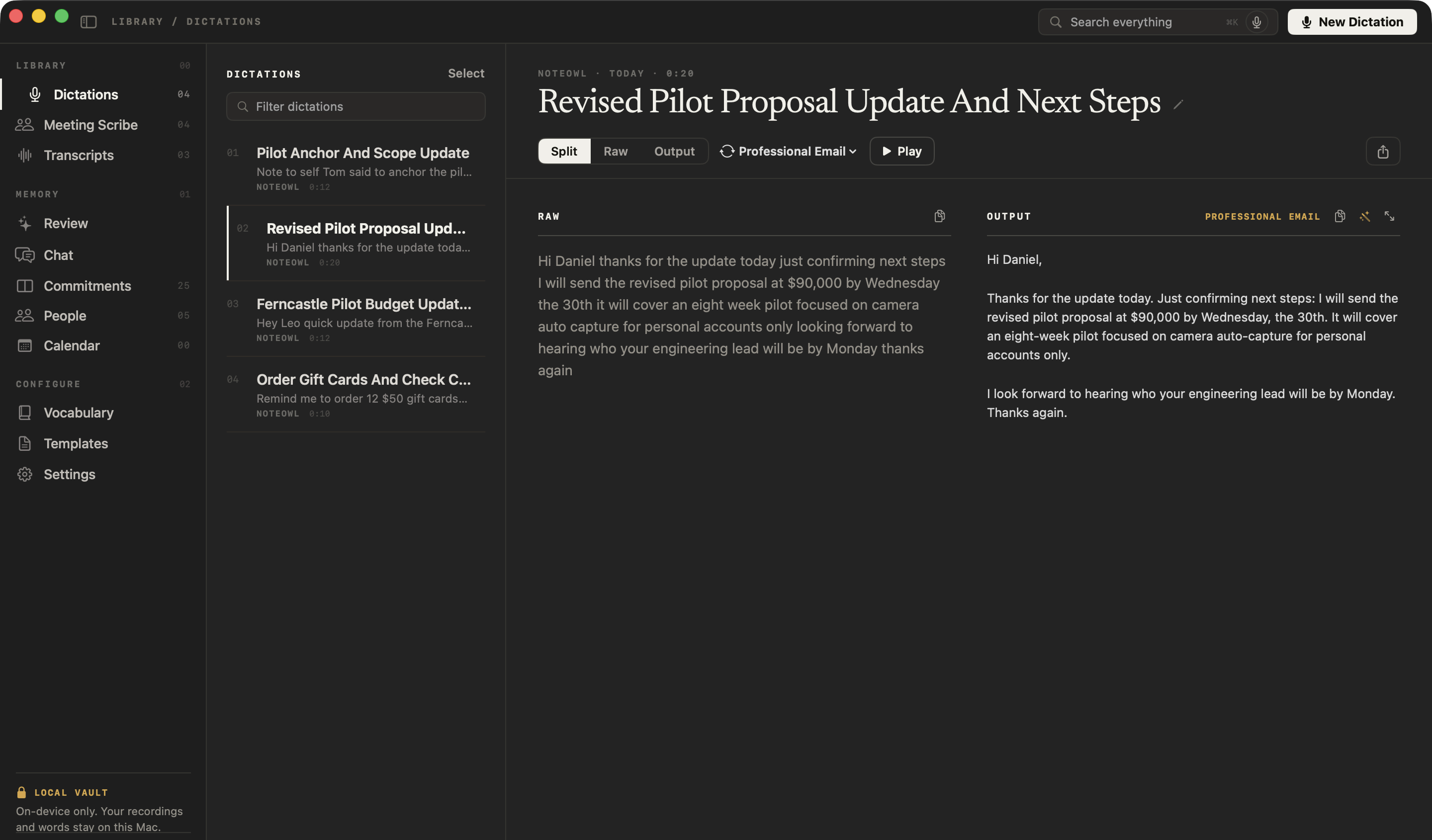
Yes. NoteOwl saves every dictation in Dictations: Raw shows exactly what you said, Output the polished version, and Split both side by side. Voice notes you record inside NoteOwl also keep their audio, so you can press Play to hear them.
Is NoteOwl dictation free?
Yes — free dictation into any app, unlimited, forever and with no account, including the tone for each app, Polish, Shorten and Clarify, and every dictation saved as a voice note. NoteOwl Pro adds rewriting by voice and custom vocabulary.
NoteOwl Pro is $79 once for one Mac, with a 7-day free trial in the app, no card. Comparing dictation apps? See why people choose NoteOwl as a Wispr Flow alternative.
- Dictation into any app with fn
- FreeUnlimited
- ProUnlimited
- The right tone for each app
- FreeYes
- ProYes
- Polish, Shorten, Clarify, Make formal, Make friendly
- FreeYes
- ProYes
- Every dictation saved, raw words beside the polished version
- FreeYes
- ProYes
- Search, rename and export dictations
- FreeYes
- ProYes
- Rewrite any selected text by voice (⌥X)
- FreeNo
- ProYes
- Custom vocabulary for names and jargon
- FreeNo
- ProYes
- Meeting notes, summaries, chat and memory
- FreeNo
- ProYes
| Free | Pro | |
|---|---|---|
| Dictation into any app with fn | Unlimited | Unlimited |
| The right tone for each app | Yes | Yes |
| Polish, Shorten, Clarify, Make formal, Make friendly | Yes | Yes |
| Every dictation saved, raw words beside the polished version | Yes | Yes |
| Search, rename and export dictations | Yes | Yes |
| Rewrite any selected text by voice (⌥X) | No | Yes |
| Custom vocabulary for names and jargon | No | Yes |
| Meeting notes, summaries, chat and memory | No | Yes |
NoteOwl dictation at a glance
The facts, in one table. NoteOwl’s dictation software runs on your Mac with on-device AI models, so it works offline and nothing you dictate is uploaded.
- Start and stop
- Tap fn; tap it again or press Stop
- Where the words go
- At the cursor, in any app, as you speak
- Tone
- Set for each app; change it in Settings → Auto-Context
- Your raw words
- Always kept, beside the polished version
- Languages
- 34, detected automatically, including Hindi and English in one sentence
- Internet
- Not needed once the on-device AI models are downloaded: about 8 GB, downloaded once after install (keep around 10 GB free)
- Permissions
- Microphone, to hear you; Accessibility, to type at the cursor; Input Monitoring, for the fn key
- Price
- Free and unlimited, with no account
- Requirements
- macOS 26 or later, Apple Silicon (M1 or newer), 16 GB memory minimum, 24 GB recommended
What else does NoteOwl do?
Dictation is the free part you use every day. NoteOwl is private AI meeting notes and memory for Mac: with NoteOwl Pro it records meetings without a bot, labels every speaker, writes summaries and action items, and lets you chat with everything you’ve recorded.
AI meeting notes without a bot
NoteOwl records your microphone and your Mac’s audio, so it takes notes on Zoom, Google Meet or Teams with nothing joining the call — then writes the speaker-labelled transcript, the summary, the decisions and the action items on your Mac.
A memory of every conversation
Ask about any past meeting in Chat, or out loud from any app with ⌥Z, and the answer cites the passage. Your action items become commitments, and each person’s profile shows what’s open between you.
FAQ
Questions about speech to text on a Mac
Is NoteOwl’s speech to text free?
Yes. NoteOwl’s speech to text for Mac is free and unlimited, forever: dictation into any app, the right tone for each app, Polish, Shorten and Clarify, and every dictation saved as a voice note, with no account. NoteOwl Pro, $79 once, adds rewriting by voice and custom vocabulary.
Does NoteOwl dictation work offline?
Yes. NoteOwl turns your speech into text on your Mac with on-device AI models, so dictation works without an internet connection once the models have been downloaded after install. Nothing you dictate is uploaded to NoteOwl or anyone else.
Which apps can I dictate into with NoteOwl?
Any Mac app with a text cursor: Mail, Slack, Messages, Notes, a document or a code editor. NoteOwl types at the cursor using the macOS Accessibility permission; without it, NoteOwl copies the finished text and the panel says “Copied — press ⌘V”.
What languages does NoteOwl dictation understand?
NoteOwl dictation understands 34 languages and detects the one you are speaking automatically, so there is nothing to switch. You can even move between Hindi and English in one sentence.
Why doesn’t the fn key start NoteOwl dictation?
The fn key needs the macOS Input Monitoring permission. Turn on NoteOwl in System Settings → Privacy & Security → Input Monitoring, then quit and reopen NoteOwl. NoteOwl’s ⌥ shortcuts keep working without it, which is how you can tell.
Does NoteOwl keep a recording of each dictation?
NoteOwl keeps every dictation in the Dictations screen, with your raw words beside the polished version, to search, rename and export. A dictation made with fn is saved as text; a voice note you record inside NoteOwl with New Dictation also keeps its audio, so you can play it. Both are free in NoteOwl.
Is NoteOwl just a dictation app?
No. NoteOwl is private AI meeting notes and memory for Mac, and free dictation into any app is the part you use every day. NoteOwl Pro records meetings without a bot, labels every speaker, writes summaries and action items, and lets you chat with everything you have recorded.
Related
- 34 languages The full list NoteOwl understands, detected automatically.
- Dictate into any app with the fn key Every step and setting, in NoteOwl’s docs.
- The fn key doesn’t start dictation The permission to turn on, and how to check it.
- Rewrite by voice (⌥X) Select text in any app and say how to change it. NoteOwl Pro.
Keep exploring
Related features
- Voice notes on your MacVoice notes and dictations saved as searchable text on your Mac, with the raw words beside the polished version; free
- Audio to textTranscription software for your Mac: drop in an audio or video file and get a speaker-labelled transcript with timestamps, unlimited, with nothing uploaded
- Lecture recorderRecord lectures in the room through your Mac’s microphone, in an online class with no bot, or from a file, then turn them into study notes
Who uses it
- AI notes for therapistsSession notes dictated the moment the client leaves, on your Mac; no third party processes the audio, and your recordings and notes are never uploaded
- AI note taker for doctorsVisit notes dictated on your own Mac for doctors in private practice; no third party processes patient audio, and no subscription
Free tools
- Mic testA free online mic test: a live level meter, a microphone picker and a 5-second recording to play back, in your browser
- Online voice recorderRecord your voice in the browser with a level meter, timer and pause, play it back, and save it as MP3 or WAV; nothing is uploaded
- Speech time calculatorHow long a speech takes to say from its word count, at a slow, average or fast pace, and how many words fit in a set time
- Typing testA 30-second to 5-minute typing test that scores words per minute and accuracy word by word, with how your speed compares
Start dictating on your Mac, free
Free to download. Runs entirely on your Mac.
macOS 26 or later · Apple Silicon (M1 or newer) · 16 GB memory minimum, 24 GB recommended
About NoteOwl
NoteOwl is private AI meeting notes and memory for the Mac. It captures meetings without a bot joining the call, labels every speaker, writes summaries and action items, and builds a memory of every conversation that you can chat with — fully offline, because the speech recognition and the AI run on the Mac itself. Dictation into any app is free; Pro is a one-time purchase.
NoteOwl pricing: what’s free and what Pro adds
Last updated