Template
Lecture notes template
This template turns lecture notes into study notes in four sections — the main topics, the key concepts and definitions, the important examples, and anything flagged for the exam — and it copies as plain text into Google Docs, Notion, Word or any notes app.
In NoteOwl, the Student Lecture template writes these sections from a lecture you record on your Mac, in the room or in an online class, or from a recording you import; an example is below.
Student Lecture · 4 sections
- 01Main topics
- 02Key concepts and definitions
- 03Important examples
- 04Flagged for the exam
What should lecture notes include?
Four things: the main topics, the key concepts and definitions, the important examples, and anything the lecturer flagged for the exam. Keep definitions in the lecturer’s words and examples with their numbers, so the notes still make sense the week before the exam.
- Main topics
- What to writeWhat the lecture covered, in the order it was taught. Lecturers often list them at the start: three or four lines is enough.
- Key concepts and definitions
- What to writeEach new term with its definition, in the lecturer’s words when they say to learn it exactly. Add a formula the way it was written on the board.
- Important examples
- What to writeThe worked examples, case studies and demonstrations, with their numbers, and what each one shows.
- Flagged for the exam
- What to writeEverything the lecturer said will be examined, and how: show your working, explain with an example, learn word for word.
| Section | What to write |
|---|---|
| Main topics | What the lecture covered, in the order it was taught. Lecturers often list them at the start: three or four lines is enough. |
| Key concepts and definitions | Each new term with its definition, in the lecturer’s words when they say to learn it exactly. Add a formula the way it was written on the board. |
| Important examples | The worked examples, case studies and demonstrations, with their numbers, and what each one shows. |
| Flagged for the exam | Everything the lecturer said will be examined, and how: show your working, explain with an example, learn word for word. |
A note-taking template to copy
Paste it into Google Docs, Notion, Word or Apple Notes and fill it in during the lecture or straight after. It is plain text, so it keeps its shape anywhere, and it works for class notes, seminars and online lectures alike.
The four sections match NoteOwl’s Student Lecture template, so notes you write by hand and notes NoteOwl writes read the same. Prefer a page with a cue column? See how to take Cornell notes.
LECTURE NOTES

Course:
Lecture or week:
Date:
Lecturer:

1. MAIN TOPICS
-
-
-

2. KEY CONCEPTS AND DEFINITIONS
Term | Definition (in the lecturer's words)
     |
     |
Formula:

3. IMPORTANT EXAMPLES
Example:
What it shows:

Example:
What it shows:

4. FLAGGED FOR THE EXAM
-
-

QUESTIONS TO FOLLOW UP
Question | Who to ask (lecturer, TA, study group)
         |

Reading before the next lecture:
How do you know what to write down in a lecture?
Listen for the signals. Lecturers announce the topics, slow down for definitions, say “for example” before a worked example, and tell you what the exam will ask. Each signal tells you which section the next sentence belongs in.
- “Today we’ll cover…”, “Three things today”
- Write it underMain topics
- “The definition is…”, “Write that down exactly”
- Write it underKey concepts and definitions
- “For example…”, “Let’s work through one”
- Write it underImportant examples
- “This will be on the midterm”, “There’s always a question on…”
- Write it underFlagged for the exam
- A point you didn’t follow, or a question you didn’t get to ask
- Write it underQuestions to follow up
| When the lecturer says | Write it under |
|---|---|
| “Today we’ll cover…”, “Three things today” | Main topics |
| “The definition is…”, “Write that down exactly” | Key concepts and definitions |
| “For example…”, “Let’s work through one” | Important examples |
| “This will be on the midterm”, “There’s always a question on…” | Flagged for the exam |
| A point you didn’t follow, or a question you didn’t get to ask | Questions to follow up |
What do good study notes from a lecture look like?
Like this: NoteOwl’s Student Lecture output for an economics lecture on price elasticity of demand. The definition is in the lecturer’s words, the worked example keeps its numbers, and the exam points are in a section of their own.
Study Notes: Price Elasticity of Demand
Course: Intro to Microeconomics, week 5 · Lecturer: Dr. Aria Bennett
Main Topics
- What price elasticity of demand measures.
- How to calculate it with the midpoint method.
- What makes demand elastic or inelastic.
- The total revenue test: whether a price rise brings in more money or less.
Key Concepts and Definitions
- Price elasticity of demand: the percentage change in quantity demanded divided by the percentage change in price. Dr. Bennett asked for this definition word for word.
- Elastic: the answer is bigger than one; people are sensitive to the price.
- Inelastic: the answer is smaller than one.
- Unit elastic: the answer is exactly one.
- The minus sign: price and quantity demanded move in opposite directions, so the raw number is almost always negative. Economists drop the minus sign and report the absolute value.
- Midpoint method: divide each change by the average of the two values, so the answer is the same whether the price goes up or down.
- What makes demand more elastic:
- More close substitutes.
- Luxuries rather than necessities.
- A bigger share of the budget.
- More time to adjust.
- Total revenue test: total revenue is price × quantity. If demand is elastic, a price rise lowers revenue; if inelastic, it raises revenue; if unit elastic, revenue doesn't change.
Important Examples
- The coffee cart: the price rises from $4 to $6 and sales fall from 120 to 60 cups a day.
- Change in quantity: -60 ÷ 90 = -66.7%.
- Change in price: 2 ÷ 5 = 40%.
- Elasticity: 66.7 ÷ 40 ≈ 1.67, so demand is elastic, because there are three other places to buy coffee within a two-minute walk.
- Revenue falls from $480 to $360 a day, as the total revenue test predicts.
- Gasoline: inelastic in the short run, because people still have to drive to work; more elastic over a few years, as people buy smaller cars or move closer to work.
Flagged for the Exam
- The midpoint formula will be on the midterm. Show your working, not just the final number.
- There is always a question on the total revenue test: be able to explain it with an example.
- You don't need the four determinants word for word, but be able to explain each one with an example of your own.
How do you get study notes written automatically?
Record the lecture in NoteOwl — in the room or in an online class — or import a recording of it, then choose Summarize as → Student Lecture. NoteOwl writes the topics, definitions, examples and exam points on your Mac with on-device AI models, and nothing is uploaded.
- 1
Record or import the lecture
In the lecture hall or an online class, press ⌥Space or click Start Meeting in Meeting Scribe; NoteOwl records through your Mac’s microphone, and your Mac’s audio for a class on a call. For a lecture already recorded, click Import Recording on the Transcripts screen.
- 2
Let NoteOwl transcribe it
When you stop recording, or the import finishes, NoteOwl writes the transcript and a summary, on your Mac.
- 3
Choose Summarize as → Student Lecture
Open Summarize as, above the summary or at the top of an imported recording, and pick Student Lecture, under Academic. NoteOwl rewrites it as study notes: topics, definitions, examples and exam points.
- 4
Study from it
Copy the notes as Markdown into your notes app, or use Export to save them as Markdown or PDF. Ask NoteOwl’s chat a question about the lecture later, with Pro.
Recording lectures, importing recordings and templates are part of NoteOwl Pro, with a 7-day free trial in the app. How recording works in the room, in an online class and from a file: NoteOwl’s lecture recorder.
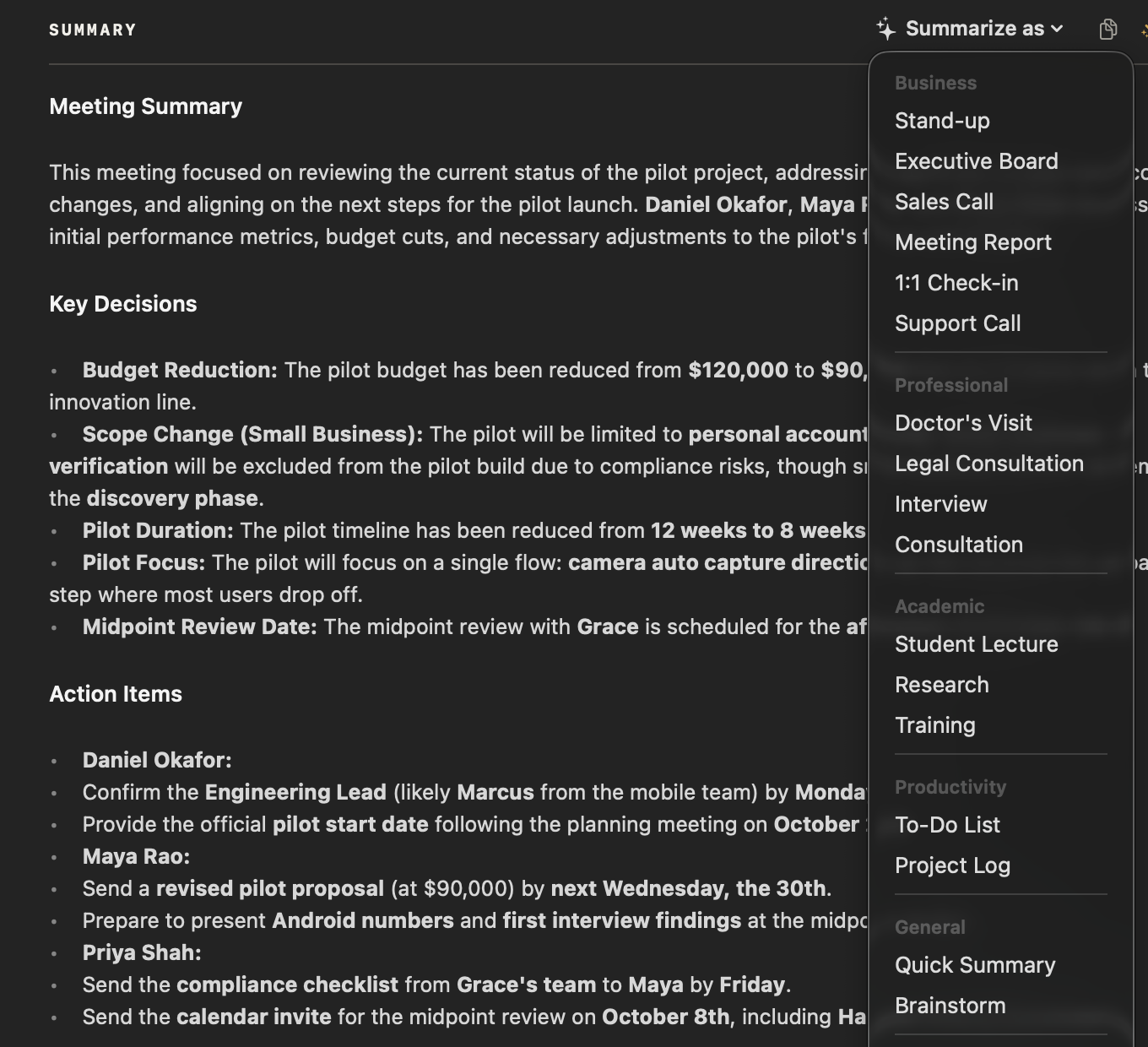
What does NoteOwl’s Student Lecture template ask for?
The four sections above. This is the template’s instruction to NoteOwl, word for word; you can change it, or write your own, in NoteOwl’s Templates screen (see how to customize a template).
“Summarize this lecture as structured study notes: Main topics, Key concepts/definitions, Important examples, and anything flagged for the exam.”
FAQ
Questions about notes from lectures
How do you write good lecture notes?
Listen for the structure: the topics announced at the start, each definition, each worked example, and anything the lecturer says will be examined, and write those down in that order. If you record the lecture in NoteOwl, it writes the study notes from the recording, so you can listen instead of copying slides.
What is the difference between lecture notes and study notes?
Notes taken in a lecture are what you capture while the lecturer talks; study notes are what you learn from afterwards, organized by topic, with definitions, examples and exam points. NoteOwl’s Student Lecture template turns a recorded lecture straight into study notes in that shape.
Can I use this note-taking template in Google Docs, Notion or Word?
Yes. The template is plain text, so it pastes into Google Docs, Notion, Word, Apple Notes or any notes app and keeps its shape, and it works for class notes, seminars and online lectures as well as lectures in a hall. NoteOwl’s Student Lecture template writes the same four sections.
Can NoteOwl write lecture notes automatically?
Yes. Record the lecture in NoteOwl, in the room or in an online class, or import a recording, then choose Summarize as → Student Lecture, and NoteOwl writes the topics, definitions, examples and exam points on your Mac. Recording, importing and templates are part of NoteOwl Pro: $79 once for one Mac, with a 7-day free trial in the app.
Can NoteOwl make study notes from a lecture recording I already have?
Yes. Import the recording on NoteOwl’s Transcripts screen — mp3, wav, m4a, aiff, flac, aac or mp4 — and NoteOwl transcribes it on your Mac and writes a summary; then choose Summarize as → Student Lecture. Nothing is uploaded.
Can I change the sections of NoteOwl’s Student Lecture template?
Yes. In NoteOwl’s Templates screen you can customize the Student Lecture template — for example, to add a short quiz or a list of readings — or write your own, then summarize any recorded lecture again in the new format.
Should I use Cornell notes or this template?
Use both if they help: the Cornell method is a page layout, with questions in a cue column and a summary at the bottom, while this template is a set of sections. NoteOwl’s Student Lecture output fills the notes side of a Cornell page, and you write the cues and the summary yourself.
Related
- How to take Cornell notes The method, a template to copy and an example from a lecture.
- Lecture recorder for Mac Record lectures in the room or online, then turn them into study notes.
- AI note taker for students Record, import and ask your lectures, on your own Mac.
- All 22 meeting notes templates Training, research, interviews and more, with their sections.
Keep exploring
More templates
- Meeting agenda templateA meeting agenda template to copy or fill in online, with start times for every item, a team meeting example and how to write one
- Retrospective templateA retrospective template to fill in online in four formats (went well / to improve / try next, start stop continue, mad sad glad, 4Ls), with votes and action items
- Project kickoff meeting agendaA kickoff meeting agenda builder: the eight usual items timed from the start, with the goal, scope, milestones, roles and risks the kickoff agrees
- Team meeting agenda templateA weekly team meeting agenda builder: standing items, topics added this week, last week’s action items and a rotating facilitator, timed from the start
Get your study notes written on your Mac
Free to download. Runs entirely on your Mac.
macOS 26 or later · Apple Silicon (M1 or newer) · 16 GB memory minimum, 24 GB recommended
About NoteOwl
NoteOwl is private AI meeting notes and memory for the Mac. It captures meetings without a bot joining the call, labels every speaker, writes summaries and action items, and builds a memory of every conversation that you can chat with — fully offline, because the speech recognition and the AI run on the Mac itself. Dictation into any app is free; Pro is a one-time purchase.
NoteOwl pricing: what’s free and what Pro adds
Last updated