Dictate into any app with the fn key
Last updated Checked against NoteOwl 1.0.0
To dictate with NoteOwl, click where you want the text, tap fn and talk, then tap fn again or press ● Stop to finish. Your words type live at the cursor in any app, and dictation is free and unlimited.
How do I start and stop dictation?
Tap fn once to start and once more to stop. NoteOwl needs to be running: its waveform icon sits in the menu bar.
- Click where you want the words to go: an email, a message, a document or a code editor.
- Tap fn. The NoteOwl panel opens at the top of the screen and starts listening.
- Talk normally. Your words appear at the cursor as you speak, and pausing doesn't end the dictation.
- Tap fn again, or press ● Stop in the panel. The panel shows where the words went, for example Inserted into Mail.
You can also start and stop from the menu bar: click the NoteOwl icon and choose Start Dictation. To have fn ready as soon as you log in, turn on Open at login in Settings → General.
What can I do after I stop?
When you stop, the panel offers four actions. Your text only changes if you choose one.
| Action | What it does |
|---|---|
| Polish | Replaces the words NoteOwl typed with a cleaned-up version, in the tone set for that app, without changing what you meant |
| Rewrite | Lets you say how you want the text changed (NoteOwl Pro) |
| More… | Shorten, Clarify, Make formal or Make friendly |
| Done | Closes the panel and leaves the text as it is |
Does dictation use a different tone in each app?
Yes. NoteOwl picks a tone for the app you're dictating into, such as a professional email in Mail or a casual message in Slack. That tone is used when you choose Polish, and for the polished copy NoteOwl saves with each dictation.
Change it in Settings → Auto-Context:
- For every app: Match each app (the default), Light polish or Keep exact.
- Under Per-app overrides, for Apple Mail, Slack, Messages, VS Code, Notes and Obsidian: Polish, Professional Email, Casual Message, Tidy Notes, Code or Keep exact.
Keep exact leaves your words as you said them.
Are my original words kept?
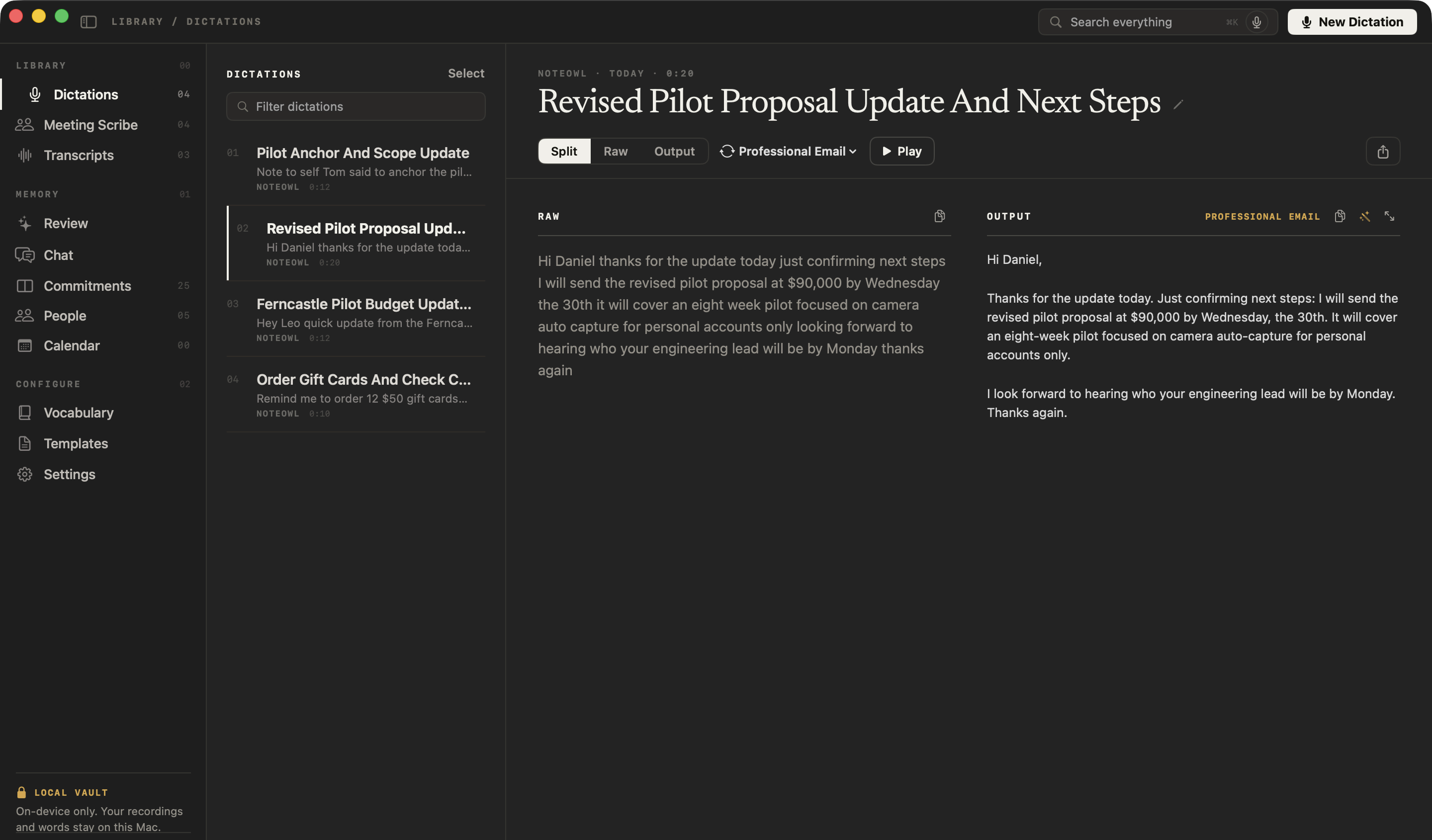
Yes. NoteOwl saves every dictation in Dictations: Raw shows exactly what you said, Output the polished version, and Split both side by side. An fn dictation is saved as text; a voice note recorded with New Dictation also keeps its audio, so you can press Play.
What if NoteOwl can't type into the app?
NoteOwl types at the cursor using the macOS Accessibility permission. Without it, NoteOwl copies the finished text instead, and the panel says Copied — press ⌘V. Press ⌘V to paste it.
To have NoteOwl type directly, turn on NoteOwl in System Settings → Privacy & Security → Accessibility.
Which other shortcuts does NoteOwl have?
Three more, all in NoteOwl Pro: ⌥ Space records a meeting, ⌥ X rewrites the selected text by voice, and ⌥ Z asks your memory out loud.
| Shortcut | What it does | Plan |
|---|---|---|
| fn | Dictate: tap to start, then tap again or press Stop to finish | Free |
| ⌥ Space | Start or stop recording a meeting | NoteOwl Pro |
| ⌥ X | Rewrite the selected text by voice | NoteOwl Pro |
| ⌥ Z | Ask your memory out loud; the answer is never typed into the app | NoteOwl Pro |
NoteOwl lists these in Settings → General → Keyboard Shortcuts. If fn does nothing but the ⌥ shortcuts work, NoteOwl is missing a permission: see the fn key doesn't start dictation.
Common questions
Is dictation in NoteOwl free?
Yes. Dictation into any app is part of NoteOwl Free, with no limit and no account. Every NoteOwl dictation is also saved as a voice note you can search, play and export.
Does NoteOwl dictation work offline?
Yes. NoteOwl turns your speech into text on your Mac, so dictation works without an internet connection once NoteOwl's on-device AI models have been downloaded after install.
Does NoteOwl send my dictations anywhere?
No. NoteOwl keeps every dictation and its text on your Mac. Nothing you dictate is uploaded to NoteOwl or anyone else.
Quick start: your first ten minutes
Get started with NoteOwl on your Mac. Dictate into any app with fn, record a meeting with ⌥Space, then ask a question about it in Chat.
Set the dictation tone for each app
NoteOwl picks a dictation tone for each app, such as professional in Mail and casual in Slack. Change it in Settings → Auto-Context. Raw words are always kept.