Search everything with ⌘K
Last updated Checked against NoteOwl 1.0.0
Press ⌘K in NoteOwl, or click Search everything at the top of the window, type what you remember and press Return. NoteOwl searches every meeting, note and person in your memory, on your Mac, and lists each matching passage with the recording it came from.
Search everything is part of NoteOwl Pro, which you can try free for 7 days: see start the 7-day NoteOwl Pro trial.
How do I search everything in NoteOwl?
Press ⌘K, type a few words you remember and press Return. Click a result to open it, or move through the results with ↑ and ↓ and press Return. Press Esc to close the search.
- In the NoteOwl window, press ⌘K, or click Search everything at the top right.
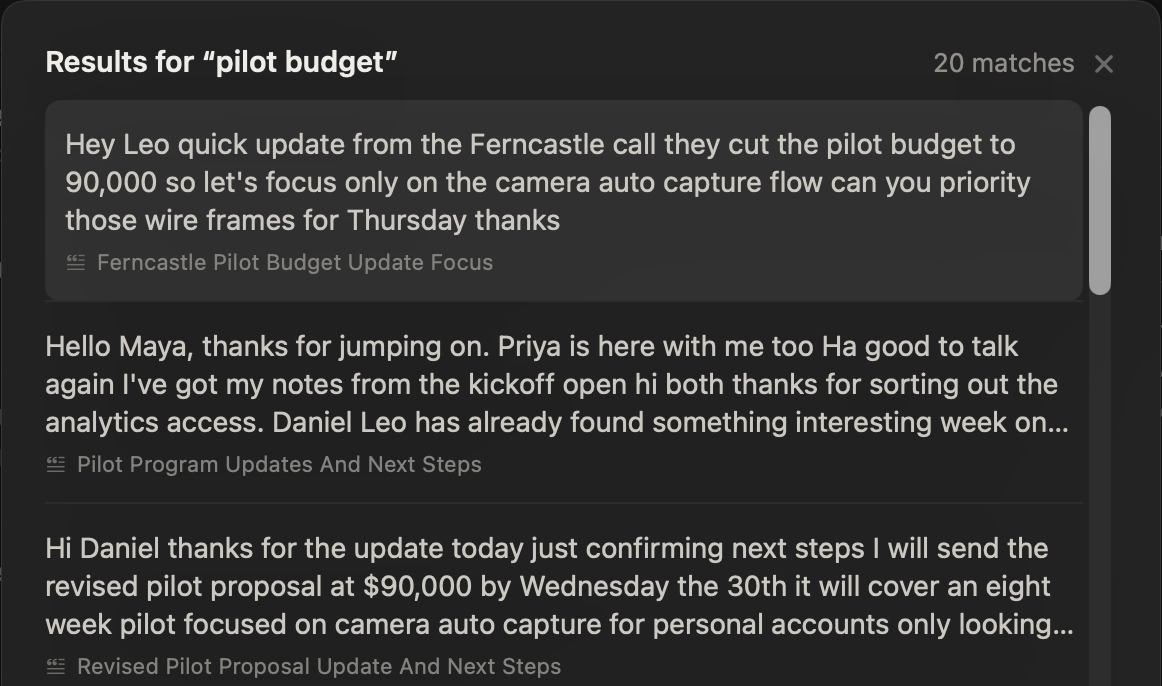
- Type what you remember, such as "pilot budget". To say it instead, click the microphone in the search box.
- Press Return. NoteOwl shows Searching your memory…, then Results for your words, with the number of matches.
- Click a result, or move to it with ↑ and ↓ and press Return. NoteOwl opens the recording at that passage.
Press ⌘K again to select what you typed, so you can type a new search over it.
What does Search everything look through?
Every meeting, note and person in NoteOwl: the meetings you record, the recordings you import in Transcripts, and your dictations and voice notes. It all happens on your Mac, and the results say so: Searched entirely on this Mac — across every word you've captured.
- It matches meaning as well as words. NoteOwl finds passages that contain the words you type and passages that say the same thing in other words, and ranks them together.
- You can say when. Add a time, such as "last week" or "in June", to search only recordings made then.
- It shows the best matches. You get up to 20 passages, each with up to three lines of text and the title of its recording.
To find a person's profile by name, nickname, company or title, use Search people at the top of People.
What happens when I open a result?
NoteOwl closes the search and opens the recording on its own screen, at that passage: a meeting in Meeting Scribe, a dictation or voice note in Dictations, and an imported recording in Transcripts.
Can I ask a question in the search box?
Yes. When what you type is a question, NoteOwl also writes a short answer above the results, under FROM YOUR MEMORY, and lists the recordings it used under SOURCES. Click a source to open it.
NoteOwl treats your search as a question when it ends with a question mark, or starts with a word such as what, who, when, how, why, where, did, does or is. While it writes, it shows Answering from your memory…, and the results stay below. If NoteOwl can't finish the answer, it says so and keeps the results.
For follow-up questions and answers you can come back to, use Chat: see ask questions about your meetings in Chat.
What if nothing matches?
NoteOwl says No matches in your vault. Try the words people actually used, fewer words, or a different time. A new recording turns up once NoteOwl has finished processing it.
How is Search everything different from Filter dictations?
Filter dictations, at the top of the Dictations list, narrows that one list by a dictation's title, raw words or polished version, and it's free. Search everything looks through all your recordings at once, meetings included, and opens each match at its passage.
See find, play and export your dictations.
Common questions
Does NoteOwl search work offline?
Yes. NoteOwl's Search everything runs entirely on your Mac, with on-device AI models, so it works without an internet connection. Your searches and your recordings are never sent anywhere.
Is Search everything part of NoteOwl Free?
No. Search everything is part of NoteOwl Pro, which you can try free for 7 days. On NoteOwl Free, NoteOwl says that searching your memory is part of NoteOwl Pro, and Filter dictations on the Dictations screen stays free.
What's the difference between NoteOwl search and Chat?
NoteOwl's Search everything lists the passages that match what you type, so you can jump straight to the moment. NoteOwl Chat reads the matching passages and writes an answer, in a saved conversation you can follow up in.
Ask your memory out loud from any app (⌥Z)
Press ⌥Z in any app and ask NoteOwl a question out loud. The answer appears in the NoteOwl panel with its source and is never typed into the app.
What goes into NoteOwl's memory
NoteOwl's memory is built from your meetings, imported recordings and notes you take in NoteOwl. Dictations into other apps stay out unless you turn them on.