What goes into NoteOwl's memory
Last updated Checked against NoteOwl 1.0.0
NoteOwl's memory is built from your meetings, the recordings you import in Transcripts, and the voice notes and dictations you make inside NoteOwl. Dictations into other apps, such as a quick email, stay out of it unless you turn on Dictations into other apps feed memory in Settings → Memory.
NoteOwl builds its memory on your Mac, and Chat, People, Commitments and Review read from it. Those are part of NoteOwl Pro, which you can try free for 7 days: see start the 7-day NoteOwl Pro trial.
What feeds NoteOwl's memory?
Everything you record or import in NoteOwl, and the notes you take inside it. Only dictations you make into other apps with fn are left out, unless you choose otherwise in Settings → Memory.
| What you capture | In memory? |
|---|---|
| Meetings you record in Meeting Scribe or with ⌥ Space | Always |
| Recordings you import in Transcripts | Always |
| Voice notes you record with New Dictation | Always |
| Dictations into NoteOwl itself | Always |
| Dictations into other apps with fn | Only with Dictations into other apps feed memory on. It's off to start with |
What does NoteOwl take from a recording?
When a recording joins its memory, NoteOwl reads the transcript on your Mac and notes three kinds of thing:
- People: the people who are mentioned or who speak.
- Commitments: what someone said they'd do, who owes it to whom, and when it's due.
- Facts: decisions and other things worth remembering, such as a budget figure.
Each one keeps a link to the lines of the transcript it came from. The transcript and summary are also added to the search index, so Chat and Search everything can find the passages themselves.
What does NoteOwl's memory power?
Five parts of NoteOwl read from it, all part of NoteOwl Pro:
| Where | What it uses memory for |
|---|---|
| Chat | Answers your questions from your recordings and shows the passages it used |
| Search everything | Finds passages across all your recordings: see search everything with ⌘K |
| People | A profile for each person NoteOwl notes |
| Commitments | The I owe and Owed to me board |
| Review | What needs your attention, and what you captured in the last day |
Keep dictations into other apps in or out
- Open NoteOwl and click Settings in the sidebar.
- Click the Memory tab.
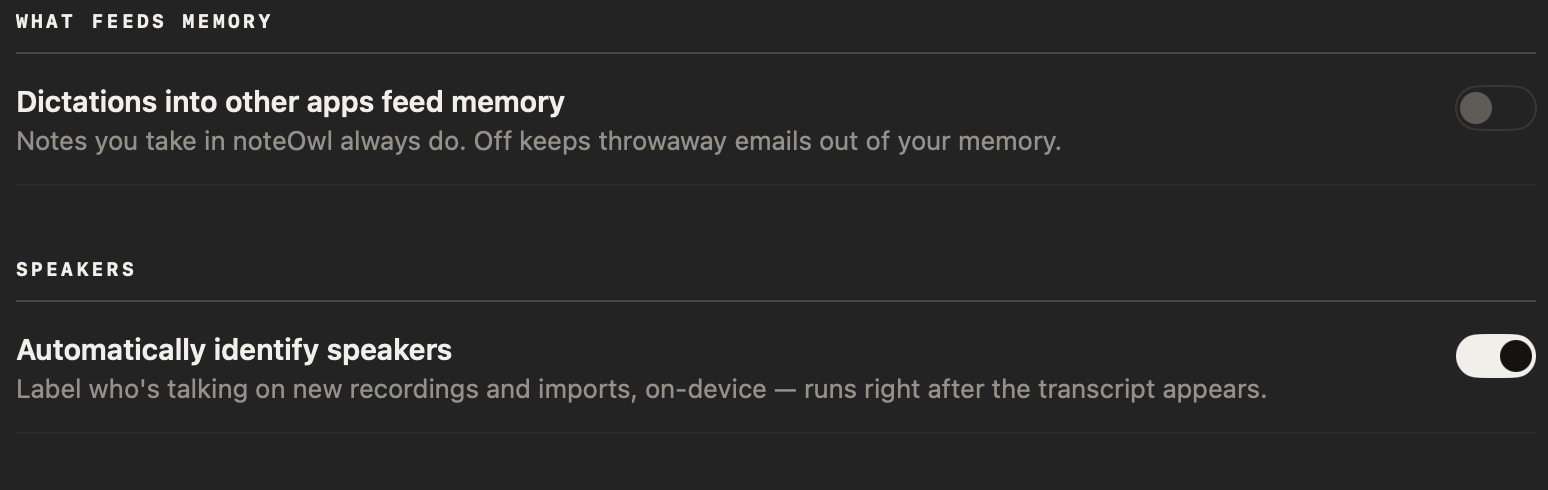
- Under What feeds memory, turn Dictations into other apps feed memory on or off. It's off to start with.
The setting applies to dictations you make after you change it. Turning it on doesn't add older dictations to memory.
Are dictations into other apps still saved when it's off?
Yes. NoteOwl saves every dictation in Dictations, with your raw words and the polished version, and Search everything can still find it. With the setting off, NoteOwl just doesn't take people, commitments or facts from dictations into other apps.
Chat searches your meetings and imported recordings to start with. Click Meetings & transcripts under the question box to include your dictations too: see ask questions about your meetings in Chat.
What happens when something changes later?
NoteOwl keeps the newer statement. When a later recording updates a fact it noted earlier, such as a new budget figure, NoteOwl treats the later one as current and keeps the earlier one as history.
"Later" means when it was said, not when NoteOwl processed it. Processing an old recording again doesn't override what a newer one said.
Tell NoteOwl who you are
NoteOwl uses your name to tell what you owe from what's owed to you. In Settings → Memory, under Who you are, type your name in Your name and click Save.
How do I erase NoteOwl's memory?
Use Delete all my data in Settings → Memory. It erases every recording, transcript and memory on your Mac and can't be undone, so export anything you want to keep first. See delete a recording or all your data.
Common questions
Does NoteOwl's memory leave my Mac?
No. NoteOwl builds its memory on your Mac with on-device AI models, and keeps it in NoteOwl's own files there. Nothing in your memory is uploaded to NoteOwl or anyone else.
Why are dictations into other apps left out of NoteOwl's memory?
Most dictations into other apps are quick messages and emails, and they would fill NoteOwl's memory with people and to-dos that don't matter later. That's why Dictations into other apps feed memory is off to start with. Notes you take inside NoteOwl always count.
Can I still find a dictation that isn't in NoteOwl's memory?
Yes. With the setting off, NoteOwl still saves every dictation in Dictations, and Search everything can still find it. NoteOwl just doesn't take people, commitments or facts from it.
Search everything with ⌘K
Press ⌘K in NoteOwl to search every meeting, note and person on your Mac. Each match opens at its passage, and a question gets a short answer too.
Track what you owe and what you're owed
NoteOwl's Commitments board lists every promise from your meetings and notes, in two columns, I owe and Owed to me, with the most urgent first.