People profiles for everyone you meet
Last updated Checked against NoteOwl 1.0.0
NoteOwl's People screen keeps a profile for everyone who comes up in your conversations: their company and title, a short relationship summary, your private notes, what's still open between you, and the conversations they appeared in. NoteOwl builds the profiles on your Mac, and you can edit any of it.
People is part of NoteOwl Pro, which you can try free for 7 days: see start the 7-day NoteOwl Pro trial. To open it, click People in the sidebar.
Where do the people in NoteOwl come from?
From your conversations. When NoteOwl processes a meeting, an imported recording or a note, it adds the people named in it to People. You can also add someone yourself. A profile added in the last seven days is marked NEW.
The list shows how many people you have. To find someone, type in Search people at the top of the list: it matches names, nicknames, companies and titles.
What's in a person's profile?
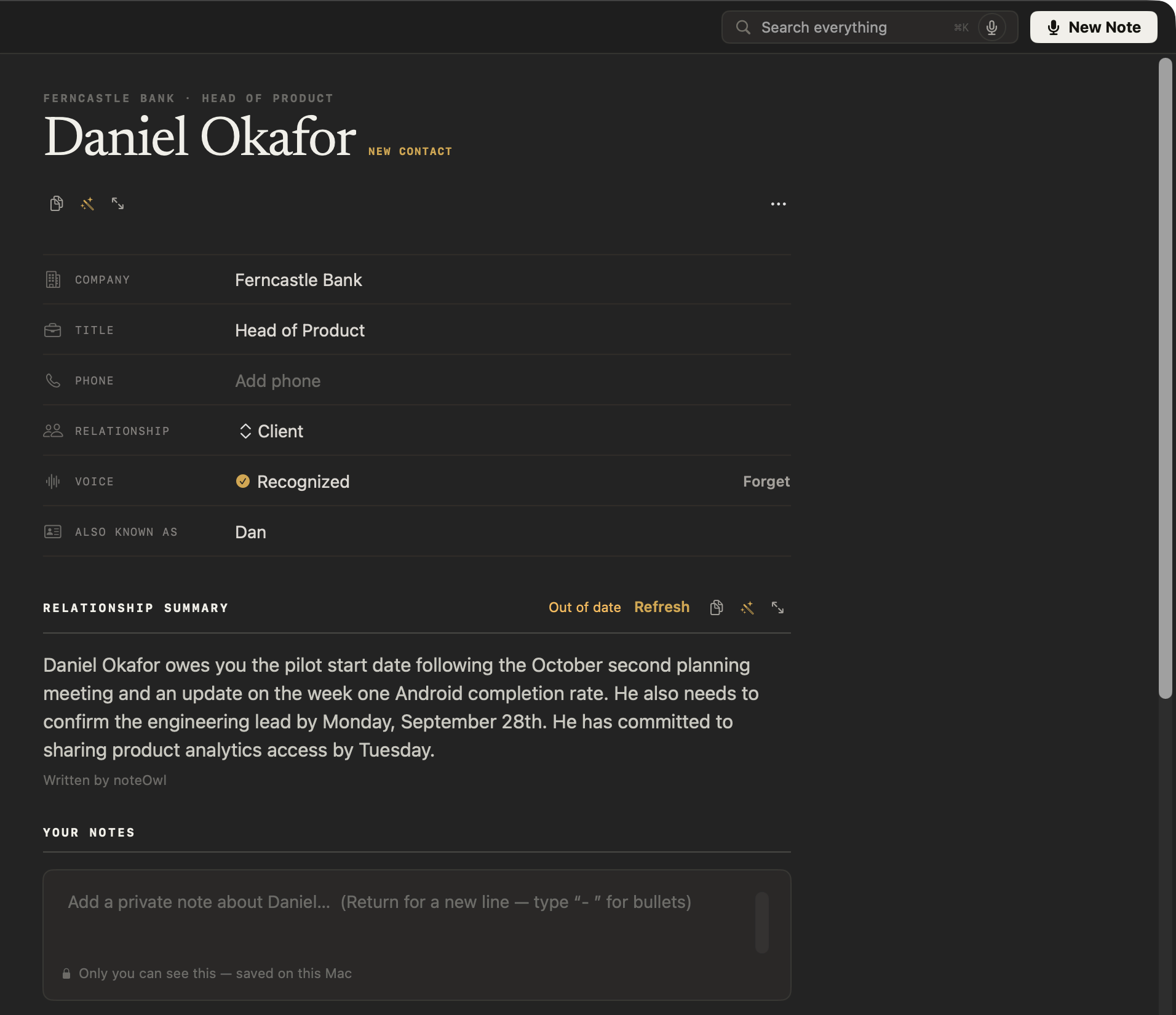
Their details at the top, then what NoteOwl knows about them from your conversations.
| Part of the profile | What it holds |
|---|---|
| Company, Title and Phone | Filled in from your Contacts if you allow it, or typed by you. Click a row to edit it, press Return to save, or Esc to cancel |
| Relationship | Choose Client, Colleague, Partner, External, Family, Friend or Other, or Custom… to type your own |
| Voice | Recognized when NoteOwl can put this person's name on their voice in meetings, or Not learned yet |
| Also known as | Other names they go by, such as a nickname. NoteOwl uses them to match this person in your conversations |
| Relationship summary | A few sentences NoteOwl writes on your Mac about where things stand with them |
| Your notes | Your own private notes. Press Return for a new line, and type "- " for a bulleted list |
| Last met, Meetings and Open commitments | When you last had a meeting with them, how many meetings they were in, and how many promises are open between you |
| Open | What you owe them, marked OWE, and what they owe you, marked OWED. Tick one to mark it done, or click it to edit it |
| Timeline | The last eight conversations they came up in, newest first. Click one to open it at the passage |
Meetings and Last met count only meetings. A dictation about someone, or a file you imported, appears in their Timeline but isn't counted as meeting them.
How does NoteOwl fill in company, title and phone?
From your Contacts, if you allow it. NoteOwl matches a person to a contact with the same full name, or the same first name when only one contact has it, and copies the company, job title and first phone number. It never changes your contacts.
Anything you type in a profile wins over your contacts, and a field you clear stays empty. NoteOwl asks for Contacts only when you click Grant beside Contacts in Settings → General: see the Calendar or Contacts prompt doesn't appear.
How is the relationship summary written?
NoteOwl writes it on your Mac the first time you open a person, from what was said in your conversations. When newer conversations change the picture, it says Out of date: click Refresh to write it again. If you edit the summary yourself, NoteOwl never replaces your words.
While NoteOwl writes, the summary says Writing…. A summary you edited is marked Written by you. Use the buttons beside Relationship summary to copy it, ask for changes or edit it.
Add a person
- Click People in the sidebar.
- Click + at the top of the list.
- In Add Person, type their name in Name. Optionally, add a role in Role (optional) — e.g. Acme · Client.
- Click Add. The new profile opens, ready for you to fill in their details.
Edit, merge or remove a person
Click ⋯ at the top right of a profile to change the person as a whole.
- Edit… changes their name, role and private notes. Click Save.
- Merge into… combines two profiles for the same person, such as "Dan" and "Daniel Okafor". Choose the profile to keep, then click Merge. Their history, commitments and notes combine, and this can't be undone.
- Remove profile… deletes the profile. Click Remove profile to confirm.
Removing a profile deletes their profile, your private notes about them, their relationship summary, contact details and learned voice. Your conversations and the action items that mention them are kept. If a future conversation names them, NoteOwl can add them again. This can't be undone.
How do I stop NoteOwl recognising someone's voice?
Click Forget in their Voice row. NoteOwl deletes only the voice it learned for them, so it stops naming them in new meetings. Their profile, your notes and their name on earlier transcripts all stay.
NoteOwl learns a voice when you name a speaker in a transcript with Rename speakers: see name speakers and recognise voices. If the Voice row says Needs re-learning, the voice was learned by an earlier version of NoteOwl. Name the person on a transcript once more and NoteOwl learns it again.
Common questions
Are my notes about a person private?
Yes. Your notes in a NoteOwl People profile are saved on your Mac and never sent anywhere. They're kept apart from the relationship summary, and NoteOwl never writes over them.
Does NoteOwl need my Contacts?
No. Contacts is optional. Without it, NoteOwl still builds People profiles from your conversations, and you can type a person's company, title and phone yourself. With it, NoteOwl fills those in from matching contacts, on your Mac.
Will a removed person come back in NoteOwl?
They can. Remove profile deletes the profile and what you wrote about them, but if a later meeting or note names them, NoteOwl can add them to People again.
Track what you owe and what you're owed
NoteOwl's Commitments board lists every promise from your meetings and notes, in two columns, I owe and Owed to me, with the most urgent first.
Daily review and meeting prep
NoteOwl's Review shows what needs you today, and Calendar gives each meeting on your Mac's calendar a prep page: attendees, your notes and open commitments.