Track what you owe and what you're owed
Last updated Checked against NoteOwl 1.0.0
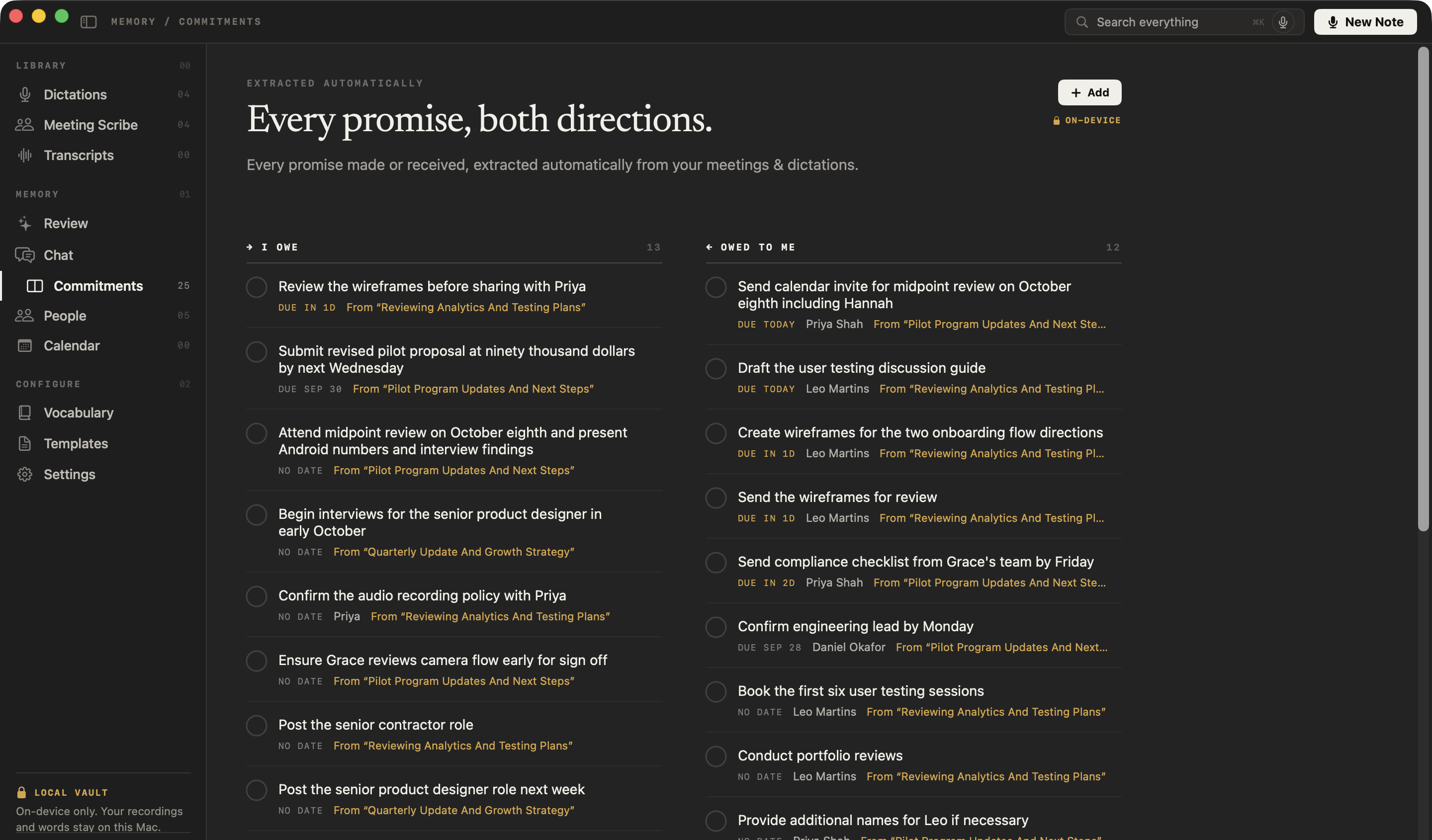
NoteOwl's Commitments board lists every promise made in your meetings and notes, in two columns: I owe and Owed to me. The most urgent are at the top, and each one links back to the moment it was said.
Commitments are part of NoteOwl Pro, which you can try free for 7 days: see start the 7-day NoteOwl Pro trial. To open the board, click Commitments in the sidebar.
What's on the Commitments board?
Every open promise in NoteOwl's memory where one side is you. I owe lists what you promised, and Owed to me what other people promised you. Each promise shows when it's due, who it's with, and where it was said.
- The promise, in a short line. Click it to open, edit or delete it.
- When it's due: Due today, Due in 2d, Due Sep 30, 3d overdue or No date. Promises that are overdue, due today or due within three days are shown in amber.
- The other person, when NoteOwl knows who it is.
- From and the recording's name. Click it to open that recording at the moment the promise was made. +1 more means it was said in more than one recording: right-click the promise to open the others.
Promises between two other people, such as "Alice will send Bob the deck", aren't on the board, because neither side is you. Things you said you'd do yourself go under I owe with no name.
Where do commitments come from?
From your recordings. When NoteOwl processes a meeting, a recording you import in Transcripts or a note you take in NoteOwl, it finds the promises in it, on your Mac, and adds them to the board. A meeting's action items are commitments too.
Dictations into other apps count only if you turn on Dictations into other apps feed memory in Settings → Memory. See what goes into NoteOwl's memory.
To put each promise in the right column, NoteOwl needs your name. Enter it under Who you are in Settings → Memory, then click Save.
How are commitments ordered?
Most urgent first: overdue, then due today, then due in the next three days, then later dates, then promises with no date. Within each group, the earliest deadline comes first, so a promise that's ten days overdue sits above one that's a day overdue.
The board updates when the day changes, so yesterday's Due today moves up as overdue.
How does NoteOwl work out a due date?
From the words used. A due date said in a meeting, such as "by Friday", is dated from the day of that meeting, so a promise made on a Monday "by Friday" is due that Friday. A due date you type yourself is dated from today.
Resolve a commitment
Click the circle beside a promise when it's done. It moves to Resolved, below Owed to me, most recently resolved first, and it's resolved everywhere NoteOwl shows it, including the person's profile in People.
Resolved shows the latest five. Click Show and the number of older ones, such as Show 3 older resolved, to see the rest. To reopen a promise, click its filled circle.
Add a commitment
- Click Commitments in the sidebar, then click Add at the top right.
- In New Commitment, type the promise in What needs to happen?.
- Choose I owe or Owed to me.
- Optionally, type the other person in Person (optional), and a date in Due — e.g. Friday, EOD, such as "Friday", "tomorrow" or "Mar 14". NoteOwl shows the date it read, such as Will be due Friday, Oct 2.
- Click Add. The promise appears on the board in its place in the order.
If NoteOwl can't read the date, it says That date couldn’t be read — try “Friday”, “tomorrow”, or “Mar 14”. and Add stays greyed out until you change it or clear it.
Edit or delete a commitment
Click a promise to open it. You can change the words, I owe or Owed to me, the person and the due date, then click Save.
- Change the due date. The sheet shows the date it has now, such as Currently due Friday, Oct 2. Type a new one, or click No due date to remove it.
- Open where it was said. Under Source, click a recording's name to open it at that moment.
- Delete it. Click Delete, then Delete again in Delete this commitment?. It's removed from your memory.
You can also right-click a promise on the board and choose Edit…, Copy or Delete….
If you opened the board from the overdue items in Review, it says Showing overdue only. Click Show all to see every promise.
Common questions
Where do NoteOwl's commitments come from?
From the recordings in NoteOwl's memory, found on your Mac. That means your meetings, recordings you import and notes you take in NoteOwl, including a meeting's action items. You can also add a commitment yourself with Add on the Commitments board.
Why is a commitment under I owe when someone else owes it?
NoteOwl needs your name to tell which way a promise runs. Enter it under Who you are in Settings → Memory. To fix a single commitment, click it on the Commitments board, choose I owe or Owed to me, and click Save.
Can I see what I owe one person?
Yes. Open the person in NoteOwl's People screen. Their open commitments are listed under Open, marked OWE or OWED, and you can tick one off or edit it there, just as on the Commitments board.
What goes into NoteOwl's memory
NoteOwl's memory is built from your meetings, imported recordings and notes you take in NoteOwl. Dictations into other apps stay out unless you turn them on.
People profiles for everyone you meet
NoteOwl's People screen keeps a profile for everyone in your conversations, with their details, a relationship summary, your private notes and a timeline.