NoteOwl vs Meetily
A Meetily alternative with speaker labels, chat and meeting memory
NoteOwl is a Meetily alternative for Mac. Like Meetily, the open-source meeting notetaker, it sends no bot to the call and keeps your recordings and transcripts on your computer. NoteOwl adds chat across every meeting and voices recognised from one meeting to the next, which Meetily doesn’t offer yet, plus a board of every promise.
Dictation into any app is free, and NoteOwl Pro is $79 lifetime, with no subscription. Meetily Pro, the plan with its speaker labels, is $120 a year.
Read the transcript
Quick question. What did you actually promise in your last meeting? …Yeah. Me neither.
This is NoteOwl. It’s a Mac app that takes notes on your calls. And no, there’s no bot joining your meeting.
The second the call ends, it’s written everything up. What got decided. Who’s doing what. And by when.
All those promises end up in one list. What you owe people… and what they owe you.
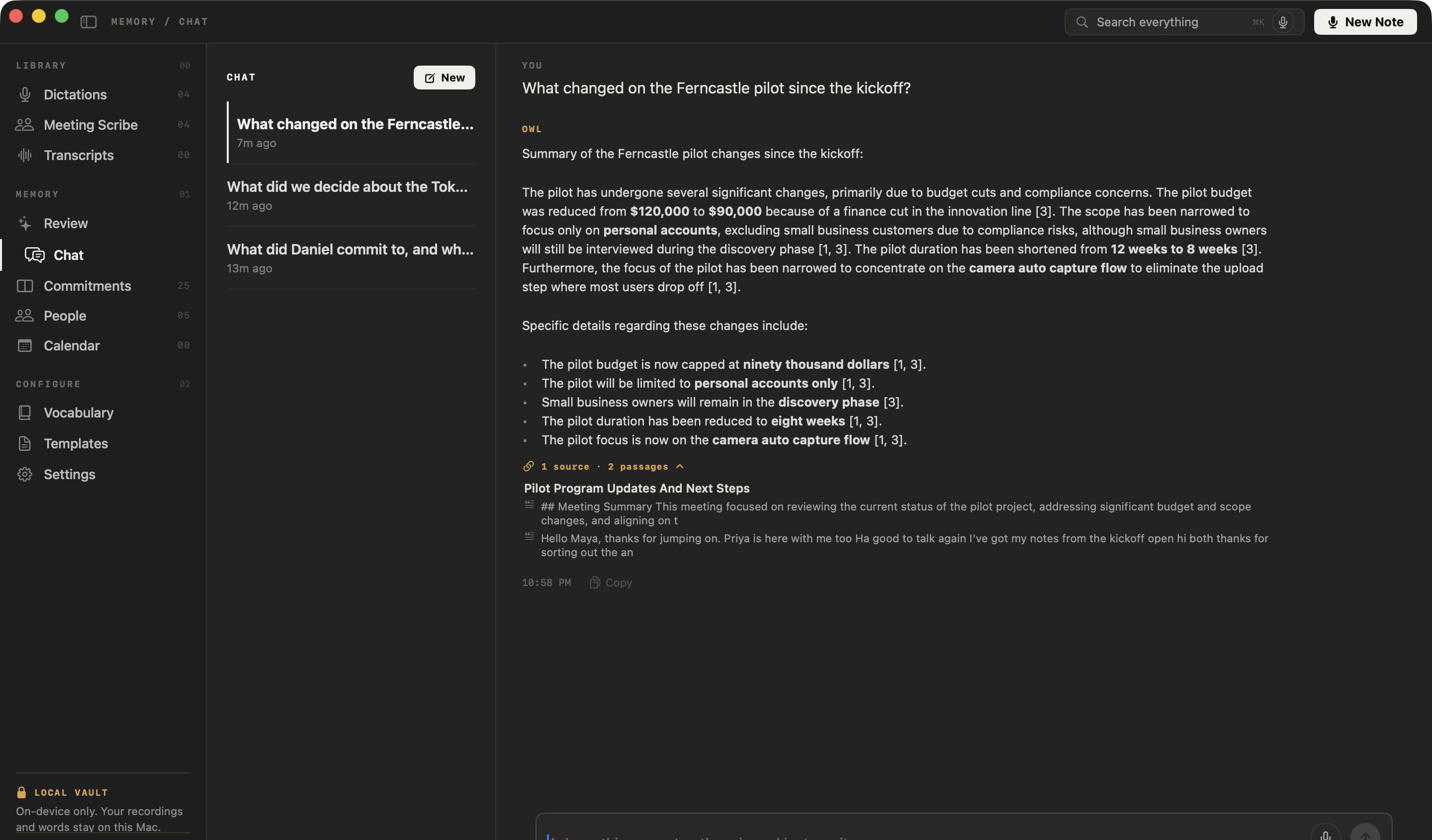
And here’s the part that got me. You can just ask it. “What changed on the Ferncastle pilot?” And it shows you exactly where that came from.
The whole thing runs on your Mac. Nothing gets uploaded. It even works with the Wi-Fi off.
NoteOwl. It’s free to download. Try it on your next call.
Why choose NoteOwl over Meetily?
Every promise, and everyone you meet
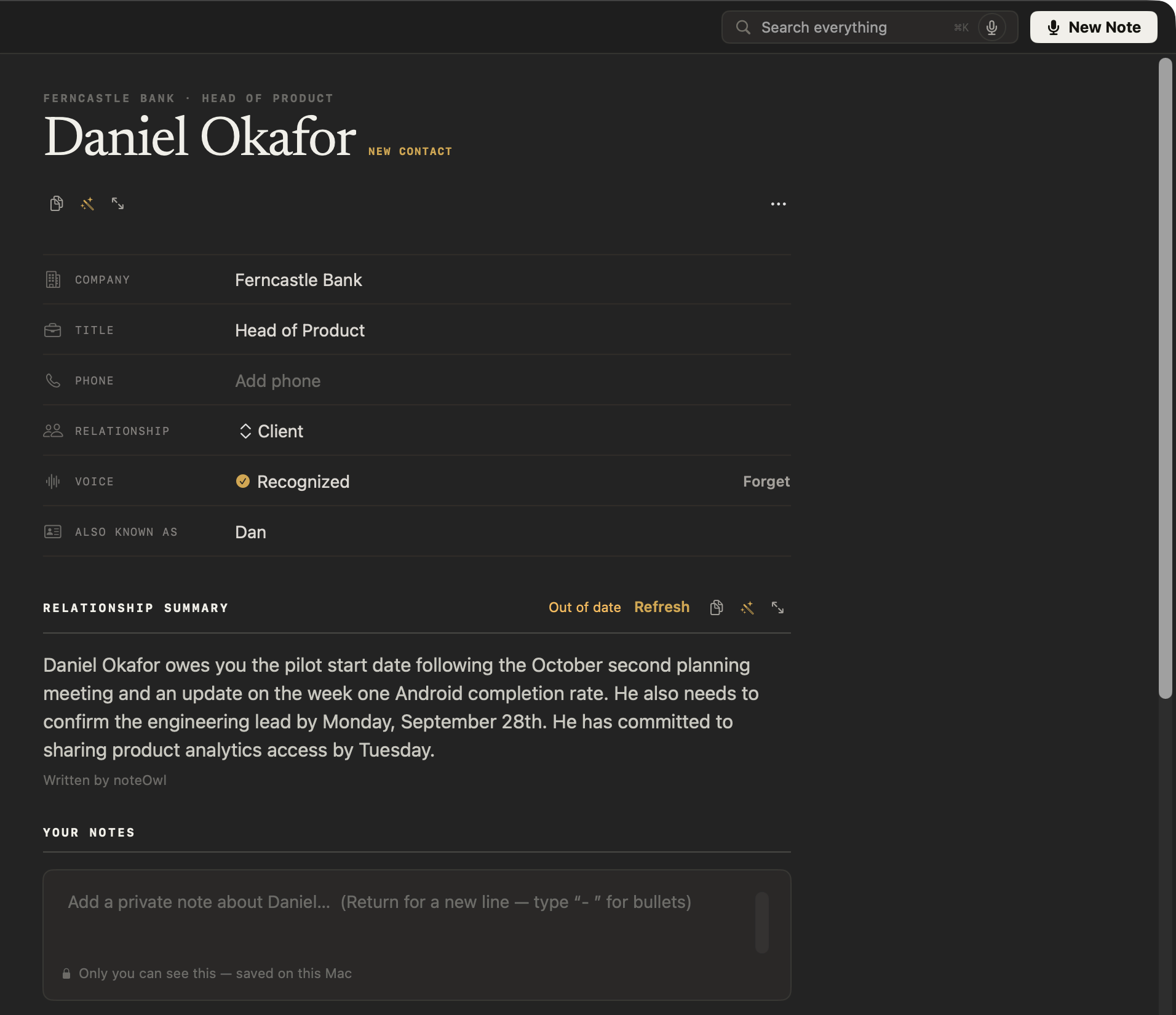
A board of what you owe and what you’re owed, a profile for everyone you meet, and prep pages from your Mac’s Calendar, all written on your Mac from your own meetings. Meetily lists calendar integration as coming soon.[1]
Lifetime licence. No subscription.
NoteOwl Pro is $79 lifetime for your Mac. Meetily Pro is $120 a year per person, for one device.[1]
Ask every meeting, cited
Chat answers from all your meetings and cites the passage it used, or tells you when nothing matches — on your Mac, with Wi-Fi off. Meetily lists chat with your meetings as coming soon, on every plan.[1]
Summaries in 22 templates
Written on your Mac when the call ends, then rewritten as a 1:1, a sales call or an interview with Summarize as. Meetily’s free edition has one default template.[2]
Offline, Chat included
Every NoteOwl feature, from transcripts to Chat and People, works with Wi-Fi off after the one-time model download.
Free dictation in every app
Tap fn and talk in any app: your words type at the cursor as you talk, and one tap polishes them in the right tone for that app — free and unlimited. No Meetily plan lists dictation into other apps.[1]
Private AI, nothing to choose
Transcription, speakers, summaries and chat run on your Mac with on-device AI models that come with the app: no engine, provider or API key to pick. Meetily’s transcription and summaries run locally by default; pick a cloud provider or your own API key and the audio or transcript leaves the computer.[2,5]
Meetily pricing
What does Meetily cost compared with NoteOwl?
NoteOwl Pro is $79 lifetime, with no subscription. Meetily’s Community edition is free, without speaker labels; Meetily Pro, which adds them, is $10 per person per month, billed yearly at $120 — $360 over three years.[1,3]
Every NoteOwl Pro feature is free for 7 days in the app, with no card, and NoteOwl’s dictation into any app stays free after the trial.
- Price
- NoteOwl$79 lifetime for one Mac; no subscription
- MeetilyCommunity: free and open source. Pro: $10 per person per month, billed yearly at $120; one device per licence[1]
- Speaker labels
- NoteOwlPro: in every meeting; a voice named once is recognised in later meetings
- MeetilyPro only; names stay with the meeting they were given in[3,4]
- Chat with your meetings
- NoteOwlPro: answers from every meeting, citing the passage
- MeetilyComing soon, on every plan[1]
| NoteOwl | Meetily | |
|---|---|---|
| Price | $79 lifetime for one Mac; no subscription | Community: free and open source. Pro: $10 per person per month, billed yearly at $120; one device per licence[1] |
| Speaker labels | Pro: in every meeting; a voice named once is recognised in later meetings | Pro only; names stay with the meeting they were given in[3,4] |
| Chat with your meetings | Pro: answers from every meeting, citing the passage | Coming soon, on every plan[1] |
| Dictation into other apps | Free and unlimited | Not in any plan[1] |
How is NoteOwl different from Meetily?
- Bot in the call
- NoteOwlNone; records your microphone and your Mac’s audio
- MeetilyNone; captures your microphone and system audio[6,9]
- Where transcription runs
- NoteOwlOn your Mac, always, with on-device AI models
- MeetilyOn your computer by default; Pro adds cloud and custom transcription providers, which receive the audio[1,5]
- Where summaries run
- NoteOwlOn your Mac, built in; nothing to install, connect or pay per use
- MeetilyA local model by default, or a provider you add with your own API key, which receives the transcript text[1,2]
- Works offline
- NoteOwlEverything, after the one-time model download
- MeetilyYes, with local models, after the download[6]
- Speaker labels
- NoteOwlPro: speakers separated in any call app; name a voice once and it’s recognised in later meetings
- MeetilyPro only, in beta and off by default; names are kept for that meeting, and recognising a voice across meetings is not currently available[3,4]
- Chat with your meetings
- NoteOwlPro: ask across every meeting; each answer cites the passage it came from
- MeetilyComing soon, on every plan[1]
- Calendar
- NoteOwlPro: your Mac’s Calendar, with a prep page for each meeting from your own notes
- MeetilyComing soon, on every plan[1]
- Summary templates
- NoteOwlPro: 22 built-in, plus your own
- MeetilyCommunity: a default template. Pro: 6 built-in, plus your own[2]
- Getting notes out
- NoteOwlCopy any note into any app, export it as Markdown, PDF, text or SRT, or export everything as plain files
- MeetilyCommunity: copy. Pro: PDF, DOCX and Markdown exports[1]
- Dictation into other apps
- NoteOwlFree and unlimited: tap fn and your words type at the cursor as you talk; one tap polishes them for that app
- MeetilyNot in any plan[1]
- Analytics in the app
- NoteOwlNone: no analytics or telemetry
- MeetilyOpt-in usage statistics and anonymized crash reports, which can be turned off[8]
- Price
- NoteOwl$79 lifetime for one Mac; no subscription. Dictation is free
- MeetilyCommunity free. Pro $10 per person per month, billed yearly at $120, for one device[1]
- Mac requirements
- NoteOwlmacOS 26 or later, Apple silicon, 16 GB memory
- MeetilymacOS 11 or later, Apple silicon, 8 GB memory[6]
| NoteOwl | Meetily | |
|---|---|---|
| Bot in the call | None; records your microphone and your Mac’s audio | None; captures your microphone and system audio[6,9] |
| Where transcription runs | On your Mac, always, with on-device AI models | On your computer by default; Pro adds cloud and custom transcription providers, which receive the audio[1,5] |
| Where summaries run | On your Mac, built in; nothing to install, connect or pay per use | A local model by default, or a provider you add with your own API key, which receives the transcript text[1,2] |
| Works offline | Everything, after the one-time model download | Yes, with local models, after the download[6] |
| Speaker labels | Pro: speakers separated in any call app; name a voice once and it’s recognised in later meetings | Pro only, in beta and off by default; names are kept for that meeting, and recognising a voice across meetings is not currently available[3,4] |
| Chat with your meetings | Pro: ask across every meeting; each answer cites the passage it came from | Coming soon, on every plan[1] |
| Calendar | Pro: your Mac’s Calendar, with a prep page for each meeting from your own notes | Coming soon, on every plan[1] |
| Summary templates | Pro: 22 built-in, plus your own | Community: a default template. Pro: 6 built-in, plus your own[2] |
| Getting notes out | Copy any note into any app, export it as Markdown, PDF, text or SRT, or export everything as plain files | Community: copy. Pro: PDF, DOCX and Markdown exports[1] |
| Dictation into other apps | Free and unlimited: tap fn and your words type at the cursor as you talk; one tap polishes them for that app | Not in any plan[1] |
| Analytics in the app | None: no analytics or telemetry | Opt-in usage statistics and anonymized crash reports, which can be turned off[8] |
| Price | $79 lifetime for one Mac; no subscription. Dictation is free | Community free. Pro $10 per person per month, billed yearly at $120, for one device[1] |
| Devices | Mac | Mac and Windows; Linux by building it from source[7] |
| Mac requirements | macOS 26 or later, Apple silicon, 16 GB memory | macOS 11 or later, Apple silicon, 8 GB memory[6] |
Does Meetily keep your meetings on your computer?
Meetily, in its own words
“Meetily sends audio to the transcription engine you select.”[5]
“With BYOK, only the transcript text is sent to your chosen provider. Audio and recordings never leave your device.”[2]
“Names and corrections are saved for the current meeting. Automatic speaker recognition across different meetings is not currently available.”[4]
“All analytics are completely optional and can be disabled in settings.”[8]
NoteOwl
Recording, transcription, speaker detection, summaries, search and chat all run on the Mac, with on-device AI models that come with the app. There is no transcription engine to pick, no summary provider to choose and no API key to add. Recordings, transcripts and notes are never uploaded, and the app has no analytics or telemetry.
The only network use: the one-time model download, update checks and, for Pro, signing in and an occasional licence check — none of which sends what you record. Offline AI meeting notes, and what stays on your Mac
What does NoteOwl remember from one meeting to the next?
Who spoke, what was promised, and who you met. NoteOwl Pro recognises the voices you’ve named, keeps a board of what you owe and are owed, writes a profile for everyone you meet, and answers questions across all your meetings, citing the passage — on your Mac.
Who spoke. Speakers are separated in any call app, and a voice you name in one meeting is labelled in the next one too. Transcription with speaker identification
What was promised. Action items land on a board of what you owe and what you’re owed, each linked to the moment it was said. Meeting action items, tracked
Who you met. Everyone gets a profile written from your meetings, with your own private notes beside it. A personal CRM from your meetings
When is Meetily the better choice?
Can you switch from Meetily to NoteOwl?
Yes, starting with your next meeting. Download NoteOwl, and the next call you take is transcribed and summarized on your Mac. Meeting audio you’ve already saved can be imported into NoteOwl Pro and transcribed with speaker labels.
Your notes are never locked in: copy any note into any app, or export your meeting notes as Markdown, PDF, text or SRT — or all of your data at once as plain files.
Sources
Last checked . Meetily facts are quoted or summarised from Meetily’s own website, docs and GitHub repository.
- [1]Meetily, Pricing — the feature table: Community, Pro Trial, Pro, Enterprise
- [2]Meetily, Meetily Pro
- [3]Meetily, Speaker diarization
- [4]Meetily Docs, Speaker Diarization
- [5]Meetily Docs, Transcription providers
- [6]Meetily, Meetily Free: Community Edition
- [7]Meetily, Download Meetily
- [8]Meetily, Privacy Policy & Data Protection
- [9]Zackriya Solutions on GitHub, Meetily: README and MIT licence (Community release v0.4.1)
FAQ
Questions about NoteOwl and Meetily
Is Meetily free?
Meetily’s Community edition is free and open source under the MIT licence, with transcription and summaries on your computer. Speaker labels, custom summary templates and PDF, DOCX and Markdown exports are part of Meetily Pro, at $10 per person per month, billed yearly at $120. Prices checked on 31 October 2026.
Does Meetily have speaker identification?
In Meetily Pro, yes: it labels speakers on your computer, and you name them in each meeting. Meetily’s docs say recognising a voice across different meetings is not currently available. NoteOwl Pro separates speakers in every meeting and recognises a voice you’ve named in every meeting after.
Is NoteOwl cheaper than Meetily?
Than Meetily Pro, yes, from the first year: NoteOwl Pro is $79 lifetime, with no subscription, while Meetily Pro is $120 a year, or $360 over three years. Meetily’s Community edition costs nothing, without speaker labels. NoteOwl’s dictation is free forever. Prices checked on 31 October 2026.
Can you chat with your meetings in NoteOwl?
Yes, with NoteOwl Pro. Chat answers questions from every meeting on your Mac and cites the passage it used, or says when nothing matches, with Wi-Fi off. Meetily lists chat with your meetings as coming soon on all of its plans.
Does NoteOwl work offline?
Yes. NoteOwl records, transcribes, summarizes and answers questions on your Mac, so everything works offline after the one-time model download. There is no engine, provider or API key to set, and the app has no analytics or telemetry.
Does NoteOwl have a free plan?
Yes. Dictation into any app and voice notes are free forever, with no limit. Meeting notes, speaker labels, chat and the rest of Pro are free for 7 days in the app, with no card; after that Pro is $79 lifetime.
Does NoteOwl run on Windows?
No. NoteOwl is a Mac app for macOS 26 or later on Apple silicon with 16 GB of memory. Meetily runs on Windows and on Apple silicon Macs from macOS 11.
Related
- Transcription with speaker identification Speakers separated in any call app, and voices you name recognised in every meeting after.
- Offline AI meeting notes Every feature works with Wi-Fi off; what NoteOwl sends over the network, and what it never does.
- An Anarlog alternative with private AI built in NoteOwl and Anarlog, formerly Hyprnote, side by side: two note takers with no bot.
- Pricing: Free vs Pro What is free forever, what Pro adds, and the free trial.
Keep exploring
More comparisons
- NoteOwl vs GranolaWhy NoteOwl over Granola, the total cost over three years, and a sourced side-by-side: on-device vs cloud, recordings, speakers, dictation, export and price
- NoteOwl vs OtterWhy NoteOwl over Otter, the total cost, and a sourced side-by-side: no bot and on-device vs Otter’s cloud
- NoteOwl vs FirefliesWhy NoteOwl over Fireflies.ai, the total cost, and a sourced side-by-side: no bot and on-device vs Fireflies’ cloud
- NoteOwl vs FathomWhy NoteOwl over Fathom, the total cost, and a sourced side-by-side: no bot and on-device vs Fathom’s cloud
How NoteOwl does it
- AI meeting notes without a botHow NoteOwl records calls from your Mac with no bot joining, and what you get when the call ends
- Offline AI meeting notesEvery NoteOwl feature works offline after a one-time model download; what the app sends over the network, and what it never does
- Chat with your meetingsAsk your own meetings a question on your Mac, even offline; every answer cites the passage it came from
- AI meeting summariesAI meeting summaries, decisions and action items written on your Mac from any template, when the call ends
Try private meeting notes that remember every voice
Free to download. Runs entirely on your Mac.
macOS 26 or later · Apple Silicon (M1 or newer) · 16 GB memory minimum, 24 GB recommended
About NoteOwl
NoteOwl is private AI meeting notes and memory for the Mac. It captures meetings without a bot joining the call, labels every speaker, writes summaries and action items, and builds a memory of every conversation that you can chat with — fully offline, because the speech recognition and the AI run on the Mac itself. Dictation into any app is free; Pro is a lifetime licence.
NoteOwl pricing: what’s free and what Pro adds
Last updated