NoteOwl vs Metaview
A Metaview alternative that keeps interview notes on your Mac
NoteOwl is a Metaview alternative for recruiters on a Mac: it takes notes on candidate screens, interviews and hiring-manager calls with no bot in the call, and transcribes and summarizes them on the Mac itself.
Candidate conversations are never uploaded, everything works offline, and NoteOwl Pro is $79 lifetime with no subscription, where Metaview Pro is $60 per user per month. NoteOwl keeps the record; the hiring call stays yours.
Read the transcript
Where do your meeting notes actually go?
With NoteOwl? Nowhere. Watch. Wi-Fi off.
Every meeting is still here. The summary, the action items, the transcript. It’s all on your Mac, and NoteOwl wrote it here, too.
Search every call, and it still finds the moment the budget got cut. Searched entirely on this Mac.
No upload. No cloud. Nothing leaves your Mac.
NoteOwl. Private AI meeting notes for Mac. Free to download.
Why choose NoteOwl over Metaview?
Because candidate conversations never leave your Mac, NoteOwl works the same with or without internet, and you buy a lifetime licence instead of paying every month. No bot joins your interviews, every promise is tracked, and your own write-ups can be dictated for free.
Candidate conversations stay on your Mac
Recording, transcription, summaries and chat all run on your Mac with on-device AI models, and nothing is uploaded. Metaview stores interviews on AWS in the UK and writes notes with AI models from its partners.[5]
Lifetime licence. No subscription.
NoteOwl Pro is $79 lifetime for your Mac. Metaview Pro is $60 a month per user: $720 a year.[1]
Works with Wi-Fi off
Interview notes, chat and dictation all work offline after the one-time model download.
Ask across every interview
Ask what a candidate said about their notice period, or what the hiring manager called a must-have, and Chat answers from your own calls with the passage it came from — or tells you when nothing matches.
Your assessment, in your words, free
The judgment is yours, so write it your way: tap fn in a scorecard, an email or Slack and talk, and your words type at the cursor. Dictation is free and unlimited.
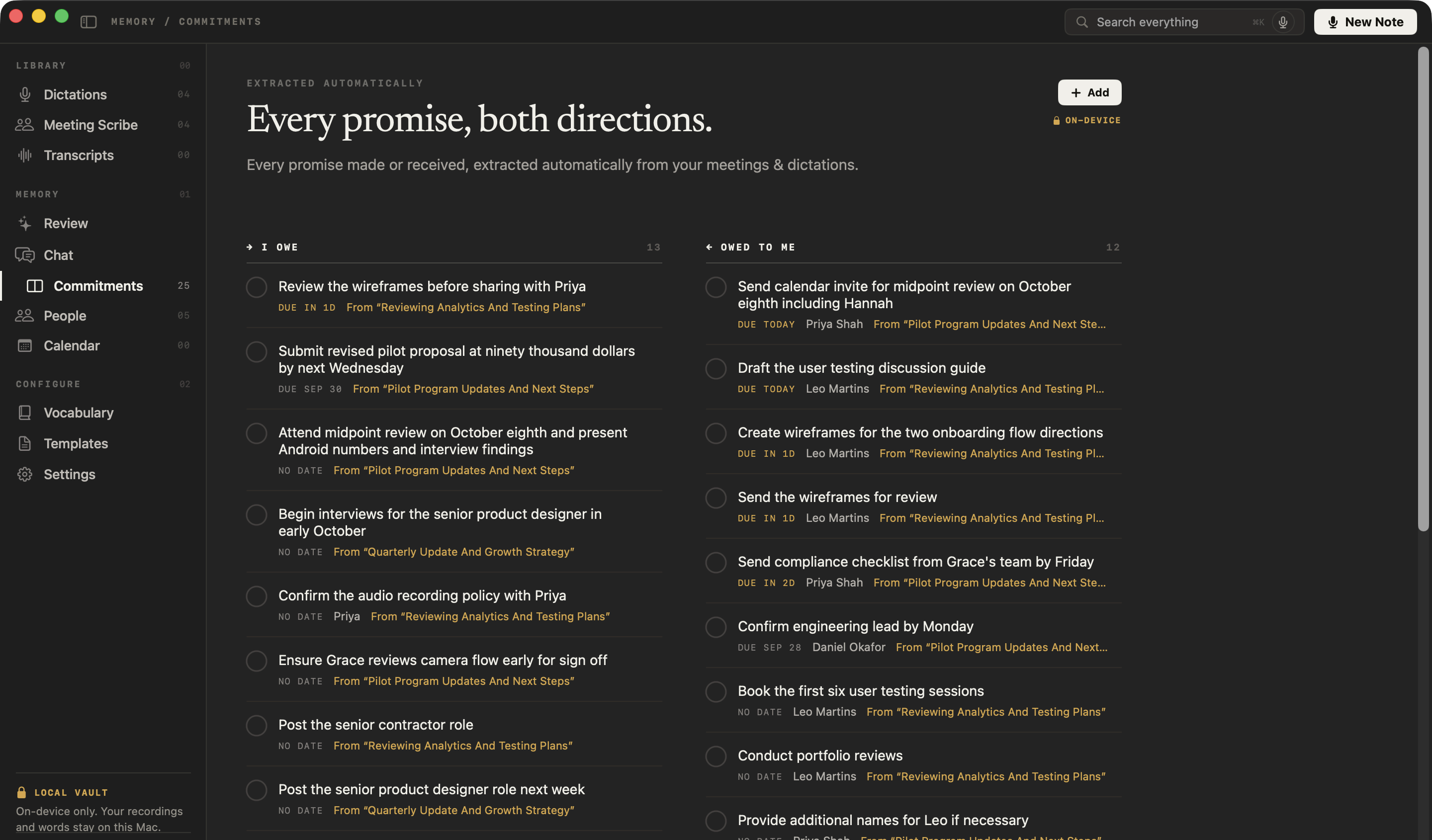
Every promise, on both sides
The feedback you said you’d send and what candidates and hiring managers promised you land on one board of what you owe and what you’re owed, each linked to the moment it was said.
Metaview pricing
Is NoteOwl cheaper than Metaview?
Yes, for one recruiter on one Mac. NoteOwl Pro is $79 lifetime, with no subscription. Metaview Pro is $60 a month per user — $720 a year and $2,160 over three years.[1]
And you can start free: dictation and voice notes are free forever, and every Pro feature is free for 7 days in the app, with no card.
What one person pays
After 1 year
NoteOwl Pro$79Metaview Pro$720After 2 years
NoteOwl Pro$79Metaview Pro$1440After 3 years
NoteOwl Pro$79Metaview Pro$2160
What does NoteOwl keep from each interview?
The record: a transcript that names who said each line, the audio to replay any answer, a summary, and the promises made on both sides. Everything stays on your Mac, and the judgment stays with you.
Interview notes, laid out. Summarize as rewrites a call’s summary with the Interview template, which sets out the candidate’s background and the key questions with their answers. Interview notes template
Promises on both sides. The feedback you said you’d send, and what hiring managers and candidates promised you, land on a board of what you owe and what you’re owed. Meeting action items, tracked
Your assessment, your words. Tap fn in a scorecard, an email or Slack and talk; NoteOwl types at the cursor, free and unlimited. Free speech to text for Mac
How is NoteOwl different from Metaview?
Both can take interview notes without a bot in the call. The difference is where the work happens: Metaview processes interviews in its cloud and stores them on AWS in the UK[5]; NoteOwl does all of it on your Mac, with nothing uploaded.
- Bot in the call
- NoteOwlNone; records your microphone and your Mac’s audio
- MetaviewIts notetaker joins scheduled Google Meet, Teams, Webex and Zoom interviews on its own; a desktop app records without a bot once your workspace enables it[2,4]
- Where transcription and AI run
- NoteOwlOn your Mac, with on-device AI models
- MetaviewIn Metaview’s cloud, with pre-trained AI models from its partners; desktop recordings are uploaded, then processed[4,5]
- Where interviews are stored
- NoteOwlA folder on your Mac; never uploaded
- MetaviewAWS in the UK; your organization decides how long recordings, transcripts and notes are kept[5,6]
- Training on your data
- NoteOwlNothing is uploaded; the app has no analytics or telemetry
- MetaviewNone: Metaview says it doesn’t use customer data for AI model training[5]
- Works offline
- NoteOwlEverything, after the one-time model download
- MetaviewDesktop recordings are uploaded before the transcript and notes are processed[4]
- Price
- NoteOwl$79 lifetime for one Mac; no subscription
- MetaviewPro $60 per user per month, unlimited calls; Enterprise priced on request[1]
- Recordings
- NoteOwlAudio only, kept on your Mac; replay any line of the transcript
- MetaviewVideo, audio and transcript for calls its notetaker joins; audio only from the desktop app[4,6]
- Speaker names
- NoteOwlPro: speakers separated in any call app; name a colleague’s voice once and it’s recognised in later calls
- MetaviewAd hoc desktop recordings and uploaded files may need speakers assigned by hand[4,7]
- Ask your interviews
- NoteOwlPro: Chat answers across every call and note, citing the passage, offline
- MetaviewIts Assistant answers from the transcript and cites the moments it used[6]
- Recordings made elsewhere
- NoteOwlPro: drag in MP3, WAV, M4A, AIFF, FLAC, AAC or MP4 files; transcribed on your Mac with speakers labelled
- MetaviewUpload .wav, .mp3, .mp4, .mpeg or .mov files up to 4 GB, then assign speakers by hand[7]
- Dictation into other apps
- NoteOwlFree and unlimited: tap fn in a scorecard, an email or Slack and talk
- MetaviewNot listed in Metaview’s Help Center[8]
- Mac requirements
- NoteOwlmacOS 26 or later, Apple silicon, 16 GB memory
- MetaviewDesktop app: Apple silicon, macOS 14.2 or later[4]
| NoteOwl | Metaview | |
|---|---|---|
| Bot in the call | None; records your microphone and your Mac’s audio | Its notetaker joins scheduled Google Meet, Teams, Webex and Zoom interviews on its own; a desktop app records without a bot once your workspace enables it[2,4] |
| Where transcription and AI run | On your Mac, with on-device AI models | In Metaview’s cloud, with pre-trained AI models from its partners; desktop recordings are uploaded, then processed[4,5] |
| Where interviews are stored | A folder on your Mac; never uploaded | AWS in the UK; your organization decides how long recordings, transcripts and notes are kept[5,6] |
| Training on your data | Nothing is uploaded; the app has no analytics or telemetry | None: Metaview says it doesn’t use customer data for AI model training[5] |
| Works offline | Everything, after the one-time model download | Desktop recordings are uploaded before the transcript and notes are processed[4] |
| Price | $79 lifetime for one Mac; no subscription | Pro $60 per user per month, unlimited calls; Enterprise priced on request[1] |
| Recordings | Audio only, kept on your Mac; replay any line of the transcript | Video, audio and transcript for calls its notetaker joins; audio only from the desktop app[4,6] |
| Speaker names | Pro: speakers separated in any call app; name a colleague’s voice once and it’s recognised in later calls | Ad hoc desktop recordings and uploaded files may need speakers assigned by hand[4,7] |
| Ask your interviews | Pro: Chat answers across every call and note, citing the passage, offline | Its Assistant answers from the transcript and cites the moments it used[6] |
| Recordings made elsewhere | Pro: drag in MP3, WAV, M4A, AIFF, FLAC, AAC or MP4 files; transcribed on your Mac with speakers labelled | Upload .wav, .mp3, .mp4, .mpeg or .mov files up to 4 GB, then assign speakers by hand[7] |
| Dictation into other apps | Free and unlimited: tap fn in a scorecard, an email or Slack and talk | Not listed in Metaview’s Help Center[8] |
| Devices | Mac | A web app, plus the desktop app for Mac and Windows[4,7] |
| Mac requirements | macOS 26 or later, Apple silicon, 16 GB memory | Desktop app: Apple silicon, macOS 14.2 or later[4] |
Where does Metaview process and store interviews?
Metaview, in its own words
NoteOwl
Recording, transcription, speaker detection, summaries, search and chat all run on the Mac. Candidate conversations, transcripts and notes are never uploaded to NoteOwl or anyone else, and the app has no analytics or telemetry.
The only network use: the one-time model download, update checks and, for Pro, signing in and an occasional licence check — none of which sends what you record. Offline AI meeting notes, and what stays on your Mac
When is Metaview the better choice?
When you want a cloud service. Metaview processes interviews in its cloud and stores them on AWS in the UK, so they’re there wherever you sign in. If you want candidate conversations on your Mac, online or offline, choose NoteOwl.
Can you switch from Metaview to NoteOwl?
Yes, starting with your next interview. Download NoteOwl, and the next call you take is transcribed and summarized on your Mac. Recordings you already have as audio or video files can be imported into NoteOwl Pro and transcribed with speaker labels.
Your notes are never locked in: copy any interview note into any app, or export your meeting notes as Markdown, PDF, text or SRT — or all of your data at once as plain files. More on how recruiters use NoteOwl: an AI note taker for recruiters.
Sources
Last checked . Metaview facts are quoted or summarised from Metaview’s own website, blog and Help Center.
- [1]Metaview, Pricing, Notetaker tab
- [2]Metaview, AI Interview Notes, with its FAQ
- [3]Metaview, October 2026: Botless notes, 18x faster AI agents, & smarter screening (12 October 2026)
- [4]Metaview Help Center, Record With the Desktop App
- [5]Metaview Help Center, Privacy & Security Overview
- [6]Metaview Help Center, Transcript And Recording
- [7]Metaview Help Center, Upload Recordings
- [8]Metaview Help Center, Documentation index — every article, searched for dictation
FAQ
Questions about NoteOwl and Metaview
Is there a Metaview alternative that keeps interviews on your Mac?
Yes. NoteOwl takes notes on candidate screens, interviews and hiring-manager calls with no bot, and transcribes, summarizes and answers questions on your Mac, so interviews are never uploaded and everything works offline. Metaview stores interviews on AWS in the UK and processes them in its cloud.
Is NoteOwl cheaper than Metaview?
Yes, for one recruiter on one Mac. NoteOwl Pro is $79 lifetime, with no subscription and a 7-day free trial with no card, and NoteOwl’s dictation is free forever. Metaview Pro is $60 per user per month — $720 a year, or $2,160 over three years. Prices checked on 30 October 2026.
Does NoteOwl join my interviews as a bot?
No. NoteOwl records your microphone and your Mac’s audio, so it takes interview notes on Zoom, Microsoft Teams, Google Meet, Webex or FaceTime calls with nothing joining the call. It records audio only and keeps it on your Mac.
Where does Metaview AI store interview notes?
Metaview says it stores customer data on AWS in the UK, uses pre-trained AI models through its partners, and doesn’t use customer data for AI model training. NoteOwl keeps interviews in a folder on your Mac: transcription, summaries and chat run on the Mac, and nothing is uploaded.
Can NoteOwl transcribe interviews recorded elsewhere?
Yes, with NoteOwl Pro. Drag in an MP3, WAV, M4A, AIFF, FLAC, AAC or MP4 recording and NoteOwl transcribes it on your Mac with speakers labelled, then writes a summary and action items you can ask about in Chat.
Who makes the hiring decision with NoteOwl?
You do. NoteOwl keeps the record of each call — the transcript with who said what, a summary, and answers that cite the passage — and the judgment stays with you. To write up your assessment, tap fn in any app and talk; NoteOwl’s dictation is free.
Does NoteOwl run on Windows?
No. NoteOwl is a Mac app for macOS 26 or later on Apple silicon with 16 GB of memory. Its AI runs on the Mac itself, which is what keeps candidate conversations off the cloud.
Related
- AI note taker for recruiters Candidate screens and hiring-manager calls on your Mac, with free dictation for write-ups.
- Interview notes template A template to copy, what each section holds, and how NoteOwl fills it in.
- Chat with your meetings Ask about any past call on your Mac, even offline; every answer cites the passage.
- Pricing: Free vs Pro What is free forever, what Pro adds, and the free trial.
Keep exploring
More comparisons
- NoteOwl vs MeetilyMeetily is free, open source and local by default; NoteOwl adds voices recognised across meetings, chat and meeting memory, free dictation, and Pro paid once against Meetily Pro’s $120 a year
- NoteOwl vs GranolaWhy NoteOwl over Granola, the total cost over three years, and a sourced side-by-side: on-device vs cloud, recordings, speakers, dictation, export and price
- NoteOwl vs OtterWhy NoteOwl over Otter, the total cost, and a sourced side-by-side: no bot and on-device vs Otter’s cloud
- NoteOwl vs FirefliesWhy NoteOwl over Fireflies.ai, the total cost, and a sourced side-by-side: no bot and on-device vs Fireflies’ cloud
How NoteOwl does it
- AI meeting notes without a botHow NoteOwl records calls from your Mac with no bot joining, and what you get when the call ends
- Offline AI meeting notesEvery NoteOwl feature works offline after a one-time model download; what the app sends over the network, and what it never does
- Chat with your meetingsAsk your own meetings a question on your Mac, even offline; every answer cites the passage it came from
- AI meeting summariesAI meeting summaries, decisions and action items written on your Mac from any template, when the call ends
Keep your next interview’s notes on your Mac
Free to download. Runs entirely on your Mac.
macOS 26 or later · Apple Silicon (M1 or newer) · 16 GB memory minimum, 24 GB recommended
About NoteOwl
NoteOwl is private AI meeting notes and memory for the Mac. It captures meetings without a bot joining the call, labels every speaker, writes summaries and action items, and builds a memory of every conversation that you can chat with — fully offline, because the speech recognition and the AI run on the Mac itself. Dictation into any app is free; Pro is a lifetime licence.
NoteOwl pricing: what’s free and what Pro adds
Last updated