For financial advisors
Private AI note taker for financial advisors
NoteOwl is a private AI note taker for financial advisors: it takes notes on client reviews, discovery meetings and check-in calls on your Mac, with no bot joining, and writes up the client’s goals, your advice, the options you discussed and the next steps. Transcription and summaries run on your Mac with on-device AI models, so client conversations are never uploaded.
Every promise from a meeting, yours and the client’s, lands on one board, and you can ask past meetings what a client said about retiring. Dictating emails and notes into any app is free.
Read the transcript
Where do your meeting notes actually go?
With NoteOwl? Nowhere. Watch. Wi-Fi off.
Every meeting is still here. The summary, the action items, the transcript. It’s all on your Mac, and NoteOwl wrote it here, too.
Search every call, and it still finds the moment the budget got cut. Searched entirely on this Mac.
No upload. No cloud. Nothing leaves your Mac.
NoteOwl. Private AI meeting notes for Mac. Free to download.
How do financial advisors use an AI note taker?
For the meetings a client relationship runs on: reviews, first meetings and check-in calls. NoteOwl takes the notes without a bot in the call, writes them up when you stop, and keeps every promise made along the way.
Before the review
Walk in knowing what’s open
With NoteOwl Pro, NoteOwl reads your Mac’s Calendar and builds a prep page for each meeting: who’s coming, your notes, and what’s still open with them from past meetings.
During the meeting
Talk to the client, not the keyboard
No bot joins your Zoom, Teams or Google Meet call; in your office, NoteOwl records through your Mac’s microphone. Type a point in the notes box and it feeds the summary.
After the meeting
The write-up, done
The summary and action items are written on your Mac when you stop. Summarize as → Consultation turns them into the client’s situation and goals, your advice, the options and the next steps.
The follow-up
The recap email, drafted
In the meeting, ask the wand for the follow-up email to the client, and NoteOwl drafts it from what was said, for you to edit and send from your own mail.
Where do your clients’ conversations go?
They stay on your Mac. NoteOwl transcribes, summarizes and answers questions with on-device AI models, and has no server that receives your content, so no third party processes what your clients say, and we have no way to see it.
What stays on your Mac
- The audio of every client meeting you record or import
- Transcripts and summaries
- Your notes, templates and vocabulary
- People, commitments and everything in NoteOwl’s memory
- Your Chat questions and NoteOwl’s answers
None of it is uploaded, synced to a cloud or used to train AI models, and the app has no analytics or telemetry.
| When NoteOwl connects | What it sends |
|---|---|
| The one-time model download | Model files come to your Mac; nothing of yours is sent |
| Apple’s on-device language assets, once, if your Mac doesn’t have them | Nothing of yours; macOS downloads them from Apple |
| Checking for app updates, about once a day | A request for the list of NoteOwl versions; no personal data or content |
| Starting the trial, buying Pro or activating a Mac | Your email address and an identifier for this Mac |
| A licence status check, at most once a week (Pro) | Only your licence’s identifier |
Every connection is listed in what NoteOwl sends over the network and in section 4 of NoteOwl’s privacy policy.
Check it on your own Mac
- 1
Turn off Wi-Fi and record
After the model download, turn off Wi-Fi and record a short meeting. The transcript, the summary and Chat all still work, because they run on your Mac.
- 2
Open the folder
In NoteOwl, open Settings → General and click Show in Finder beside Local Vault. Your recordings, transcripts and notes are there, as files on your Mac.
- 3
Watch the connections
Run a network monitor while you record and summarize a meeting. NoteOwl makes only the connections in the table above, and none of them carries what your clients said.
What does NoteOwl write after a client review?
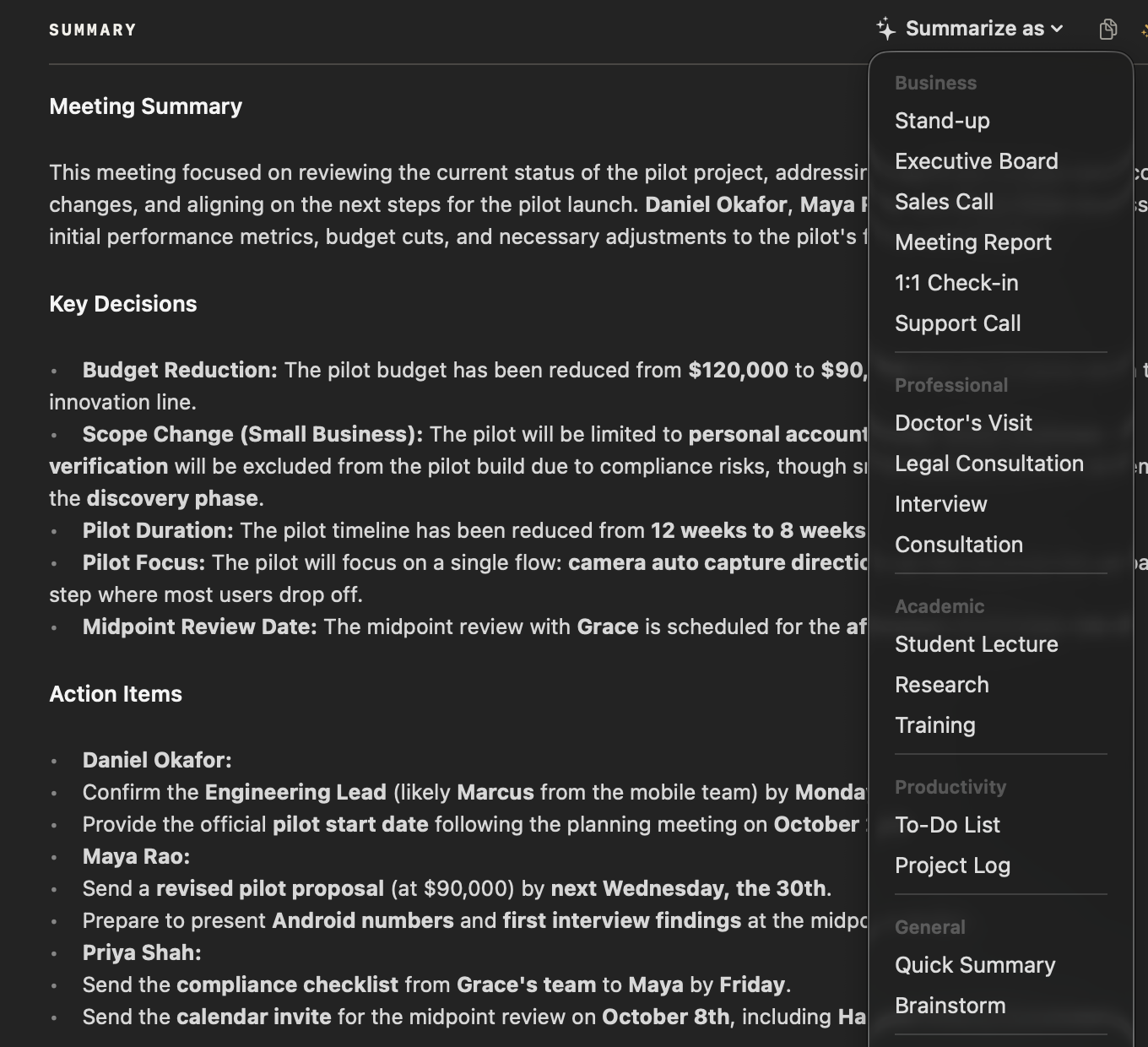
The client’s goals, your advice, the options you discussed and the next steps. NoteOwl writes a summary when the meeting ends; Summarize as → Consultation rewrites it with the instruction below, word for word as the app ships it.
Template · Consultation
“Summarize this consultation: the client’s situation and goals, the advice or recommendations given, the options or alternatives discussed, and the agreed next steps or documents needed.”
| Meeting | Template | What it writes |
|---|---|---|
| Client reviews and planning meetings | Consultation | Situation & goals · Advice · Options · Next steps |
| First meetings with a prospect | Sales Call | Customer needs · Objections · Next steps · Follow-ups with dates |
| Team and partner meetings | Meeting Report | Attendees · Purpose · Key points · Decisions · Action items · Open questions |
| Short check-in calls | Quick Summary | 3–5 key points · Bottom line |
Four of NoteOwl’s 22 meeting notes templates, or see the consultation notes template with its sections explained.
Can NoteOwl write notes in your own review format?
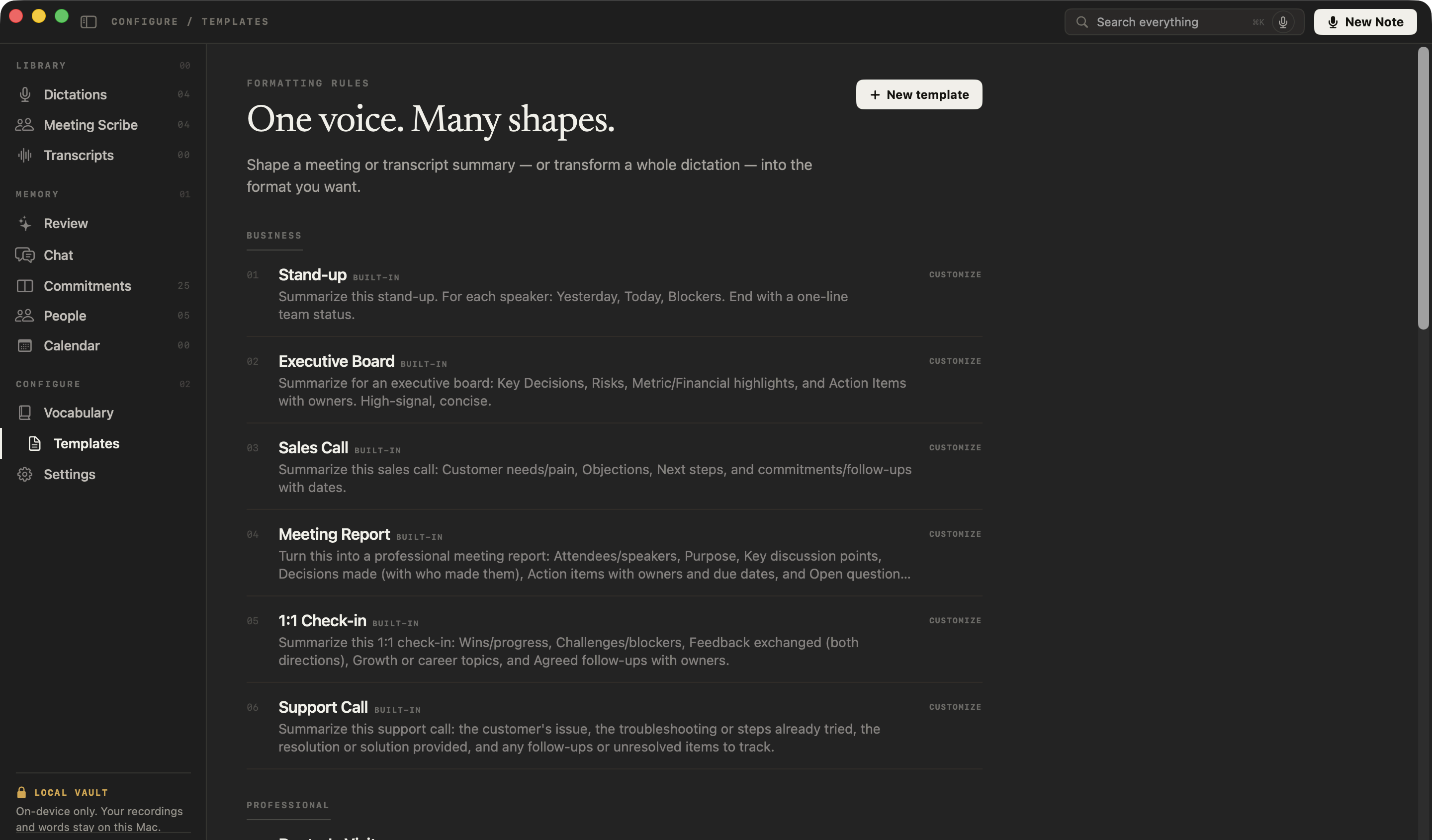
Yes. Customize the Consultation template and NoteOwl saves your own editable copy, with your headings as its prompt. After each meeting, Summarize as rewrites the notes under them. The instruction below is a starting point.
- 1
Open Templates
In NoteOwl’s sidebar, under Configure, click Templates.
- 2
Customize Consultation
Click the built-in Consultation template. NoteOwl opens Customize Template with a copy named “Consultation (my version)”; rename it “Client review”.
- 3
Paste the prompt
Replace the prompt with the instruction below, or your own headings, and click Save my copy. The built-in stays as it was.
- 4
Use it after a meeting
Open the meeting and choose Summarize as → Client review. NoteOwl rewrites the summary under your headings, on your Mac.
Summarize this client review meeting using only what was said. Don't add anything.
Life changes: family, work, health or plans the client mentioned.
Goals: what they want, with amounts and dates when they were stated.
Discussion: each topic covered, and the advice or recommendations given.
Client questions and concerns, in their words.
Decisions: what the client agreed to.
Next steps: who does what, by when, including documents to send or receive.
If a heading wasn't discussed, write "Not discussed".
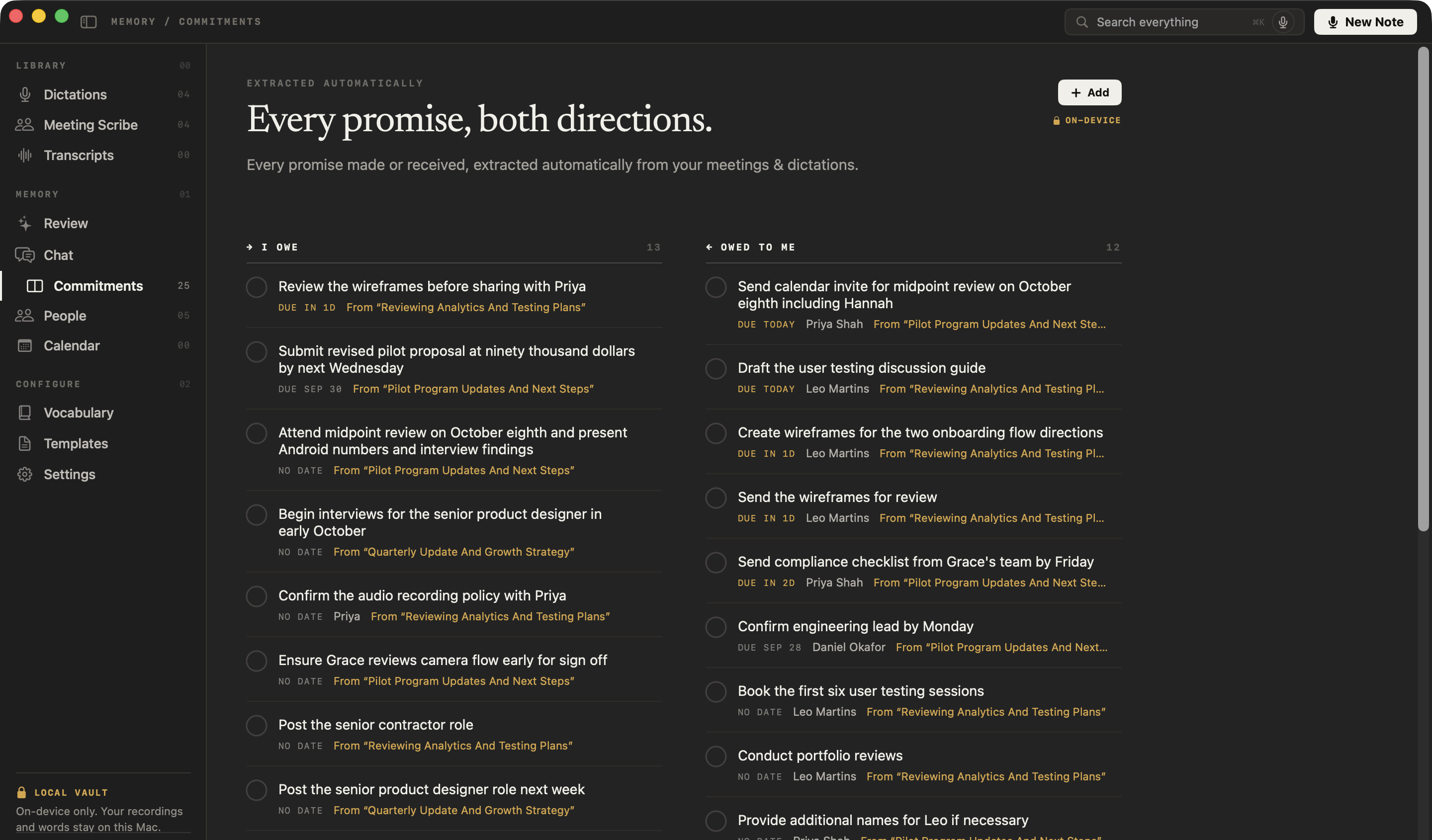
How do you keep track of what you promised a client?
Let NoteOwl keep it. Every promise from your meetings, the statement you’ll send and the documents they’ll bring, goes onto one board of what you owe and what you’re owed, sorted by what’s due and linked to the meeting it came from.
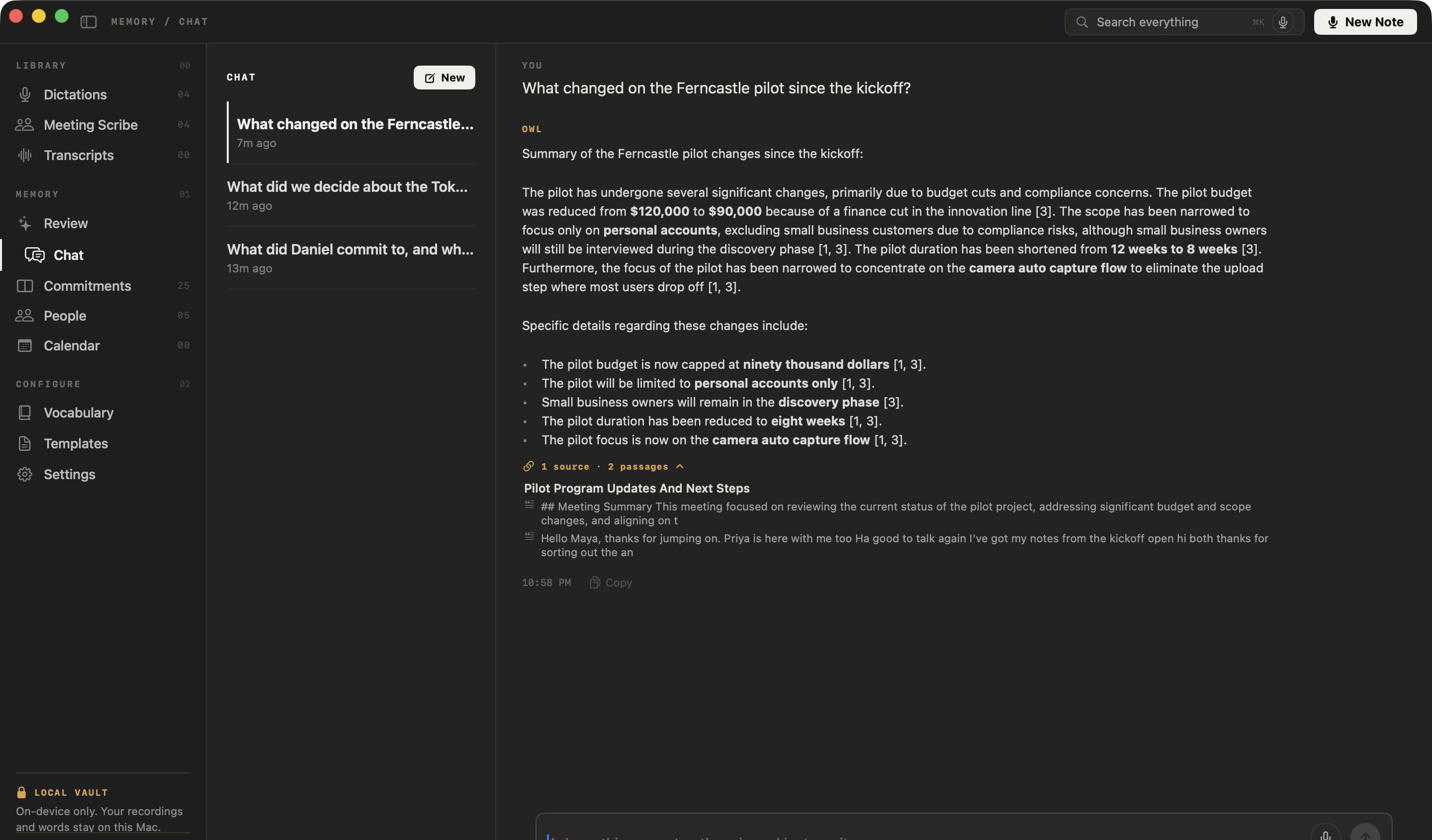
Can you find what a client said months ago?
Yes. Ask NoteOwl’s chat with your meetings in plain English, even offline. It answers only from your own meetings, cites the passage each point came from, and says so when nothing matches instead of guessing.
Ask things like
- What did the client say about retiring early?
- Which documents did they say they would send?
- What did we agree about the house sale last spring?
Can you dictate client emails and notes instead of typing?
Yes, and it’s free forever. Tap fn in Mail, your CRM’s note field or anywhere you can type, talk, and tap fn again: NoteOwl types your words at the cursor. It runs on your Mac, works offline and is unlimited. How free dictation works on your Mac
Casual in chat
Hey Leo, quick update from the Ferncastle call. They cut the pilot budget to $90,000, so let’s focus only on the camera auto-capture flow. Can you prioritize those wireframes for Thursday? Thanks.
- To
- Daniel Okafor
- Subject
- Next steps
Hi Daniel,
Thanks for the update today. Just confirming next steps: I will send the revised pilot proposal at $90,000 by Wednesday, the 30th. It will cover an eight-week pilot focused on camera auto-capture for personal accounts only.
I look forward to hearing who your engineering lead will be by Monday. Thanks again.
12export const pilot = {13 budgetCap: 90_000,14 weeks: 8,15 accounts: 'personal',16};17
- Polish — one tap tidies your words in the tone set for that app
- Voice notes — a thought after a meeting, audio and text kept together
- Rewrite by voice — select text, press ⌥X and say how to change itPro
- Custom vocabulary — client, fund and company names spelled your wayPro
What else does NoteOwl do for a financial advisor?
Everything around the meetings, with NoteOwl Pro: a profile for every client, recordings brought in, a review every morning, all on your Mac, even with Wi-Fi off.
A profile for every client
Who they are, a summary of your relationship written from your meetings, your private notes, what’s still open, and every conversation you’ve had. Set the relationship to Client.
Who said what
On a call, each line of the transcript is labelled by speaker. Rename Speaker 2 to your client and the whole transcript updates.
Help mid-meeting
Joined late, or lost the thread? Catch up summarizes the meeting so far, and Ask answers a question about it. Only you see it.
Search every meeting
Every meeting, note and dictation, one keystroke away with ⌘K.
Bring in recordings
Drag in a meeting recorded on your phone or in another app (mp3, wav, m4a, aiff, flac, aac or mp4) and get a transcript, a summary and action items.
Export for your files
Save any meeting as Markdown, PDF or text, to a folder you choose. Nothing is uploaded to share it.
A daily review
What’s overdue, what’s due today and what came in, every morning.
Works with Wi-Fi off
Notes, Chat and dictation run on your Mac, so they work on a plane or at a client’s kitchen table.
34 languages
Meetings and dictation in 34 languages, detected automatically.
Before a review, the client’s profile and the meeting prep page show what’s still open with them.
What does NoteOwl cost for a financial advisor?
Dictation is free forever. NoteOwl Pro, with meeting notes, templates, client profiles and Chat, is $79 for one Mac, with no subscription. Try it free for 7 days in the app first, with no card.
Step 1
Download free
Install NoteOwl and dictate into any app, free forever. NoteOwl then downloads its on-device AI models: about 8 GB, downloaded once after install (keep around 10 GB free).
Step 2
Try Pro free for 7 days
Start the trial inside the app with your email address, with no card. Record your next client review and read the notes.
Step 3
Buy Pro: $79
When you’re ready, buy NoteOwl Pro inside the app: a perpetual licence to NoteOwl Pro for one Mac, with no subscription.
Cloud note takers are usually a monthly subscription for each person who uses them. NoteOwl Pro is a lifetime licence, for one Mac, and it keeps working offline. What’s free and what Pro adds
NoteOwl needs a Mac with Apple Silicon (M1 or newer), 16 GB memory minimum, 24 GB recommended, and macOS 26 or later.
FAQ
Questions financial advisors ask about NoteOwl
Does NoteOwl upload client meetings or train on them?
No. NoteOwl records, transcribes and summarizes client meetings on your Mac with on-device AI models. Recordings, transcripts and notes never leave your Mac, no third party processes the audio, and nothing you record is used to train AI models.
Does a bot join Zoom or Teams client meetings?
No. NoteOwl records your microphone and your Mac’s audio, so it takes notes on Zoom, Microsoft Teams, Google Meet, Webex or FaceTime calls with nothing joining the call.
Can NoteOwl take notes in an in-person client meeting?
Yes. Start a meeting in NoteOwl and it records through your Mac’s microphone, with no call app needed, then writes the summary and action items when you stop. A meeting recorded on your phone can be imported instead. Meetings and imports are part of NoteOwl Pro.
Does NoteOwl connect to my CRM?
No. NoteOwl has no CRM integration. Copy the meeting notes from NoteOwl into the client’s record, or export them as Markdown, PDF or text; free dictation also types straight into your CRM’s note field, or anywhere else you can type.
Can NoteOwl write meeting notes in my own review format?
Yes. On NoteOwl’s Templates screen, click the built-in Consultation template to customize it, or click New template, then type the headings you want as the prompt and save. After a meeting, Summarize as rewrites the notes under your headings. Templates are part of NoteOwl Pro.
Does NoteOwl work offline?
Yes. After the model download, NoteOwl records, transcribes, summarizes and answers questions about client meetings with Wi-Fi off. Starting the trial or activating a Mac needs a connection; after that, an activated licence keeps working offline.
How much does NoteOwl cost for a financial advisor?
Dictation is free forever. NoteOwl Pro, with meeting notes, templates, client profiles and Chat, is $79 lifetime for one Mac, with no subscription. Try Pro free for 7 days in the app first, with no card, then buy it inside the app.
Related
- Consultation notes template Situation and goals, advice, options and next steps, with a template to copy.
- AI meeting notes without a bot How NoteOwl records any call from your Mac, with nothing joining it.
- Offline meeting notes Everything NoteOwl does with the Wi-Fi off, and why.
- NoteOwl Pro, $79 No subscription; one Mac; try it free first.
Keep exploring
Made for this work
- Consultation notes templateA consultation notes template to copy, what each section holds, an example, and how NoteOwl writes it
- People profilesA personal CRM that fills itself from your meetings: who they are, what is open between you, every conversation
- Action items and commitmentsAction items that involve you become commitments: what you owe and what you are owed, sorted by what is due
- Meeting prepA prep page for every meeting on your calendar: who is coming, your notes, and what your memory holds about them, on your Mac
- Follow-up emailAsk NoteOwl to draft the follow-up email from a meeting: decisions, owners and dates, written on your Mac
- Offline AI meeting notesEvery NoteOwl feature works offline after a one-time model download; what the app sends over the network, and what it never does
Other roles
- StudentsLectures recorded in the room or an online class, or imported, turned into study notes you can ask questions of before the exam; dictating essays is free
- AI note taker for foundersCustomer calls, investor updates and 1:1s — commitments tracked, answers cited — plus free dictation into any app
- AI note taker for consultantsClient calls, workshops and interviews with every commitment tracked and answers cited, on your Mac
Try the private AI note taker for financial advisors on your next client review
Free to download. Runs entirely on your Mac.
macOS 26 or later · Apple Silicon (M1 or newer) · 16 GB memory minimum, 24 GB recommended
About NoteOwl
NoteOwl is private AI meeting notes and memory for the Mac. It captures meetings without a bot joining the call, labels every speaker, writes summaries and action items, and builds a memory of every conversation that you can chat with — fully offline, because the speech recognition and the AI run on the Mac itself. Dictation into any app is free; Pro is a lifetime licence.
NoteOwl pricing: what’s free and what Pro adds
Last updated